

What if the next IT outage could be spotted before it interrupts your team or customer service? For Galena businesses, proactive IT maintenance can bring warning signs into view earlier, but it works best when it reflects how your company actually operates. The goal is a practical approach to proactive IT maintenance Galena businesses can shape around their systems, staff, and day-to-day priorities, not a generic checklist.
When urgent work takes priority, security updates, backups, and network health can slip behind. If no one owns those tasks, small technology concerns may go untracked until they disrupt work. A planned maintenance routine makes it easier to see what has been reviewed, what needs attention, and who is responsible for follow-up.
In this guide, you’ll learn what proactive maintenance involves, how it connects to cybersecurity, backup and recovery, and network reliability, and how to prioritize risks before they affect operations. We’ll also explain how JOB Technologies supports small and medium-sized businesses in Galena and nearby communities with outsourced IT services tailored to their technology needs.
Key Takeaways
- Proactive IT maintenance Galena businesses can tailor to their needs starts with planned oversight, not a promise that every incident can be prevented.
- Group maintenance checks by purpose, including system health, updates, security signals, and data protection, then align the scope with your business environment and support arrangement.
- Compare proactive and reactive support by when work begins, how maintenance is planned, and how clearly technology risks are visible. Keep urgent troubleshooting in your plans, too.
- Prioritize systems your business depends on, and document recurring issues, affected teams, and possible operational consequences.
- JOB Technologies connects managed IT and network support with cybersecurity, ransomware protection, backup, and recovery for small and medium-sized businesses in Galena and nearby communities.
What proactive IT maintenance means for Galena businesses
A technology issue can interrupt work before anyone recognizes it as a larger problem. A computer that freezes repeatedly, email that becomes unreliable, or a network that slows during everyday tasks may be easy to work around at first. But recurring warning signs deserve attention before they affect staff, customer service, or essential business processes.
Proactive IT maintenance is planned oversight and upkeep of business technology to identify concerns and address them before they become larger disruptions. It helps a business manage risk, but it cannot guarantee against every outage, security incident, or equipment failure. For proactive IT maintenance Galena businesses should connect the work to the systems they use and the tasks that depend on them.
This short video introduces the idea of proactive maintenance:
The idea extends beyond IT: Proactive maintenance generally means taking planned steps to address possible problems rather than waiting for a breakdown. In a business technology environment, that means reviewing system condition and recurring issues, then planning upkeep around how the organization works.
How proactive maintenance differs from break-fix support
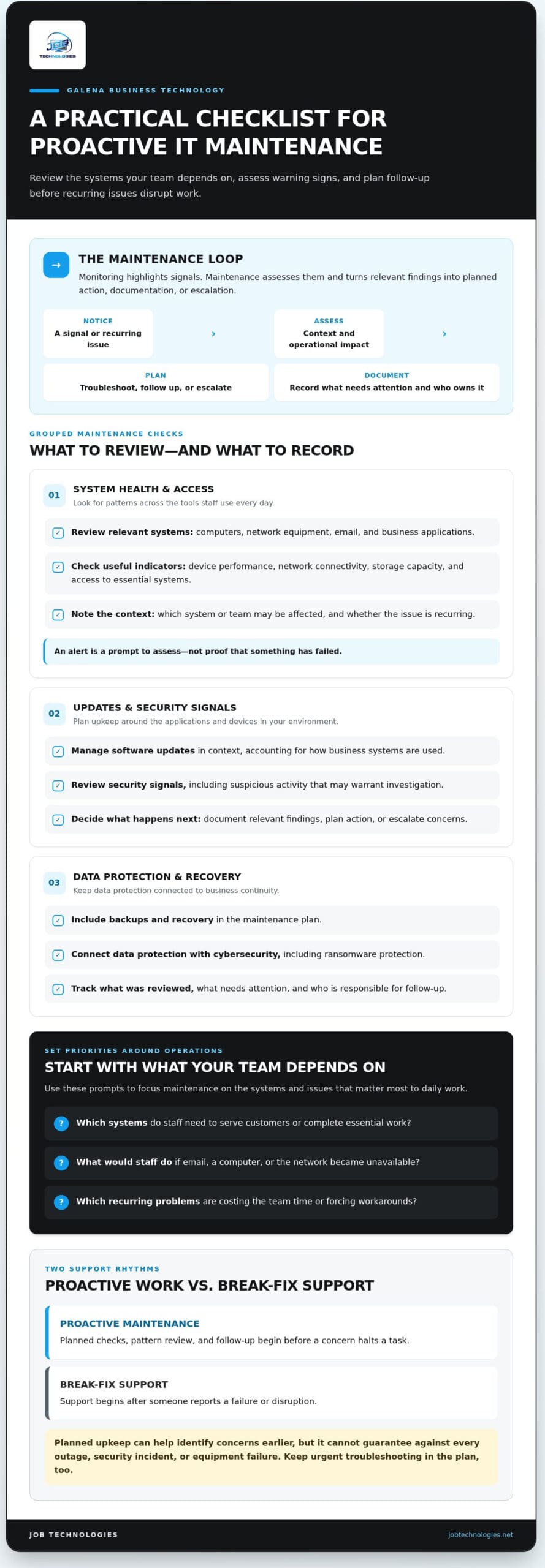
The main difference is when support begins. Proactive work includes planned checks, reviewing patterns, and following up on concerns before they halt a task. Break-fix support starts after someone reports a failure or disruption. Both approaches can involve troubleshooting and resolving technology problems, but proactive maintenance looks for warning signs before a breakdown is reported.
For example, if a staff member’s computer freezes repeatedly, a reactive approach may begin when it stops working altogether. A proactive approach treats the recurring freezes as a signal to investigate. The cause still needs to be identified and may require hands-on troubleshooting, but recording the pattern gives the business a chance to plan the next step before work is fully blocked.
Why Galena small businesses should connect IT upkeep to operations
Maintenance matters because technology supports everyday tasks, not just technical work. Staff may rely on email to communicate with customers and colleagues, computers to access business information, and networks to connect devices and shared systems. If one of these dependencies becomes unreliable, the effects can spread: staff may lose time, delay a response, or need to change their usual workflow.
Start with the operational impact rather than a generic technology checklist. Ask:
- Which systems do staff need to serve customers or complete essential work?
- What would staff do if email, a computer, or the network became unavailable?
- Which recurring technology problems are already costing the team time or forcing workarounds?
Your answers help identify which risks deserve attention first and where planned upkeep can support continuity. They also give your IT support team useful context for prioritizing work instead of treating every system as equally important.
What proactive IT maintenance checks across business systems
Useful maintenance is more than a list of devices to inspect. It connects technology condition to the work your business needs to get done. Checks may cover computers, network equipment, email, business applications, security controls, and data backups. The right scope depends on the systems your staff use and how those systems support daily operations.
Organize the work by purpose: review system health, manage updates, assess security signals, and oversee data protection. As the proactive IT maintenance overview explains, routine attention and monitoring can help identify concerns before they cause disruption. The practical value comes from assessing the findings and deciding what action to take.
Monitoring highlights signals; maintenance assesses them and turns relevant findings into planned action, documentation, or escalation.
Monitoring devices, networks, and business systems
Reviewing relevant indicators over time can help distinguish a one-off issue from a recurring pattern. Depending on the environment, that could mean checking device performance, network connectivity, storage capacity, or whether an essential business system is accessible. A slow connection or unstable computer can make it harder for staff to reach shared files, email, and other everyday tools.
An alert is a prompt to assess, not proof that something has failed. Consider the context, determine whether the signal affects business operations, and decide what to do next. Useful records note what was observed, which systems or teams may be affected, and whether the concern needs troubleshooting or escalation.
Updates, cybersecurity, and data protection
Software updates are part of upkeep because they can address known issues and help keep systems current. They need to be managed in context: businesses rely on different applications and devices, so planned updates should account for how those systems are used. Security review adds another layer by looking at suspicious activity or other signals that may warrant investigation.
For a closer look at small business cybersecurity in Galena, consider how security practices fit into routine maintenance rather than treating them as an occasional, separate task. Ransomware protection and data backup oversight also support continuity planning. Reviewing whether backups are completing and whether recovery steps are understood can help a business prepare for disruption, but no maintenance plan can promise immunity from an attack or data loss.
Findings should lead to a next step. A minor issue may be documented and watched; a recurring problem may call for troubleshooting; a concern that could affect critical systems may need prompt escalation. Clear records help the business and its IT support team understand what was observed, what action followed, and what remains unresolved.
For Galena businesses, proactive IT maintenance Galena works best when checks reflect the systems staff rely on and the risks that matter to operations. JOB Technologies provides small and medium-sized businesses with managed IT and network support.
Proactive IT maintenance versus reactive support: what changes for Galena SMBs?
If systems appear to be working, ongoing maintenance can seem like effort without an immediate payoff. The difference becomes clearer when you compare how each support approach handles early warning signs, planning, and the impact on staff. Proactive IT maintenance Galena businesses use should fit their operations without adding unnecessary complexity.
| Area | Proactive maintenance | Reactive support |
|---|---|---|
| When work begins | Planned reviews and investigation of concerns can happen before a major disruption. | Work typically starts after someone reports a problem or a system stops working. |
| Planning | Findings can inform scheduled upkeep and help prioritize next steps. | Work is organized around the issue that has already surfaced. |
| Visibility | Records and review can reveal recurring concerns and outstanding risks. | The immediate failure may be clear, while earlier patterns may be less visible. |
| Business impact | Earlier assessment may give the business more opportunity to plan around needed work. | Staff may need to adapt workflows while a disruption is being addressed. |
These are different starting points, not mutually exclusive ways to resolve technology issues. Even with planned maintenance, an urgent troubleshooting need can arise. A device can fail unexpectedly, or a new problem can affect a system between scheduled reviews. Proactive work creates more visibility and structure; it doesn’t replace responsive support when something goes wrong.
What changes when maintenance happens before a disruption
With planned review, a concern can be investigated while the system is still usable. For example, a team can record repeated slowdowns and when they occur, then use that information to assess whether planned troubleshooting is needed. In a purely reactive pattern, the investigation may begin only after the slowdown prevents someone from completing a task. Notes about frequency, affected users, and business impact help clarify the next step in either case.
Proactive work can reduce uncertainty by bringing risks into view, but it can’t eliminate every IT issue. Maintenance doesn’t guarantee that outages or security incidents won’t happen. It gives the business a clearer basis for deciding what deserves attention, what can be scheduled, and what needs escalation.
Is proactive maintenance excessive for a small business?
Not necessarily. The right level depends on how complex your systems are and how much the business relies on them. A small team may depend on a few core services every day, while another business may have more connected systems and dependencies to manage. The goal isn’t to maintain everything in the same way; it’s to match attention to operational importance.
Start by identifying the systems staff need to serve customers and complete essential work. Then note recurring concerns and the consequences if each system becomes unavailable. That short inventory gives your team a practical basis for discussing priorities and support. A planned approach can stay focused while making responsibilities and follow-up easier to understand.
How Galena businesses can set practical IT maintenance priorities
A maintenance plan is easier to act on when it starts with business impact, not a long inventory of technical details. Identify what staff rely on, record where problems recur, and agree on who will decide what happens next. This gives your IT support team a clearer picture of your priorities and keeps maintenance connected to day-to-day work.
Build a maintenance priority list around business impact
Start with the tools and connections your team needs to serve customers, communicate, and keep essential tasks moving. Rank them by the consequences of interruption, not by assumptions about which device is most important. Record symptoms as staff experience them without guessing at the technical cause.
- List essential systems. Include work computers, network access, email, business data, and connected technology your staff depend on.
- Describe the business impact. For each item, note which tasks depend on it and what could happen if it becomes unavailable. Consider effects on employees, customer service, and continuity.
- Record recurring concerns. Capture what happens, when it occurs, which teams or users are affected, and any workarounds. For example, record that several staff members have trouble accessing a shared business tool rather than assuming the network is the cause.
- Set priorities for follow-up. Use the documented impact and frequency to identify what needs attention first, what can be planned, and what should be escalated if it worsens.
This inventory can also help businesses exploring managed IT services in Dubuque describe their environment and support needs clearly. Keep it current as systems, staff responsibilities, and business processes change.
Make maintenance visible with clear responsibilities and reporting
A priority list only helps if people know what happens next. Decide who receives maintenance updates, who approves planned work that could affect staff, and who follows up on unresolved concerns. In a small business, one person may fill several roles, but naming the responsibilities helps prevent issues from getting lost between the team and its IT support partner.
Useful reporting doesn’t need to be complicated. It should show what was reviewed, what was found, which items matter most to operations, and what actions are complete or still pending. If a finding needs more investigation, record who owns the follow-up and when it will be reviewed again.
Agree on a consistent schedule for reviewing findings and next steps. The right rhythm should fit your business and support arrangement, with an additional review when a significant change or recurring issue calls for it. This gives you a chance to adjust priorities instead of relying on a checklist that no longer reflects current needs.
For Galena businesses, proactive IT maintenance Galena becomes more manageable when priorities, owners, and follow-up are visible. JOB Technologies provides outsourced IT support for small and medium-sized businesses, including managed IT services.
How JOB Technologies supports proactive IT maintenance in Galena
For a small or medium-sized business, IT maintenance isn’t separate from the work technology supports. Computers, networks, and email contribute to daily operations, while cybersecurity, backups, and recovery are part of planning for business continuity. JOB Technologies provides outsourced IT services in Galena, bringing these connected needs into one support relationship.
The right approach depends on your systems, the tasks that rely on them, and what interruptions could mean for staff or customers. That’s why proactive IT maintenance Galena businesses consider should be grounded in their operating priorities, rather than a one-size-fits-all checklist or an assumption that technology risks can be removed entirely.
Connect maintenance with managed IT and cybersecurity support
JOB Technologies supports business computers, networks, and email systems through outsourced IT services. These areas are interconnected: network problems can affect access to business tools, while computer and email support are closely tied to how staff communicate and complete everyday work. JOB Technologies also provides managed cybersecurity and ransomware protection, along with data backup and recovery.
Considering these capabilities together helps businesses discuss technology health and continuity as parts of the same picture. It doesn’t mean every system needs identical attention. The key is understanding how each part supports your operations and what priorities make sense for your environment.
- Computer, network, and email support relates to the systems employees use to carry out routine work.
- Cybersecurity and ransomware protection addresses security as part of managing business technology.
- Backup and recovery connects data protection with planning for continuity if information or systems are disrupted.
Take the next step toward steadier business technology
A productive support discussion can begin with a simple picture of your current environment. Identify the systems your team depends on, note recurring issues in plain language, and describe which employees or business activities are affected. You don’t need to diagnose the technical cause. Details such as when a problem occurs and what work it interrupts help clarify its practical importance.
It’s also helpful to consider what continuity means for your business: which tools are essential, what disruptions would create the most difficulty, and where support responsibilities need to be clearer. Those priorities provide a useful basis for discussing managed IT, network needs, cybersecurity, ransomware protection, backup, and recovery in context.
JOB Technologies supports small and medium-sized businesses in Galena, Dubuque, East Dubuque, Dyersville, Farley, and Peosta. Its outsourced IT services connect business systems with operational and continuity needs.
Learn about JOB Technologies’ IT services.
Make your next IT decision with confidence
You don’t need to solve every technology concern at once. Choose one recurring issue or essential system that deserves clearer attention, then decide who will track it and what follow-up would help. That concrete step can turn proactive IT maintenance Galena from a general goal into a manageable part of running your business.
A strong support relationship makes technology decisions easier to discuss and connects them to your team’s real priorities. JOB Technologies works with small and medium-sized businesses in Galena and nearby communities, helping them consider IT support in the context of their operations and continuity needs.
Ready to talk through the systems your team relies on and the support that could fit your business? Talk with JOB Technologies about proactive IT support.
Frequently Asked Questions
How often should a small business schedule IT maintenance?
There’s no universal interval; maintenance frequency should reflect the systems a business depends on, its risks, and how interruptions affect operations. A useful schedule for proactive IT maintenance Galena businesses can follow distinguishes ongoing monitoring from planned reviews. Monitoring may surface changes as they happen, while reviews help assess patterns, open tasks, and upcoming needs. Set a repeatable review rhythm with clear follow-up, then adjust it as systems or business demands change.
Can proactive IT maintenance prevent ransomware?
No maintenance approach can guarantee ransomware prevention. Updates, security oversight, and backup planning can reduce exposure and give a business options to consider if systems are affected. Treat cybersecurity as layered protection rather than relying on one tool: maintain systems, manage security practices, and plan how important data could be recovered. JOB Technologies provides managed cybersecurity and ransomware protection, which can be considered alongside wider maintenance and recovery planning.
Does proactive maintenance require downtime for employees?
Not always, but some maintenance may require a system restart, a software change, or temporary limits on access. The impact depends on which systems are involved and how employees use them. Before planned work, identify affected teams and essential tasks, then communicate expected timing and any steps staff should take. For example, employees who rely on a shared business application may need notice before access is briefly interrupted.
Can proactive IT maintenance support remote and hybrid employees?
Yes, maintenance planning can include the computers, email, network connections, and other business systems employees use away from the office. The right scope depends on how your company provides access and which tools remote staff need for their roles. Document which devices and systems support off-site work, who uses them, and what tasks depend on them. This helps ensure remote-work technology is considered alongside office-based systems.
Is proactive IT maintenance useful if a small business has no in-house IT team?
Yes. An outsourced IT partner can manage technology upkeep, so employees aren’t left to handle every technical concern alongside their regular duties. A practical starting point is to identify systems essential to daily work, note recurring problems, and describe which business priorities they affect. JOB Technologies provides outsourced IT services for small and medium-sized businesses in Galena, Dubuque, East Dubuque, Dyersville, Farley, and Peosta.
What information should a business prepare before discussing IT maintenance?
Prepare a basic picture of your technology, not a technical diagnosis. Note the main computers, network and email systems, important business data, and recurring issues, including when they happen and which work is affected. If you know how backups or security practices are handled, include that too. Concrete examples, such as a repeated login problem or a tool staff can’t access, can make the discussion more focused.