

A network outage after the workday ends can disrupt more than one computer. It may stall email, disconnect staff, or put access to business data at risk. If you’re searching for 24/7 IT support for business near me, the key question isn’t just whether help is available around the clock. It’s what happens when you report an urgent issue, who takes ownership, and how it gets escalated.
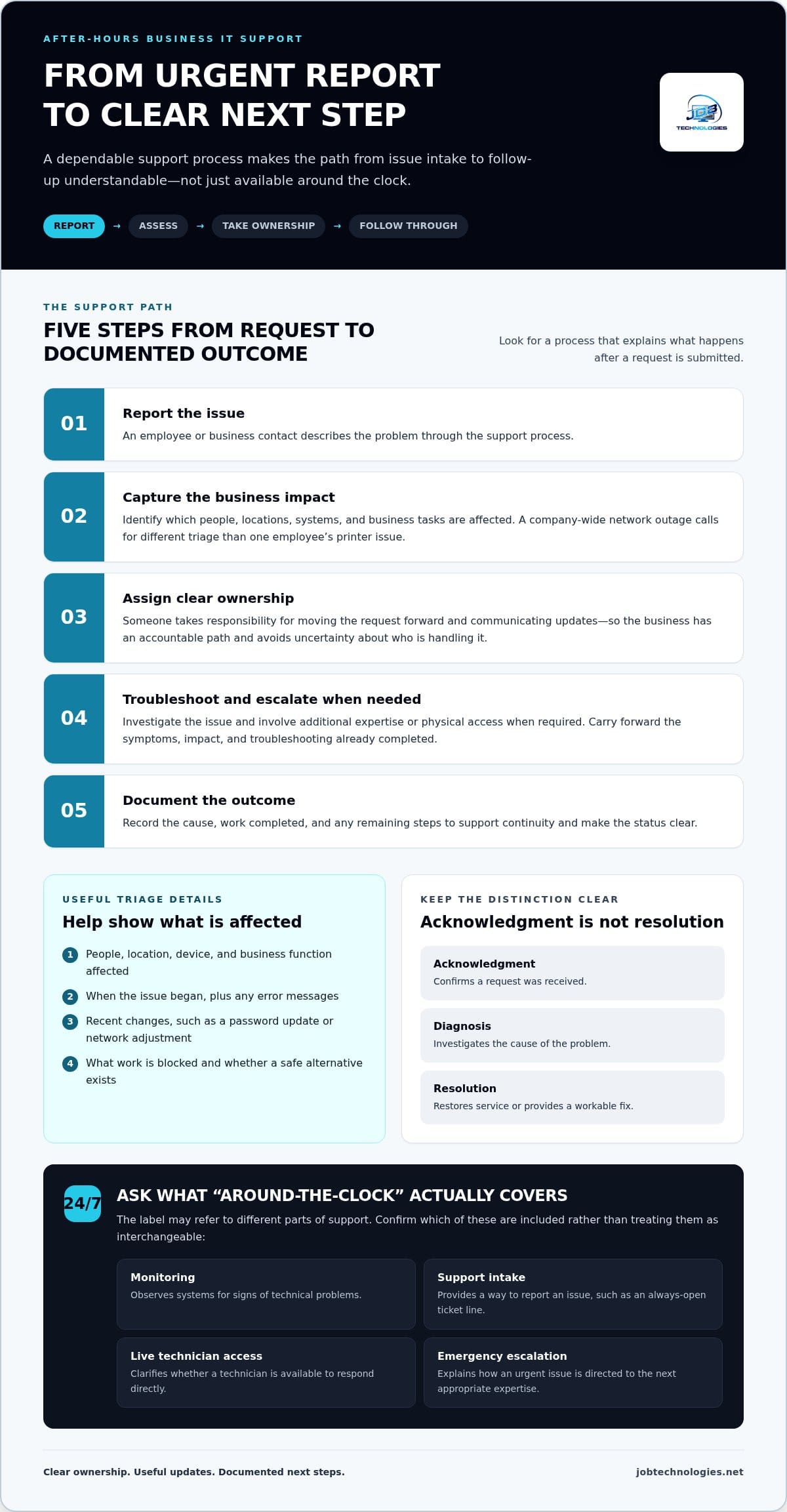
Before relying on IT support, get clear on what “24/7” means. It can refer to automated monitoring, an always-open ticket line, access to a live technician, or an emergency escalation process. Those aren’t the same level of coverage. A quick acknowledgment also isn’t the same as a fix.
This guide explains what around-the-clock support can mean in practice and how to compare intake, response, ownership, and escalation. It also looks at how managed IT connects everyday computer, network, and email support with cybersecurity and backup and recovery. JOB Technologies supports businesses in Dubuque and nearby communities, including Galena, East Dubuque, Dyersville, Farley, and Peosta. Use the guidance below to assess support and plan for business continuity.
Key Takeaways
- Learn why around-the-clock monitoring, support intake, technician response, and issue resolution are different parts of IT coverage.
- Compare support plans by asking about ownership, severity triage, and escalation, not just the “24/7” label.
- Searching for 24/7 IT support for business near me? Understand a provider’s process before an urgent issue disrupts operations.
- Prepare for after-hours incidents by documenting key contacts, critical systems, access needs, and backup priorities.
- See how JOB Technologies supports business computers, networks, email, cybersecurity, and recovery across the Dubuque area.
What 24/7 IT support for business near Dubuque should actually mean
A “24/7” label describes an availability model: a defined way to report an IT issue and have it handled at any hour. By itself, it doesn’t explain whether a technician is available live, how quickly diagnosis begins, or when the problem will be resolved. If you’re searching for 24/7 IT support for business near me, look beyond the headline and separate the stages of support.
Support hours describe when help can be requested or delivered. Response means acknowledging the request; diagnosis means investigating the cause; resolution means restoring service or providing a workable fix. Onsite work is another consideration, since some issues may need a site visit even after remote troubleshooting. These are related parts of support, but they aren’t interchangeable promises.
For an overview of how support can be delivered and organized, see Technical support.
To see how 24/7 support is commonly described, watch this brief overview:
Help-desk coverage gives people a process for reporting and handling support requests. Proactive IT management works to maintain and protect systems before users report a problem. A service may include one or both. Clear descriptions help you understand what coverage means for your business rather than relying on a broad label.
Does 24/7 support mean a technician fixes every issue immediately?
No. An acknowledgment confirms a request has been received, but it doesn’t mean investigation has started or a fix is complete. A support process should capture what’s affected, how many people are impacted, and whether core work has stopped. That information helps determine priority. A company-wide network outage needs different triage from one employee’s printer issue, while diagnosis and resolution can take additional time.
How does continuous monitoring differ from a 24/7 help desk?
Monitoring observes systems for signs of technical problems, such as a device or service becoming unavailable. A help desk handles issues reported by users or through another intake process. Monitoring may reveal an issue before employees notice it; user support gives staff a way to describe problems they encounter. Together, these functions can inform troubleshooting, but monitoring alone isn’t a conversation with a technician or a guarantee of a fix.
For Dubuque-area businesses, the distinction matters because dependable operations involve more than answering a ticket. Managed IT connects everyday computer, network, and email support with cybersecurity and backup and recovery planning. JOB Technologies provides business-focused managed IT services in Dubuque and nearby communities, supporting the technology teams rely on to keep work moving.
What happens after a business IT support request is submitted?
A useful support process does more than create a ticket. It turns a report into a shared understanding of what’s wrong, how the issue affects work, and what happens next. If you’re evaluating 24/7 IT support for business near me, look for a clear path from intake through follow-up, not just a way to send a message.
A typical request moves through these steps:
- Report the issue. An employee or business contact describes the problem through the support process.
- Capture the impact. The team identifies which people, locations, systems, and business tasks are affected.
- Assign ownership. Someone takes responsibility for moving the request forward and communicating updates.
- Troubleshoot and escalate. The issue is investigated, with additional expertise or physical access involved when needed.
- Document the outcome. The cause, work completed, and any remaining steps are recorded for continuity.
Clear ownership and documented next steps give the business one accountable path forward, reducing uncertainty even before a problem is fully resolved. They can also prevent duplicate requests from employees who don’t know whether anyone is handling the issue. Updates should state what’s being investigated, what information is still needed, and when the business can expect another status update. An acknowledgment should never be confused with a completed fix.
What information helps a support team triage an urgent issue?
Useful details help distinguish an isolated user problem from a broader outage. Include the affected people, location, device, and business function, along with when the issue began. Note any error messages and recent changes, such as a password update or network adjustment. Avoid sharing passwords in a ticket; describe the access problem instead.
- Can one employee not sign in, or are several people affected?
- Is the issue limited to one device, or are network or email services unavailable across a location?
- What work is blocked, and is there a safe alternative employees can use?
When might a remote fix need an escalation path?
Remote troubleshooting can help with software errors, account access, or settings that can be examined securely from a distance. A damaged device, a disrupted network connection at a site, or a problem requiring hands-on inspection may need another next step. Escalation means directing the issue to the appropriate expertise while carrying forward the symptoms, impact, and troubleshooting already completed. This saves the business from having to explain the problem all over again.
Good records also support continuity across computer, network, and email issues. JOB Technologies’ managed IT support serves businesses in Dubuque and nearby communities, connecting day-to-day technology needs with cybersecurity and backup and recovery. Clear issue details help support conversations begin with useful context.
How to compare 24/7 IT support plans without relying on slogans
A useful comparison starts with the process behind the promise. For businesses looking for 24/7 IT support for business near me, coverage hours matter, but so do the way requests enter the queue, how urgent issues are prioritized, and who keeps the business informed. Compare these details side by side rather than treating “24/7” as a complete description.
| What to compare | What a clear description explains |
|---|---|
| Coverage hours | When requests can be submitted, when a person can respond, and which work is covered outside standard hours. |
| Intake | How users report an issue and what information helps the team understand its impact. |
| Severity triage | How urgency is categorized, including the distinction between an individual problem and a service-wide disruption. |
| Ownership | Who tracks the request, provides updates, and makes sure next steps are clear. |
| Escalation | How work moves to the right expertise, and how remote troubleshooting or physical access is handled. |
| Reporting | What records are shared about recurring issues, completed work, and open follow-up items. |
Also separate the kinds of work included. Proactive management focuses on maintaining systems and reducing avoidable problems. User support helps staff with day-to-day computer, network, or email issues. Cybersecurity response addresses suspected threats, while recovery planning prepares the business to restore data and operations after disruption. A plan may cover several of these, but its scope should make the distinctions clear.
Which service commitments should a business understand before choosing support?
Look for written definitions of coverage windows, supported systems, escalation contacts, and severity categories. Response targets describe when acknowledgment or initial attention is expected; they aren’t the same as a resolution guarantee. Resolution can depend on the cause, affected systems, and whether remote access or physical work is needed. A clear written scope helps align expectations without relying on a headline claim.
Remote assistance can address some software, account, or configuration issues. A physical device fault or a network problem that requires access to equipment may involve onsite work. Compare what each plan says about remote support and local onsite capabilities, without assuming one automatically includes the other.
Why should support include cybersecurity and data recovery context?
A suspected ransomware incident can quickly become a business-continuity concern, not just a technical ticket. Decisions about limiting further impact, protecting data, and restoring essential operations are connected. Prevention and recovery planning help businesses identify critical systems and information, and understand what restoration may require. JOB Technologies connects business IT with cybersecurity and backup and recovery, bringing these needs into the same conversation.
Ongoing support also needs to fit the business’s wider technology needs. JOB Technologies supports businesses across the Dubuque area with managed IT, network, computer, and email support. A thoughtful comparison can help your team identify the coverage and continuity priorities that matter most. Explore JOB Technologies’ business IT support as you consider those needs.
How Dubuque-area businesses can prepare for an after-hours IT issue
A little preparation can make an unexpected technology problem easier to explain and manage. Whether your team works from one office or across Dubuque, Galena, East Dubuque, Dyersville, Farley, and Peosta, keep a practical incident reference where authorized staff can find it. It should help people identify what’s affected, who can make decisions, and which business functions need attention first.
Use this checklist to prepare:
- List decision-makers. Record the primary business contact and a backup who can approve operational decisions.
- Map locations and systems. Note each site, the systems used there, and which services are essential to daily work.
- Identify key contacts. Include relevant vendors and internal staff who understand critical applications, network access, or business processes.
- Protect access information. Follow your organization’s security practices for storing credentials and access instructions. Don’t leave passwords in an unprotected document.
- Document issue details. Provide a place to record the start time, affected users and devices, error messages, recent changes, and steps already attempted.
- Set decision authority. Clarify who can approve business-impacting changes, such as temporarily disabling a system or changing how staff work.
Then rank services by operational impact. For example, a business may need network access and email restored before a less time-sensitive internal tool. Another organization may depend first on a specific application, shared files, or phone service to serve customers. Identify dependencies too: a critical application may rely on network connectivity, user access, or stored data. Set priorities according to how your organization operates, not simply which system sounds most technical.
What should go in a business IT incident contact sheet?
Keep the reference concise enough to use under pressure. Include internal decision-makers, affected locations, key systems, and essential vendor contacts, plus a secure pointer to approved access procedures. Note who can authorize changes and who should receive status updates. Review the sheet when staff roles, systems, or locations change so the information remains useful across the organization.
How can backups and recovery plans reduce disruption?
Having backups is different from knowing how restoration fits business priorities. Identify which data and systems are essential, what they depend on, and who coordinates recovery decisions. Consider the order that would let employees resume the most important work. JOB Technologies provides data backup and recovery as part of its business IT capabilities. When planning, account for the fact that recovery outcomes depend on the applicable arrangements and the situation, rather than assuming a particular restoration time.
A documented contact sheet and practical recovery priorities give your team a steadier starting point during an incident. Discuss your business IT support needs with JOB Technologies.
How JOB Technologies supports business IT needs across the Dubuque area
Searching for 24/7 IT support for business near me often reflects a wider need: keeping the technology your team depends on secure, supported, and connected to daily operations. JOB Technologies provides managed IT services for small and medium-sized businesses in Dubuque, Galena, East Dubuque, Dyersville, Farley, and Peosta. Its services cover business technology, from everyday computer, network, and email needs to cybersecurity and recovery planning.
Which business technology needs can JOB Technologies support?
Computer, network, and email support all connect to routine work. A sign-in problem can prevent an employee from doing their job; a network issue can affect access across a location; email problems can interrupt communication with colleagues and customers. Managed IT brings these needs into a broader view of the systems a business relies on, helping technology support operational continuity rather than treating every issue in isolation.
Cybersecurity and ransomware protection address digital risks that can affect access to systems and business information. Data backup and recovery support planning for data restoration after disruption. These services address different parts of a business technology approach, and outcomes depend on the circumstances and applicable arrangements. Compliance assistance can also help organizations align technology practices with their compliance needs.
Other capabilities can support specific operational goals. Businesses assessing their phone infrastructure can consider VoIP systems, while AI implementation may be relevant when evaluating how AI could fit into existing workflows. The right combination depends on how your people work, which systems are essential, and what risks or process challenges you’re trying to address.
How does local business context shape an IT support relationship?
JOB Technologies serves businesses in Dubuque and nearby communities, including Galena, East Dubuque, Dyersville, Farley, and Peosta. Each organization has its own mix of locations, users, and essential systems, so useful IT support starts with understanding what the business depends on.
The value of a managed IT relationship is the connection between daily support and broader technology needs. That may mean addressing computers and email while also considering network management, cybersecurity, backups, recovery, or compliance assistance in the context of the organization’s operations. A business-focused partner can help keep those needs in view as systems and priorities change, rather than reducing the relationship to a single support request.
If your organization is reviewing its technology priorities or looking for a more coordinated approach, talk with JOB Technologies about your business IT. It’s a straightforward next step toward discussing the systems your team relies on and the support that fits your business.
Make IT readiness part of your next business decision
Technology needs change as teams, workflows, and customer expectations evolve. Rather than waiting for a disruption to expose a gap, make support planning part of regular business conversations. Revisit who makes decisions during an incident, which operations need priority, and whether your current arrangements still fit the way your organization works.
If you’re searching for 24/7 IT support for business near me, use what you’ve learned to define dependable support for your company. Consider the process you need, how communication should work, and how technology support connects with security and continuity. A clear understanding of those priorities can make the next discussion more productive, whether you’re reviewing existing arrangements or planning for future needs.
JOB Technologies works with businesses on managed IT and related technology needs. Take a practical next step and start a conversation about your business IT. With the right priorities in view, you can move forward with greater clarity and confidence.
Frequently Asked Questions
What does 24/7 IT support for a business include?
It depends on the coverage model and written scope, so the label alone doesn’t specify every service. A business may need user assistance, infrastructure support, cybersecurity response, or help restoring access to essential systems. For Dubuque-area businesses, map those needs to actual work processes, such as processing orders or accessing shared files, then identify what kind of support each depends on.
Is 24/7 IT support the same as 24/7 system monitoring?
No. Monitoring looks for system conditions that may signal trouble, while support handles requests or investigates identified issues. For example, a monitoring alert might flag a server capacity concern before staff notice a slowdown; a help desk would address an employee’s report that a business application is freezing. Businesses benefit from understanding who reviews alerts and how a detected issue becomes a tracked support task.
Can business IT support resolve issues remotely?
Yes, some issues can be investigated or corrected remotely, provided the affected system can be accessed securely and the problem is suitable for remote work. Account settings, software configuration, and certain email problems may be candidates. A technician may need more information or a user’s cooperation during troubleshooting. Remote access should follow the business’s security practices, especially when the issue involves sensitive data or unusual account activity.
What happens when a business IT problem needs onsite attention?
If a fault involves equipment or a connection that can’t be assessed remotely, the next step may involve coordinating physical access to the affected location. The business can help by identifying the site contact, the equipment involved, and any access or safety considerations. For example, a local employee might describe which network devices have power and whether nearby workstations are affected, helping the support team understand the situation before next steps are arranged.
How should a business define an urgent IT issue?
Define urgency by business impact, not just by how frustrating a problem feels. An issue may be urgent if it stops a critical process, affects multiple teams, creates a credible security concern, or risks access to important business information. A minor display problem on one workstation may be lower priority than staff being unable to process transactions. Written severity guidelines help employees report concerns consistently and support appropriate triage.
Does managed IT support include cybersecurity and data backup?
Managed IT can connect routine technology support with cybersecurity and data protection, though the exact scope depends on the services arranged. JOB Technologies provides cybersecurity and ransomware protection, along with data backup and recovery services for businesses. These capabilities address different needs: cybersecurity helps manage digital risk, while backup and recovery support planning for data restoration. Together, they can inform a broader approach to protecting business operations.
What information should I prepare before reporting a business IT issue?
Have the affected user or team, device or application, location, and start time ready. Include the exact error message, what the employee was trying to do, and whether the problem happens repeatedly or after a recent change. A screenshot can help if it contains no sensitive information. Don’t include passwords or confidential data in an ordinary report. These details give support staff a clearer starting point for investigation.