

The most feature-rich AI productivity tools aren’t automatically the best fit for your business. Choose based on the work you need to improve, how well a tool connects with your core software, and whether its security, usability, and scalability suit your organization.
It’s understandable to focus first on impressive features or a low starting price. But a tool only helps when it fits daily workflows and people can use it confidently. A mismatch can add complexity instead of reducing it.
This guide explains what AI productivity tools can do, how to compare their features and pricing, and which business criteria matter most. We’ll cover common tool categories and practical considerations such as integrations, security, user experience, and scalability, so you can focus on your needs rather than a feature list.
Key Takeaways
- Match each tool to a specific workflow problem before comparing features.
- Explore how automation, meeting support, and research assistants can reduce repetitive work.
- Compare plan limits and pricing structures against the capabilities your team will actually use.
- Assess integration, security, user experience, and scalability to find a practical business fit.
- Use a focused trial to see whether a tool fits your team’s day-to-day work.
1. What is an AI productivity tool?
An AI productivity tool uses artificial intelligence to help people complete work, find information, or coordinate tasks. Three out of four knowledge workers use AI at work. For example, a writing assistant can turn meeting notes into a draft email, while an automation tool routes an invoice for approval. The tool supports a task; a person remains responsible for checking whether the result is accurate and appropriate.
Automation connects steps people would otherwise handle manually. Imagine a customer inquiry arriving through a website form: software can record the details, create a task, and notify the right team member. AI can add value by sorting the message by topic or drafting a response. The workflow still needs clear rules, including which requests require human review before a reply goes out.
Integrations let separate software services share information. A calendar, email platform, and project-management system might exchange meeting details and follow-up tasks. Before automating a workflow, map its steps: identify the starting event, the information each step needs, and the intended outcome. Then test the connection with a sample record. If a field fails to transfer, the process could stop or create incorrect work downstream.
AI agents extend automation by handling a sequence of related tasks toward a goal. For example, an agent might review a support request, find relevant internal material, and prepare a suggested answer—an approach platforms like GraiaCX use to coordinate customer interactions across voice, chat, and email. Unlike a fixed script, an agent can choose actions based on the information it receives. That flexibility calls for defined boundaries, approved data sources, and a clear point where a person reviews decisions.
AI orchestration coordinates multiple tools or agents within one process. Consider a project handoff: transcription software captures a discussion, an assistant extracts decisions, and project software receives proposed tasks. Descript is one example of software associated with transcription and media work. The orchestration layer determines how information moves between tools, while people confirm that the transcript and extracted actions reflect the conversation.
To assess an automation, start with one repetitive workflow and document its current steps. Mark where information is entered twice, where delays occur, and where judgment is essential. Automate predictable handoffs first, such as creating a task from an approved form submission. Keep approval steps for sensitive or ambiguous decisions. A focused test shows whether the workflow saves effort without making the process harder to manage.
2. Transcription, meeting assistants, and scheduling
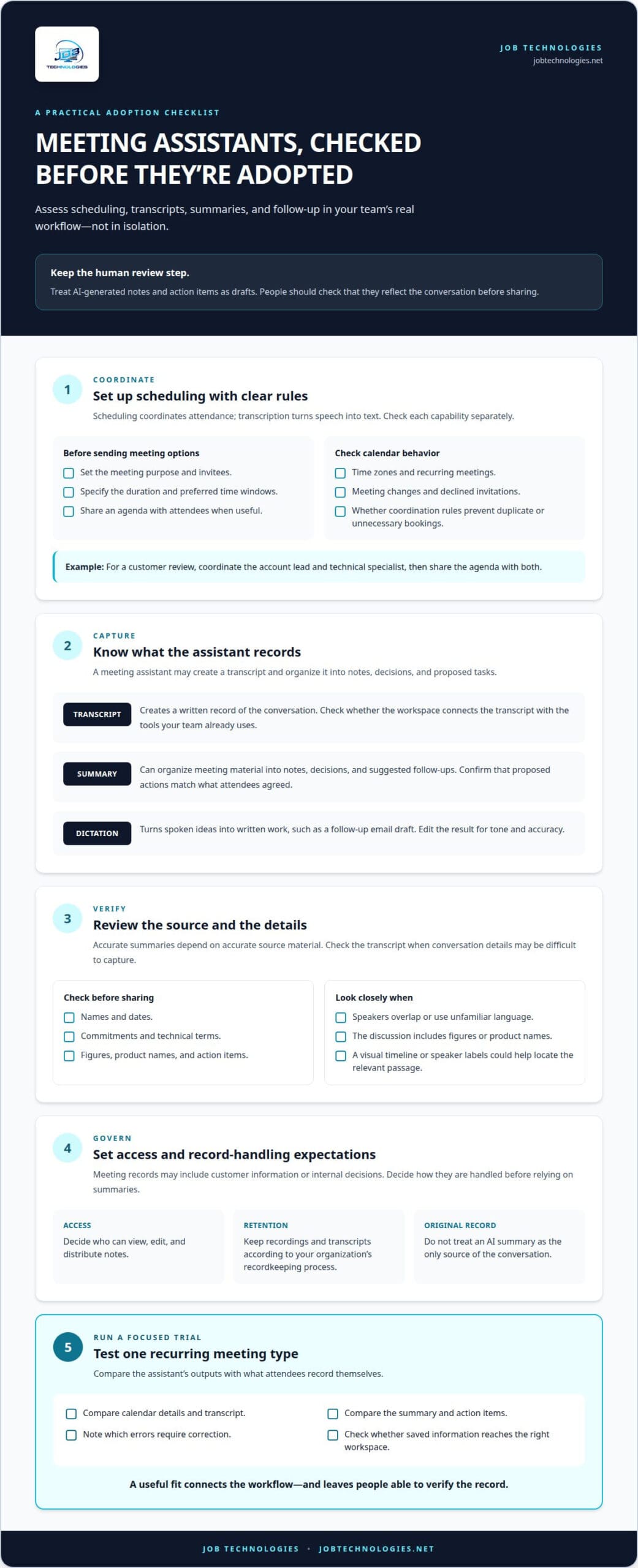
A meeting assistant can coordinate calendars, capture discussions, and organize follow-up. For example, Google Calendar can show available times, while a meeting assistant prepares an agenda and records decisions. Compare these capabilities separately: scheduling coordinates attendance, while transcription turns speech into text. A useful workspace connects those outputs to the tools your team already uses.
Start with scheduling. Set the meeting purpose, invitees, duration, and preferred time windows before sending options. For a customer review, the organizer might reserve time for the account lead and technical specialist, then share an agenda with both. Check how the tool handles time zones, recurring meetings, changes, and declined invitations. Clear coordination rules help prevent duplicate or unnecessary bookings from filling the calendar.
Transcription creates a written record of a conversation. A meeting assistant may also organize that transcript into notes, decisions, and proposed tasks. After a project discussion, for example, it could identify a delivery date and suggest a follow-up for review. Treat the output as a draft: check names, dates, commitments, and technical terms against the conversation before sharing the notes.
Conversation insights can help teams find themes across meetings, but useful summaries depend on accurate source material. Review the transcript when speakers overlap, use unfamiliar language, or discuss figures and product names. A visual timeline or speaker labels can help locate the relevant passage. Keep the original recording or transcript according to your organization’s recordkeeping process, rather than treating an AI summary as the only source.
Voice dictation offers another way to turn spoken ideas into written work. A manager could dictate a follow-up email after a call, then edit the draft for tone and accuracy. Test the feature with your team’s common terminology, names, and language needs. For meeting notes, decide who can view, edit, and distribute them. Permissions matter when a discussion includes customer information or internal decisions.
Before adopting a meeting assistant, run a controlled trial with one recurring meeting type. Compare the calendar details, transcript, summary, and action items against what attendees record themselves. Note which errors require correction and whether the saved information reaches the right workspace. Set a retention and access process for recordings and transcripts; compliance assistance for meeting records can help businesses consider those information-handling needs.
AI assistants for research, writing, and general productivity
AI assistants can help draft writing, organize research, summarize meeting material, and turn decisions into task lists. ChatGPT, Claude, and Perplexity are examples businesses may compare for these tasks. The right choice depends on whether your work calls for drafting, source discovery, summarization, or a mix. For a weekly project update, an assistant could organize supplied notes into a first draft for a manager to review.
Use a clear request and relevant context to get a more useful draft. For example, ask ChatGPT to turn approved product details into an email for a specific audience, then check every claim against the source material. AI-assisted drafting can make blogs, emails, social posts, and product descriptions 50-70% faster. That speed helps with a first version, but a person should still handle strategy, judgment, and final polish.
Research assistants can gather information, summarize documents, and provide quick answers. Perplexity, for example, can be part of a research workflow where users review cited sources rather than relying on a summary alone. A practical process is to define the question, collect relevant sources, compare the answer with those sources, and record what remains uncertain. This connects a concise response to material your team can inspect.
For research synthesis, provide the assistant with selected documents and request a summary organized by topic, decision, or open question. Research synthesis that might take 2-3 hours can be reduced to 20-30 minutes using AI tools. Treat that as a starting point: confirm names, figures, dates, and conclusions in the original documents. For example, compare a generated project brief with the source reports before sharing it with decision-makers.
AI can also support routine general work. It can help format data, adapt a template, or proofread a draft. Tasks that take 30-60 minutes, such as repetitive formatting, template work, and proofreading, may take 5-10 minutes with AI. It can also generate a task list from approved notes. Set the requested format and check the result before adding tasks to a project system.
These tools can save time, but their answers need review. In a survey of 1,100 enterprise AI users, 52% said AI research and fact-finding often needed a fix afterward. Verify claims against reliable source documents, especially when a summary will guide a business decision or be shared externally. A polished response can still contain an incorrect detail or omit context that changes its meaning.
Consider privacy and data use before employees enter business material. Avoid putting confidential customer details, credentials, or internal documents into an assistant unless your organization has approved that use. Review the tool’s data settings and access controls, then establish a team rule for what information can be entered. A brief review with IT or compliance staff can help align everyday use with security and recordkeeping practices.
4. AI productivity tool pricing and free plans
AI productivity tool pricing varies by plan type, features, usage limits, and number of users. Treat these as broad comparison ranges, not a quote for a specific product. For a small team, calculate the total using the number of users and billing period before comparing plans.
A free plan can help students and professionals test a productivity tool for a specific task. There isn’t one best free option for everyone: compare assistants such as ChatGPT, Claude, and Perplexity against the work you need done. To evaluate AI productivity tools, check each plan’s usage limits and capabilities, then try the same task in each. For example, compare how clearly each assistant summarizes a document you’re allowed to use.
Paid plans may make sense when a team needs capabilities or usage levels its free option doesn’t provide. Compare plan details directly, including user access, usage limits, administration, and integrations. A Microsoft-centered team might assess how an AI feature fits its existing workspace. A team using Notion or HubSpot can evaluate whether a paid tool supports the workflows employees already rely on. These details help distinguish a useful upgrade from a more expensive version of the same setup.
Look beyond the monthly price. Calendar, writing, and research assistants may charge differently or bundle different features. List the tools in your proposed stack, identify overlapping functions, and estimate the total per user. Then decide which capabilities are essential. If a free calendar feature already handles scheduling, paying for another tool that duplicates it may add little practical value.
For a fair comparison, test each candidate against the same work sample and record the results. Note the time spent learning the tool, corrections needed, and whether the output works in your existing software. A lower-priced plan may require manual work elsewhere; a higher-priced plan may include capabilities your team won’t use. Compare overall workflow fit, not just the plan label.
Before approving a subscription, document who needs access, which tasks it supports, and how usage will be reviewed. A team could start with one approved writing workflow, track adoption, then decide whether broader access makes sense. Review the renewal period, billing basis, and cancellation terms in the plan details. This helps prevent unused subscriptions from accumulating across departments.
Students and professionals can start with a free option for one recurring task, then compare its limits with paid alternatives. Businesses should weigh data handling and administrative needs alongside per-user cost. A short trial using real, low-risk work can show whether AI productivity tools fit the workflow or simply add another workspace to manage.
5. Business criteria for selecting AI tools
Choose an AI tool by matching its capabilities to a specific workflow, then testing it with real, low-risk work. Define the task, connect the platform to the required software, set access rules, and compare results with your current process before expanding its use.
Start with scope and functionality. Identify the business problem, such as sorting incoming requests or preparing project summaries. Then compare the tool’s AI features with the steps employees actually perform. An advanced feature adds little value if it doesn’t address the bottleneck. For example, a team that spends time routing requests may value accurate classification more than a tool that generates long reports.
Integration is a practical deciding factor. Nearly 80% of enterprises struggle to integrate AI with their current tech stacks. Map the information flow between the AI platform and core software, including where data starts and where results must appear. Test a representative workflow, such as moving an approved request into a task system, and confirm that fields transfer correctly. A tool that works in isolation may create extra manual steps.
Assess user experience with the people who will use the tool. Ask a small group to complete the same task with and without the AI features, then note confusing steps, corrections, and handoffs. If project teams manage 3 or more client projects simultaneously, project-management capabilities may help organize deadlines and ownership. Choose a workflow employees can explain clearly, rather than one that depends on a complicated prompt or hidden process.
Review security and responsible use separately. Decide which information employees may enter, who can access outputs, and which tasks require human approval. For example, allow a draft response to be generated automatically, but require an employee to review it before sending. Check generated insights for accuracy and fairness, particularly when they influence decisions about customers, employees, or business priorities.
Scalability means a tool can support a broader workflow without creating avoidable complexity. Test how it handles additional users, new teams, or more connected software. Before a pilot, record the current process, expected output, integration points, and review owner. Then assess whether the platform remains understandable as the workflow grows. This helps distinguish useful automation from an impressive demonstration.
Use a simple decision record to compare candidates: task fit, integration, user experience, security, and scalability. Give each criterion a clear pass, concern, or follow-up based on the pilot. This keeps selection grounded in evidence from your own workflows, rather than feature claims alone. Discuss your AI workflow requirements to plan a practical next step.
JOB Technologies: Managed IT Services
JOB Technologies helps businesses put technology decisions into practice through Managed IT Services and AI Implementation. Turn to the team when you’ve identified a workflow worth improving and need support aligning AI with your existing systems and day-to-day operations.
For example, a business may need to consider how an AI platform fits its network and current software before rolling it out. JOB Technologies also offers Network Installation & Management and Phone Systems VoIP, which can support broader technology planning when those needs apply. Define the workflow, the tools involved, and the outcome your team wants to achieve.
Contact JOB Technologies to discuss your business’s AI and IT needs.
Make Your Next Technology Decision With Confidence
Choosing AI productivity tools is a starting point, not a one-time decision. Begin with a workflow your team understands, assign someone to oversee its use, and decide how you’ll assess its value. As your needs change, review whether your AI productivity tools still fit the way your business works.
JOB Technologies offers Managed IT Services, Network Installation & Management, and AI Implementation to support business technology planning and implementation.
If you’re ready to discuss how AI could fit your workflows, contact JOB Technologies about AI tools. A clear starting point can make your next technology decision more manageable.
Frequently Asked Questions
What do I consider the best AI productivity tools?
The best AI productivity tools improve a real task without adding unnecessary work. Compare options using the same sample, such as drafting a customer update from approved notes. Assess accuracy, editing effort, ease of use, and fit with your team’s process. A focused assistant that handles a frequent task reliably may suit your needs better than a broad platform with unused features.
How do AI tools improve workflows?
AI tools can help move information through a process by classifying content, generating drafts, or extracting details for review. For example, an assistant could sort feedback into product themes before a manager reviews it. To judge whether this improves the workflow, compare the handoffs and corrections required before and after using the tool. Keep a person responsible for decisions that affect customers, employees, or business commitments.
What are examples of AI productivity in the workplace?
Examples include drafting an internal announcement, extracting requested changes from customer feedback, and turning a policy document into a staff reference. A project coordinator might ask an assistant to group open questions by department, then check each item against the original notes. These tasks are useful candidates when the source material is approved for use and someone reviews the output before it guides work.
What is an AI productivity tool?
An AI productivity tool is software that uses AI to assist with a work activity. Some tools focus on writing or research, while others support meeting records, scheduling, or repetitive process steps. For example, an assistant can produce a draft from supplied material, but it doesn’t replace the person who checks the facts and decides what to send. Its value lies in helping with a task, not taking responsibility for the outcome.
What are the best AI productivity tools in 2026?
There’s no single best choice for every business in 2026. ChatGPT, Claude, and Perplexity are examples to compare for research and writing, but each should be assessed against your actual work. Give candidates the same prompt and source material, then compare the usefulness of their responses and the effort needed to correct them. Revisit the choice as your workflows, software, or information-handling needs change.
Which AI productivity tools are best for individuals, teams, and businesses?
Individuals may prefer a simple assistant for drafting or organizing personal work. Teams often need shared ways to manage review, collaboration, and handoffs, while businesses also consider administration, access, security, and integration. Compare AI productivity tools by assigning each group a representative task. A solo consultant could test proposal drafting, a job seeker might evaluate AI writing using cover letter examples, while a department could assess how a shared workflow handles approvals and ownership.
What are the prices and free-plan limits of popular AI productivity tools in the United States?
Free-plan limits vary by product and can affect usage, available features, or access to certain functions. Before choosing, compare the plan terms with your expected workload, number of users, and administrative needs. Check the current terms for the specific tool you’re evaluating.
Which AI tools integrate with Google Workspace, Microsoft 365, Slack, Notion, and Zoom?
Integration support varies by tool, plan, and workflow, so assess each connection rather than assuming broad compatibility. Identify the information that should move between platforms, such as a meeting summary reaching your team’s project space. Then test that path with non-sensitive material and confirm the right people can access the result. This check can show whether an integration reduces manual work or adds another step.