
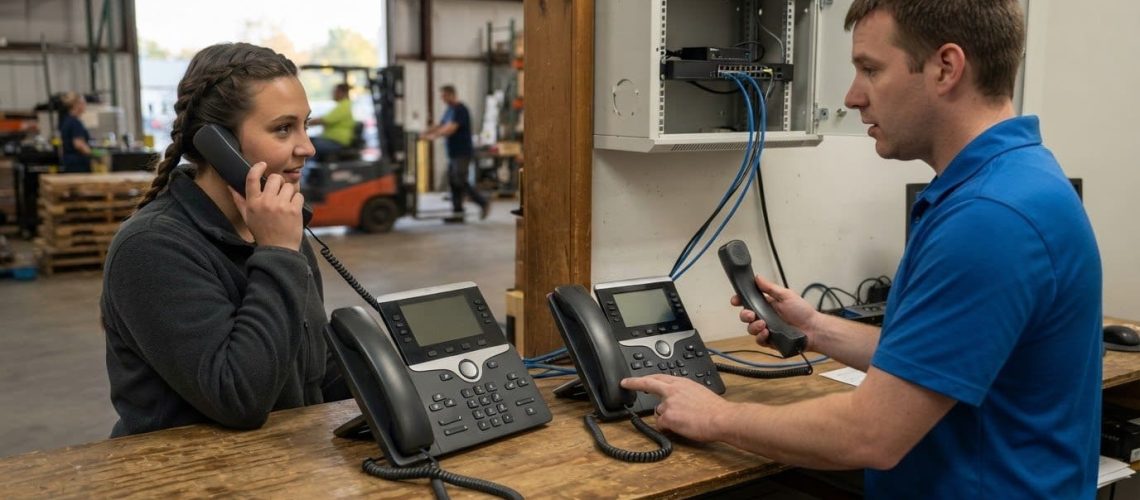
The better Teams phone choice isn’t automatically the one with the strongest audio reputation. In the AudioCodes vs. Yealink comparison, both support HD voice codecs and Teams-certified audio processing. The decision comes down to how each fits your calling needs, security priorities, and deployment environment. In many cases, devices from both brands can operate in the same environment.
That gives you room to focus on practical differences rather than treating the decision as all or nothing. The right fit depends on where phones will be used, how your team manages them, and what users need during everyday calls.
This guide compares Teams calling and audio, security and emergency-calling features, deployment effort, and pilot evaluation. You’ll also find a side-by-side criteria table and decision guide to help weigh the options against your organization’s needs before committing to a rollout.
Key Takeaways
- Both brands support HD voice codecs and Teams-certified audio processing, so compare how their phones perform in your actual calling spaces.
- Assess noise suppression in realistic conditions, including busy work areas, rather than relying on specifications alone.
- Match device features to the environment: for example, the AudioCodes C456HD has a programmable action button for emergency calling in classrooms and workspaces.
- Plan deployment around device setup, user needs, and IT capacity; a well-planned Teams device rollout for a mid-sized team usually takes two to six weeks, including a short pilot phase.
- Use a pilot to evaluate call experience, management effort, and total cost of ownership over a three-year horizon before making a broader procurement decision.
Audio quality and Teams calling experience
For Microsoft Teams calling, both AudioCodes and Yealink support HD voice codecs and Teams-certified audio processing. That gives you a shared baseline. Practical differences come down to each model’s screen, call controls, and fit for its location.
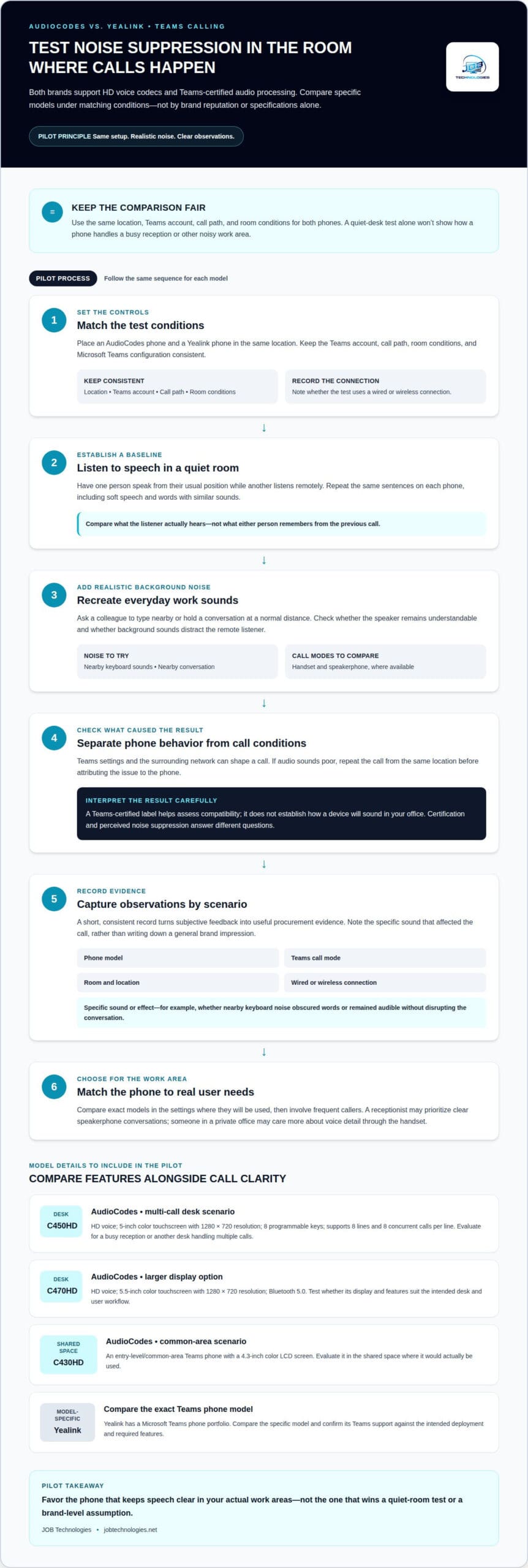
AudioCodes offers distinct options for desk and shared-phone scenarios. The C450HD has a 5-inch color touchscreen, 1280 x 720 resolution, and 8 programmable keys. It supports 8 lines and 8 concurrent calls per line, which can suit a busy reception or other desk handling multiple calls. The C470HD has a 5.5-inch color touchscreen with 1280 x 720 resolution and Bluetooth 5.0. Those details help narrow the model choice, but they don’t establish which phone sounds better in your room.
For a shared space, the AudioCodes C430HD is an entry-level/common-area Teams phone with a 4.3-inch color LCD screen. For a high-use desk, compare the C450HD’s programmable keys and line capacity with the C470HD’s larger screen. These are concrete differences to test alongside call clarity, speakerphone use, and how easily users reach the features they need.
Yealink has a Microsoft Teams phone portfolio, but a model-by-model comparison matters more than brand alone. The Microsoft Teams phone hardware list records the Yealink T55/T55A as certified from October 4, 2021, through October 4, 2023. Treat that as a dated certification record, not a current certification claim. Confirm your shortlisted model’s Teams support against your intended deployment and required features.
For Microsoft Teams, both brands have Teams-certified devices. For Zoom, compare the exact phone model and calling setup you plan to use. Teams certification alone doesn’t establish Zoom compatibility.
A reported user favored the AudioCodes C455HD for common-area use. That’s one organization’s experience, not a broad verdict or a reliable summary of complaints across both brands. In a pilot, ask users to assess call clarity, speakerphone performance, navigation, and whether call controls work well in their setting.
| Option | Audio and calling | Useful fit to evaluate |
|---|---|---|
| AudioCodes C450HD | HD voice; 5-inch, 1280 x 720 screen | Desk with multiple lines and programmable keys |
| AudioCodes C470HD | HD voice; 5.5-inch, 1280 x 720 screen | Desk where a larger display and Bluetooth 5.0 matter |
| Yealink Teams phones | HD voice and Teams-certified audio processing | Compare the specific model and certification record |
Match the exact model to its location, call volume, and user workflow, then test those conditions in a pilot.
Both AudioCodes and Yealink offer Teams-certified devices. For Zoom, compatibility depends on the exact phone model and calling setup, so there’s no basis here to rank one brand above the other.
Audio quality and noise suppression
Judge a phone’s noise suppression in the room where people will use it. In an AudioCodes and Yealink comparison, test the complete Microsoft Teams call experience, not just a model description. Background voices, keyboard sounds, and room echo can affect how clearly speech reaches the other participant. A quiet desk test alone won’t show how either phone handles a busy reception.
Start with a consistent test setup. Place an AudioCodes phone and a Yealink phone in the same location, use the same Teams account and call path, and keep room conditions consistent. Have one person speak from their usual position while another listens remotely. Repeat the same sentences, including soft speech and words with similar sounds, so listeners can compare clarity instead of relying on memory.
Then introduce realistic background noise. Ask a colleague to type nearby or hold a conversation at a normal distance. Check whether the speaker remains understandable and whether background sounds distract the remote listener. Repeat the test using the handset and speakerphone, where available. Record observations by scenario, not by brand impression.
Teams settings and the surrounding network can also shape a call. Keep the Microsoft Teams configuration consistent during comparisons, and note whether the test uses a wired or wireless connection. If a call sounds poor, repeat it from the same location before blaming the phone. This helps separate device behavior from changes in room noise, network conditions, or call settings.
A Microsoft Teams certified label is useful when assessing compatibility, but it doesn’t tell you how a device will sound in your office. Certification and perceived noise suppression answer different questions. Compare specific Yealink and AudioCodes models under matching conditions, then involve the people who make frequent calls. A receptionist may value clear speakerphone conversations, while someone in a private office may care more about voice detail through the handset.
Keep a short record of each test. Note the phone model, Teams call mode, room, connection type, and the specific sound that caused difficulty. For instance, record whether nearby keyboard noise obscured a caller’s words or remained audible without disrupting the conversation. This turns subjective feedback into useful evidence for procurement.
Choose the phone that keeps speech clear in your actual work areas, rather than assuming one brand’s noise suppression will suit every room. If testing points to wider call-quality or network concerns, review your calling setup as part of the evaluation.
Security and emergency calling features
Compare security by reviewing how each device fits your organization’s controls, not by assuming a brand name guarantees protection. For AudioCodes and Yealink, assess the exact model, its intended location, and how your team manages access and changes. A phone on an executive’s desk may need a different handling process from a shared device in a lobby.
During evaluation, document the security requirements that apply to your Teams environment. Identify who configures devices, who can change settings, and how your team tracks approved models and firmware. Apply the same checklist to each shortlisted AudioCodes and Yealink phone. This makes gaps visible without treating a feature or certification label as proof that every required security control is in place.
Keep the review practical. Ask your IT team to map each phone to its user or location, record its configuration, and include it in the organization’s device management process. For a shared reception phone, consider who can access its controls and how staff report unusual behavior. For an executive device, include the support and replacement process in the review. These are operational checks, not claims about a particular model’s built-in protections.
Emergency calling deserves its own scenario test. The AudioCodes C456HD has a programmable action button for emergency calling in classrooms and workspaces. That may be relevant where a quick, clearly identified action is part of the intended workflow. Before deployment, define who programs the button, where the phone will sit, and how staff will learn its purpose. Test the configured workflow in a controlled way that does not place an unintended emergency call.
- Model and location: Record whether each phone serves an executive, reception desk, classroom, or shared workspace.
- Administration: Identify the team responsible for configuration and approved changes.
- Emergency workflow: For the C456HD, document the button’s intended use and staff instructions.
- Lifecycle: Include device inventory and replacement planning in the security review.
Compare AudioCodes and Yealink against the same written criteria. A model that suits a private office may not suit a classroom where staff need an obvious emergency-calling action. Keep the result tied to the deployment scenario rather than making a broad security ranking between brands.
Before rollout, assign responsibility for maintaining the device inventory, communicating changes, and reviewing the emergency-calling procedure. With that groundwork, security and emergency readiness become specific deployment decisions, not assumptions based on the phone’s manufacturer.
Review its approved configuration and response process. AudioCodes lists Outlook calendar integration as a feature of its Teams phone portfolio. Record that feature during model review, but don’t treat calendar convenience as a security control or emergency workflow.
A forum participant reported that 10 US users on a Microsoft 3,000-minute calling plan share 30,000 minutes. Treat that report as an example of a shared calling-plan arrangement, not as evidence of device-level emergency-call behavior or a rule for your own deployment. Confirm the organization’s calling setup with its administrator, and keep emergency-button instructions and escalation procedures documented separately.
Enterprise deployment requirements and IT resourcing
A well-planned Microsoft Teams device rollout for a mid-sized team usually takes two to six weeks, including a short pilot phase. For AudioCodes and Yealink, use that time to assess setup, management workload, and user readiness before expanding deployment. The timeline depends on planning rollout tasks, not simply selecting a phone brand.
Compare provisioning, management, and firmware updates through the same operational workflow. For each Teams phone model, document how IT prepares the device, assigns its settings, tracks its status, and schedules firmware changes. Record each hands-on step and identify who owns it. This gives you a practical view of the work involved for both AudioCodes and Yealink.
Build a small pilot around representative locations. Include a desk phone, a shared-area device, and users with different calling needs. Have IT provision each model, apply the intended Teams policies, and record any manual configuration. Then observe how administrators monitor devices and handle routine changes. A consistent process makes differences in effort easier to spot than comparing vendor names alone.
Include firmware planning in the rollout schedule. Record the current version for each model, the update management process, and how IT will respond if an update disrupts a user workflow. Keep a change log with the device model, date, assigned owner, and result. This helps support teams distinguish a device issue from a Teams policy or network change.
Microsoft Teams phone deployments also need clear ownership across IT, network administration, and the business teams receiving devices. For example, the network team can prepare the connection environment, while the Teams administrator manages account and policy assignments. Give users a simple way to report problems, and make sure support staff know which phone models are used at each location.
Fast-scaling businesses should consider whether their device ecosystem can avoid a full re-platform every eighteen months. Evaluate how new locations, user roles, and existing devices fit the planned approach. AudioCodes and Yealink devices can operate in the same environment in many cases, which may help organizations plan mixed deployments instead of treating migration as an all-or-nothing choice.
- List each model, location, and deployment owner before ordering.
- Use the pilot to compare provisioning steps and management visibility.
- Document firmware handling and support handoffs for each phone.
- Review the process against planned growth and future locations.
Choose the approach that fits your team’s operational capacity. A documented pilot helps reveal whether AudioCodes, Yealink, or a mixed environment best fits your Teams administration workflow.
A forum participant reported an organization with 20k+ staff, including 6,000 at sites in the United States. For deployments at this scale, use the rollout plan to check that device ownership, provisioning, and support responsibilities remain clear across locations. Ask local teams to flag differences that could affect setup or ongoing management before expanding beyond the pilot.
This helps IT assess whether the documented workflow is practical across the organization, rather than assuming a process tested in one setting will suit every site. Keep the deployment approach adaptable so teams can address local needs while maintaining a consistent view of device status and support ownership.
Procurement evaluation and pilot testing
Compare AudioCodes and Yealink through a defined evaluation, not a single purchase figure. The useful question is which models fit your call workflows, administration capacity, and three-year total cost of ownership. Set the criteria before testing, then apply them equally to each option. This keeps a familiar brand or favorable first impression from outweighing day-to-day operational needs.
Assess warranty and support differences for the exact model and purchase agreement. Compare written coverage, support channels, response commitments, firmware support, and the process for replacing a faulty device. Evaluate reliability using pilot observations, such as recurring call problems, device restarts, or support incidents. For an AudioCodes vs. Yealink evaluation, record evidence for each model rather than assuming one manufacturer is more reliable overall.
Comparable AudioCodes and Yealink phone prices depend on the model, configuration, and purchasing terms. Request quotes for the specific phones you’re comparing, then weigh those figures alongside support, deployment labor, device management, and replacement assumptions. A three-year total cost of ownership comparison should reflect the full operating picture, not just the initial handset purchase.
Use a pilot to make the comparison concrete. Select models for the roles you expect to deploy, such as an individual desk and a shared reception area. Keep the Teams configuration and network conditions consistent. Ask users to complete representative tasks, including placing and transferring calls, using the controls they need, and reporting problems through the usual support route.
Track each result in a shared evaluation record. Include the model, location, task, user feedback, support effort, and any issue that arose. If a receptionist struggles to find a call control, for example, record the task and assistance required. Document any extra configuration steps IT needs, too. Consistent notes make procurement discussions more useful than broad comments like “easy to use.”
- Fit: Map each model to its intended role and location.
- Operations: Record setup, support, and management effort.
- Reliability: Track repeat incidents and user-impacting faults.
- Ownership cost: Compare three-year operating assumptions, not handset price alone.
Before deciding, review the scores with IT, procurement, and the teams that will use the phones. Weight the criteria according to business needs and note trade-offs clearly. The AudioCodes vs. Yealink comparison may point to different models for different settings, so assess the deployment mix rather than forcing one option everywhere.
For help planning the phone evaluation and rollout, discuss your VoIP phone requirements.
Prices vary by model, configuration, and purchasing terms. Request quotes for the specific phones you’re comparing, then evaluate them alongside support and operating costs.
JOB Technologies: Managed IT Services
JOB Technologies helps businesses connect phone-system decisions with the IT environment that supports them. If you’re choosing AudioCodes or Yealink devices and need help coordinating the wider deployment, Managed IT Services can support your business’s ongoing IT needs. Network Installation & Management supports the network infrastructure, while Phone Systems VoIP helps with planning and managing business calling.
Consider turning to JOB Technologies when your comparison moves from model selection to rollout planning, or when phone deployment needs to fit alongside broader IT operations. The right next step depends on your calling goals, network environment, and internal support capacity.
Contact JOB Technologies to discuss your business phone and IT requirements.
Turn Your Phone Decision Into a Practical Plan
Your audiocodes vs yealink decision is most useful when it leads to a clear plan for ownership, support, and future IT changes. Look beyond handset selection: consider how business calling will fit into your wider technology environment as your needs evolve. This can help keep infrastructure decisions coordinated rather than treating each new tool as a separate project.
JOB Technologies can help connect those planning needs through Managed IT Services, Network Installation & Management, and AI Implementation. This is a practical next step if your team wants to align a phone-system decision with network operations or broader technology initiatives. The right focus depends on your priorities and how your existing environment supports them.
Bring your goals and deployment requirements into the conversation, then work through a path that fits your organization. Contact JOB Technologies to discuss your options. A thoughtful plan can make your next technology decision feel more manageable.
Frequently Asked Questions
Which brands offer better compatibility with Microsoft Teams and Zoom?
Both brands offer Teams-certified devices and support HD voice codecs and Teams-certified audio processing. For Zoom, compatibility depends on the exact phone model and calling setup, so there’s no basis here to rank one brand above the other.
What are common user reviews and complaints about AudioCodes versus Yealink?
One organization reported favoring the AudioCodes C455HD for common-area use. This is a single user report, not a broad comparison of reviews or complaints.
How do AudioCodes and Yealink compare in provisioning, management, and firmware updates?
Assess both brands using the same process: identify who configures devices and approves changes, track approved models and firmware, and include phones in device management. There’s no brand-specific comparison here of provisioning or firmware-update capabilities.
Which is better for small businesses versus large enterprise deployments?
The material does not establish that either brand is better based on company size. Match specific models to their use: the C450HD supports busy desks with multiple lines, while the C430HD is an entry-level common-area phone; both brands’ devices can often operate in the same environment.