

The cheapest IT line item can become the most expensive choice for a business. A business case for outsourced IT support compares a provider’s fee with the full cost of in-house capability, including staff time, tools, licenses, and services. It also weighs what reliable support could protect or improve, such as productivity, continuity, and progress on business priorities.
It’s understandable to focus first on the budget. But the decision isn’t simply whether outsourcing costs less than hiring. It’s whether the support model delivers value that matters to your organization. A lower bill alone doesn’t make a strong case if service gaps disrupt work or the arrangement doesn’t support your goals.
This article explains how to compare outsourced and in-house costs without confusing a monthly fee with total cost of ownership. You’ll also learn how to assess service measures, connect IT performance to business priorities, and build an ROI case around measurable outcomes. The aim is a clear, practical way to decide which responsibilities belong outside your team and what success should look like.
Key Takeaways
- Compare the full cost of in-house IT, including staff time and tools, with the scope and value of outsourced support.
- Assess whether access to specialized expertise can address gaps your internal team can’t easily cover.
- Use service metrics that connect IT performance, such as response and resolution, to business priorities and continuity.
- Consider which routine or specialized IT responsibilities can be managed externally so your team can focus on core work.
- Build an ROI case around total costs, expected operational value, and how you’ll measure whether the arrangement is working.
What is the business case for outsourcing IT?
A business case for outsourced IT support weighs the value of outside expertise against the work your organization needs done. It considers whether a provider can address capability gaps, support employees, and help protect business operations. The case is strongest when each responsibility connects to a clear need, such as cybersecurity, network reliability, or timely help for staff.
Specialized expertise matters when your internal team has limited capacity across different technologies. For example, a business may need help managing its network while strengthening cybersecurity. Outsourcing can provide access to technical knowledge and resources without requiring the organization to build every capability internally. Map your needs first: identify recurring issues, systems without a clear owner, and projects that require skills your team doesn’t use every day.
Cybersecurity deserves its own review because it affects continuity and customer confidence. A 2023 survey found that 83% of small and midsized businesses considered cybersecurity a top board-level priority, according to the survey cited in the research. An external specialist may help with security-focused work, while internal leaders retain responsibility for business decisions. Define access controls and data-handling expectations so the provider’s work fits your organization’s risk priorities.
Industry expertise is useful when a provider understands how your organization operates, not just which tools it uses. Compare experience with businesses that have similar workflows, systems, and customer expectations. A professional services firm, for example, may prioritize secure document access, while a manufacturer may depend on stable connections between office and operational systems. Discuss those specific needs and assess whether the proposed support fits.
Service quality also shapes the customer experience. PwC’s 2025 Customer Experience Survey found that 52% of customers had stopped purchasing from a brand after a bad experience with its services or products. The survey also found that 29% had stopped buying because of bad customer service. IT support affects this experience when employees rely on working systems to respond to customers, process orders, or deliver services. Consider which interruptions would affect customers directly.
On-site support can help when an issue involves physical equipment, office networks, or devices employees need handled in person. Remote help may suit account access or software troubleshooting, while an office network installation can require hands-on work. Compare the issues your employees face, how they prefer to get help, and how unresolved problems affect their day. Those details clarify whether the support model fits their needs.
Finally, weigh outside expertise against your need for internal knowledge and control. Keep highly business-specific decisions close to the people who understand them, while considering external support for clearly defined technical functions. Focus on capability gaps, customer impact, and the work employees need to keep moving.
Comparing outsourced and in-house IT costs
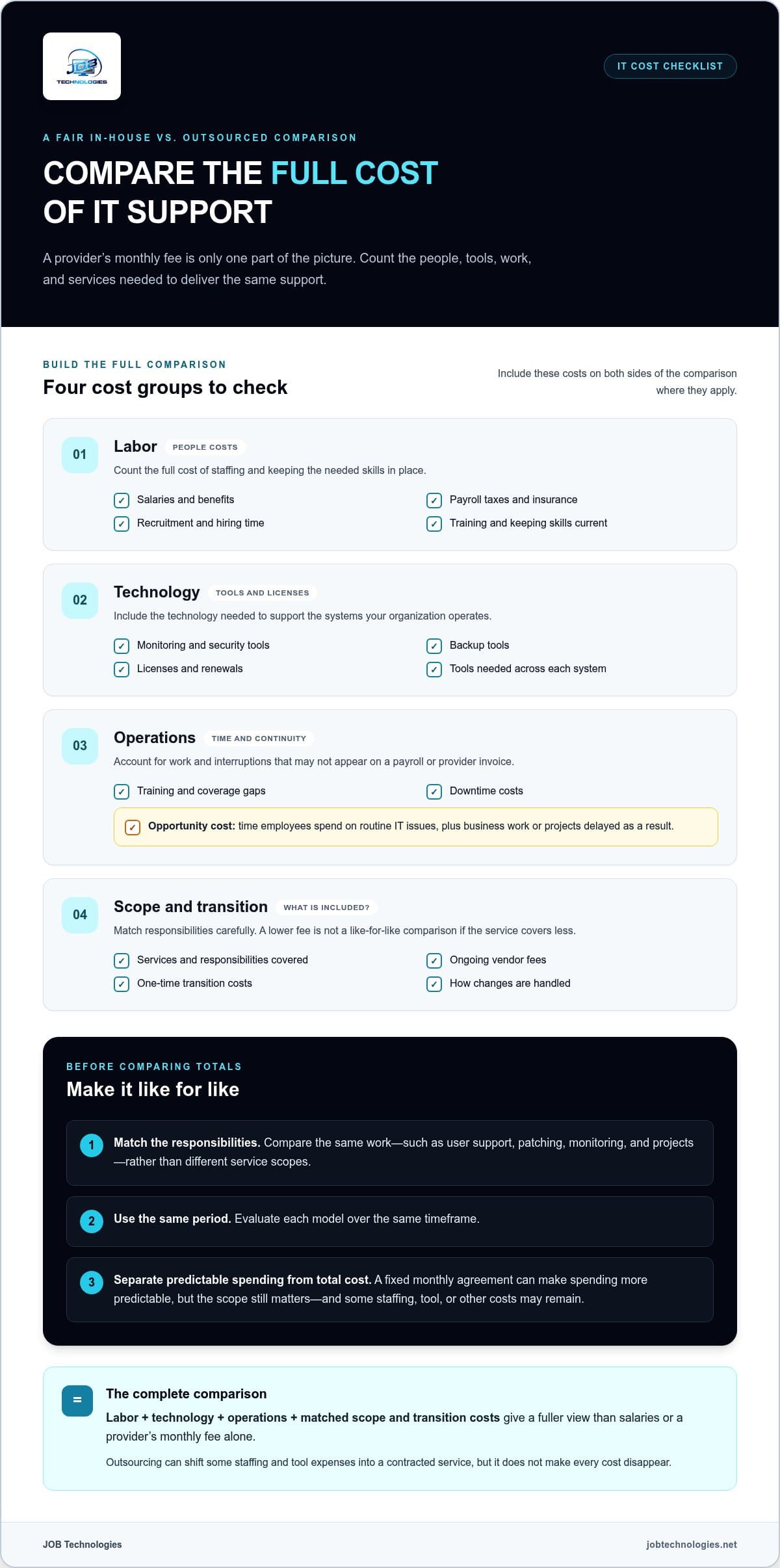
A fair comparison includes more than salaries or a provider’s monthly fee. Count labor, benefits, tools, training, licenses, services, and downtime costs.
Compare the same responsibilities over the same period. An in-house team may handle user support, patching, monitoring, and projects, while a managed service provider covers only designated systems. A fixed monthly agreement can make spending more predictable, but scope matters. Compare what each model actually covers, including ongoing vendor fees and one-time transition costs.
- Labor: Include salaries, benefits, payroll taxes, and insurance.
- Technology: Count monitoring, security, backup tools, and licenses.
- Operations: Account for training, recruitment, coverage gaps, and downtime.
- Scope: Match included services and responsibilities before comparing totals.
Tools, Training, and Licensing Expenses
These are the technology and skills investments needed to keep an internal IT function effective. They matter because salaries alone can make in-house support look less expensive than it is.
Add licensing and renewal costs to the same worksheet. If your organization operates several systems, count each tool needed to support them, not just the initial purchase.
Staffing and Opportunity Costs
Staffing costs include compensation, hiring, benefits, and keeping skills current. They matter because a single employee can’t cover every specialty or prevent every coverage gap.
These figures help frame payroll, but they don’t capture the full cost of internal support. Recruitment time, training, and work delayed while a role is unfilled also affect the comparison.
Opportunity cost is the value of work employees postpone while handling IT tasks. If an internal specialist spends time resolving routine access issues, that time isn’t available for system improvements or business projects. Track recurring support work and delayed initiatives alongside payroll. This shows whether hiring would create needed capacity or simply shift existing work between employees.
Outsourcing can shift some staffing and tool expenses into a contracted service, but it doesn’t make every cost disappear. Define which systems the provider manages, which tasks stay internal, and how changes are handled. Officials at three military installations said outsourcing work had reduced the costs of performing it, according to the U.S. Government Accountability Office. The useful lesson is to evaluate actual scope and outcomes, not assume every arrangement saves money.
For a clearer view of infrastructure spending, network cost planning can help distinguish installation needs from ongoing management responsibilities.
Service metrics and alignment with business goals
Service measures show whether outsourced IT supports business outcomes, not just closes tickets. Set expectations for responsiveness, resolution, availability, and the operational impact of recurring issues.
Choose measures that reflect how your organization works. A sales team may depend on customer relationship software, while a warehouse needs reliable access to inventory systems. Track how often important systems are unavailable, how long priority issues remain open, and whether incidents recur. Pair each measure with a business impact, such as delayed orders or interrupted customer service.
A service-level agreement can define support responsibilities, response times, issue resolution, and service availability. It should distinguish urgent incidents from routine requests: a locked account and a network outage have different consequences. Review measures regularly with the provider, then use ticket trends and open issues to identify where service needs adjustment. Metrics help only when leaders act on them.
Provider dependence is a practical risk to manage, not a reason to avoid outsourcing. Keep an internal owner for key systems and current records of system access, configurations, and support responsibilities. Establish data-handling, access-control, and privacy protocols with the provider. A documented escalation path, for example, helps employees know who handles a disrupted system and who makes business decisions during recovery.
Transitioning to a managed service model works best as a planned handoff. Start by recording current systems, recurring issues, internal owners, and business-critical workflows. Agree on how the provider will receive requests and share status updates. Set transition success measures for 30, 60, and 90 days, then compare ticket patterns and service performance against the starting point. This creates a practical way to spot gaps before they become routine.
Scaling should follow changes in business needs. A new office, more employees, or a shift to cloud-based workflows can change support demand. Review system coverage and request volume when those changes occur, then adjust responsibilities and service measures. A managed arrangement can cover selected functions while internal staff retain ownership of specialized business processes.
U.S. outsourced customer service providers handle customer-facing interactions, while IT providers manage technology services. The roles can affect the same customer experience but need different measures. For customer service, evaluate contact handling and service quality. For IT, focus on system access, incident response, and whether employees can complete customer work. Keeping those measures distinct prevents a call-handling target from being mistaken for proof that the underlying technology is working well.
Focus on core business functions
Outsourcing can move defined, non-strategic IT work outside the organization, freeing attention for activities that create customer value. The benefit depends on keeping business-critical decisions with the people who understand the work.
Separate core activities from the technology that enables them. A retailer’s core work may include selecting products, serving customers, and managing inventory. Its network and infrastructure support those activities, but routine maintenance may not require the retailer’s product expertise. Mapping this distinction helps leaders consider which responsibilities can be delegated while keeping technology decisions connected to business priorities.
A useful prioritization lens is the 80-20 rule: 20% of growth activities yield 80% of results. Treat this as a way to examine priorities, not as a forecast for every organization. For example, a consulting firm might identify client delivery and relationship development as central growth work. Time spent coordinating routine access requests could then be compared with time available for those priorities.
Delegation works best when a task is repeatable, its boundaries are clear, and the business can describe a successful outcome. Routine network monitoring or standard account administration may be easier to define than work involving unique workflows. Choices about how customer information is organized, by contrast, may require close involvement from internal leaders. The key is deciding where specialist execution ends and business judgment begins.
Consider a growing organization planning a new location. Leaders must decide how the office will support staff, customers, and daily operations. They can delegate technical work such as connecting the office network while managers decide which teams need access and how the site fits business processes. This division helps align infrastructure work with actual operating needs.
Delegation also requires ownership. Assign an internal point person to prioritize requests, explain business context, and review how outsourced work supports team objectives. If employees use a scheduling system for customer appointments, for example, the business owner can explain peak periods and the effect of interruptions. That context helps technical work reflect operational realities instead of treating every request alike.
- Identify: List recurring IT tasks and the business activity each one supports.
- Classify: Separate repeatable technical work from decisions requiring internal context.
- Assign: Name an internal owner for priorities, approvals, and business requirements.
- Review: Compare delegated work with project progress and customer-facing needs.
This approach makes outsourcing a choice about focus, not simply task removal. Keep ownership of business priorities inside the organization, and delegate clearly scoped technical work when outside execution fits. Network or infrastructure work should support a defined operating need, such as connecting employees at a new site or maintaining access to essential business systems.
Business case structure and ROI
A useful business case links IT spending to outcomes leaders can assess. Explain the current problem, proposed operating model, total costs, and how the organization will measure value. If a department loses time to recurring system interruptions, for example, describe the affected work and how improved service could help.
Build the case around a clear baseline
Start with the current state, not an idealized comparison. Record existing responsibilities, recurring issues, project delays, and the internal time spent coordinating support. Then describe the proposed scope and distinguish provider tasks from internal ownership. This gives finance and operations a shared starting point instead of separate assumptions about what outsourcing changes.
Compare costs across the same period and scope. Include the provider agreement, transition work, internal oversight, existing tools, and any responsibilities that remain in-house. Set expected benefits beside those costs, such as reduced disruption or more staff capacity for strategic work. Avoid counting a benefit twice: time freed for a department’s project and improved project delivery may describe the same outcome.
Connect measures to business value
Choose measures that reflect the original problem. If delayed access slows customer onboarding, track access-related delays and the onboarding process. If employees spend time resolving repeated issues, monitor those requests and the time they consume. Set a baseline, define the desired outcome, and agree on review points with the provider. Clear measures help leaders see whether the relationship is producing operational value.
ROI is more than a lower IT bill. A business can compare measurable benefits with the total investment, including internal time and transition effort. Managed IT services are stated to deliver ROI for most businesses within 6-12 months. Treat that timeframe as context, not a substitute for measuring your own costs, outcomes, and priorities.
For a practical decision, compare at least two scenarios: keeping the current model and changing the support arrangement. In each, record assumptions about staff capacity, service scope, and business impact. If a planned automation project depends on stable systems, for example, include its expected operational contribution only when it has a defined owner and success measure. This keeps projected value distinct from realized results.
The business case for outsourced IT support should also explain what remains strategic and internal. Leaders may retain control of business priorities while delegating defined technical responsibilities. Review results with finance, operations, and the department affected; disagreements can reveal different assumptions before approval. If you’re assessing how managed services fit your goals, discuss your IT priorities with JOB Technologies.
JOB Technologies: Managed IT Services
JOB Technologies provides Managed IT Services for businesses that need ongoing support for their IT environment. Consider this approach when internal capacity is stretched, recurring technology issues distract employees, or day-to-day IT responsibilities need clearer ownership. The right scope should reflect your priorities and the systems your team depends on.
JOB Technologies also provides Network Installation & Management, AI Implementation, and Phone Systems VoIP. These services can support organizations planning infrastructure changes, evaluating AI, or updating business communications. Choose each to address a defined operational need, rather than adding it without a clear business purpose.
If you’re considering outsourced IT support, share your priorities and discuss what support could fit your organization. Visit jobtechnologies.net to contact JOB Technologies.
Make your next IT decision with confidence
Make the business case for outsourced IT support a working decision, not a document that sits untouched after approval. Revisit its assumptions when your organization changes direction, such as opening an office, planning automation, or changing how employees serve customers. This keeps IT investment connected to current priorities and makes future trade-offs easier to explain.
Choose an internal owner to keep the decision grounded in real operating needs. They can bring finance, operations, and technical stakeholders together when service scope or business priorities change. JOB Technologies provides Managed IT Services, Network Installation & Management, and AI Implementation for organizations evaluating those needs.
For a conversation about how these services could fit your priorities, contact JOB Technologies. A clear next step can help your team move forward with greater focus.
Frequently Asked Questions
Can I outsource just part of my IT?
Yes, you can outsource selected IT responsibilities and keep others internal. A hybrid arrangement might assign network monitoring or cybersecurity to an external team while employees retain ownership of business-specific systems. Start by defining the boundary: list the systems, decision rights, and escalation responsibilities involved. Clarify, for example, who approves access changes and who communicates with employees during a disruption. Clear ownership helps prevent gaps between teams.
Do the Pros of Outsourced IT Outweigh the Cons?
Outsourcing can help when outside support addresses a real capability or capacity gap without weakening business control. Potential advantages include specialized skills and defined support responsibilities. Trade-offs include dependence on an external team and the need to share system access. Weigh these against your operating needs: if a process depends on unique internal knowledge, keep that decision close to your team while outsourcing clearly scoped technical work.
Making the decision: Is outsourcing right for you?
Outsourcing may fit if recurring IT work distracts employees, projects stall for lack of expertise, or essential systems lack clear ownership. It may be less suitable for work that relies heavily on confidential business context or frequent decisions from internal leaders. Write down the problem, who owns it now, and what a better outcome would look like. That gives decision-makers a concrete basis for comparing operating models.
What is a Managed Service Provider (MSP)?
An MSP is a company that manages agreed technology responsibilities for another organization as an ongoing service. The relationship typically defines which systems are covered, how requests are handled, and which duties stay with internal staff. For example, an MSP might manage network operations while a department retains responsibility for application workflows. The acronym describes the service model, not a specific support level or universal set of included services.
What is outsourced IT support and what services does it include?
Outsourced IT support is technical work handled by an external provider under an agreed scope. Services can include computer and network support, cybersecurity, data backup and recovery, compliance assistance, AI implementation, and VoIP phone systems. JOB Technologies provides business IT services in Dubuque, Galena, East Dubuque, Dyersville, Farley, and Peosta. The right scope depends on which systems and responsibilities your organization wants managed.
What are the business benefits of outsourced IT support?
Outsourced support can give an organization access to technical expertise without assigning every specialized task to its own employees. It can also create a clearer process for handling technology issues across departments. A growing firm, for example, can assign support responsibilities for new users and systems while managers focus on onboarding and customer work. The value is strongest when the service scope meets an operational need and internal ownership remains clear.
How much does outsourced IT support cost in the United States?
There isn’t one price for every U.S. business. Cost depends on the scope of support, systems covered, and service requirements. JOB Technologies sets pricing per computer or per user after a needs assessment, then provides the price in a proposal. Compare proposals by matching responsibilities and coverage, rather than focusing on a monthly figure without understanding what it includes.
How do outsourced IT support costs compare with hiring in-house IT staff?
Compare the complete operating cost of each model, not just a provider fee against one salary. In-house costs can include recruitment, benefits, training, management time, and support tools. Outsourcing adds a recurring service expense and may still require internal oversight. For a fair comparison, list the duties each option covers and account for tools or responsibilities that remain with your organization.