

What good is a backup if your business can’t restore the files it needs after a system failure, cyberattack, or simple mistake? That’s the practical question behind business data backup services Dubuque companies rely on. A stored copy is only part of the solution. Recovery also needs to account for the data, applications, and systems your team depends on to serve customers and keep work moving.
If you’re concerned about downtime, incomplete restores, or how backup fits with cybersecurity and compliance, start by identifying what your team needs to recover first. A clear approach can reduce uncertainty and give your business a more dependable path forward. This guide explains how to prioritize data, plan recovery, and assess managed backup and recovery support. It also covers how backup connects with ransomware protection and compliance assistance. JOB Technologies supports businesses in Dubuque and nearby communities with data backup and recovery as part of a broader managed IT and cybersecurity approach. Use the steps below to build a practical starting point for continuity at your organization.
Key Takeaways
- Identify the business data and systems your team needs to keep working, then prioritize them for recovery.
- Understand why stored copies alone aren’t enough: backups need to support restoring usable data and operations.
- Compare business data backup services Dubuque businesses can use by looking at protected data, recovery testing, ransomware resilience, support, and reporting.
- Build a practical recovery plan by defining priorities, assigning responsibilities, and testing restoration.
- See how coordinated backup, recovery, cybersecurity, and compliance support can help Dubuque-area businesses plan for continuity.
What business data backup services protect for Dubuque companies
Business data backup services protect important digital information and provide a way to recover it after a disruption. That can include shared files, business email, accounting records, and data held in applications your team uses to serve customers and run daily operations. For business data backup services Dubuque companies depend on, the goal isn’t simply to store copies. It’s to make sure the information and systems your team needs can be restored in a useful form.
A copy is only useful if it’s accessible, intact, and suited to the recovery situation. For example, a saved accounting file won’t help much if your team can’t restore it to the right system or tell whether it contains the latest usable information. That’s why a backup plan should name the data and applications it covers, as well as how staff will restore them. For a foundational overview of business data backup, see how backup methods help preserve information for later recovery.
This video discusses an online backup service and offers another perspective on assessing backup tools:
Which business data should a backup plan prioritize?
Begin with the information essential to serving customers and keeping daily work moving. List shared files, business email, financial records, and data in critical applications. Then ask department leaders which records would be difficult or time-consuming to recreate. Their answers can reveal information that’s easy to overlook, such as files needed for billing, customer communication, scheduling, or core services. Record where each item is stored and which team uses it, so recovery planning can account for both the data and the people who need it.
Why local SMBs need a recovery-focused approach
Data loss can follow an accidental deletion, a failed device, or a ransomware disruption. The impact can reach beyond a missing file: staff may be unable to respond to customers, send invoices, access communications, or complete everyday tasks. Dubuque-area businesses may rely on records across office and remote workflows, so include both in your inventory. For a broader look at planning and restoration, read our business data backup and recovery guide.
How business backups support recovery after outages and ransomware
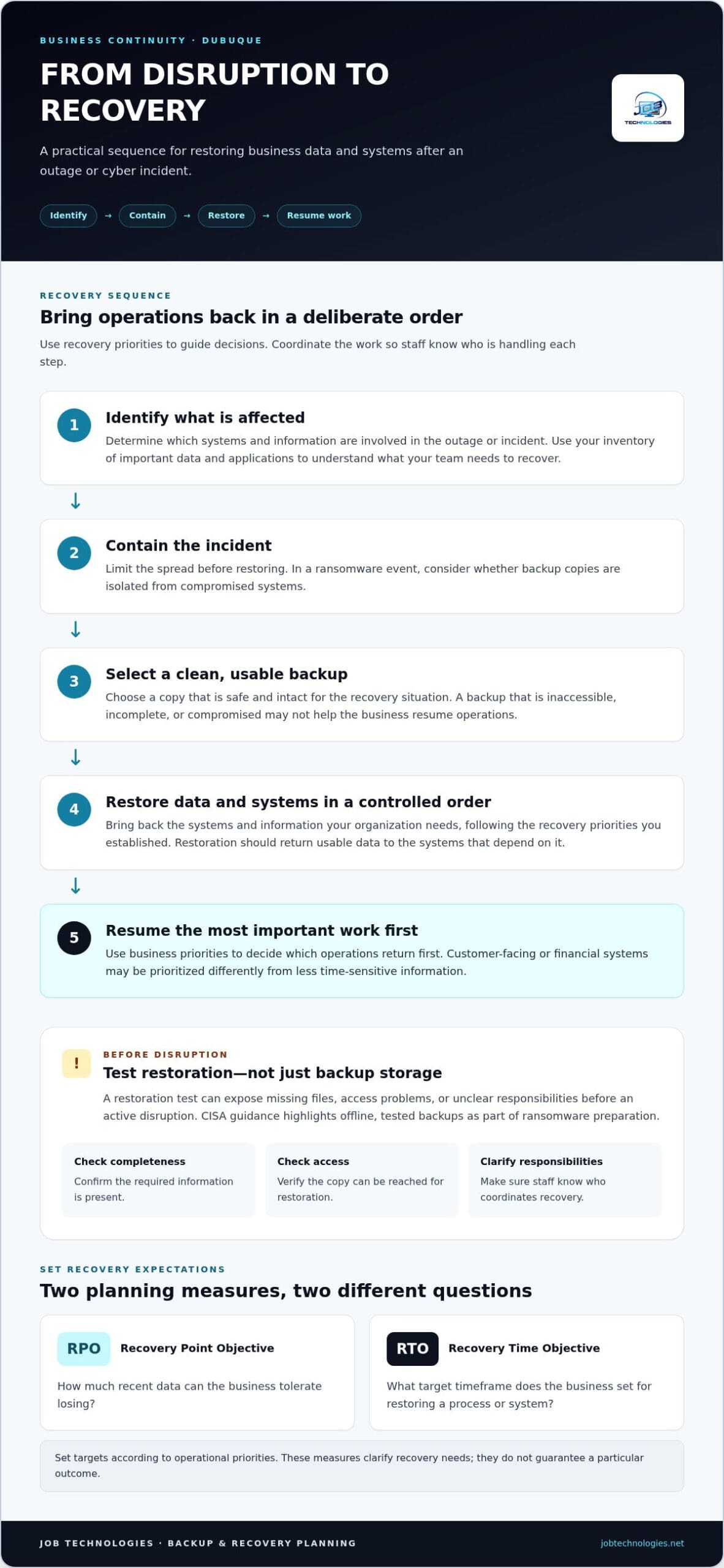
A backup becomes valuable during an outage or cyber incident when it supports a deliberate return to work. First, identify which systems and information are affected. Contain the incident so it doesn’t spread, then select a clean backup copy and restore data and systems in a controlled order. Use your recovery priorities to decide which operations to bring back first, and communicate responsibilities so staff know who is coordinating each step.
A backup is a recovery resource only when restoration has been tested. A copy that can’t be reached, is incomplete, or contains compromised data may not help the business resume operations. Testing can reveal issues such as missing files, access problems, or unclear restoration responsibilities before teams are handling an active disruption.
Can business backups help after a ransomware incident?
Protected backup copies can support recovery, but they can’t prevent every attack or replace other cybersecurity controls. Recovery depends on the incident, the systems affected, whether backup copies are isolated from compromised systems, and whether the selected data is safe and usable. CISA’s recovery after ransomware guidance highlights the value of offline, tested backups as part of preparation.
Backups and cybersecurity work together, but they do different jobs. Security controls help reduce the likelihood or impact of an attack. Backups provide a route to restore data when information is lost or systems are disrupted. Neither makes the other unnecessary. Coordinating data backup and cybersecurity planning helps small businesses account for both prevention and recovery.
What do RPO and RTO mean for a small business?
A recovery point objective (RPO) is the amount of recent data a business can tolerate losing. A recovery time objective (RTO) is the target timeframe for restoring a process or system. These planning measures clarify recovery needs, but they don’t guarantee a particular outcome. A business may prioritize customer-facing or financial systems differently from less time-sensitive information, so set targets according to operational priorities.
For businesses evaluating business data backup services Dubuque, recovery planning should connect technology decisions to the work the organization needs to resume first. JOB Technologies provides data backup and recovery alongside managed cybersecurity and ransomware protection for small and midsize businesses. Businesses in Dubuque and nearby communities can explore managed IT and backup support as part of a broader continuity approach.
How to compare business data backup services in the Dubuque area
When comparing business data backup services Dubuque companies may use, look beyond where copies are stored. Focus on what’s protected, how recovery is tested, and who coordinates the work if systems are disrupted. Ask for clear descriptions of the backup scope, restoration process, and reporting. Make sure the plan defines its backup schedule, retention period, and recovery expectations for your business rather than relying on assumptions.
Use these criteria to organize the comparison and identify what your recovery plan needs to address:
| Area | What to clarify | Why it matters |
|---|---|---|
| Protected data | Which files, email, financial records, applications, and systems are covered? | Unprotected information can leave gaps in recovery. |
| Recovery testing | How is restoration tested, and how are results documented? | A copy’s value depends on whether it can be restored and used. |
| Ransomware resilience | How are backup copies protected from unauthorized access or alteration? | Backups need protection as well as storage. |
| Support | Who coordinates recovery and communicates responsibilities? | Clear ownership helps reduce confusion during an incident. |
| Reporting | What information is available about backup status and recovery activity? | Useful reporting helps reveal issues and support oversight. |
Cloud backup, local copies, and layered protection
Cloud and local backups have different operational trade-offs, including how data is accessed and where copies are kept. Relying on only one copy or location can create a single point of failure. A layered approach can spread that dependence, but the design should reflect your business’s systems and recovery priorities. Consider how staff will access each copy, what happens if a device or location is unavailable, and how the recovery steps fit together.
Cloud storage alone isn’t a complete recovery plan. Businesses also need defined ownership, appropriate access controls, and documented restoration steps. The U.S. Small Business Administration’s emergency guidance can help put a practical backup and recovery plan within a broader approach to business continuity.
What should a business expect from managed backup support?
Managed support can connect planning and oversight with recovery coordination and cybersecurity needs. JOB Technologies provides data backup and recovery as part of its managed IT services, alongside managed cybersecurity and ransomware protection. This brings backup into the wider continuity discussion, including which information and systems matter most to daily operations. For more on that support, read about managed IT services in Dubuque.
If your team is ready to connect backup decisions with ongoing IT support, explore backup and recovery support for your business.
How Dubuque businesses can prepare a practical backup and recovery plan
A written plan turns backup from a technical task into a shared business responsibility. It helps people know what matters most, who makes decisions, and how recovery should proceed during a disruption. It can reduce confusion, but it can’t guarantee uninterrupted operations. For businesses considering business data backup services Dubuque has available, these five steps offer a practical starting point:
- Inventory your data. List key records, applications, devices, and storage locations, including information used by staff in the office and remotely.
- Rank business priorities. Identify which services and processes must return first to support customers and employees.
- Define recovery needs. Set realistic expectations for how much recent data the business can tolerate losing and how quickly priority operations should be restored.
- Document responsibilities. Assign a business owner to approve priorities and a technical lead to coordinate recovery. Record who makes decisions and who handles key tasks.
- Test restoration. Practice restoring selected data or systems, then document results and follow-up actions.
Set recovery priorities around business impact
Start with the work that keeps the business functioning. A customer-service team, for example, may need customer records, while billing staff may depend on accounting data and related applications. Map each priority process to the records, systems, and teams it relies on. This helps set recovery objectives according to real operational needs, rather than treating every file or system as equally urgent.
Make priorities a business decision, not a technical assumption. Department leaders can explain which processes are time-sensitive and what workarounds are practical. The business owner can approve the order, and the technical lead can use that direction to coordinate recovery steps and communicate progress.
Test restoration and update the plan
A restore test can reveal whether the right people have access, whether needed information is available, and whether the documented process makes sense in practice. Scheduled restoration tests build confidence in a documented recovery plan. Record what was tested, the outcome, any gaps found, and who owns each follow-up action. Keep the plan current after major technology changes, workflow updates, or shifts in staff responsibilities.
A clear plan helps your team move from uncertainty to organized action. JOB Technologies provides data backup and recovery as part of managed IT services for businesses in Dubuque and nearby communities. Plan your business backup and recovery with support that connects recovery planning to your IT and cybersecurity needs.
Business data backup services from JOB Technologies in Dubuque
Backup works best as part of a broader plan for keeping your business operating, not as an isolated storage task. JOB Technologies supports small and midsize businesses with data backup and recovery, managed IT, cybersecurity and ransomware protection, and compliance assistance. Coordinating these areas connects decisions about protecting data with the practical question of how your team will resume essential work if information or systems become unavailable.
Continuity needs vary by business. You may need to prioritize customer records, financial systems, shared files, or another part of your daily workflow. Start by identifying those priorities and the systems staff rely on, then align backup and recovery support with your operations. This keeps planning focused on what your organization needs to protect and restore, rather than assuming one approach fits every company.
A managed approach to backup and recovery
As part of managed IT services, backup and recovery can be considered alongside cybersecurity and ransomware protection. This joined-up view accounts for both data protection and the work of coordinating restoration. It also helps decision-makers connect recovery priorities with the technology and teams involved. For more context on broader support, explore the Dubuque managed IT services guide.
JOB Technologies supports businesses in Dubuque, Galena, East Dubuque, Dyersville, Farley, and Peosta. The plan should be shaped around your systems, responsibilities, and business priorities. The goal is a clear path for protecting important information and coordinating recovery, not a one-size-fits-all promise.
Start a conversation about your business continuity needs
Before discussing a plan, make a short list of the data and workflows your staff depends on, what needs to return first, and who should approve priorities or coordinate technical recovery. You don’t need to have every answer ready. These starting points help focus the discussion on your operations and highlight the decisions that still need to be made.
If you’re considering business data backup services in Dubuque, bring your recovery priorities to JOB Technologies. The conversation can focus on how backup, recovery, cybersecurity, and compliance assistance fit your business continuity needs.
Take the Next Step Toward Stronger Business Continuity
Reliable backups are more than stored copies. They’re part of a recovery plan that identifies critical information, sets clear priorities, and tests whether data can be restored when it matters. For business data backup services Dubuque companies need, connect backup decisions to the systems and workflows your team depends on every day.
JOB Technologies includes data backup and recovery in its managed IT services, with managed cybersecurity and compliance assistance alongside that support. The team serves businesses in Dubuque and nearby communities, including Galena, East Dubuque, Dyersville, Farley, and Peosta. A useful first step is to list your most important data, the work that depends on it, and the recovery questions you’d like to resolve.
Discuss your business backup and recovery needs with JOB Technologies and explore an approach shaped around your operations. With clear priorities and thoughtful planning, your business can take a steadier step toward continuity.
Frequently Asked Questions
What do business data backup services include?
Business data backup services protect important digital information and support its recovery after data loss or disruption. For a small business, that may include shared files, email, financial records, and data used by critical applications. Business data backup services Dubuque companies rely on should fit their operations and recovery priorities. A backup plan should account for how staff will access and restore usable information, not just where copies are stored.
Can backups protect a business from ransomware?
Backups can help a business recover data after ransomware, but they can’t prevent every attack or replace cybersecurity controls. Recovery depends on whether backup copies are accessible, protected from the incident, and safe to restore. A business should also plan how to contain affected systems and coordinate restoration. Combining data backup and recovery with managed cybersecurity and ransomware protection supports a more complete approach to reducing disruption.
How often should a business back up its data?
Backup frequency should reflect how much recent data your business can afford to lose and how quickly information changes. For example, a team updating customer or financial records throughout the day may have different recovery needs from one working with less frequently changed files. Define those priorities with the business owner and technical lead, then align the backup plan accordingly. Avoid assuming one schedule suits every system or department.
What is the difference between data backup and disaster recovery?
Data backup creates copies of information; disaster recovery describes the broader process for restoring systems and business operations after a disruption. A backup may preserve files, but the business also needs to know which systems to restore, in what order, who is responsible, and how staff will resume essential work. A written recovery plan connects protected data with practical steps for returning priority processes to service.
Is cloud backup enough for a small business?
Cloud backup can be part of a small business’s protection strategy, but cloud storage alone doesn’t ensure complete recovery. The business still needs to know what data is covered, who can access it, how copies are protected, and how restoration will work. Some organizations may consider cloud and local copies as layers, based on their operational needs. The key is a documented, tested plan rather than reliance on a storage location alone.
How can I tell whether my business backups will actually restore?
Test restoration. A restore test can confirm whether selected files or systems can be recovered and help uncover access problems, missing information, or unclear responsibilities. Record what was tested, the result, and any follow-up actions. Repeat tests as part of ongoing planning, especially after major technology or workflow changes. A backup is a recovery resource only when restoration has been tested and the process is understood by the people responsible.
Does JOB Technologies provide business backup services in Dubuque?
Yes. JOB Technologies provides data backup and recovery as part of managed IT services, alongside managed cybersecurity with ransomware protection and compliance assistance. Support is available to businesses in Dubuque, Galena, East Dubuque, Dyersville, Farley, and Peosta. Planning can be shaped around your important data, workflows, and recovery priorities, connecting backup decisions with wider IT and business continuity needs.