

Business email compromise (BEC) is a scam in which criminals impersonate trusted people, such as executives or suppliers, to persuade employees to send money or share sensitive information. Effective business email compromise protection combines email safeguards, account security, staff awareness, and clear procedures for handling unusual requests.
Because these messages may rely on impersonation rather than malicious links or attachments, employees should consider the request itself when assessing whether an email is suspicious. Requests to change payment details or act urgently deserve careful scrutiny, even when the sender seems trustworthy.
This article explains how BEC attacks work, how they differ from email account compromise, and which safeguards can reduce risk. You’ll also learn how staff training and organizational measures help employees recognize, verify, and report suspicious requests, giving your business a clearer path to stronger email security.
Key Takeaways
- BEC relies on trust and convincing impersonation, so a message can be fraudulent even without a suspicious link or attachment.
- Understand how attackers exploit compromised accounts, urgent payment requests, AI-generated content, and deepfakes to make scams seem credible.
- Layer email filtering and sender authentication with account protections; no single safeguard addresses every BEC technique.
- Build clear verification and reporting procedures, especially for unusual payment requests or changes to supplier banking details.
- Regular, role-focused training can help employees recognize suspicious requests and know how to respond.
Employee training and organizational measures
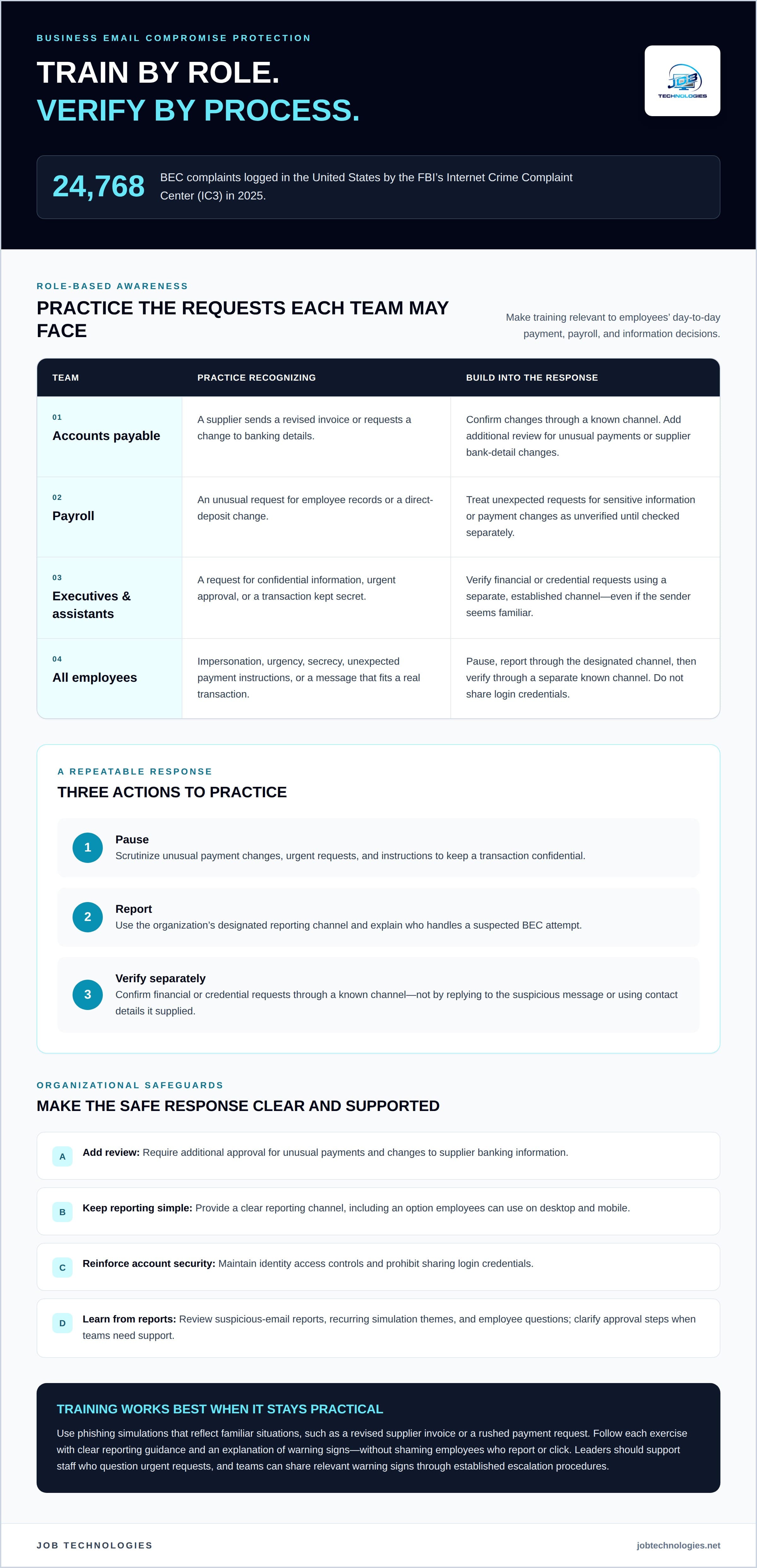
Security tools can flag suspicious messages, but employees still make decisions about payment and access requests. The FBI’s Internet Crime Complaint Center (IC3) logged 24,768 BEC complaints in the United States in 2025. Training helps staff recognize the social engineering behind fraudulent requests, including messages that appear to come from a known colleague or supplier.
Effective security awareness training reflects the work employees actually do. Accounts payable staff need practice recognizing altered banking details, while payroll teams should identify unusual requests for employee records or direct-deposit changes. Executives and assistants benefit from examples involving confidential information, urgent approvals, or requests to keep a transaction secret. Role-based scenarios make cybersecurity guidance relevant to daily decisions.
Phishing simulations can turn those examples into practical exercises. A simulated email might imitate a supplier sending a revised invoice or a manager requesting a rushed payment. Employees should learn to pause, report the message through the designated channel, and verify financial or credential requests using a separate, known channel. Follow-up training can explain warning signs without shaming anyone who reported or clicked.
Monitoring should help an organization improve its defenses, not simply count mistakes. Review reports of suspicious email, recurring themes in simulations, and employees’ questions about payment changes. If several teams struggle to distinguish a legitimate invoice from an altered one, update the scenario and clarify the approval process. A simple reporting option on desktop and mobile can help staff flag messages while they work.
- Verify unusual requests: Confirm payment changes or sensitive requests through a known channel, not by replying to the message.
- Add approval: Require additional review for unusual payments and changes to supplier banking information.
- Protect accounts: Reinforce identity access controls and prohibit sharing login credentials.
- Escalate quickly: Give employees a clear reporting channel and explain who handles a suspected BEC attempt.
These procedures work best when leaders reinforce them consistently. Employees should be able to question an urgent request from a senior executive without fear of blame. Finance, human resources, procurement, and IT teams can share relevant warning signs through established escalation protocols. Open communication helps staff report suspicious activity early, while managers can use those reports to refine training and response procedures.
Ongoing training keeps awareness connected to changing tactics. Use phishing and social engineering simulations to practice recognizing impersonation, urgency, secrecy, and unexpected payment instructions. Pair each exercise with a clear explanation of how to report the message and verify the request. This makes employee awareness part of the organization’s security routine, rather than a one-time lesson.
AI-generated invoice fraud and deepfakes
Artificial intelligence can make a fraudulent invoice or message sound polished, familiar, and legitimate. Attackers may use generative tools to imitate a supplier’s writing style, create convincing payment instructions, or produce messages with fewer spelling errors. That removes some traditional clues, so employees need to assess the request and context, not just its grammar.
Deepfakes add another layer of social engineering. A criminal can use fabricated audio or video to impersonate an executive and pressure an employee into approving a payment. A familiar voice or face may seem persuasive, but it doesn’t independently confirm the request. Treat unexpected instructions to transfer funds or change payment details as unverified until checked through a separate, established channel.
Common payment fraud involves supplier impersonation, a modified invoice, or a false bank-account update. The message may arrive during a real transaction, making the request seem routine. A changed account number, an unexpected payment deadline, or instructions to keep a transfer confidential should prompt additional review. Confirm changes using contact details already held in company records, rather than details supplied in the new message.
AI-assisted attacks can also target the verification process itself. A convincing message may refer to a real project, use the correct names, and match the timing of an expected payment. For high-value or unusual transfers, organizations can require a second approver and independent confirmation. Keep approval records so finance staff can establish who authorized a change and which channel confirmed it.
If a BEC scam is suspected, a cybersecurity provider can help preserve relevant emails, account activity, and a timeline of events. They can help organize those details for a report to the FBI Internet Crime Complaint Center (IC3) or other authorities, while the organization reports through the appropriate channels. Notify the bank and management promptly when a transfer may be involved.
Cyber insurance may cover some BEC losses, but coverage terms matter. Policies may apply a sub-limit or exclude BEC losses unless the business has a specific endorsement; the policy wording determines the applicable terms. Keep the policy and endorsements accessible, and involve the insurer promptly after an incident.
When invoice fraud or impersonation concerns expose gaps in email security, a structured cybersecurity review can help identify where technical controls and approval processes need attention.
What is business email compromise (BEC)?
Business email compromise (BEC) is a scam that uses impersonation or social engineering to make a fraudulent request seem genuine. Attackers may persuade employees to transfer money or disclose sensitive information using either a spoofed identity or a compromised account.
Reported U.S. BEC losses totaled $3.05 billion in 2025. The loss can follow a single convincing request, such as a criminal’s message redirecting a vendor payment.
Compromised Email Accounts
A compromised email account is a legitimate mailbox that an attacker has gained access to. It matters because messages from that account can arrive within existing business conversations, making fraudulent instructions harder to distinguish from routine correspondence.
For example, a criminal with access to a vendor’s mailbox could monitor invoice discussions, then send revised payment details in the same thread. The names, project details, and timing may all seem familiar. That access can also expose sensitive messages and contacts, giving the attacker useful context for future requests.
Social Engineering in BEC Attacks
Social engineering manipulates a person’s trust, sense of authority, or urgency to prompt an action. BEC attacks use it to make employees send funds, share sensitive data, or change account information without careful scrutiny.
An attacker might pose as a senior leader and request a confidential transfer, or impersonate a vendor asking for payment to a different bank account. The message may exploit a real deadline or ongoing transaction. This matters because the deception targets the employee’s decision, not necessarily a technical weakness in the email itself.
Attackers may also use information gathered from compromised accounts to make requests more convincing. A message that references a real invoice or project can seem consistent with normal business activity. Employees should treat unusual requests as unverified, even when the sender’s name and conversation history look familiar.
BEC, Account Compromise, and Account Takeover
BEC describes the fraud scheme; email account compromise describes an attacker’s access to a real mailbox. Account takeover is the act of gaining control of an account, which can enable BEC but isn’t required for it.
A criminal can conduct BEC by spoofing an executive’s address or using a lookalike identity, without entering the executive’s mailbox. In an account-compromise scenario, the attacker sends from a legitimate account. This distinction matters because sender authentication may help identify spoofing, but it doesn’t by itself prevent direct account takeover.
Organizations should consider both the identity shown in a message and whether someone else may control the account. Unexpected requests for money, credentials, or sensitive records deserve separate verification. A familiar email address alone doesn’t establish that its owner sent the message.
Financial Losses from BEC Attacks
Reported U.S. BEC losses totaled $2.77 billion in 2024 and $3.05 billion in 2025. These figures show why payment redirection and impersonation create a serious operational risk for organizations.
Losses can occur when an employee acts on a false invoice, altered bank details, or an executive impersonation. The transfer may appear to be an ordinary vendor payment until the intended recipient reports it missing. BEC can also expose sensitive information, creating consequences beyond the initial payment.
Understanding whether a scam used spoofing, a compromised mailbox, or another form of account takeover helps focus investigation and response. It also clarifies why BEC defenses need to address both fraudulent requests and access to legitimate email accounts.
Email filtering, authentication, encryption, and DMARC
Strong email security layers message filtering, sender authentication, encryption, and account controls. Each addresses a different risk, so no single safeguard will stop every BEC attempt.
Email Filtering and Encryption
Secure email gateways filter incoming messages and analyze them for signs of fraud or spoofing. They can help flag messages that imitate a trusted sender, contain a suspicious link, or use unusual language. URL scanning and filtering add another layer when a message directs employees to a harmful site.
Encryption protects message contents from unauthorized access in transit or storage, depending on how it’s implemented. It can help protect sensitive information, but it doesn’t establish that a payment request is genuine. A fraudulent invoice may still arrive in an otherwise legitimate-looking message, so filtering and encryption need to work alongside verification and account safeguards.
Email Authentication with SPF, DKIM, and DMARC
SPF, DKIM, and DMARC are email authentication methods that help validate authorized senders and protect a domain against spoofing. SPF identifies permitted sending sources, DKIM uses a digital signature, and DMARC sets how receiving systems should handle messages that fail authentication checks.
These controls can make it harder for an attacker to send email that appears to come from an organization’s domain. A business can work toward a DMARC reject policy, with validation intended to reduce disruption to legitimate email. Correct configuration matters: misaligned settings can affect real messages, while an effective policy helps limit domain impersonation.
DMARC has limits. It doesn’t stop lookalike domains, supplier impersonation, or an attacker using a compromised email account. Authentication can show whether a message aligns with a domain’s sending rules; it can’t prove that the person behind a legitimate account intended to send it.
Multifactor authentication (MFA) adds a further barrier to account access by requiring another form of verification alongside a password. Organizations can apply MFA to email accounts and financial workflows; identity and access management, privileged access management, or biometrics can provide additional controls. These measures make stolen credentials harder to exploit, but they don’t replace filtering or payment verification.
For example, a message may pass domain authentication yet request an urgent bank-account change. Staff should treat the request as a business decision, not just a technical signal. Strong business email compromise protection combines filtering, SPF, DKIM, DMARC, MFA, and a separate verification channel. Together, these safeguards address spoofed domains, suspicious messages, and unauthorized access without treating any single control as a complete defense.
How Does a BEC Attack Work?
A BEC attack uses impersonation or social engineering to make a fraudulent request seem routine. The attacker aims to prompt an employee to send money, share sensitive information, or take another risky action.
Attacker Techniques and Email Warning Signs
Attackers may impersonate executives, suppliers, customers, or colleagues using a spoofed address or compromised account. They often exploit authority, urgency, or secrecy to steer employees toward quick action. For example, a message may claim a vendor’s payment details changed just before an invoice is due.
Warning signs include unexpected requests to transfer funds, altered payment instructions, unusual secrecy, or pressure to bypass normal approval. A familiar name or ongoing conversation doesn’t prove the request is genuine. Employees should verify unusual instructions through a separate, known channel and report suspicious messages using the organization’s designated process.
BEC Attack Tactics and Effectiveness
BEC tactics work by matching a fraudulent request to normal business activity. An attacker may study public information, exploit a compromised mailbox, or use details from earlier correspondence. A message referencing a current project or a real supplier can seem credible, even if its payment destination has changed.
The attack may begin with reconnaissance, followed by impersonation and a request for money or sensitive data. Some criminals use free online services to send messages, collect credentials, or host malicious content. Their goal is to make the action feel familiar and time-sensitive, reducing the chance that an employee pauses to verify it.
Organizations can interrupt that sequence with clear defenses: independently confirm unusual payment requests, apply additional review to changed banking details, and make escalation straightforward. These measures address the human decision the attacker is trying to influence, whether the message came from a spoofed domain or a real account.
Whaling Attacks
Whaling is a BEC tactic that targets senior leaders or other high-value individuals with tailored impersonation. The attacker may pose as an executive and direct a finance employee to make a confidential transfer, using authority and urgency to discourage questions.
These requests can also target employees who support executives, manage payments, or handle sensitive information. A message invoking a leader’s name should still follow the same approval process as other financial instructions. Clear escalation procedures let staff verify unusual requests without relying solely on the sender’s apparent status.
Strengthen your organization’s defenses with email security support focused on reducing impersonation and payment fraud risks.
JOB Technologies: Cybersecurity & Ransomware Protection
JOB Technologies provides Cybersecurity & Ransomware Protection for businesses addressing email-based threats and broader security risks. Its Managed IT Services support a coordinated approach to protecting business systems, while Network Installation & Management addresses the underlying network environment.
Consider involving JOB Technologies when your organization needs professional help reviewing its cybersecurity posture, strengthening protections, or improving IT management. You can discuss the email risks affecting your business and the support that fits your needs.
Contact JOB Technologies to talk about cybersecurity support for your organization.
Make your next security decision a practical one
Choose a next step that fits your organization’s systems, payment workflows, and exposure to impersonation. Reviewing business email compromise protection can help identify where technical safeguards and internal processes need to work together, so improvements support the way your team operates.
JOB Technologies can bring cybersecurity into a broader IT plan through Managed IT Services and Network Installation & Management. Where relevant, AI Implementation can help organizations consider how AI fits their operations. The right starting point depends on the risks and systems your business needs to address.
Discuss your cybersecurity needs with JOB Technologies and take a considered step toward a more resilient business.
Frequently Asked Questions
What is the difference between phishing and BEC?
Phishing is a broad type of deception that tries to make someone reveal information or take an unsafe action; BEC is a business-focused form that often impersonates a trusted person or organization. A phishing attempt might use a fake password-reset message, while a BEC message could imitate a supplier and request payment. BEC can use email without a malicious link or attachment, so the request itself may be the warning sign.
Whom do BEC attacks typically target?
BEC attackers often target people who can move money, access sensitive records, or approve business transactions. Finance and payroll employees, executives, procurement staff, IT administrators, and employees managing supplier relationships may face tailored requests. For example, an attacker might pose as a manager and ask an assistant to change payment details. Organizations should make sure staff understand who can approve exceptions and how unusual requests are escalated.
How do attackers gain access to a legitimate email account for BEC?
Attackers can gain access by tricking someone into revealing login credentials, exploiting weak or reused passwords, or using malicious software to capture account access. A compromised mailbox lets a criminal observe real conversations and send messages that fit ongoing business activity. For example, an attacker could wait for an invoice discussion before sending altered payment instructions. Multifactor authentication and prompt reporting of unexpected sign-in activity can make misuse harder.
What is BEC?
Business email compromise is a scam that uses impersonation or social engineering to trick someone into sending money or sensitive information. The attacker may spoof a familiar address, take over a real mailbox, or pose as a supplier through a lookalike identity. For example, a message may appear to come from a business partner and request a change to payment details. The defining feature is the fraudulent business request, not a particular email attachment.
How can a cybersecurity provider guide employees who suspect a BEC attempt?
A cybersecurity provider can help an organization establish a clear reporting path and guide staff on preserving suspicious messages and related details. Employees should report through the designated internal channel, avoid replying to the suspected sender, and verify financial or credential requests through a separate, known contact method. If money may have moved, notify the bank and management promptly. A provider can also help coordinate technical investigation and response.
Why are BEC attacks so effective?
BEC attacks exploit familiar business routines and trust in colleagues, executives, and vendors. A message tied to a real project or expected invoice can seem ordinary, especially when it uses the right names and timing. Attackers may add urgency or secrecy to discourage employees from pausing. Since some scams contain no malicious link or attachment, people can miss the risk if they rely only on technical warning signs.
What are the most common types of BEC scams and warning signs?
Common BEC scams include executive impersonation, supplier payment redirection, false invoices, payroll changes, and requests for sensitive employee information. Warning signs include unexpected banking changes, unusual urgency, secrecy, or instructions that bypass normal approvals. For instance, an invoice may match a real purchase but list a new account. Treat the change as a separate request and confirm it using trusted contact details already on file.
What email security tools and services help prevent BEC?
Useful safeguards include secure email filtering, SPF, DKIM, and DMARC authentication, multifactor authentication, and staff training with phishing simulations. Each addresses a different risk: authentication helps reduce domain spoofing, while account controls make unauthorized access harder. These controls work best alongside payment-review procedures and a simple way to report suspicious messages. Organizations in Dubuque, Galena, East Dubuque, Dyersville, Farley, and Peosta can also consider professional cybersecurity support tailored to their IT environment.