

For business WiFi solutions in Dubuque, six providers offer business internet service, but availability varies by address. No provider currently offers fiber-optic service in the city, so the connection options at your location matter when planning reliable business Wi-Fi. A fast plan is only part of the picture: the network must also support busy periods and keep business-critical devices connected.
Staff, customers, and point-of-sale systems need to stay online without competing unnecessarily for the same network resources. This article explains how local service availability, bandwidth needs, and separate staff and point-of-sale networks shape your choices. It also covers professional installation, management, and support, so you can assess whether a business Wi-Fi setup fits your operations and what ongoing help can mean when connection issues disrupt the workday.
Key Takeaways
- Confirm which internet connections are available at your business address, since local options can vary by location.
- Separate staff and point-of-sale traffic to help protect business operations and keep networks organized.
- Match bandwidth to the devices, applications and busiest periods your business needs to support.
- Consider how installation, network management and responsive support can affect day-to-day connection reliability.
- Learn what managed Wi-Fi, access points and network monitoring can contribute to a coordinated business network.
Internet speed and service availability limitations
Business Wi-Fi solutions in Dubuque depend on the internet service available at each address. A suitable setup needs to match both the connection options and your business’s daily workload.
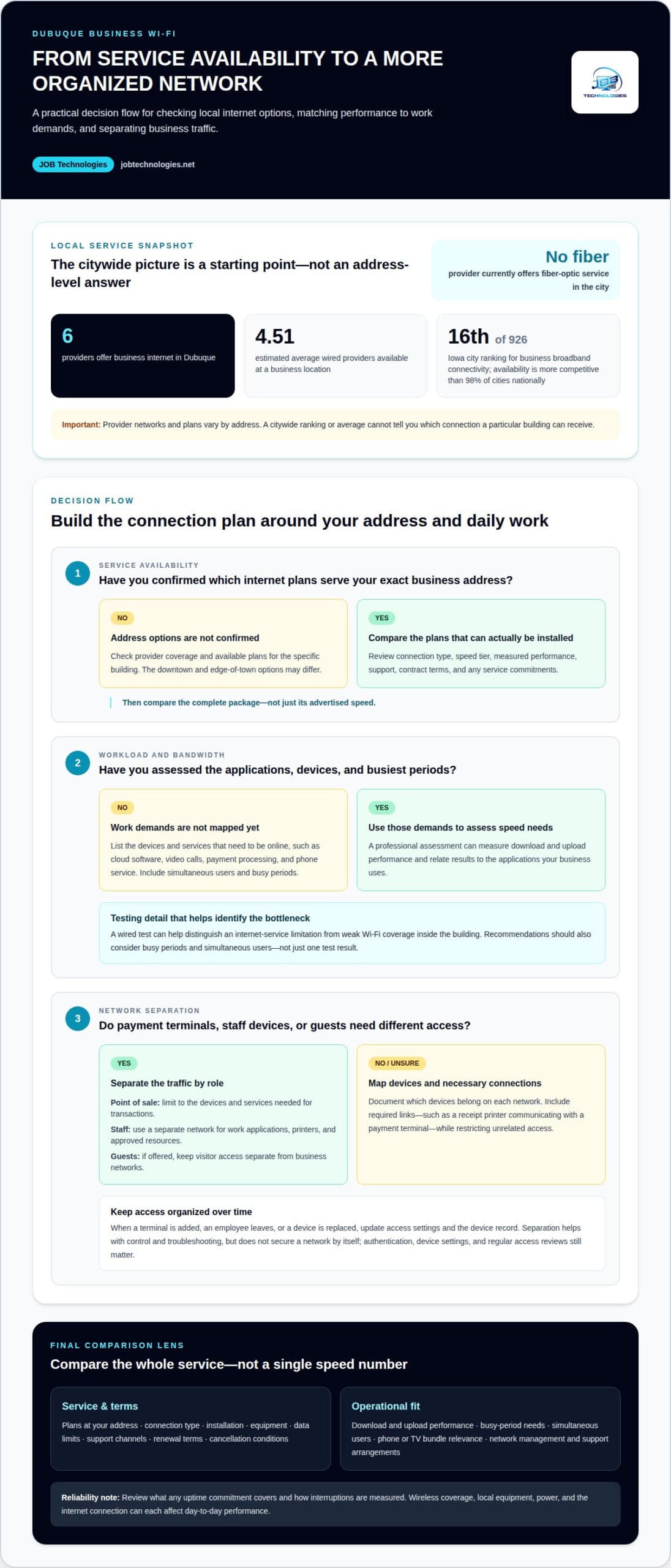
Six providers offer business internet in Dubuque. Businesses have an estimated average of 4.51 wired providers available at their location. That average doesn’t mean every address can choose from the same plans. A downtown office and a business on the edge of town may have different options because provider networks don’t cover every location equally.
Dubuque ranks 16th among 926 Iowa cities for business broadband connectivity. Its business broadband availability is more competitive than 98% of cities nationally. Fiber availability may vary by location, so check the options for your address. Those details make address-level availability important: a citywide ranking can’t tell you which connection a particular building can receive.
Local service availability and broadband grants are separate considerations. The number of providers in an area does not determine whether a business qualifies for a grant or incentive. Eligibility depends on the program’s rules and the business’s circumstances. Treat grant research as a separate funding question, not a measure of service quality.
Business internet prices vary by provider, connection type, speed tier, and contract terms. Compare the full package, including installation, equipment, data limits, support, and cancellation conditions. Depending on the provider and address, bundles may combine internet with phone service or TV. A clinic may prioritize internet and phone service, while a customer-facing venue may also consider TV.
Professional Speed Testing and Plan Selection
A professional assessment starts with the applications and devices your business needs online. Testing can measure download and upload performance, then relate the results to cloud software, video calls, payment processing, and phone service. Test conditions matter: using a wired connection can help distinguish limitations in the internet service from weak Wi-Fi coverage inside the building.
Recommendations should account for busy periods, simultaneous users, and the effect of slow service on daily work. This helps match speed tiers to operational demands instead of relying on a single test result.
Provider Speed, Reliability, Support, and Terms
Compare providers based on the plans available at your address, measured performance, support, and contract details. Business Wi-Fi solutions in Dubuque can involve different service and support arrangements, so review service commitments, support channels, renewal terms, data limits, and cancellation conditions. These details show how each option fits your operations beyond its advertised speed.
Consider whether internet, phone service, and TV are available together. The useful comparison is how a package supports your business, not simply how many features it lists.
Separate staff and point-of-sale networks
A business network connects different users and devices, from employee laptops to payment terminals. Separating staff and point-of-sale traffic helps limit unnecessary access between these groups. For example, staff at a Dubuque café may need shared business files, while payment terminals need access to payment services. A shared network can make those distinct needs harder to manage.
A network professional can create separate wireless networks or network segments, then assign devices according to their roles. The point-of-sale network should be limited to the devices and services needed for transactions. Staff devices can use a separate network for work applications, printers, and approved resources. Guest access, if offered, should also remain separate from business systems. This structure makes access easier to manage and issues easier to troubleshoot.
Device management helps maintain that separation. An installer can document which devices belong on each network and apply access settings consistently. For example, a new payment terminal should join the point-of-sale segment, not the staff network. When an employee leaves or a device is replaced, updating access keeps the network organized. A clear device record also helps identify which group may be affected by a connection problem.
- Staff network: supports employee devices and approved work tools.
- Point-of-sale network: carries payment traffic and related terminal connections.
- Guest network: provides visitor access without placing guests on business networks.
Separating networks can improve control, but it does not secure a network by itself. Strong authentication, appropriate device settings, and regular access reviews still matter. A reliable design also accounts for how devices communicate. For example, a receipt printer may need to connect to a payment terminal. The network plan must allow that necessary traffic while restricting unrelated access.
Review any uptime commitments, support terms, and exclusions in a network package. A written uptime guarantee, when included, should state which service it covers and how interruptions are measured. It does not promise that every wireless device will stay connected. Wi-Fi coverage, local equipment, power, and the internet connection can each affect reliability. Clear terms distinguish the provider’s commitments from in-building network performance.
For a business with payment terminals or shared staff devices, professionally planned segmentation can make access easier to manage. Explore network segmentation planning as part of a more organized business network.
Bandwidth and performance options
Bandwidth needs depend on what employees do online and how many devices operate at once. A small office using email and cloud documents has different demands from a clinic running video appointments, cloud records, and payment processing. Choose a plan that supports essential operations during busy periods, rather than simply the one with the largest advertised speed.
A professional assessment starts with your workday. It identifies business applications, connected devices, and tasks that rely on fast uploads or downloads. Video calls and sending large files use upload capacity; downloading cloud files and updates uses download capacity. If employees do both at once, the connection must handle the activities together. Reviewing peak periods helps avoid choosing a plan based only on quiet hours.
Count device types as well as users. An employee may connect a laptop and phone, while printers, payment terminals, cameras, and guest devices also use the network. A restaurant, for example, may process payments while staff access cloud scheduling and customers use guest Wi-Fi. Unless the network is designed to separate or prioritize traffic, these activities share the internet connection.
- Workload: identify cloud tools, video calls, file transfers, and payment services.
- Concurrency: consider which employees and devices are active at the same time.
- Coverage: assess where staff need Wi-Fi, including offices, counters, and meeting rooms.
- Growth: account for planned changes, such as adding staff or cloud applications.
Treat internet speed and wireless coverage as related but distinct needs. A fast connection entering the building will not fix weak Wi-Fi in a back office. Walls, floor layout, equipment placement, and nearby wireless activity can all affect device connections. A point-of-sale terminal at a front counter, for example, needs a stable signal there, not just strong internet near the router.
Performance also depends on network equipment and configuration. A professional can map where employees use devices, identify dead spots, and position access points to serve those work areas. The design should account for business-critical tasks, such as processing a transaction while staff use cloud software. Adding capacity without addressing coverage may leave the same operational problem in place.
After reviewing workloads and the building layout, compare available plan tiers with actual business needs. A professional can explain where more bandwidth may help and where coverage or network design is the bigger issue. This ties the decision to daily operations: employees can use required applications, devices can connect in their work areas, and the internet plan can be sized to the business instead of guesswork.
Customer support and connection reliability
A dependable connection involves more than the internet plan. Your business also needs a clear way to report outages, diagnose causes, and restore essential services. For a Dubuque retailer, a payment interruption affects transactions; for a clinic, it can disrupt online scheduling. Support matters most when an issue affects a specific business task.
Compare support processes, not reassuring phrases. Find out which contact methods are available, how service issues are recorded, and how updates are shared. Review the service terms for support hours, response commitments, outage definitions, and exclusions. A stated uptime guarantee may cover the internet service, but not every wireless device or application inside the building. The written terms explain what the provider measures.
When a connection slows, diagnosis should distinguish among possible causes. A provider can assess whether the problem involves the incoming service, network equipment, Wi-Fi coverage, or an individual device. For example, if a wired workstation connects while a laptop across the building struggles, the issue may be wireless coverage rather than the internet connection. Record affected devices, locations, and business applications to help support teams narrow down the fault.
Consider whether your operations need a backup connection. A secondary service can provide another route to the internet if the primary connection fails, but it requires suitable connectivity and network configuration. The backup plan should identify which operations need continuity, such as payment processing or phone service, and how devices will use the alternate connection. A second connection alone does not ensure automatic switching or uninterrupted service.
Dubuque businesses may see “business fiber” in general plan discussions, but local availability determines the real options. No internet provider currently offers fiber-optic service in Dubuque. To support reliability, choose among services available at your business address and weigh support terms alongside speed. The connection type affects the service delivered, while in-building equipment and Wi-Fi design affect how devices connect to it.
A practical comparison can focus on three areas:
- Support process: identify how outages are reported and how progress updates reach staff.
- Service terms: distinguish a provider’s connection commitment from internal Wi-Fi performance.
- Continuity: define which operations need a backup path and what setup they require.
Data backup addresses a different risk: restoring business information after data loss, rather than keeping an internet connection online. A retailer, for example, may need both payment continuity planning and a way to recover business records. Treating these as separate plans clarifies responsibilities and helps prevent an internet outage from being mistaken for a data recovery issue.
Which Dubuque providers offer managed Wi-Fi, access points, and network monitoring?
Dubuque has six providers offering business internet, but internet access and managed Wi-Fi are distinct services. The six-provider count describes business internet availability, not how many providers manage wireless networks, install access points, or monitor network performance. A business may use one company for internet service and another for network installation and management.
For a useful comparison, divide the work into three areas. Managed Wi-Fi covers ongoing wireless network configuration and oversight. Access points extend wireless coverage to work areas beyond a single router’s reach. Network monitoring observes equipment and connections, helping identify issues such as an access point going offline. Each function addresses a different need, so the provider’s scope matters as much as its service label.
Ask for a clear description of the work included. A proposal should explain what equipment will be installed, where access points will serve devices, and what network monitoring covers. A multi-room office, for example, may need wireless coverage in reception, workspaces, and a meeting room. The plan should reflect actual device use in those locations, rather than assume one access point will serve every room.
Ongoing management is different from a one-time installation. Installation establishes equipment and network configuration; management covers continued oversight and adjustments as business needs evolve. Monitoring can help identify a problem, but the service terms should explain how alerts are handled and what support follows. Understand whether the provider monitors only network equipment or also the incoming internet connection.
- Managed Wi-Fi: clarify what configuration and ongoing oversight include.
- Access points: identify which work areas the installation is designed to cover.
- Network monitoring: define what is monitored and how problems are addressed.
- Service boundaries: distinguish internet-provider responsibilities from internal network support.
These distinctions help Dubuque businesses compare offers without mistaking internet plans for complete network solutions. A payment terminal losing Wi-Fi may need an access-point or configuration assessment, while a wider outage may involve the internet connection. Knowing which service handles each issue clarifies support expectations and helps direct troubleshooting to the right part of the network.
For a coordinated assessment of business network installation and management, discuss your managed Wi-Fi and network needs.
For essential operations, ask each prospective network provider how it would scope work for the rooms and devices that matter to your business. Request a distinction between setup tasks and ongoing responsibilities, including who receives monitoring alerts and what action is included. The listed market count is six providers offering business internet service; it is not a count of firms that handle wireless design or ongoing network support.
Before agreeing to a service, ask how coverage needs will be assessed and equipment placement decided. Find out what information will be available about network status, how issues are reported, and which party handles follow-up when the internet connection or internal wireless equipment is involved. Clear answers help you compare proposals by actual scope rather than broad service labels. If responsibilities are shared between companies, ask each to define its role and when another provider should be contacted. This makes it easier to assess whether the proposed support meets your business’s needs and expectations.
JOB Technologies
JOB Technologies helps businesses align Wi-Fi and network needs with daily operations. When coverage gaps, device access, or recurring network issues complicate work, Network Installation & Management can provide a more coordinated setup. Managed IT Services can also help businesses manage technology as operational needs change.
The right next step depends on the challenge. A business planning a network update may need installation and management support; one seeking broader technology help may consider managed IT. For connected workflows, JOB Technologies also offers AI Implementation and Phone Systems VoIP. Consider these services alongside network planning when they fit your business goals.
To discuss your business’s network needs, contact JOB Technologies.
Make your next network decision with clarity
Use your next planning conversation to define what dependable connectivity should make easier for your team. Identify the work that needs a stable connection, who needs network access, and what kind of support would reduce disruption. These priorities offer a practical starting point for evaluating business Wi-Fi solutions in Dubuque, without letting equipment labels or advertised speeds drive the decision.
Consider how your technology plans fit together as your business changes. JOB Technologies offers Network Installation & Management and Managed IT Services to support business technology needs. Its AI Implementation services may also suit organizations exploring new ways to support workflows. Start with the operational challenge you want to address, then discuss an approach that aligns network decisions with your broader business goals.
You don’t need to solve every technology question at once. A focused conversation can help clarify the right next step for your team and its priorities. Contact JOB Technologies to discuss your business needs and move forward with greater clarity.
Frequently Asked Questions
Which providers offer business Wi-Fi solutions in Dubuque, Iowa?
Six providers offer business internet in Dubuque, but that count does not identify which ones manage Wi-Fi networks. Internet service and business network installation are separate needs. JOB Technologies offers Network Installation & Management for businesses in Dubuque and nearby communities, including Galena, East Dubuque, Dyersville, Farley, and Peosta. This service can help when your business needs its internal network planned or managed alongside its internet connection.
How much do business Wi-Fi installation and monthly service cost in Dubuque?
Costs depend on the work involved, including network size, installation requirements, and ongoing support needs. JOB Technologies determines Managed IT Services pricing per computer or per user after a needs assessment, then provides the price in a proposal. This pricing model applies to managed services, not necessarily every installation project. The proposal gives your business a clear scope and price before you proceed.
What Wi-Fi equipment and coverage does a small business in Dubuque need?
A small business needs equipment suited to its floor plan, connected devices, and work areas. A compact office may need fewer access points than a space with separate rooms, thick walls, or a distant stockroom. A retail shop, for example, should account for both the checkout counter and back office. A professional network assessment can map those needs and specify suitable equipment and placement, avoiding guesswork.
What cybersecurity features should a business Wi-Fi network include?
Look for security controls that limit access and help protect connected business devices. Ask how the network handles administrator access, employee credentials, guest connections, and security updates. A dental office, for example, should consider how staff devices and visitors access Wi-Fi. JOB Technologies offers Cybersecurity & Ransomware Protection for businesses, complementing network planning. Security also means protecting business data, not just securing the wireless connection.