

The best accounting and tax software for a financial firm is the system that fits its reporting workflows, recordkeeping needs, and security controls, not simply the one with the longest feature list. The right IT services for financial firms in Galena can help keep that software dependable, while tools for transaction tracking, reconciliations, and tax records support organized compliance work. Software can strengthen the process, but it can’t replace sound procedures or professional tax judgment.
Choosing a platform means balancing practical needs with sensitive financial data and changing reporting demands. This guide explains which accounting and tax software capabilities matter, how to assess security and integration needs, and how technology fits into tax compliance for firms in Galena. It also covers how ongoing IT support can help maintain the systems your team relies on.
Key Takeaways
- Match accounting and tax software to your firm’s reporting workflows, recordkeeping needs, and security requirements.
- Identify which compliance obligations apply to your firm before selecting software or setting up its controls.
- Compare IT providers by the services they deliver, relevant credentials, and the quality and consistency of their reviews.
- Reduce outsourcing risks with clear access controls, defined responsibilities, and reliable backup and recovery processes.
- Consider managed IT support when maintaining secure, dependable systems is pulling attention away from your financial work.
Financial industry IT compliance requirements: GLBA, SEC, FINRA, and PCI DSS
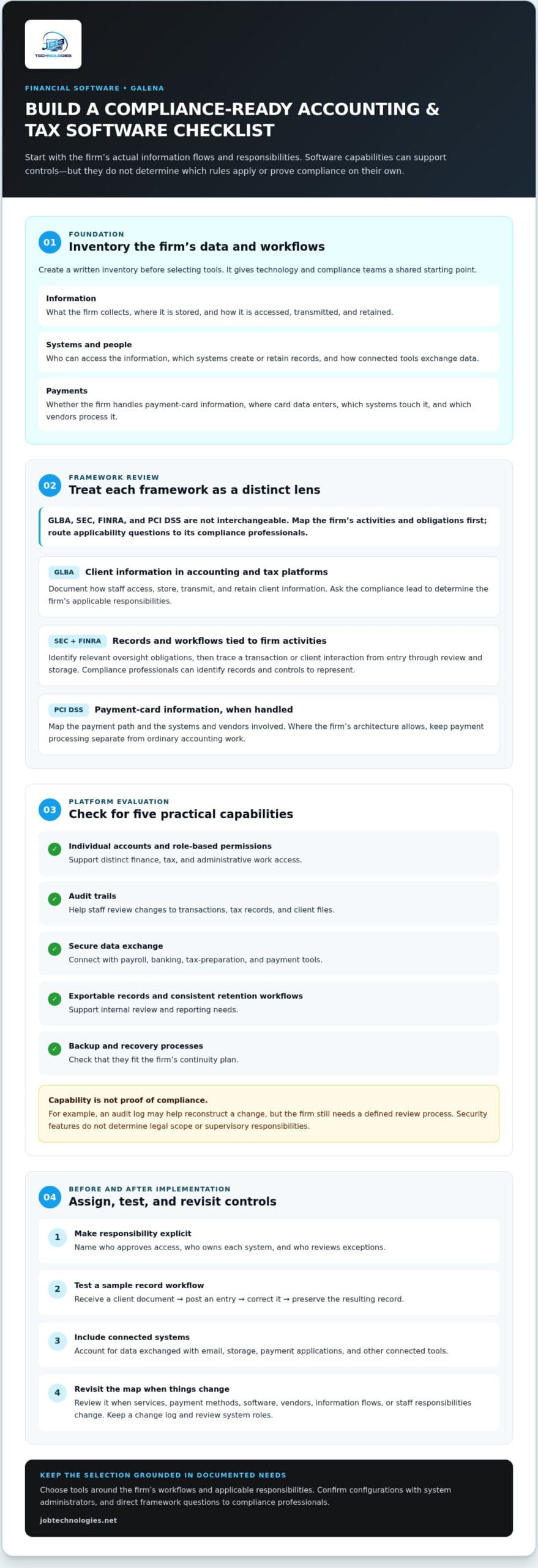
Accounting and tax software can organize financial records, but it doesn’t determine which compliance frameworks apply. A Galena firm should map its activities, client information, payment processes, and reporting workflows before choosing tools. GLBA, SEC, FINRA, and PCI DSS are distinct frameworks, so treating them as interchangeable can leave important needs unaddressed.
Start with a written inventory. Record what information the firm collects, where it’s stored, who can access it, and which systems process payments. For example, a firm preparing tax records may handle sensitive client documents, while a business accepting card payments also needs to examine its payment environment. This inventory gives compliance and technology teams a shared starting point.
To see how accounting firms approach software and technology stack choices, watch this video:
Use the inventory to frame questions about GLBA. Identify client information in accounting and tax platforms, then document how staff access, store, transmit, and retain it. Ask the compliance lead to determine the firm’s applicable GLBA responsibilities. Choose software that supports the resulting controls, rather than assuming a product’s security features establish compliance on their own.
For SEC and FINRA considerations, first identify the firm’s activities and applicable oversight obligations. Then map relevant records and workflows to the systems that create or retain them. A useful test is to trace a transaction or client interaction from entry through review and storage. The firm’s compliance professionals can identify the records and controls that need to be represented in that process.
Include PCI DSS in the review if the firm handles payment-card information. Map the payment path, including where card data enters, which systems touch it, and which vendors process it. Keep payment processing separate from ordinary accounting work where the firm’s architecture allows. This helps teams identify the systems that need focused review without treating every financial application as a card environment.
Turn those framework questions into software requirements. For each candidate platform, document whether it supports:
- Individual user accounts and role-based permissions for finance, tax, and administrative work.
- Audit trails that help staff review changes to transactions, tax records, and client files.
- Secure data exchange with connected payroll, banking, tax-preparation, and payment tools.
- Exportable records and consistent retention workflows for internal review and reporting.
- Backup and recovery processes that fit the firm’s continuity plan.
These are evaluation criteria, not proof that a platform meets a particular rule. For example, an audit log may help reconstruct who changed a tax entry, but the firm still needs a defined review process. Similarly, encryption and access controls can support information protection, but they don’t determine the firm’s legal scope or supervisory responsibilities.
Before implementation, create a responsibility map. Name the person who approves access, the owner of each system, and the staff member responsible for reviewing exceptions. Test a sample workflow, such as receiving a client document, posting an entry, correcting it, and preserving the resulting record. Include connected systems, since a tax platform may exchange data with email, storage, or payment applications.
Finally, revisit the map when the firm changes its services, payment methods, software, or vendors. A new integration can alter where information travels, while staff changes can make old access permissions unnecessary. Keep a change log, review system roles, and route framework questions to the firm’s compliance professionals. This practical sequence helps Galena financial firms choose accounting and tax tools that fit their actual workflows and compliance responsibilities.
Keep clear records of what data moves between providers. Check how each platform handles backups, retention, exports, and account removal when staff responsibilities change. Ask vendors to explain which security settings the firm can configure and what evidence is available for internal review. These checks help distinguish an advertised feature from a control the firm can operate and document.
GALENA SOLUTIONS, LLC is categorized in the accounting industry. Tax workflows may also need to accommodate the fact that taxpayers must take required minimum distributions from age 73. That requirement does not make every accounting platform suitable; the firm should assess whether its tools support the relevant records and review steps. Keep the final selection tied to documented responsibilities, confirm configuration with the people who administer the systems, and revisit the inventory when services, vendors, or information flows change.
Compare local IT providers for financial firms: services, certifications, and reviews
Compare providers against your firm’s actual systems, not a generic list of technology promises. A Galena advisory office, tax practice, and payment-processing business may rely on different applications and workflows. Write down your needs first, then use the same questions to evaluate each provider. This makes service gaps easier to spot before discussing an agreement.
Start with service coverage. Ask each provider how it handles day-to-day support, network management, cybersecurity, backups, and recovery. Tie each answer to a real example from your office. For instance, if tax staff lose access to a shared client-file system, who investigates the network, application, or account issue? The response should clearly explain responsibilities and next steps.
Consider how support fits your financial software. List the accounting, tax-preparation, payroll, email, and document-storage platforms your team uses. Ask how the provider coordinates with software vendors when an issue crosses systems. A provider might manage workstation access while the application vendor investigates a tax-software error. Clear boundaries help prevent delays and confusion during filing work.
Compare service descriptions line by line. “Security support” is broad, so ask whether the provider handles account access, device protection, suspicious activity, and incident coordination. “Backup support” should prompt questions about what data is copied, how recovery is tested, and who initiates restoration. These examples distinguish defined responsibilities from general assurances.
Credentials can add context, but they don’t replace a clear service plan. Ask which staff credentials are relevant to your environment and whether they belong to employees assigned to your account. Examples to discuss include CISSP, CISA, and CompTIA Security+. Also ask how the provider keeps staff knowledge current as your systems and risks change.
Separate individual credentials from organization-level assessments. If a provider references an audit or security framework, ask what was assessed, which services it covers, and whether the evidence applies to your proposed work. A credential or report is useful only when its scope connects to the systems and responsibilities your firm is outsourcing.
Look for patterns in reviews rather than focusing on isolated praise or criticism. Compare comments across platforms and look for specific examples involving communication, follow-through, and problem resolution. A review describing a clear update during an accounting-system outage offers more context than a star rating alone. Note recurring concerns, then ask how the provider handles similar situations.
Use a short, repeatable comparison process:
- Map needs: List your core software, office locations, users, and recurring support requests.
- Request examples: Ask each provider to explain a similar support scenario and its response steps.
- Check ownership: Identify who handles user access, vendor coordination, backups, and escalation.
- Review evidence: Match credentials, assessments, and client feedback to the work proposed.
- Compare scope: Record included tasks, exclusions, reporting, and communication expectations.
For example, compare two proposals against the same case: a staff member can’t access a tax application before a filing deadline. One proposal may define an intake route, escalation contact, and vendor coordination. Another may describe support broadly without explaining who owns the issue. The comparison reveals which plan gives your team a clearer path forward.
Keep the final comparison in a simple table with one row per requirement and one column per provider. Mark each item as described, unclear, or outside scope, then follow up on unclear entries. Firms assessing managed IT support considerations can use this same method to connect service scope with daily systems. A structured review helps Galena firms choose support that aligns with their operations, rather than relying on marketing language alone.
A review is most useful when it describes a concrete support experience, including how promptly a provider responded, whether the issue was resolved, and whether communication stayed clear. Treat these details as prompts for follow-up, not proof that the same result is guaranteed for your firm. Ask for references whose systems and service needs resemble yours, then discuss how the provider would handle a comparable problem. Record the answers alongside service coverage, relevant credentials, and review patterns so your comparison reflects evidence as well as impressions.
Local financial firms require specialized technology support tailored to regional regulatory requirements and community service models. For firms evaluating IT support, questions about the applications, data flows, and recovery responsibilities involved in their own work can help determine whether a proposed service fits their daily operations.
Risks of outsourcing IT for financial firms and how providers mitigate them
Outsourcing IT can give a financial firm access to technical expertise, but it also changes who can access systems and information. A provider may manage user accounts, networks, backups, or security tools. Each responsibility raises practical questions: who approves changes, who reviews activity, and who acts when something goes wrong? Answer them before granting access.
Start with access risk. A provider account with broad permissions could expose accounting software, tax files, or shared client documents if misused. Use named accounts instead of shared logins, assign only necessary permissions, and record approvals. For example, a support technician troubleshooting a workstation shouldn’t automatically have access to every finance folder.
Review vendor access regularly. When a provider employee leaves or a project ends, remove access that’s no longer necessary. Keep a list of provider accounts, the systems each can reach, and the person responsible for approval. Routine access reviews can reveal dormant accounts before they become overlooked entry points.
Responsibility gaps create another risk. The firm may assume the provider handles an issue, while the provider expects the firm to contact the software vendor. A written responsibility map should identify who handles workstation problems, application faults, user permissions, and vendor escalation. During a tax-platform outage, clear ownership helps staff know whom to notify and what information to provide.
Service interruptions can disrupt payroll, reconciliations, and filing preparation. A provider can help reduce operational exposure by documenting backup responsibilities, recovery steps, and decision-makers. The firm should know which systems are backed up, where recovery instructions are stored, and who authorizes restoration. Test recovery of a sample file so staff understand the process before an urgent incident.
Review data handling separately. Ask how the provider accesses firm information during support, where diagnostic files are stored, and how access is removed after work concludes. For example, a support ticket containing a client document should have a defined storage location and access permissions. Avoid sending sensitive files through informal channels without an approved process.
Provider dependence can make a transition difficult if system knowledge exists only outside the firm. Keep current network diagrams, application inventories, administrator contacts, and configuration records in a firm-controlled location. Document how to retrieve backups and export essential records. These materials help internal decision-makers understand the environment and support an orderly handoff if responsibilities change.
Incident communication also needs a clear structure. Define who reports suspected unauthorized access, who preserves relevant records, and who coordinates with the firm’s compliance personnel. Consider an employee reporting an unexpected login prompt. Staff should know the reporting route, and the provider should know which firm contact can authorize containment steps.
Before work begins, put these safeguards into the service agreement or operating procedures:
- Access: Specify approval, account management, and removal responsibilities.
- Changes: Record who authorizes system changes and how those changes are documented.
- Recovery: Assign backup oversight, restoration steps, and firm decision-makers.
- Communication: Set incident reporting channels and escalation contacts.
- Exit planning: Define how records, credentials, and system documentation return to firm control.
Then test the arrangement with a tabletop exercise. Walk through a lost employee laptop, a locked accounting account, or an unavailable shared drive. Ask each participant to explain their first action and notification path. Record unclear handoffs, assign an owner, and update the procedure. This turns contract language into a workable response for staff.
For Galena financial firms, outsourcing works best when the provider’s access, responsibilities, and exit process are visible to firm leadership. If you’re reviewing these safeguards, discuss reducing IT outsourcing risks as part of your firm’s support planning.
JOB Technologies: Managed IT Services
JOB Technologies helps financial firms manage the technology behind accounting and tax work through Managed IT Services. If software access, network reliability, or ongoing technical demands distract your team, managed support can help keep essential systems organized and operational.
For example, Network Installation & Management can address network needs that affect access to financial applications and shared records. If your firm is exploring AI Implementation or Phone Systems VoIP, these services can support specific technology goals alongside your broader IT environment. Start by identifying the systems causing friction, the workflows they support, and the help your team needs.
For practical support with your firm’s technology, contact JOB Technologies or visit jobtechnologies.net.
Make Your Next Software Decision With Confidence
Before changing platforms, choose one workflow to assess, such as preparing a client’s tax records or reconciling transactions. Document who uses each tool, where information moves, and which process creates friction. This gives your team a practical basis for deciding what to retain, integrate, or improve without disrupting every system at once.
For firms seeking IT services for financial firms in Galena, JOB Technologies offers Managed IT Services to support daily operations. Network Installation & Management can address infrastructure needs, while AI Implementation may suit firms exploring ways to incorporate AI into their work. Connect your software priorities with the systems your staff rely on, then identify the support that best fits your plan.
Contact JOB Technologies to discuss your firm’s technology needs. A considered next step can help your team move forward with greater clarity.
Frequently Asked Questions
What IT services are available for financial firms in Galena, Illinois?
Financial firms in Galena can use managed IT support for business technology, alongside cybersecurity, data backup and recovery, and compliance assistance. If you’re looking for IT services for financial firms in Galena, prepare a short list of recurring technology interruptions, such as staff losing email access or difficulty retrieving tax files. Those examples help clarify your most urgent support needs and their effect on daily work.
Which managed IT providers serve financial firms near Galena, IL?
JOB Technologies provides Managed IT Services to businesses in Galena, Dubuque, East Dubuque, Dyersville, Farley, and Peosta. If your firm has staff or offices across these communities, identify which locations need ongoing technology support and whether network installation is a priority. This helps define the starting scope. JOB Technologies also offers Network Installation & Management for business network needs.