

A cloud move should be planned around the work your business needs to keep running, not just the systems it can move. Cloud migration services in Dubuque can begin with an assessment of your infrastructure, applications, data, dependencies, and operating requirements. That review helps shape a migration plan and determine whether cloud, on-premise, or hybrid systems best fit your needs.
It’s reasonable to want better control over operating costs without putting everyday access to applications and data at risk. A careful plan accounts for workload priorities, backups, recovery readiness, security, and the steps needed to maintain continuity during the transition. Moving to the cloud alone doesn’t settle those decisions. The right approach depends on how your systems support the business.
This article explains what a readiness assessment covers, how staged migration planning can limit disruption, and what to weigh when considering cloud or hybrid infrastructure. You’ll also see how resource choices, monitoring, and operating requirements inform cost and uptime planning, so you can approach a migration with a clearer path forward.
Key Takeaways
- Map applications, data, dependencies, and operational needs before deciding what to move.
- Plan migration in stages and validate each phase to help protect continuity and limit disruption.
- Match cloud, on-premise, or hybrid infrastructure to your workloads, compliance needs, and budget.
- Use resource right-sizing and monitoring to support more predictable cloud spending and reliable access.
- Managed IT Services can help coordinate infrastructure decisions and ongoing technology needs as your plans develop.
Cloud migration strategy and planning
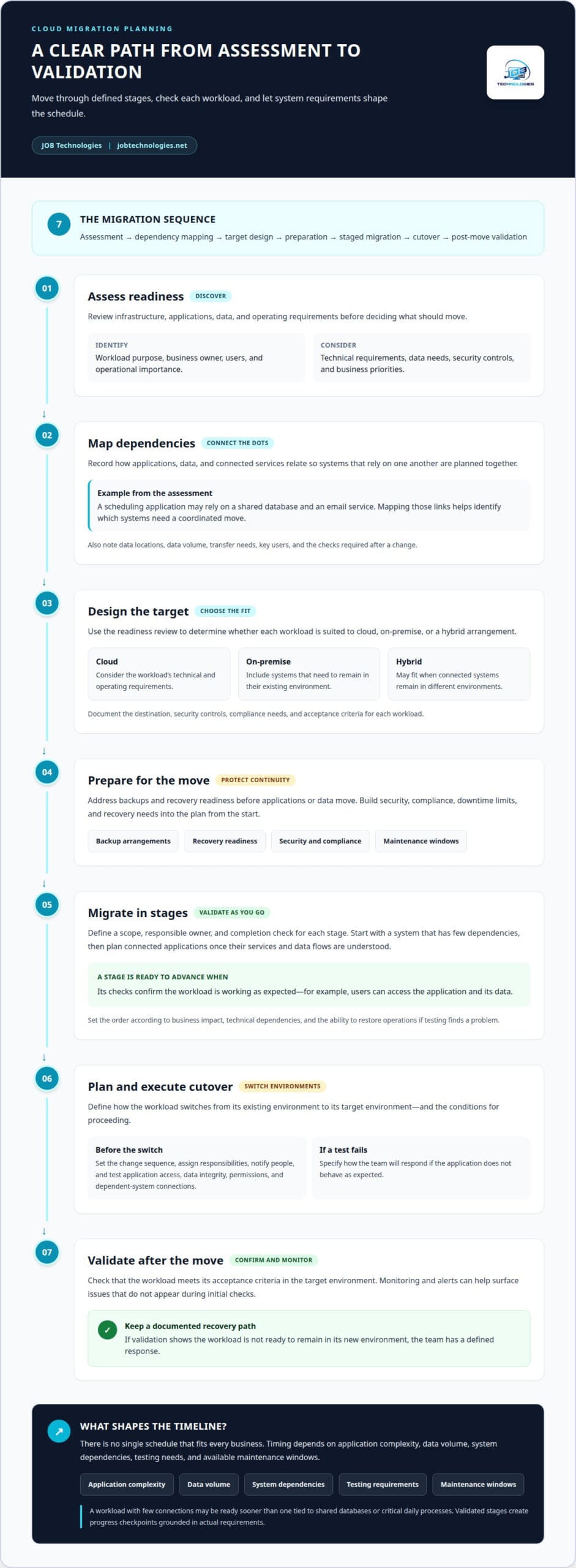
A migration typically moves through discovery, design, preparation, staged transfer, cutover, and validation. The timeline depends on the systems involved, their dependencies, and the testing required before each workload is ready.
In Dubuque, a practical strategy ties each migration decision to a business priority: keeping essential applications running, managing operating costs, or protecting access to data. Security and compliance belong in the plan from the start, alongside downtime limits and recovery needs.
Customized Migration Plans
A customized plan begins by grouping business systems according to their purpose, dependencies, and operational importance. For example, an application that relies on a shared database needs a coordinated move, while a separate workload may be easier to schedule independently. This mapping helps set priorities and identify where disruption could affect daily operations.
The plan should also document the target environment, security controls, compliance needs, backup arrangements, and acceptance criteria for each workload. These details make the strategy actionable: the team can see what moves, what must remain available, and what evidence confirms a system is working effectively after migration.
Staged Migration Approach
Moving workloads in stages gives teams opportunities to validate each phase before proceeding. The sequence might begin with a system that has few dependencies, then move applications that rely on shared services once their connections and data flows are understood. The order should reflect business impact, technical dependencies, and the ability to restore operations if testing reveals a problem.
Each stage needs a defined scope, a responsible owner, and a completion check. For example, validation can confirm that users can access an application and its data. Backups, recovery readiness testing, infrastructure redundancy, and monitoring help prepare the next stage and reduce migration risk.
Cutover Planning and Testing
Cutover planning defines how a workload switches from its existing environment to the target environment. The plan should identify the sequence of changes, who is responsible, how people will be notified, and the conditions for proceeding. It should also explain how the team will respond if a test fails or the application does not behave as expected.
Before cutover, testing can check application access, data integrity, user permissions, and connections to dependent systems. After the switch, monitoring and alerts help surface issues that may not appear during initial checks. A documented recovery path gives the team a clear response if validation shows the workload is not ready to remain in its new environment.
Migration Steps and Timeline
The practical sequence is assessment, dependency mapping, target design, preparation, staged migration, cutover, and post-move validation. Assessment identifies workloads and requirements; mapping reveals connections; design sets the destination and security approach. Preparation addresses backups and recovery readiness before data or applications move.
There is no single timeline that fits every business. The schedule depends on application complexity, data volume, system dependencies, testing needs, and available maintenance windows. A workload with few connections may be ready sooner than one tied to shared databases or critical daily processes. Breaking the work into validated stages creates progress checkpoints and grounds scheduling decisions in the actual requirements.
Cloud readiness assessment and migration planning
A readiness assessment examines infrastructure, applications, data, and operating requirements before migration decisions are made. For businesses in Dubuque, planning for security, compliance, and backups means identifying the information and systems that need protection, then building safeguards and recovery steps into the migration plan.
Application, Data, and Dependency Review
An application review records each system’s purpose, business owner, users, and connections to other tools. For example, a scheduling application may rely on a shared database and an email service. Mapping those links helps determine which systems must move together and which can be assessed independently.
Data review adds context to that inventory. The assessment identifies where business records are stored, which applications use them, and how teams access them. It also examines data volume and transfer needs, since these factors affect migration sequencing and preparation. Recording these details helps prevent a system from moving before its essential information and connections are understood.
Dependency mapping should also capture operational needs. A system used throughout the workday may need a different migration window from an application used occasionally. The review can document key users, connected services, and the checks needed after a change. That gives the migration team practical criteria for prioritizing workloads and assessing whether each system is ready.
Cloud Readiness Evaluation
A readiness evaluation turns the inventory into decisions. It considers each application’s technical requirements, data needs, security controls, and business importance. One workload may be ready for a direct move; another may need preparation or a hybrid arrangement while connected systems remain in different environments. The goal is to match the plan to actual workload needs.
Security and compliance planning should identify how access is managed, what protections apply to business data, and which operating requirements shape the destination. Backup planning should document what information is protected, how recovery would work, and how restoration can be tested. This makes safeguards part of migration preparation rather than an afterthought.
The assessment should also define readiness criteria for each workload. For example, a system may need its user access reviewed, its data transfer method documented, and its key functions tested before migration proceeds. Consider monitoring requirements alongside those checks to help teams identify issues after a workload changes environments.
For a practical next step, bring the inventory, security needs, and backup priorities into one coordinated review. Infrastructure and backup planning can help connect those findings to a workable migration plan.
Cloud infrastructure migration planning often includes backups, disaster recovery planning, infrastructure redundancy, monitoring and alerts, and recovery readiness testing. Careful cloud migration planning can reduce risk by minimizing downtime and supporting operational continuity during the transition.
Cloud, on-premise, and hybrid recommendations
Choose an environment by matching each workload to its business purpose, compliance needs, and budget. AWS, Microsoft Azure, and Google Cloud are platform options to evaluate. The right fit depends on your applications and operating requirements.
Public and Private Cloud Options
Public cloud places workloads in a provider-operated environment, while private cloud dedicates an environment to one organization. On-premise systems keep infrastructure at the business location. Each choice affects management needs, access, and how resources can be adjusted. For example, a business might assess a customer-facing application differently from a system containing sensitive internal records.
Compare the workload’s requirements, compliance considerations, and budget before selecting an environment. A recommendation should explain why the chosen model fits, what it means for day-to-day operations, and which dependencies must remain available. These criteria matter more than choosing a model simply because it is widely used.
Supported Cloud Platforms
A platform review should identify the destination for each workload and document how applications, data, and connected services will operate there. AWS, Microsoft Azure, and Google Cloud can all be considered in that evaluation. Their inclusion should reflect an actual workload fit, not an assumption that every platform serves the same purpose.
For each option, assess how the environment aligns with existing systems, security needs, compliance requirements, and available management capacity. The migration plan should also describe how access, monitoring, and recovery will work after the move. This makes platform selection part of an operating strategy, not just a technical preference.
A hybrid environment combines cloud resources with systems that remain on-premise. This can suit workloads with different requirements or dependencies. For example, an application may move to cloud infrastructure while a connected system stays in place during the transition. The plan should identify how these workloads exchange data and how teams will monitor their connections.
Multicloud means using services across more than one cloud platform. It can be appropriate when distinct workloads have distinct needs, but it also requires clear oversight of access, security, and dependencies. Before implementing it, map which applications rely on each environment and how staff will manage those connections. Otherwise, operational complexity can outweigh the flexibility.
Remote and hybrid work also influence the recommendation. Employees working from different locations need reliable access to the applications and data required for their roles. Assess user access, application dependencies, and security controls together. A managed approach can help coordinate these operational needs, while monitoring can reveal access or performance issues after a workload moves.
For a hybrid cloud migration, define which systems move, which remain, and how they connect. Then set validation steps for each workload, including user access and data availability. This approach gives the business a clear basis for deciding what to implement now and what should remain in its current environment.
Reducing operating costs and improving uptime
Cloud planning affects more than where applications run. For businesses in Dubuque, moving selected workloads can shift IT consumption toward an operating expense and may help reduce costs. The financial result depends on what moves, the resources it uses, and how those resources are managed after migration.
Start by connecting each cloud resource to an operational need. A database serving a critical application may require steady capacity, while a development environment may not need to run continuously. Right-sizing resources to actual demand and monitoring usage can help keep spending more predictable. Regular reviews help identify resources that no longer match the business workload.
Operating expenses also require a different budgeting rhythm from infrastructure purchases. Instead of focusing only on initial migration work, account for ongoing cloud consumption, support, backup, monitoring, and recovery activities. A forecast should tie these costs to specific applications and expected use. For example, changing demand for a customer portal may affect the resources needed to keep it available.
Uptime planning begins by identifying which systems are critical to daily work. A business can map how employees use its accounting application, file storage, or customer database, then decide which interruptions would affect operations most. That priority list helps guide monitoring, recovery preparation, and the order for addressing service issues after migration.
Cloud environments can help businesses maintain access to applications, systems, and data during operational disruptions. That benefit depends on preparation. Backups need to be part of a recovery plan, and restoration readiness should be tested. Monitoring and alerts can also help teams notice an issue with an application or its connections before it disrupts more work.
After migration, operational support shifts from project completion to ongoing management. A useful routine reviews resource use, application performance, access, backups, and alerts. For instance, if monitoring shows that a workload consistently uses less capacity than provisioned, right-sizing may help optimize consumption. If access patterns change, the team can review whether current resources and controls still fit.
Post-migration reviews should connect technical findings to business outcomes. Compare application availability and resource use against the plan, then record issues, owners, and next steps. If a critical system has slow access, investigate its dependencies and resource settings before making changes. This creates a disciplined improvement cycle instead of treating migration as a one-time event.
Cost and uptime decisions should stay connected. Reducing resources without understanding workload needs can affect performance, while leaving unused capacity untouched can weaken cost control. Regular monitoring, clear ownership, and recovery testing help teams balance both goals. The result is a more informed basis for adjusting cloud operations as business requirements change.
Cloud migration services in Dubuque
For organizations in Dubuque, a migration plan should connect technical work with operating priorities. Define the scope, decision criteria, and post-move responsibilities before choosing a partner.
Provider Experience and Reviews
Compare a provider’s experience by examining how it approaches assessment, migration sequencing, cutover, and post-migration operations. Look for explanations that connect each step to business continuity, security, and workload requirements, rather than broad claims about cloud expertise.
Reviews can add context about communication, project coordination, and support after migration. Read for specific examples of issues addressed and how progress was handled. A clear description of who manages each task, monitors workloads, and responds to operational concerns helps show whether the working relationship fits your organization.
Migration Rules and Requirements
Iowa or federal requirements depend on the business, its data, and its industry. Identify the rules and contractual commitments that apply to the information being moved, then include relevant access controls, security, retention, and backup practices in the migration plan.
For example, an organization handling sensitive records should map where those records reside, which applications use them, and who needs access. Compliance planning should carry those requirements into the cloud environment and its ongoing operations. The migration approach should not assume every workload has identical obligations.
Service Cost Considerations
The price depends on the project and is provided after a needs assessment. Factors include workload complexity, data volume, dependencies, migration scope, testing, and ongoing operational needs. A useful estimate separates migration work from cloud consumption and support, so organizations can understand what each part covers.
Scope matters. Moving an application, its data, and connected services involves different work from transferring storage alone. Cloud migration services in Dubuque can also involve collaboration platforms or communication systems, depending on the project. A written plan should connect each cost factor to a deliverable, such as assessment, migration, cutover, or validation.
Before committing, align the proposed scope with business priorities. Confirm which workloads move, which remain in place, and what post-migration support covers. A detailed plan makes trade-offs easier to understand and helps prevent overlooked dependencies from disrupting schedules or operations.
To plan a migration around your workloads, continuity needs, and operating priorities, discuss your cloud migration plan.
JOB Technologies: Managed IT Services
JOB Technologies helps businesses manage technology through Managed IT Services, including infrastructure and operational support. If your migration plan involves network dependencies or changing how staff communicate, Network Installation & Management and Phone Systems VoIP can also address related needs.
Consider this next step when you need ongoing coordination after assessing workloads, planning a move, or reviewing cloud and hybrid options. A clear discussion of your priorities, critical systems, and continuity needs can connect infrastructure decisions with day-to-day operations. JOB Technologies can also help with AI Implementation when it fits your business objectives.
Contact JOB Technologies to discuss your IT planning needs.
Make your next cloud decision with confidence
A cloud move is not the finish line. The next step is deciding how technology should support your business as its priorities change. A deliberate plan gives your team a clearer basis for future infrastructure choices, without treating every application or workload the same way.
For organizations considering cloud migration services in Dubuque, Galena, East Dubuque, Dyersville, Farley, and Peosta, it helps to connect technical decisions with the work employees need to do each day. Keep ownership clear, revisit whether the environment still fits operational needs, and make adjustments when business requirements shift. That ongoing attention helps technology planning remain useful beyond the initial transition.
JOB Technologies can work with your business on the IT decisions that shape a migration and its next phase. Bring your priorities and questions into a conversation, then identify a practical path forward together.
Start a conversation about your cloud migration. A clear next step can make complex decisions easier to manage.
Frequently Asked Questions
What cloud migration services are available in Dubuque, Iowa?
Businesses in Dubuque can get help planning and coordinating cloud migrations, alongside related IT support. The work may involve moving business applications, data, storage, collaboration tools, or communication systems. Managed IT Services, Data Backup & Recovery, Cybersecurity & Ransomware Protection, and Compliance Assistance can support the wider transition. The right scope depends on what your organization uses and which systems need to remain accessible during the change.
Which Dubuque IT providers offer cloud migration for small businesses?
JOB Technologies provides Managed IT Services for small and medium-sized businesses in Dubuque and nearby communities. For a small business considering cloud migration, its role can connect migration planning with ongoing IT needs, such as network management, backup and recovery, and security. Consider whether your provider can account for the way your business operates, including the applications your employees rely on and the support needed after systems move.
What is included in a cloud migration assessment and project plan?
An assessment typically reviews the business’s infrastructure, applications, data, dependencies, and operational needs. The project plan translates those findings into a migration scope, sequence, security and backup considerations, testing activities, and post-move responsibilities. For example, if a team uses a shared database with a core application, the plan should account for their connection and verify that both still work together after the move.
What risks and downtime should businesses expect during cloud migration?
Migration risks include interrupted access, data transfer issues, application failures, and missed connections between dependent systems. Downtime depends on the systems involved, the migration method, and the cutover plan, so no single duration applies to every business. A practical way to manage exposure is to identify essential services, test important workflows, and prepare backups and recovery steps before changing environments. After cutover, monitor access and application behavior.
How much do cloud migration services cost in Dubuque?
JOB Technologies models migration costs before a client commits, taking workloads and operating requirements into account.