

Privacy compliance isn’t a policy you write once and file away. It’s an ongoing record of how your business collects, uses, protects, and eventually removes information. For small business owners, data privacy compliance for small business can feel difficult to manage when customer and employee details are spread across software, devices, and vendor systems. It may also be unclear which rules apply or who’s responsible. Those uncertainties are common, but they don’t have to leave you without a practical next step.
This checklist will help you build a clear starting point. You’ll learn how to identify the privacy laws that may apply based on your location, the information you handle, and your business activities, and when to seek qualified legal advice. Then you can take stock of the data you hold and who can access it, assign owners to manageable privacy tasks, set review dates, and organize evidence of your practices. We’ll also cover how secure systems, access controls, and documented recovery practices support responsible data handling. The goal isn’t to make privacy a paperwork exercise. It’s to create a repeatable process that reduces avoidable risk and gives your team a clearer view of what needs attention.
Key Takeaways
- Data privacy governance and cybersecurity work together, but they address different responsibilities.
- Data privacy compliance for small business depends on your business activities, the information you handle, and where you operate.
- A practical checklist can turn scattered privacy tasks into a manageable plan with clear ownership and review dates.
- Organized records of policies, staff training, vendor reviews, and key decisions can help show how your business handles personal information.
- Know when a privacy attorney should guide legal interpretation or incident notification decisions, and where IT support can strengthen technical safeguards and recovery practices.
What data privacy compliance means for a small business
Data privacy compliance is the ongoing practice of handling personal information according to the rules that apply to your business and the processes you use to manage it responsibly. That includes how information is collected, used, stored, shared, and eventually removed. This overview of information privacy introduces the broader concepts behind protecting personal information.
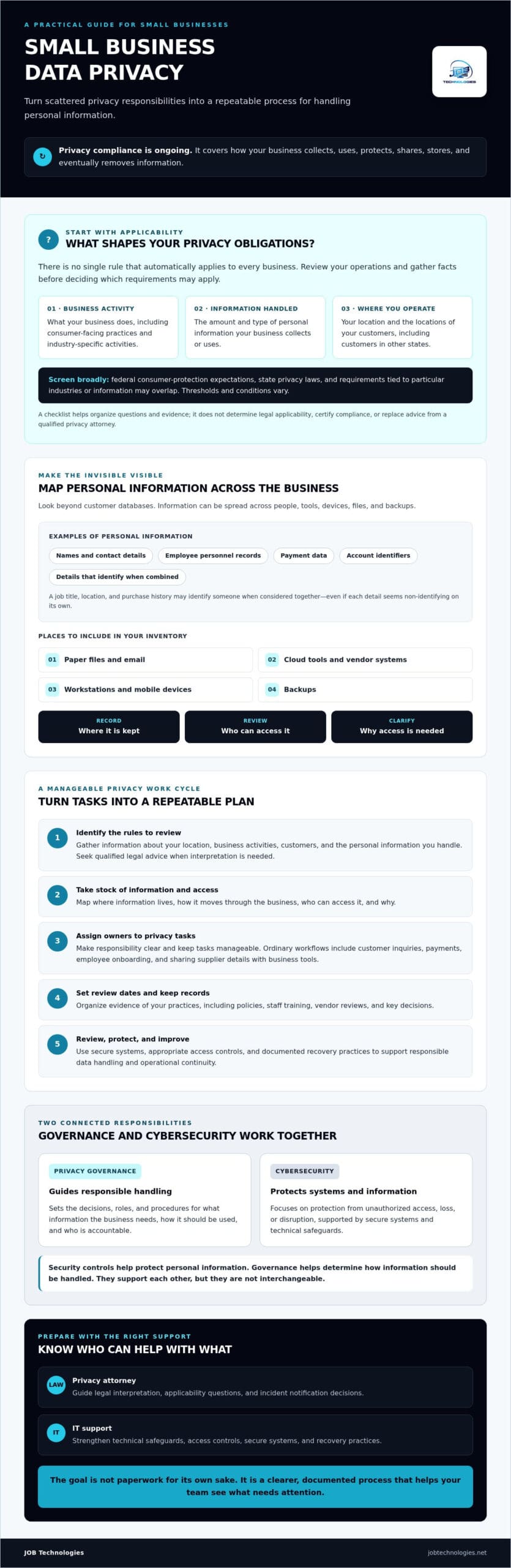
For data privacy compliance for small business, the first question isn’t simply how many people you employ. Your obligations can depend on the data you handle, what your business does, where your customers are located, and whether your industry has specific requirements. A checklist can help you organize questions and evidence, but it can’t certify legal compliance or replace advice from a qualified privacy attorney.
For a high-level introduction to privacy obligations for smaller organizations, watch this video:
What counts as personal information in everyday business records?
Start with information that identifies someone directly, such as a customer’s name and contact details, employee personnel records, payment data, or an account identifier. Combinations matter, too. A job title, location, and purchase history might identify a person when considered together, even if none seems identifying on its own.
Look beyond customer databases. Personal information may also be in paper files, email, cloud tools, workstations, mobile devices, and backups. Include each place in your inventory, along with who can access it and why. This gives you a more accurate picture of where information is kept and how it moves through the business.
Why small businesses need a repeatable privacy process
Privacy responsibilities arise in ordinary workflows: responding to a customer inquiry, processing a payment, onboarding an employee, or sharing supplier contact details with a business tool. A repeatable process helps staff handle these tasks consistently and gives someone clear responsibility for reviewing how information is managed.
Privacy governance is the set of decisions, roles, and procedures that guide how information is handled. Cybersecurity focuses on protecting systems and information from unauthorized access, loss, or disruption. They support each other, but they aren’t interchangeable. Security controls can help protect personal information, while governance helps determine what information the business needs, how it should be used, and who is accountable. The right practices vary by business. A clear, documented approach can support customer trust and operational continuity without assuming every small business needs identical controls.
Which US data privacy rules may apply to your small business?
There isn’t one simple rule that applies to every business. Federal consumer-protection expectations, state privacy laws, and requirements tied to particular industries or information can overlap. The right starting point for data privacy compliance for small business is to review your operations, rather than assume that a small company’s size settles the question. The FTC’s business guide to protecting personal information offers practical security guidance, but it doesn’t determine which laws apply to your specific situation.
Serving customers in another state may bring that state’s requirements into your applicability review. Thresholds and other conditions vary. A law may depend on the amount or type of personal data handled, business activity, or industry. Use this table to gather facts for review, not as a legal determination.
| Rule or framework | Possible trigger to screen | Records to review | Who can confirm applicability |
|---|---|---|---|
| FTC consumer-protection oversight | Consumer-facing practices, including privacy or security claims that may be unfair or deceptive | Privacy statements, marketing claims, data-handling procedures, security practices, and customer complaints | A qualified privacy attorney; the FTC’s business guidance can help with general safeguards |
| HIPAA | Your organization is a covered entity or handles protected health information as a business associate | Service agreements, customer relationships, data flows, and the type of health information handled | Qualified healthcare privacy counsel |
| GLBA | Your business may qualify as a financial institution or provide certain services to one | Services offered, customer and financial data handled, contracts, and business relationships | Qualified counsel familiar with financial privacy requirements |
| State privacy laws | Relevant business activity, data volume, revenue, or other state-specific criteria, including customers’ locations | Customer locations, data inventory, processing activities, and revenue or volume records where relevant | Qualified privacy counsel |
| Iowa and Illinois requirements | Operating in either state or handling information covered by state-specific requirements; don’t assume one state’s rules cover both | Where customers and employees are located, types of information collected, and current privacy and breach-response practices | Qualified counsel who can review current state law |
HIPAA doesn’t automatically cover every healthcare-adjacent business. A vendor’s connection to a clinic, for example, isn’t enough by itself to determine its status. The organization’s role and the information it handles need review. For a practical look at that regulated setting, see this HIPAA IT support guide for Dubuque healthcare. GLBA is another screening question for certain financial institutions and related service providers, not a blanket rule for every business that accepts payments.
As of September 2026, Iowa and Illinois aren’t among the states with active comprehensive consumer privacy laws identified in the current research for this article. That doesn’t settle whether other state or sector-specific obligations apply. Treat the comparison as an issue-spotting tool, then ask a qualified attorney to confirm applicability, interpret legal requirements, and advise on incident-notification decisions. This overview is educational, not legal advice or a compliance determination. If you need help reviewing the technical side of your privacy program, you can learn about IT and compliance assistance.
Small-business data privacy compliance checklist: map data and reduce exposure
Compliance work starts with knowing what personal data exists, where it goes, and who can access it. Use the checklist below as a working record, not a one-time exercise. Assign an owner and review date to each item, then update it when tools, workflows, or business needs change. The FTC guide to protecting personal information offers additional practical guidance on handling and safeguarding data.
Inventory personal information and its lifecycle
Follow each category of information from the moment it enters your business through use, sharing, storage, archiving, and deletion. Include less obvious locations, such as spreadsheets, messaging platforms, paper records, mobile devices, email, backups, and third-party services. Record the purpose for each category and name a responsible owner.
- List the data. Note the types of personal information you handle, such as customer, employee, payment, or supplier contact details.
- Map how it arrives and moves. Record collection points, business purposes, internal uses, sharing, and storage locations.
- Identify access. Name the teams or roles that can view or change each category, including access through devices and connected services.
- Document vendors. List service providers that store or process business information. Review relevant agreements and ask how their practices align with your needs.
- Set retention decisions. Record how long information is kept and how it is deleted or archived. Seek legal input before setting timelines where laws, contracts, or other duties may affect retention.
- Reduce exposure. Collect only information needed for a clear business purpose. Use least-privilege access so staff can reach the information required for their responsibilities, and review access when roles change.
- Check safeguards and ownership. Review system configurations and protective measures, then assign someone to maintain the inventory and schedule its next review.
Review access, vendors, retention, and safeguards
Make the inventory useful by connecting each entry to an owner, evidence, and a review date. Evidence might include a current vendor list, access review notes, or a written reason for a retention decision. These records help your team see what needs attention without assuming every business needs identical controls.
For data privacy compliance for small business, a manageable routine is more useful than a checklist nobody maintains. Review the record when a system or provider changes, and revisit it on a regular schedule that fits your operations. Managed IT and compliance assistance can support parts of this work, while legal questions about applicable duties belong with qualified counsel. To learn about the technical and compliance support available, visit JOB Technologies.
How to document privacy practices and prepare for a data incident
A privacy program is easier to maintain when it leaves a clear record. Keep evidence that shows not only what your policies say, but how your team follows them. Useful records include dated data inventories, access reviews, staff training logs, vendor assessments, and approvals of current policies. If you are tracking structured regulatory standards across your systems, visit CWORT to see how automated compliance validation can help streamline evidence collection.
Make the records practical. For each issue or exception, note the decision, who owns the next step, its target completion date, and any question that still needs an answer. Review documentation when your business changes, such as when you add a system or vendor, and set a regular review schedule that reflects your risks and applicable obligations. These habits make data privacy compliance for small business an active process rather than a collection of old files.
Prepare a privacy incident response path
Before an incident, identify internal decision-makers and keep contact details for outside legal counsel, your insurer, and technical support in an accessible place. Staff should know whom to alert and how to escalate a suspected exposure, lost device, or unauthorized account access. A simple, documented path can help the team respond in an orderly way.
- Contain the issue. Work with appropriate technical support to limit ongoing access or exposure without taking steps that could unnecessarily destroy useful evidence.
- Preserve relevant information. Retain logs, messages, and records that may help establish what happened. Limit access to people involved in the response, and avoid unnecessary changes to the records.
- Assess the situation. Determine what systems and information may be involved, what is known, and what remains uncertain. Record decisions and the information supporting them.
- Consult qualified counsel. Ask an attorney to assess legal obligations, including whether notification is required and who must be contacted.
- Follow verified duties. Use counsel’s advice to confirm applicable notification requirements and timelines. Don’t assume one deadline applies everywhere. Requirements can vary by jurisdiction, information, and circumstances.
Privacy response and backup recovery have different purposes. The response process focuses on understanding and managing the exposure, preserving evidence, and addressing legal and communication decisions. Backup and recovery help restore data or operations after disruption. Coordinate the two so recovery steps don’t compromise relevant evidence or leave affected systems exposed. For more on continuity planning, see the business data backup and recovery guide.
Managed IT, cybersecurity, and backup and recovery support can contribute to technical safeguards and continuity, but they don’t replace legal advice. Learn about IT and compliance support from JOB Technologies as one part of building a documented, coordinated response plan.
Make data privacy compliance manageable with the right support
A checklist is most useful when it becomes a short, prioritized work plan. You don’t need to resolve every open question at once. Start with clear ownership, address the most consequential gaps first, and record what needs follow-up. That steady approach can make data privacy compliance for small business easier to manage alongside daily operations.
Prioritize the next 30 days of privacy work
Use the next month to establish a workable starting point. Name an internal owner, create a basic data inventory, and identify access gaps that could expose personal information unnecessarily. Then assign an owner and target date for vendor reviews, policy questions, and unresolved legal applicability checks. If you’re unsure whether a requirement applies, document the question and route it to qualified counsel rather than guessing.
Put review dates on the calendar, too. Revisit the plan after adding a system or service, expanding into a new location, or using personal information for a new purpose. Those changes can affect how data is collected, accessed, stored, or shared. Update the inventory and action list so they continue to reflect how the business actually operates.
Know when IT support and legal advice each help
IT professionals can help assess systems, access controls, backup practices, and technical implementation options. Managed IT and cybersecurity support can contribute to safeguards, while documented backup and recovery practices help support continuity. These technical measures are one part of a privacy program. They don’t determine which laws apply or guarantee compliance.
Bring in a qualified privacy attorney for legal interpretation, contract questions, individual rights requests, and decisions about breach notification obligations. The right division of responsibility helps keep technical and legal decisions connected without confusing one for the other.
For technical incident readiness, review this ransomware recovery guide for businesses. A recovery plan can help your team consider how systems and data may be restored after disruption, while legal counsel advises on any privacy obligations arising from an incident.
If your business is in Dubuque, Galena, East Dubuque, Dyersville, Farley, or Peosta, JOB Technologies offers managed IT, cybersecurity, data backup and recovery, and compliance assistance for small and medium-sized businesses. Talk with JOB Technologies about IT and compliance support as you turn your findings into a practical plan. Your legal questions should still go to qualified counsel.
Turn your privacy checklist into steady progress
Strong data privacy compliance for small business starts with a clear view of the information you hold, the people and providers who can access it, and the rules that may apply. Turn that picture into a working plan: assign owners, prioritize gaps, document decisions, and set review dates. A repeatable process helps keep privacy responsibilities visible as your business changes.
Technical safeguards and legal guidance play different roles. Managed IT and cybersecurity can support the systems and access controls that help protect information, while data backup and recovery contribute to business continuity. A qualified privacy attorney can advise on legal interpretation and incident notification decisions.
JOB Technologies provides managed IT, cybersecurity, compliance assistance, and data backup and recovery for small and medium-sized businesses in Dubuque, Galena, East Dubuque, Dyersville, Farley, and Peosta. Talk with JOB Technologies about practical IT and compliance support to discuss how these services may fit into your privacy program. You don’t have to solve every issue at once. Start with one clear priority, assign an owner, and build from there.
Frequently Asked Questions
Does every small business need to comply with data privacy laws?
No, the same privacy laws and requirements don’t apply to every small business. Applicability can depend on the type and amount of information you handle, your business activities, industry, and where your customers are located. Some businesses may also have contractual or sector-specific obligations. For data privacy compliance for small business, list these facts and ask a qualified privacy attorney to confirm which rules apply.
What personal information should a small business include in a data inventory?
Include information that can identify a person, such as customer contact details, employee records, payment data, and account identifiers. Note where it’s collected, its business purpose, where it’s stored, who can access it, which vendors handle it, and how it’s retained or deleted. Check paper files, email, spreadsheets, messaging platforms, cloud services, devices, and backups. Combinations of ordinary details may also identify someone in context.
How can a small business start a data privacy compliance checklist?
Start by naming an owner and listing the personal information your business collects or receives. Trace where each type comes from, how it’s used and shared, where it’s stored, and who has access. Then identify vendors, retention practices, and obvious access gaps. Give each open task an owner and review date. Record legal questions for a qualified privacy attorney rather than treating a checklist as proof of compliance.
Does a small business need to follow HIPAA?
Not automatically. HIPAA applies to covered entities and business associates as defined under the law, not simply to every business that works with a healthcare provider or handles health-related information. Your organization’s role, relationships, and information flows matter. If your business provides services to a healthcare organization or may handle protected health information, have qualified healthcare privacy counsel assess whether HIPAA applies and what responsibilities may follow.
What should a small business do if customer data may have been exposed?
Act promptly, but avoid assumptions about what happened or what must be reported. Limit ongoing access, preserve relevant logs and records, and document what’s known, what’s uncertain, and the steps taken. Contact your technical response resources and consult qualified legal counsel to assess notification obligations. Requirements and timelines can vary by jurisdiction, information involved, and circumstances, so don’t rely on a universal deadline or send notices before verifying what applies.
How often should a small business review its privacy practices?
Set a regular review schedule that fits your operations and applicable obligations, then revisit the records when something changes. New software, vendors, locations, data uses, or staff responsibilities can affect where personal information goes and who can access it. Keep dates and decisions in your records, and assign owners to follow-up work. A consistent review process helps keep policies and inventories aligned with actual business practices.
Can managed IT services make a small business privacy compliant?
No. Managed IT can support technical safeguards, system access reviews, cybersecurity, and backup and recovery practices, but it can’t determine legal applicability or guarantee compliance. JOB Technologies provides managed IT, cybersecurity, data backup and recovery, and compliance assistance for small and medium-sized businesses. For businesses in Dubuque, Galena, East Dubuque, Dyersville, Farley, and Peosta, an IT partner can support the technical work while qualified legal counsel advises on legal duties.