

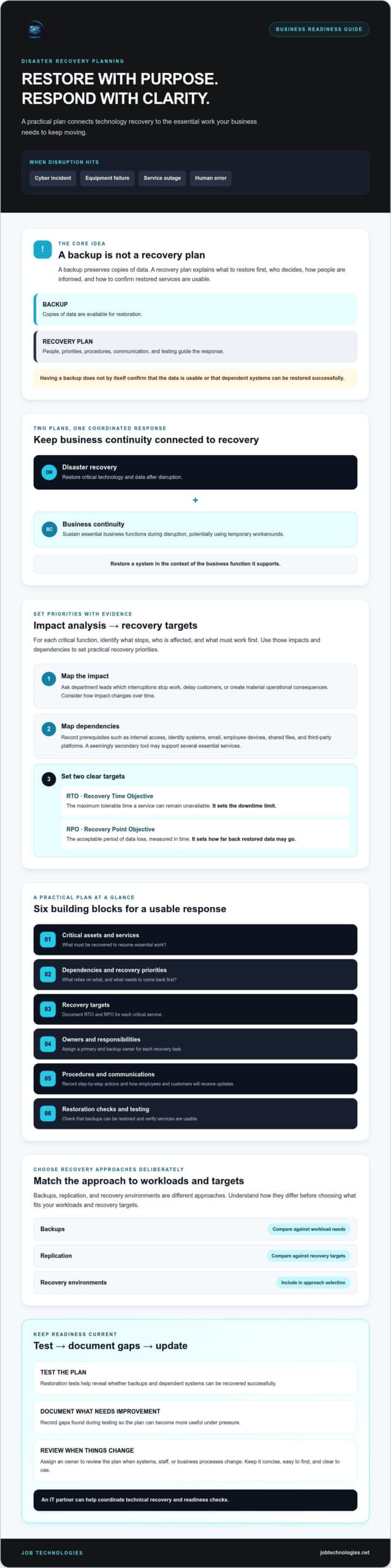
What if the first hours of an outage are spent debating what to restore, who’s responsible, and whether the backups will work? That’s why disaster recovery planning for businesses needs to be more than a backup checklist. A useful plan gives your team clear priorities and actions for responding when normal operations are disrupted.
You may already know that backups matter. But a backup alone doesn’t tell you which systems to restore first, how to communicate with employees and customers, or who makes key decisions. Documenting those details can help your team act under pressure instead of trying to make every decision from scratch.
This practical 2026 template will help you document critical operations, set recovery priorities, assign responsibilities, and outline communication steps. You’ll also learn how to check whether backups can be restored and test your plan so gaps surface before an incident. Whether you’re building a plan from scratch or reviewing an existing one, use this as a starting point and adapt it to your business.
Key Takeaways
- Disaster recovery planning for businesses should connect technology recovery with the operations your team needs to keep essential work moving.
- Use impact analysis, recovery time objectives (RTOs), and recovery point objectives (RPOs) to set practical priorities for each critical service.
- Understand how backups, replication, and recovery environments differ before choosing an approach for your workloads and recovery targets.
- Build a plan that records key systems, dependencies, procedures, communications, and a primary and backup owner for each recovery task.
- Test the plan, document what needs improvement, and consider how an IT partner can help coordinate technical recovery and readiness checks.
What Disaster Recovery Planning for Businesses Covers, and Why It Matters
A cyber incident, equipment failure, service outage, or human error can interrupt work without warning. Disaster recovery planning for businesses means documenting how your company will restore critical technology and operations after a disruption, including what to recover first and who makes the decisions.
Disaster recovery focuses on getting systems and data working again. Business continuity focuses on sustaining essential business functions during disruption, which may involve temporary workarounds while technology is restored. The plans should work together: restoring a system matters most when it supports a business function that needs to resume.
For a concise overview of how the concepts connect, watch this video:
As you set priorities and targets, Business continuity planning offers useful background on business impact analysis, recovery time objectives (RTO), and recovery point objectives (RPO).
What belongs in a business disaster recovery plan?
A practical plan identifies critical assets and services, their dependencies, recovery targets, assigned roles, step-by-step procedures, communication methods, and how recovery will be tested. Make it specific to your setup. For example, note which applications require a working network connection, which tasks depend on shared files, and who can verify that a restored service is usable.
Keep the plan concise, easy to find, and clear enough to use under pressure. An extensive document that nobody can locate, or that no longer reflects current systems, can leave the team uncertain. Assign an owner to review it when systems, staff, or business processes change.
Disaster recovery planning versus backup planning
Backups preserve copies of data. A recovery plan explains how to use available resources to restore systems and make business decisions, such as which service to bring back first and who communicates updates. Having a backup does not, by itself, confirm that the data is usable or that dependent systems can be restored successfully. Restoration tests help reveal gaps before an actual disruption.
For more detail on protecting and restoring business data, see this business data backup and recovery guide. A useful plan connects people, processes, systems, and recovery decisions so the business can move from disruption toward an orderly restoration.
Set Business Recovery Priorities with RTO, RPO, and Impact Analysis
Not every service needs to return at the same time. Start by asking what an outage prevents your team from doing, how the impact changes over time, and what other systems must work first. For each function, identify the work that stops, the people affected, and any dependencies that must be restored beforehand. This impact analysis gives disaster recovery planning for businesses a practical basis for setting priorities instead of relying on guesswork.
Two targets help turn those priorities into clear requirements. A recovery time objective (RTO) is the maximum tolerable time a service can remain unavailable. A recovery point objective (RPO) is the acceptable period of data loss, measured in time. Put simply, RTO sets the downtime limit, while RPO sets how far back restored data may go.
How to identify the systems your business must restore first
Ask department leads which interruptions stop work, delay customers, or create material operational consequences. Consider customer communications, accounting, line-of-business applications, and access to shared files. Then map what each function depends on, such as internet access, identity systems, email, employee devices, and third-party platforms. A tool that seems secondary may be a prerequisite for several essential services, so record dependencies rather than ranking applications in isolation.
How to assign recovery time and data-loss targets
Compare the consequences of a brief interruption with those of a longer one. A short email outage might slow coordination; a prolonged outage could disrupt customer responses and approvals. Discuss acceptable limits with the people accountable for each function, then approve a separate RTO and RPO for each critical service. These illustrative entries are examples for discussion, not universal recommendations.
| Business function | Impact if unavailable | Key dependencies | Illustrative proposed targets | Accountable owner |
|---|---|---|---|---|
| Customer communications | Delayed inquiries and updates | Internet, email, identity system | RTO: 4 hours; RPO: 1 hour | Customer service lead |
| Accounting | Payment and reconciliation work delayed | Accounting application, identity system, data | RTO: 1 business day; RPO: 4 hours | Finance lead |
| Line-of-business application | Core workflows interrupted | Network, application access, third-party platform | RTO: 8 hours; RPO: 2 hours | Operations lead |
Replace these sample targets with limits your business can support and approve. The business continuity plan template from Ready.gov can provide a starting point for documenting impact and response planning. Businesses in Dubuque, Galena, East Dubuque, Dyersville, Farley, and Peosta can also discuss technical dependencies and recovery priorities with JOB Technologies.
Compare Recovery Approaches: Backups, Replication, and Recovery Support
Recovery tools solve different problems. A backup may preserve a usable copy of data, while replication may help make a separate environment available. Neither alone decides what the business should restore first or confirms that people can resume work. For disaster recovery planning for businesses, compare each approach against approved recovery targets, workload needs, technical dependencies, and the resources available to manage recovery.
What each recovery approach can and cannot do
Think about purpose as well as speed. A recovery environment is a place or service where systems can be restored or run, but the options and requirements depend on the specific setup. No approach guarantees a successful recovery or prevents downtime. The Disaster Recovery Journal offers further industry resources on continuity and recovery planning.
| Approach | Purpose | Recovery speed | Complexity and dependencies |
|---|---|---|---|
| Backups | Keep recoverable copies of data or systems | Depends on the copy, restoration process, and approved target | Requires access to intact copies, compatible systems, and documented restore steps |
| Replication | Copy data or changes between environments | May support faster recovery, depending on design and readiness | Requires connected environments and oversight; unwanted changes can also be copied |
| Recovery environment | Provide a place or service to restore operations | Depends on what is prepared and tested | May rely on network access, identity services, applications, vendors, and staff |
These approaches may complement each other, but they aren’t interchangeable. A business with a less time-sensitive workload may accept a different recovery method than one that depends on continuous access to a core application. Choose based on each workload’s needs and approved RTO and RPO, not on a general promise of speed.
How to assess an IT recovery partner
Ask how backup status and restore-test results are recorded, who escalates issues, and which party is responsible for each recovery task. Confirm what systems are included or excluded and identify dependencies on third-party platforms. Also clarify who makes business decisions, communicates updates, and confirms that recovered systems are ready for staff use.
Technical recovery is only part of the work. Your team still needs to decide which operations take priority, coordinate people, and communicate when processes change. If you’re responding to a cyber incident, the ransomware recovery buyer’s guide can help you consider recovery questions. Businesses across Dubuque, Galena, East Dubuque, Dyersville, Farley, and Peosta can also discuss backup and recovery planning with JOB Technologies’ IT team.
Build and Test a Business Disaster Recovery Plan: Practical Template
A plan is useful only if the right people can find it and act on it. Use the template below as a working document, assigning both a primary owner and a backup for every decision and recovery task. Keep copies and essential contact details securely accessible when your usual email, network, or file storage is unavailable. Limit access to people who need it, and avoid storing sensitive access credentials directly in the plan.
A fill-in template for a small business
- Scope: Record which locations, teams, systems, and business functions the plan covers.
- Contacts and escalation: List role, name, approved contact method, escalation order, and alternate communication method for decision-makers, staff, vendors, and technical support. Keep details current.
- Critical services and dependencies: For each business function, name the system it relies on and dependencies such as internet access, identity services, devices, or third-party platforms.
- Recovery targets and owners: Document the approved RTO and RPO for each service, plus the accountable primary owner and backup.
- Recovery procedures: Record the action sequence, where authorized instructions are stored, who performs each step, and how the business confirms the service is usable.
- Communications: Specify who shares updates, with whom, through which approved channels, and who can make decisions if the primary contact is unavailable.
- Review and change log: Track the review date, approver, changes made, unresolved actions, assigned action owners, and follow-up dates.
Keep entries specific to your actual systems. “Restore accounting” is less useful than naming the relevant application, its dependencies, the responsible roles, and the documented recovery steps. Store the plan somewhere protected but reachable through an approved method if primary systems are down.
How to test, review, and improve the plan
Start with a tabletop discussion. Walk staff through a realistic disruption and ask who declares an incident, which service takes priority, how people communicate, and what happens if a key decision-maker is unavailable. Record unclear steps and unanswered questions rather than treating the exercise as a pass-or-fail test.
Then arrange controlled restoration tests for selected data or systems. Record what was tested, the outcome, evidence reviewed, and any limitations. Assign each gap an owner and follow-up date. A successful test of one item doesn’t establish that every service can be recovered, so be clear about what remains untested.
Review the plan after material changes to technology, staffing, vendors, or business processes, and record approval of updates. Practical disaster recovery planning for businesses depends on keeping these details current and learning from each exercise. Work with JOB Technologies on backup and recovery planning to help document technical dependencies and readiness steps.
Turn the Plan into Readiness with a Trusted IT Recovery Partner
Your team should own business priorities: which services matter most, who can approve decisions, and how employees and customers receive updates. Technical support may help document system dependencies, review backup and recovery arrangements, and clarify the steps needed to restore technology. The goal is a shared plan with clear responsibilities, not an assumption that a provider will make every decision for you.
As you compare providers, look for practical alignment with your approved recovery targets. Ask how responsibilities and escalation steps are documented, how communication works during recovery, and how testing is handled. Confirm which systems and activities are included, what remains your responsibility, and whether any step depends on a software vendor or another external provider.
Questions to ask an IT recovery provider
- Which systems, applications, and data do you support during recovery, and what must our staff or other providers handle?
- How are restore tests planned and recorded? Can we review results, limitations, unresolved risks, and follow-up actions?
- How are recovery procedures and plan updates documented, and who approves changes?
- How do you coordinate with software vendors and other external service providers if their systems are part of our recovery process?
- How do your documented responsibilities and capabilities fit the RTO and RPO targets our business has approved?
For businesses in Dubuque, Galena, East Dubuque, Dyersville, Farley, and Peosta, confirm service coverage, escalation arrangements, and communication expectations directly with any provider you’re considering. Don’t assume that location or a general service description answers those questions.
When managed IT and recovery support may help
Consider additional support if your systems aren’t documented, no one is sure who owns key recovery decisions, or backups haven’t been tested through restoration. These are useful prompts to review readiness, not proof that a particular recovery outcome is assured. Internal staff can still lead business decisions while technical specialists help clarify systems and recovery responsibilities.
JOB Technologies provides managed IT, cybersecurity, and data backup and recovery for small and midsize businesses. If you’d like a partner to help assess how those areas fit your recovery plan, discuss the scope, responsibilities, and testing approach before deciding on next steps. Discuss disaster recovery planning with JOB Technologies and identify practical ways to strengthen your business’s recovery readiness.
Make Recovery Readiness Part of Your Business Plan
Strong disaster recovery planning for businesses turns uncertainty into agreed priorities and practical next steps. Set recovery targets around operational needs, clarify who owns each decision, and choose recovery approaches that fit your systems. Most importantly, test the plan and use what you learn to close gaps.
Backups are only one part of readiness. Your team also needs clear procedures, dependable communication, and a shared understanding of how technology recovery supports essential work. Keep the plan current as your people, processes, and systems change.
JOB Technologies supports small and midsize businesses with managed IT services, cybersecurity and ransomware protection, and data backup and recovery. Businesses in Dubuque, Galena, East Dubuque, Dyersville, Farley, and Peosta can start a conversation to clarify what their team owns and where technical support may fit. Discuss your business recovery planning needs with JOB Technologies.
Start with one service, one owner, and one realistic test. Each clear step can help your business build greater confidence in its recovery readiness.
Frequently Asked Questions
What should a disaster recovery plan include for a small business?
A small-business disaster recovery plan should identify critical services, system dependencies, approved recovery targets, assigned roles, procedures, communication methods, and test results. Include a primary owner and backup for each key task, plus escalation contacts and a review date. Keep a secure copy accessible if normal systems are unavailable. Effective disaster recovery planning for businesses reflects the company’s actual operations, not just a generic technology checklist.
What is the difference between disaster recovery and business continuity?
Disaster recovery focuses on restoring technology, systems, and data after disruption. Business continuity focuses on keeping essential business functions operating during that disruption, which may involve temporary workarounds. For example, a team might use an alternate communication method while email is being restored. The plans should connect: continuity addresses how work carries on, while disaster recovery guides the return of supporting technology.
What do RTO and RPO mean in disaster recovery planning?
RTO, or recovery time objective, is the maximum acceptable time a service can remain unavailable. RPO, or recovery point objective, is the acceptable period of data loss measured in time. For example, an approved RPO of two hours means the business has decided it can tolerate losing up to two hours of data. Set separate targets for critical services based on operational impact, rather than assuming one target fits every system.
Are backups enough for a business disaster recovery plan?
No. Backups preserve copies of data, but a recovery plan also defines how systems will be restored, what gets priority, who takes action, and how the business communicates. Backup availability alone doesn’t confirm that copies are intact, accessible, or usable in restoration. Document the restore process and test selected data or systems under controlled conditions. Record what worked, what wasn’t tested, and any follow-up actions.
How often should a business test its disaster recovery plan?
Test the plan regularly and after significant changes to systems, staff, vendors, or business processes. There’s no single testing schedule that suits every business, so set a review and exercise cadence that matches your risks and resources. A tabletop discussion can check whether people understand decisions and responsibilities. Restore tests can check selected data or systems. Document results, limitations, assigned owners, and follow-up dates.
Can a small business create a disaster recovery plan without an IT team?
Yes. Business owners and department leads can document critical work, priorities, decision-makers, and communication steps, even without an internal IT team. Technical support can help map system dependencies, review backup and recovery arrangements, and clarify restoration responsibilities. JOB Technologies provides managed IT services for small and midsize businesses in Dubuque, Galena, East Dubuque, Dyersville, Farley, and Peosta.
How is ransomware addressed in a business disaster recovery plan?
Include ransomware in the plan’s incident procedures, with clear escalation contacts, decision owners, communication steps, and criteria for restoring affected systems. Don’t assume a backup is safe or usable just because it exists; document how restoration will be assessed and tested. Coordinate technical recovery with cybersecurity support and any relevant external providers. The plan should make responsibilities clear without assuming every incident follows the same path.