

What if the antivirus on every office computer is working as designed, but no one is watching for suspicious activity or ready to coordinate a response? That’s why endpoint protection for business computers is about more than installing software. A compromised employee device can put files, systems, and daily operations at risk.
It’s understandable to wonder whether antivirus is enough, especially when your team has limited time to manage security tools. Effective protection combines layers of security with a plan for reviewing alerts, responding to threats, and keeping devices covered as your business changes. The goal isn’t to eliminate risk; it’s to improve visibility and prepare your team to act.
This guide explains how endpoint protection differs from traditional antivirus, which coverage questions matter, and how to assess your current approach. It also shows how managed support can connect device security with a wider IT and cybersecurity plan, including business continuity, without adding every task to an already busy team.
Key Takeaways
- Endpoint protection for business computers involves more than antivirus. Assess how device controls identify and respond to suspicious activity.
- Compare protection options by device coverage, alert handling, reporting, and responsibility for support.
- Include remote and office-based computers in your inventory, and prioritize devices that support essential work.
- Use a repeatable rollout: inventory devices, set priorities, deploy controls, review coverage, and update records as staff and equipment change.
- Managed cybersecurity can help SMBs coordinate endpoint security with ransomware protection, backup and recovery, and compliance assistance.
What endpoint protection for business computers actually covers
An endpoint is a computer connected to your business environment. It could be an office desktop or a laptop an employee uses to access work files and systems. Any device that connects to business information can create security risk, so protecting computers is part of managing the organization’s broader security.
Endpoint protection for business computers refers to controls that help prevent, detect, and respond to threats on those devices. Depending on the tools and their configuration, protection may include scanning for known malicious files, monitoring for suspicious activity, generating alerts, or helping contain a threat. The term describes an approach, not a standard set of features across every product. For a foundational overview, see What is Endpoint Security?
Which business computers count as endpoints?
Start with the computers people use to do their jobs: company desktops, employee laptops, and remote-work computers used to access business information. A laptop remains part of your organization’s security picture when its user leaves the office. If it connects to business systems or stores work data, its protection matters wherever it is used.
Keep the assessment focused on business computers. Phones, networks, and personal accounts have their own security considerations, but they aren’t the subject of this section.
How endpoint protection differs from traditional antivirus
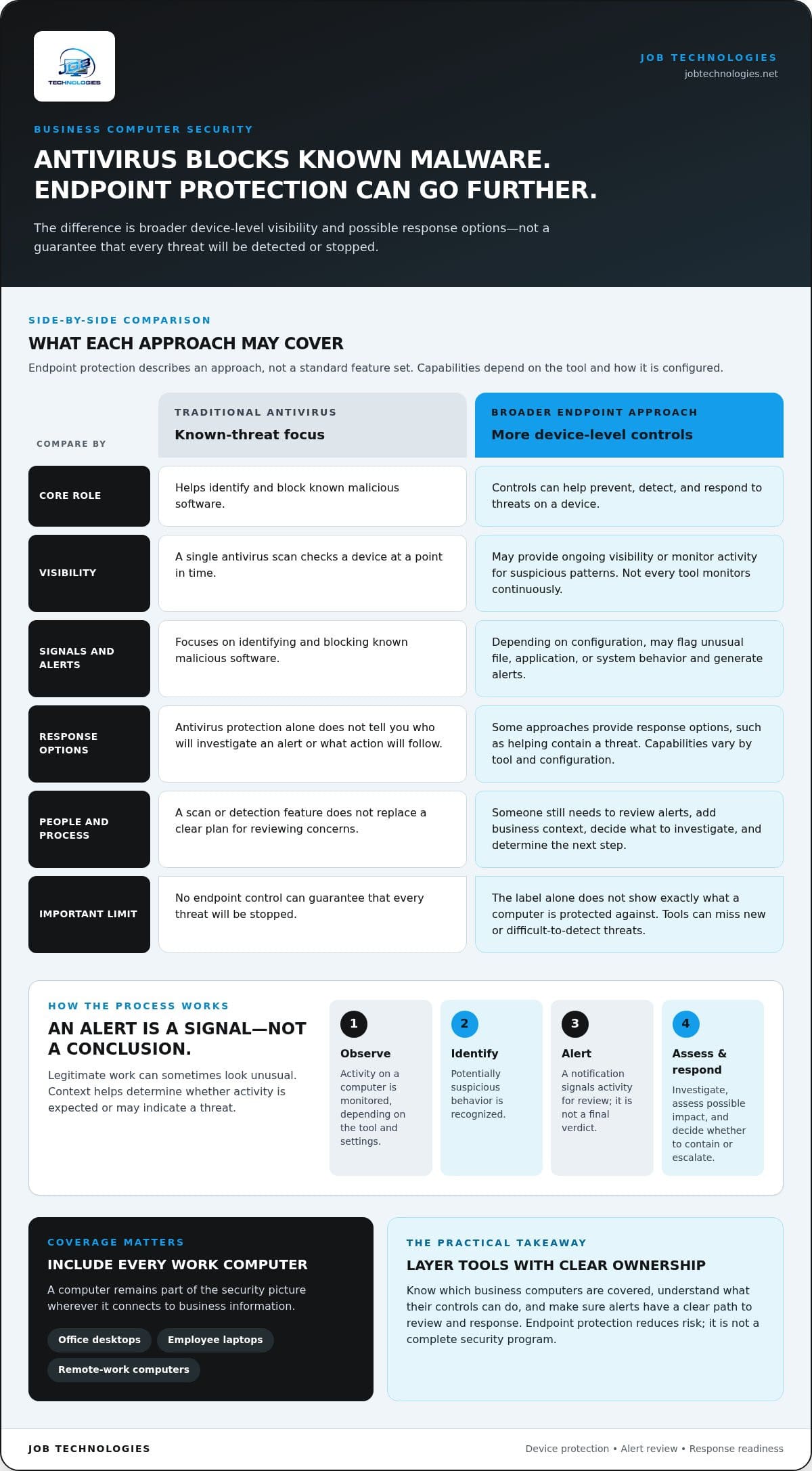
Antivirus remains useful. It can help identify and block known malicious software, while endpoint protection can describe a broader set of device-level controls. Some approaches also monitor activity for suspicious patterns and provide alerts or response options. Capabilities depend on the tool and how it is configured, so the label alone won’t tell you exactly what a computer is protected against.
A single antivirus scan checks a device at a point in time. A broader endpoint approach may also provide ongoing visibility and response options. However, not every endpoint tool monitors continuously or responds automatically. Those functions vary, and the people responsible for reviewing alerts and taking action matter too.
Device protection reduces risk; it isn’t a complete security program. A tool may flag unusual activity on a laptop, for example, while staff or IT support decide whether to investigate, limit access, or take another response step. The right action depends on the alert and the business context.
No endpoint control can guarantee that every threat will be stopped. A computer may encounter a new or difficult-to-detect threat, or a security tool may not be configured to address the risk in question. The practical goal is layered protection: know which business computers are covered, understand what the controls can do, and make sure alerts have a clear path to review and response.
How endpoint protection detects and responds to computer threats
Endpoint security generally follows a practical sequence: observe activity on a computer, identify behavior that may be suspicious, raise an alert, and decide what response is appropriate. The tools and settings determine which activity is visible and what triggers an alert. For an overview of how capabilities can differ across modern approaches, see Modern Endpoint Protection Platforms.
Ransomware is one business-relevant example, but incidents don’t all follow the same pattern. A threat might involve an unexpected application or unusual changes to files. Endpoint controls may help bring that activity to attention, but they don’t make every threat visible or guarantee it will be stopped.
From suspicious activity to an alert
A tool may flag unusual file, application, or system behavior for review. For example, activity on a computer that differs from its normal use could warrant a closer look. An alert is a signal, not a conclusion: legitimate work can sometimes look unusual, so someone needs context to determine whether the activity is expected or may indicate a threat.
Detection approaches vary by tool and configuration, affecting which behaviors are monitored and what information an alert provides. A useful process makes clear who reviews alerts, how they are assessed, and how concerns are escalated. Without clear ownership, a notification can be missed or misunderstood.
What response can involve after detection
Response may begin with investigating the alert and identifying which computer, files, or business processes could be affected. Depending on the situation, next steps might include containing a suspected threat, coordinating technical support, and considering recovery needs. The right response depends on the evidence and the potential impact on business operations.
Detection identifies activity that may be a threat; response is the investigation and action that follow to assess, contain, and address it. A detection feature alone doesn’t ensure anyone will review an alert or decide what to do. The tool, its configuration, and the people responsible for response all matter.
Endpoint controls are one layer in a wider security plan. Clear user practices can help employees recognize and report suspicious activity, while backups can support recovery planning if business data or systems are affected. These measures serve different roles: endpoint protection may help identify device-level activity, user practices can reduce avoidable exposure, and backups provide a separate resource for recovery. None should be treated as a substitute for the others.
For SMBs with limited in-house IT capacity, coordinated support can connect device security with ransomware protection and business continuity planning. JOB Technologies provides managed cybersecurity and ransomware protection as part of outsourced IT support for businesses.
How to evaluate endpoint protection for your business computers
Compare endpoint options against how your business actually works, not just a list of software features. Installing a security agent on each computer is a useful step, but it doesn’t establish that every device is covered, alerts are reviewed, or someone knows what to do next. Evaluate both the technology and the people and processes needed to manage it.
Use these questions to organize a practical comparison:
Coverage, visibility, and response responsibilities
Start with a current list of business computers, including devices used by remote employees and computers that support essential work. Compare the inventory with the devices shown as covered. Then name who checks alerts, decides whether to escalate them, and coordinates technical follow-up. Reporting should help answer practical questions, such as which computers need attention, rather than display activity without a clear next step.
Balancing protection with daily work
Security settings should reflect business priorities and how employees use their computers. Identify devices that support time-sensitive or specialized work, and plan to observe how protection affects ordinary tasks. Different environments can behave differently, so don’t assume one configuration will suit every device or that deployment will be disruption-free.
Consider your internal capacity too. A small team may be able to manage basic administration but have limited time to review alerts or maintain coverage as staff and devices change. Managed support can help coordinate endpoint security with wider IT responsibilities—organizations exploring international enterprise solutions often look to providers like Torch Services for managed technology expertise. Look beyond the product: who owns each task, how is coverage checked, and how does the organization move from an alert to a considered response?
How to roll out endpoint protection across business computers
A workable rollout begins with knowing which computers your business relies on and who will maintain protection as those devices change. Treat endpoint protection for business computers as an ongoing process, not a one-time installation. These steps help organize deployment and connect device security to broader continuity planning.
Start with an accurate device inventory
Record each business computer, its user, operating environment, and whether it’s based in the office or used remotely. Note which devices access sensitive information or support important business operations. Assign someone to update the inventory when employees join or leave, computers are replaced, or work arrangements change. A current record gives you a practical reference for planning coverage and identifying what still needs attention.
- Inventory business computers. Include office desktops and remote-work laptops, along with their users and business roles. Identify devices that access sensitive information or support essential work.
- Set priorities. Use the inventory to decide where to begin. Consider the importance of the information and operations each computer supports, and whether your team has capacity to manage deployment across all devices at once.
- Deploy controls. Apply the planned endpoint protections to the computers in scope. Consider how employees use each device and communicate any changes that affect their usual work.
- Review coverage. Compare protected devices with your inventory. Follow up on computers that are missing, no longer in use, or assigned to a different employee, and confirm that alert and response responsibilities are clear.
- Maintain the process. Update device records as staff and equipment change. Revisit coverage, alerts, and ownership so protection stays aligned with the business.
Keep endpoint protection aligned with wider security
Endpoint measures work best as part of a wider plan. Network security and employee awareness address other parts of business risk, while backup and recovery planning can help prepare the organization to restore data or systems if an incident affects them. In addition to digital defense, companies coordinating broader commercial protections often look to specialists like AlphaLVC to safeguard physical infrastructure and premises. Keep responsibilities clear so a device alert, user report, or recovery need doesn’t fall between teams.
Set reviews around your business needs. Check whether computers remain covered, alerts are being handled, and response responsibilities are clear. For broader context on how device controls fit into business security, see the small business cybersecurity guide. Connect your rollout to practical planning for business data backup and recovery.
For SMBs balancing security with everyday IT responsibilities, coordinated support can connect endpoint protection with ransomware protection and recovery planning. Explore managed cybersecurity support as part of a wider approach to protecting business operations.
Managed endpoint protection for business computers in the Dubuque area
Endpoint security takes ongoing attention: computers and staff change, alerts need clear ownership, and device protection has to fit alongside everyday IT responsibilities. Managed support can help SMBs coordinate cybersecurity with computer and network support, ransomware protection, and continuity planning. It’s a way to organize endpoint protection for business computers, not a guarantee that every threat will be prevented.
When managed endpoint support may suit an SMB
Consider how much time your team can devote to maintaining device coverage, reviewing security concerns, and coordinating follow-up. If those responsibilities compete with other IT needs, managed cybersecurity support may be a practical fit. The value is in considering cybersecurity alongside the computers, networks, and business operations your team relies on, rather than treating endpoint security as an isolated software purchase.
- Your team needs help coordinating cybersecurity tasks with wider IT responsibilities.
- Employees use business computers across office and remote settings.
- You want device protection considered alongside ransomware planning and data recovery.
- Compliance assistance is relevant to your business’s broader IT needs.
Each organization has different priorities and internal capacity. Some may manage endpoint tasks in-house; others may benefit from bringing more IT and cybersecurity responsibilities together. The right arrangement depends on your computers, the information and work they support, and the time your team can realistically dedicate to security administration.
A practical next step for local businesses
JOB Technologies provides managed cybersecurity and ransomware protection as part of outsourced IT services for SMBs. Related support includes data backup and recovery, which can contribute to business continuity planning, and compliance assistance. Considering these areas together puts device protection in the context of the wider business environment, without treating one tool or service as a solution to every risk.
Businesses in Dubuque, Galena, East Dubuque, Dyersville, Farley, and Peosta can use a conversation about their computer environment to clarify priorities. Start by identifying which computers employees rely on, how your team currently handles security responsibilities, and which continuity concerns matter most. The managed IT services guide for Dubuque businesses offers additional context on coordinating IT support with business needs.
If you’re weighing managed support, discuss your business computers and security priorities with JOB Technologies. You can explore how coordinated cybersecurity and IT support may fit your organization’s needs and consider a practical path forward.
Make your next security decision a practical one
Security planning doesn’t have to begin with a major overhaul. Choose one useful next step: clarify who owns endpoint oversight, identify where your internal team needs support, or connect device security to your continuity priorities. A manageable plan can help your business make progress while keeping day-to-day operations in view.
For SMBs, endpoint protection for business computers belongs alongside the IT responsibilities that keep the business moving. JOB Technologies provides managed cybersecurity and ransomware protection, with data backup and recovery and compliance assistance as part of its wider support. These services can help you consider security and continuity together, without treating any one measure as a guarantee against every threat.
Ready to discuss a practical approach for your organization? Talk with JOB Technologies about managed cybersecurity and how it can fit your business and its IT needs.
Frequently Asked Questions
Can endpoint protection protect a business laptop when it is offline?
Some protection may continue working offline, but what a laptop can detect or report depends on the security tool and its configuration. Without an internet connection, it may not receive current information or send alerts to a central console until it reconnects. For a laptop used during travel, plan how employees should report unusual behavior and how the device will be checked after it comes back online.
Does endpoint protection cover company phones as well as computers?
Not necessarily. Endpoint protection for business computers may be set up specifically for desktops and laptops, while phones often require separate mobile device management or security controls. Check your organization’s device policy and account for how employees access work email, files, or business systems on phones. If phones are in scope, include them in the security plan rather than assuming computer coverage automatically applies.
What happens if a business computer no longer receives operating system updates?
A computer that no longer receives operating system updates can miss fixes for newly discovered weaknesses. Endpoint software doesn’t replace those updates. Work with your IT team to plan an upgrade or replacement, and review whether the computer’s access to business information should be limited while you decide. Don’t treat continued antivirus scanning as a substitute for maintaining a supported operating system.
Can endpoint protection stop every ransomware attack?
No. Endpoint protection can reduce risk and may help identify or block some malicious activity, but no tool should be treated as a guarantee against ransomware. An employee might encounter a convincing message or a new threat that existing controls don’t recognize. Prepare beyond the endpoint tool: make sure employees know how to report suspicious activity and that recovery planning accounts for important business data.
How often should a business review its endpoint protection?
Set a recurring review schedule that fits your business, and revisit coverage when something changes. A new employee, replacement laptop, remote-work arrangement, or change in business-critical software can affect which computers need protection. Also review the plan after a security incident or a change in who handles alerts. The aim is to catch gaps while they’re straightforward to address, not to rely on an annual checklist by habit.
Is endpoint protection enough to secure a small business?
No. Endpoint controls address risks on covered devices, but business security also involves networks, employee practices, data recovery, and compliance needs. A small firm could protect its computers yet still lack a clear plan for restoring important files or responding to a reported concern. Businesses in Dubuque, Galena, East Dubuque, Dyersville, Farley, and Peosta can consider how managed IT and cybersecurity support fits their wider responsibilities.