
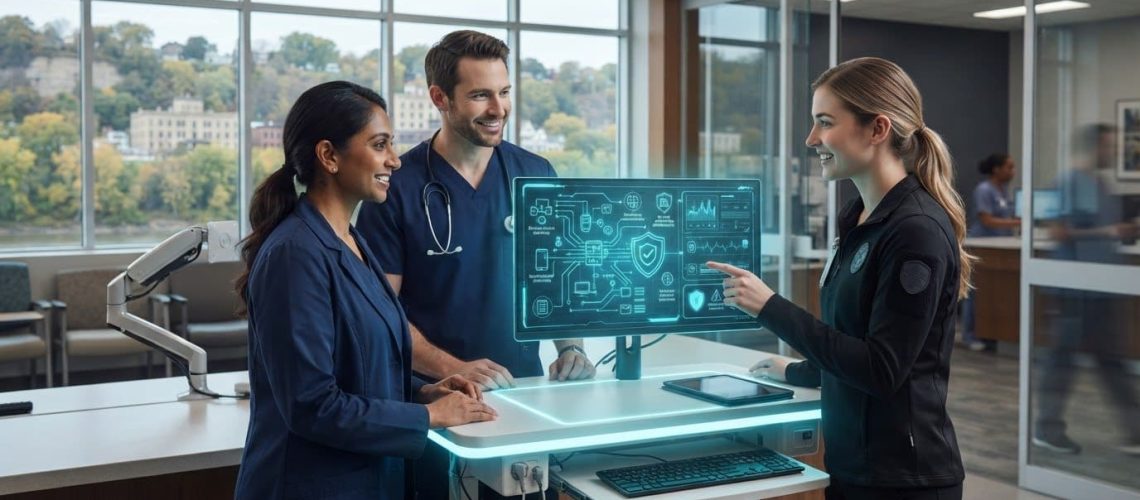
Reliable care depends on reliable information systems. Healthcare IT support in East Dubuque helps practices manage electronic health records, coordinate care, and maintain the technology used for scheduling. With the systems behind these daily tasks properly supported, staff can spend less time working around technical disruptions.
Records, communication tools, and scheduling systems need to work together, especially when teams are busy. This article explains how IT support can help manage those systems and what to consider when choosing support. It also covers network management, cybersecurity, backups, and compliance assistance, so you can assess your practice’s technology needs and plan practical next steps.
Key Takeaways
- Map how records, scheduling, and communication systems support daily care so you can identify where technical help matters most.
- Clarify what emergency response includes, how incidents are escalated, and which support arrangements match your practice’s needs.
- Review how EHR access, network reliability, and connected medical devices affect care coordination and day-to-day operations.
- Reduce cybersecurity exposure by identifying common risks and building practical safeguards into staff routines and IT management.
- Consider managed IT and network support when technology issues are pulling attention away from patient and administrative work.
Do East Dubuque healthcare IT providers offer HIPAA compliance support?
Healthcare IT support can help protect the systems that handle patient information. For a clinic, that may include reviewing user access, strengthening account security, documenting backup processes, and organizing technical records. A clear division of responsibilities is important: IT support addresses technology and workflows, while compliance decisions may also involve clinic leadership and qualified legal or compliance professionals.
Begin by listing the systems that handle patient information, including the electronic health record, appointment scheduling, staff email, shared files, and connected devices. For each one, record who uses it, how access is granted, and where its data is stored. This gives the clinic a practical map for spotting gaps and assigning follow-up tasks.
FHIR, an interoperability standard discussed in the video below, illustrates how healthcare information can be structured for exchange.
Compliance support is most useful when it turns broad concerns into specific technical actions. A support team can help review access permissions, network settings, backups, and device management. For example, if a former employee’s account remains active, the clinic can document an offboarding step to disable access and update shared credentials.
Build the review around practical questions:
- Access: Which staff members need each system, and how are permissions changed when duties change?
- Protection: Are computers, wireless networks, and remote connections configured to limit unauthorized access?
- Recovery: Are patient-system backups included in a documented recovery process, with responsibility assigned?
- Records: Can the clinic locate system inventories, access procedures, and incident notes when needed?
These checks help staff identify issues, but a checklist alone doesn’t establish compliance. Assign an owner to each finding, record the corrective action, and revisit anything unresolved. For instance, a review may reveal that scheduling staff can access files unrelated to their work. Adjust permissions, document the change, and confirm that essential scheduling tasks still work.
Healthcare IT support in East Dubuque can also help organize technical records for a clinic’s internal compliance process. Useful materials may include system diagrams, account-change procedures, backup logs, and notes on how identified issues were addressed. Keep these records current when the clinic changes its EHR, adds a device, updates its network, or changes staff responsibilities.
Before assigning a task, define the systems involved, who approves changes, and how completed work will be recorded. For broader compliance assistance, a structured review can connect technical improvements with internal policies. Keep the process focused: identify a system, assess its controls, assign an action, and record its completion.
Technical support does not replace service navigation or clinical care. District 7 Disability Access Point helps determine whether people are eligible for service funding, provides information about local services and support, and assists with referrals to service providers. Keeping these referral details distinct from technical records can help staff direct questions to the appropriate service without treating a referral as a system-security task.
For brain health services, Crescent Community Health Center’s brain health clinic provides therapy and psychiatric prescribing for adults aged 18 and older. It offers psychiatric prescribing and limited therapy to adolescents aged 12-17, and psychiatric prescribing and limited therapy to children aged 6-11. Crescent Community Health Center lists 563.690.2863 as the phone number for information about its brain health services or providers. For transportation to scheduled medical appointments, the VA works with Disabled American Veterans and county Veterans Affairs directors to provide transportation for Veterans and authorized caregivers. These resources address patient support and access, while technical safeguards and records remain matters for the clinic’s healthcare IT and compliance processes.
Does healthcare IT support in East Dubuque include 24/7 emergency response?
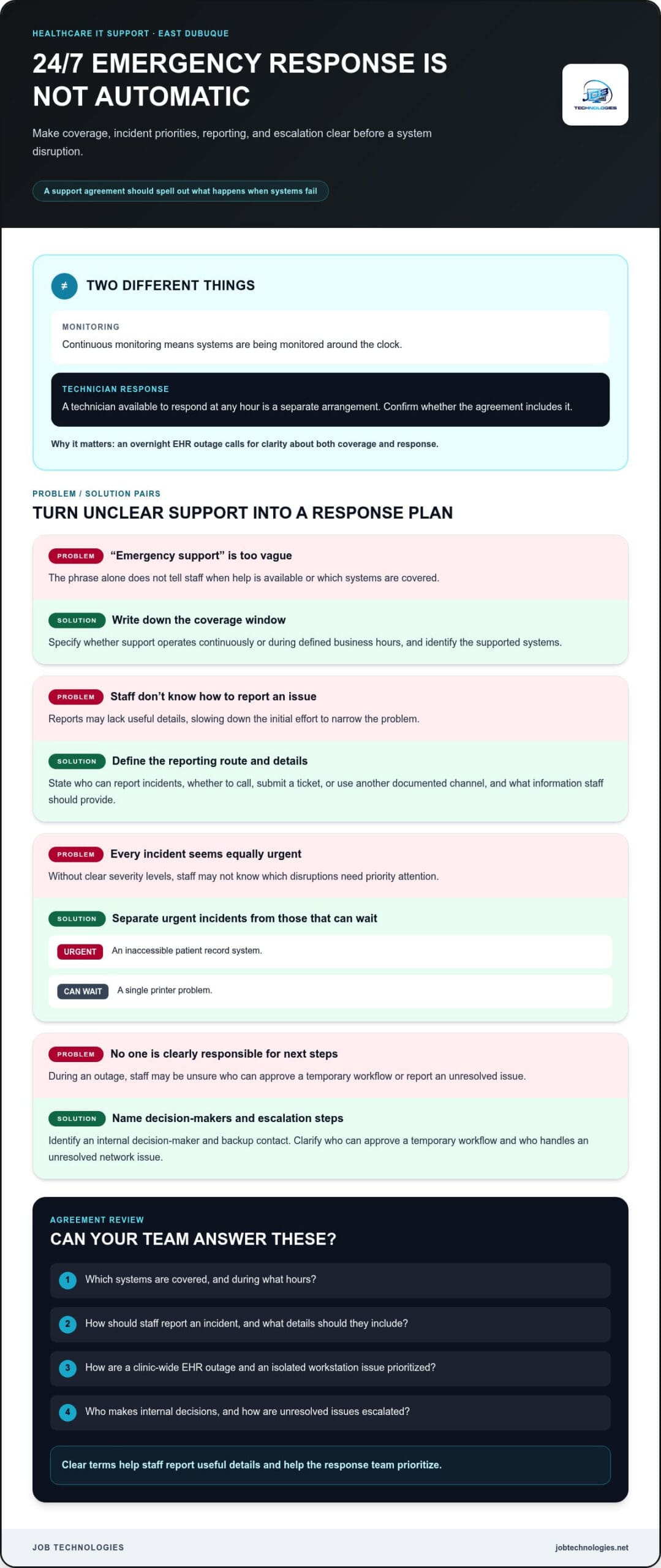
Round-the-clock response is not automatic. Each support agreement defines coverage, including contact methods, supported systems, and escalation steps. Distinguish continuous monitoring from having a technician available to respond at any hour. These are different arrangements, and the difference matters during an overnight EHR outage.
First, identify incidents that could interrupt care or administration. A clinic might classify an inaccessible patient record system as urgent, while a single printer problem can wait. Clear categories help staff report useful details and help the response team prioritize. Specify who can report incidents, which channel to use, and what information to provide.
A useful response plan names an internal decision-maker and a backup contact. If the appointment system stops working, staff need to know who can approve a temporary workflow. If network access fails, the designated contact should report the affected location, devices, and systems. These details help narrow the issue before troubleshooting begins.
Review the agreement for specific operational terms instead of relying on the phrase “emergency support.” Look for clear answers about:
- Coverage window: Does support operate continuously, or during defined business hours?
- Reporting method: Should staff call, submit a ticket, or use another documented channel?
- Severity levels: How are a clinic-wide EHR outage and an isolated workstation issue prioritized?
- Escalation: Who handles an unresolved network, server, or phone-system problem?
- Responsibilities: Which tasks belong to the clinic, the IT team, or the software vendor?
Test the plan before a disruption happens. A tabletop exercise can use a realistic example, such as staff losing access to scheduling during a busy clinic session. Walk through reporting, internal communication, temporary procedures, and restoration checks. Note confusing steps, then update the contact list and staff instructions. This rehearsal shows whether employees know what to do without assuming how quickly support will respond.
Keep technology incidents separate from medical emergencies. An IT responder can work on access, connectivity, or system restoration, but does not provide clinical triage. When care is affected, clinic staff should follow established patient-safety procedures. For example, if an outage prevents staff from viewing records, they may need to use an approved downtime workflow while technical troubleshooting continues.
After an incident, record when it began, which systems were affected, what decisions were made, and how service was restored. A brief review can reveal recurring causes, such as a failed network connection or unclear escalation steps. Assign follow-up actions and update the response plan when systems or responsibilities change. This creates a useful record for improving readiness, rather than relying on memory next time.
For practices in East Dubuque, match support coverage to actual operating needs. List critical systems, rank likely disruptions, and document who reports each issue. Then compare that workflow with the written response terms. Named contacts, defined priorities, and practiced downtime steps give staff a clearer path during technology interruptions.
Healthcare IT support for EHR systems and medical devices in East Dubuque
An electronic health record depends on more than the application. Staff also rely on workstations, network connections, printers, scanners, and secure access. If one part fails, a clinician may lose time retrieving a chart or documenting a visit. IT support can trace the problem across connected systems instead of treating each symptom separately.
Start with an inventory of the EHR environment: the software, workstations, network equipment, connected devices, and responsible vendors. Then map how a patient visit moves through the clinic. For example, a receptionist may schedule an appointment, a nurse may record vital signs, and a clinician may review the chart. Each step shows which systems need to work together.
A practical support plan can address several common needs:
- Access: Organize staff accounts and permissions around their actual duties, such as scheduling or clinical documentation.
- Connectivity: Trace whether a slow chart is caused by a workstation, network connection, or application issue.
- Device coordination: Document how scanners, printers, and clinical equipment connect to clinic systems.
- Change management: Record configuration changes so staff know what changed and who approved it.
Set a clear support boundary for medical devices. Identify each device, its purpose, how it connects, and which vendor is responsible for its operation. For example, if a device sends readings to an EHR, staff should know whether the interruption involves the device, its connection, or the record system. This helps route troubleshooting to the right technical or clinical contact.
Before adding equipment, document the intended workflow. List the devices involved, the systems receiving information, and the staff who need access. A new workstation in an exam room, for instance, may need network access, user permissions, and a chart-retrieval test. Testing the full workflow helps reveal practical problems before staff depend on it during appointments.
Interoperability matters when information moves between systems. Identify where data originates, where it needs to appear, and what staff should do if it doesn’t arrive. A missing result, for example, needs a clear process for checking the source system and notifying the right person. Documenting that process helps staff distinguish a display issue from missing data.
Communication systems support the same care workflows. A clinic using VoIP phones may need clear call routing for reception, clinical teams, and appointment follow-up. Phone and EHR platforms don’t automatically connect. Instead, map how staff use each system, such as calling a patient after reviewing a chart, and identify where a failed connection interrupts the task.
Maintain a concise system record and update it whenever the clinic changes an EHR, device, workstation, or network connection. Include the system owner, support contact, dependencies, and basic troubleshooting steps. During an outage, this gives staff a practical starting point and helps technical teams narrow the issue. Regular reviews can also reveal outdated equipment or unclear responsibilities before they disrupt routine work.
What cybersecurity risks do small healthcare practices face, and how can IT support reduce them?
A phishing email can expose clinic accounts if an employee opens a deceptive attachment or enters credentials on a fake sign-in page. A compromised account may provide access to email, shared files, or systems used for patient administration. Give staff a simple reporting process: stop interacting with the message, alert the designated contact, and preserve the email for review.
Ransomware can cause a different kind of disruption. Malicious software may make files or systems unavailable, interrupting access to schedules and records. A clinic can reduce exposure by limiting account permissions, securing network access, and maintaining backups with a recovery process. Backups are most useful when staff know which systems they cover and how restoration will be handled.
Routine account and device changes can create other risks. A staff member may leave while an old account remains active, or a shared workstation may stay signed in between users. Assign responsibility for removing access, reviewing permissions, and locking unattended devices. A written offboarding checklist helps ensure email, shared folders, and system accounts are addressed.
Start a practical cybersecurity review by mapping the clinic’s essential systems and their users. Include email, EHR access, scheduling, network equipment, and connected workstations. Then consider how each system could be affected by a stolen password, unsafe attachment, or lost device. This turns general concerns into specific risks the practice can address.
Useful safeguards include:
- Account controls: Give staff access based on their work, and remove permissions when duties change.
- Email habits: Train staff to report unexpected attachments, urgent payment requests, and unfamiliar sign-in prompts.
- Device protection: Set clear steps for securing shared workstations and reporting lost equipment.
- Backup planning: Document which business systems are backed up and who coordinates restoration.
- Incident response: Name the internal contact who records the issue and coordinates technical follow-up.
These safeguards work together. For example, if a staff member reports a suspicious sign-in, a response plan can guide the practice through reviewing the account, changing access, and documenting the incident. If a computer behaves unexpectedly, staff should report the device and affected system rather than attempt improvised fixes. Clear reporting helps technical responders understand the scope and choose a controlled next step.
Cybersecurity support can help organize protections across a clinic’s network and systems. A structured review can identify exposed accounts, weak access practices, missing backup procedures, or unclear responsibilities. The practice can then prioritize changes based on which systems support essential work, such as accessing records or managing appointments.
To build a stronger plan, document the safeguards already in place, assign an owner to each gap, and revisit the list after staff or system changes. If your practice needs help assessing technical risks and improving protection, take the next step on healthcare cybersecurity.
Cybersecurity planning also benefits from linking technical controls to the services a practice provides. Epic Health and Wellness describes its practice as specializing in individualized family medicine, women’s health, and psychiatric care. IT support can help the practice identify which accounts and systems staff need for those services, limit access to those needs, and define what to do if a system is unavailable. Periodic access reviews and clear escalation routes can reveal permissions that no longer match someone’s work, without expecting staff to solve technical problems themselves.
Continuity planning should account for practical access needs as well as digital records. The Dubuque VA Clinic campus has wheelchairs available upon arrival for patients who need them to access the building. A support plan can name the person to contact if a technology outage affects arrival coordination or routine communication, and document a fallback process for staff. IT support can help test where to report an incident, what information to record, and how to resume normal access after a disruption. A brief rehearsal can expose unclear handoffs before an interruption. Clear, regularly reviewed steps help a small practice respond consistently, protect patient information, and maintain essential operations.
JOB Technologies: Managed IT Services
JOB Technologies provides Managed IT Services for organizations that need consistent support for their technology environment. For a healthcare practice, this means practical help managing IT and keeping network infrastructure aligned with daily operations. Network Installation & Management supports the connections between staff and systems, while Phone Systems VoIP helps organize business communications.
Turn to managed support when technology issues are pulling staff away from records, scheduling, or patient communication. JOB Technologies also offers AI Implementation for businesses exploring ways to use AI in their operations. Start with a conversation about your systems, current challenges, and priorities.
Contact JOB Technologies to discuss IT support for your practice.
Make Your Next IT Decision With Confidence
Turn technology concerns into a clear priority list. Note which systems create the most friction, who relies on them, and what improvement would help daily work. This gives your practice a practical starting point for discussing healthcare IT support in East Dubuque and aligning technical decisions with care operations.
JOB Technologies offers Managed IT Services, Network Installation & Management, and AI Implementation. These services can support broader IT management, network planning, or thoughtful consideration of AI in your operations. Begin with your current environment and the challenges you want to address, while keeping your staff’s day-to-day needs in view.
When you’re ready to discuss a practical path forward, contact JOB Technologies. A clearer technology plan can help your team move ahead with greater confidence.
Frequently Asked Questions
What healthcare IT services are available in East Dubuque?
Available services include Managed IT Services, Network Installation & Management, Cybersecurity & Ransomware Protection, Data Backup & Recovery, Compliance Assistance, Phone Systems VoIP, and AI Implementation. For example, a practice can get support for its computers and email, plan network installation, or organize business phone communications. The right combination depends on the systems your staff use and the operational needs you want to address.
Compare local healthcare IT support providers by services and reviews
Compare providers by whether they support EHR access, network reliability, connected devices, cybersecurity, backups, and incident escalation. Check written coverage hours, reporting methods, severity levels, and responsibilities; no review information is available here.
How to choose a managed IT provider for a clinic in East Dubuque
Start by listing the clinic’s critical systems, users, connected devices, and likely disruptions. Choose support with written terms defining coverage, reporting channels, escalation, responsibilities, and help for EHR access, networks, security, and backups. Rehearse the response plan and clarify how changes will be documented.