

The right managed IT provider should strengthen your internal IT team, not automatically replace it. Knowing how to choose a managed IT service provider starts with assessing how well it works with your people, communicates clearly, delivers reliable support, and adapts as your business changes. Look for a provider that understands your goals and existing technology instead of pushing a one-size-fits-all approach.
If you’re weighing providers, it’s reasonable to look beyond a list of technical services. You need to know who will respond when an issue arises, how work will be coordinated with your team, and whether the relationship can adapt as your needs change. This guide shows you how to assess communication, service quality, scalability, and alignment with your business priorities. It also explains what to look for in a co-managed partnership, so you can decide whether an outside provider will fill important gaps while keeping your internal IT team involved.
Key Takeaways
- Map your current systems and IT pain points before comparing providers so you can assess their expertise against real business needs.
- Look for clear support channels, escalation paths, and service-level expectations that match how your team works.
- Assess service quality by how well a provider supports your goals, security needs, and day-to-day operations, not by technical promises alone.
- Choose an arrangement that can adapt as your business changes, with services that can scale without disrupting your operations.
- A co-managed model can complement internal IT by filling capability gaps while keeping your team involved in decisions and workflows.
1. How Do I Choose the Right Managed IT Services Provider?
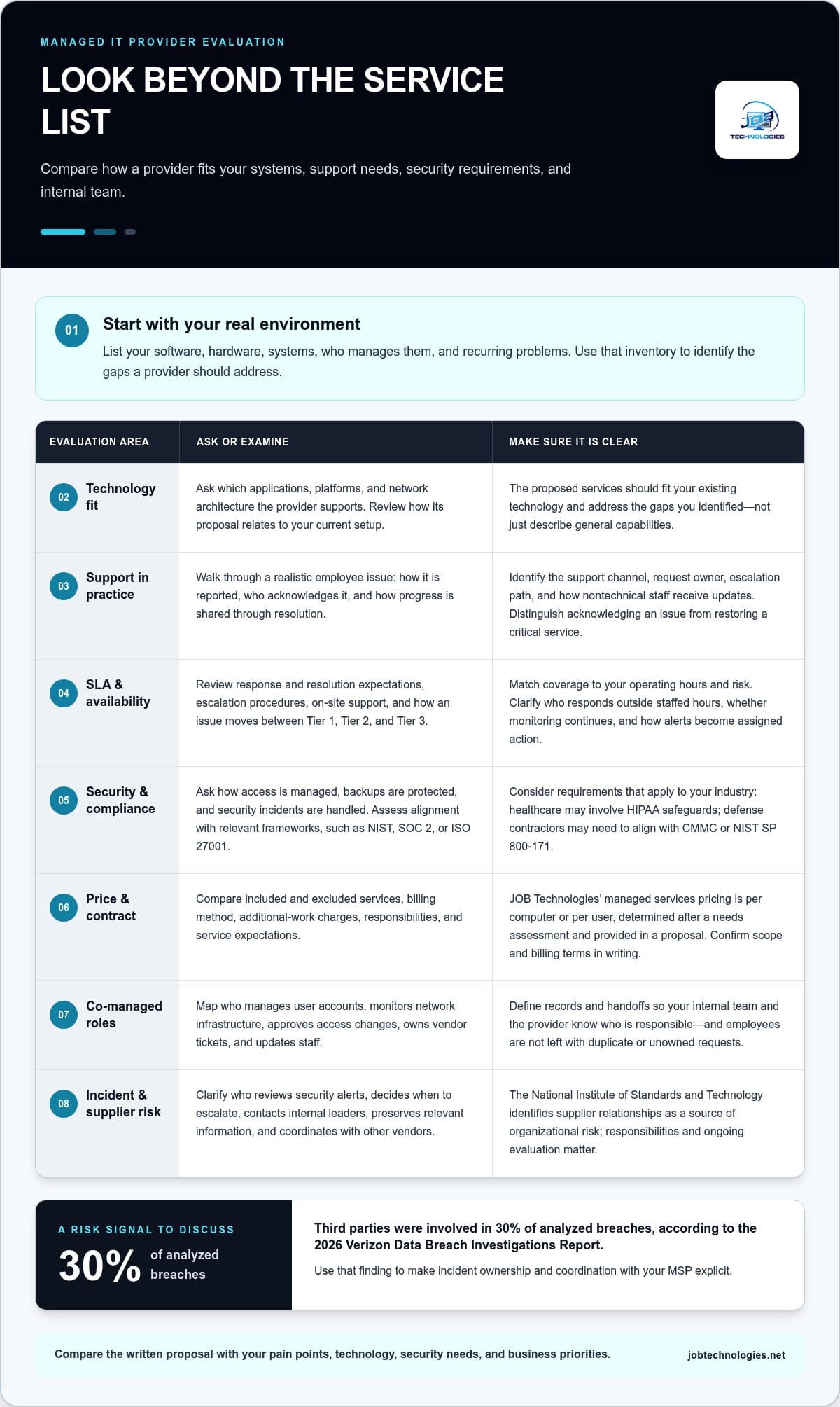
Start by documenting your current technology and support structure: software, hardware, systems, and who manages them. Then list recurring problems, such as unreliable email or slow recovery after an outage. This inventory helps you compare a provider’s services with your organization’s specific needs and identify the gaps you want it to address.
A managed service provider (MSP) can add technical expertise without requiring your business to hire for every IT role internally. That support can help maintain systems, strengthen security, and plan improvements. Ask how the provider will support the applications, platforms, and network architecture you use. A useful proposal explains how its services fit your current setup, not just what the provider can do in general.
Security and compliance deserve separate attention. Ask how the provider manages access, protects backups, and responds to security incidents. The National Institute of Standards and Technology recommends due diligence before supplier relationships and ongoing evaluation of supplier risk. For cybersecurity practices, assess alignment with recognized frameworks such as NIST, SOC 2, or ISO 27001. These examples help focus the discussion on how security is handled, rather than relying on broad assurances.
Industry knowledge matters when your workflows involve specific requirements. Healthcare organizations may need to address HIPAA safeguards; defense contractors may need to align systems with CMMC or NIST SP 800-171. Ask how the provider’s experience fits your industry and technology. For example, a firm handling sensitive medical records needs relevant familiarity, not simply general network support. Compliance Assistance can help address compliance needs alongside managed IT support.
How should you compare pricing and contract terms? Compare what services are included, how billing is calculated, what is excluded, and how additional work is handled. Review responsibilities, service expectations, and how the provider will coordinate with your organization. For JOB Technologies, managed services pricing is per computer or per user, determined after a needs assessment and provided in a proposal. Make sure the written scope and billing terms are clear before agreeing.
What should you ask before hiring? Ask which technologies the team supports, how staff share technical knowledge, and how it handles security, backups, and service improvements. Also ask how performance is measured and whether the provider can adapt to your existing infrastructure instead of pushing a preferred vendor.
What risks come with hiring an MSP? External support creates supplier dependence, and poor coordination or unclear responsibilities can disrupt operations. The National Institute of Standards and Technology identifies supplier relationships as a source of organizational risk, making ongoing evaluation and clearly assigned responsibilities important.
Review the service-level agreement for clear service expectations, responsibilities, and escalation procedures. Compare the proposed work with your pain points, technical environment, and business priorities. That makes it easier to assess expertise, security, compliance needs, and cost predictability together, rather than treating each as a separate decision.
2. Evaluating communication, availability, and responsiveness
Test the support experience before signing by tracing one realistic employee issue from report to resolution. Ask which channel employees use, who acknowledges the request, and how they receive progress updates. Then describe a time-sensitive example, such as a failed email system, and listen for a clear sequence of actions. The answer should explain ownership, escalation, and how nontechnical staff will be kept informed.
What should an MSP’s service-level agreement and response times cover? It should define response and issue-resolution expectations, escalation procedures, and expectations for on-site support. Ask how long an issue takes to move from Tier 1 to Tier 2 or Tier 3. These measures should distinguish acknowledging a report from restoring a critical service.
Availability should match your actual operating hours and risk. Ask who handles a support call at 2 a.m. if your business needs overnight coverage, and what escalation path follows. Some providers advertise 24/7 support, but the important detail is which team responds and what coverage includes. Also establish whether infrastructure monitoring runs outside your staffed hours, and how alerts become action rather than unassigned notifications.
For cybersecurity, ask who reviews alerts, decides whether an incident needs escalation, and communicates next steps. The 2026 Verizon Data Breach Investigations Report found third parties were involved in 30% of analyzed breaches. That makes clear coordination with an MSP important: agree who contacts internal leaders, preserves relevant information, and manages communication with other vendors during an incident.
A co-managed arrangement needs a clear responsibility map. Your internal IT lead might manage user accounts while the MSP monitors network infrastructure. Specify who approves access changes, owns vendor tickets, and updates staff. Without those boundaries, an employee could report the same problem to two teams, each assuming the other is handling it. Agree on how records and handoffs will work.
Use a realistic scenario to assess customer support. For example, explain that a remote employee cannot access a business application before a customer meeting. Notice whether the representative asks focused questions, explains the next step plainly, and provides a useful update if an immediate fix is not possible. Patient, specific communication is more revealing than a polished promise.
Finally, ask references about consistency, responsiveness, and communication during downtime or data loss. Compare their examples with the provider’s written escalation and service-level terms. If you’re clarifying how managed IT support can coordinate with internal staff, explore managed IT support options as part of your evaluation.
3. Making a final decision based on business goals and service quality
Connect a provider’s proposed work to specific business outcomes. Start with a priority, such as fewer interruptions to customer orders, safer access to company files, or a network that supports additional locations. Ask which services address that priority and how progress will be assessed. A proposal that lists tools without connecting them to your operations gives you little basis for judging its value.
Industry experience should be relevant to your workflows, not just your sector’s name. A healthcare organization, for example, may need technology support that accounts for HIPAA safeguards and the way staff access records. A defense contractor may need familiarity with CMMC or NIST SP 800-171. Ask how the provider has handled comparable technology and compliance needs, and what expertise its assigned staff bring to your environment.
Map the proposed services to actual business requirements. If employees depend on a stable network, check whether network installation and management are in scope. If you want to improve a manual process, ask whether the provider can help evaluate relevant technology changes. Match each need with a defined service, a responsible party, and an expected business effect. This keeps an impressive-looking portfolio from distracting you from the work your organization needs.
Use a decision matrix to compare proposals against your priorities. Assess every provider against the same needs, and base your judgment on written details rather than a sales presentation alone.
- Business fit: Does the plan address a named operational problem, such as recurring network interruptions?
- Technical fit: Can the team support your existing applications, architecture, and workflows?
- Service quality: Are responsibilities, performance measures, and service improvements clearly described?
- Adaptability: Can the proposed approach work with your current systems and preferences?
A provider should recommend what serves your business, even when that means improving existing systems instead of replacing them. If you rely on a stable application, ask whether the proposal supports it or assumes a migration. Recommendations should explain the reason for a change, its effects on staff, and how disruption will be managed. That helps you determine whether the provider is tailoring its approach or defaulting to a standard solution.
Finally, compare service quality with the outcomes that matter to your organization. The Information Technology Infrastructure Library (ITIL) focuses on aligning IT services with client and business needs. Use that principle to examine whether a proposal can streamline operations, reduce service disruption, or support a planned change. A small business with 5 people, for instance, may need a different service structure than a larger organization. Select the provider whose demonstrated capacity, communication, and recommendations best match your goals.
4. Planning for scalable services and future growth
Scalability means adjusting support as your organization changes without rebuilding the entire IT relationship. If your company opens another office, for example, it may need network support, additional employee accounts, and a clear onboarding plan. Ask how the provider would adjust responsibilities, tools, and service scope. Look for practical steps that connect the proposed support to your growth.
Discuss likely changes before signing, such as hiring, opening locations, adopting applications, or moving more work online. Ask which services can expand independently and what triggers a change in scope. A growing business, for example, may need more account support while keeping its existing infrastructure. The provider should explain how the transition fits the agreement and daily operations.
Flexibility also matters when your needs change in just one area. Ask whether you can expand a particular service without moving into a substantially more expensive package. Clarify how adjustments are documented, approved, and reflected in billing. A written process shows what changes, who is responsible, and how the transition affects ongoing work. Do not rely on broad claims about scalability when the agreement defines a fixed service structure.
Assess whether the provider can support organizations at your current size and likely future scale. Some providers serve organizations with 1000+ employees, but capacity alone does not prove a suitable fit. Ask how the team handles different environments, assigns expertise, and shares knowledge as client needs evolve. A smaller organization may value direct coordination, while a larger operation may need clear ownership across departments and locations.
Onboarding is an early test of how well a provider can support changing needs. Request a transition plan that identifies systems to document, access to establish, vendors to coordinate, and responsibilities to transfer. If your current IT contact manages a business application, for example, specify how that knowledge will reach the provider before support responsibilities change. A structured handoff reduces confusion and helps keep essential work running.
Contract terms also shape flexibility. Review how service changes, renewals, and termination are handled, and understand any commitments before agreeing. Make sure the terms leave your business room to adapt. Ask how the provider would support a change in direction, such as adding a location or retiring an application, and what steps would maintain continuity during the adjustment.
To evaluate scalability, describe a realistic growth scenario and ask the provider to walk through its response. Compare the process with your hiring plans, technology roadmap, and operational priorities. A suitable arrangement should support growth where it occurs, preserve clear responsibilities, and make service changes understandable before they affect employees or customers.
5. Co-managed services alongside internal IT teams
A co-managed arrangement adds outside capacity while your internal IT team retains its role. The provider might monitor infrastructure and handle routine support, while your IT lead manages business applications and technology priorities. This can help when a small team is stretched across daily requests, security tasks, and planned projects. The key is to define where responsibilities begin and end.
List the work your team owns today, including employee onboarding, account access, network changes, vendor coordination, and incident handling. Mark each task as internal, shared, or provider-owned. Your IT lead might approve a new employee’s access, for example, while the provider completes setup using the approved process. This keeps business decisions with your team and makes execution responsibilities clear.
Map the tools and environments both teams will support. Document how each side accesses systems, where configuration records are stored, and how changes are logged. If your team manages a business application and the provider manages its underlying infrastructure, define how application problems are escalated. Shared records and agreed handoffs reduce duplicate work and prevent tasks from falling between teams.
Define cybersecurity responsibilities just as clearly. Decide who reviews alerts, who determines whether an issue needs escalation, and who communicates with employees. If a suspicious login appears, your internal lead may assess its business context while the provider investigates the technical activity. Agree on how information is shared and who coordinates with vendors. A written incident workflow helps both teams act on the same understanding.
Knowledge transfer matters when internal staff and outside specialists share support. Ask how the provider documents changes and makes technical information accessible to your team. When a network setting changes, for example, record the reason, owner, and impact on connected systems. This helps maintain continuity if a team member is unavailable or responsibilities shift.
Schedule regular reviews around actual work, not just ticket totals. Your internal IT lead and provider can review recurring problems, upcoming projects, and tasks that need reassignment. If the provider repeatedly handles application access requests, consider whether approval processes or workflows need adjustment. Use reviews to refine the arrangement as business needs change, while keeping your internal team involved in decisions.
A co-managed model works best when your team needs additional expertise or capacity but still wants direct ownership of IT priorities. It may be less useful if your organization has no internal point person to coordinate decisions and share business context. If you’re considering added support alongside your existing team, explore managed IT services as a practical next step.
JOB Technologies: Managed IT Services
JOB Technologies provides Managed IT Services for businesses that need help managing technology and day-to-day IT operations. If your internal team needs additional capacity or your business needs a clearer approach to IT support, its services can be a practical next step. Network Installation & Management addresses network setup and ongoing management. JOB Technologies also offers AI Implementation and Phone Systems VoIP for businesses exploring new tools or communication systems.
Consider the priorities identified in your provider evaluation, such as coordinating support with your team, improving network management, or assessing AI and phone system needs. That gives you a focused starting point for discussing which services fit your organization. Contact JOB Technologies to discuss your business needs, or visit jobtechnologies.net.
Turn Your IT Priorities Into a Practical Next Step
The next step is to turn your IT priorities into a focused conversation, not another broad technology plan. As you decide how to choose a managed IT service provider, consider which challenge deserves attention first and what meaningful progress would look like for your team. A defined starting point makes it easier to discuss responsibilities, timing, and how support should fit your business.
JOB Technologies offers Managed IT Services, Network Installation & Management, and AI Implementation. These services can support businesses with ongoing IT needs, network requirements, or opportunities to apply AI. Bring your goals and current challenges to a consultation to discuss an approach that fits your organization.
Contact JOB Technologies to discuss your business’s IT priorities. A clear first step can help you move forward with greater confidence and keep technology aligned with the work your business needs to do.
Frequently Asked Questions
How Do I Choose the Right Managed IT Services Provider?
To decide how to choose a managed IT service provider, compare each provider’s proposed responsibilities with the problems your team needs solved. If staff struggle to access shared files, for example, ask how the provider would investigate the cause and prevent recurring disruption. Businesses in Dubuque, Galena, East Dubuque, Dyersville, Farley, and Peosta can also consider whether local support and clear communication fit their needs.
Can an MSP work alongside my internal IT team?
Yes. An MSP can take on defined work while your internal team retains control of business priorities. Your IT lead could own technology planning, for instance, while the provider handles a specialized network project. Agree on who approves changes, shares system documentation, and communicates with affected employees. Clear decision rights let both teams contribute without creating competing instructions or leaving important work without an owner.
What are the benefits of working with an MSP?
An MSP can give your organization access to technical expertise and support capacity without building every capability in-house. That can help a small IT team focus on internal projects rather than routine requests. A clearly defined service scope can also make recurring support expenses easier to plan. For example, a business preparing to adopt new software can get external guidance while its employees continue managing business processes.
What is an MSP, and why does your enterprise need one?
An MSP is an IT company that provides ongoing, proactive support and helps manage an organization’s technology. An enterprise might use one to supplement internal expertise, support a complex environment, or manage work that would otherwise compete with other priorities. It is not automatically necessary for every enterprise. The decision depends on staff capabilities, operational demands, security priorities, and whether external support fills a clearly defined gap.
What is the difference between an MSP and an in-house IT team?
An in-house IT team works within the organization and understands its staff, workflows, and priorities. An MSP is an external partner that provides agreed technical services. The two can complement each other: internal staff may set business priorities and approve changes, while an MSP contributes specialist support. The right arrangement depends on which responsibilities your organization wants to retain and where outside capacity adds value.
What services should a managed IT service provider include?
Services should match your organization’s systems and operational risks rather than follow a generic package. A scope might cover user support, network management, cybersecurity, data backup and recovery, or compliance assistance. JOB Technologies also offers AI implementation and VoIP phone systems. Review each service’s boundaries, ownership, and exclusions so your team understands what the provider manages and what remains an internal responsibility.
How do you assess a managed IT provider’s experience, certifications, and references?
Assess experience by asking for examples involving technologies and business workflows similar to yours. Ask which relevant staff credentials the provider holds and how expertise is maintained across its team. Then speak with references about consistency, communication, and how the provider handled a difficult support issue. Compare those accounts with the proposed service scope, since strong technical experience matters most when it addresses your organization’s actual needs.
What security standards and compliance requirements should an MSP meet?
There is no single framework that fits every organization. Consider your industry and data: healthcare organizations may need to address HIPAA safeguards, while defense contractors may need to consider CMMC or NIST SP 800-171. For security practices, assess alignment with frameworks such as NIST, SOC 2, or ISO 27001. Clarify how the provider’s work supports your compliance responsibilities, rather than assuming a framework alone resolves them.