

A VPN for small business setup can help employees securely access company systems outside the office, especially when they handle sensitive business data. It protects information in transit between remote devices and your network, but it is only one part of a security plan. Whether your business needs a VPN depends on how your team works and which systems employees must reach.
Remote access should be convenient without giving every employee the same access to company resources. Choosing the right VPN approach and configuring permissions, authentication, and updates are as important as the connection itself.
This guide explains when a VPN is useful, how cloud-based and other setups differ, and what to consider when configuring and testing one. It also covers how multi-factor authentication and access controls can reduce exposure, helping you make a practical decision.
Key Takeaways
- Decide whether staff need secure remote access to company systems, then limit each person’s access to the resources their role requires.
- Plan for multi-factor authentication, secure encryption, and clear rules for connecting from public Wi-Fi.
- Choose a cloud-based, hardware-based, or hybrid approach based on your team’s size, work patterns, and network needs.
- Test connectivity, speed, and security before rollout, and keep VPN software and connected devices updated.
- Assess provider options for compatibility with your existing tools, capacity for growth, and the support your business needs.
Remote-access VPN benefits for small businesses
A business VPN creates an encrypted connection between a remote device and company resources. It helps protect sensitive data in transit and gives employees secure remote access to approved systems. According to the National Institute of Standards and Technology (NIST), an SSL VPN can provide access to web and client/server applications and internal networks.
For U.S. businesses that handle healthcare information, HIPAA is a relevant data-protection requirement, according to the U.S. Department of Health and Human Services. Businesses handling financial data should account for PCI DSS. A VPN can support secure access, but it does not replace broader compliance work.
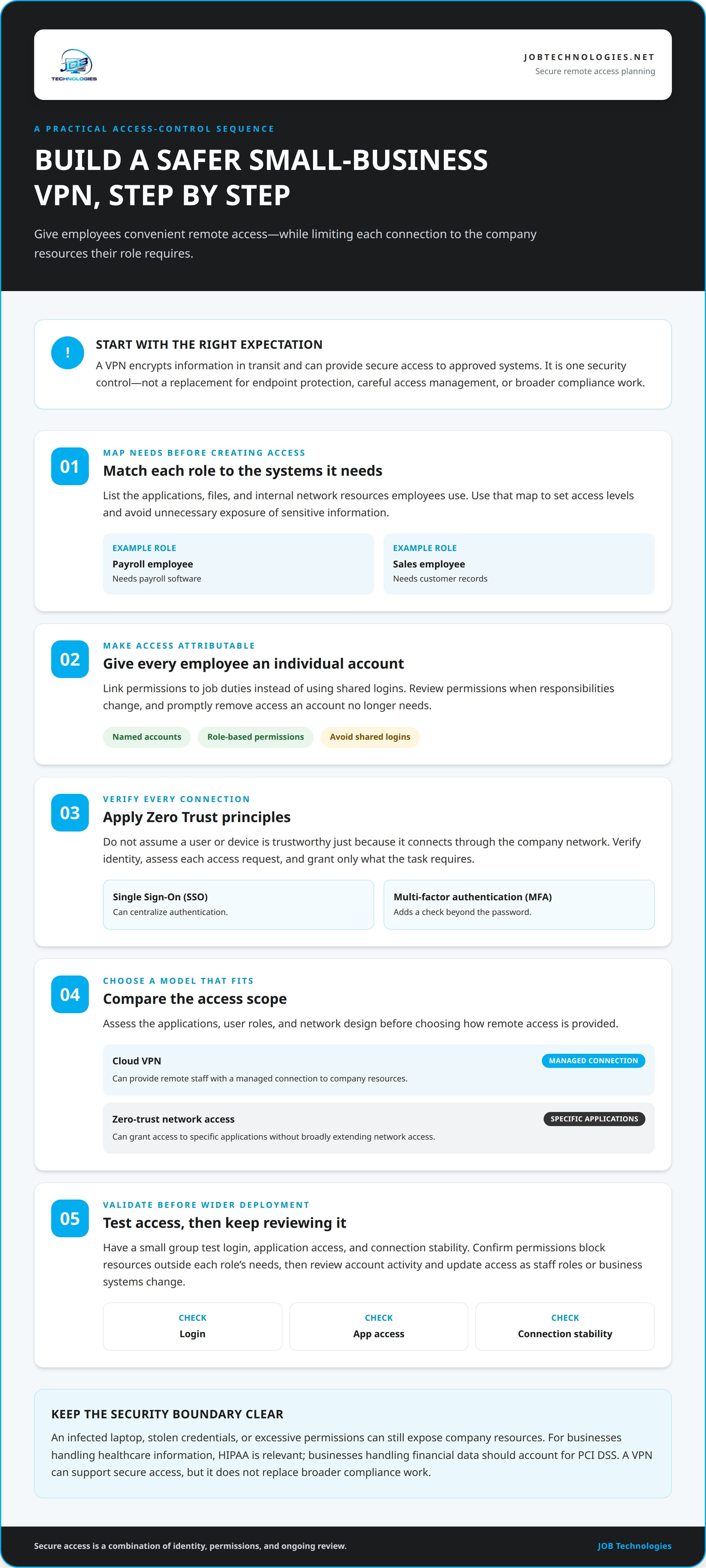
A VPN does not protect every device or prevent every account compromise. An infected laptop, stolen credentials, or excessive permissions can still expose company resources. Treat the VPN as one security control, not a substitute for endpoint protection and careful access management.
- Map remote work to the systems employees need. List the applications, files, and internal network resources each role uses. For example, a payroll employee may need payroll software, while a sales employee needs customer records. This map helps set access levels before creating accounts and limits unnecessary exposure of sensitive information.
- Create individual accounts and role-based permissions. Assign each employee a named account, then link permissions to job duties. Avoid shared logins, which make it harder to identify who accessed a resource. Review permissions when responsibilities change, and promptly remove access an account no longer needs.
- Apply Zero Trust principles to each connection. Do not assume a user or device is trustworthy just because it connects through the company network. Verify identity, assess access requests, and grant only the resources needed for the task. Single Sign-On can centralize authentication, while multi-factor authentication (MFA) adds a check beyond the password.
- Choose cloud VPN or zero-trust access to match applications. A cloud VPN can provide remote staff with a managed connection to company resources. Zero-trust network access can instead grant access to specific applications without broadly extending network access. Assess which model fits your applications, user roles, and network design.
- Test the user experience and review access regularly. Have a small group test login, application access, and connection stability before wider deployment. Confirm permissions block resources outside each role’s needs. Review account activity for unusual access patterns, and update access when staff roles or business systems change.
Security audits and VPN server configuration
IT professionals set up a small-business VPN by reviewing network needs, configuring server security, and testing connections before deployment. They then document access rules and monitor VPN activity so unusual traffic can be investigated.
- Review the network and its risks. Map VPN servers, business applications, remote users, and existing security controls. This identifies which connections need protection and where a misconfigured server could expose traffic. The review should also consider whether employees connect through public Wi-Fi, which can introduce security risks.
- Select encryption and authentication settings. Encryption changes readable plaintext into ciphertext inside a VPN tunnel, according to the National Institute of Standards and Technology (NIST). The configuration can use OpenVPN with AES-256 encryption and require multi-factor authentication for VPN connections. The appropriate settings depend on the business’s systems, user needs, and security policies.
- Define monitoring and response procedures. VPN logs can help professionals identify unusual sign-ins, unexpected connection patterns, or access outside normal permissions. Monitoring should support investigation without collecting more activity data than the business needs. The audit also records who reviews alerts and how the business responds when VPN activity could threaten company data.
Configure VPN Encryption and Security Features for a Small Business
Have a professional configure encryption, authentication, and server access rules together. OpenVPN with AES-256 is one encryption option identified for business VPNs, while multi-factor authentication adds a further identity check. The configuration should also reflect whether staff may connect on public Wi-Fi and which internal systems the VPN can reach. Avoid treating encryption alone as proof that a server is secure.
A security audit should examine VPN settings and the systems connected through the tunnel. VPNs do not replace GDPR or HIPAA audits, so compliance reviews remain separate work. If your business handles healthcare information, configure the VPN to fit wider HIPAA-related security practices, not as a substitute for the compliance program.
Professional Testing of VPN Connectivity, Speed, and Security
Before deployment, ask the IT professional to test connectivity, speed, and security across the business’s expected connection types. Tests should confirm that authorized users can reach required applications, while the VPN blocks access outside the configured scope. Comparing performance on the office network and public Wi-Fi can reveal connection issues before employees rely on remote access.
Testing should include failed logins, reconnections, and access to representative business applications. Review VPN logs for unexpected traffic and confirm security alerts reach the people responsible for handling them. Repeat testing after significant server or network configuration changes, and document results to guide later security audits.
For help aligning VPN servers with the wider business network, explore professional network installation and management.
Cloud-based, hardware-based, and software-defined VPN options
Site-to-site VPNs connect networks, remote-access VPNs connect individual employees, and mesh VPNs link participating devices or sites. Consider employee numbers, locations, applications, and device needs before recommending a deployment.
-
How to Compare VPN Deployment Options for a Small Business
Ask an IT professional to compare cloud-based, hardware-based, and software-defined options against your network. Cloud-based VPNs suit businesses with 5-25 employees, while businesses with 25 or more employees can consider hardware or hybrid solutions. Hardware places VPN capability on network equipment; cloud services deliver access through a hosted environment. Software-defined approaches use software to manage network connections and access policies.
Compare how each option handles remote employees, office connections, and company applications. A hardware setup may suit a business that needs a dedicated network gateway. A cloud VPN may better fit a team connecting from different locations. Account for management needs and future growth, not just employee count.
-
How an IT professional helps a small business choose a VPN type
Have the professional match the VPN type to the connections employees actually need. A site-to-site VPN joins separate office networks, while remote access connects an individual employee to business resources. A mesh VPN can connect participating devices or locations without relying on one central connection point for every route.
For example, a business with remote staff and one office may need remote access. A company with multiple offices may also need site-to-site links. Map which systems and locations need to communicate, then choose a design that avoids unnecessary connections. WireGuard may be an option where performance is a priority, but compatibility and operational needs matter too.
-
Professional Installation of VPN Software on Employee Devices
Provide an inventory of the computers, laptops, and mobile devices that need access. Install VPN software on every device that will connect to the network. Configure each client to use the company’s VPN service, then test access to the work applications employees need.
Include device type, operating system, and employee role in the inventory. For example, a remote employee may need VPN access from both a laptop and a phone. Make instructions clear, including how to start a connection and where to report a failed login. A consistent setup makes access easier to manage across devices.
- Plan software updates and ongoing protection. Keep VPN infrastructure and employee VPN client software current with security patches. Install updates provided by the VPN provider promptly, and keep employee devices updated too. WireGuard and other VPN protocols still depend on maintained software and supported devices. Assign update responsibilities in the rollout plan so server and client patches do not fall between teams. Review the device inventory when staff or equipment changes, and remove VPN access from retired devices.
Choosing a business VPN provider
Choose a provider by matching its security, capacity, and support to your remote-work needs. A VPN for small business setup should fit your network and work practices, not just offer an appealing monthly plan.
- Estimate the number of remote users. Forecast how many employees will need access over the next 12-24 months. Include staff who work remotely full-time, travel, or occasionally need company systems away from the office. A provider should support expected growth without forcing a disruptive change as your team expands. Also distinguish registered users from simultaneous connections, since they affect capacity differently.
- Compare capacity and device coverage. Business plans do not share a standard user or device limit. Compare each provider’s licensed users, simultaneous connection capacity, and supported devices with expected demand. For example, count employees who may connect from both a laptop and a phone. Confirm the plan can accommodate those connections without disrupting normal work.
- Set a realistic subscription budget. Use the per-user rate to estimate the VPN subscription cost for a team with remote employees. Treat it as the service estimate, not the full cost of configuration, network changes, or ongoing IT work. Those costs depend on the deployment and support required.
- Assess security and privacy features. Look for AES-256 encryption, multi-factor authentication, and controls for managing user access. Ask how the provider handles VPN activity logs, protects account credentials, and alerts customers to unusual activity. If employees connect through public Wi-Fi, confirm the service encrypts their VPN traffic. Review privacy policies carefully, including what information the provider collects and retains. These checks help you judge whether a VPN for small business setup fits your security priorities.
- Check compatibility before committing. Have a technical professional compare the VPN with your existing productivity tools, operating systems, and network equipment. A connection that disrupts file access or business applications can impede remote work, even with strong encryption. Test representative workflows, such as opening a shared business file, before wider deployment.
- Evaluate support and growth options. Compare provider support, connection speed, security features, and how service incidents are handled. Find out how the plan accommodates new users, additional features, and simultaneous connections as your needs change. Ongoing service monitoring can help identify incidents. Review these capabilities alongside written policies rather than relying on an advanced feature label alone.
Business plans do not share a standard user or device limit. Compare each provider’s licensed users, simultaneous connection capacity, and supported devices with your expected demand.
Cyber threats and data interception
A VPN can encrypt traffic between an employee’s device and the business network, but it cannot prevent every breach. Protecting accounts, devices, and business systems requires several coordinated safeguards.
- Identify where interception could expose business information. Remote employees may access email, shared files, or customer records online. On public Wi-Fi, an encrypted VPN connection helps protect traffic between the VPN client and company network. However, it does not make a compromised device safe or protect information entered into a fraudulent site. Set a clear policy for public connections and sensitive work.
- Protect VPN accounts from credential theft. A stolen password can give an attacker a path to business resources, especially when accounts have broad permissions. Require multi-factor authentication for VPN access, assign individual accounts, and remove access when an employee leaves. For example, do not leave a former employee’s account active just because current employees do not know its password.
- Limit the impact of a compromised device. A VPN protects data in transit, but it doesn’t remove malware from a laptop or stop an employee from opening a harmful attachment. Keep device security and VPN access policies aligned. If an employee reports a suspicious download, IT staff can disable the affected account or device’s access while investigating, instead of leaving the connection active.
- Monitor connections for unusual activity. Review VPN logs for unfamiliar devices, unexpected access times, repeated failed logins, or attempts to reach resources outside an employee’s role. Monitoring can help identify activity that threatens business data, but logs need a clear owner and review process. Define who investigates alerts and how staff report unexpected VPN prompts or connection behavior.
- Prepare for a VPN-related incident. Document how IT staff can disable accounts, revoke device access, and preserve relevant logs after suspected misuse. If an employee reports an unexpected login, secure the account first, then assess which systems it could access. A VPN breach can expose personal data, so connect incident handling with the business’s existing privacy and response procedures.
- Keep productivity and protection in balance. A VPN that disconnects during routine work may lead employees to bypass it. Test business applications, file access, and video calls through the VPN client, then address connection issues through managed settings. Explain the approved connection process clearly so employees know how to report problems rather than disable security controls.
If account controls, device access, or suspicious VPN activity need coordinated oversight, get managed IT support for your business systems.
JOB Technologies
JOB Technologies helps small businesses consider VPN decisions alongside their wider IT environment. For businesses in Dubuque, Galena, East Dubuque, Dyersville, Farley, and Peosta, Managed IT Services and Network Installation & Management support related operational and network needs.
Bring your current setup, remote-work needs, and key concerns to the conversation. This context helps the team discuss how VPN decisions relate to your business systems and network. JOB Technologies also offers AI Implementation and Phone Systems VoIP for broader technology planning.
Contact JOB Technologies to discuss your small business IT and network needs.
Make your next VPN decision with confidence
A VPN should support the way your team works, not become another system employees have to work around. Treat your VPN for small business setup as part of an ongoing security and operations plan, with clear ownership for access, updates, and changes as your needs evolve.
JOB Technologies connects VPN planning with the broader IT environment through Managed IT Services and Network Installation & Management. AI Implementation is also available for businesses considering wider technology improvements. Start with a conversation about your current network, remote-work needs, and the systems employees rely on. That context can help shape an approach that fits your operations without adding complexity for its own sake.
Contact JOB Technologies for VPN advice and discuss the next step for your business. A thoughtful plan can make secure remote work easier to manage.
Frequently Asked Questions
Do Small Businesses Need a VPN?
A VPN may help small businesses provide employees with secure remote access to company systems. For example, a field employee accessing an internal inventory application may need a protected connection. A business using only cloud services with their own access controls might not need traditional network-wide VPN access. Decide based on which resources staff use remotely, then choose the narrowest secure connection that supports their work.
Does a VPN slow down the internet connection?
A VPN can slow internet activity because it encrypts traffic and routes it through VPN servers. The effect depends on server capacity, distance, network congestion, device performance, and the VPN protocol. A video meeting may show interruptions while ordinary email still works normally. Have IT compare the same work tasks with and without the VPN, then investigate server load, routing, and local network conditions before changing security settings.
Which VPN providers are best for small businesses in the United States?
The right provider is the one that fits your business’s users, systems, and support needs, rather than a universal brand choice. Compare encryption, authentication controls, privacy policies, application compatibility, connection capacity, and incident support. For a U.S. company, also consider whether the provider’s data handling aligns with its privacy and compliance needs. Test key work applications before deployment, and assess how adding employees or locations would affect management.
What security features should a small business VPN include, such as MFA, encryption, and a kill switch?
Prioritize strong encryption, multi-factor authentication, individual accounts, and role-based access permissions. A kill switch is designed to stop network traffic if the VPN connection drops, helping prevent a device from continuing over an unprotected connection. Have IT test how it behaves during a disconnection and confirm essential work applications remain usable after reconnecting. Pair these controls with updated devices and a process for removing access when roles change.
How do IT professionals configure VPN access for employees, contractors, and multiple office locations?
Assign access according to each person’s role and business needs. Employees need permissions for required systems; contractors should have limited access tied to their work, then lose it when the work ends. For multiple offices, map which networks and applications need to communicate before configuring site-to-site connections. Document account ownership and location access to make reviews clearer when a project ends or an office changes its systems.
How do IT professionals troubleshoot common small business VPN connection and performance problems?
IT professionals first determine whether the issue affects one user, one device, or the whole business. They review connection status and VPN logs, then check credentials, client software, device updates, network access, and relevant server availability. If the VPN connects but work feels slow, they compare affected applications and network conditions to isolate the cause. Recording recurring errors helps distinguish a user-specific problem from a wider configuration issue.
How many VPN users and devices can common business plans support?
Capacity varies by provider and plan, so check how many simultaneous connections it supports and estimate your remote VPN users over the next 12-24 months. Install VPN software on each computer, laptop, and mobile device that will connect.