

A recovery plan is only as useful as the decisions made before disruption strikes. Choosing disaster recovery solutions for a small business starts with setting a recovery time objective, which defines how long you can tolerate downtime, and a recovery point objective, which defines how much data loss you can accept. The plan should also connect likely disruptions with clear recovery steps, backup and failover methods, and assigned responsibilities.
It’s understandable to focus first on backups, but copies of your data are only part of being prepared. Your team also needs to know which systems matter most, how quickly each must be restored, and how to keep operations moving if the usual tools or worksite are unavailable.
This guide explains what a disaster recovery plan includes and how backups, replication, and failover support recovery. You’ll also learn how to assess your business requirements, compare solution types, and build a practical budget. The goal is a clear, workable approach that fits your operations and helps you make informed decisions without adding unnecessary complexity.
Key Takeaways
- Set recovery priorities by identifying which systems your business needs back first and how much downtime or data loss it can tolerate.
- Choose a mix of backup, replication, and failover methods that fits your recovery needs and accounts for the trade-offs between on-site control and geographic separation.
- Document likely disruption scenarios, recovery steps, staff responsibilities, and key vendor contacts so your team knows what to do.
- Compare solution costs by considering storage, tools, support, and staff time alongside the recovery capabilities your operations require.
- Test restoration procedures and update the plan as your systems, data, and business priorities change.
What is a Disaster Recovery Plan?
A disaster recovery plan is a written sequence for responding to disruptions and restoring essential systems. Start by identifying business impacts, then set recovery time and data-loss limits for each critical system.
Analyze Business Impact
Map how a disruption would affect each business function, from taking payments to communicating with customers. Record the systems and data each function depends on, then rank them by operational importance. For example, an e-commerce business may rely on its website and sales records to keep orders moving. Use this analysis to shape a recovery plan around actual priorities, not assumptions about which technology matters most.
Set Recovery Time and Point Objectives
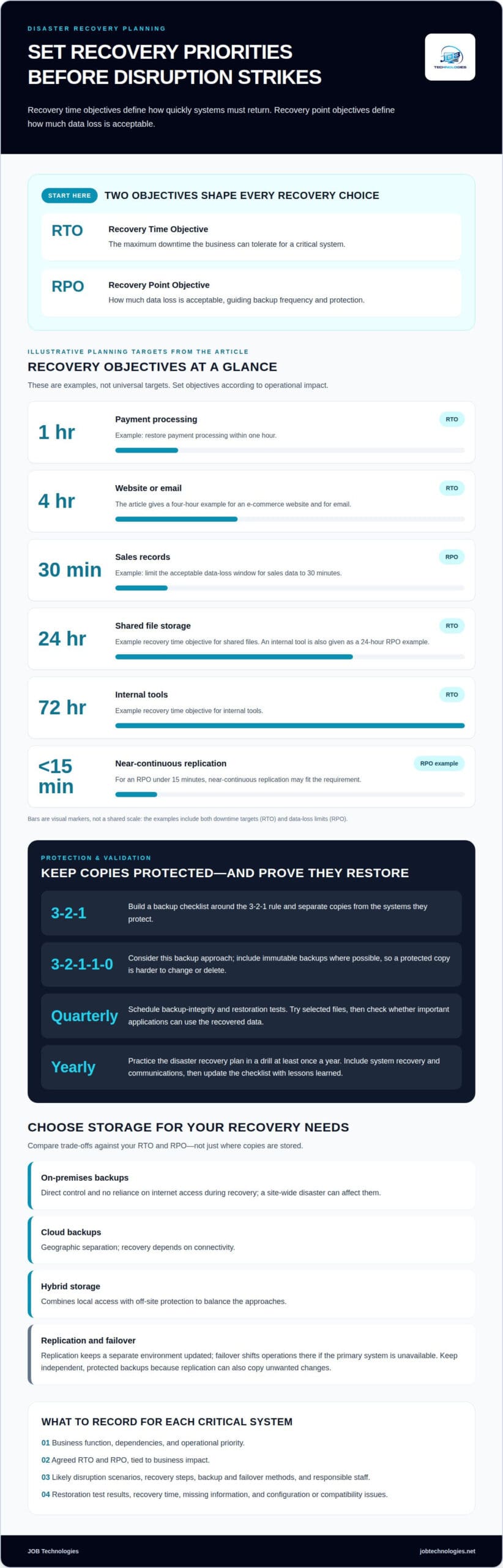
Set a recovery time objective (RTO) for each critical system: the maximum downtime your business can tolerate. Set a recovery point objective (RPO) to define how much data loss is acceptable. An e-commerce business might set a four-hour RTO for its website and a 30-minute RPO for sales data. Keep objectives tied to operational impact, not to a target that sounds impressive.
- List possible disruptions, such as system failure, ransomware, or loss of access to your worksite. For each scenario, identify which business activities would stop and what staff need to restore them. Specific scenarios make the plan useful during an incident, rather than leaving your team with general instructions.
- Rank systems by how quickly the business needs them restored. Payment processing may need a one-hour RTO, while email may have a four-hour RTO. Shared file storage could have a 24-hour RTO, and internal tools could have a 72-hour RTO. Treat these as planning examples, then set objectives that reflect your own operations.
- Choose an RPO for each data set by deciding how much recent work the business can recreate. For example, an internal tool may have a 24-hour RPO, while sales records may need a shorter recovery point. The RPO should guide backup frequency and retention: data you can’t afford to lose needs more frequent protection.
- Compare each objective with the business impact analysis before choosing a recovery approach. A short RTO calls for a process that can restore the system quickly; a short RPO requires recent, usable data copies. Also assess the regulatory and legislative standards that apply to the critical systems and information your organization handles.
Record the agreed RTOs and RPOs beside each system in the recovery plan. This gives decision-makers a practical basis for comparing disaster recovery solutions for small business and helps teams prioritize when several systems are affected at once.
Backup, replication, and failover capabilities
To create and test a disaster recovery plan, select backup methods, document restoration steps, and practice them. Compare on-premises, cloud, and hybrid storage against your recovery objectives.
-
Apply Backup Tools and Storage Practices
Build a backup checklist around the 3-2-1 rule, and separate copies from the systems they protect. On-premises backups offer direct control and don’t rely on internet access during recovery, but a site-wide disaster can affect them. Cloud backups add geographic separation, though recovery depends on connectivity. A hybrid platform combines these approaches to balance local access with off-site protection.
Consider the 3-2-1-1-0 backup approach when reviewing data protection. Include immutable backups where possible, so a protected copy is harder to change or delete. Incremental backups capture changed data, which can reduce storage needs and backup windows. Organize the checklist by data set, backup location, retention, and who can access each copy.
-
Plan Replication and Failover
Match replication frequency and failover design to each critical system’s recovery point objective. Replication keeps a separate environment updated, while failover shifts operations to that environment if the primary system becomes unavailable. Neither replaces a recoverable backup: replication can also copy unwanted changes, so keep independent, protected copies.
For an RPO under 15 minutes, near-continuous replication may fit the requirement. Consider whether the business can run on virtual servers in a separate geographic location rather than maintaining a second physical site. Document who initiates failover, which systems must move first, and how staff will confirm restored services are usable.
-
Test Backups and Restore Data
Schedule quarterly backup-integrity and restoration tests. Restore selected files first, then test whether important applications can use the recovered data. Record the recovery time, any missing information, and each configuration or compatibility issue. A successful backup job alone doesn’t show whether the files can be restored and used.
Practice the disaster recovery plan in a drill at least once a year, using an operational environment whenever possible. The Department of Homeland Security recommends this approach to validate recovery procedures and staff training. Include both the people who restore systems and those who coordinate communications, then update the checklist with lessons from each exercise.
For practical support reviewing a backup design, backup and recovery planning can help turn these steps into a workable process.
Business continuity and disaster recovery requirements
Build continuity into your recovery strategy by documenting who acts, what comes first, and how work continues during a disruption. The plan needs practical steps for restoring systems and keeping essential business activities moving.
-
Develop Disaster Recovery Runbooks
Create a runbook with step-by-step instructions for restoring systems, contacting your team, and coordinating with vendors. Assign responsibility for leading recovery, managing communications, and handling technical fixes or insurance claims. List a primary contact for each third-party vendor so staff know whom to reach during an operational disruption. Keep the instructions accessible if normal systems are unavailable.
- Audit the resources your daily operations depend on, including equipment, data systems, and property. Identify which resources are essential, which activities rely on them, and what happens if they become unavailable. For example, list the equipment and records needed to process orders, then note which staff are responsible for keeping that work moving. This connects recovery tasks to business impact instead of treating every asset equally.
-
Plan for Business Continuity
Decide how essential work will continue while systems are restored. Prepare customer communications across multiple channels, such as email, social media, and your website, rather than relying on one. Name the person responsible for each update and a backup contact. If the website is unavailable, another channel gives your team a way to share service information.
- Keep digital and printed copies of insurance policies, and make sure leadership knows how to access them. Review the policies regularly. Businesses in flood- or earthquake-prone regions should verify whether those risks are covered, since standard policies often exclude them and endorsements may be available. Record where policy documents are stored and who can retrieve them during an office or system disruption.
- Schedule time to review the plan, assign recovery roles, and update procedures when operations change. Disaster recovery testing and documentation updates require four to eight staff hours per quarter. Use that time to correct outdated contact details, replace steps that no longer match your systems, and make sure assigned staff understand their responsibilities. A documented strategy helps organizations reduce confusion and limit disruption-related data loss.
Disaster recovery costs and budgeting
Build a disaster recovery budget around the systems your business must restore and the downtime it can absorb. Compare ongoing protection, recovery resources, and staff time before choosing a technical approach.
- Inventory the resources that drive recovery costs, including backup hardware, software, cloud storage, support, and labor. Separate recurring expenses from setup work and internal staff time. For example, a business protecting employee devices and a server should list each separately, then include the work required to configure and maintain their backups. This gives you a consistent basis for comparing options.
- Connect each expense to a recovery need instead of buying capacity without a clear purpose. Compare cloud storage costs with local storage, and include the internet connectivity needed for cloud recovery. A hybrid setup may involve both storage environments, but can provide local access alongside geographic separation. Consider which arrangement best supports your systems and priorities.
- Include technical support, additional tools, and operational overhead in the budget, not just backup software. Restoring a server, for example, may require staff time to verify applications and reconnect users after data recovery. With JOB Technologies Managed IT Services, pricing is per computer or per user, determined after a needs assessment and provided in a proposal.
- Compare recovery approaches by their effect on downtime and business resilience. A business that can pause internal reporting may need a different setup from one that relies on payment processing. Record the business impact beside each planned expense, then decide which systems need faster recovery and which can wait. This keeps your budget aligned with operational needs.
- Review the budget whenever equipment, stored data, or business processes change. Adding a server, moving records to a new platform, or increasing data volume can affect storage and support needs. Record assumptions, renewal dates, and who approves changes. During each review, compare planned spending with actual usage and remove capacity that no longer supports a recovery objective.
Use this comparison to choose disaster recovery solutions that balance protection with practical costs for your small business. Budget for the complete recovery process, including the people and technical work needed to restore operations, rather than treating backup storage as the only expense.
Disaster recovery solutions for small and medium businesses
Choose an approach that fits your workloads, staffing, and disruption risks. A few hours of downtime can threaten a small business, so match recovery capability to operational priorities.
- Size the solution around the systems you actually operate. One example describes a business with fewer than 20 PCs, one Windows server running virtual machines and SQL, and 500GB of data. That setup calls for a different recovery design than a company with multiple sites and servers. Inventory endpoints, applications, and data first, then identify dependencies that could interrupt essential operations.
- Choose a recovery environment that fits the amount of downtime your business can tolerate. Cloud disaster recovery can replicate data to another geographic location and use virtual servers without requiring a second physical site. If the required recovery time objective is under two hours, warm or hot standby may be appropriate. Compare recovery speed with the technical work required to operate the alternate environment.
- Include cybersecurity and physical hazards in the same strategy. Ransomware can affect both production systems and accessible backups, so use protected backup copies and encrypt data at rest and in transit. Natural disasters create different risks: a flood can affect equipment at one site, while an earthquake can disrupt access. FEMA reports nearly 40 percent of small businesses never reopen after a disaster.
- Assign recovery work to a realistic team. For a business with five to 30 employees, consolidate ten disaster recovery roles into three, such as recovery lead, communications lead, and technical lead. One person may hold more than one responsibility, but document who takes each role if the primary person is unavailable. This keeps response tasks clear without requiring a large dedicated team.
- Automate repeatable recovery tasks where practical. Automation can reduce manual steps and human error while improving reliability and recovery speed. For example, a documented sequence can help restore a virtual server and confirm that its key application is running. Keep staff involved in testing: recovery still depends on people who understand business workflows and can communicate changes during an incident.
Review your workloads and recovery priorities with a disaster recovery planning team.
JOB Technologies: Managed IT Services
JOB Technologies provides Managed IT Services to help small businesses manage the technology their recovery plans depend on. Turn to the team when you need help coordinating systems, networks, and day-to-day IT operations around continuity priorities.
Recovery planning also depends on reliable infrastructure. JOB Technologies provides Network Installation & Management to support an organized business network, along with AI Implementation and Phone Systems VoIP for broader technology needs. Discuss how your existing systems and operational priorities fit together so your plan reflects how your business works.
Contact JOB Technologies to discuss your IT needs, or visit JOB Technologies online.
Make recovery readiness part of everyday operations
A recovery strategy becomes more useful as your business changes. When your team adopts software, adds workloads, or adjusts how it serves customers, revisit which operations depend on each system. Treat recovery readiness as an ongoing business decision, not a document that goes untouched after setup.
Choosing disaster recovery solutions for a small business also means deciding how much planning your team can manage internally. If recovery responsibilities compete with daily work, outside IT support can help organize those priorities. JOB Technologies supports small businesses through Managed IT Services, Network Installation & Management, and AI Implementation, connecting technology decisions with operational needs.
Take the next step by discussing your recovery priorities with JOB Technologies. Contact JOB Technologies for disaster recovery help and move toward a plan your team can maintain with confidence.
Frequently Asked Questions
How do I simplify a DR plan for a very small business (under 10 to 20 employees)?
Keep the plan short, accessible, and focused on actions your team can take. Put system access instructions, key contacts, recovery priorities, and customer communication steps in one document. Assign a primary person and backup for essential tasks, even if both have other roles. A small business serving Dubuque, Galena, East Dubuque, Dyersville, Farley, or Peosta should also plan how staff will coordinate if its usual worksite is unavailable.
What’s the difference between a DR plan and a business continuity plan?
A disaster recovery plan focuses on restoring technology and data after a disruption; a business continuity plan covers how essential work carries on during recovery. For example, the recovery plan may guide the restoration of an order system, while continuity procedures explain how staff record incoming orders temporarily. Connect the plans so the workaround accounts for data that must later be entered or reconciled.
What is a disaster recovery plan for a small business?
A disaster recovery plan is a practical document that guides staff through responding to an incident and restoring essential technology. It should explain who coordinates recovery, how to access backup data, which systems to restore, and how to communicate operational changes. For example, a retailer could document how staff record orders if its point-of-sale system becomes unavailable, then reconcile those records after restoration.
What are the most common disaster recovery solutions for small businesses?
Common approaches include local backups, cloud backups, hybrid backup setups, data replication, and failover to an alternate environment. Each addresses a different recovery need. A local copy can help restore individual files, while an alternate environment can support broader operations. Choose based on the systems you rely on, how quickly they must return, and whether your team can operate the recovery process.
How much do small business disaster recovery services cost?
Costs depend on the protected systems, storage needs, recovery approach, support, and labor involved. Compare ongoing service costs with setup and testing work, rather than looking at storage alone. JOB Technologies pricing is per computer or per user, determined after a needs assessment and provided in a proposal. The proposal reflects the business’s devices, systems, and recovery requirements.
How should a small business calculate its recovery time objective (RTO) and recovery point objective (RPO)?
Start with a business activity, such as taking payments or fulfilling orders, and identify the impact of losing its supporting system. Estimate the longest interruption the business can absorb, then determine how much recent work staff could recreate manually. Compare those limits with customer commitments, manual workarounds, and dependencies on other systems before recording objectives for each workload.
How do cloud backup, on-site backup, and hybrid disaster recovery compare?
On-site backups offer direct access, but a local incident can affect both production systems and nearby copies. Cloud backups separate data geographically, though restoration depends on connectivity. A hybrid design uses both locations, giving a business another recovery path if one becomes inaccessible. For example, a company might use local copies for routine file restoration and cloud copies for a site-wide disruption.
What data and systems should a small business prioritize for recovery?
Prioritize systems that directly support revenue, customer service, and essential staff work. Then map their dependencies: a sales application may rely on a database, network access, and user credentials. Include business records that would be difficult to recreate, such as current orders or accounting entries. Ranking complete workflows instead of individual devices helps prevent restoring a system that still cannot support operations.