

Your IT plan should support where the business is going, not just fix what’s slowing it down today. Effective IT strategy planning for a small business means writing down the changes and progress you want from technology, then aligning priorities with wider business goals. IT strategic plans commonly cover the next 12 to 16 months, giving you a practical horizon for turning direction into action.
It’s easy to treat technology as a series of separate decisions: replace a system, improve security, or introduce a new tool. The challenge is deciding what matters most when time and resources are limited. A clear IT strategy connects those choices to the outcomes your business needs.
This guide explains what strategic planning means and how to build an IT strategy around measurable goals. You’ll learn how to use SWOT analysis to assess your current position, rank initiatives by impact and budget, and review the plan as your business changes, with practical examples to help turn priorities into next steps.
Key Takeaways
- Connect IT goals to your business mission, then turn each goal into clear actions and measures of progress.
- Rank technology initiatives by business impact, cost, risk, and the people and time needed to deliver them.
- Use SWOT analysis to identify where technology can build on strengths, address weaknesses, and prepare for change.
- Review progress regularly and adjust priorities when business needs, performance, or available resources shift.
- Use practical small-business examples to shape priorities around customer experience, smoother operations, and sustainable growth.
Strategic plan elements: mission, vision, values, goals, and action plans
Strategic planning sets a business’s direction, goals, and intended progress. An IT strategy connects technology decisions to that direction through measurable goals and practical actions.
-
Define the Mission, Vision, and Values
Write a mission that says whom your business serves and how it helps them. Describe a vision of what you want the company to become in five to 10 years. Then list values that guide decisions, such as reliability, customer care, or responsible data handling.
Make each statement specific enough to guide technology choices. For example, if your mission emphasizes responsive customer service, dependable communications and easy access to customer information may be priorities. Use your mission, vision, and values as a filter: if a proposed system does not support them, reconsider its priority.
-
Set Measurable Business Goals
Set business goals for the next year, three years, and five years, then make each one SMART: Specific, Measurable, Attainable, Relevant, and Time-based. “Improve customer service,” for example, needs a defined measure and deadline before it can guide action. A useful goal states the intended outcome, how you’ll measure it, and who is responsible.
Track progress with a KPI dashboard or Objectives and Key Results (OKRs). Measures might include system uptime, user satisfaction, or return on investment for an IT initiative. Break longer-term goals into daily, weekly, and monthly actions. Keep quarterly priorities within your team’s capacity. Three to seven objectives per quarter is a practical limit.
-
Align IT Goals with Business Objectives
For each business goal, identify the technology change that could support it and the result you expect. If customer satisfaction is a priority, improving service delivery with a customer relationship management (CRM) system may help. If reducing operating costs matters, assess whether automating a repetitive process could contribute.
An IT strategy for a small business should connect goals, systems, security, and action plans, rather than becoming a list of purchases. Review each proposed IT goal against a business objective, a measure of progress, and an owner. Remove technology projects that lack a clear connection to customer value, operations, or another stated goal.
-
Outline IT Actions and Requirements
List the infrastructure and software your business needs for current operations and planned growth. This may include a reliable network, business devices, email, collaboration tools, core business applications, cybersecurity, and backups. For each need, define an action, owner, timeframe, and budget that accounts for hardware, software, training, and maintenance.
Cloud applications can reduce the need for expensive on-premises hardware, but compare operating needs and security controls before choosing. Assess vendors and support contracts by their scope, security responsibilities, support terms, and data handling. Choose what fits your business goals, not what has the longest feature list.
For US privacy and cybersecurity requirements, identify the federal and state rules that apply to your industry, data, and customers. Don’t assume one rule covers every business. Document how data is backed up, who handles recovery, and which essential operations must continue after a disruption. Include recovery testing in the plan.
Prioritising initiatives by business impact and budget
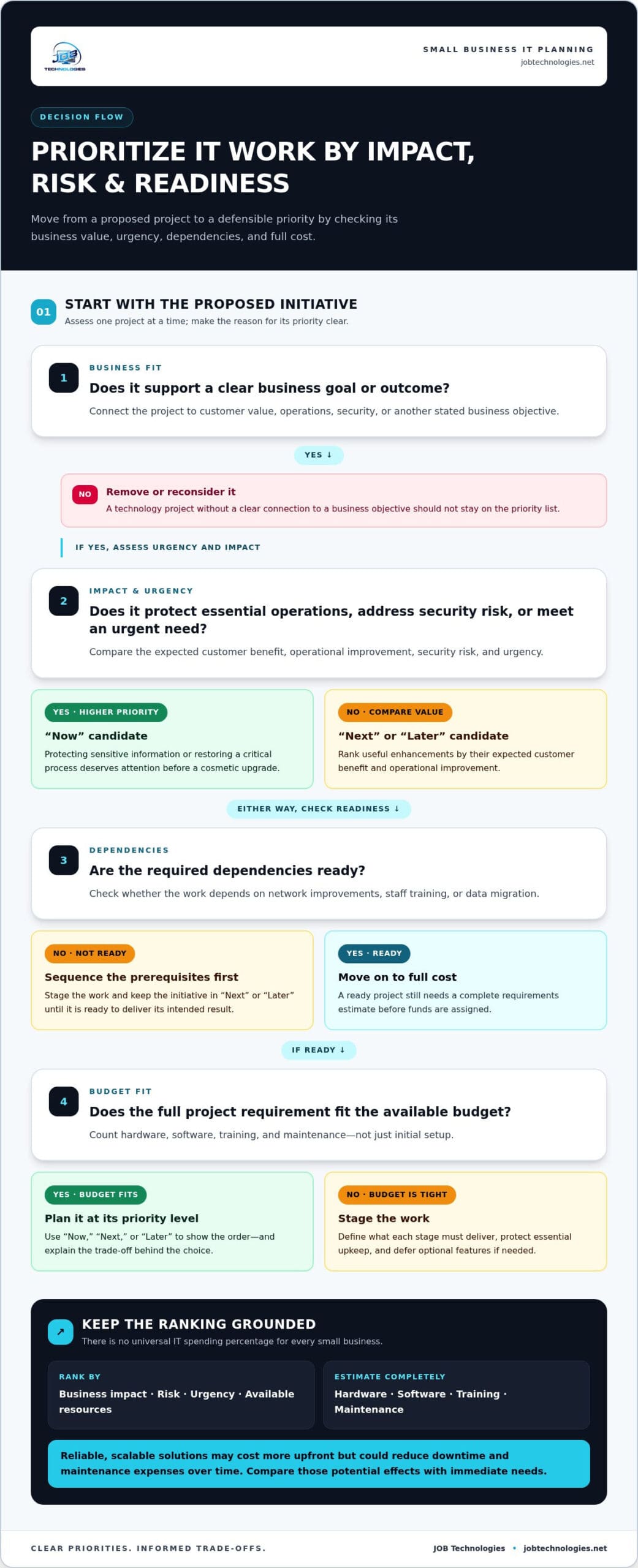
Assess each proposed IT initiative against its business impact, risk, and available resources. Fund the work that protects essential operations and advances clear business goals.
-
Rank Initiatives by Business Impact
Pair every proposed project with the business outcome it supports. Rank initiatives by expected customer benefit, operational improvement, security risk, and urgency. For example, if repeated failures in a core application waste staff time, stabilizing that system may matter more than adding a new feature.
Separate essential work from useful enhancements. Protecting sensitive information or restoring a critical process deserves attention before a cosmetic upgrade. Record dependencies, too: new software may rely on network improvements, staff training, or data migration. Sequencing these steps helps prevent spending on a project that is not ready to deliver its intended result.
Use simple priority labels such as “now,” “next,” and “later,” and explain each choice. This makes trade-offs clear to owners and staff. Revisit the order when customer needs, business risks, or project dependencies change.
-
Set Budget Priorities
Build your IT budget from planned initiatives, not a single spending percentage. There is no percentage that works as a universal benchmark for every small business. Needs vary with existing systems, growth plans, security risks, and the work technology must support.
Estimate each project’s full requirements before assigning funds. Include hardware, software, training, and maintenance, then compare the total with your available budget and the expected impact. A new application, for example, may need staff training and ongoing maintenance, not just initial setup.
Protect funding for essential upkeep before adding optional features. If the budget cannot cover every initiative, divide projects into manageable stages and define what each stage must deliver. Reliable, scalable solutions may cost more upfront but could reduce downtime and maintenance expenses over time. Weigh those potential longer-term effects against immediate needs, without assuming a higher-cost option is automatically the better investment.
Document deferred work and its consequences. A clear record shows leaders what the business is postponing and why, making it easier to reconsider priorities at the next budget review.
-
Prioritize Cybersecurity Measures
Start with the systems and information whose loss would disrupt essential work. Prioritize robust security measures and employee education, and connect each investment to the risks it addresses. If staff handle sensitive information, for example, include secure working practices in training and consider how access is managed.
Cybersecurity costs depend on the protections selected, the systems being secured, staff training, and the ongoing work needed to maintain those protections. Compare proposals by their coverage, fit with your infrastructure, and recurring maintenance or training needs. Don’t judge an option by its initial purchase alone.
Set aside resources for prevention and recovery, then check that planned measures work together. Cybersecurity and ransomware protection can be part of that planning when your business needs support assessing and managing technology risks.
Reviewing and updating a strategic plan
Set a regular review schedule and use evidence to keep IT priorities aligned with business needs. A quarterly review gives owners a consistent opportunity to assess results and adjust planned work.
- Schedule a quarterly review. Put it on the same calendar as quarterly financial reporting, so technology decisions reflect current business priorities. Invite the people responsible for IT, operations, and finance. Before the meeting, gather project updates, spending records, staff feedback, and changes to business goals. A consistent agenda helps the team make decisions, not just report activity.
If a planned system change is delayed, for example, identify the cause and its effect on dependent projects. Record whether the initiative remains on track, needs support, or should move behind a higher-priority need. Keep the reasoning with the plan so the next review can build on the decision.
- Compare progress with intended outcomes. Use a performance dashboard to view key indicators together instead of judging projects only by whether they were completed. Measures such as system uptime, user satisfaction, and return on investment can show whether an IT initiative is helping the business.
Compare each measure with the goal in your plan. If a new application is live but user satisfaction remains low, completion alone does not mean it succeeded. Gather user feedback, identify obstacles such as confusing workflows, and assign a corrective action. Keep the measure consistent across reviews to spot meaningful changes.
- Check assumptions and new business needs. Review whether the plan still reflects your customers, processes, staffing, and growth direction. A new location, a change in order handling, or a shift in staff responsibilities can alter technology needs. Ask managers and employees which tools support their work and which recurring problems slow service or operations.
Compare those observations with current initiatives. If a process has changed, update the technology requirement and its owner. If the business no longer needs a planned feature, pause or remove the work rather than spending resources on an outdated assumption.
- Update decisions and communicate ownership. Revise the action plan for each approved change, including the accountable person, intended outcome, and next review point. Mark completed work, deferred initiatives, and newly identified needs separately. This shows which commitments remain active and prevents old tasks from quietly returning to the schedule.
Share the updated plan with staff affected by the decisions. If a rollout changes a team’s workflow, for example, explain what will change and where employees can report problems. At the next quarterly review, revisit those issues alongside the relevant performance indicators.
Strategic plan checklist and SWOT analysis
Use an IT audit and SWOT analysis to check whether your plan reflects current systems, costs, and business risks. Turn each finding into an action, an assigned owner, or a documented reason for taking no action.
-
Assess IT Systems, Costs, and Risks
Begin with an IT audit of infrastructure, policies, and operations. Record which systems support essential work, who uses them, and where problems occur. An audit can identify vulnerabilities, assess compliance, and show whether technology meets business needs.
To assess current systems, costs, and risks, compare each system’s role, condition, support needs, and business impact. For example, record recurring disruptions alongside the processes they affect, then note related costs and risks in one inventory.
Separate direct spending from operational effects, such as staff time spent resolving repeat issues. Include software, maintenance, training, and recovery needs in your records. The purchase price alone is not the full cost of a system.
-
Work Through the Strategic Plan Checklist
Review the plan’s core elements, marking each one complete, unclear, or in need of action. A useful checklist includes the mission, vision, values, competitive advantage, financial plan, action plan, and evaluation process. Confirm that each reflects current business priorities, not assumptions left over from an earlier plan.
- Mission and vision: Check that they still describe whom the business serves and where it intends to go.
- Values and advantage: Confirm that decision principles and differentiators guide technology choices.
- Financial plan: Match planned IT work to available resources and expected business outcomes.
- Action plan: Give each initiative a clear owner, next action, and intended result.
- Evaluation process: Identify the measures and review process used to assess progress.
Use the checklist to reveal gaps. For example, an action without an owner needs an assignment before it can become a reliable commitment.
-
Apply SWOT Analysis
Use SWOT to assess your business’s current reality: strengths, weaknesses, opportunities, and threats. Gather observations from people who use the systems, manage operations, and make business decisions. Keep each point specific, such as a dependable customer database or a recurring process that relies on manual work.
Separate internal conditions from external ones. Strengths and weaknesses describe current capabilities and limitations; opportunities and threats describe outside changes that could affect your goals. Avoid broad labels such as “technology” without explaining their business impact.
Turn findings into decisions. Use a strength to pursue an opportunity, such as applying an effective customer process to a new service channel. Address a weakness that increases exposure to a threat, then assign a practical action. Add each selected action to the plan with an owner and a way to evaluate progress.
Strategic planning examples for small businesses
Turn business priorities into technology actions with a clear owner, outcome, and timeline. An IT strategic plan commonly covers the next 12 to 16 months, while longer-term goals help guide its direction.
- Start with a business outcome. Choose a result the business wants, then identify technology that could support it. For example, a small retailer seeking higher sales might focus on improving how it manages customer information and service requests. An example business goal is increasing sales by 10% the next year.
Translate the findings into a practical IT initiative, such as reviewing whether existing systems support customer follow-up. Involve the staff who handle customer interactions, so the proposed change reflects daily work. Don’t choose a tool first and look for a business reason afterward.
- Connect each initiative to a measurable result. A marketing plan might target a 15% increase in sales. The related IT work could include improving access to accurate customer and sales information, if those systems support the goal.
Define how you’ll assess progress before implementation. Choose a measure that reflects the intended outcome, assign someone to track it, and record the starting point. If the measure does not improve, examine whether the system, process, or staff adoption needs attention. This keeps technology work tied to business results.
- Build priorities around growth and capacity. If your business plans to grow over three years, identify the systems that need to expand alongside operations. Choose scalable, flexible, and secure solutions that can adapt as needs change, rather than planning replacements around short-term convenience alone.
Involve staff and management in decisions. Employees can identify workflow problems leadership may not see, while managers can explain business priorities and resource limits. Before a wider rollout, pilot new technology on a small scale. Use the pilot to surface practical issues and refine the implementation plan.
- Set a sequence and keep the plan active. For a plan covering 12 to 16 months, group initiatives by dependencies and business impact. For example, address a network requirement before launching software that depends on reliable access. Assign an owner and a next action to each project, then tie implementation to the business calendar.
Track planned work against the intended goals and revise the sequence when business conditions change. A three-year priority can remain the destination while the current IT plan sets near-term actions. If choosing and sequencing projects is difficult, plan your IT priorities with support suited to your business needs.
JOB Technologies: Managed IT Services
When planning, maintenance, or implementation exceeds your team’s capacity, JOB Technologies can help turn your IT priorities into practical support. Its Managed IT Services support small businesses managing day-to-day technology needs. Network Installation & Management can support the infrastructure behind a network upgrade. For AI adoption or business communications, JOB Technologies also offers AI Implementation and Phone Systems VoIP.
Bring your business goals and current technology challenges to the conversation. That provides a focused starting point for discussing which initiatives need attention and how they connect to your operations. Contact JOB Technologies to discuss your small business IT priorities.
Put Your Next IT Priority Into Motion
A plan is useful when it guides the next decision, not just the next document update. Choose one priority your team can advance, clarify who owns the next action, and agree on what progress looks like. Effective IT strategy planning for small business owners turns that commitment into practical leadership.
As you move forward, use IT strategy planning for small business growth to connect technology decisions with the outcomes your team needs. JOB Technologies offers Managed IT Services, Network Installation & Management, and AI Implementation for businesses managing technology, strengthening network infrastructure, or considering AI for their operations.
Contact JOB Technologies to discuss your IT priorities and how they connect to your business plans. Move forward with a clear next step, and let your technology decisions support the business you’re building.
Frequently Asked Questions
What Is Strategic Planning?
Strategic planning helps leaders choose a business direction and decide how to respond to change. Before adding a sales channel, for example, an owner can weigh customer demand, staff capacity, and operational readiness. This connects major decisions instead of treating every opportunity as a separate project. The resulting priorities guide how the business uses its time and resources, and what it tackles first.
What Is a Strategic Plan?
A strategic plan is a written reference for the business’s direction, intended outcomes, and the reasoning behind its priorities. It helps owners and staff understand why certain initiatives matter and how decisions fit together. Unlike a task list, it provides context for choosing between competing projects. A team can use it, for instance, to assess whether a proposed expansion supports the business’s chosen direction.
What is a good objective?
A good objective describes a meaningful result, how progress will be measured, and who is accountable for moving it forward. It focuses on an outcome rather than a task. “Install a new system” describes activity; “make invoice preparation easier to track” points to a business improvement. Add a deadline and a suitable measure, such as invoice processing time, so the team can judge whether the change helped.
How should a small business align IT goals with its business plan?
Start with a business-plan priority, then identify the technology and work needed to support it. If the goal is to handle more customer inquiries smoothly, for example, review how calls are routed and how staff respond. Assign an owner and choose a relevant measure, such as missed inquiries. This connects the business objective, IT work, and result being monitored.
How do cloud services compare with on-premises IT for small businesses in cost and security?
Cloud applications can reduce the need for expensive on-premises hardware. Before choosing, compare operating needs and security controls, and include hardware, software, training, and maintenance in cost estimates.
What IT budget percentage or spending benchmarks are typical for small businesses?
There is no universal IT spending percentage for small businesses. Build the budget from planned initiatives, accounting for hardware, software, training, maintenance, available funds, and expected impact.