

Cutting IT spending across the board can create bigger problems than it solves. Reducing IT operational costs works best when you target waste, simplify routine work, and invest in tools that support reliable operations. The goal is not simply to spend less, but to make each technology decision work harder for your business.
It’s reasonable to want lower, more predictable IT expenses without sacrificing productivity, security, or support. The best opportunities often come from finding overlapping subscriptions, outdated processes, and tasks that automation can handle efficiently, while keeping people involved where their judgment matters.
This guide explains how to assess cost-reduction investments, review vendors and recurring fees, and decide when outsourcing or modern tools may make sense. You’ll also see how automation and AI can streamline operations, and why improving a process before automating it can help you avoid paying to do inefficient work faster.
Key Takeaways
- Automate repetitive work where it can ease staff workload, while preserving human support for situations that need judgment.
- Evaluate cost-saving investments by their effect on the full process, not just the expense of one tool or department.
- Review software subscriptions, vendor services, and maintenance fees to uncover overlap and spending that no longer supports business needs.
- Consider outsourcing routine IT operations when shared expertise and resources are a better fit than building every capability in-house.
- Choose modern tools based on how well they support reliable operations, reduce manual effort, and scale with your business.
1. Using automation and AI to streamline operations
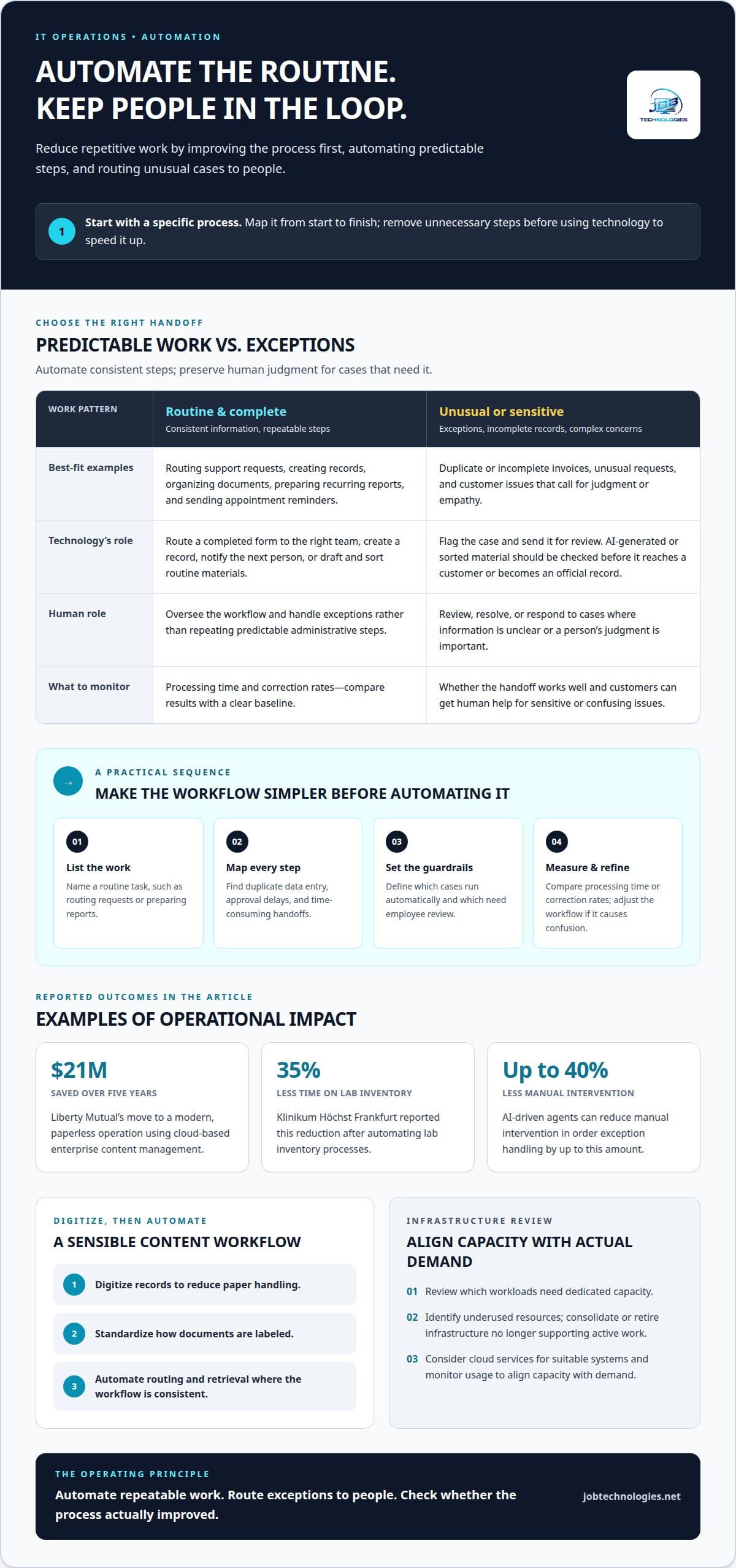
Automation can reduce repetitive work, but the best gains start with a specific process. List routine tasks such as routing support requests, creating records, organizing documents, or preparing recurring reports. Then map each task from start to finish. Identify duplicate data entry, approval delays, and handoffs that consume staff time. Simplifying those steps before introducing automation prevents technology from reproducing an inefficient process.
Administrative automation can handle predictable actions while employees focus on exceptions. For example, a workflow can route a completed form to the right team, create a record, and notify the next person. AI tools can also help draft or sort routine materials, with an employee reviewing the result before it reaches a customer or becomes an official record. Set a clear measure, such as processing time or correction rates, and compare results after implementation. A useful report shows whether the work became simpler, not merely whether a new tool was deployed.
Cloud-based content management can reduce paper handling and make digital documents easier to organize and retrieve. Liberty Mutual saved $21 million over five years by moving to a modern, paperless operation using cloud-based enterprise content management. For another example, Siemens Healthineers reported that Klinikum Höchst Frankfurt reduced time spent on lab inventory by 35% after automating those processes. These examples point to a practical sequence: digitize records, standardize how they are labeled, then automate routing and retrieval where the workflow is consistent.
How can businesses lower data center and infrastructure costs? Review which workloads need dedicated capacity, identify underused resources, and consolidate or retire infrastructure that no longer supports active work. Moving suitable systems to cloud services can reduce the need to maintain local infrastructure, while monitoring usage helps align capacity with actual demand.
Intelligent automation is most useful when it handles routine cases and directs unusual ones for review. For example, a system can route an invoice with complete information through a standard workflow, while sending a duplicate or incomplete record to an employee. AI-driven agents can reduce manual intervention in order exception handling by up to 40%. Start with a narrow workflow, define which exceptions require human attention, and review the results before expanding.
Keep customer service in the design. Automating appointment reminders or basic status updates may free staff from repetitive inquiries, but complex concerns often need human judgment and empathy. Let automation collect information and route the request, then make a person available for sensitive or unusual issues. If automation repeatedly confuses customers, adjust the workflow rather than removing the human handoff. A technology partner can help assess whether automation, cloud services, or infrastructure changes suit the process and its service needs.
Questions for evaluating cost-reduction investments
Before approving a technology change, define the expense it should reduce and the operational result it must protect. For example, an automation proposal might target repeated data entry while maintaining approval accuracy. Ask who will use the change, which process will change, and what current measure provides a fair comparison. This makes cost reduction a testable business decision rather than a spending freeze with unclear effects.
Measure AI savings against the full cost of adopting and operating the tool. Include implementation work, ongoing support, employee review time, and any process changes. Then compare those expenses with measurable benefits, such as reduced handling time or fewer errors. In supply chain management, 41% of organizations reported AI-related cost reductions of 10-19%, while about 4% reported reductions above 20%. These figures show why a realistic business case should use the result expected for its specific workflow, not assume the largest possible saving.
Efficiency metrics help distinguish sustainable engineering from simple cost cutting. Track the operating expense ratio by dividing operating expenses by net sales and multiplying by 100. A change from 60% to 55% means the business keeps an extra 5 cents of every revenue dollar as profit. For technology decisions, also monitor finance cost as a percentage of revenue, cost per finance transaction, and time spent completing the process. A lower expense matters most when service quality and useful output remain intact.
What are the risks of cutting IT operational costs too aggressively? Removing support, maintenance, or essential capacity can lead to interruptions, slower work, and greater recovery effort. A cost plan should protect the systems and expertise that keep critical business processes running.
Build a cost-reduction plan around the whole process, not an isolated team or tool. First, document the current workflow and its cost drivers. Next, remove unnecessary approvals or rarely used reports before automating what remains. Set a baseline, assign an owner, and record the expected operational benefit. This sequence helps prevent automating an inefficient process and carrying its waste into a new system.
Monitor results against the baseline after implementation. Compare expenses, processing time, error rates, and service outcomes, then investigate any measure that moves in the wrong direction. For an AI project, separate time saved from time genuinely released for other work. That distinction keeps the report useful to decision-makers. Businesses assessing infrastructure, systems, and ongoing IT needs can review their IT cost opportunities alongside operational priorities.
3. Reviewing vendors, subscriptions, and maintenance fees
Start with a single inventory of technology vendors, subscriptions, and maintenance agreements. Record the product or service, business owner, renewal date, payment frequency, and teams that rely on it. For example, an organization may find separate file-sharing subscriptions across departments alongside a company-wide platform with similar functions. That overlap is worth reviewing, but usage and business dependencies should guide any cancellation.
Assess actual use before changing a subscription. Compare assigned licenses with active users, identify accounts no longer tied to current roles, and look for overlapping features across tools. A design team might need advanced editing features, while occasional reviewers need only basic access. Adjusting license types can reduce waste while maintaining the capabilities each team uses. Include trial accounts and add-ons in the review, since small recurring charges are easy to miss.
Vendor consolidation can simplify administration as well as spending. Group services by purpose, such as communications, document storage, or endpoint management, then identify providers performing similar roles. Consolidating may reduce duplicate contracts and make renewals easier to manage. However, placing several critical functions with one vendor can increase dependence on that provider. Weigh the administrative benefit against service continuity, integration needs, and the effort involved in moving data or workflows.
Review maintenance fees separately. Map each agreement to the system it supports, the work covered, and the business process that depends on it. For example, an older application may still have a maintenance agreement after employees have moved to a replacement. Confirming whether the system is still in use can expose hidden expenses. Also distinguish active support from maintenance tied to equipment or software being phased out.
Vendor negotiations work best when they begin with a clear account of current needs. Gather renewal dates, active license counts, overlapping services, and support requirements before discussing terms. Ask whether a contract can better reflect actual usage, whether separate services can be combined, and how renewal terms change over time. These steps keep discussions grounded in operational value rather than price alone, while preserving the support and features teams need.
- Document: Assign an owner and renewal date to every subscription and agreement.
- Compare: Identify duplicate functions and unused access across departments.
- Decide: Keep, adjust, consolidate, or retire each service based on use and dependency.
- Review: Track the change after renewal to catch new inefficiencies or service gaps.
Make vendor reviews a recurring business process, not a one-time cleanup. A calendar reminder before each renewal gives teams time to assess usage, compare overlapping services, and prepare negotiation priorities. Record why a service remains necessary or how its use has changed. That history helps the next review distinguish genuine business needs from legacy spending that continued because nobody revisited the agreement.
4. Outsourcing non-core functions
Outsourcing can shift routine IT work away from employees whose primary roles support sales, operations, or customer service. For example, a growing organization may need help managing user access, network changes, and recurring support requests, but not enough work to justify hiring specialists for every function. A managed services provider can supply shared operational resources, reducing the need to build every capability in-house. Start by defining the work to transfer and the responsibilities that remain internal.
Begin by separating repeatable support tasks from decisions that require deep knowledge of your business. A team might outsource routine device monitoring while retaining ownership of system priorities, sensitive workflows, and business planning. This keeps internal leaders connected to technology decisions without requiring them to manage every manual task. Map each function, its current owner, and the result employees need. That inventory helps prevent duplicated work during a transition.
The Hackett Group identifies optimized service delivery strategies, business process improvement, shared services, and business process outsourcing as ways to reduce operational costs. These approaches can work together. For instance, an organization could standardize how employees submit support requests, route common issues through a shared process, and outsource the agreed service desk function. Improving the workflow first makes handoffs clearer and helps teams assess whether the arrangement supports productivity and growth.
Standardization matters because inconsistent internal processes can be difficult to scale and outsource affordably. If one department tracks requests by email and another uses a spreadsheet, a provider must account for different steps and records. Document the current workflow, define consistent request categories, and agree on how completed work is reported. Then transition a well-defined function rather than transferring confusion. This also gives employees a shared understanding of when to use the outsourced process.
Before transferring work, define service boundaries, access requirements, escalation paths, and reporting expectations. For example, decide which requests can be resolved through a standard process and which must go to an internal decision-maker. Specify how system changes are approved and how unresolved issues return to the business. These operating details help protect continuity while giving the provider enough context to handle the assigned work.
Finally, review the arrangement against business needs rather than treating outsourcing as a permanent, fixed decision. Track request volume, unresolved issues, repeat incidents, and internal staff time spent coordinating the function. If growth changes demand, adjust the scope or workflow accordingly. Outsourcing is most useful when it frees employees from recurring operational work while preserving internal ownership of priorities, business knowledge, and decisions that shape the organization’s direction.
5. Modern tools for reducing IT operational costs
Modern tools create savings when they remove a recurring source of waste, not simply because they are new. Start by connecting a proposed tool to a specific workflow, such as responding to support requests or maintaining network equipment. Then identify the task it changes, the people affected, and the operating measure that should improve. This keeps technology choices focused on business needs rather than feature lists.
Infrastructure monitoring tools can reveal where computing resources sit idle or struggle to meet demand. Use their reports to compare actual usage with capacity, then resize or consolidate resources where workloads allow. For example, a business might find that a development environment remains active outside working hours. Scheduling it to run only when needed can reduce unnecessary resource use while preserving access during planned work.
Predictive maintenance tools use system data to identify signs of potential equipment problems before they cause disruption. AI-based predictive maintenance typically reduces annual maintenance costs by about 10% and can reduce unplanned downtime by up to 25%. A practical rollout starts with equipment that has clear maintenance records and operational impact. Track warning accuracy, planned repairs, and downtime to understand whether the tool improves reliability effectively.
Integrated data and workflow tools can also reduce the manual effort involved in moving information between systems. For example, a sales order that automatically updates inventory and billing avoids repeated entry across separate platforms. Before connecting systems, map which data each workflow needs and who owns it. This helps teams avoid paying for integrations that add complexity without improving the process.
What are the most effective ways to reduce IT operational costs? Combine usage monitoring, well-chosen automation, preventive maintenance, and regular reviews of technology workflows. Measure changes against service quality and business output, so lower expenses do not come at the expense of reliable operations or revenue-producing work.
U.S. tax credits are not automatic for routine technology purchases. Eligibility depends on the specific investment and applicable tax rules, so assess any potential credit separately before counting it as a saving in the business case.
Choose tools in stages. First, select a workflow with a visible operational issue. Next, define the outcome, such as fewer manual steps or less unplanned downtime. Then run a focused implementation and review usage, support needs, and workflow results before expanding. This approach limits unnecessary complexity and gives decision-makers evidence for the next investment.
If you’re assessing whether infrastructure tools or automation fit your operations, discuss your technology needs and the workflows you want to improve.
JOB Technologies
JOB Technologies helps businesses in Dubuque, Galena, East Dubuque, Dyersville, Farley, and Peosta assess technology spending and identify where managed support, network management, or AI implementation fits their operational needs. If recurring IT work is consuming staff time, infrastructure needs have changed, or a workflow may benefit from automation, these services offer a practical next step. VoIP phone systems can also be part of a broader review of business technology and ongoing processes.
Bring your priorities, current challenges, and the processes you want to improve into the conversation. JOB Technologies can help you consider which technology needs attention and what approach supports your business. Contact JOB Technologies to discuss your IT operational cost goals.
Turn your next IT decision into a clear step forward
Lasting progress starts with a focused decision, not a broad spending freeze. Choose one area where technology work feels unnecessarily complex, then define what a better outcome would look like for your team. That gives you a practical way to approach reducing IT operational costs while keeping business priorities in view.
From there, consider what should change, what must keep working, and how you’ll recognize improvement. If you’d like a partner in assessing your options, JOB Technologies can discuss your IT priorities and how Managed IT Services, Network Installation & Management, or AI Implementation may fit your needs.
Contact JOB Technologies to discuss your IT costs and identify a sensible next step. A clear plan can help you move forward with greater confidence.
Frequently Asked Questions
How can cloud cost optimization reduce IT spending?
Cloud cost optimization reduces waste by matching services and storage to actual workloads. For example, tag cloud resources by department and project so teams can identify ownership before usage grows unnoticed. Set spending alerts, review data retention needs, and remove abandoned test environments. Also examine data transfer between services, since architecture choices can affect ongoing usage. These steps help organizations manage cloud expenses without disrupting systems employees depend on.
How much can IT automation reduce operating costs?
There is no single savings figure that applies to every automation project. The result depends on task volume, process complexity, implementation effort, and the time needed to review exceptions. For example, measure how long staff spend processing a recurring request, then compare that with the automated workflow, including correction work. Separate time freed for other duties from expenses actually removed. This gives leaders a practical basis for deciding whether automation delivers value.
How can organizations reduce software licensing and SaaS costs?
Organizations can control licensing expenses by tying access to current job needs and reclaiming accounts during employee departures or role changes. For example, a departing employee’s software seat can be reassigned rather than left unused until renewal. Assign an owner for each application, review access changes during onboarding and offboarding, and check whether lower access tiers meet some users’ needs. This keeps licenses aligned with actual responsibilities without removing tools teams rely on.
When does outsourcing IT support cost less than an in-house team?
Outsourcing may cost less when support needs are steady but don’t justify hiring and retaining every required specialist internally. Compare the service scope with the full employment costs of salaries, benefits, recruitment, training, tools, and coverage during absences. A business needing occasional network expertise, for instance, may not require a dedicated network employee. Also account for internal time spent coordinating outsourced work, so the comparison reflects the full operating arrangement.
How can companies measure IT cost savings and total cost of ownership?
Measure savings by comparing the current operating approach with the new option across the same period and workload. Include purchase or subscription expenses, setup, integration, staff training, ongoing support, and future upgrades in total cost of ownership. For example, compare the full cost of maintaining an older application with a replacement, including migration and employee transition time. Track service quality alongside spending, so a lower total doesn’t conceal slower work or reduced capability.