

Your business phone system shouldn’t stop at the office door. A hybrid workforce VoIP setup uses internet-based calling so employees can make and receive business calls across locations and devices. With the right configuration, your team can stay reachable through work numbers on a desk phone, laptop, or smartphone.
That flexibility matters, but calls still need to work smoothly for employees and customers. VoIP can combine call routing, softphone apps, and hosted services to get calls to the right person without tying work communication to one desk or a personal phone number.
This article explains how VoIP calls work, how unified communications support collaboration, and how employees can use work extensions across devices. It also covers hosted VoIP for small and medium-sized organizations and how network planning can support clear, dependable calls throughout the workday.
Key Takeaways
- Understand how internet-based calling, call queues, and routing can help direct customer calls to the right team.
- See how unified communications can bring calls and collaboration together across devices and work locations.
- Learn how employees can use laptops, smartphones, and desktops to make and receive business calls.
- Explore how softphone apps can help employees stay connected to their work extensions while away from the office.
- Find out what hosted VoIP involves and how JOB Technologies’ phone systems service can support a small or medium-sized organization.
VoIP Services: How Does It Work?
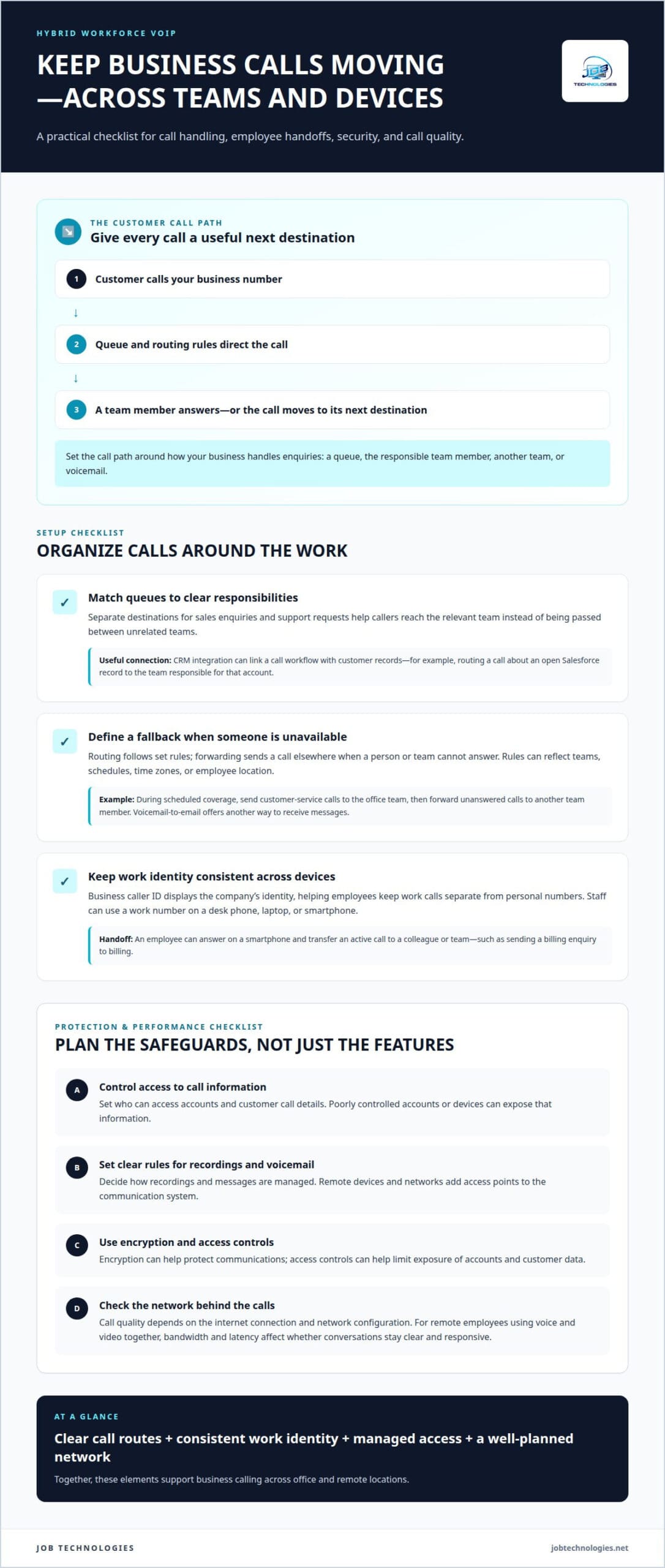
VoIP sends calls over the internet, allowing hybrid teams to use business phones from office and remote locations. Call queues, routing, caller ID, and CRM connections help shape how customers reach your team.
Call Queues and CRM Connections
A call queue holds incoming customer calls until a team member is available, while CRM integration connects call workflows with customer records. Together, these tools help remote teams manage enquiries in an organized way.
For example, a customer calling about an open Salesforce record could be routed to the team responsible for that account. Queue rules can direct unanswered calls elsewhere, while voicemail-to-email gives staff another way to receive messages. The right setup depends on how the business organizes teams and assigns customer enquiries.
For customer service, match each queue to a clear responsibility. A sales enquiry and a support request may need different destinations. This helps employees respond with relevant context instead of passing calls between unrelated teams.
Routing and Forwarding for Distributed Teams
Call routing directs incoming calls according to set rules. Forwarding sends calls to another destination when a person or team is unavailable. For hybrid and distributed teams, both settings connect customer calls with employees working in different places.
A business might route customer-service calls to the office team during scheduled coverage, then forward unanswered calls to another team member. Routing can also reflect time zones, teams, schedules, or an employee’s location. This gives remote teams a consistent call path without relying on one office phone.
Clear routing rules give each call a useful next destination. A defined sequence can send a call to a queue, a team member, or voicemail. Shape these paths around how your business handles service instead of forwarding every call to one person’s mobile.
Caller ID and Mobile Call Transfers
Business caller ID displays the company’s identity, helping employees keep work calls separate from personal numbers. Mobile call transfers let an employee move an active call to another person or destination from a smartphone.
For example, an employee away from the office can answer a customer’s call on a mobile phone, then transfer it to a colleague who can resolve the issue. Using a business number maintains a consistent identity across phones and locations. The transfer process should fit the team’s call-handling workflow.
These functions can also save customers from calling back when the first employee can’t complete a request. A clear handoff, such as transferring a billing enquiry to the billing team, keeps the conversation on track and connects the caller with the right staff.
Hybrid VoIP Features and Risks
A hybrid workforce VoIP system should include flexible routing, call queues, business caller ID, mobile transfers, and voicemail-to-email. These features help employees manage calls across devices, locations, and schedules.
Security and compliance risks can include exposing customer call details through poorly controlled accounts or devices, or handling recordings and voicemail without clear internal rules. Remote phones and networks add access points to the communication system. Define who can access call information and how recordings and messages are managed.
Encryption can help protect communications, while access controls help limit exposure of accounts and customer data. Call quality also depends on the internet connection and network configuration. For remote employees using voice and video together, bandwidth and latency affect whether conversations stay clear and responsive.
What is a Unified Communications Solution?
VoIP supports remote and in-office employees by carrying business calls over the internet to their devices. Unified communications brings calling and collaboration tools together, helping employees stay connected across locations.
Calling Across Devices and Locations
Unified communications combines voice, messaging, and conferencing so employees can communicate from different devices and locations. An office worker and a remote colleague can join the same conversation without needing the same type of phone.
For example, one team member can answer a business call on a smartphone while a colleague joins from a laptop. Web, video, and audio conferencing can also support meetings with screen sharing. This flexibility helps when a customer discussion needs input from employees in different places.
Depending on the platform, employees can also use messaging, email, SMS, or fax alongside calls. A quick message may suit a short update, while a conference call may work better for a complex decision. Choosing the right channel for each task helps keep conversations organized.
Centralized Management Across Locations
Centralized management gives a business one place to manage communication services across locations. Cloud-based call management can provide that shared control, helping teams use consistent call-handling rules without managing each office as a separate phone system.
For example, an organization with an office and remote employees can manage business calling centrally while staff connect through their chosen devices. This can make it easier to change who receives calls when team responsibilities shift. It can also support growth as the business adds employees or locations.
Centralized management can simplify the employee experience, too. With a consistent setup, staff can move between desk phones, laptops, and mobile devices within the same communication environment. The internet connection and platform still affect how smoothly calls and collaboration work.
For businesses planning network changes alongside communication updates, network installation and management can help align the underlying infrastructure with the way employees work.
Mobile Communication and Team Connections
Mobile communication lets employees use smartphones and other devices to stay connected with colleagues, clients, and partners across locations. It’s useful when someone leaves the office but still needs to join a meeting or respond to a work message.
Presence features can show whether a contact is available, busy, away, or on do not disturb. An employee can use that status to decide whether to call immediately or send a message instead. For instance, a remote worker can check a colleague’s availability before arranging a customer handoff.
Unified conferencing brings colleagues together through web, audio, or video meetings, with screen sharing when a document or presentation needs discussion. These tools give distributed employees a shared way to collaborate, while messaging can handle updates that don’t need a meeting. A dependable internet connection supports the calls and collaboration features employees use across devices.
Making and receiving business calls from laptops, smartphones, and desktops
VoIP lets employees make and receive business calls on laptops, smartphones, and desktop computers using an internet connection. A team member can answer a work call on a laptop at the office, then use a smartphone while working remotely. This makes business calling available without tying every conversation to a traditional phone on one desk.
The same business number can follow an employee across locations and supported devices. For example, a customer can call the company’s main number while an employee answers through a desktop app from home. This helps keep work calls distinct from personal calls and gives customers a consistent number, wherever staff are working.
VoIP phone systems can use IP desk phones, mobile apps, and web or desktop softphones. A business can assign devices to suit each role: a receptionist might use a desk phone, while a field employee uses a smartphone. Staff can choose devices that suit their work while the business manages calling through a shared system.
Adding users or locations involves configuring the system for new employees and destinations, rather than relying only on phone lines tied to one office. A growing business might extend its call setup to a new location while keeping its existing business number and call flow. This can support changing teams and work arrangements.
Integration with business applications can bring calling into familiar work environments. VoIP can integrate with Microsoft 365 and Salesforce, which may help employees move between communication and business tasks. For example, a team member working in Salesforce can use the platform’s integrated calling tools if the communication system and application support that workflow.
A business communication solution may combine voice calls with video meetings, team messaging, and file sharing. This can reduce the need to switch between disconnected tools during a customer conversation. An employee might discuss a request by phone, then use a meeting or shared file to clarify details with colleagues. The exact workflow depends on the applications and features the business uses.
For smooth communication across devices, plan how employees access calls, how numbers are assigned, and how calls reach teams. Remote employees need suitable internet connections and supported devices. Desk-based employees may prefer physical phones. Aligning these choices with job duties helps the system serve daily work instead of dictating it.
Softphone apps for work extensions
A softphone app lets an employee use a work extension on a computer or mobile device instead of a physical desk phone. In a hybrid workplace, employees can take the extension between the office and home, helping the team stay connected as work locations change.
A hybrid workforce VoIP phone system combines internet-based calling with the devices and apps employees use in different places. Calls travel as data over the internet, then reach an employee’s softphone, desk phone, or another configured destination. Voicemail and call settings can follow the extension rather than being tied to one piece of hardware.
Start planning with the way employees handle calls. A customer-facing employee, for example, may need an extension, voicemail, and call transfers, while a colleague who rarely takes external calls may need different access. Matching features to job duties avoids giving every user the same setup when their responsibilities differ.
A practical setup has several connected parts:
- Assign each employee a work extension and define how incoming calls reach them.
- Choose supported devices, such as a desktop softphone, smartphone app, or IP-based desk phone.
- Set voicemail and call-forwarding behavior for remote days, office days, and unavailable periods.
- Check that the internet connection can support voice and video use at the employee’s location.
- Provide employees with usage guides and live training so they can use calling features confidently.
These choices help enterprise VoIP fit the organization instead of forcing everyone into the same work pattern. A remote employee might use a laptop app during the day and receive a forwarded call on a mobile device away from the desk. Another employee could use a physical phone in the office and the same extension through an app at home.
Hybrid-work technology needs to support collaboration beyond calls, too. A team might share a file during a meeting, message about a customer request, then return to a voice call to make a decision. Keeping these tasks accessible across devices can support productivity, while clear employee guidance reduces confusion about which tool to use.
Before deployment, consider how employees collaborate, how customer service works, and whether cloud technologies suit your operations. Network conditions matter, too: voice and video compete with other internet activity, so Quality of Service settings can prioritize VoIP calls. A well-considered configuration connects extensions, devices, network capacity, and call rules in one workable system.
Hosted VoIP services for small and medium-sized organizations
A hosted VoIP service is provided and managed by a third party that supplies the infrastructure for internet calling. For a small or medium-sized organization, this can shift phone-system management away from equipment maintained entirely at one office. Employees can use supported devices from the office, home, or another work location.
Hosted calling offers flexibility by managing calls through a shared system instead of relying only on a fixed office setup. For example, a business can use desk phones at reception and softphone apps for remote employees. Staff can use the same business calling environment as their work location changes, provided they have a suitable internet connection.
Call routing is central to making this arrangement useful. A hosted system can direct incoming calls to a team, queue, or employee according to the organization’s call-handling needs. A customer calling the main number might reach reception first, then be sent elsewhere if staff are unavailable. Defined routing gives each call a practical next step.
Small businesses can adapt the setup as teams change. Adding employees or a location involves configuring users and call destinations, rather than building every communication path around one office. Plan which employees need extensions, which devices they’ll use, and how callers should reach each team.
Hosted VoIP can also support gradual upgrades. Cloud-based upgrades can be made without a full rip-and-replace of legacy technology, which can help organizations transition without replacing every existing component at once. The useful approach depends on how the current phone system works and which parts need to change first.
Some cloud-based VoIP arrangements let an IT support provider manage updates, troubleshoot remotely, and scale the service. This can help when someone has a calling issue away from the office or the organization needs to adjust its setup. The hosted provider manages the service infrastructure, while the business still plans how employees and customers use the system.
To optimize a hosted system, consider call routing, device choices, internet capacity, and employee workflows together. Voice and video traffic can compete with other internet activity, so network configuration matters for call quality. A unified setup should also give staff clear guidance on using devices and handling calls across locations.
If your organization is planning hosted VoIP, discuss your VoIP setup in the context of your users, locations, and call flows.
JOB Technologies: Phone Systems VoIP
JOB Technologies provides VoIP phone systems for businesses that need calling across office and remote locations. We can help align calling features, employee devices, and call routing with how your team serves customers and collaborates day to day.
Turn to JOB Technologies when your current phone setup makes it difficult to manage calls across locations, add remote employees, or handle calls consistently. Network installation and management and Managed IT Services can also support the infrastructure and wider technology environment behind a hybrid setup.
Bring your work locations, calling needs, and employee workflows into the conversation so your system can be planned around your operations. Contact JOB Technologies to discuss VoIP phone systems for your team.
Build a Calling Setup That Can Adapt
Communication needs change as roles, schedules, and work locations evolve. A well-planned hybrid workforce VoIP system should make those changes easier to manage, with call handling that reflects how your team works now and can adapt as work shifts.
The next step is to connect your phone system with the wider technology environment. JOB Technologies offers VoIP phone systems alongside Managed IT Services, network installation and management, and AI implementation. Considering these areas together can help you plan a practical fit for your business operations.
Share your team’s calling needs and work setup with JOB Technologies to discuss a path forward. Contact JOB Technologies about VoIP and take the next step toward business calling that supports your team wherever work happens.
Frequently Asked Questions
Are fixed phone lines the thing of the past?
No, fixed phone lines aren’t automatically obsolete. They can still suit businesses with established equipment or calling needs tied to a physical site. VoIP offers more flexibility when employees work in different locations, but you don’t have to move every call at once. Plan a gradual transition by considering which existing lines remain useful and which workflows could benefit from internet-based calling.
Is VoIP cloud-based systems the future?
Cloud-based VoIP is a practical option for businesses seeking centralized phone management and flexible access across locations. It can also support changes to users and call flows without relying entirely on equipment at one office. Rather than assuming it’s right for every organization, consider how your team works, which communication tools it needs, and whether your internet and support setup suit cloud calling.
How does VoIP compare with traditional business phone systems for hybrid work?
VoIP is generally more adaptable to hybrid work because employees can use internet-connected devices, while traditional systems often depend more on office-based equipment. A business with reception staff on-site and account managers working remotely, for example, may value access to the same business calling environment. The right fit depends on current equipment, work patterns, network readiness, and how the business wants to handle calls during a transition.
What internet bandwidth and equipment do employees need for VoIP?
Employees need an internet connection that can support voice calls alongside their other work, plus a compatible calling device. Options include a computer with a softphone app, a smartphone, or an IP desk phone. Required connection capacity depends on how many people call at once and whether they also use video or other bandwidth-heavy applications. A headset can help reduce background noise during calls.
How can businesses ensure VoIP call quality for remote employees?
Businesses can improve remote call quality by prioritizing voice traffic with Quality of Service settings and ensuring connections can handle voice and video. Monitoring call quality, uptime, and usage can help identify recurring trouble spots. For teams working across Dubuque, Galena, East Dubuque, Dyersville, Farley, and Peosta, comparing call performance by location can help pinpoint network issues that need attention.