

More bandwidth may not make a slow business network faster. If employees are waiting for cloud tools and files to load, or calls become choppy when the office gets busy, the cause could be Wi-Fi coverage, network equipment, or the internet connection itself. Improving business network speed starts with finding the bottleneck, not automatically upgrading your plan.
It’s easy to suspect your internet service when everything feels sluggish. But paying for more bandwidth won’t fix a crowded wireless channel, aging equipment, or an issue affecting only one part of the office. A few practical checks can help you identify what’s happening before investing in a fix.
This guide explains how to spot patterns in slow performance, distinguish internet connection issues from Wi-Fi or equipment problems, and apply improvements in a sensible order. You’ll also learn when recurring disruptions may call for professional network support or ongoing management, so your team can work with greater confidence.
Key Takeaways
- Learn how bandwidth, Wi-Fi, latency, packet loss, and office equipment affect network performance in different ways.
- Use a repeatable diagnostic checklist to identify when and where slowdowns occur before changing settings.
- Explore practical ways to improve business network speed, from reducing avoidable congestion to using Ethernet where it makes sense.
- Recognize when recurring issues may need a coordinated review of your internet connection and office network.
- See how managed network support can help troubleshoot persistent problems and plan improvements over time.
Why improving business network speed starts with finding the slowdown
Cloud applications take longer to respond, uploads crawl, and video or VoIP calls break up just when colleagues need to collaborate. Performance may vary by room, device, or time of day. These symptoms are frustrating, but they don’t automatically mean your internet plan is too small. Improving business network speed starts with locating the delay so you can choose a fix that addresses the cause.
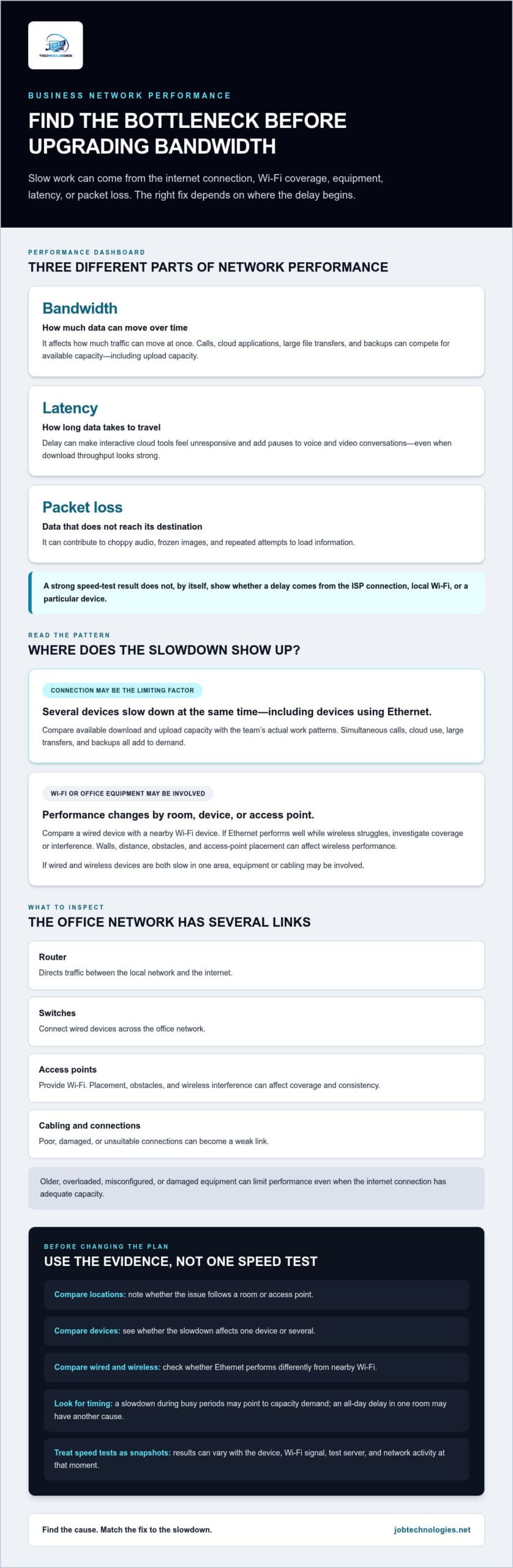
A business network includes both the internet connection and the systems that move data around your office. Bandwidth describes how much data a connection can transfer over time. Latency is the delay as data travels between points, while packet loss happens when some data doesn’t reach its destination. These measures describe different aspects of performance, as outlined in Understanding Network Performance Metrics. A connection can have ample bandwidth yet still feel unresponsive if latency or packet loss affects real-time tasks.
A speed test can help, but it’s only a snapshot. The result can vary with the device, its Wi-Fi signal, the test server, and network activity at that moment. A test on one laptop near an access point won’t necessarily show what’s happening across the office or during a busy video meeting. Even a strong result can’t tell you on its own whether a delay comes from the ISP connection, local wireless coverage, or a particular device. Look for patterns before treating one number as a diagnosis.
Internet speed and internal network speed are not the same
Your ISP connection links the business to the internet. Inside the office, the router, switches, access points, cabling, and connected devices make up the local network. If a laptop struggles to connect over Wi-Fi in one area, an internal coverage or interference issue may be responsible, even while the ISP connection performs normally. Compare affected devices and locations to help distinguish an office network problem from an internet service problem.
How slow networks affect everyday business work
Slow downloads can hold up cloud files and shared documents. Slow uploads can delay sending large files or completing backups. Latency adds pauses to voice and video conversations, while packet loss can cause choppy audio, frozen images, or repeated attempts to load information. These problems make collaboration harder, even when a basic speed test looks acceptable.
Bandwidth is how much data can move; latency is how long it takes, and packet loss is data that doesn’t arrive. That distinction helps explain why a network may struggle with calls or interactive cloud tools even when downloads seem adequate. The goal isn’t simply to chase a higher speed-test result. Identify which part of the connection is limiting the work your team needs to do, then use that evidence to guide troubleshooting.
What affects business network speed: bandwidth, Wi-Fi, and equipment
Bandwidth is the amount of data a connection can transfer over time. It affects how much traffic can move at once, but it doesn’t guarantee applications will respond immediately. Latency and packet loss can still disrupt performance when a speed test shows strong throughput. That’s why a network may handle a large download reasonably well but struggle with an interactive call.
Available bandwidth is shared. When employees are on video calls while others use cloud applications, transfer large files, or run backups, those activities compete for capacity. Upload demand matters too: sending files or backing up data can slow other work if upload capacity is constrained. A slowdown that appears only during busy periods may point to a capacity issue, while an all-day delay in one room may have another cause.
Office equipment also affects performance. Routers direct traffic between the local network and the internet, switches connect wired devices, and access points provide Wi-Fi. Older, overloaded, misconfigured, or damaged equipment can limit how effectively data moves, even if the ISP connection has adequate capacity. Poor cabling or connections can also be a weak link, leading many organizations to consult commercial technology systems specialists like UTD Technology to ensure their infrastructure is sound. Consider these factors before assuming that a faster internet plan is the answer.
Wi-Fi performance depends on more than the service plan. Walls and distance can weaken coverage, while interference from other wireless activity may make connections inconsistent. An access point placed far from work areas or behind obstacles can leave some desks with poor performance. If the problem follows a location rather than a particular application, investigate wireless coverage.
When the internet plan may be the limiting factor
Suspect the internet connection when slowdowns happen at the same time across multiple devices, including those connected by Ethernet. Compare the available download and upload capacity with actual work patterns: simultaneous calls, cloud use, large transfers, and backups all contribute to demand. There’s no universal speed target for every employee or business. The right capacity depends on what the team does and when those activities overlap.
When Wi-Fi or office equipment may be the limiting factor
Compare a wired device with a nearby device using Wi-Fi, then note whether performance changes by room, access point, or device. If Ethernet performs well while wireless connections struggle, investigate coverage or interference. If both are slow in one area, equipment or cabling may be involved. Equipment age, configuration, and condition can be difficult to assess, so recurring issues benefit from a professional review.
For persistent problems, JOB Technologies’ network installation and management can help assess how the internet connection and office equipment work together. Understanding those components makes it easier to choose practical next steps for improving business network speed.
How to diagnose a slow business network before making changes
Before changing settings or replacing equipment, gather observations that show when the slowdown happens and what it affects. Keep a simple record of the time, location, device, application, connection type, and what the user experienced. Comparing like with like helps reveal patterns. One test result alone is not a complete diagnosis.
Work through these checks in order, and keep the notes for comparison:
- Describe the problem. Record whether the issue involves slow downloads, delayed uploads, choppy calls, or a specific application. Note which employees and devices are affected, and whether it happens all day or only during busy periods.
- Repeat a consistent test. Use the same testing method at a normal time and during a reported slowdown. Record download and upload results, plus latency and packet loss if the test provides them. Don’t compare different tests or conditions as though they were equivalent.
- Compare connection types and devices. On the same device, compare Wi-Fi with Ethernet where practical, using the same test method. Then repeat a relevant check on another device. This can show whether the issue follows the wireless connection, a particular device, or multiple users.
- Review network information. If you have authorized access to router or network-management information, look for heavy usage, congestion, recurring disconnects, or unusual patterns when employees report trouble. Record what you find, but hold off on changing settings.
Run repeatable checks that help isolate the cause
Consistency matters more than collecting disconnected speed-test numbers. Test in the same location, with the same device and connection type, and note whether employees are using calls, cloud tools, or file transfers at the time. A result that drops during a busy period may point to a different issue than a poor result that persists in one room throughout the day.
Compare another device when possible. If one computer performs poorly while nearby devices work normally, the issue may be specific to that computer or its configuration. If several devices show similar problems at once, investigate a network component they share. Your notes give troubleshooting a useful starting point and support a more informed approach to improving business network speed.
Use the symptoms to narrow the next step
Patterns help focus the investigation without prematurely changing network-wide settings:
- If wired and wireless devices slow at the same time, investigate the internet connection or equipment shared by both.
- If Ethernet works better than Wi-Fi, focus on wireless coverage, interference, or access-point performance.
- If only one device or application is affected, examine its configuration or the application’s service before changing the whole network.
Use care with online diagnostic tools. Don’t post business-sensitive information publicly, including network addresses, wireless network names, configuration screenshots, or details that could expose how your environment is set up. Keep diagnostic notes within your organization and share them only through appropriate channels.
Practical ways to improve business network speed and reliability
Start with changes that are easy to reverse and unlikely to interrupt business operations. Use your observations to target the likely cause, and make one change at a time. That makes it easier to see whether a change helped, rather than introducing several new variables at once.
- Restart equipment thoughtfully. A planned restart may help with a temporary issue, but restarting routers or switches can disconnect staff and interrupt active work. Choose an appropriate time and follow the equipment’s guidance.
- Apply supported updates carefully. Maintain network equipment and connected devices with updates appropriate for the hardware. Plan changes so they don’t unexpectedly interrupt critical work.
- Reduce avoidable congestion. Identify non-urgent transfers or other heavy network activity that overlaps with busy periods, then adjust the timing when business needs permit.
- Use Ethernet where practical. Connecting stationary, bandwidth-sensitive workstations by cable can reduce reliance on Wi-Fi and provide a useful comparison when wireless performance is inconsistent.
Make targeted Wi-Fi and traffic improvements
If your notes point to weak coverage, position access points to serve active work areas rather than placing them in enclosed spaces or behind obstacles. Address observed dead zones and interference, then retest from the same locations. A signal problem limited to certain rooms needs a different response from a slowdown affecting wired devices across the office.
Consider when large uploads, file transfers, and backups run. Scheduling non-urgent activity outside high-demand periods may reduce competition with calls and other time-sensitive work. If your router or network equipment supports Quality of Service (QoS), a qualified administrator can configure it to prioritize selected traffic, such as voice calls. QoS can manage competing traffic, but it doesn’t add internet capacity or correct a weak Wi-Fi signal by itself.
Know when a change needs professional network support
Repeated packet loss, unexplained disconnects, or slowdowns across multiple wired devices deserve a closer assessment, especially if low-risk steps haven’t resolved the pattern. Avoid changing firewall, network, or QoS settings without understanding their operational and security effects. Changes without a clear plan can disrupt access or affect how business systems communicate.
Cabling may be part of the problem if wired connections are unreliable or the layout doesn’t support work areas. This professional office network wiring guide offers context for thinking about office cabling. For recurring performance issues that need coordinated troubleshooting, JOB Technologies provides network management. An evidence-led approach to improving business network speed helps protect day-to-day work while focusing on changes that suit your network.
When network management can help your business maintain speed
Some network problems are isolated and straightforward to address. Others return after a temporary fix, affect several parts of the office, or appear as the business changes. In those cases, troubleshooting the internet connection and internal network together can provide a clearer path forward. Improving business network speed is often an ongoing operations task, not a one-time change to an internet plan.
Managed network support can help keep attention on the whole environment: the ISP connection, network equipment, Wi-Fi, cabling, and the devices and applications employees rely on. Providers like Insoft Services offer specialized consultancy and managed networking solutions to help identify recurring patterns, investigate disruptions, and plan improvements around business needs. Network installation and management are also relevant when equipment or cabling changes, or when an office layout or the way the team works evolves.
Signs your business may need ongoing network oversight
Consider a coordinated approach when slowdowns return after temporary fixes, or when unexplained disconnects and packet loss continue to interfere with work. More users, devices, cloud applications, or connected locations can also change network demand. What worked for a smaller or less connected operation may need reassessment as daily workloads shift.
Documentation makes these issues easier to follow. A record of symptoms, affected work, diagnostic results, and network changes gives each troubleshooting step context. It can help distinguish a recurring issue from a new one and reduce uncertainty when deciding what to try next. That history also supports improvements based on how the business actually operates.
A clear next step for local businesses
For businesses in Dubuque, Galena, East Dubuque, Dyersville, Farley, and Peosta, JOB Technologies provides managed IT and network support. The managed IT services guide for Dubuque businesses explains how managed support can fit into day-to-day operations. The small business IT support guide offers further context on support for common business technology needs.
To make troubleshooting more useful, describe when the slowdown happens, which employees, devices, or applications are affected, and what your diagnostic checks showed. JOB Technologies provides network support focused on your infrastructure and operating needs, including how the internet connection and office network work together. Discuss your business network with JOB Technologies.
Make network performance part of your operating plan
A dependable network isn’t a finish line you reach with one upgrade. As your team, tools, and workloads change, revisit what reliable performance means for your business and keep track of issues before they become routine interruptions. That ongoing attention helps you make deliberate decisions instead of reacting to every slowdown with a costly guess. Improving business network speed starts with a clear picture of what your team needs to work well.
For businesses in Dubuque, Galena, East Dubuque, Dyersville, Farley, and Peosta, JOB Technologies provides business-focused managed IT and network solutions. When you’re ready to plan a practical next step, contact JOB Technologies to discuss your business network.
Frequently Asked Questions
Is upgrading my business internet plan always the fastest way to improve network speed?
No. Improving business network speed may require a change inside the office, not a faster internet plan. Before upgrading, check whether the problem happens on a wired connection, affects several applications, or occurs only during certain tasks. If one cloud service is slow while other work runs normally, for example, the plan may not be the cause. Use the pattern to decide what to investigate next.
Can a VPN slow down a business network?
Yes, a VPN can affect performance because data is routed through a VPN connection and may be encrypted along the way. The effect depends on factors such as the VPN service, the route to its endpoint, and the device handling the connection. If work slows only while the VPN is active, record which applications are affected and share that information with your IT support team rather than bypassing security controls.
Does Ethernet make a business network faster than Wi-Fi?
Ethernet often provides a steadier connection for a fixed workstation because it avoids wireless signal changes and interference. That can be useful for tasks such as large file transfers or frequent video calls. It doesn’t guarantee a higher internet speed, though: the connection, network equipment, and device still matter. For a fair comparison, test the same computer and application over each connection under similar conditions.
Can an old router limit business network speed?
Yes. A router can become a bottleneck if its capabilities, configuration, or condition no longer suit the devices and applications using it. For example, a router that struggles under concurrent demand may cause intermittent delays even if basic browsing seems fine. Age alone doesn’t prove it’s the problem. Review the model and performance history with a network professional before replacing equipment, especially if the router also supports business security functions.
Are upload speeds important for a small business?
Yes. Upload capacity affects how quickly your business can send data, including email attachments, shared files, and cloud backups. It matters especially when several employees upload content or back up data during the same period. A company that mostly receives information has different needs from one that regularly sends large files. Compare upload performance during the work that feels slow, not only when testing downloads.
How often should a business check its network performance?
Check performance when employees report a recurring issue, after a major network or office change, and as the business adds users, devices, or applications. For a practical baseline, note how key business tasks perform during ordinary work and revisit those observations when patterns change. Local businesses in the Dubuque area can use consistent records to distinguish a brief disruption from an ongoing issue that warrants closer review.