

Technology improves business productivity when it removes friction from everyday work, not when it adds another system to manage. Improving business productivity with technology means choosing collaboration tools, focus practices, and reliable IT support that help people complete tasks efficiently and maintain work quality.
It’s reasonable to expect better tools to save time, but software alone won’t fix unclear priorities or slow processes. Gains come from matching technology to the work, helping employees use it well, and measuring whether it makes a practical difference.
This article explains how to choose collaboration tools, protect focused work time, and use IT support to reduce interruptions. You’ll also learn which productivity measures can reveal bottlenecks and help determine whether a technology change is improving business output.
Key Takeaways
- Match software and automation to repetitive tasks so employees can spend more time on work that calls for judgment.
- Choose collaboration tools that make it easier to share information and coordinate work across locations.
- Protect focused work time, then assess progress through task completion and output quality.
- Compare productivity measures over time to see whether a new tool is improving performance.
- Trace recurring delays to their source before choosing technology, so the solution addresses the actual bottleneck.
1. What is business productivity?
Business productivity measures how effectively an organization uses time, labor, and capital to complete work. It considers output, quality, and task efficiency, not activity alone. For example, a team that accurately resolves customer requests with fewer handoffs may be more productive than one sending more messages.
Business software can organize information and reduce repeated manual steps. A project management system, for instance, can assign tasks, set deadlines, and show progress in one shared workspace. Analytics can reveal where work slows down, such as approvals waiting in a queue or recurring data-entry errors. These operational details help leaders target a process instead of buying technology based on assumptions.
Automation works best for repetitive, rule-based tasks with clear inputs and outcomes. A business might automate appointment scheduling, report generation, approval routing, or transferring form details into a record. Before automating, map the current process, identify exceptions, and decide who handles them. This cuts unnecessary steps while keeping human judgment available for unusual cases.
Task management tools can connect priorities with automation. For example, a system can create a follow-up task when a sales record changes, then track its completion. Teams can review overdue work and rebalance workloads instead of relying on memory. This also supports remote work, since employees can see assignments and progress without sharing an office.
Automated processes still depend on reliable data and recovery plans. Scheduled backups preserve copies of business information for restoration after accidental deletion, equipment problems, or other disruptions. Access controls limit who can view or change records. For processes involving sensitive information, document how data moves and align permissions with each employee’s role.
Tool costs depend on factors such as user count, features, integrations, and support; implementation service pricing depends on project scope and is provided after a quote request. To assess ROI, compare the cost of adoption with measured changes in time spent, errors, throughput, or customer outcomes, using a clear business case.
Productivity technology can create cybersecurity and privacy risks if it exposes data, grants excessive access, or leads to poorly managed accounts. Reduce exposure with role-based permissions, staff security training, and backups. Review what information a tool collects, where it is stored, and which employees or systems can access it.
Train employees around actual workflows, not feature lists. Demonstrate a task, such as creating a project update or routing an approval, then let staff practice in the system. Provide concise process documentation and a clear way to report problems. The National Bureau of Economic Research found access to an AI tool increased worker productivity by an average of 14% in a study, with the greatest impact on novice and low-skilled workers.
2. Communication and collaboration tools
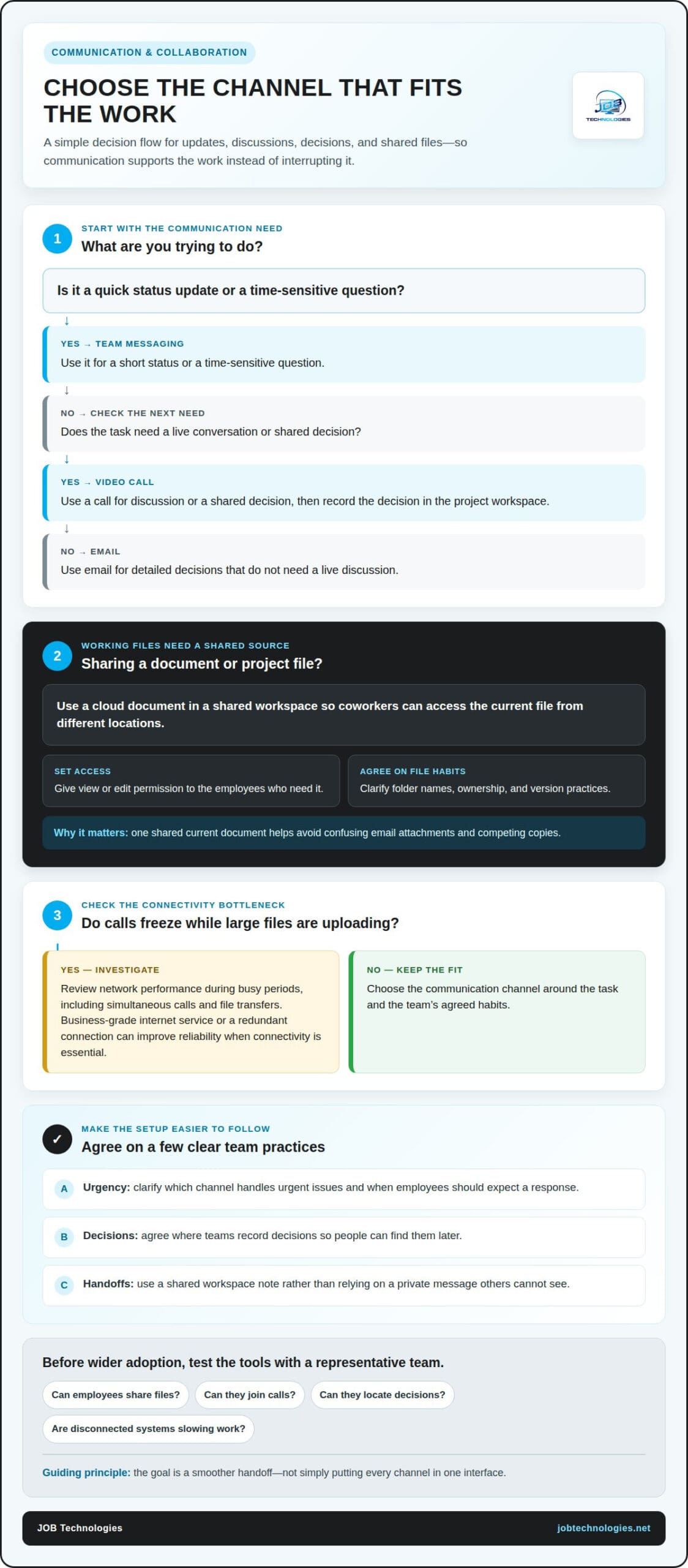
A shared communication setup helps employees choose the right channel for each task. Use email for detailed decisions, messaging for quick coordination, and video calls for conversations that need discussion. For example, a project team can post routine updates in a shared channel and reserve meetings for decisions or complex handoffs. Clear channel habits streamline communication without adding unnecessary interruptions.
Cloud file sharing gives coworkers access to current documents from different locations. A team can store a project brief in one shared workspace, then give relevant employees permission to view or edit it. This reduces confusion between email attachments named “final” and “final revised.” Agree on folder names, ownership, and version practices so remote work doesn’t create competing copies or unclear records.
Video calls and large file transfers rely on sufficient internet capacity. If calls freeze while staff upload design files, the connection may be a bottleneck. Review network performance during busy work periods, including simultaneous calls and transfers. A business-grade internet service or a redundant connection can improve reliability when connectivity is essential to daily operations.
Unified communications bring channels such as voice, messaging, and video into a coordinated system. For example, an employee can move a customer discussion from a phone call to a video meeting while keeping the relevant team informed. Cloud-based tools can also help colleagues in different locations respond in real time. The goal is a smoother handoff, not simply putting every channel in one interface.
- For a quick update: Use team messaging for a short status or a time-sensitive question.
- For a shared decision: Use a video call, then record the decision in the project workspace.
- For working files: Share a cloud document with access limited to the employees who need it.
Leaders can make collaboration tools more useful by setting expectations. Clarify which channel handles urgent issues, where teams record decisions, and when employees should expect a response. For instance, a support team can post a handoff note in its shared workspace instead of relying on a private message others can’t see. These practices make communication easier to follow across shifts and locations.
Choose tools around real workflows and test them with a representative team before wider adoption. Observe whether employees can share files, join calls, and locate decisions without switching between disconnected systems. If dropped calls or slow transfers repeatedly interrupt work, business network setup can help address the connectivity side of collaboration. A stable foundation lets communication tools support work instead of interrupting it.
3. Focus time, task completion, and output quality
Productivity isn’t measured by how many applications employees keep open. Organizations can assess work through focus time, task completion, and output quality. For example, a design team might track uninterrupted project work, completed milestones, and revisions needed before approval. Together, these measures show whether work is progressing efficiently and meeting expectations.
Protecting focus starts with identifying common interruptions. Review a typical workday and note whether social media, frequent messages, or overlapping meeting channels interrupt tasks that need concentration. Teams can agree on focused work blocks, then use messaging for brief updates and meetings for decisions. This reduces avoidable context switching without cutting off necessary collaboration.
Task completion data provides another perspective. A project management system can show which assignments are finished, overdue, or waiting for someone else. If approvals repeatedly delay a report, the process may need clearer ownership or a simpler review path. Interpret tracking in context: a high completion count doesn’t prove quality if work regularly comes back for corrections.
Assess output quality through practical indicators such as error rates, rework, customer feedback, or whether deliverables meet agreed specifications. A support team, for instance, might check whether a resolved issue stays resolved instead of counting calls alone. Pairing quality checks with completion data helps organizations avoid rewarding speed at the expense of reliable work.
Technology can support focus when configured around agreed work practices. Notification settings can separate urgent alerts from routine updates, while task boards make priorities visible without constant status meetings. For example, a team might reserve a shared channel for urgent operational issues and put ordinary project updates in its task system. Clear rules keep tools from becoming another source of distraction.
Compliance and audit readiness also depend on how work is documented. Audit logs can show actions taken in a system, access controls can limit who views or changes records, and process documentation can clarify how recurring tasks are completed. Record-retention practices help keep relevant information organized. Together, these technology-enabled controls make it easier to trace a decision or reconstruct a process.
Make these controls useful by connecting them to actual workflows. For example, document who approves a change, where the approval is recorded, and which employees can access supporting files. Review permissions when responsibilities change, and keep process instructions aligned with the current system. JOB Technologies’ Compliance Assistance helps organizations align technology practices and documentation with operational needs.
Review performance measures over time instead of judging a new workflow by one busy week. Compare focus patterns, completed tasks, and quality indicators before and after a change. If output rises but rework also increases, adjust the process or training. This balanced review helps distinguish genuine improvement from faster activity that creates extra work later.
5. Productivity metrics and performance data
Productivity data helps leaders decide whether a technology change improves actual work. Start with a business goal, such as shortening order processing or reducing repeated corrections. Then choose a measure that reflects that goal. If a new workflow is meant to speed up order handling, track processing time and completed orders alongside errors. Faster processing alone isn’t success if mistakes increase.
Use a balanced set of measures instead of relying on a single dashboard number. Task-based metrics can show completed assignments and overdue work. Time-tracking data can reveal where employees spend effort. Financial measures can show changes in operating costs or revenue, while customer measures can reflect satisfaction or issue resolution. Together, these views connect daily activity with business priorities.
Before adopting a tool, establish a baseline using the same process and definitions you’ll use afterward. For example, record how a team handles incoming requests, including waiting time, completion, and reopened issues. After making a change, compare equivalent work periods and account for differences in workload or request complexity. Consistent definitions make the comparison more useful than estimates or memory.
Operational data becomes more valuable when teams can access and analyze it. A shared dashboard can bring together project status, service requests, and delivery information. Microsoft Excel can help organize a focused dataset, while a business dashboard can surface trends across workflows. For a remote team, shared access lets employees and leaders review the same measures without relying on separate local files.
Keep measurement tied to decisions. If a report shows approvals are delaying projects, examine the approval steps before changing software. If customer issues take longer to resolve, review handoffs and the information available to staff. Each metric should answer a practical question, identify an owner, or guide a process adjustment. Collecting data without a clear use adds work without improving decisions.
- Task: Track completed work, overdue assignments, and reopened tasks.
- Time: Compare time spent on a defined workflow before and after a change.
- Quality: Monitor corrections, errors, or customer feedback alongside speed.
- Business outcome: Connect operational measures to customer or financial priorities.
Review results over time and decide whether the new approach is worth continuing, adjusting, or retiring. A tool that helps one team work efficiently may not fit another team’s process. For example, a competitive sales team might value response speed, while an operations group may prioritize accuracy and predictable completion. Use measures that reflect each team’s responsibilities, then revisit them as priorities change.
Good performance data supports informed technology choices, not surveillance for its own sake. Explain what a measure is intended to improve, who can see it, and how leaders will use the results. When employees understand the context, they can flag misleading data, such as tasks that appear overdue because another team hasn’t supplied required information. Their feedback helps keep decisions grounded in the work itself.
5. How can businesses identify productivity bottlenecks before choosing technology?
Start with a specific workflow, such as handling a customer order from receipt through delivery. Map each handoff, approval, and data-entry step, then note where work waits or repeats. A process map helps distinguish delays caused by unclear ownership from those caused by limited system capability. That difference matters: new software won’t fix a process without a clear decision-maker.
Talk with the employees who do the work, not just the managers who review results. Ask them to walk through a recent example, such as resolving a support request or preparing an invoice. Note where they re-enter information, search for files, wait for approval, or correct errors. These details reveal friction that a high-level workflow diagram may miss.
A dashboard can bring key measures together and help leaders spot emerging problems. Track the stages that matter to the chosen workflow, such as incoming requests, items awaiting approval, completed work, and returned tasks. Review the data with staff who understand the process. A growing queue at one stage can signal a bottleneck, while repeated returns may point to missing information or unclear instructions.
Use a consistent observation period and the same definitions when comparing workflow performance. For example, define when an order is “received,” when processing begins, and what counts as “complete.” Then compare similar work instead of mixing simple requests with complex cases. This makes patterns easier to interpret and reduces the risk of choosing technology based on an unusually busy period.
- Choose one workflow: Identify a recurring process tied to a business priority.
- Map its steps: Record handoffs, approvals, data entry, and waiting points.
- Gather examples: Ask employees to describe where work stalls or repeats.
- Review operational data: Use a dashboard to see where queues, delays, or corrections concentrate.
- Define the problem: State what needs to change before considering a tool.
Separate symptoms from root causes. A delayed customer response might stem from disconnected records, unclear responsibility, or insufficient staffing at a busy stage. Each cause suggests a different remedy. Document the evidence, affected step, and intended result, such as fewer duplicate entries or clearer ownership. This creates a practical basis for evaluating technology and its business case.
Once the bottleneck is clear, compare potential solutions against the workflow and the measure you intend to improve. A pilot can show whether the tool fits actual tasks, integrates with existing processes, and gives employees useful information. Keep the evaluation focused on the original problem, not the number of features. Get support identifying workflow bottlenecks before choosing technology.
JOB Technologies
JOB Technologies helps businesses address technology challenges that disrupt everyday work. If recurring IT issues, unreliable networks, or disconnected communication systems slow your team, its Managed IT Services and Network Installation & Management can support a more dependable operating environment. For organizations exploring automation, AI Implementation can help align AI tools with business workflows, while Phone Systems VoIP supports business communication needs.
Consider reaching out when you’ve identified a bottleneck but need help assessing the technology behind it, planning an implementation, or managing the systems your employees rely on. A clear picture of the workflow and desired outcome can help shape a practical conversation about next steps.
Contact JOB Technologies to discuss the productivity challenges your business is working to solve.
Make your next technology decision count
Lasting progress comes from making technology serve a defined business priority, then learning from its performance in daily work. Improving business productivity with technology doesn’t mean changing every system at once. It means choosing a practical next step, giving employees a clear way to use it, and refining the process as your needs evolve.
JOB Technologies can connect that next step to the systems your team relies on. Its Managed IT Services support ongoing technology needs, while Network Installation & Management addresses the network foundation. For businesses exploring AI in their workflows, AI Implementation can help bring that technology into the conversation. The right starting point depends on the challenge you’re trying to solve.
Share the workflow or technology concern you want to address, and start a conversation about a suitable path forward. Contact JOB Technologies to discuss your business needs. A considered next step can help your team move forward with greater clarity.
Frequently Asked Questions
How Can Technology Improve Productivity?
Technology can help employees act on information without waiting for another person or system. For example, a field technician can review a customer’s service history, record completed work, and send an update from a mobile device. This can reduce avoidable trips back to the office and help the next employee understand the job’s status. Improving business productivity with technology starts with finding where delayed information slows decisions.
How Has Technology Helped Small Businesses Grow?
Technology helps small businesses handle more work without increasing administrative effort at the same pace. A customer relationship management system, for example, can organize customer details and past interactions, helping a growing team maintain continuity as responsibilities shift. For businesses in Dubuque, Galena, East Dubuque, Dyersville, Farley, and Peosta, digital tools can also support coordination among employees at different locations.
What is business productivity?
Business productivity describes how well an organization turns its resources and employee effort into valuable results. A bakery, for example, could consider orders completed, product quality, ingredient waste, and labor together. Those factors offer a fuller picture than counting items produced alone. The right measure reflects the business’s purpose: a professional services firm may value accurate client work, while a distributor may focus on order fulfillment.
What technologies improve business productivity the most?
The most useful technology addresses a business’s specific work needs. Workflow software can coordinate approvals, analytics can help leaders understand performance, and cloud applications can make shared resources accessible across locations. Reliable IT infrastructure supports these tools in daily operations. A business handling frequent customer inquiries may benefit from organized customer records, while a team processing recurring forms may prioritize automation.
How much can automation and AI improve business productivity?
The productivity impact of automation and AI depends on how often a task occurs, how consistent its inputs are, and how much human review it still needs. Automating a predictable data transfer may save repeated manual effort. An AI tool used to draft responses may require staff review for accuracy and tone. Assess each workflow by examining time saved, errors, exceptions, and whether employees can use freed capacity productively.
How can businesses automate repetitive tasks and workflows?
Start by defining the event that triggers automation, the information it needs, and the action it should perform. For example, a completed expense form could notify the assigned approver. Decide how to handle incomplete submissions or unusual expenses, and assign someone to review exceptions. Test the workflow with representative cases before applying it broadly, then update it as business needs change.
How can cloud collaboration tools improve employee productivity?
Cloud collaboration tools help employees access shared work materials without relying on a colleague to forward the latest copy. For example, a purchasing team can maintain a shared supplier document that authorized staff update as details change. A clear record of decisions also helps new project members understand what has already been agreed. Set access permissions carefully so convenient sharing doesn’t expose information unnecessarily.
How can businesses measure the productivity impact of technology?
Measure both whether employees use a tool and whether the intended business outcome changes. For example, a company introducing digital expense submissions could track staff adoption, incomplete forms, and the time finance spends correcting submissions. If usage rises but corrections remain common, the workflow may need clearer instructions. Reviewing adoption and operating results helps leaders distinguish a tool that’s merely installed from one that supports better work.