

Manufacturing IT costs depend on operational complexity, not just headcount. For IT support for manufacturing companies in Dyersville, factors include the number of facilities, production systems to protect, data-management needs, and help desk coverage. Pricing is scoped to the operation and provided after a quote request.
It makes sense to want a clear picture of cost before planning for IT support, especially when downtime can affect production and coordination across locations. This guide explains what drives pricing and what manufacturing IT support can cover, including multi-facility data management, production-system protection, and 24×7 help desk support. You’ll also see how to assess the scope of support your operation needs and where JOB Technologies’ managed IT, networking, cybersecurity, and backup services fit into that picture.
Key Takeaways
- Compare support plans by what they cover, how monitoring and help desk work are handled, and which systems are included, not by one headline price alone.
- Manufacturing support may need to account for office, warehouse, and production areas, where connectivity and system interruptions can affect daily work.
- Map dependencies between ERP applications, robotics, networks, and business data to identify where support and protection matter most.
- Assess provider fit by looking at manufacturing experience, response processes, and how support coverage aligns with your operating schedule.
- Before moving to managed support, document your facilities, devices, applications, recurring issues, and operational priorities to clarify the scope you need.
24×7 Remote monitoring and help desk
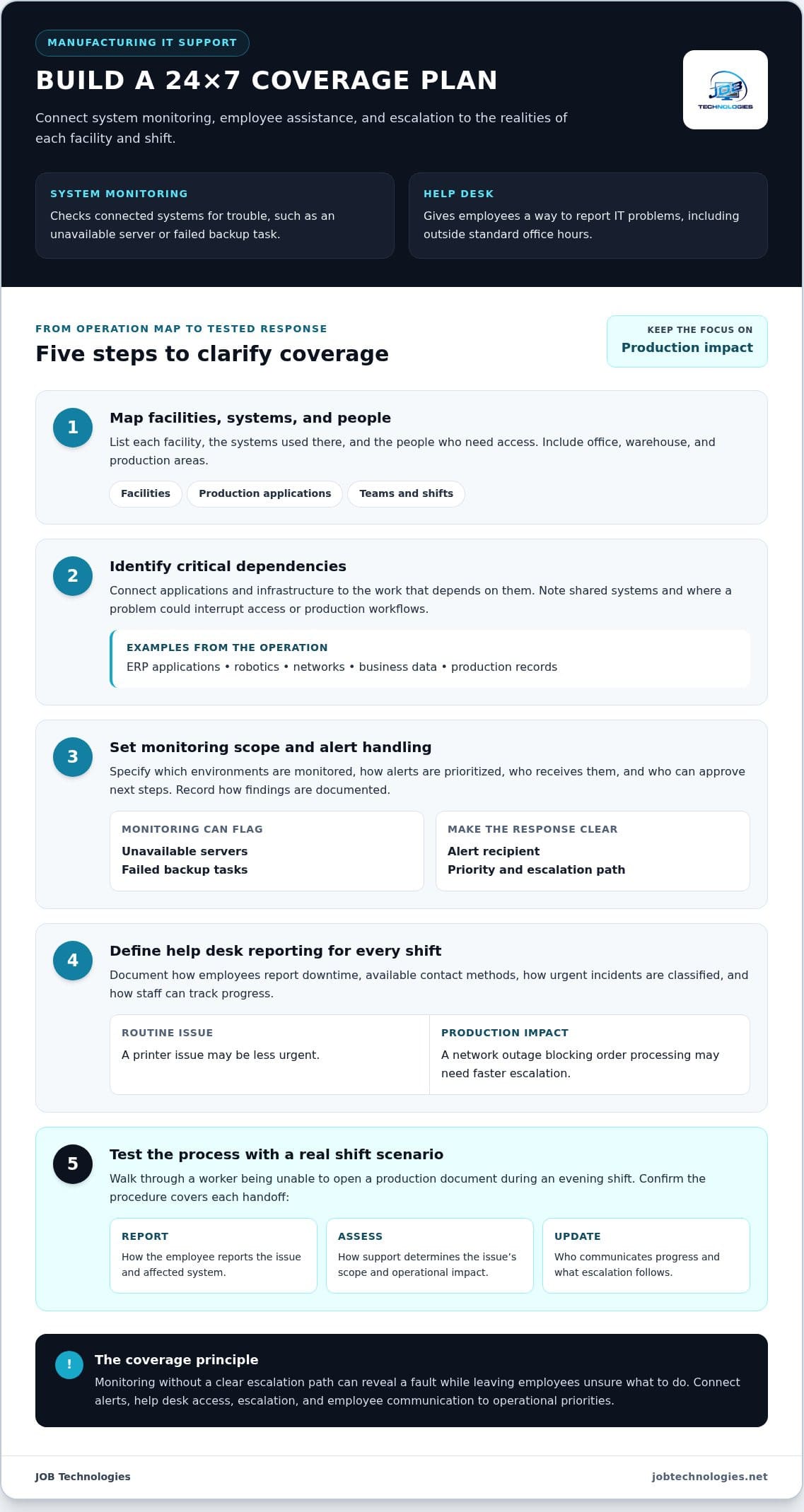
A 24×7 support model separates system monitoring from employee assistance, though the two functions can work together. For a Dyersville manufacturer, clarify which systems are watched, how alerts are handled, and what happens when production needs help outside normal business hours.
Remote System Monitoring
Remote monitoring checks connected systems for signs of trouble, such as an unavailable server or a failed backup task. A support team can review alerts and investigate remotely, helping identify issues before they disrupt access to production records or business applications. Clarify which environments are monitored, how alerts are prioritized, and how findings are documented.
Coverage matters as much as the word “monitoring.” A plant may depend on office servers, network equipment, and software used by production staff. Create a simple inventory of these dependencies, then identify which systems need prompt attention. Monitoring a device without a clear escalation path may reveal a fault but leave employees unsure what to do next.
Help Desk Assistance
A 24×7 help desk gives employees a way to report IT problems beyond standard office hours. That can matter when a night-shift worker cannot access a shared file or a supervisor loses access to a business application. Review the available contact methods, how urgent incidents are classified, and how staff can track progress.
Support coverage should distinguish routine questions from incidents that affect production. A printer issue, for example, may be less urgent than a network outage blocking order processing. Agree on how employees report the affected system, who explains the operational impact, and how issues are escalated. In Dyersville, JOB Technologies provides managed IT support for business technology and networks.
Before comparing plans, create a simple coverage map. List each facility, the systems used there, and the people who need access. Mark critical dependencies, such as an application shared by scheduling and production teams. This connects monitoring to business priorities instead of treating every alert as equally urgent.
- List production applications and the teams that rely on them.
- Identify who receives alerts and who can approve next steps.
- Record how staff report downtime during each shift.
Test the escalation process with a realistic scenario. Imagine a worker cannot open a production document during an evening shift. The procedure should explain how to report the issue, how support determines its scope, and who communicates updates. A clear workflow helps manufacturers shape support practices around actual operations.
For an operation with multiple facilities, compare coverage location by location. One site may rely on shared systems, while another has different network dependencies. Document those differences before setting monitoring priorities. This gives decision-makers a practical basis for assessing service scope across the operation.
Finally, review coverage alongside operational needs, not as a standalone technology feature. A useful plan connects alerts, help desk access, escalation, and employee communication. That structure can help protect competitive priorities by reducing confusion during an incident, while giving staff a defined route to report technical problems.
Manufacturing and industrial IT support
Manufacturing IT connects business applications with the people, equipment, and data that keep work moving. Support planning should account for how ERP systems, robotics, cybersecurity, and production workflows depend on one another.
Cybersecurity Support
Cybersecurity support helps protect business data and the systems connected to manufacturing operations. Missouri Enterprise/Missouri MEP identifies cybersecurity, ERP systems, and robotics as support and training needs for small and medium-sized manufacturers. Map which production and office systems exchange information, then prioritize access controls, backup practices, and incident response around those connections.
For example, if a production workstation can access shared business files, document that relationship and who needs access. Review how employees report suspicious activity and how the organization responds. A written process gives staff and technical support a shared set of steps to follow during a disruption.
Manufacturing Network Support
Network support covers connections used by computers, printers, business applications, and production teams. For manufacturers in Dyersville, JOB Technologies supports computers, networks, email, and other connected business technology. A network map can show whether a connection problem affects one office, a warehouse, or an entire facility.
Start by recording network equipment, connected areas, and the systems employees use at each location. Note recurring problems, such as a printer losing access to a shared system or a workstation failing to connect. This gives the support team a clearer path to investigate and resolve issues.
Manufacturing support also has a practical, on-site dimension. A technician’s work is mostly in an office, but may also take place in warehouse and manufacturing areas as needed. That distinction matters when a fault involves equipment or connectivity that remote troubleshooting cannot fully assess. Identify who can explain the production impact and guide a technician to the affected area.
Use a simple dependency review to make the organization’s needs visible:
- List the ERP applications used for scheduling, inventory, or production records.
- Record which work areas rely on robotics or connected workstations.
- Note network connections shared by office, warehouse, and manufacturing teams.
- Describe the business effect when each system becomes unavailable.
This inventory supports better prioritization. A brief outage affecting one office printer differs from a connection issue that prevents production staff from using a required application. Documenting the difference helps align monitoring, cybersecurity, and network support with operational efficiency and production needs.
Review the map whenever a facility changes its applications, equipment, or work processes. A new robotics workflow, for instance, may create additional dependencies between production systems and the network. If you’re mapping those connections, manufacturing network support is a useful next topic to explore.
What IT services do Dyersville manufacturers need, including cybersecurity, networking, and ERP support?
Manufacturers in Dyersville need IT support matched to the systems employees use across business and production work. Start by identifying essential applications, network connections, data, and security needs. That inventory shows where support should focus first.
Cybersecurity and ransomware protection help safeguard company information and connected systems. A practical review identifies who can access sensitive files, which devices connect to business networks, and how staff report suspicious activity. For example, an employee who receives an unusual attachment needs a clear reporting route. Access controls and response steps should reflect how each team works.
Backups and recovery planning are also important to protecting business data. Identify the files and applications needed to resume essential work, then document how staff access recovery support. Understand which records are backed up and how recovery procedures connect to day-to-day operations. These details turn a general security plan into actionable steps.
Network support covers connections used by computers, printers, software applications, and other systems. JOB Technologies supports business networks and connected technology for manufacturers in Dyersville. Map connections between office, warehouse, and production areas. If a shared application becomes unreachable, the map can help determine whether the issue affects one workstation or a wider network segment.
Network planning should account for how teams exchange information. Production staff, for example, may need access to shared records maintained by office staff. Record which applications and work areas depend on each connection. This gives support teams useful troubleshooting context and helps prioritize network installation or management according to operational needs.
ERP support deserves specific attention because these applications can connect business processes, inventory information, scheduling, and production records. Missouri Enterprise/Missouri MEP identifies ERP systems as a support and training need for small and medium-sized manufacturers. List the ERP tasks employees perform, the departments involved, and the problems that interrupt those tasks. This clarifies what support and staff guidance should address.
To organize priorities, group IT needs by business impact:
- Security: identify sensitive data, user access, and incident reporting steps.
- Connectivity: map the systems and work areas that rely on shared networks.
- ERP: document essential workflows and the teams using each application.
- Recovery: identify critical records and the steps employees follow after disruption.
Review the list with employees who use the systems daily. A production supervisor can describe workflow interruptions, while office staff can explain ERP or printer dependencies. Combining these examples helps define managed IT priorities without treating every device or application as equally urgent.
How do Dyersville IT providers compare on manufacturing experience, response times, and service coverage?
Compare support by how well it fits manufacturing workflows, not by broad claims alone. A provider should understand how production, office, and warehouse systems depend on each other. Use a consistent checklist to compare experience, incident handling, coverage, and communication. This makes differences easier to assess against your facility’s actual operating needs.
Assess Manufacturing Experience
Discuss manufacturing-specific systems, such as ERP applications, robotics, and production networks. A useful support plan connects technical issues to work processes. For example, a network problem affecting an ERP workflow may disrupt access to production records. Establish how support will investigate the issue, identify affected teams, and communicate progress.
Local job requirements offer context for the technical work involved. In Dyersville, an entry-level IT support technician position requires an associate’s degree or two years of related experience and/or training, or an equivalent combination of education and experience. That requirement describes a role, not a provider’s manufacturing expertise. Evaluate relevant experience by asking how support handles systems and work areas like yours.
Compare Response Processes
Response time means more than a quick acknowledgement. Compare how incidents are classified, who receives urgent reports, and how updates reach your staff. Consider two examples: one employee cannot print, or a network issue affects a production application. The response process should distinguish their operational impact and explain how each issue moves toward resolution.
Look for a defined path from report to follow-up. Establish how employees open a request, what details to include, and how they learn an issue’s status. An incident record can capture the affected location, system, symptoms, and operational effect. These details help support teams investigate efficiently and give managers a clearer view of recurring problems.
Check Service Coverage
Match coverage to your work schedule and facility layout. Define how support handles reports outside regular office hours and which situations are escalated. For a multi-facility operation, consider whether employees at each location use the same reporting process and receive consistent guidance.
Before comparing proposals, document your priorities on one page. Include critical applications, production shifts, facilities, and the people responsible for reporting incidents. Compare each support model against those needs, including monitoring, help desk access, and escalation. A managed IT arrangement should make its scope and process clear so you can judge whether coverage fits your operation.
- Compare manufacturing workflows and system familiarity.
- Review incident classification, communication, and escalation.
- Match coverage to operating schedules and facilities.
- Use the same operational checklist for each assessment.
How can a Dyersville manufacturer assess its IT needs and transition to a managed service provider?
A structured assessment helps a manufacturer define what support must cover before changing providers. Start with an inventory of facilities, users, applications, devices, and recurring issues. Connect each item to the work it supports, such as production scheduling, order processing, or inventory records. This creates a practical scope for comparing managed support.
Include input from employees who use systems throughout the workday. A production supervisor may identify a workflow interruption that office staff never see. An administrator may explain how a shared application supports purchasing or customer records. These examples help distinguish everyday requests from technology issues affecting several departments or locations.
Use this sequence to prepare for a transition:
- Inventory the environment. Record each facility, network connection, business application, workstation, printer, and production system.
- Document operational priorities. Note which systems support production, scheduling, inventory, communication, and essential business records.
- Identify recurring problems. Describe the issue, affected team, location, and business impact, such as delays accessing a shared file.
- Set support expectations. Define how employees report problems, how urgent incidents are escalated, and who receives status updates.
- Plan the handoff. Organize system documentation, account access, backup details, vendor contacts, and open issue records for transition.
During planning, group systems by dependency. If production staff rely on an ERP application connected to shared network storage, for example, document both systems together. Identify the business owner for each application and the employees who can explain its daily use. Clear ownership reduces confusion and gives the support team useful operational context.
Agree on a transition sequence that protects routine work. Begin with documentation and access review, then map support responsibilities and open issues. Schedule configuration changes around production priorities, and explain the reporting process to employees before the handoff. Supervisors should know where staff submit requests, while management should understand how unresolved issues are tracked.
After transition, review service activity against the original inventory. Compare reported issues with documented priorities, and update records when equipment, applications, or workflows change. If a new production application is introduced, add its dependencies and users. Ongoing review keeps managed support aligned with the manufacturer’s operations.
Use your inventory and transition priorities to shape a focused next step. Plan your managed IT transition around the systems and workflows your Dyersville facility depends on.
JOB Technologies: Managed IT Services
JOB Technologies provides Managed IT Services for manufacturers seeking coordinated support across business technology. Network Installation & Management can address infrastructure needs, while AI Implementation and Phone Systems VoIP can support modernization and business communications when they fit your plans.
Consider this next step when recurring IT demands distract from production or when you need a clearer view of your systems and support priorities. Sharing your facilities, applications, recurring issues, and operational goals can frame a useful discussion about the right scope.
To discuss your manufacturing IT needs, contact JOB Technologies.
Make Your Next IT Decision With Confidence
Your next step is to turn operational priorities into a support scope your team can evaluate. Start with the systems and workflows that matter most, then decide which improvements belong in the current plan and which can wait. This keeps the discussion focused on business needs rather than a generic package.
For manufacturers considering IT support for manufacturing companies in Dyersville, start with your goals. JOB Technologies offers Managed IT Services and Network Installation & Management, with AI Implementation available to support your plans. Share your priorities to discuss where support fits and how technology can serve your operation.
Ready to discuss your next step? Contact JOB Technologies to talk through your manufacturing IT needs. A clear plan can help your team move forward with greater confidence.
Frequently Asked Questions
How does pricing work?
Pricing for IT support for manufacturing companies in Dyersville is scoped around the operation’s needs and provided after a quote request. Cost factors include facilities, users, network complexity, applications, security needs, backup requirements, monitoring, and help desk scope. A manufacturer using specialized production software may need a different scope from an office-only business. An inventory helps define the requirements.
What is manufacturing IT support?
Manufacturing IT support helps keep technology for business and production activities working together. It can cover workplace computers, printers, networks, software, and the systems employees use to coordinate work. An ERP application, for example, may connect purchasing records with production schedules. Support needs can also involve robotics, cybersecurity, and staff guidance. The right scope reflects how people use technology across office and production tasks.
Which IT support companies serve manufacturing businesses in Dyersville, Iowa?
JOB Technologies serves businesses in Dyersville, offering Managed IT Services and Network Installation & Management. Manufacturers can use these services for coordinated support with business technology and networks. The company also serves Dubuque, Galena, East Dubuque, Farley, and Peosta. To assess fit, define the systems and workflows your operation depends on, then compare the support scope with those priorities.
Which local IT providers offer 24/7 help desk and on-site support in Dyersville?
JOB Technologies offers Managed IT Services in Dyersville. Help desk access and on-site support are distinct parts of service coverage, so define the support your operation needs across office, warehouse, and manufacturing areas. Manufacturers should also specify how support handles reports outside regular business hours and which issues require escalation.
What are typical managed IT support prices for small and midsize manufacturers in Iowa?
There is no single price that applies to every small or midsize manufacturer. Pricing depends on the case and is provided after a quote request. Important factors include facilities, network and application complexity, cybersecurity needs, backup requirements, and help desk scope. Before requesting a scoped estimate, document your systems, users, production dependencies, and recurring support needs.
What should manufacturers check before choosing an IT support provider in Dyersville?
When evaluating IT support for manufacturing companies in Dyersville, check whether the proposed scope matches production priorities and internal processes. Review how the support team documents system changes, coordinates planned maintenance, and communicates with department leads. A maintenance window, for example, should account for production scheduling and employees who rely on shared applications. Also clarify how new staff receive access and how unresolved issues are reported.
What IT support risks should manufacturers address, including ransomware, downtime, and backup failures?
Manufacturers should address ransomware exposure, disruptions to essential systems, and whether backups can support recovery. Identify critical production and business records, who can access them, and how employees report suspicious messages. A practical backup review checks whether important files are included and periodically tests restoration. Document response steps so staff know who coordinates decisions if systems become unavailable or data appears compromised.