
Your firewall may be in place, but is anyone responsible for keeping its settings aligned with how your business works? Unclear ownership can leave you unsure whether network access is being managed or what happens if a cyber incident disrupts operations. Managed firewall services for SMBs bring ongoing oversight to this important layer of security, without asking a small team to handle every technical detail alone.
A firewall helps control traffic moving into and out of your network. Managing one involves more than installing a device: its settings need to fit your systems, users, and business needs. A firewall is not a substitute for endpoint security, employee awareness, or reliable backups. These safeguards work best as part of a coordinated plan.
This guide explains managed firewall services in plain language and offers practical criteria for assessing service scope, communication, and fit with your operations. It also shows how firewall oversight connects with ransomware protection, backup and recovery, and compliance assistance. For businesses in Dubuque, Galena, East Dubuque, Dyersville, Farley, and Peosta, the goal is a locally supported security approach that protects the network while helping your team stay focused on its work.
Key Takeaways
- Understand how a managed firewall filters network traffic and where it fits within your wider security plan.
- Assess managed firewall services for SMBs by looking at responsibility, visibility, coordination, and fit with business needs.
- Distinguish the firewall device or license from the ongoing work of managing its security settings.
- Prepare for a useful security discussion by listing your locations, internet connections, network devices, and critical applications.
- Connect firewall oversight with ransomware resilience, backups, and compliance through managed IT and cybersecurity support in the Dubuque region.
What Managed Firewall Services for SMBs Cover, and What They Do Not
A managed firewall service combines a network firewall with professional oversight of its security settings and role in the business network. The firewall applies rules to traffic moving in and out, allowing permitted connections and blocking traffic that does not meet those rules. This basic function is central to understanding a firewall (computing), but it is only one part of a wider security plan.
For a small business, the practical value is clear responsibility. Instead of installing a firewall and then leaving it unattended, management connects its settings to how employees, locations, and business systems use the network.
What does a managed firewall service typically involve?
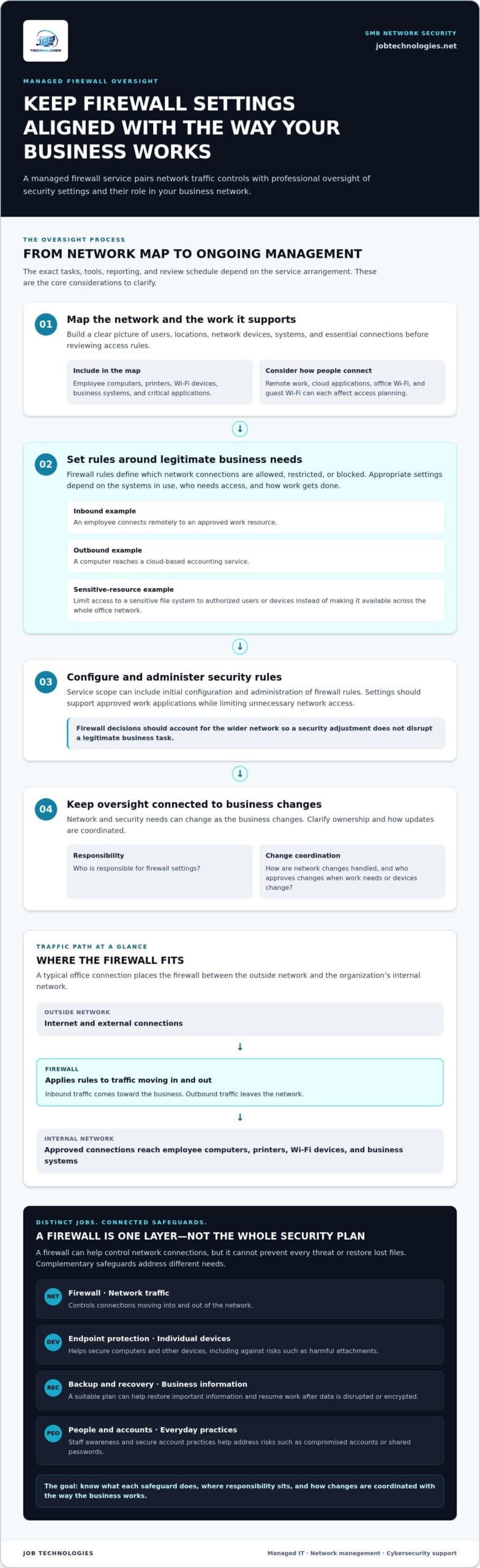
Service scope can include initial configuration, administration of security rules, and ongoing oversight. A business, for example, may need rules that support approved work applications while limiting unnecessary network access. As the business changes, its network and security needs can change too. Firewall decisions should account for the wider network so that a security adjustment does not disrupt a legitimate business task.
The exact tasks, tools, reporting, and review schedule depend on the service arrangement. When assessing a service, identify who is responsible for firewall settings and how network changes are handled. JOB Technologies provides managed firewall oversight as part of its managed IT, network management, and cybersecurity support for SMBs.
Firewall management controls network traffic. Endpoint protection helps secure individual devices, while data backup supports recovery of business information.
What a firewall cannot do on its own
A firewall can help control network connections, but it cannot prevent every threat. An employee could open a harmful attachment, use a compromised account, or share a password. Those risks call for complementary safeguards, including endpoint protection on computers and other devices, staff awareness, and secure account practices. No single network control can replace that combination.
Backups serve a different purpose. If an attacker gets through and disrupts or encrypts files, a suitable backup and recovery plan can help the business restore important information and resume work. A firewall may reduce exposure to certain unwanted traffic, but it is not a copy of your data and cannot restore lost files.
Think of these protections as connected layers with distinct jobs: network controls manage traffic, endpoint safeguards protect devices, and backup and recovery support continuity after data loss. This makes it easier to identify gaps instead of assuming that installing a firewall completes the security plan. When reviewing your safeguards, list which systems hold important business information, how that information is backed up, and who is responsible for recovery planning.
How Managed Firewall Protection Fits Into an SMB Network
Picture a typical office connection: internet service enters the building, traffic passes through the firewall, and approved connections reach employee computers, printers, Wi-Fi devices, and business systems. The firewall sits between the outside network and the organization’s internal network, applying rules to help control what can pass. The layout varies, but mapping this path helps show where protection is needed and which people and systems depend on each connection.
How firewall rules control network traffic
Rules define which connections are allowed, restricted, or blocked. Inbound traffic is data coming toward the business, such as an employee connecting remotely to an approved work resource. Outbound traffic leaves the network, such as a computer reaching a cloud-based accounting service. A rule might limit access to a sensitive file system to authorized users or devices instead of making it available across the whole office network.
There is no single set of rules that fits every business. Appropriate settings depend on the systems in use, who needs access, and how work gets done. Firewall decisions should account for legitimate workflows as well as potential risks, and fit the business network they are meant to protect.
Remote work, cloud applications, and office Wi-Fi all affect that planning. Employees working from home may connect differently from staff at the office, while cloud services may be accessed directly over the internet. Guest Wi-Fi should also be considered separately from access to business resources. A clear network picture helps prevent a security change from disrupting an essential task or leaving an access path broader than the business intends.
Before setting or reviewing policies, clarify the questions they need to answer:
- Which business systems should be reachable from outside the office?
- Who needs access to sensitive resources, and from which devices or locations?
- Which cloud services and other external connections are essential for daily work?
- How should guest Wi-Fi and employee devices relate to business systems?
- Who approves and coordinates changes when work needs or network devices change?
How firewalls relate to ransomware and business continuity
A firewall can help reduce certain network risks, but it cannot guarantee that ransomware or another threat will not reach a business. An employee’s device, a compromised account, or an unsafe action may create risks that network controls alone cannot address. That is why firewall planning belongs alongside endpoint protection, secure account access, staff awareness, and a clear incident plan. The NIST Cybersecurity Framework offers a broader structure for thinking about cybersecurity practices and risk.
If an incident disrupts access to files or systems, backups and recovery planning can help the business work toward restoring operations. JOB Technologies connects network protection with managed IT, cybersecurity, data backup, and recovery support. When planning recovery, identify which information and systems are critical, who needs access to them, and what the business would need to resume essential work.
How SMBs Can Evaluate Managed Firewall Services
A firewall device or license is only one part of the picture. The ongoing work involves understanding the network, managing its security settings, and coordinating changes as the business evolves. When comparing managed firewall services for SMBs, focus on what the service covers and how its responsibilities fit your team, not just on the equipment involved.
Use this comparison framework to make the service scope easier to assess:
Does the scope identify who owns firewall configuration, approves changes, and handles policy updates?
Does it explain what information about firewall activity or settings you will receive, and how you can access it?
Does it describe how firewall work connects with network changes, business applications, and the people responsible for IT decisions?
Does the approach account for your locations, remote access, critical systems, and available internal expertise?
Service fit depends on your network’s complexity and your team’s capacity to oversee it. A single office with a small number of systems may need a different working arrangement from a business with several locations, remote employees, and specialized applications.
Which responsibilities should the service scope explain?
Look for clear ownership of configuration and a defined way to manage requested changes. The scope should explain how policy updates are submitted, reviewed, and communicated, along with who makes decisions if a change could affect access to a business system. It should also document communication and escalation responsibilities, so your team knows where to bring a concern and who coordinates next steps.
Tasks, reporting, review schedules, and response commitments vary by service agreement, so define them rather than assuming they are included. JOB Technologies provides managed IT, network management, and cybersecurity support for SMBs, with firewall oversight considered as part of the wider technology environment rather than as an isolated device.
How to match firewall oversight to your business
Start with your organization’s actual operating needs. Consider whether internal IT staff can manage settings and coordinate changes, how many locations connect to the network, whether employees work remotely, and which systems are essential to daily operations. These factors help clarify how much outside coordination makes sense and where shared responsibilities need to be especially clear.
Then assess whether firewall oversight works alongside the rest of your security and IT support. A network change, for example, may affect employee access, endpoint safeguards, or business applications. Aligning these decisions through managed IT and cybersecurity support can help reduce gaps between separate responsibilities. JOB Technologies connects network management with broader cybersecurity and ransomware protection.
Before settling on a service scope, document the responsibilities, communication channels, change process, and escalation path in language your leadership and technical contacts can both use. That shared understanding makes it easier to review the arrangement as your network or business priorities change.
A Practical Readiness Plan for Managed Firewall Services
A little preparation can make firewall planning more useful and reduce confusion during a handoff. You do not need a perfect network diagram or a technical team to get started. A current, plain-language picture of your locations, systems, and responsibilities gives everyone a clearer basis for discussing managed firewall services for SMBs.
Prepare a useful network and access inventory
Start with what your team knows today. Gather existing network diagrams, device lists, and notes about who handles changes. If records are missing or outdated, mark what needs review instead of guessing. Keep passwords, private keys, and other sensitive credentials out of general inventory documents; manage them through appropriate secure processes.
A practical inventory can include:
- Business locations and the internet connections serving each one
- Network devices, such as firewalls, switches, wireless access points, and business computers
- Critical cloud and on-premises applications, including the teams that rely on them
- Remote work arrangements and the business resources employees need to reach
- Current points of contact for network changes and the location of existing documentation
Even a simple diagram showing the connection from internet service to network devices and business systems can make dependencies easier to spot. Access records help clarify which employees or roles need particular resources. Together, these materials give your support team useful context and help prevent important connections from being overlooked.
Coordinate firewall work with broader IT support
Firewall responsibilities should fit alongside network management, endpoint security, backup and recovery, and incident preparation. Identify who maintains each area and how a change in one could affect the others. For example, a revised network policy may affect access to a business application, while recovery planning should account for the systems the business needs to resume essential work.
Note any business continuity priorities and compliance needs that shape how information and systems are protected. Consider which requirements affect access, data handling, or records, and include them when reviewing the wider security plan instead of treating the firewall as a standalone safeguard.
Use this readiness sequence to turn your notes into a workable plan:
- Document the network. List locations, internet connections, network devices, and critical applications.
- Review access. Note who needs which business resources, including remote employees and teams using cloud services.
- Locate current records. Gather diagrams, device details, and change history, and identify gaps that need follow-up.
- Map responsibilities. Record who currently approves network changes and who supports security, backups, and recovery.
- Agree on communication. Define how proposed changes, concerns, and escalation will be coordinated and documented.
With that foundation, your team can have a focused conversation about practical security priorities and how network oversight fits your operations. JOB Technologies provides managed IT and cybersecurity support that can connect network management with ransomware protection, backup, and recovery needs.
Managed Firewall Services for SMBs in the Dubuque Region
For a small business, network security is closely tied to daily operations. Firewall planning should account for how employees work, which systems they rely on, and how the business would respond if access were disrupted. JOB Technologies provides managed IT, network management, cybersecurity, and ransomware protection for SMBs, bringing firewall oversight into a broader approach to business technology.
That local perspective matters across Dubuque, Galena, East Dubuque, Dyersville, Farley, and Peosta. Each organization has its own network, work patterns, and priorities. A practical security plan starts with those realities rather than a one-size-fits-all checklist.
What a local SMB should discuss when planning firewall management
Start with the way your business operates: how locations connect, what employees need to access remotely, and which applications or systems are essential. Share what you know about the network layout and where responsibilities currently sit. These details help frame firewall management around the work the network needs to support and show how it fits with your wider managed IT and cybersecurity priorities.
It is also useful to talk through continuity concerns. Which systems would need attention first after a disruption? What information must be recoverable? Are there compliance needs that affect how your business handles data or access? Clear answers help align network protection with operational priorities and guide an approach suited to your organization.
How JOB Technologies supports a broader security plan
JOB Technologies provides managed IT services, network management, cybersecurity and ransomware protection, data backup and recovery, and compliance assistance for small and medium-sized businesses. These services complement firewall oversight: network security helps protect connections, while backup and recovery planning supports the ability to restore important information after an incident. Compliance assistance brings relevant business requirements into the planning process.
For a more complete continuity plan, consider how business data backup and recovery supports the systems your team depends on. A firewall and backups serve different purposes, but planning them together helps clarify how the business protects network access and prepares for recovery.
JOB Technologies brings more than 20 years of company experience to its work with SMBs across the Dubuque region. The aim is a practical relationship that connects network decisions to the way your organization works, not a technical plan separate from day-to-day operations.
If your business is reviewing firewall oversight or wants to connect network protection with managed IT, ransomware resilience, and recovery planning, JOB Technologies can help bring those needs together.
Make Your Next Security Decision With Confidence
A useful next step does not have to be a major technology project. Start by choosing one question your team needs answered: who owns firewall changes, how remote access should work, or which business systems need the clearest protection? A focused discussion can turn uncertainty into priorities and help you decide what to address first.
Approach managed firewall services for SMBs as part of an ongoing business plan. A suitable arrangement should make responsibilities easier to understand and support the way your organization operates, while leaving room to adapt as needs change. JOB Technologies brings more than 20 years of company experience to supporting local businesses with IT and security needs.
Talk with JOB Technologies about your business IT and security needs and take a practical step toward a network plan your team can move forward with confidently.
Frequently Asked Questions
Is a firewall enough to protect a small business?
No. A firewall is one layer of protection, not a complete security plan. A small business also needs endpoint security for individual devices, secure account access, practical staff habits, and backups that can be recovered if data is lost or encrypted. For example, an employee who clicks a malicious attachment creates a risk a network firewall alone may not resolve. The right mix depends on your network, systems, and risk profile.
Can a managed firewall stop ransomware?
No firewall service can guarantee ransomware prevention. Firewall controls can restrict some unwanted connections, but an attack may start with stolen credentials, a deceptive email, or malware on an employee’s device. A layered approach combines network safeguards with cybersecurity support, employee awareness, and backup and recovery planning. Businesses should also know who coordinates decisions during an incident, so technical response and operational priorities are handled together.
How often should a business firewall be reviewed?
There is no single review schedule that suits every business. The cadence should reflect your network, security process, and how often the organization changes. Revisit policies when you add a system, change user roles, open a location, or alter remote access needs. Policy review is different from routine device or software maintenance, which follows its own plan. Recording why a rule exists can make future reviews more useful.
What happens if a firewall rule blocks a business application?
First, identify which application is affected, which users experience the problem, and how they connect to it. Note whether the issue affects everyone or only remote staff, and whether it began after a network change. That information helps narrow down the cause before changing a rule. Document any adjustment and assess both its effect on business operations and whether it creates access beyond what the application requires.
Does a managed firewall protect employees working remotely?
Coverage depends on where an employee’s internet traffic flows and how the remote connection is set up. A firewall at the office may not govern every connection made by a device at home or while traveling. Endpoint protection helps address risks on the device itself, while secure remote access and account safeguards add other layers. Map remote work practices and the systems employees need before deciding how the controls fit together.
Do small businesses need both a firewall and endpoint protection?
These controls serve different purposes. A firewall helps manage network traffic, while endpoint protection focuses on computers and other devices where employees work. A device may encounter a threat through email even if the business network has traffic controls. Coordinating both with secure account practices and data recovery planning gives a business a more complete approach. The specific combination should reflect its systems, work patterns, and risks.
What information should an SMB prepare before discussing managed firewall services?
Gather a basic inventory of locations, internet connections, network devices, critical applications, and current support responsibilities. Existing network diagrams or notes about recent changes can also help frame the discussion around real operations. Do not include passwords, private keys, or other sensitive credentials in general documents; share them only through an appropriate secure process. For a business in Dubuque, Galena, East Dubuque, Dyersville, Farley, or Peosta, this preparation makes a conversation about managed firewall services for SMBs more specific and productive.