

What if the sign-in change meant to protect your business became the reason an employee couldn’t get into an account? MFA adds a step, and losing a phone or security key can cause a lockout if recovery hasn’t been planned. A practical multi-factor authentication setup for business accounts balances stronger protection with dependable access, so employees know what to expect and what to do if something goes wrong.
This guide covers how to choose verification methods, set clear policies, and roll out enrollment in manageable stages. You’ll also learn how to plan recovery safeguards, handle older systems, and review MFA over time. The goal is to protect important accounts without confusing your team or making everyday work harder. Secure defaults, usable recovery, and ongoing oversight all belong in the plan from the start.
Key Takeaways
- Understand how distinct verification factors strengthen sign-in security, and why MFA is one layer in a broader cybersecurity approach.
- Compare authenticator apps, security keys, passkeys, and text-message codes to match protection with employee needs and account risk.
- Plan enrollment and recovery separately so staff can get started smoothly and regain access through a controlled process if a device is lost.
- Use a practical multi-factor authentication setup for business accounts by inventorying access, setting priorities, testing policies, and rolling out enforcement in stages.
- Keep MFA dependable by revisiting access after staff or role changes, reviewing exceptions, and including authentication in ongoing security oversight.
Why business MFA matters, and what it does at sign-in
Multi-factor authentication (MFA) requires someone to prove their identity with at least two different types of evidence before access is granted. For example, an employee enters a password, then approves a sign-in using a registered device. If a password is stolen or reused, that second factor adds another check an attacker must get past. MFA does not make an account invulnerable, but it reduces reliance on a password alone. A clear Multi-factor authentication explanation can help staff understand why that additional proof matters.
For a practical multi-factor authentication setup for business, distinguish authentication factors from sign-in steps. A longer process is not automatically MFA: the evidence must come from different factor categories.
What counts as a multi-factor authentication factor?
Authentication factors generally fall into three categories: something you know, something you have, and something you are. A password or PIN is something you know; a registered phone or security key is something you have; a fingerprint or face scan is something you are. MFA combines at least two categories, rather than asking for two pieces of evidence from just one.
- Knowledge: a password or PIN.
- Possession: a prompt on a registered device or a security key.
- Inherence: a fingerprint or facial recognition, where supported.
Two passwords are still two knowledge checks, not two distinct factors. Similarly, single sign-on (SSO) is not MFA: SSO lets a user access multiple connected applications through one sign-in, while MFA adds identity checks. They can work together, but they solve different problems.
Which business accounts should MFA cover first?
When building an account inventory, prioritize accounts that could expose sensitive information, change security settings, or provide a path into other systems. Start with business email, administrator accounts, remote access, and financial systems. Then note which identity providers manage sign-ins and which applications connect to them.
- Email: often holds password-reset messages and links to business services.
- Administrator accounts: can change access, settings, or security controls.
- Remote access: connects users to business systems from outside the workplace.
- Financial systems: may provide access to payment, banking, or payroll functions.
A compromised email account can become a stepping stone: an attacker may read confidential conversations, impersonate an employee, or attempt password resets for connected services. That is why email protection matters beyond the mailbox itself. Include shared accounts, service accounts, and less frequently used applications in the inventory, so overlooked sign-ins do not become gaps in the policy.
Before setting rules, map each application to its identity provider and record who owns it, who uses it, and how access is granted. This groundwork helps you apply MFA consistently and identify systems that need a different implementation approach. MFA is one layer of a broader managed cybersecurity program, alongside access oversight and other safeguards that support business continuity.
How business MFA works across methods, devices, and sign-in policies
The right method depends on the account, the devices employees use, and the sign-in controls supported by your identity provider. An authenticator app, security key, passkey, or text message can add a check beyond a password, but each works differently. A practical multi-factor authentication setup for business weighs security alongside access, usability, and how policies can be managed across applications.
How do authenticator apps, security keys, and passkeys differ?
Authenticator apps may generate time-based codes that employees enter at sign-in or send approval prompts they review and accept. These methods work differently: a code is entered manually, while a prompt asks the user to approve a request. Security keys connect or tap to verify a sign-in. Passkeys use cryptographic credentials on a device or security key, often with a PIN or biometric check. Properly implemented security keys and passkeys can offer phishing-resistant sign-in, but support and configuration matter.
| Method | How it works | Practical considerations |
|---|---|---|
| Authenticator app | Provides a time-based code or an approval prompt. | Convenient for employees with compatible phones; prompts need careful review to avoid approving an unexpected request. |
| Hardware security key | Uses a physical key to verify sign-in. | Can support phishing-resistant authentication; users need access to the key and compatible systems. |
| Passkey | Uses a device-held or synced credential, often unlocked with a PIN or biometric. | Can provide phishing-resistant sign-in; device compatibility and account recovery arrangements affect deployment. |
| Text-message code | Sends a one-time code to a phone number. | Familiar and accessible, but depends on mobile service and is more exposed to risks such as SIM swapping. |
No method is automatically the best fit for every team. Compare the options your identity provider supports, how they work across your business applications, and whether its controls allow different requirements for different users or sign-in situations. Test the methods with the devices and applications employees actually use before making one the basis of your rollout.
How should a small business choose its MFA policy?
Set requirements according to the sensitivity of each account and the consequences of unauthorized access. Privileged accounts and systems holding sensitive business or financial information warrant stronger methods where supported. Then consider whether employees use company or personal phones, share workstations, work remotely, or need accessible alternatives. A policy that ignores daily workflows can lead to workarounds instead of reliable protection.
For example, encourage stronger, phishing-resistant options for administrators while providing a workable approved method for other staff. Define exceptions, who can authorize them, and how they will be reviewed. Test the policy with a small group across the devices and applications employees use before expanding it. Managed IT support can help align security changes with business workflows; managed IT support for security planning can be part of that broader effort.
Will business MFA disrupt work? Plan for enrollment and account recovery
MFA adds a sign-in step, but it does not have to derail the workday. Disruption is more likely when employees do not know how to enroll, which device to use, or where to turn if verification fails. Build enrollment and recovery into the rollout plan instead of treating them as last-minute support issues.
Keep routine enrollment separate from emergency recovery. Enrollment is the planned process for registering an approved authenticator. Recovery is the controlled process for restoring access after a phone or security key is lost, replaced, or unavailable. Both need clear instructions, but recovery also needs identity checks to prevent someone from impersonating an employee and taking over an account.
What happens if an employee loses a phone or security key?
Use a documented recovery route that verifies the person before an administrator resets MFA or registers a replacement device. For example, a help desk should follow an established identity-checking process rather than relying only on a request from an unfamiliar phone number or email address. Simple security questions or information known to coworkers are not strong proof of identity.
Where supported, provide more than one controlled recovery option, such as a separately registered backup authenticator or a recovery code stored securely. Avoid making one employee’s personal phone the only route into an administrator account or business system. Approved backup methods help prevent a lost device from stopping essential work, while limiting who can authorize a reset keeps recovery from becoming an easy way around MFA.
Backup methods reduce lockout risk only when they’re registered, protected, and covered by a clear recovery process. Test the process before rollout, and make sure the people responsible for access know how to use it without weakening identity checks.
How can a business reduce MFA rollout friction?
Employees are more likely to complete enrollment smoothly when they understand what is changing and why. Tell them which sign-ins will require MFA, which approved methods they can use, how to enroll, and where to get help. Keep instructions concise and specific to the devices and applications staff use. Explain that an unexpected approval request should be denied and reported.
Start with a small pilot group that reflects different roles, devices, and work patterns. Ask participants to test enrollment, routine sign-ins, and the recovery route. Use what you learn to fix confusing instructions or access problems before expanding the rollout. Then schedule enrollment around operational needs, giving employees a defined window and support contact rather than switching on enforcement without warning.
- Assign an owner for the rollout and for approving any exceptions.
- Record why an exception is needed, which accounts it affects, and when it will be reviewed.
- Plan access for employees who share workstations or do not use a personal phone for work.
- Confirm that recovery procedures work for administrators as well as everyday users.
A thoughtful multi-factor authentication setup for business makes secure access part of normal operations. Clear communication, a measured pilot, and carefully controlled recovery give employees a predictable path through the change without leaving the business dependent on one device or one person.
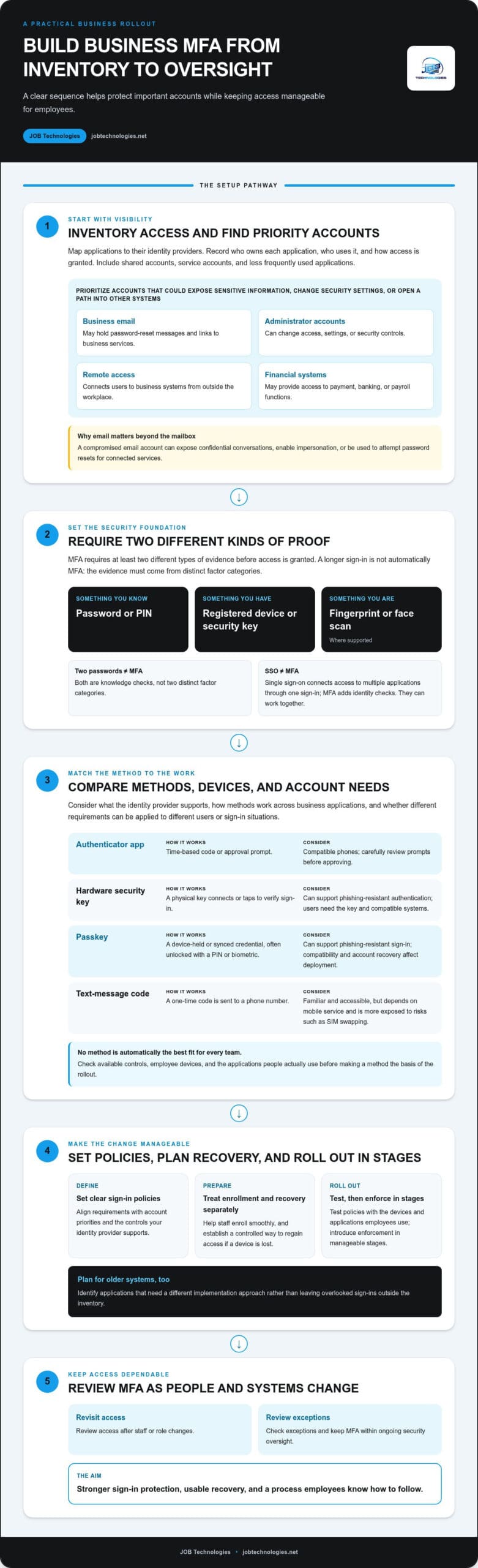
Business MFA setup checklist: prepare, configure, test, and enforce
A reliable rollout starts before anyone is asked to enroll. Treat multi-factor authentication setup for business as a controlled change: identify what needs protection, understand what your identity provider supports, and test the process before enforcement. The sequence below applies across providers, although settings and controls differ.
- Inventory accounts and applications. List business email, administrator accounts, remote access, financial systems, shared accounts, and third-party applications. Note which identity provider handles each sign-in, who owns the account or application, who uses it, and what information or functions it can access. Include infrequently used systems so they are not missed.
- Set access priorities and ownership. Identify accounts with administrative privileges and systems containing sensitive information. Assign an owner for each application and for MFA policy decisions. Record shared-account use and plan how access will be managed without tying a critical account to one employee’s personal device.
- Review provider capabilities and recovery arrangements. Review current provider documentation and plan controls for supported methods, enforcement options, and application compatibility. Record recovery contacts and procedures, including who can approve an MFA reset. Do not assume every connected application supports the same sign-in policy.
- Prepare the pilot and communications. Choose a small group whose roles, devices, and work patterns represent the business. Give them enrollment instructions, explain what will change and why, and name the person or team responsible for support. Set a rollout schedule that accounts for operational needs.
- Enroll and test before enforcement. Have pilot users complete enrollment, then test everyday sign-in from their usual devices and from remote-work situations. Check that approved fallback and recovery routes work, and verify that administrators can still access the identity provider and essential systems. Resolve confusing steps or access problems before expanding.
- Expand in stages and document decisions. Enforce the policy for one group or set of applications at a time. Track enrollment progress and exceptions, recording the reason, approving owner, affected accounts, and review date. Keep the policy and support instructions available to the people who maintain access.
Test less common paths, not just a successful sign-in on one person’s laptop. Confirm what happens when a user changes devices, loses access to a factor, or needs help restoring an account. Keep administrative recovery information controlled and accessible to authorized personnel, and verify that at least one approved administrative access path remains available throughout the rollout.
This checklist covers MFA as one part of a wider security program. Connect rollout planning with broader small-business cybersecurity work, including account protection, recovery, and ongoing security oversight. JOB Technologies provides managed cybersecurity support to help businesses plan security changes as part of that work. Discuss managed cybersecurity support as you prepare your implementation.
Keep business MFA reliable with ongoing oversight and managed IT support
MFA needs regular attention after rollout. It is part of access management, not a one-time setting: employees join or leave, roles change, devices are replaced, and business applications evolve. Without a clear owner and review process, old access can linger, exceptions can become permanent, or recovery details can stop matching how the organization works.
Build MFA checks into existing account-management routines. A review should confirm that access and verification methods still fit each person’s responsibilities. For a durable multi-factor authentication setup for business, document who owns the policy, who can approve exceptions, and how changes are recorded.
What should businesses review after MFA is enabled?
Set a recurring review schedule that fits your organization, and revisit access whenever a significant personnel or technology change occurs. Record findings and follow-up actions so the review leads to meaningful updates.
- Active users and administrators: Compare active accounts with current staff and job responsibilities. Remove access when an employee leaves, and adjust permissions when someone changes roles.
- Enrollment and devices: Check that people still have a working approved method. When an employee replaces a phone or security key, remove the old registration and confirm the new one works.
- Exceptions: Review the reason, affected account, approving owner, and review date for each exception. Close exceptions that are no longer needed.
- Recovery arrangements: Confirm recovery contacts and procedures remain accurate after changes to identity systems, staffing, or business operations.
Look for patterns as well as individual issues. Repeated enrollment problems may point to unclear instructions, while frequent exceptions could signal that the policy does not fit a role or application. Use those findings to improve the process without weakening access safeguards across the board.
When can managed IT support make MFA easier to maintain?
Smaller organizations may not have a dedicated security team to coordinate identity settings with email, network access, and connected applications. Managed IT support can help keep these responsibilities in view as business systems and employee access change. Managed cybersecurity and compliance assistance can also help place MFA within a broader security program, without treating MFA alone as a guarantee of compliance.
Access protection works alongside other continuity measures. A recovery plan should consider both restoring access to accounts and recovering business information if systems or data become unavailable. Include MFA recovery procedures in that planning, and align them with business data backup and recovery planning so the plans support dependable operations.
JOB Technologies provides managed IT services, managed cybersecurity, data backup and recovery, and compliance assistance for small and midsize businesses. If maintaining access controls is becoming one more responsibility for your team, JOB Technologies can help bring those technology and security needs into a steadier plan.
Make secure access part of your next business review
Give MFA a clear place in your ongoing security planning. Set a date to review how access needs are changing, and decide who will keep the policy aligned with your team and systems. That ownership helps turn a one-time multi-factor authentication setup for business into a dependable part of daily operations.
Identity security also connects to the wider work of protecting business systems and maintaining access to important information. JOB Technologies supports small and midsize businesses with their IT and cybersecurity needs. A steady partner can help you keep these responsibilities connected as your organization changes.
Talk with JOB Technologies about a steadier business cybersecurity approach. With a thoughtful plan and the right support, your team can strengthen account protection while keeping work moving with confidence.
Frequently Asked Questions
For small businesses in Dubuque, Galena, East Dubuque, Dyersville, Farley, and Peosta, MFA planning should fit the way each team works and the systems it depends on. These answers address common questions that come up as organizations make access decisions.
Is MFA necessary for a small business?
Yes. MFA is a practical safeguard for businesses of every size because passwords can be reused, guessed, or exposed. For a small business, the multi-factor authentication setup for business should reflect the systems in use, the sensitivity of the information, and what the identity provider supports. MFA strengthens sign-in security, but it does not replace software updates, access reviews, data backups, or employee awareness.
Can employees use their personal phones for business MFA?
They may be able to, depending on company policy and identity-provider support, but decide how personal-device use will work before enrollment. Explain what the authentication app requests permission to access, how employees can get help, and what happens if someone leaves the organization. For example, offer an approved security key or another supported method for a staff member who does not want to use a personal phone for work authentication.
How many MFA methods should a business offer?
There is no single number that suits every organization. Offer enough approved options for employees to sign in reliably and recover access, while keeping the list manageable for support and administration. For example, a business might designate one preferred method and one approved backup, then document who can authorize changes. Review the options if employees’ accessibility needs, devices, or identity systems change.
What happens if an employee loses the device used for MFA?
The employee should report the loss and follow the organization’s documented recovery process, rather than asking a coworker to share a code or bypass the check. An authorized administrator should verify identity using a separate approved channel before resetting enrollment. If the identity provider allows it, revoke the lost device’s access and review recent sign-ins. Keep recovery instructions available even when the employee cannot access work email.
Are text-message codes secure enough for business MFA?
Text-message codes add a check beyond a password, but they are vulnerable to risks such as SIM swapping and may not fit every business’s requirements. Compare them with authenticator apps, passkeys, or hardware security keys based on account sensitivity and available provider controls. For example, a policy might permit a text code for a lower-risk workflow but require a stronger method for sensitive administrative access. Check applicable contractual or industry requirements before deciding.
Does MFA guarantee that a business account cannot be hacked?
No. MFA makes unauthorized sign-in harder, but it cannot eliminate every risk. An employee might approve a fraudulent prompt, a device could be compromised, or an attacker could exploit weak recovery procedures or excessive permissions. Reduce exposure with timely updates, limited access rights, employee awareness, monitoring, and tested data recovery. Treat MFA as one safeguard in a wider security program, not as a substitute for other protections.
How often should a business review its MFA setup?
Review MFA after employee departures or role changes, device replacements, identity-system changes, and security incidents. Also set a recurring review interval that reflects the organization’s size, risk, and operational needs. Check enrollment, administrator access, exceptions, and recovery details, then record decisions and follow-up owners. A business serving customers across the Dubuque area, for example, can include these checks in its regular access-management review rather than relying on memory.