

A successful Microsoft 365 migration depends on careful planning, secure access, and an organized transfer of email, files, and other business data. For businesses seeking Microsoft 365 migration support in East Dubuque, the right provider should plan around your systems and workflows, protect data integrity, and keep day-to-day work moving during the transition. A staged or hybrid migration can let employees continue sending and receiving email while data moves in the background.
It’s reasonable to focus on the technical move, but the provider’s planning and follow-through matter just as much. A migration affects how people access information and collaborate, so continuity and staff readiness belong in the plan from the start.
This article explains how to assess migration support, plan email and data transfers, reduce disruption, and help employees after the move. You’ll also learn which project details shape timing and how to choose an approach that fits your organization’s systems and priorities.
Key Takeaways
- Organize and classify business content before transfer, and preserve metadata so information remains useful and traceable.
- Plan email, calendar, and contact moves together, with a migration approach that helps employees stay connected during the transition.
- Set migration timing and continuity plans around the organization’s systems, workloads, access needs, and complexity.
- Prepare staff for changed workflows with role-based training and ongoing support after the move.
- Use a pre-migration assessment to define project scope, identify risks, and coordinate each stage of the transition.
Document and business data transfer
A Microsoft 365 migration can move email, files, and collaboration tools from on-premises servers or another cloud platform. For East Dubuque businesses, the transfer plan should map each data source to its destination and protect access throughout the move.
Email and OneDrive Data Transfer
Email and OneDrive support different work habits: email enables communication, while OneDrive stores users’ working files. A migration team maps mailboxes and file locations to the right user accounts, then plans transfers around how employees access each item. Files organized by employee or department, for example, need destinations that preserve useful access and collaboration.
Before transfer, the team identifies duplicate, outdated, or misplaced content. It can then organize business files by owner, department, or purpose instead of carrying disorder into the new environment. The Internal Revenue Service says metadata must be maintained during transfers and migrations.
Migration Steps and Risk Reduction
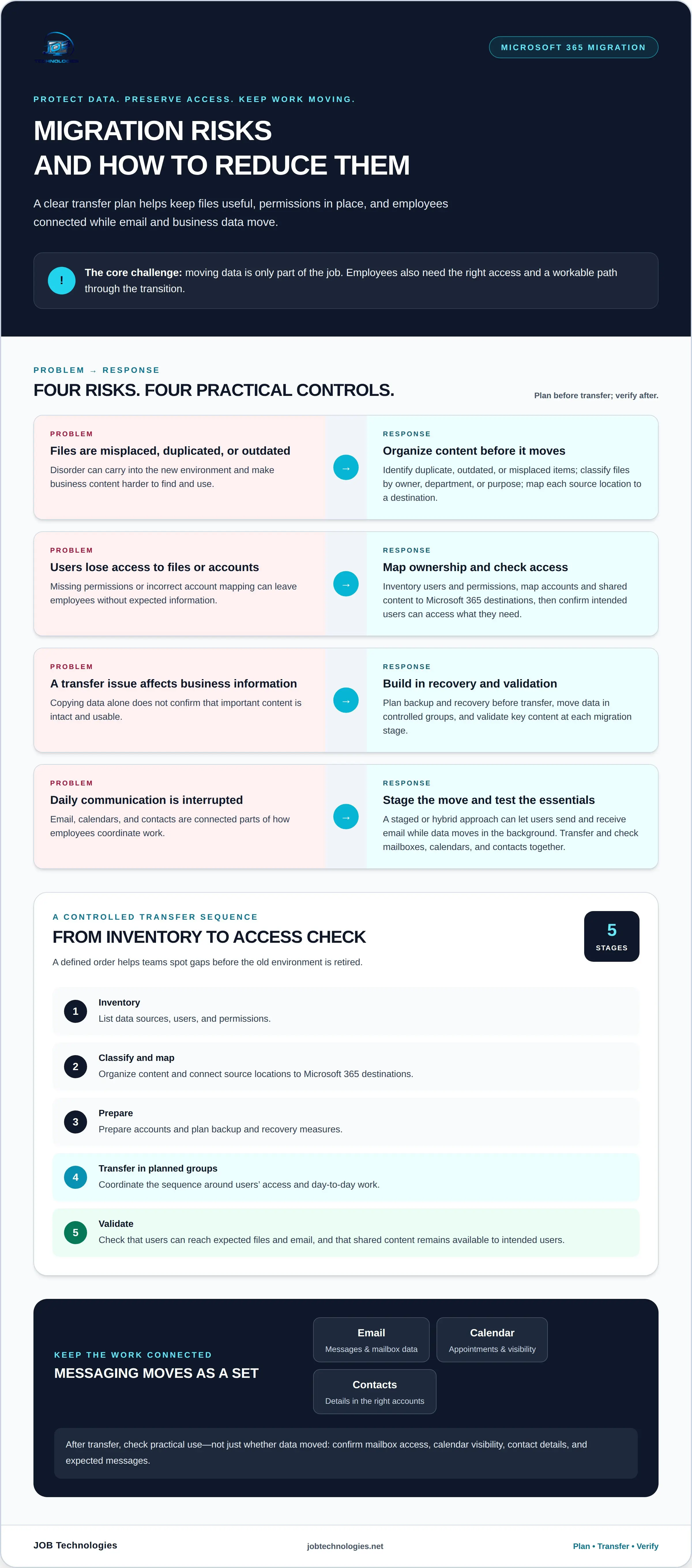
Providers begin by inventorying data sources, users, and permissions. They classify content, map source locations to Microsoft 365 destinations, and prepare accounts for the move. Next, they transfer data in planned groups, then check that users can access expected files and email. A defined sequence helps teams spot gaps before the old environment is retired.
Common risks include misplaced files, missing permissions, duplicate content, and interruptions to daily work. A provider can reduce these risks through pre-transfer mapping, backup planning, controlled migration batches, and post-transfer checks. Confirming that a department’s shared files remain available to the intended users, for instance, can catch access problems early.
Small Business Migration Costs
The cost of a Microsoft 365 migration for a small business depends on the project’s scope and complexity, including data volume, source systems, user accounts, and cleanup needs. The price is determined case by case and provided after a quote request. A transfer from one organized source may require different planning than a move involving scattered files and overlapping permissions.
For East Dubuque businesses, migration support can include assessment, data mapping, email and file transfer, and post-move validation. Providers should describe which workloads the project covers and how they’ll handle records that need organizing before transfer. This scope makes it easier to understand what the migration includes before work begins.
Data integrity depends on more than copying files. A provider plans backup and recovery measures before transfer, then validates key content at each migration stage. Managed data backup and recovery can support this preparation by keeping a recovery path in view if a transfer issue affects business information. Clear ownership, destination mapping, and access checks help ensure the results remain usable.
Email, calendar, and contact migration
Email migration transfers messages and related account data from an existing messaging environment to Microsoft 365. A careful plan maps each account and workload before the transition begins.
Email Account Migration
A provider assesses the current email environment, identifies mailboxes, and maps each account to its Microsoft 365 destination. The transfer can include messages and mailbox data, so the plan should account for how employees use folders and shared communication. For example, a project team’s mailbox history may be important for finding earlier decisions and correspondence.
Account mapping also connects each employee with the right destination account. Providers coordinate the transfer sequence and check access after migration. This helps identify issues such as a mailbox that appears in Microsoft 365 but lacks expected messages.
Calendar and Contact Transfer
Calendars and contacts are part of the messaging environment, not details to overlook. A migration plan identifies which calendar and contact data belongs with each account, then includes it in the transfer. Preserving a team calendar, for example, helps employees find scheduled meetings after the move.
Validation should cover practical use, not just whether data transferred. A provider checks that users can access expected appointments, contact details, and mailbox content in Microsoft 365. This review can also reveal mismatches between account ownership and transferred information.
Email Continuity During Migration
A staged or hybrid migration can let users continue sending and receiving email while data moves in the background. The provider plans the sequence so the existing messaging environment and Microsoft 365 support the transition together. This approach can limit disruption while mailboxes are transferred.
Employees may be able to keep using email during a planned mailbox move rather than waiting for every account to transfer. The provider coordinates the stages and checks that messages reach the intended environment. Clear timing and instructions also help employees know where to find their current email.
Before work starts, providers review the source environment, account ownership, and any shared mailboxes. They also identify dependencies, such as a department relying on a shared calendar for scheduling. These details shape the migration order and help ensure email, calendars, and contacts move together as parts of daily work.
After transfer, checks should confirm that employees can use their accounts as expected. A provider can verify mailbox access, review calendar visibility, and confirm contact information appears in the right accounts. These checks help uncover problems while the migration team can still address them.
- Map existing email accounts to Microsoft 365 destinations.
- Include calendars and contacts in the transfer plan.
- Use staged or hybrid migration to support email continuity.
- Validate account access and transferred information after the move.
For businesses planning connected email and account changes, managed IT support can help coordinate the work around existing systems and employee needs.
Migration planning and business continuity
An Office 365 migration plan sets the order, method, and safeguards for moving workloads. Small businesses can often complete a Microsoft 365 migration within a few days, while larger or more complex migrations may take several weeks.
Migration Planning and Strategy
Planning begins by defining which workloads will move and how employees use them. The migration team maps users, data, and dependencies, then schedules work around essential business activities. A team that relies on shared documents each morning, for example, needs those files available during its working hours.
Access planning is part of the strategy. Microsoft 365 migration planning should establish secure identities, role-based access, and conditional access policies. These controls help align account permissions with job responsibilities, such as limiting a finance folder to its intended users.
Migration Method Selection
The source environment and workload count shape the migration method. For a move between Microsoft 365 tenants, providers can use individual workload tools or Microsoft 365 Migration Orchestrator for coordinated, multi-workload moves. The choice depends on whether email, files, and other workloads need separate handling or coordinated sequencing.
A provider also considers how employees need to work during the transfer. A staged or hybrid approach may keep email sending and receiving while data moves in the background. For a tenant-to-tenant project, the plan should also account for user data and workloads moving between separate tenants.
Migration Timeline
The timeline depends on project scope and complexity. A small business may finish in a few days, while a larger or more complex migration may take several weeks. The number of workloads, source systems, and required access changes all affect how the provider sequences the work.
A practical schedule identifies preparation, transfer, and validation milestones. The team can prepare identities and permissions before transferring workloads, then review access afterward. This sequence gives employees and managers clearer expectations about when systems will change.
Business continuity planning connects the migration schedule to daily operations. The provider identifies critical work periods and, where possible, schedules disruptive changes outside them. A business with a busy morning order cycle, for example, can plan key account changes around that workflow.
During a tenant-to-tenant move, coordination matters because users and workloads cross organizational boundaries. The provider maps which accounts and workloads move together, then sets a sequence that supports continued access. For mergers, acquisitions, divestitures, or internal reorganizations, the sequence should reflect the new organization’s intended structure.
Before transfer begins, the migration plan should define ownership, access roles, and the order of work. A clear schedule helps employees understand when their accounts or tools may change, while planned validation gives the team a way to identify access problems before the project closes.
Post-migration staff training and support
For post-migration help in East Dubuque, look for a managed IT provider that offers ongoing support. Support may be delivered onsite, remotely, or through a combination of both.
User Training and Support
Training helps employees apply Microsoft 365 to the work they already do. A provider can organize instruction around roles, such as showing project staff how Microsoft Teams supports collaboration and helping managers coordinate team conversations. Role-based training keeps examples relevant to each group’s daily tasks.
After initial training, on-demand learning resources give employees a reference when questions arise. A staff member can revisit instructions for finding a Teams conversation, for example, instead of interrupting a colleague. A support plan should also explain how employees raise issues and find guidance.
Post-migration support works best when it addresses employees’ actual questions. A provider can gather recurring issues, identify confusing workflows, and adapt guidance accordingly. If several employees struggle to locate shared files, a focused demonstration of the team’s file-sharing process may help.
Training should cover more than where buttons appear. Employees need to understand how their work changes, which account to use, and how to reach colleagues through the new tools. A department that schedules meetings in Outlook, for example, may need guidance on finding invitations and coordinating related discussions in Teams.
Local Provider and Onsite Support
For businesses in East Dubuque, managed IT support can help with migration-related needs. The support plan should explain how employees receive help, whether through onsite sessions, remote guidance, or a combination suited to the project.
Onsite instruction lets a trainer respond directly to questions in a shared workplace, while remote sessions can reach employees in different locations. The right format depends on staff schedules, work locations, and the help required. A provider should make the support process clear, including how users report an issue and receive instructions.
When assessing post-migration help, look for a defined handoff from migration work to ongoing support. The handoff can identify who handles account-access questions and where employees find Microsoft Teams learning materials. Clear ownership reduces confusion when a user encounters an unfamiliar workflow.
A practical support plan connects training with real business tasks. It can pair role-based sessions with on-demand resources, then use employee questions to identify follow-up topics. This keeps guidance focused on the tools and processes staff use, rather than offering a generic tour of Microsoft 365. For managers, a short list of common questions can also help direct employees to the right instructions.
Pre-migration assessment and project management
A pre-migration assessment turns business requirements into a workable project plan. It gives the migration team a structured view of systems, workloads, dependencies, and decision-makers before work begins.
The assessment starts with an inventory of the current environment. The team records user accounts, email systems, file locations, and Microsoft 365 workloads in scope. It also identifies shared resources, such as a department mailbox or a calendar used for scheduling. This inventory helps prevent important services from being overlooked.
Next, the project team maps technical dependencies and business priorities. For example, if employees use a shared folder to process orders, its access and timing belong in the migration plan. The team also reviews identities, permissions, and access roles so the planned Microsoft 365 setup reflects how people work.
A clear project plan assigns ownership and makes decisions visible. It can document:
- Which workloads and user accounts are included in the migration.
- Who approves access changes and resolves project questions.
- What order the migration stages follow, and how progress is reviewed.
- Which business activities affect scheduling or continuity.
- How the team records issues, decisions, and completed checks.
These details help the project team respond consistently when conditions change. Discovering an unlisted shared mailbox, for example, may require an updated account map and transfer sequence. Recording the decision helps prevent conflicting instructions and keeps the project scope clear.
Risk review should connect each identified issue to a practical response. If a department depends on a particular system during a busy period, the schedule can account for that dependency. If permissions are unclear, the team can assign someone to resolve them before affected users move. This makes risks actionable rather than leaving them as general concerns.
Project management continues through preparation, migration, and validation. The team tracks milestones, communicates upcoming changes, and confirms that planned workloads have been addressed. A completion review, for instance, can compare the original inventory with transferred workloads and flag unresolved items for follow-up.
For businesses seeking Microsoft 365 migration support in East Dubuque, assessment quality matters because it shapes the project’s scope, schedule, and safeguards. A structured review gives decision-makers a clearer basis for planning, while defined ownership keeps technical and business decisions connected. Discuss your migration project to plan the assessment and coordination around your organization’s needs.
The organization seeking Microsoft 365 migration assistance reported having 90+ users, making account inventory and ownership checks important parts of project preparation.
JOB Technologies
JOB Technologies helps East Dubuque businesses manage technology needs through Managed IT Services and Network Installation & Management. If your organization is planning a Microsoft 365 move, a coordinated approach can connect migration decisions with the systems employees rely on each day. AI Implementation and Phone Systems VoIP are also part of its broader business technology work, where relevant to your organization’s goals.
Turn to JOB Technologies when you need support aligning technology planning with daily operations, or when your systems and network need coordinated management. A conversation can help clarify your priorities and the next steps for your business.
Contact JOB Technologies to discuss your needs.
Set Your Migration Up for What Comes Next
A Microsoft 365 move is also a chance to align technology decisions with how your business works. Before starting, consider what employees need from their systems after the transition, and how future changes might affect access, collaboration, and daily operations. That perspective can keep the project focused on lasting usefulness, not just the move itself.
For businesses considering Microsoft 365 migration support in East Dubuque, JOB Technologies can connect migration planning with its Managed IT Services, Network Installation & Management, and AI Implementation offerings. These capabilities can help frame technology decisions within the wider needs of your organization, without losing sight of the work employees need to do each day.
Choose a next step that fits your readiness. If you’re ready to discuss the migration and its priorities, contact JOB Technologies to discuss your migration. A clear conversation can help you move forward with a plan that reflects your business and gives your team a steady path into Microsoft 365.
Frequently Asked Questions
The Selection Framework: What Should Enterprises Look for in an M365 Migration Provider?
Choose a provider that can explain its project responsibilities, decision process, and post-move handoff. For Microsoft 365 migration support in East Dubuque, ask how the provider will document scope, report progress, and handle issues that need business approval. A useful proposal names the work included, key dependencies, and who owns each decision. Businesses in Dubuque, Galena, East Dubuque, Dyersville, Farley, and Peosta can use these criteria to assess whether a provider’s approach fits their operations.
What does Microsoft 365 migration support typically include?
Support can span preparation, transfer coordination, and transition assistance. Clarify whether the project includes account setup, workload sequencing, access review, issue tracking, and employee guidance. A company with a shared scheduling mailbox, for example, may need that resource handled differently from individual accounts. Agreeing on deliverables and responsibilities before work starts helps your team understand what the provider handles and which business decisions remain yours.
How do Microsoft 365 migration providers compare on experience, support, and pricing?
Compare providers using the same project scope, then assess relevant experience, communication, support processes, and proposal details. Look for clear descriptions of included work, assumptions, and how follow-up questions are handled. JOB Technologies’ Managed Services pricing is per computer or per user, determined after a needs assessment and provided in a proposal. Comparing proposals this way highlights differences in scope rather than relying on a headline price alone.
What data backup and security precautions are needed before a Microsoft 365 migration?
Before a migration, establish a recovery plan and review who can access the data being moved. Identify important business records, confirm backups cover the information in scope, and define who can approve access changes. The migration team should also account for permissions and data handling throughout the project. A sensitive finance folder, for example, needs an intended owner and access group, not merely a successful file transfer.