

What if a recurring login, email, or network issue didn’t pull your team away from its work for long? For a Dubuque business, an outsourced IT helpdesk can give employees a clear path to technical support while helping protect the systems and data they rely on. But support should do more than close tickets. An outsourced IT helpdesk Dubuque partnership should fit the way your business operates and help keep work moving when technology gets in the way.
Everyday tech problems can interrupt employees and leave internal staff juggling IT alongside their other responsibilities. It can also be hard to know which recurring tasks a helpdesk can take on, or what dependable support looks like beyond fixing an immediate issue.
This guide explains what helpdesk support can cover, how employees can access it, and what to consider when assessing scope, communication, security, and continuity. You’ll also see how JOB Technologies supports local businesses, from everyday computer, network, and email needs to cybersecurity and backup. The goal is a support relationship that works with your operations today and can adapt as your business changes.
Key Takeaways
- See how an outsourced IT helpdesk in Dubuque can handle everyday employee technology issues and free internal staff to focus on other responsibilities.
- Understand how a clear support process helps employees report issues and stay informed as problems are addressed.
- Compare support options by scope, communication, security, continuity, and fit with your business operations.
- Prepare your team by documenting users, devices, essential systems, recurring issues, and preferred communication channels.
- Explore how JOB Technologies connects computer, network, and email support with cybersecurity, backup, and recovery.
What outsourced IT helpdesk support means for a Dubuque business
A computer that won’t start, email that won’t send, or a network connection that drops can bring an employee’s work to a halt. When that happens, employees need a clear route to support instead of having to find a coworker who can troubleshoot.
An outsourced IT helpdesk is an external support function that helps resolve employees’ business technology issues. It focuses on user requests, while broader managed IT services can include ongoing oversight of networks, security, and other systems. This distinction reflects the wider meaning of Technical support: helping users address problems with the technology they rely on.
This short video offers a quick look at outsourced IT services:
In brief: An outsourced helpdesk supports employees with day-to-day technology issues. Managed IT services address the broader health and management of business technology. A one-time repair can make sense for an isolated problem, while ongoing helpdesk support gives employees a consistent way to report issues and helps a business spot recurring trouble that may need a wider solution.
What issues can a business helpdesk handle?
Helpdesk support can assist with common computer, network, and email problems, such as an employee unable to access a work system, a connection disrupting tasks, or email not working as expected. A clear report helps the support team understand what’s affected and assess the impact on work.
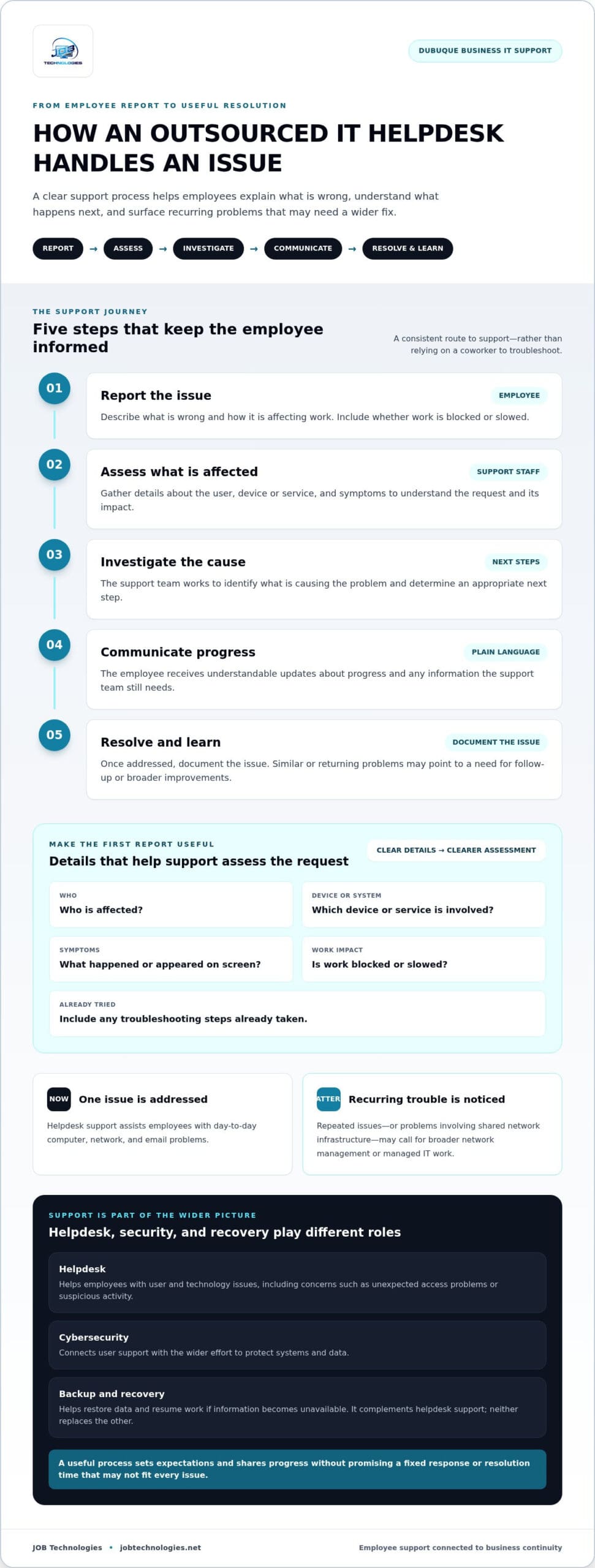
When reporting a problem, share who is affected, which device or system is involved, what happened, and whether work is blocked or slowed. Include any troubleshooting steps already tried. If similar problems keep returning, or the cause involves shared network infrastructure, the issue may call for broader network management or managed IT work. Resolving a single request helps in the moment; addressing a recurring cause can reduce repeated disruption.
Who benefits from outsourced helpdesk support in the Dubuque area?
Owners and office managers can use an outsourced IT helpdesk Dubuque businesses rely on to give employees a clear support path and keep internal staff focused on core responsibilities. JOB Technologies supports small and midsize businesses in Dubuque, Galena, East Dubuque, Dyersville, Farley, and Peosta.
The right support arrangement depends on how many people need help, how heavily work relies on technology, and whether the business has internal IT capacity. A smaller team may need help with everyday computer and email issues. A more technology-dependent operation may also need recurring network problems addressed as part of broader support. In either case, support should reflect how the business works.
How an outsourced IT helpdesk supports employees and business continuity
A useful helpdesk process does more than collect a complaint. It gives employees a consistent way to explain what’s wrong, helps support staff understand the business impact, and keeps the employee informed while the issue is addressed. That structure matters when a problem affects access to email, a shared network, or important business data.
What happens after an employee reports an IT issue?
A support request is easier to assess when it explains who needs help, which device or service is affected, what the employee sees, and how the issue is interrupting work. Support staff can then investigate, explain next steps in plain language, and share updates as the request progresses. A clear process should set expectations without promising a fixed response or resolution time that may not fit every issue.
- Report: The employee describes the problem and its impact on work.
- Assess: Support staff gather details about the user, device, service, and symptoms.
- Investigate: The team works to identify the cause and determine an appropriate next step.
- Communicate: The employee receives understandable updates about progress or any information needed.
- Resolve and learn: Once addressed, the issue can be documented. Recurring problems may point to a need for follow-up or broader improvements.
If several employees report similar trouble, or a problem keeps returning, the pattern may reveal an underlying network or managed IT concern. Tracking those trends helps shift the focus from repeated workarounds to a more durable fix.
How helpdesk support connects with security and recovery
Employees often bring technology concerns to the helpdesk first, including unexpected access problems or suspicious activity. Clear reporting and careful handling can connect user support with cybersecurity and ransomware protection. An outsourced IT helpdesk Dubuque businesses partner with should fit into a wider approach to protecting systems and maintaining operations, not operate as an isolated ticket queue.
Backups and recovery play a complementary role. A helpdesk assists with user and technology issues; backup and recovery support helps a business restore data and resume work if information becomes unavailable. Neither replaces the other. Planning for how essential operations continue through disruption is also part of a thoughtful Business continuity plan.
For a practical look at continuity planning, explore a business data backup and recovery guide alongside your helpdesk planning. JOB Technologies brings employee support together with cybersecurity, backup, and recovery as part of its outsourced IT services. Learn more about business IT support from JOB Technologies.
How to compare outsourced IT helpdesk options in Dubuque
A useful comparison looks beyond how individual tickets are handled. Support should match the systems employees depend on, help protect business information, and give you a clear view of what’s happening. Outsourcing doesn’t mean surrendering visibility or control. Define what support covers, how issues are escalated, and how the relationship is reviewed.
Scope: Compare support for computers, networks, and email with the issues your employees face day to day. Consider whether recurring problems point to a need for broader network or managed IT services.
Communication: Look for understandable progress updates, clear ownership of requests, and a defined way to escalate issues that disrupt important work.
Security: Consider how employee support fits alongside cybersecurity and ransomware protection, especially when an issue could affect access or business information.
Continuity: Assess how backup and recovery planning complements helpdesk assistance if data or systems become unavailable.
Business fit: Weigh your team’s size, reliance on technology, internal IT capacity, and the importance of different workflows. The right scope should reflect how your organization operates, whether that involves local on-site assistance or specialized IT firms like ZANGAARD that provide flexible support models.
Which helpdesk capabilities matter to a small business?
Start with the support employees need most. For one business, computer and email access may be the common concern; for another, stable network access may be central to daily operations. Then consider the wider picture: cybersecurity, ransomware protection, and recovery planning can complement helpdesk support. Compliance assistance may also be relevant to a business’s obligations, but it should not be treated as a blanket promise of compliance.
How do you assess communication and accountability?
Good communication makes the working relationship visible. Agree on how employees submit issues, who tracks them, what updates should include, and how a business-impacting problem is escalated. These expectations help employees know what to do without leaving leaders in the dark.
Accountability also means reviewing recurring issues and changing priorities together. If the same problem keeps affecting employees, the discussion can move from individual fixes to a broader improvement. This preserves your team’s input while bringing in outside support.
For context on how ongoing support connects with broader IT responsibilities, read a Dubuque managed IT services guide. JOB Technologies’ outsourced IT services connect employee needs with computer, network, email, security, backup, and recovery support. An outsourced IT helpdesk Dubuque businesses can work with should fit those needs while keeping communication clear and the business involved.
How to prepare your Dubuque team for outsourced helpdesk support
Some preparation helps an outsourced helpdesk understand both the technology your business uses and how employees depend on it. Before support begins, gather essential information and identify which interruptions affect important work. This gives the support discussion a practical starting point, grounded in your organization rather than assumptions.
What information should your business organize first?
Use this checklist to create a practical starting point. It doesn’t need to be a perfect technical inventory. Clear, current information is more useful than a long list no one can maintain.
- Users and devices: Record employees who need support and the business computers they use.
- Key systems: Note email, important applications, and network connections staff rely on to do their work.
- Recurring disruptions: Describe common issues, when they occur, who they affect, and how they interrupt staff or customer service.
- Critical workflows: Identify processes that depend on technology and what happens if access is interrupted.
- Decision-makers: Name the people authorized to approve access, system changes, and decisions affecting operations.
This overview gives the support team useful context and helps distinguish a single-user inconvenience from a disruption affecting a shared system or essential workflow.
How can employees make the support relationship work well?
Give staff one consistent way to report technology issues and explain what details to include: the affected device or service, what they were trying to do, what happened, and whether anyone else is affected. Employees should flag problems involving multiple people or a critical workflow so the business impact is clear from the start.
Leaders can also set communication preferences in advance. Decide who should receive updates on significant disruptions, how employees prefer to hear progress, and who can answer questions about business priorities. Review recurring issues with the support team and update the inventory as staff, systems, or workflows change. For related context, explore a small business IT support guide.
Preparing this information makes an outsourced IT helpdesk Dubuque partnership more practical from the outset. It gives everyone a shared picture of the organization’s technology, priorities, and support needs, while leaving room to adjust as the business evolves.
Ready to put your team’s technology needs into a clear support plan? Talk with JOB Technologies about business IT support.
How JOB Technologies can support your Dubuque-area helpdesk needs
The right support relationship connects everyday employee questions with the systems and safeguards your business depends on. JOB Technologies supports small and midsize businesses with computer, network, and email needs alongside cybersecurity, ransomware protection, backup, and recovery. This lets business leaders consider helpdesk support as part of a broader plan for reliable operations, rather than as a series of disconnected fixes.
JOB Technologies serves businesses in Dubuque and nearby communities, including Galena, East Dubuque, Dyersville, Farley, and Peosta. Support is shaped around your team’s technology, priorities, and workflows, since every organization has different needs.
A local IT relationship built around business operations
As a privately owned and operated business, JOB Technologies takes a collaborative approach to supporting organizations. Your employees’ day-to-day needs, essential workflows, recurring issues, and communication preferences all help shape support around how the business operates.
For example, if email access is central to coordinating work, make that dependency clear in the support conversation. If recurring network issues affect multiple employees, consider the broader network environment, not just each user’s individual report. Connecting helpdesk needs with managed IT services, security, and data recovery helps leaders consider both immediate assistance and operational continuity.
Choose a practical next step for your business
Start with a short outline of the technology your team relies on, the issues employees encounter repeatedly, and the workflows most affected when systems are unavailable. Then identify your priorities: everyday computer and email assistance, network reliability, stronger cybersecurity, or backup and recovery planning. This gives you a useful foundation for discussing support tailored to your organization.
If cybersecurity is a particular concern, the 2026 small business cybersecurity guide for Galena offers related context for thinking through protection needs. Bringing those concerns into the same conversation as employee support can help create a more connected view of technology and risk.
JOB Technologies supports businesses across Dubuque and nearby communities with outsourced IT services that connect helpdesk needs to broader business technology priorities. Take the next step: discuss your outsourced IT helpdesk needs with JOB Technologies.
Give your team a clearer path to IT support
A dependable helpdesk partnership does more than address individual computer, network, or email issues. It gives employees a clear way to get support and helps business leaders connect recurring problems with wider needs for security, backup, and recovery. Before choosing an approach, outline what your team relies on, what interrupts its work, and how you want updates and decisions handled.
An outsourced IT helpdesk Dubuque businesses can shape around their operations should fit both today’s support needs and the changes ahead. JOB Technologies works with businesses in Dubuque, Galena, East Dubuque, Dyersville, Farley, and Peosta, connecting employee support with cybersecurity and data backup and recovery.
Take a practical next step: Discuss outsourced IT helpdesk support for your business. A conversation can help you define priorities and move toward steadier day-to-day operations.
Frequently Asked Questions
What does an outsourced IT helpdesk do for a small business?
An outsourced IT helpdesk gives employees a defined way to get help with business technology issues. Support can cover computers, networks, and email. Staff report the problem, explain its impact, and receive updates as the issue is investigated. The support team can also document recurring issues for follow-up. Clear responsibilities and escalation steps help align support with your business priorities.
Is outsourced IT helpdesk support a good fit for a small business?
It can be a good fit if employees regularly need technical assistance and your business wants outside support without managing every IT function internally. The right arrangement depends on your users, systems, risk concerns, and internal capacity. Before discussing an approach, identify common technology issues, essential workflows, and communication expectations. That preparation helps shape support around your organization instead of assuming every small business needs the same services.
Can an outsourced IT helpdesk support businesses in Dubuque and nearby communities?
Yes. JOB Technologies serves small and midsize businesses in Dubuque, Galena, East Dubuque, Dyersville, Farley, and Peosta. Its business IT services include computer, network, and email support, along with cybersecurity, backup, and recovery. To start planning, list the systems employees rely on and the technology problems that interrupt their work or affect customer service.
How does an outsourced helpdesk handle an employee’s IT problem?
The employee reports what’s happening, including the affected device or service, symptoms, and impact on work. Support staff use those details to assess and investigate the issue, then communicate progress in understandable terms. If the problem affects an essential workflow or keeps recurring, it may need escalation or broader follow-up. A consistent reporting process helps the support team understand what’s at stake and helps employees share useful information.
Will outsourcing IT helpdesk support mean losing control of business technology?
No, outsourcing doesn’t have to mean giving up visibility or control. A clear working relationship can define support responsibilities, access, approvals, updates, and escalation steps. Your business can decide who authorizes technology changes and how recurring problems are reviewed. JOB Technologies works with small and midsize businesses on technology needs, with support shaped around each organization’s operations. Clear expectations keep leaders involved while employees have a reliable path to assistance.
What should a business prepare before moving to outsourced IT helpdesk support?
Start by documenting users, business computers, network dependencies, email systems, and important applications. Add notes about recurring issues, who they affect, and which workflows they disrupt. Identify the systems essential to daily operations and the people authorized to approve access or technology changes. This information gives the support discussion a practical foundation and helps clarify priorities, responsibilities, and an appropriate scope for your business.
Does an outsourced IT helpdesk also cover cybersecurity and data recovery?
Helpdesk support and security or recovery services address connected but distinct needs. A helpdesk helps employees work through technology issues, while cybersecurity and ransomware protection help safeguard systems. Data backup and recovery support continuity if business information becomes unavailable. JOB Technologies provides these services alongside managed IT support. Businesses can consider how they fit together based on their systems, data, operational priorities, and compliance needs.
How do I get started with outsourced IT helpdesk support in Dubuque?
Begin by listing the technology issues that interrupt work, the systems employees rely on, and the outcomes your business needs. Then discuss scope, communication, security, and continuity with JOB Technologies. This creates a practical starting point based on your organization’s needs. JOB Technologies serves businesses in Dubuque and nearby communities, including Galena, East Dubuque, Dyersville, Farley, and Peosta.