

What if reliable IT support meant more than getting computers working again after something goes wrong? For a Galena business, peace of mind IT support Galena should help reduce recurring disruptions, protect important data, and make recovery more manageable when an incident affects operations.
It’s understandable to want technology problems off your team’s plate, especially when you don’t have the time or in-house expertise to oversee every system. But peace of mind doesn’t come from a promise that problems will never happen. It comes from connecting prevention, cybersecurity, backup and recovery, and support around your business priorities.
This 2026 buying guide explains what managed IT services should address, how security and recovery fit together, and what to consider when choosing a local IT partner. Use it to identify support gaps and build a clearer plan for keeping your business moving.
Key Takeaways
- Peace of mind IT support Galena businesses can rely on is built around prevention, protection, and recovery, not a promise that technology problems will never happen.
- Map the support you need across computers, networks, email, cybersecurity, and data recovery to see where gaps could disrupt daily operations.
- Compare managed IT with break-fix support by looking at prevention, planning, ownership, and how each approach supports continuity.
- Evaluate how a potential IT partnership fits your business priorities, communicates about technology, and prepares for security incidents or disruption.
- A tailored support approach can connect your existing systems and business goals with a clearer plan for more predictable IT.
What Peace-of-Mind IT Support Means for a Galena Business
A technology disruption can ripple beyond the screen where it starts. When email is inaccessible, employees may struggle to coordinate work. An unstable network can interrupt access to shared files, while a recurring software issue can slow a workflow and affect customer service. If no one knows who should take ownership, even a small problem can distract staff from their responsibilities.
Peace-of-mind IT support is planned, accountable help that reduces uncertainty by preparing your business to prevent, manage, and recover from technology problems. It doesn’t guarantee that issues will never occur. Instead, it gives your business a clearer way to handle everyday support needs and prepare for disruptions that could affect operations.
That preparation connects dependable systems with cybersecurity and data recovery. Security measures help protect business information, while backup and recovery planning gives your organization a path forward if files or systems become unavailable. Together, these measures support continuity by clarifying what to do and where support fits when technology doesn’t cooperate.
The business risks behind everyday IT stress
One isolated inconvenience may be resolved without changing how your business manages technology. Look for patterns. If the same network drops, email access problem, or workflow interruption keeps returning, your team may be spending time treating symptoms instead of addressing the underlying support need. Note the issue, who it affects, and what work it interrupts. Those details can help identify where a planned approach would be useful.
For a small or midsize business, relying on employees to troubleshoot every issue can leave responsibilities unclear. Staff may not know whether a problem belongs to a computer, network, or email system, or who should take ownership. Managed services provide a structured way to organize ongoing technology support. For additional background, Managed Services on Wikipedia describes the broader model of having services managed on an ongoing basis.
What reassurance should look like in practice
Reassurance begins with clear ownership. Your team should understand how computer, network, and email issues are handled instead of guessing who is responsible each time a problem appears. Cybersecurity preparation and data backup and recovery belong in the same conversation as troubleshooting, because protecting systems and restoring access both matter to continuity.
Trust also depends on communication that makes technical decisions understandable and connects them to business priorities. A support partner should understand how your organization works, explain relevant risks, and shape an approach around its systems and needs. For Galena businesses, peace of mind IT support Galena is most meaningful when daily assistance, security preparation, and recovery planning work together, without suggesting that every disruption can be prevented.
What Reliable IT Support for Galena Businesses Should Cover
Reliable business IT support brings the everyday parts of your technology environment into one clear view. Computers, networks, and email need to work together, while security and data protection help your organization prepare for disruption. If support focuses only on fixing a device after someone reports a problem, important connections between these areas can be overlooked.
Managed IT support gives your business an ongoing way to address technology needs, rather than leaving employees to diagnose each issue alongside their regular responsibilities. The goal isn’t to remove your team from technology decisions. It’s to provide a dependable support structure shaped around the systems people use and the work those systems enable.
Daily support and network management
Employee computers, business networks, and email systems form the foundation of daily work. Support across these areas helps employees get assistance with common technology issues and gives the organization a clearer view of how its systems connect. Network installation and management can also align network setup and oversight with business operations, rather than treating connectivity as an isolated technical concern.
Set priorities according to how your organization works. A team that depends on shared files may have different network and support needs from one whose daily work relies heavily on email. Managed support helps coordinate those needs without requiring employees to take on IT ownership themselves.
Security, backup, and business continuity
Cybersecurity and ransomware protection help reduce risk, but no security approach can promise that every threat will be prevented. Backup and recovery address another part of the problem: planning how business data can be restored after it becomes unavailable or is affected by a disruption. Used together, these safeguards support a more complete approach to keeping business operations moving.
For a closer look at practical security considerations, see this small business cybersecurity guide for Galena. Recovery planning deserves its own attention, too. The business data backup and recovery guide explores how to think through restoring important information when access is interrupted.
As you consider coverage, map it against the work your team needs to keep doing. A useful starting checklist includes:
- Which computers, network services, and email systems staff rely on
- Who owns support coordination when an issue crosses systems
- How cybersecurity and ransomware protection fit into everyday IT management
- How backup and recovery planning supports business continuity
This map can reveal whether staff are carrying too much troubleshooting responsibility or whether key systems and safeguards need more coordinated attention. Businesses looking for peace of mind IT support Galena can benefit from connecting daily support with security and recovery planning. JOB Technologies provides comprehensive outsourced IT services for small and midsize businesses, including support for computers, networks, and email. Learn more about business IT support from JOB Technologies.
Managed IT or Break-Fix Support: Which Brings More Peace of Mind?
Both managed IT and break-fix support can help resolve technology problems, but they organize responsibility differently. With break-fix assistance, a business seeks help when a particular issue arises. Managed IT takes an ongoing view of technology needs, making room for oversight and planning as well as support. The better fit depends on your internal capacity, how much your operations rely on technology, and how your organization handles risk.
Managed IT plans for technology needs before they become urgent; break-fix support is typically requested after a specific issue appears. Neither model guarantees the same experience for every business. The comparison below highlights differences in approach.
| Consideration | Managed IT | Break-fix support |
|---|---|---|
| Prevention | Ongoing oversight can help identify support needs and address them as part of a broader plan. | Attention generally begins with a reported problem, though the scope depends on the arrangement. |
| Ownership | Technology responsibilities can be handled through an ongoing support relationship. | Your team coordinates help when an issue occurs and works through the specific repair. |
| Planning | Support can account for changing systems and business priorities over time. | Planning may be more limited if assistance is focused on the immediate problem. |
| Continuity | Security, systems management, and recovery needs can be considered together. | Continuity planning may need to be managed separately from issue-by-issue troubleshooting. |
How proactive support differs from break-fix
A managed approach creates space to consider technology before a specific failure demands attention. That can include reviewing how systems support business processes and where security or recovery planning fits. Break-fix support can suit organizations with the internal capacity to manage technology planning and coordinate help as issues arise. The key difference is when support is engaged and how consistently responsibilities are handled, not that one model suits every business.
When a connected service approach matters
Technology systems often depend on one another. A network issue can affect access to email or business applications; a security incident may also make data recovery important. VoIP phone systems and AI implementation can introduce additional business technology needs, so coordination across systems can keep support aligned with how your organization works. For regional context, this managed IT services guide for Dubuque discusses managed support in a nearby business community.
To decide which model better fits your needs, consider how often employees depend on technology to serve customers, whether someone on staff can own IT coordination, and how prepared the business is to manage security and recovery planning. If internal capacity is limited or systems are closely connected, an ongoing relationship can provide a more coordinated structure. JOB Technologies provides managed IT services for businesses, tailored to organizational systems and goals.
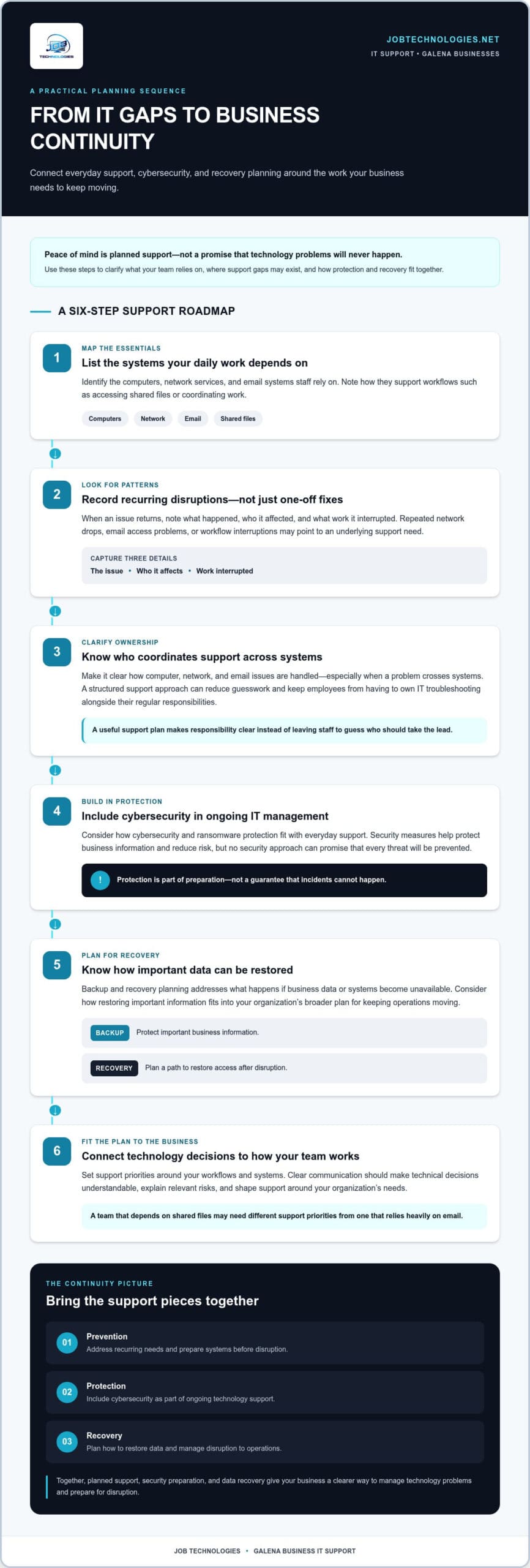
How to Evaluate IT Support for Your Galena Business
A useful evaluation starts with your business, not a list of technical features. Identify the systems your team depends on, the interruptions that take time away from work, and the support responsibilities your staff can realistically manage. Then connect those needs to an approach that accounts for daily operations, security, and recovery.
Use this sequence to build a clear picture of what your organization needs:
- Map essential technology. Note the computers employees use, your network and internet-connected systems, business email, and any other technology that supports customer service or everyday workflows. Mark which systems are central to keeping work moving.
- Identify recurring interruptions. Record issues that return, who they affect, and which tasks are delayed or made harder. A repeated problem with access, connectivity, or a business application may point to a broader support need rather than a one-off fix.
- List protection and continuity concerns. Consider which business data needs backup and recovery planning, what cybersecurity or ransomware risks need attention, and whether compliance assistance belongs among your IT priorities. Make these concerns visible alongside routine support needs.
- Connect needs to service scope. Match your priorities to managed IT, network management, cybersecurity, data backup and recovery, and compliance assistance. If your plans include AI implementation or VoIP phone systems, include those technologies so their role in your operations can be considered too.
- Consider communication and operational fit. Think about how your team should raise support needs, how technical issues should be explained, and how an IT plan can reflect your organization’s existing systems and goals. Clear communication keeps technology decisions connected to business priorities.
This process turns a broad search for peace of mind IT support Galena into a practical discussion about scope and fit. Bring a list of systems, recurring challenges, and questions about security, recovery, and continuity to help shape the support relationship.
JOB Technologies provides outsourced IT support for small and midsize businesses in Galena, with an approach tailored to an organization’s systems and goals. For related context on how small businesses can think about IT support, the small business IT support guide explores support models in a nearby regional market.
Discuss how managed IT, security, backup, recovery, or compliance support can align with your business needs. Discuss your business IT needs.
Start Building Peace of Mind with Local IT Support in Galena
A useful first conversation about IT support doesn’t require a technical audit or a perfect inventory. Start with what your team relies on, what gets in the way, and what you want technology to support next. That gives JOB Technologies a practical foundation for shaping an IT approach around your organization’s systems and goals. For a Galena business, peace of mind IT support begins with understanding its priorities, not applying a one-size-fits-all plan.
What to prepare before discussing IT needs
A few notes can make it easier to describe your current environment. Gather what you know, and don’t worry about having every technical detail. Focus on the systems and work that matter to your organization:
- List the computers, network, email, and other internet-connected systems your team uses.
- Note recurring problems and the workflows, employees, or customer interactions they disrupt.
- Identify security concerns and business data that would be important to restore after an interruption.
- Outline upcoming changes, such as staff growth, VoIP phone systems, AI implementation, compliance needs, or new business priorities.
This snapshot helps distinguish immediate support needs from longer-term planning. For example, a recurring issue affecting one workflow may call for a different priority than a planned change to phone systems or the way your team uses business data.
Turn the conversation into a practical support plan
With those priorities in view, discovery can clarify how managed IT support, cybersecurity and ransomware protection, data backup and recovery, or compliance assistance relate to your organization. The discussion can also account for network management, email, and how systems connect. This keeps the focus on your business requirements rather than technology for its own sake.
A tailored approach should reflect the systems you already use, how your staff works, and the outcomes you want technology to support. It can help define what needs attention first and where ongoing support could reduce the load on internal staff. As your organization’s goals change, its IT priorities may change too, making clear communication an important part of a lasting support relationship.
You don’t need to solve every technology question before beginning. Sharing the challenges you’ve noticed and the changes you’re planning is a practical first step. JOB Technologies can work with your business to align managed IT, cybersecurity, network management, backup and recovery, and other support with its priorities.
If you’re ready to discuss managed IT support for your Galena business, talk with JOB Technologies about business IT support.
Make Your Next IT Decision with Confidence
You don’t have to resolve every technology concern at once. Start by clarifying which systems are most important to your team and what you’d like to feel more confident about, whether that’s day-to-day support, security planning, or preparation for a disruption. That priority can turn the search for peace of mind IT support Galena into a focused conversation about making work more predictable.
With a clear understanding of your needs, JOB Technologies can shape an IT approach around your organization’s systems and goals. The aim is a support relationship that fits the way your business operates and gives you a clearer path for addressing technology needs as they evolve.
Take the next step and talk with JOB Technologies about IT support for your Galena business. A more confident approach to business technology can start with one straightforward conversation.
Frequently Asked Questions
Is managed IT support worth it for a small business in Galena?
Managed IT support can be worthwhile when staff spend too much time coordinating technology issues or the business lacks dedicated IT expertise. Consider whether ongoing support would clarify responsibilities and help you plan for upcoming needs, rather than relying on employees to troubleshoot alongside their regular work. For a small business evaluating peace of mind IT support Galena, the value depends on how important reliable technology is to daily operations and the capacity available internally.
Can IT support help a Galena business prepare for ransomware or data loss?
Yes. Cybersecurity and ransomware protection help reduce risk, while data backup and recovery planning can prepare the business to restore information if it becomes unavailable. A practical preparation step is to identify who should coordinate internally during an incident, which systems are essential to resume work, and what business data needs protection. JOB Technologies provides cybersecurity, ransomware protection, and data backup and recovery for business continuity planning.
What should a business prepare before starting with an IT support provider?
Prepare a simple inventory of the computers, network, email, and business systems employees use, along with a short record of recurring issues. Note who is affected and which work gets interrupted. It can also help to identify important business data, current security concerns, and planned changes such as adding staff or adopting new technology. You don’t need a technical report; clear examples help connect support priorities to everyday work.
Can a managed IT provider support business email and phone systems?
Yes. JOB Technologies supports business email and provides VoIP phone systems. These tools often matter to everyday communication, so include them in the same discussion as computers and networks. For example, describe how staff use email to coordinate work and how customers reach your business by phone. That context helps align communication systems with the way your organization serves customers and collaborates internally.
Does managed IT support include AI implementation for small businesses?
JOB Technologies provides AI implementation for businesses. Before exploring it, identify a specific task or workflow your team hopes to improve, such as handling repetitive administrative work or organizing information. Also consider what data the task involves and how employees would use the technology in their roles. These details keep the conversation focused on practical business goals rather than adopting AI simply because it’s available.
How can a Galena business make its technology more reliable as it grows?
Review technology needs as your staff, workflows, and customer communications change. Adding employees, for instance, may affect computer and network needs, email access, permissions, and security planning. Businesses in Galena and nearby communities such as Dubuque, East Dubuque, Dyersville, Farley, and Peosta can use managed IT, network management, cybersecurity, and compliance assistance to align technology with evolving operations. Revisiting priorities helps keep the support approach relevant as the business develops.