

A board budget presentation typically receives 15 to 20 minutes in 2026. That makes presenting an IT budget to management less about showing every line item and more about making the decision clear, with enough time left for discussion.
It can be tempting to add slides to show that you’ve prepared the budget carefully. But a focused presentation is easier for decision-makers to follow, especially when it explains what the figures mean and why they matter to the business.
Learn how to plan your presentation, decide what to include, and compare budget variances with actual spending. You’ll also see how charts and supporting spreadsheets can make the detail accessible without crowding the main message.
Key Takeaways
- Compare prior-year actual spending, current projections, and the proposed budget to show how needs and assumptions are changing.
- Use focused charts to make trends and variances easier to grasp, and keep detailed calculations in supporting spreadsheets.
- Build the presentation around the decision required, the reasons behind the request, and the assumptions that shape it.
- Connect each major IT investment to a business priority, such as operational continuity, security, or efficiency.
- Explain what the financial figures mean so management can assess the request, not just review the numbers.
2. Should the variance slide compare to budget or to actual?
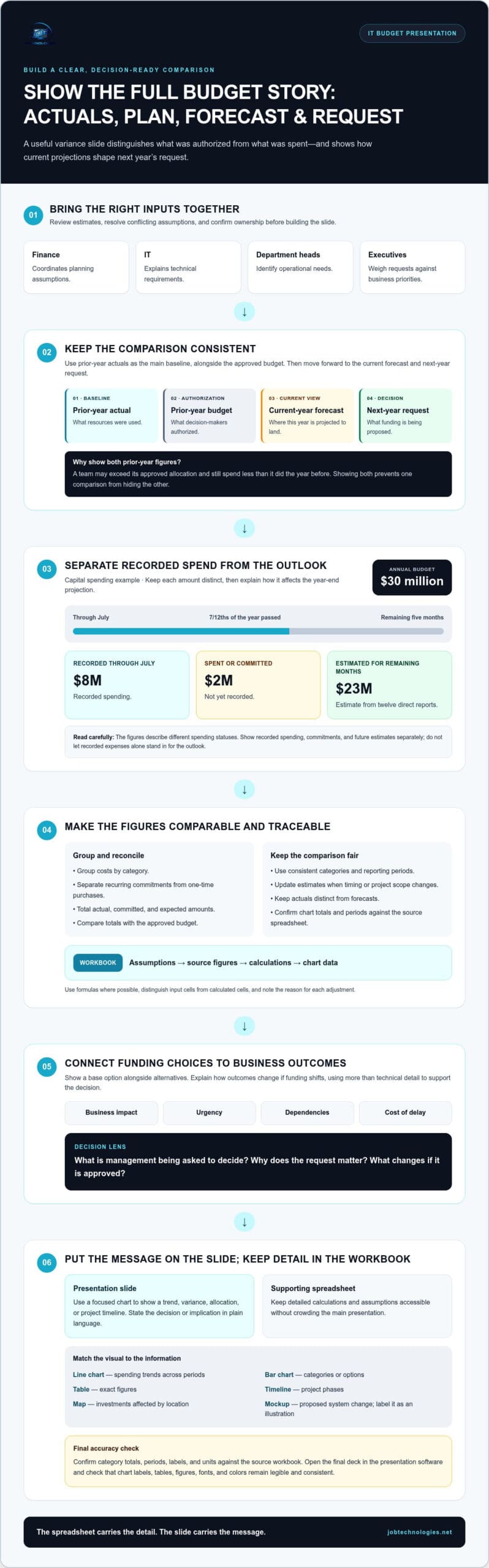
Presenting an IT budget to management works best when the variance slide shows both actual spending and the approved budget. Use prior-year actuals as the main baseline, alongside the prior-year approved budget. Then show the current-year forecast and next-year request. This sequence helps leaders distinguish the original plan from actual spending and projected needs.
Actual spending shows what resources were used; the approved budget shows what decision-makers authorized. Showing both keeps one comparison from obscuring the other. For example, a team may exceed its approved allocation but still spend less than it did last year. Label each column clearly, using terms such as “prior-year actual,” “prior-year budget,” “current-year forecast,” and “next-year request.”
A capital spending example illustrates why recorded expenses alone may mislead. The annual budget is $30 million. Through July, $8 million has been recorded, with another $2 million spent or committed but not yet recorded. By then, 7/12ths of the year has passed. Twelve direct reports estimate they can spend $23 million during the remaining five months. Show recorded spending, commitments, and future estimates separately, then explain how each affects the year-end projection.
Company budgets involve people across the organization. Finance coordinates planning assumptions, IT explains technical requirements, and department heads identify operational needs. Executives weigh requests against business priorities. Before building the slide, bring these contributors together to review estimates, resolve conflicting assumptions, and confirm who owns each proposed expense. This preparation makes the comparison easier to explain and support.
To compare IT budget options and prioritize projects, assess business impact, urgency, dependencies, and the consequences of delaying each project. Show a base option alongside alternatives, then explain how the outcomes change if funding shifts. For presenting an IT budget to management, this gives executives a consistent way to weigh requests without relying on technical details alone.
To calculate IT costs and forecast spending, group expenses by category, separate recurring commitments from one-time purchases, and total actual, committed, and expected amounts. Compare those totals with the approved budget, updating estimates when timing or project scope changes. For year-over-year comparisons, keep categories and reporting periods consistent across last year’s actuals, the current projection, and next year’s request.
Build the comparison in a spreadsheet, then transfer the key figures to Google Slides, Canva, or PowerPoint. Open the final file in the software you’ll use for the presentation. Check that chart labels, tables, and figures remain legible and consistent after transfer.
3. Providing charts, graphs, and supporting spreadsheets
A chart should clarify one budget point, not add another layer of interpretation. Use a visual to show a trend, variance, allocation, or project timeline, then state the decision or implication in plain language. Keep detailed calculations in a supporting spreadsheet so leaders can review the assumptions without crowding the presentation.
Match the visual to the information. A line chart can show spending trends across periods, while a bar chart can compare categories or options. Use a table when exact figures matter, a timeline for project phases, and a map when location affects an investment. A mockup can explain a proposed system change, but label it clearly as an illustration, not a financial result.
Keep each slide visually focused. Use a small, consistent color palette, with the same meaning for each color throughout the deck. For example, one color can represent approved funding, another forecast spending, and a third a variance. Don’t rely on color alone: use clear labels, readable values, and a short caption so the information remains accessible in print or grayscale.
International Business Communication Standards (IBCS) templates can help make financial visuals consistent. Whether you use an IBCS template or a simpler house style, write specific titles. “Projected operating expenses by category” tells the audience more than “Budget chart.” Define abbreviations, identify the period, and use the same units across comparable visuals.
Reconcile every chart with its source spreadsheet before sharing it. Confirm that category totals match the displayed overall total, periods align, and actuals are not mixed with forecasts. For example, if a chart shows quarterly expenses, check each quarter against the underlying rows and verify that the annual figure adds up. Compare chart labels and units with the spreadsheet, especially after copying visuals into presentation software.
Keep a clear supporting workbook with separate tabs for assumptions, source figures, calculations, and chart data. Use formulas where possible, and distinguish input cells from calculated cells. Add a note beside each adjustment so reviewers can trace the figure to its reason. The spreadsheet carries the detail; the slide carries the message.
Before presenting, open the final deck on the equipment you’ll use. Check that chart labels are readable, tables don’t break across pages, and fonts or colors haven’t shifted. A careful visual review helps the audience focus on the budget’s meaning and supports a more productive discussion.
Review the visuals in the presentation setting to confirm they remain clear. International Business Communication Standards (IBCS) templates can provide a consistent framework for financial visuals and help keep the budget message easy to follow.
4. Budget presentation purpose and components
A budget presentation should make clear what stakeholders are being asked to decide, why the request matters, and what changes if they approve it. For an IT proposal, connect the financial picture to business consequences, such as supporting essential systems or enabling a planned operational change. Figures show the scale of a request; the explanation shows its purpose. Before building slides, write the decision in one sentence and use it to shape the presentation.
A six-slide template can keep the main discussion focused. For a 20-minute board item, one practical allocation gives the presentation’s six core slides eleven minutes, leaving nine minutes for board discussion and questions:
- Decision: Use 60 seconds to state the approval or direction needed and identify the requested action.
- Variance: Use 90 seconds to highlight the most meaningful difference between plan and projection.
- Drivers: Use three minutes to explain the business reasons behind the request, such as a planned change or an operational need.
- Assumptions: Use two minutes to explain three key assumptions and how each shapes the proposed budget.
- Request: Use 90 seconds to summarize the proposed funding and the intended outcome.
- Risk: Use two minutes to describe the consequences of delay, reduced scope, or an alternative decision.
Keep one main idea on each slide. A variance slide, for example, should explain the most important movement, not reproduce every spreadsheet row. Use a separate slide to explain the drivers behind that movement. This helps leaders follow the logic from observed change to requested decision instead of interpreting several arguments at once.
Use the board paper or appendix for material that supports the decision but doesn’t need live explanation. This may include detailed calculations, project-level assumptions, and background schedules. Refer to a specific appendix item when questions arise, so the meeting can explore the detail without turning every slide into a dense data page.
Before presenting, align the main takeaways with key administrators and the people responsible for the figures. Confirm that the decision, assumptions, and risk descriptions tell the same story. Then rehearse within the available agenda time. If a point needs more explanation, simplify the slide or move the supporting detail to the paper. A clear purpose and disciplined sequence give stakeholders a useful picture of the choice, its rationale, and its implications.
A strong presentation explains what the financial figures mean for the organization rather than asking stakeholders to interpret them on their own. Connect each important amount or movement to its practical consequence, and show how that consequence informs the decision. This keeps financial detail useful without obscuring the purpose of the request.
A six-slide structure can keep the board discussion focused, while the board budget paper carries detail that isn’t needed during the live presentation. Include three key assumptions in the paper and explain how they shape the request, so readers can review the basis for the figures. The slides can focus on the decision, its drivers, and the consequences of different choices, with supporting material available when stakeholders want to examine the reasoning.
4. What financial data should be included in an IT budget proposal
An IT budget proposal should show how each requested amount was built and what it supports. Give management a financial view that connects forecast spending to services, projects, and business needs. Start with the requested total, then break it into categories that decision-makers can review. For a capital expenditure forecast, show the estimate for the remaining period separately from spending already recorded. One example projects a $33 million capital expenditure outlook for the rest of the year. Explain the assumptions behind that outlook and what could change it.
Use a consistent data structure so reviewers can trace each figure. Include the planning period, amount requested, prior approved amount, current estimate, and variance where relevant. Separate recurring expenses from one-time project costs, and distinguish committed spending from proposed work. For each line, identify its owner and purpose. For example, don’t combine a software renewal with a new implementation project: their timing and business rationale differ.
- Run costs: List recurring expenses such as subscriptions, support, and ongoing service commitments.
- Project costs: Show planned initiatives separately, with expected timing and the reason for the investment.
- People and delivery: Include the staffing or implementation effort required to complete the work.
- Dependencies: Identify related purchases or projects that affect whether a request can proceed.
- Funding choices: Show how a reduced or phased option changes scope, timing, or expected outcomes.
Make the forecast traceable by including the source for each estimate, the period it covers, and any known timing assumptions. If a project starts later than planned, explain how that shifts spending between periods. Keep actuals, commitments, and forecast amounts in separate columns. This helps reviewers see whether a balance represents available funds or future obligations.
Show how uncertainty could affect the total. Add a sensitivity line for each key budget assumption, showing how the budget would change if that assumption were wrong by a stated percentage. For example, test whether a change in project timing or expected usage shifts the request. State the assumption, the percentage used, and the resulting budget effect. This gives management a clear view of exposure without presenting an estimate as certain.
Connect financial detail to the decision. For every major request, state what the amount enables, what happens if it’s deferred, and which assumption matters most. Keep supporting calculations in a spreadsheet and reconcile its totals with the proposal. Reviewers should be able to trace the summary figure to its category, timing, and rationale without guessing what it includes.
5. How to align an IT budget with business goals
Start with the company’s stated priorities, then connect each IT request to a specific business outcome. If leadership wants smoother customer service, explain how a proposed system change supports that goal. If the priority is operational continuity, show which investment addresses a known dependency or service risk. Reconsider or defer a request without a clear connection, or explain how it supports existing operations.
Create a clear line from goal to result: business priority, IT initiative, required resources, and observable outcome. For example, a project intended to reduce manual work should identify the process it changes and how the team will assess the effect. Don’t claim savings or productivity gains without a defensible basis. Describe the expected benefit, the assumptions behind it, and who will evaluate progress after approval.
Ask each department leader to describe the operational need behind a request. Then compare those needs with company priorities using consistent criteria. Consider whether the work supports a strategic objective, protects a critical process, enables another approved project, or addresses a problem that can wait. This helps distinguish urgent infrastructure work from useful improvements that are less connected to current goals.
- Strategic fit: Name the company priority and explain how the investment advances it.
- Operational impact: Identify the team, workflow, or business service affected.
- Dependencies: Show which initiatives rely on the request and what delays could affect.
- Outcome tracking: State what evidence will show whether the investment delivered its intended benefit.
Use those criteria to compare funding choices. A full proposal may deliver the intended scope, while a phased option could protect the most important outcome first. Explain the tradeoff plainly: which capability moves ahead, which work is delayed, and which business objective receives less support. Management can then weigh priorities rather than isolated technical specifications.
Include the people responsible for business outcomes and delivery in the planning conversation. Department leaders can clarify how processes work today; IT can identify technical dependencies; finance can assess how requests fit the organization’s planning assumptions. Resolve differences before the meeting, especially when teams define success differently. For instance, a customer-service team may value faster handling, while finance focuses on avoiding duplicated spending.
Revisit approved projects during budget reviews. Compare progress with the original purpose, document scope changes, and explain whether assumptions still hold. If a project no longer supports the priority that justified it, present revised options and implications. This keeps future requests tied to current business needs and gives management a consistent basis for adjusting investment.
JOB Technologies: Managed IT Services
JOB Technologies helps businesses connect IT planning with the systems they rely on every day. Its Managed IT Services support organizations reviewing ongoing technology needs, while Network Installation & Management can help with infrastructure planning. For budgets that include new capabilities, AI Implementation and Phone Systems VoIP may also fit the business case. These services are useful when your team needs to assess IT priorities, plan technology work, or align infrastructure decisions with operational goals.
If your budget process needs a clearer connection between business priorities and IT planning, explore JOB Technologies’ IT services. Contact JOB Technologies to discuss your business’s IT planning needs.
Turn the budget into a practical next step
A strong plan remains useful after approval. Use its priorities to guide upcoming IT work, identify where internal planning needs support, and keep business leaders involved as needs change. This gives presenting an IT budget to management a lasting purpose: connecting funding decisions with the systems and capabilities the business depends on.
JOB Technologies provides Managed IT Services, Network Installation & Management, and AI Implementation for businesses in Dubuque, Galena, East Dubuque, Dyersville, Farley, and Peosta. These services can help refine technology priorities and plan infrastructure or implementation work. Start with a conversation about your goals, current challenges, and intended outcomes.
Explore your IT planning options with JOB Technologies, and take the next step toward a budget that supports your business with clarity and confidence.
Frequently Asked Questions
How long should a board budget presentation be in 2026?
In 2026, allow 15 to 20 minutes for a board budget item, including time for discussion. Confirm whether the agenda allocation includes questions or only the prepared presentation. If questions are included, shorten the spoken portion and leave supporting detail available for follow-up. A concise run-through helps presenters stay within the slot while giving board members room to clarify the decision.
Should the variance slide compare to budget or to actual?
Show both comparisons when possible: actual spending against the approved budget, and current projections against actual spending. The approved amount shows whether spending followed the plan; actuals reveal how needs have changed. Label the periods and comparison basis clearly. For each notable difference, add a brief explanation, such as a delayed implementation or change in scope, so leaders can distinguish timing effects from ongoing changes.
What goes in the appendix versus on the slides?
Keep slides focused on the figures needed to understand the request and make a decision. Put detailed calculations, project schedules, assumptions, and category breakdowns in the appendix or supporting budget paper. For example, show a project’s total funding request on the slide, then keep its phased spending plan and calculations in the appendix. This lets reviewers trace figures without overwhelming the main presentation.
What questions do executives ask about IT budgets?
Executives often want to know what outcome a request supports, what drives its largest expenses, and what happens if approval is delayed or reduced. They may also ask which assumptions could change the forecast, how the proposal compares with other priorities, and how progress will be assessed. Prepare direct answers that connect each point to a business effect, such as a workflow, service dependency, or planned operational change.