

Buying your own network equipment may seem like the simplest way to control your setup, but ownership alone doesn’t determine whether it will serve your business well. For professional network setup in Dubuque, consider the equipment alongside installation, ongoing administration, backups, and the planning needed to make the network work as a whole.
It’s reasonable to want clear choices before investing in business technology. The right option depends on how your team works, which devices and systems need to connect, and who will manage the network over time. This article explains how to compare equipment options alongside installation, local availability, administration, data backups, and planning for future needs. You’ll come away with a practical way to weigh the trade-offs, including when buying equipment yourself may fit and when a managed setup may better support stable day-to-day operations.
Key Takeaways
- Compare network equipment by how well it supports your business’s devices, systems, and day-to-day work, not just by the purchase itself.
- Understand how local internet availability and your installation approach affect the network’s overall fit.
- Consider who will handle administration and backups so routine upkeep and data protection are part of the plan.
- Plan for current needs and future systems before choosing how to implement the network.
- Use the decision guide to weigh self-installation against professional network installation and management.
Coverage areas and availability estimates
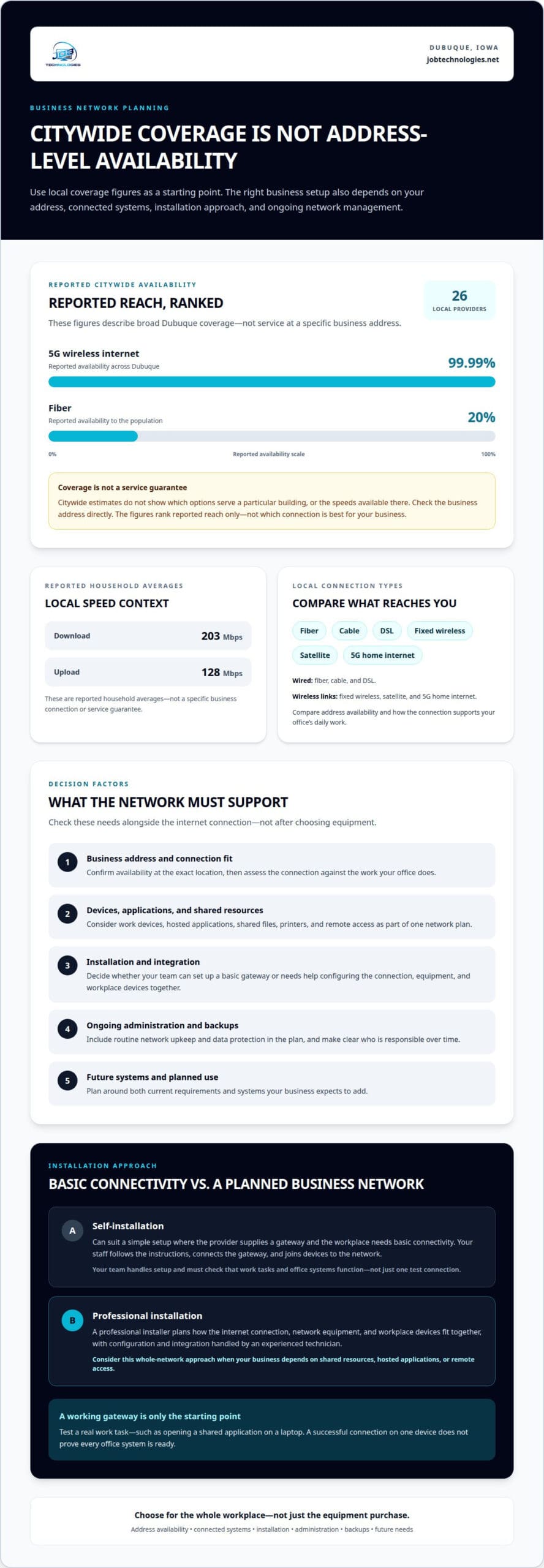
For professional network setup in Dubuque, internet availability is only one part of the decision. A business needs a connection that reaches its address and supports its daily systems. Dubuque households report average download speeds of 203 Mbps and average upload speeds of 128 Mbps. These figures describe reported household averages, not a specific business connection or service guarantee.
Availability varies by location and connection type. Dubuque has 26 internet providers across fiber, cable, DSL, fixed wireless, and satellite. The reported availability of 5G wireless internet reaches 99.99% of Dubuque, while fiber is available to 20% of the population. Those citywide estimates don’t show which options serve a particular business address. Fiber availability by address matters because coverage can differ from one street or building to another.
When choosing a business network setup provider in Dubuque, look for a plan that connects internet service with your office network, devices, and ongoing administration. It should account for your location, the systems you need, and how the network will be managed after installation.
Reviews and service areas offer useful context, but neither tells you whether a connection reaches your exact address. Consider how the provider handles network planning, installation, and management, then compare that scope with your business needs. For example, an office that relies on cloud systems may prioritize upload capacity and consistent access differently from one with lighter online use.
| Connection option | Availability consideration | Comparison point |
|---|---|---|
| Fiber | Available to 20% of Dubuque’s population | Check address-level coverage and reported upload and download speeds |
| Cable or DSL | Among the connection types offered across the local market | Compare address availability and fit with business systems |
| Fixed wireless or satellite | Availability depends on the location and service type | Assess how the connection supports the office’s daily work |
| 5G home internet | Reported 5G wireless availability reaches 99.99% of Dubuque | Distinguish broad coverage estimates from service at your address |
These options differ in how they connect a building: fiber, cable, and DSL use wired infrastructure, while fixed wireless, satellite, and 5G home internet use wireless links. Citywide availability doesn’t establish the speeds available at your location. Ask how the selected connection will support work devices, business applications, and planned network use.
Autopay is a billing arrangement, not a measure of broadband coverage, upload speeds, or network suitability. Keep payment preferences separate from the technical comparison. Choose internet service that fits your address and business network requirements, then plan installation and management around it.
Household internet choices may also involve affordability and local support, though these considerations are separate from confirming service at a business address. The federal Lifeline program can provide eligible low-income households with an internet discount of up to $9.25 per month. That assistance is relevant to eligible households considering internet costs, but it does not establish which providers serve a particular location.
Local technical support is another point to distinguish from a provider’s coverage estimate. The City of Dubuque IT Department provides help desk support to over 1,000 end-users, and City of Dubuque IT staff provide off-hours computer assistance on weekends and holidays. These details describe city IT assistance; they do not confirm business internet availability or replace checking address-level service and the network support included in a provider’s offering.
Professional and self-installation options
Business network setup services in Dubuque can include equipment installation, network planning, and ongoing management. The right approach depends on the devices, applications, and connection needs your workplace must support.
Professional Installation Providers
A professional installer plans how the internet connection, network equipment, and workplace devices fit together. That matters when an office uses shared files, hosted applications, printers, and remote access. Unlike self-installation, professional setup puts configuration and integration in the hands of an experienced technician. The work can address the business network as a whole, rather than simply bringing one gateway online.
Self-installation can suit a simple setup where the internet provider supplies a gateway and the workplace needs basic connectivity. Follow the provider’s instructions, connect the gateway, and join devices to the network. Home internet instructions may focus on streaming and browsing, while a business may also need dependable access to work applications and shared resources.
Business Network Setup Services
Business network services address connected workplace systems, not just the internet gateway. Setup can coordinate the connection, network equipment, and business devices so they work together. A basic self-setup generally focuses on activating the supplied gateway. If your team relies on remote access or shared business applications, planning the whole network can better support daily work.
A Wi-Fi gateway combines internet access and wireless networking in one device. For self-setup, connect it as instructed, complete the setup process, and join a test device. Then try a real work task, such as opening a shared application on a laptop. A successful connection on one device doesn’t prove every office system is ready.
Compare the approaches by considering what each leaves your team responsible for. With self-installation, your staff handles setup and initial troubleshooting. With professional installation, a technician handles the planned setup and network integration. Consider the office layout, wired devices, wireless coverage, and whether remote workers depend on the same systems.
- Gateway setup: best suited to straightforward connectivity and provider-led instructions.
- Professional installation: useful when several business devices or systems must work together.
- Ongoing management: relevant when the business needs continued network administration beyond initial installation.
Internet plans describe the connection, while network setup determines how that connection serves workplace devices. Keep those decisions linked: a reliable connection still needs suitable configuration for the systems using it. For a business that wants planning and implementation handled together, explore professional network setup options as a next step.
Network administration and backups
A network needs routine care after installation, not just a router that works on day one. Administration includes troubleshooting, maintenance, access controls, and keeping connected systems aligned with business needs.
The City of Dubuque IT Department schedules monthly maintenance to troubleshoot and prevent problems with servers and network equipment. The example shows why administration belongs in the network plan: routers, connected devices, and business systems all need attention over time. Maintenance can also help identify changes that affect users, such as a new application or mobile device joining the network.
Backups protect business data when files are lost, systems fail, or recovery is needed. City of Dubuque IT staff maintain regular backups and off-site storage for data on central servers. For your business, identify which information needs protection, where backups are stored, and how restoration would work. Backups are most useful when you can retrieve the data you need and resume essential work.
Include administration and recovery in the same plan. For example, a company using a central file server can identify key folders, set a backup routine suited to its operations, and document who handles restoration. Network records should also note the router’s role, essential system connections, and who is responsible for changes. This gives staff a clear starting point when troubleshooting.
Local permits or codes for commercial network cabling in Dubuque depend on the work and the building. Include cabling scope and building requirements in project planning rather than assuming every installation follows the same process.
Business network security and firewall setup help control traffic between the network and outside connections. Firewall configuration should reflect which systems need access, how employees connect remotely, and what activity requires protection. Security planning also covers how changes are managed, so firewall rules stay aligned with business operations.
Keep these responsibilities visible when comparing administration approaches:
- Maintenance: assign responsibility for troubleshooting and preventive work on network equipment.
- Backups: identify protected data, regular backup routines, and off-site storage needs.
- Recovery: document how staff access backed-up information and restore business systems.
- Changes: record updates to the router, connected devices, and firewall settings.
A monthly review can bring these tasks together without confusing maintenance with a service contract or installation charge. The fastest connection won’t replace administration, and mobile devices still need appropriate network access. A clear plan identifies who maintains your systems, how data is backed up, and what steps support recovery.
The City of Dubuque IT Department is staffed by two Senior Network/Systems Administrators. For a business, assigning responsibility for routine checks, backup oversight, and restoration decisions makes tasks easier to follow. Staff should know who records network changes and who coordinates recovery, so troubleshooting doesn’t begin with uncertainty about the next step.
Systems planning and implementation
A practical implementation plan connects internet service, workplace devices, and business systems. Its timeline depends on the project scope and the coordination each step requires.
Setup Timeline
A business network setup timeline starts by defining what the network must support. Planning considers the office layout, internet connection, connected devices, and systems such as VoIP phones or shared business applications. A small change to one device differs from an office-wide installation involving several systems, so the work plan should reflect the actual scope.
Next, plan for equipment readiness, access to the work area, and coordination with the internet service provider. If your business is changing providers, consider the existing connection and new service together. A planned transition helps the team understand when systems are being configured and when they can test their usual tasks.
Provider terms also matter during planning. Compare internet plans by their stated details, including discounts, data limits, unlimited-use terms, contract conditions, and termination requirements. These affect the internet service arrangement, while the network implementation plan addresses how the connection supports business operations. Keep the decisions distinct, but coordinate them.
Installation Steps
Installation turns the plan into a working network. A structured sequence helps connect equipment and systems without overlooking the devices employees use every day. Start by documenting required connections, then move on to configuration and functional testing.
- Map the requirements. Identify the internet service, business systems, wired equipment, wireless needs, and each device that must connect.
- Plan the layout. Determine where network equipment will sit and how office devices will reach the network.
- Prepare the connection. Coordinate the internet service and equipment so the network can be configured as planned.
- Configure the network. Set up the equipment and connect the identified devices and systems.
- Test typical work. Confirm that a staff member can access business applications, use connected equipment, and complete routine tasks.
Test real work, not just whether a device shows a Wi-Fi connection. For example, check access to a shared application and confirm that a VoIP phone connects as intended. If a remote employee relies on business systems, include that need in the plan and test it during implementation.
Finish by recording the network layout, connected equipment, and relevant service details. This gives the business a useful reference when adding a device, changing an internet plan, or planning a termination or provider transition. Documentation also clarifies which systems were tested and what the network was designed to support.
Professional network installation providers in Dubuque, Iowa
For a Dubuque business, a network installation provider should plan around workplace systems, not just connect equipment. Compare the work included, how installation is coordinated, and whether network management continues afterward. These distinctions separate a one-time setup from ongoing support for the business network.
Start with the project scope. An office connecting laptops, printers, shared systems, and VoIP phones has different requirements from a small workspace with a few devices. A useful installation plan identifies the connections and explains how they fit together. It should also account for internet service and office layout.
Next, distinguish installation from ongoing management. A one-time project focuses on planning, configuring, and testing the network. Ongoing management covers administration after installation, including troubleshooting and adapting to changing business needs. For example, adding a work area or new business software can affect how existing devices connect.
Service area is another practical consideration for organizations in Dubuque. Account for the business’s exact location and on-site requirements, such as coordinating equipment placement across an office. A provider’s geographic reach alone doesn’t define the project scope. The installation should fit the site, connected systems, and need for continued administration.
Reviews can offer context about past customer experiences, but they don’t explain how a specific network will be planned. Treat them as one consideration, then compare service descriptions with the work your business needs. For instance, a review mentioning a router setup doesn’t show whether the provider also planned connections for shared business systems.
- Project scope: Does the work cover the business’s devices, systems, and network layout?
- Implementation: Does the plan include configuration and testing of normal work tasks?
- Administration: Is the engagement limited to installation, or does it also cover ongoing management?
- Business fit: Does the approach account for the office’s internet service and day-to-day operations?
A provider comparison is most useful when you measure each option against the same requirements. Compare whether a proposed setup covers a wired printer, wireless laptops, and business applications, then consider who will handle future network changes. This keeps the decision focused on practical outcomes instead of broad claims or review scores alone.
For a business that needs installation and continuing network management considered together, explore network installation and management support. This can be a natural next step when the network needs more than equipment setup, or when connected systems must be planned as part of one business environment.
Customer reviews can provide context about past experiences, while service coverage should match your business location and on-site requirements. Neither reviews nor geographic reach alone shows whether the provider’s work will fit your network project.
JOB Technologies: Network Installation & Management
JOB Technologies helps businesses plan, install, and manage networks through its Network Installation & Management service. It’s a natural next step when equipment choices, connected systems, and ongoing administration need to work together. The aim is a network setup that supports your operations, not a collection of disconnected devices.
Turn to JOB Technologies when planning a new network, changing an existing setup, or arranging ongoing management for business systems. Managed IT Services can support broader technology needs, while Phone Systems VoIP and AI Implementation may fit related operational plans.
Share what your network needs to support, such as workplace devices, business applications, or connected phone systems. Contact JOB Technologies to discuss network installation and management for your business.
Make your network plan work for what comes next
Your network should support how the business operates now while leaving room for future changes. As teams add devices, adopt systems, or adjust their work, the original setup may need to evolve. Treat professional network setup in Dubuque as an ongoing business decision, not simply a one-time equipment purchase.
JOB Technologies offers Network Installation & Management for businesses planning or improving a network. Its Managed IT Services can address broader technology management, while AI Implementation may support businesses exploring new ways to work. The right starting point depends on the systems and goals your business wants to support.
Bring your priorities into a focused conversation, whether you’re planning an installation or reviewing an existing network. Discuss your network with JOB Technologies and take a clear next step toward a setup that fits your business.
Frequently Asked Questions
Should I buy my own equipment?
You can buy your own equipment if you’re ready to make the selection and replacement decisions. Before purchasing, match each device to its intended use and decide who will configure it, maintain it, and address problems later. For example, a business expanding its office may need equipment choices coordinated with existing systems. Buying devices before the plan is clear can leave you with equipment that doesn’t fit the finished setup.
What managed IT and network support plans are available for Dubuque businesses?
JOB Technologies provides Managed IT Services and Network Installation & Management for small and medium-sized businesses in Dubuque, Galena, East Dubuque, Dyersville, Farley, and Peosta. A managed services package includes support, business and security software, hardware, and technical advisory. Pricing is per computer or per user, determined after a needs assessment and provided in a proposal. This suits businesses seeking ongoing technology support alongside network installation.
Dubuque network installers reviews and service areas
Reviews and service areas provide useful context, but they don’t establish whether internet service reaches your exact business address. Check address-level availability and compare the provider’s planning, installation, and management scope with your needs.