

The strongest questions to ask a potential IT provider focus on what happens when systems fail, not just what’s included on a typical day. Start with the service-level agreement: it should explain support hours and set response and remediation times for different levels of impact. Then ask how backups and disaster recovery are designed to bring your critical systems and data back when disruption occurs.
It’s reasonable to want dependable support and clear answers before trusting a provider with your business technology. A focused conversation can show what service looks like in practice, how urgent issues are handled, and whether the provider’s approach fits your operations. This guide covers service agreements, helpdesk availability, proactive care, insurance, backups, and recovery planning, so you can compare answers and make an informed decision for your business in Dubuque, Galena, East Dubuque, Dyersville, Farley, or Peosta.
Key Takeaways
- Make sure the service agreement defines support hours, priority levels, response times, and how progress is reported.
- Clarify how helpdesk requests are prioritized and when on-site support is available, so the process fits your team’s needs.
- Look for proactive monitoring and regular planning conversations that can keep IT aligned with business changes.
- Ask about errors and omissions, general liability, and cyber liability coverage to understand how technology-related risks are addressed.
- Discuss backup copies, restore testing, and recovery targets for critical systems so you can judge whether the plan supports business continuity.
1. What Are Your Service-Level Agreements?
Several of the most useful questions to ask a potential IT provider concern the service-level agreement (SLA). Ask for the agreement before comparing proposals. It should describe support hours, issue priorities, response and remediation times, and performance reporting. Confirm whether coverage is available 24/7/365, including weekends and holidays, or limited to 9-to-5 hours. Match those hours to your employees, customers, and operating schedule.
An SLA should measure commitments by impact level, not offer one response target for every incident. Ask what qualifies as critical, high priority, or routine, and when the response clock starts. For example, a full outage affecting customer transactions needs a different response path from one employee’s software issue. Request written response and remediation targets, plus updates while work is underway.
Response time means when the provider begins responding; it doesn’t necessarily mean when service will be restored. Ask how the agreement defines both, how missed targets are handled, and what reports show performance. A managed provider can’t reasonably prevent problems 100% of the time, so accountability also means clear escalation steps, incident updates, and a review of recurring failures.
Compare an in-house IT team with a managed IT services provider by weighing direct internal availability against the provider’s service scope and support process. The right fit depends on the work your organization needs handled and how much internal coverage it wants to maintain.
Typical managed IT pricing models include per-user, per-device, tiered, and fixed monthly arrangements; project work or requests outside the agreement may be billed separately. Some providers charge a base fee covering up to 100 service calls per month, then charge extra for additional calls. The price depends on the case and is given after a quote request, with users, systems, coverage, and included services shaping the scope.
Review contract duration, renewal language, cancellation notice, transition responsibilities, and possible charges for after-hours support, travel, projects, or work outside scope. Managed service providers commonly offer one-year or three-year terms, and contracts may automatically renew. Set a reminder six months before expiration to allow time for renewal discussions or a transition. Include questions to ask a potential IT provider about contract changes as your organization grows.
Ask whether technicians serve your location directly, how travel time affects on-site response, and whether travel or coverage limits appear in the agreement. If support is outsourced, identify who receives requests and who remains accountable. Also clarify whether related services from outside vendors are included, coordinated, or separately contracted.
Before signing, establish in writing that your business retains ownership and administrative control of its data, accounts, and equipment. Specify how credentials, records, configurations, and equipment access will be returned or transferred when the relationship ends. A documented handoff process helps prevent confusion during a provider change.
2. Helpdesk response times and on-site availability
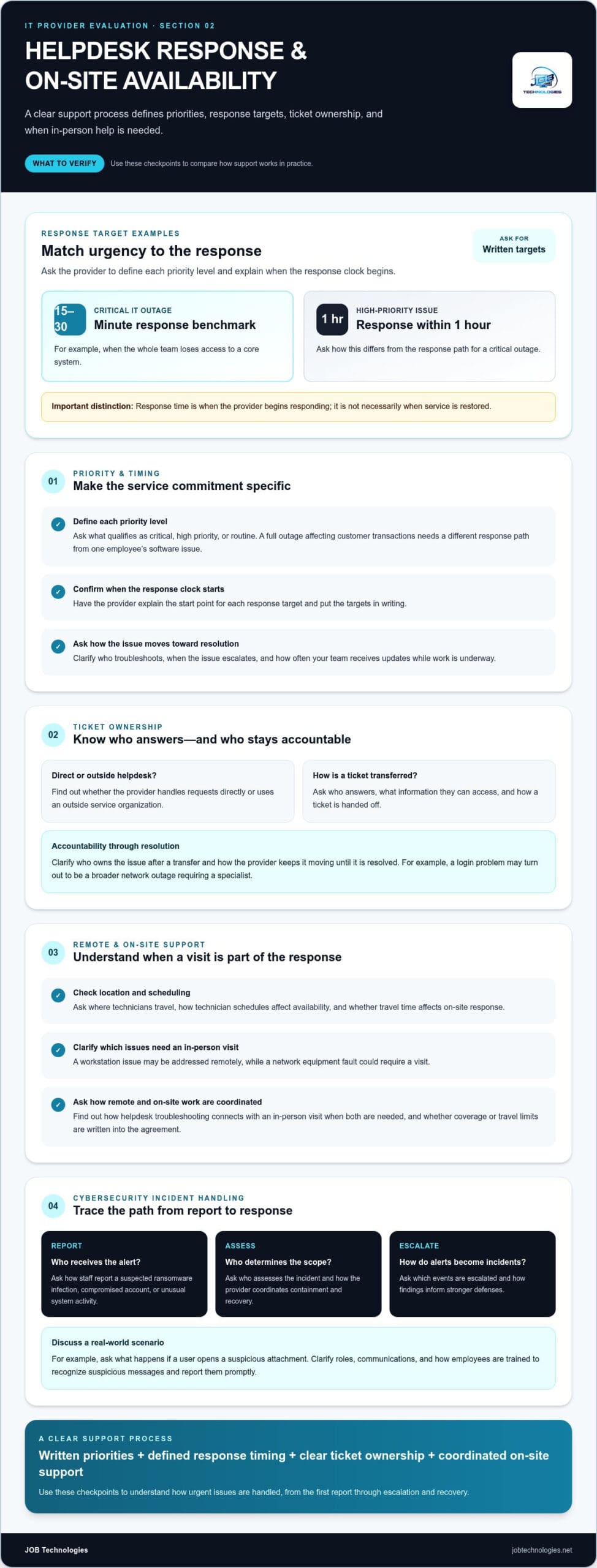
A useful helpdesk commitment separates urgent outages from routine requests. Ask what response target applies when the whole team loses access to a core system, and how that differs from one employee needing software help. A practical benchmark is a 15-30 minute response for critical IT outages and a response within 1 hour for high-priority issues. Have the provider define each priority and explain when its response clock begins.
Response time is not the same as resolution time. Ask what the helpdesk does after acknowledging a ticket: who troubleshoots it, when it escalates, and how often your team receives updates. A specialist may need to take over, for example, if a login problem becomes a broader network outage. The process should identify the next contact and keep the issue moving, rather than leave employees unsure who owns it.
Find out whether the helpdesk is handled directly by the provider or by an outside service organization. Neither arrangement alone tells you how well support will fit. Ask who answers, what information they can access, how they transfer a ticket, and how the provider remains accountable until the issue is resolved.
On-site support depends on location, technician schedules, and the issue itself. Ask which problems require an in-person visit, where technicians travel, and how an on-site visit fits into the response process. A workstation issue may be addressed remotely, while a network equipment fault could require a visit. Clarify how the helpdesk coordinates remote troubleshooting with on-site work when both are needed.
Helpdesk teams also need a clear path for cybersecurity incidents. Ask how staff report a suspected ransomware infection, compromised account, or unusual system activity. The response plan should identify who receives the report, who assesses its scope, and how the provider coordinates containment and recovery. Discuss a scenario, such as a user opening a suspicious attachment, to see whether roles and communications are clear.
Ask how the provider monitors security and reviews alerts. A useful explanation covers how an alert becomes an incident, which events are escalated, and how findings inform stronger defenses. Also ask whether employees receive cybersecurity training and how it is reinforced. Training should help staff recognize suspicious messages and report them promptly, before an isolated mistake affects other systems.
Incident response should connect to business continuity. Ask how the provider communicates during a disruption, which business functions receive attention first, and how it coordinates with your decision-makers. A company relying on online orders, for example, may prioritize restoring customer access and payment workflows. Discussing that scenario helps show whether technical steps align with operational needs.
Write down the escalation contacts, reporting channel, and update process your staff should use during an incident. If you’re strengthening cybersecurity response alongside helpdesk support, explore cybersecurity incident response support as part of your planning.
3. Are Your Services Focused on Proactivity?
A proactive relationship starts with understanding how your organization works, not simply fixing the latest problem. Ask how the provider learns your priorities, industry requirements, and plans for change. An assessment before onboarding can reveal existing systems, gaps, and capacity limits, giving recommendations a business-specific foundation. Ask what findings it shares, which risks it ranks first, and how each proposed improvement supports daily work.
Business longevity can indicate whether a provider has had time to develop repeatable processes and support infrastructure. A managed IT provider operating for a decade or more may have built experience across changing technology and client needs. Years in business alone don’t demonstrate fit, though. Ask for examples of helping organizations scale up or down, and how that experience would apply to your staffing, locations, or systems.
Growth plans should shape IT recommendations before new demands become urgent. Discuss your expected hiring, new sites, acquisitions, or changing customer workflows, then ask how these shifts affect network capacity, user access, and support needs. A useful planning conversation can forecast IT needs for the next 12-24 months. For example, a business adding remote employees may need a different access and security plan than one expanding its office network.
Proactive care should include scheduled reviews, not only ticket responses. Ask whether the provider holds IT strategy meetings at least annually and ideally quarterly, and whether it reviews systems and security quarterly. These discussions can track unresolved risks, recurring performance problems, and planned investments. Involve executives who understand business priorities, then record decisions, owners, and next steps so recommendations lead to action.
Business continuity is another measure of proactive service. Ask how often the provider tests disaster recovery plans and which situations those tests cover, such as a system outage or unavailable business location. Restore testing at least quarterly can help reveal whether backed-up data is usable. Discuss who makes recovery decisions, which business functions take priority, and how employees receive updates during a disruption.
Use onboarding as an early test of communication and follow-through. Ask for a plan covering the first 60-90 days, with milestones for the first 30, 60, and 90 days. It should identify assessment work, system priorities, assigned contacts, and how progress is shared. This structure gives your organization a clear view of the provider’s ability to understand its environment and build a working relationship.
Finally, ask how the service-level agreement will be reviewed as your business changes. A provider’s practices should adapt when your organization adds locations, changes workflows, or adopts new technology. Schedule regular reviews to revisit priorities, risks, and service scope. Those conversations help keep managed IT services connected to business goals, while data backup and recovery planning support continuity as systems evolve.
4. Errors and omissions, general liability, and cyber liability insurance
Ask what insurance the provider carries, including errors and omissions, general business liability, and cyber liability. These policies address different categories of exposure, so a policy name alone doesn’t explain the protection. Ask what work and incidents each policy covers, which exclusions apply, and whether subcontracted services are covered. Review the documentation alongside the agreement, especially if the provider accesses business systems or sensitive information.
Focus on how coverage relates to realistic scenarios. If a configuration error interrupts access to a business application, ask how errors and omissions coverage applies. If a technician’s work causes physical damage at your premises, ask how general liability applies. For a ransomware incident involving systems the provider manages, ask what cyber liability covers, who handles notification and response, and how the provider coordinates with your organization.
Ask for policy limits, deductibles, renewal dates, and proof of current coverage, then record the answers in your vendor review. Clarify whether coverage applies to the services in your agreement and whether the provider relies on subcontractors. An insurance certificate helps document coverage, but it doesn’t replace your review of policy terms, exclusions, and responsibilities after an incident.
Insurance is only one part of risk management. Ask what security practices the provider uses, including encryption, vulnerability assessments, security audits, and monitoring. Request an example of how alerts are reviewed and how an incident is analyzed afterward. A useful answer connects the event to corrective action, such as adjusting access controls after an account compromise or improving detection after suspicious activity.
Certifications and frameworks can help you understand the provider’s approach, but ask what they cover. SOC 2 is a standard from the American Institute of CPAs that examines information security controls. SOC 2 Type II evaluates controls for handling customer data. Ask whether the provider undergoes a SOC 2 examination annually and whether its practices align with ISO 27001 or the NIST CSF.
Staff knowledge matters, too. Ask whether provider employees receive cybersecurity training and how the organization reinforces secure practices. Then ask how the provider helps your own staff recognize suspicious messages, report a possible incident, and handle business information safely. Employees should know where to report a suspicious attachment, for example, instead of forwarding it to colleagues.
Use the discussion to assess whether cybersecurity is part of daily operations or only a response after trouble begins. Ask who reviews monitoring alerts, who can authorize urgent action, and how lessons from an incident update security practices. If you’re evaluating ongoing protection against cyber threats and ransomware, cybersecurity and ransomware protection can be part of that conversation.
5. Backups and disaster recovery targets
Ask how the provider handles cybersecurity, backups, and disaster recovery. A sound plan combines regular backups of your IT environment with recovery procedures prepared before a disruption. It should also explain how the team responds to ransomware, which systems it restores first, and how your organization stays informed. These details turn a general promise of protection into a practical continuity plan.
Start with the 3-2-1 backup strategy: keep three copies of data, use two media types, and store one copy off-site. Ask which business systems and files are covered, where copies are stored, and how access is protected. For example, a company may depend on both financial records and customer-facing systems. Confirm that the backup plan covers the full environment, not only selected files.
A backup is useful only if data can be restored. Ask how often the provider tests restores, which files or systems are selected, and how results are recorded. Testing at least quarterly can reveal corrupted copies, missing data, or configuration issues before an emergency. Ask what happens when a test fails, who owns the corrective work, and how the next test verifies the fix.
Set recovery targets around business impact. A recovery-time objective (RTO) describes how soon a system needs to return; a recovery-point objective (RPO) describes how much recent data the business can afford to lose. For example, four hours is a sample recovery time for key servers. A sample target for critical systems is losing no more than one hour of data.
Those examples are starting points, not universal targets. Identify the systems that support essential work, then consider the disruption caused by downtime or missing information. A customer-order platform may need faster recovery than an archive used occasionally. Ask the provider to map each critical system to an RTO and RPO, and explain how backup schedules and recovery steps support those targets.
Disaster recovery plans should be tested against specific scenarios, not left as documents on a shelf. Ask how often the provider tests the plan and whether exercises include ransomware, equipment failure, or loss of access to a business location. Find out who makes recovery decisions, how staff receive instructions, and how the team checks that restored systems work. A proactive test can expose gaps in responsibilities and communication.
For a strategic review, bring a list of essential systems, data, and acceptable downtime to the planning discussion. Plan data backup and recovery around business priorities so recovery targets reflect what your organization needs to resume critical work.
JOB Technologies: Managed IT Services
JOB Technologies provides Managed IT Services for businesses that need ongoing technology support. If your evaluation reveals gaps in network planning, system management, or day-to-day IT oversight, managed support can bring those needs into a coordinated service relationship for your business in Dubuque, Galena, East Dubuque, Dyersville, Farley, or Peosta.
For specific operational goals, Network Installation & Management supports business network needs, while AI Implementation and Phone Systems VoIP address technology projects that affect workflows and communication. The right starting point depends on the challenges you’ve identified, such as improving network reliability or planning a new phone system. Clear priorities make it easier to discuss the support your organization needs.
Contact JOB Technologies to discuss your business’s IT needs, or visit jobtechnologies.net.
Turn Your IT Priorities Into a Practical Plan
The questions to ask a potential IT provider are most useful when they lead to a clear decision about your business’s technology priorities. Before choosing a partner, identify the operational outcomes that matter most: a steadier IT environment, a network that supports your work, or a thoughtful approach to adopting new tools. That focus keeps conversations grounded in your organization’s needs rather than a generic service checklist.
JOB Technologies offers Managed IT Services, Network Installation & Management, and AI Implementation. These offerings can support businesses seeking ongoing IT management, network work, or help putting AI into practice. Start with the challenge you want to address and the outcome you hope to achieve. A focused discussion can help establish whether the work aligns with your priorities and what a useful next step looks like.
Start a conversation with JOB Technologies about your IT priorities. With a clear goal and an open discussion, you can move toward technology decisions that better support your business.
Frequently Asked Questions
What Are Your Service-Level Agreements?
A service-level agreement defines service commitments and how support priorities are handled. JOB Technologies’ agreement includes priority issue resolution. Before signing, map common situations to priority levels, such as an employee unable to access email versus a company-wide network interruption. Also clarify who can submit requests, how status updates are shared, and how the agreement is reviewed when your team or technology changes.
Are Your Services Available 24x7x365 If I Need Them?
JOB Technologies provides 24/7 monitoring, but monitoring and support availability are different commitments. Monitoring can identify technical or security alerts, while a support request involves someone responding to your issue. For your own operations, distinguish those functions in the service agreement. For example, identify how an alert is handled overnight and which channel employees use to request help during regular work hours.
Are Your Services Focused on Proactivity?
Yes. JOB Technologies’ proactive maintenance includes 24/7 monitoring, weekly updates, scheduled reboots, and immediate zero-day updates. This approach aims to address maintenance and security needs before they interrupt routine work. Ask how planned updates are coordinated with business-critical applications. For example, scheduling a reboot outside a team’s busiest operating period can reduce disruption while keeping maintenance part of an ongoing IT plan.
Are there any co-management options?
Co-management means dividing IT responsibilities between an internal employee or team and an outside provider. Start by documenting who manages user access, handles routine support, oversees security, and makes technology decisions. An internal employee might coordinate staff requests while an IT provider manages network infrastructure. Clear ownership helps prevent duplicate work and makes escalation easier when an issue crosses responsibilities.
Can Your Firm Help with Upgrades or New Technology Implementations?
Yes. JOB Technologies offers Network Installation & Management and AI Implementation, supporting network projects and the introduction of AI technology. Before a project begins, define the business goal, affected systems, user needs, and how success will be assessed. An AI implementation discussion, for example, can start with a repetitive workflow your team wants to improve, then consider how the technology fits existing operations.
Do You Deliver Both Remote Management and On-site Support?
Yes. JOB Technologies provides remote and on-site support. Remote assistance can suit an email configuration problem, while network installation or equipment-related work may call for a visit to your premises. The company serves businesses in Dubuque, Galena, East Dubuque, Dyersville, Farley, and Peosta. Clarify which support method fits the issue and how employees should submit a request.
Do You Have Experience Working with Other Organizations in My Industry?
JOB Technologies serves small and mid-size businesses, with a specialized focus on dental and medical practices. It also supports home services, automotive services, education, municipal services, industrial, and manufacturing organizations. Businesses in these fields can discuss how technology needs differ across their workflows. A manufacturing operation may prioritize production systems, for example, while a medical practice may focus on secure access to business information.
Do Your Engineers Have Experience with a Vast Breadth of Technologies and Infrastructure Types?
JOB Technologies supports business computer, network, and email systems, and works with both Microsoft and Google environments. It also provides network installation and management, AI implementation, and VoIP phone systems. If your organization uses a mix of platforms, outline how employees depend on each system and where they connect. That inventory helps frame technology support around your actual environment rather than assumptions.