

A backup can be working perfectly and still not be enough to keep your business safe from ransomware. Attackers may steal sensitive data as well as encrypt files, turning a technology disruption into a threat to operations and customer trust. Effective ransomware protection for SMBs takes more than one tool. It depends on safeguards that work together and a recovery plan your team can use.
If you’re balancing day-to-day responsibilities with limited IT time, it’s reasonable to wonder whether antivirus, backups, and other existing protections are enough. The answer depends on how ransomware could reach your systems, whether your safeguards cover those entry points, and how quickly you could restore essential work if an attack gets through.
This guide will help you understand common ransomware risks, assess your current protections, and prioritize practical steps for your business. We’ll cover prevention, employee awareness, backup testing, and incident readiness, along with how managed cybersecurity and data backup and recovery can connect protection with everyday IT operations. The goal is a clear, sustainable plan that reduces risk and helps your business recover with greater confidence.
Key Takeaways
- Understand how ransomware can disrupt access to business systems and data, affecting operations and customer trust.
- Build ransomware protection for SMBs with coordinated safeguards instead of relying on a single security tool.
- Compare prevention, detection, and recovery measures, and understand why backups support recovery but don’t prevent an attack.
- Prioritize critical accounts, devices, applications, and information when shaping a practical protection plan.
- Learn how managed IT can coordinate cybersecurity, backup, and recovery around your business’s everyday needs.
Why ransomware protection matters to small and midsize businesses
Ransomware is malicious software that can block access to files or systems, often by encrypting data and demanding payment for its release. An incident may start with a convincing phishing message or exposed account credentials, then affect resources beyond the first device if attackers gain access to connected systems. For a straightforward overview of ransomware’s methods and effects, see What is Ransomware?
For a small or midsize business, the impact can quickly become operational. Staff may be unable to open shared files, respond to email, or complete customer work on schedule. Recovery can take time as the business investigates what happened, restores systems, and determines whether sensitive information was accessed. The details vary: some incidents mainly disrupt access to data, while others involve data theft that creates additional privacy and customer-trust concerns.
How ransomware can disrupt everyday business operations
Imagine a team arriving to find its shared job files unavailable. If email, scheduling, or a business application also depends on affected accounts or systems, routine tasks can stall across multiple roles. A compromised device may provide a route to other connected resources, so the problem can extend well beyond one employee’s computer.
Disruption and data theft are related risks, but they aren’t the same outcome. Ransomware may encrypt files and interrupt work without confirmed theft. In other cases, attackers may copy information and threaten to disclose it to increase pressure. The business may then face both restoration demands and questions about what information was exposed. Planning for these possibilities means considering continuity as well as file access.
Why smaller organizations need a deliberate protection approach
Smaller teams often have fewer people available to maintain technology safeguards alongside their regular responsibilities. Email, shared documents, cloud services, and business applications may be essential to daily work, but each depends on accounts, devices, and connections that need appropriate protection. An overlooked account or exposed remote-access credential can undermine otherwise useful safeguards.
A deliberate, manageable approach is more useful than collecting tools without a clear purpose. Start by identifying which systems support essential work, how staff access them, and what would happen if they became unavailable. Then assess how prevention, detection, and recovery fit together. Ransomware protection is the coordinated use of safeguards that reduce the chance and impact of an attack while helping a business restore operations if one gets through.
For SMBs, ransomware protection should fit actual workflows and available resources, not create a program that’s too difficult to maintain. Managed cybersecurity can coordinate protections with everyday IT operations, while data backup and recovery planning can support a more orderly return to work. No single measure removes every risk, but understanding the operational stakes is a practical first step toward building resilience.
How layered ransomware protection reduces opportunities for an attack
A resilient defense doesn’t depend on one product or one perfect decision. It combines safeguards that make access harder to misuse, help identify unusual activity, and support recovery if prevention fails. These layers should reflect how your business works: which accounts can reach important files, how staff use email, and which devices connect to business applications.
Layered controls reduce dependence on any one safeguard by giving the business other ways to limit, spot, or recover from an incident when one measure falls short. For example, an email filter may miss a convincing message, but access limits and multi-factor authentication can make a stolen password less useful. Endpoint protection may flag suspicious behavior, while a recovery plan helps restore affected work. None of these controls can prevent every incident on its own.
Reduce common entry points with access and email safeguards
Start with the routes people and systems use every day. Multi-factor authentication (MFA) adds a verification step beyond a password, so a stolen password alone may not be enough to access an account. Regular vulnerability checks through services like ReadySECURE and prompt software updates help eliminate known weaknesses across external systems. In addition, give each person access only to the information and tools their role requires.
People are part of this layer, too. Practical awareness helps employees pause before opening unexpected attachments, following links, responding to login prompts, or acting on requests to change payment details. Make it clear how to report a suspicious message without blame. The CISA Ransomware Guidance offers prevention and response resources that can help inform an organization’s safeguards.
Improve visibility across business devices and systems
Endpoint protection is software that helps identify or block suspicious activity on computers and other devices. It adds a useful line of defense, but it shouldn’t be treated as proof that every threat will be stopped. Its value increases when the business has a consistent view of which devices and accounts are in use, whether protections are current, and where unusual activity needs attention.
That visibility matters because a problem on one device or account can affect connected business resources. A clear process for reviewing alerts and deciding who acts on them helps reduce uncertainty. Avoid blind spots by including work laptops, shared systems, remote access, and the accounts employees use to reach business applications in your review.
The NIST Cybersecurity Framework can provide an organizing reference for treating cybersecurity as an ongoing business risk rather than a one-time software purchase. It isn’t a certification or a guarantee of protection. Ransomware protection for SMBs is most practical when controls have clear owners, fit daily workflows, and are revisited as systems and staff needs change.
Managed cybersecurity can connect safeguards with everyday IT operations and keep prevention linked to recovery planning. Businesses looking to make those protections part of a workable IT plan can explore managed IT and cybersecurity support.
How to compare ransomware prevention, detection, and recovery safeguards
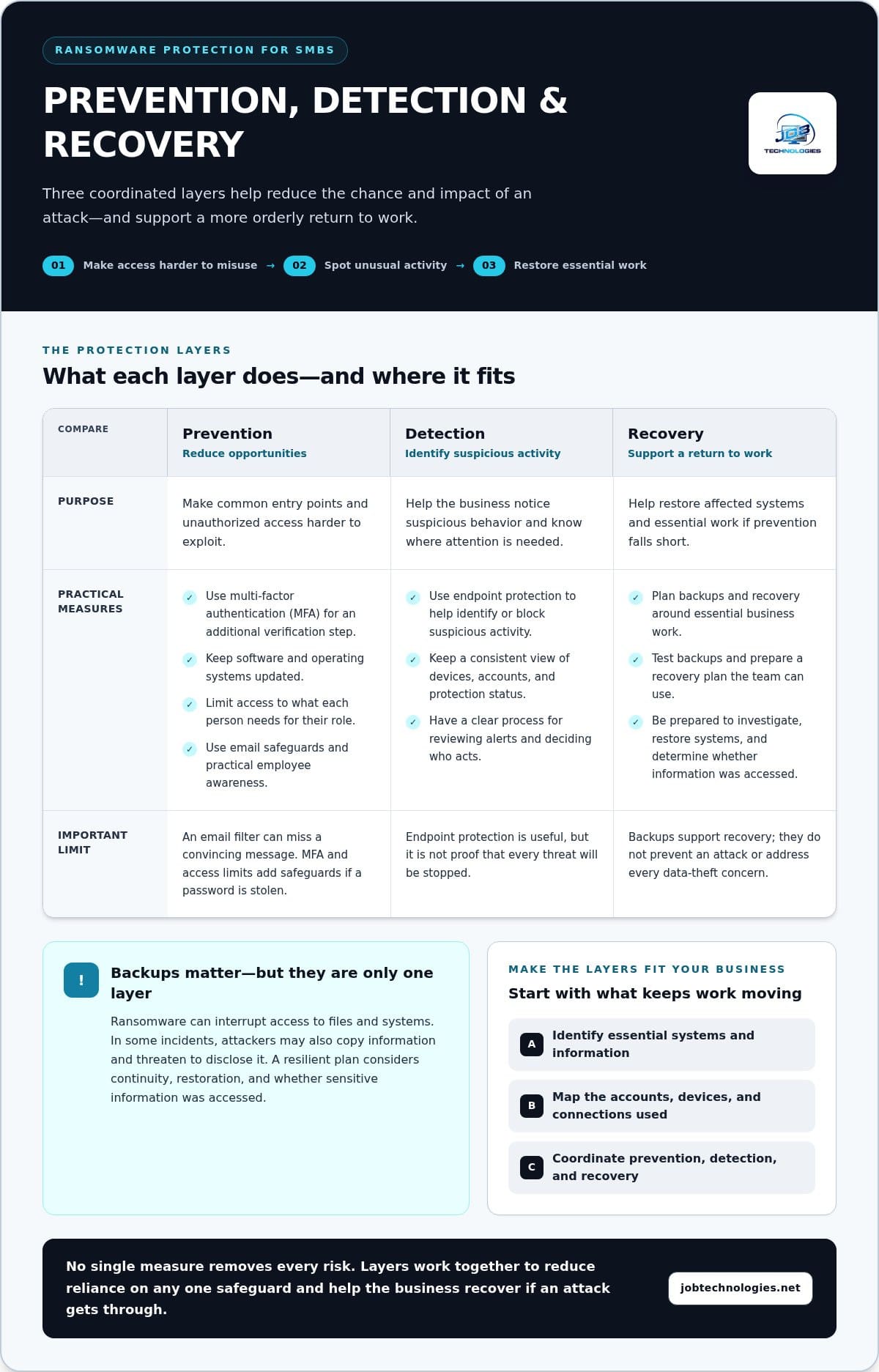
Compare safeguards by the job each one performs, not by whether it sounds comprehensive. Prevention makes an attack harder to start or spread. Detection helps surface suspicious activity. Recovery prepares the business to restore systems and data if other measures don’t stop an incident. The NIST Ransomware Risk Management Framework also treats ransomware risk as a connected effort spanning protection, detection, response, and recovery.
| Safeguard area | Purpose | Limitations |
|---|---|---|
| Prevention | Reduce opportunities for unauthorized access through MFA, timely updates, limited permissions, and email protections. | Controls can be misconfigured, missed, or bypassed; none prevents every attack. |
| Detection | Help identify unusual activity on devices, accounts, or systems so it can be investigated. | Alerts require visibility and a response process; detection may happen after access is gained. |
| Recovery readiness | Restore important information and services after disruption using protected backups and a recovery plan. | Backups may be unavailable, compromised, incomplete, or too slow to restore without testing. |
Prevention aims to reduce the chance of an attack; recovery readiness determines how well the business can restore operations if prevention falls short. Backups are essential to recovery, but they don’t prevent ransomware from entering a system, disrupting work, or stealing data. Treating a backup as the whole security plan leaves gaps before and during an incident.
What prevention and detection controls each contribute
Access safeguards, including MFA and role-based permissions, make it harder to misuse an account. Updates address known software weaknesses, while email protections can filter some harmful messages. Endpoint visibility helps surface behavior that may need investigation. These controls work in different places, so a weakness in one doesn’t automatically mean the others have failed. Detection supports prevention, but it isn’t a substitute for it.
How to assess backup and recovery readiness
Backups are more useful when attackers or compromised accounts can’t easily alter or delete every copy. Restrict access to backup systems, keep protected copies separated from everyday use, and test restoration instead of assuming a successful backup job means files can be recovered. Record what the test restored, how long it took, and whether any information was missing or damaged.
Two planning terms can make recovery needs clearer. A recovery time objective is the target for how long a critical system or process can remain unavailable. A recovery point objective describes how much recent data the business can afford to lose, measured by the point in time to which information must be restored. Set priorities based on business impact, then use tests to identify where current backup and recovery arrangements don’t meet those needs. This makes ransomware protection a practical measure of readiness, not just a list of installed tools.
How to build a practical ransomware protection plan for your SMB
A useful plan starts with business priorities, not a list of security products. Decide which work must continue, identify the technology it depends on, and assign people to maintain the safeguards. This makes ransomware protection for SMBs easier to put into practice, even when IT responsibilities are shared across a small team.
Start with a focused risk and systems inventory
Begin by listing the devices, applications, accounts, and information that support essential work. Include dependencies: for example, a customer service process may rely on email, a shared folder, and a business application. Note who administers each system, manages access, and handles updates. This inventory helps reveal where an unavailable account or service could interrupt several business tasks.
Use the inventory to prioritize improvements by operational impact and available resources. A practical sequence is:
- Identify what matters most. Mark the systems and information needed to serve customers, manage finances, and coordinate daily work.
- Review current safeguards. Check how accounts are protected, whether devices receive updates, what access users have, and whether important data can be restored.
- Address the most consequential gaps. Focus first on weaknesses affecting critical systems, rather than trying to change everything at once.
- Assign an owner. Name the person responsible for each follow-up, and record any outside IT support involved in maintaining that safeguard.
Turn safeguards into a maintained routine
A plan only helps if someone keeps it current. Assign responsibility for reviewing access, software updates, backup status, and staff awareness. Choose a recurring review schedule that fits your business, and revisit it when you add systems, change roles, or adopt new applications. Keep a brief record of what was checked, what needs attention, and who will follow through.
Include staff responsibilities without expecting everyone to become a cybersecurity expert. Employees should know how to report a suspicious message or unexpected login prompt, and whom to notify if a device or account behaves unusually. Document an internal communication path, including a primary contact and an alternate, so people aren’t left guessing during a stressful situation. The plan should also identify who can make decisions about limiting access or pausing affected work.
Recovery planning belongs alongside prevention. Decide which business functions need attention first and how the team will communicate if normal email or shared tools are unavailable. For more detail on continuity priorities and restoration planning, use this business data backup and recovery guide.
Keep the plan concise enough to use and detailed enough to assign next steps. A managed IT partner can coordinate safeguards with daily systems and responsibilities. Explore managed ransomware protection support to strengthen a practical plan for your business.
How managed ransomware protection supports local SMBs
Security measures are easier to sustain when they fit the way your business runs. Managed IT support can connect cybersecurity with the computers, network, email, business applications, backups, and recovery processes your team relies on. Instead of treating each safeguard as a separate task, a coordinated approach considers how changes to one system may affect the others.
JOB Technologies works with small and midsize businesses as a local managed IT and cybersecurity partner. Businesses in Dubuque, Galena, East Dubuque, Dyersville, Farley, and Peosta can bring day-to-day IT needs and ransomware planning into the same conversation. The focus is practical: understand what your business depends on, identify where responsibilities or safeguards need attention, and shape an approach your team can maintain.
What a managed approach can help organize
Cybersecurity is connected to routine IT management. A staff change may require updates to account access; a new application may change where important information is stored; a network change may affect how devices connect. A managed approach helps keep these decisions aligned with the business’s protection and continuity needs, rather than letting safeguards become outdated as systems evolve.
That coordination can also clarify ownership. Your team can understand who oversees access reviews, updates, backup planning, and follow-up when a concern is identified. The goal isn’t to add complexity or promise that every incident can be prevented. It’s to make protective work more consistent and connect it to the systems employees use to serve customers and complete daily tasks.
When local businesses may benefit from managed support
Consider additional support if no one is sure who reviews user access, checks whether safeguards are maintained, or coordinates IT changes with cybersecurity needs. The same applies if your business has backups but lacks clear recovery priorities, or if important systems and accounts have grown without a current overview. These are useful prompts for a planning discussion, not signs that an incident is inevitable.
Bring the conversation back to operations: which work needs to continue, what systems support it, and where would disruption create the greatest difficulty? JOB Technologies can help SMB leaders discuss those priorities and risk concerns as part of managed IT and cybersecurity planning. For businesses in the area, a small business cybersecurity guide for Galena offers additional locally relevant context.
A calm next step is to review the safeguards you already rely on, note unclear responsibilities, and decide which business needs deserve attention first. From there, you can shape a ransomware protection plan that fits your systems, staff, and operating priorities. Coordinated support can help keep that plan connected to everyday IT as your business changes, while giving your team clearer ownership and a practical path forward.
Make your next protection step manageable
A stronger plan doesn’t have to begin with a major overhaul. Choose one business-critical workflow, identify what it depends on, and decide who will own its next protection improvement. Then set a time to review progress. That small commitment can turn ransomware protection for SMBs from an abstract concern into an ongoing part of how your business manages risk.
As your systems, staff, and priorities change, your safeguards should keep pace. JOB Technologies works with small and midsize businesses to connect managed IT, cybersecurity, ransomware protection, and data backup and recovery. The aim is a practical approach shaped around your operations, with clear priorities and support to help sustain it.
Start a conversation about the systems your team relies on, the risks you want to address, and what a workable plan could look like. Talk with JOB Technologies about ransomware protection for your business. A clear next step can help you move forward with greater confidence and peace of mind.
Frequently Asked Questions
Can ransomware protection prevent every attack?
No protection can guarantee that every ransomware attempt will be stopped. A practical program combines safeguards that reduce common entry routes, ways to identify suspicious activity, and preparation for restoring business operations. For example, an unexpected login alert can prompt a review even if an attacker has bypassed another safeguard. The right mix depends on your systems and risks, so treat ransomware protection for SMBs as an ongoing process, not a one-time purchase or a promise of zero incidents.
Are backups enough to protect a small business from ransomware?
No. Backups help a business recover, but they don’t prevent ransomware from reaching systems or interrupting work. Their value depends on whether backup access is appropriately restricted and whether stored files can be restored successfully. Consider a scenario where an employee can access both shared work files and backup settings: a compromised account could put both at risk. Review recovery priorities and test restoration. A separate backup guide can help you explore business data recovery in more detail.
What is the first step in creating a ransomware protection plan?
Start by listing the systems, accounts, applications, and information your business needs to operate. Include less visible dependencies, such as an account used to administer email or a shared folder that holds active customer work. Then note who manages access and updates, and where responsibilities are unclear. This inventory helps leaders and day-to-day technology staff prioritize improvements based on business impact instead of selecting tools without a defined purpose.
Does a small business need managed ransomware protection?
Managed support can help if your team doesn’t have dedicated staff to coordinate routine IT maintenance, cybersecurity, and continuity planning. It can establish a structure for reviewing safeguards as business needs change, while your leaders set priorities and make operational decisions. JOB Technologies supports SMBs in Dubuque, Galena, East Dubuque, Dyersville, Farley, and Peosta. Whether managed support fits depends on your internal expertise, systems, and the work you need to protect.
How often should a business review its ransomware safeguards?
Review safeguards on a recurring schedule that suits your operations, and revisit them after meaningful changes. A new business application, a staff member taking on administrative duties, or a change in how employees work remotely can affect access and responsibilities. Include updates, backup readiness, and ownership in the review. Keep a record of decisions and unresolved gaps, then assign follow-up so the review leads to action instead of becoming a paperwork exercise.
What should employees do if they suspect a ransomware incident?
Employees should promptly follow the company’s reporting process and notify its designated IT or security contact. They shouldn’t delete files, try unapproved fixes, or forward unverified claims about what happened. For example, an employee who sees unfamiliar file names or an unexpected sign-in prompt should report what appeared and when, using the organization’s established channel. Clear internal instructions prepared in advance can help staff act calmly while responsible technical support assesses the situation.
Can ransomware affect cloud-based business files?
Yes. Cloud-based files can be affected if an account is compromised, permissions are misused, or synchronized changes reach stored information. Moving data online doesn’t by itself ensure that accounts are secure or files are recoverable. Include cloud applications in your systems inventory, review who can access or administer them, and understand how earlier versions or backup copies can be restored. This helps distinguish convenient access and storage from a tested recovery arrangement.