

A local provider isn’t automatically more reliable than a national one. For a small business in Dyersville, look for a support model that fits your needs, with clear response expectations, proactive network management, cloud support, and a track record of helping businesses. Choosing a reliable IT service provider in Dyersville means comparing these practical details, not just the provider’s size or location.
It makes sense to want responsive help and stable systems without adding more complexity to your workday. This guide explains how local managed IT support compares with national providers and what to look for when weighing network reliability, help desk response, client feedback, and cloud management.
You’ll see where a local relationship may be useful, where a national provider’s model may suit a business, and which service details matter most to your operations. The aim is a clearer, more confident decision about the support your business needs.
Key Takeaways
- Compare local and national support by how well each model fits your business needs, not by provider size alone.
- Clarify help desk response expectations and how issues are handled so you can judge whether support fits your operations.
- Look for client feedback that offers useful insight into communication, follow-through, and ongoing support.
- Map how your network, cloud systems, and data backup needs connect before deciding what infrastructure management should cover.
- Use the comparison to identify where managed IT support could reduce day-to-day technical strain for your team.
Managed IT support for Iowa small and mid-sized businesses
For Iowa businesses, managed IT support connects everyday technology needs with ongoing infrastructure care. Compare providers by the systems they cover, their response process, and how well their services fit your work.
Cloud, Network, and Remote-Work Support
Cloud support can include account setup, access management, and planned migration between systems. Network support covers the connections linking employees, devices, and business applications. For remote work, assess how the provider handles secure access, user issues, and connectivity interruptions across locations.
In Dyersville, internet access is separate from IT management. The city is served by three telecommunications and internet providers, but that figure does not identify managed IT firms. Fiber internet may be worth considering for business connectivity; installation planning should account for the site, existing network, and applications your team uses.
Industry needs also shape the right support model. A manufacturer may prioritize reliable access to production systems, while an accounting office may focus on cloud files and staff access. A useful comparison maps each critical workflow to the network, cloud service, and support process it depends on.
Managed IT Monitoring and Support
Managed monitoring tracks business systems so issues can be identified and addressed. Support may cover user problems, network interruptions, and routine maintenance. Ask how the provider records incidents, assigns responsibility, communicates progress, and documents recurring issues. These details show whether support is organized around ongoing operations or just individual repair requests.
For example, staff who can’t reach a shared file need a clear way to report the problem. The support process should distinguish an account issue from a network outage and route it accordingly. Understand which systems are monitored and how monitoring connects to the help desk.
Provider Contracts, SLAs, and Pricing
Compare contracts by covered systems, included tasks, exclusions, renewal terms, and cancellation conditions. Review each service-level agreement, or SLA, to see how it defines response, escalation, and communication. A response commitment describes when work begins, not necessarily when a problem is resolved, so compare those terms separately.
Pricing is easier to assess when proposals cover the same work. Compare user and device coverage, cloud management, network services, and support hours line by line. A lower quote may cover fewer tasks, while a broader plan may include services your business doesn’t need. Connect each cost to a stated service and business requirement.
Local Managed IT and Help Desk Services
Dyersville has three telecommunications and internet providers; that count concerns connectivity, not managed IT firms. The available local-market facts do not identify which businesses offer managed IT or a 24/7 help desk, so no provider names can be reliably assigned to those services here. Treat internet access and IT support as separate purchasing decisions.
Likewise, the available facts don’t identify local providers specializing in cybersecurity, backups, and disaster recovery. Compare service scope by whether cybersecurity protection, backup processes, and recovery assistance are addressed in the agreement. For Iowa businesses, matching those responsibilities to important systems helps clarify coverage without assuming that every provider offers the same support.
Network reliability
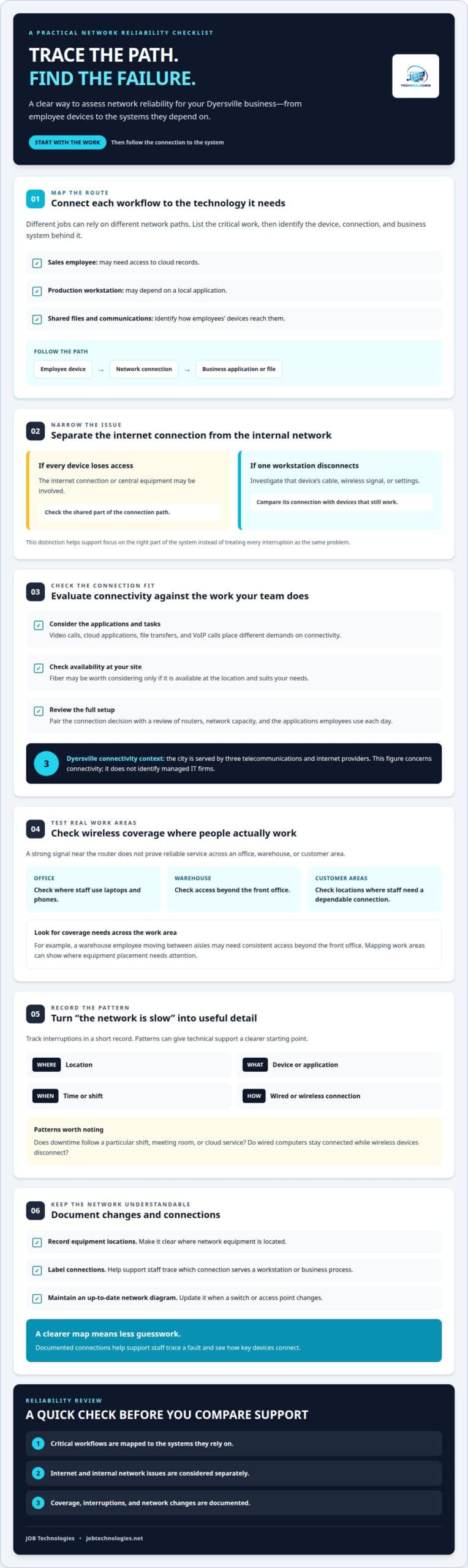
A reliable network provides consistent access to business applications, files, and communications. Map how work moves from each employee’s device to the systems they use. For example, a sales employee may need cloud records, while a production workstation depends on a local application. These different paths help pinpoint where interruptions begin and what support should examine first.
Separate internet service from the internal network when troubleshooting. If every device loses access at once, the connection or central equipment may be involved. If one workstation disconnects while others work, investigate its cable, wireless signal, or device settings. This distinction helps a reliable IT service provider in Dyersville focus on the right part of the system.
If your business is considering fiber internet, assess how it supports your actual work. Video calls, cloud applications, file transfers, and VoIP calls place different demands on connectivity. Fiber matters only if it’s available at your site and suits your needs. Pair the connection decision with a review of routers, network capacity, and the applications employees use each day.
Test wireless coverage where people work. A strong signal near the router doesn’t prove reliable service across an office, warehouse, or customer area. Check where staff use laptops, phones, or scanners. For example, a warehouse employee moving between aisles may need consistent access beyond the front office. Mapping these work areas can show where equipment placement needs attention.
Track interruptions by location, device, application, and time. A short record can reveal whether downtime follows a particular shift, meeting room, or cloud service. Note whether wired computers stay connected while wireless devices disconnect. These details give technical support a clearer starting point than a general report that “the network is slow.”
Network reliability also depends on installation and upkeep. Document where network equipment is located, label connections, and keep an up-to-date diagram of how key devices connect. Update it when a switch or access point changes. Clear documentation helps support staff trace a fault without guessing which connection serves a workstation or business process.
In Dyersville, a reliable IT service provider can assess your network installation and management against these observations. A review can help identify whether the main concern is connectivity, wireless coverage, equipment placement, or recurring downtime. A clear picture of the network gives your business a practical basis for prioritizing improvements and ongoing support.
24/7 Help desk and response times
A 24/7 help desk describes availability across every hour, but the details matter. A business should distinguish between submitting a ticket, receiving an acknowledgment, and speaking with a technician. For example, an online portal can accept a request overnight without providing a live response then. Clear definitions help set practical expectations during an urgent interruption.
Response time and resolution time measure different stages. Response time tracks how soon support acknowledges an issue; resolution time tracks how soon service is restored or a workaround is provided. If a staff member can’t access a shared application, the first reply may confirm the problem and gather details. Restoring access may require further troubleshooting.
Service-level agreements should explain how requests are prioritized. A site-wide outage may be treated differently from one employee’s printer problem. Review the definitions for urgent, high-impact, and routine issues, then check how each category affects response commitments, escalation, and updates. Specific terms make the support process easier to understand.
Also clarify what “available” means after regular business hours. It may refer to ticket intake, remote monitoring, an on-call technician, or live help desk coverage. These functions differ. Automated alerts, for example, can identify a server issue without a technician immediately contacting an employee. The contract should distinguish monitoring from direct assistance.
Business schedules shape the value of support coverage. A retailer processing customer transactions in the evening may need a different arrangement from an office operating on weekdays. List the systems that affect customers, staff, and revenue. Use those examples to assess when a delay becomes disruptive and which incidents need escalation.
Responsive support also depends on useful information when a request is submitted. A ticket should capture the affected user, device, application, location, and error message. If email stops working, noting whether other connected tools still function can help narrow the issue. A thoughtful intake process reduces repeated explanations and gives technicians a clearer starting point.
Compare support plans using the same practical scenarios. Ask how the process handles a locked account, a failed business application, and an outage affecting multiple employees. Check who communicates status, how updates arrive, and what happens if the first fix doesn’t work. These examples reveal whether the help desk’s stated coverage matches your business’s workday.
Client testimonials
Testimonials can show what IT support is like after an agreement begins. Look for a specific situation, such as employees losing access to shared files or customers waiting during an interruption. A useful account describes the problem, the provider’s communication, and the practical result. General praise without an example offers less insight into day-to-day service.
Look for details about the work involved. A business might describe support for employee devices, network equipment, or a transition between office systems. These details help you judge whether the experience resembles your needs. A testimonial about configuring laptops may say little about complex cloud management, so match each account to the service you need.
Pay attention to how the provider communicated. An account might explain whether staff received progress updates while a shared application was unavailable. Another might describe how a technician explained the cause in plain language. These details offer a better sense of responsiveness than a brief statement that support was “great.”
Separate speed from lasting improvement. A customer may say a computer ran faster after troubleshooting, but that alone doesn’t show whether the cause was fixed. Look for context: which device or application had trouble, what action was taken, and whether the issue returned. A clear account links the result to a specific service rather than making a broad promise.
Testimonials can also show how support distinguishes internet-provider issues from internal network problems. For instance, a business might describe how support traced a connection failure to its router rather than the internet provider. That example sheds light on the troubleshooting process. It doesn’t prove every future outage will be handled the same way, but it makes the account more useful.
Read several accounts for recurring themes, such as clear explanations, organized equipment changes, or support that understands business workflows. Compare those themes with the service terms you’re reviewing. If testimonials often mention smooth device setup, consider whether that matters to your priorities. One glowing comment alone doesn’t prove a provider’s overall performance.
Use a simple review process: identify the service discussed, note the problem and response, then consider whether the outcome matters to your operations. An account about restoring access to customer records may be relevant to a service business. A story about office equipment setup may matter more to a team planning a move. Specific context helps testimonials inform your decision without replacing clear service commitments.
Cloud and infrastructure management
Cloud management connects hosted applications, business files, user accounts, and office systems. Start by listing the services employees rely on. For example, a company may use cloud email, shared documents, and accounting software. Mapping these dependencies shows which tools need coordinated access and support. For organizations running more sophisticated enterprise platforms, specialized technology partners like PS WebSolution assist with process automation and workflow integration.
Infrastructure also includes local servers, network equipment, workstations, and the connections between them. A simple system diagram can show how an employee reaches a cloud application from an office computer. When a login problem appears, the map can help distinguish an account issue from a device or connectivity issue.
Plan cloud migration in stages. First, identify the files and applications involved. Then document user permissions and dependencies, and schedule the move around business workflows. After migration, test access with representative users. For example, confirm that the finance team can open shared files and use its accounting application.
Access management deserves careful attention. Give each employee the permissions needed for their role, without unnecessary access to unrelated files. When responsibilities change, update the relevant account permissions. A documented process helps keep cloud access aligned with current work and reduces confusion when teams share systems.
Connect data backup and recovery planning to your cloud environment. Identify essential files and systems, where backups are stored, and how restoration would proceed. A practical exercise might restore a sample folder and confirm its contents open correctly. This tests the recovery process rather than assuming saved data is usable.
Internet service and cloud tools also depend on each other. If staff can’t reach a hosted application, determine whether the issue affects one device, the office connection, or the application itself. Record the affected service and users. This information helps technical support isolate the failure and understand its impact on daily operations.
Account for both office and remote users. A remote employee, for instance, may need access to the same shared system as someone in the office. Document how each group connects and which applications are business-critical. This gives infrastructure planning a clear view of access needs without treating every user or tool identically.
Keep assets, cloud services, access responsibilities, and recovery steps together in a current record. Update it after changes, such as adding a cloud application or replacing network equipment. Clear documentation supports troubleshooting and planning as staff or technology changes.
For help aligning cloud systems with your business infrastructure, plan managed IT support around the applications and workflows your team depends on.
JOB Technologies: Managed IT Services
JOB Technologies provides managed IT services for businesses that need coordinated support for everyday technology. Turn to the team when network issues, changing work needs, or disconnected systems make IT harder to manage. Network installation and management can address business connectivity, while AI implementation and VoIP phone systems can support specific operational goals.
Start by identifying what’s creating the most friction. For example, note recurring network interruptions, a phone system that no longer fits team workflows, or an AI opportunity to improve a business process. That context helps focus the discussion on your priorities and the support that fits them.
Contact JOB Technologies to discuss the IT needs affecting your business.
Set a Clear Direction for Your IT
Turn technology concerns into a focused plan. Identify the systems that most affect your staff and customers, then decide which improvements deserve attention first. This gives conversations with a reliable IT service provider in Dyersville a practical starting point, grounded in your business priorities rather than a generic technology checklist.
JOB Technologies offers Managed IT Services, Network Installation & Management, and AI Implementation to help businesses address different operational needs. The right starting point may be ongoing support, a network project, or an opportunity to apply AI to a business process. A discussion can connect those needs to a sensible path forward.
Contact JOB Technologies to discuss your business’s IT priorities. With a clear view of what matters most, you can take the next step with greater confidence.
Frequently Asked Questions
Are managed IT services near me better than national IT providers?
Neither a local nor a national provider is automatically better; the right choice depends on your business’s support needs and operating model. A local relationship may make communication and coordination easier, while a national provider may have a broader support structure. Compare service scope, escalation processes, and familiarity with your applications. For a business in Dyersville, consider whether support can address remote issues as well as on-site systems.
What services do Dyersville IT providers offer for small businesses?
Small businesses commonly need help with computers, networks, email, security, and data recovery. JOB Technologies supports small and mid-sized businesses with these needs, as well as compliance assistance, AI implementation, and VoIP phone systems. For example, a growing office may need better coordination among employee email, shared systems, and business communications. Support is locally relevant to Dyersville, Dubuque, Galena, East Dubuque, Farley, and Peosta.
What are the reviews and ratings of IT service providers near Dyersville?
JOB Technologies has a 5.0 rating based on 8 reviews. Read individual comments for context, such as the type of issue addressed and how the provider communicated. A review about supporting a medical office may offer different insight than one about network work for a manufacturer. A rating summarizes reviewers’ experiences, but the written details help you judge whether those experiences relate to your business’s needs.
Do Dyersville IT providers offer on-site support and what are their response times?
JOB Technologies offers remote and on-site support, and its stated average response time is 15 minutes. Response time describes how quickly support responds, not a guaranteed resolution time or arrival time for an on-site visit. For example, a problem involving physical network equipment may require a different response than an account access issue. Clarify how support handles each kind of request within the service arrangement.
Are Dyersville IT providers experienced with healthcare, manufacturing, or other local industries?
JOB Technologies specializes in dental and medical practices and also serves manufacturing, industrial, education, municipal, automotive, and home services businesses. Its compliance assistance can support organizations managing sensitive business information. A dental office and a manufacturing operation rely on different workflows, so relevant experience means understanding the systems and priorities behind each environment. Discuss the applications and processes your team depends on to assess the fit.
What should a business check before choosing an IT service provider?
Start with a written scope of support, then confirm how account access, security concerns, and data recovery are handled. Check that the provider supports your team’s platforms; JOB Technologies supports both Microsoft and Google. Then match the service arrangement to your workflows and escalation needs. For example, a company using cloud email and local production systems should ensure both environments are covered in its support plan.