

Secure file sharing for small business is about more than choosing where to store documents. It means protecting shared files with encryption and limiting access through passwords and other security controls. The right approach depends on how sensitive the information is and who needs to use it.
When employees exchange files with customers, partners, or one another, convenience can take priority. But a tool that works for routine documents may lack the controls or reporting needed for sensitive information.
This comparison explains how common file-sharing options differ in encryption, access management, recovery, and audit reporting. You’ll learn what to consider when files contain sensitive or regulated data, so you can choose an approach that fits your business without making security harder to manage.
We’ll compare familiar storage tools, dedicated file-sharing services, and more controlled solutions. The goal is to help you decide what level of protection and oversight your team needs.
Key Takeaways
- Match the sharing option to the sensitivity of the files and the people who need access.
- Compare encryption, multifactor authentication, and permission controls before choosing a platform.
- For external collaboration, look for ways to limit access and revoke it when sharing is no longer needed.
- Consider version recovery and audit reporting alongside everyday storage and syncing features.
- For sensitive or regulated information, weigh compliance needs and oversight before settling on a solution.
What is secure file sharing?
Secure file sharing protects documents with encryption and restricts access to authorized people. For a small business, the right platform also supports external collaboration, mobile access, and clear control over stored files.
External Collaboration and Access Revocation
External collaboration lets a business share selected documents with a customer, contractor, or partner without opening access to every company file. A password and expiration date can limit how a recipient uses a shared link. Revoking access adds another control: when a project ends or someone’s role changes, access can be removed. Compared with an ordinary attachment, a managed link gives the sender more control over continued access.
Granular Controls and File Permissions
Granular permissions determine what each person can do with a document. For example, a customer might be able to view a proposal while an employee can edit it. Role-based access assigns permissions according to a person’s work, rather than giving everyone the same access. This is more precise than a shared password, especially when teams or external users need different permissions within the same workspace.
Access Visibility and Cloud Integrations
Visibility features help you see who can access a document and whether that access is still appropriate. Review shared files, recipients, and permission levels, then remove access when collaboration ends. Cloud access lets authorized users open stored files on supported devices, including mobile devices. Integrations can connect file sharing with existing work applications, reducing the need to move documents between separate systems. Features vary by platform.
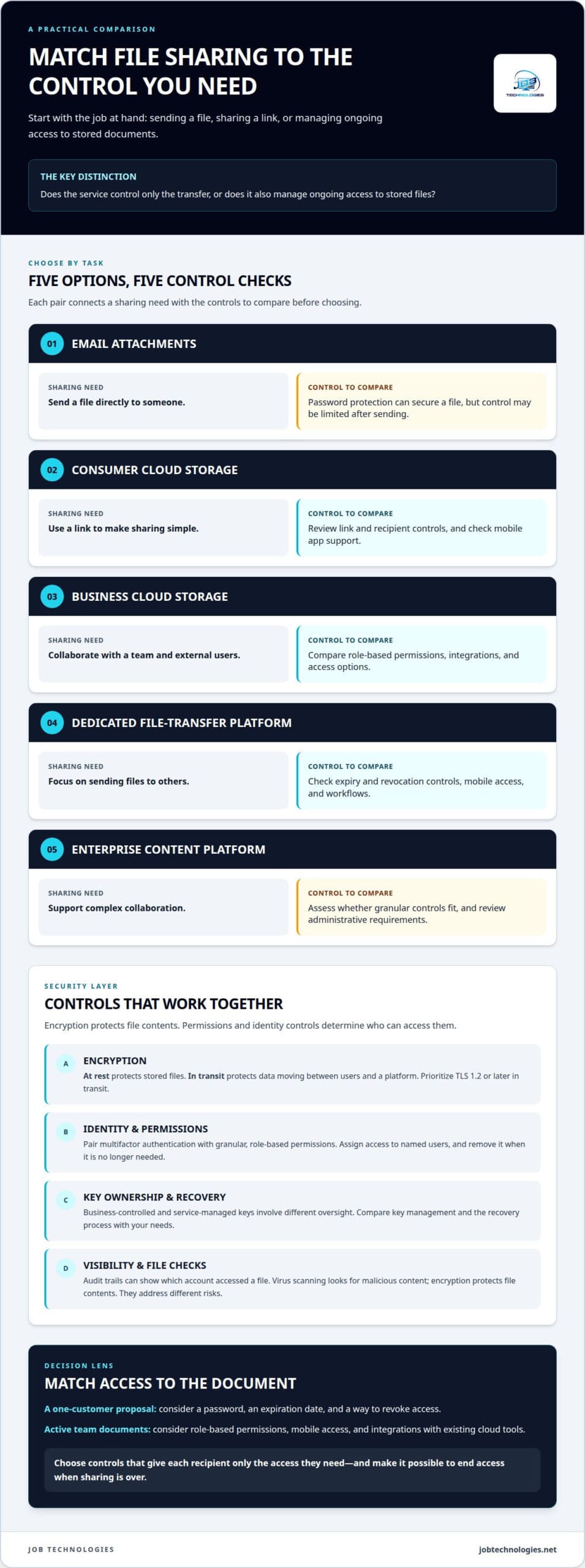
For a small business, affordability means choosing controls that match actual use, rather than paying for enterprise-level complexity the team doesn’t need. Mobile apps let employees work with documents away from their desks, while collaboration features keep shared work together. Compare the main approaches by the controls they provide:
| Option | External sharing | Permissions and revocation | Mobile and cloud access |
|---|---|---|---|
| Email attachments | Password protection can secure a file | Control may be limited after sending | Depends on email and device access |
| Consumer cloud storage | Links can simplify sharing | Review link and recipient controls | Check mobile app support |
| Business cloud storage | Supports team and external collaboration | Compare role-based permissions | Review integrations and access options |
| Dedicated file-transfer platform | Designed around sending files | Compare expiry and revocation controls | Check mobile access and workflows |
| Enterprise content platform | Can support complex collaboration | Assess whether granular controls fit | Review administrative requirements |
A small firm sharing a proposal with one customer, for example, may need a password, an expiration date, and a simple way to revoke access. A team working together on active documents may benefit more from role-based permissions, mobile access, and integrations with its existing cloud tools. The key difference is whether the service controls only the transfer or also manages ongoing access to stored files.
Choose a platform that gives each recipient only the access they need, supports your team’s devices, and makes it easy to end access when sharing is over.
Encryption, permissions, and user management
Encryption protects file contents, while permissions determine who can access them. A strong setup combines these safeguards with identity controls, recovery planning, and malware checks.
Encryption and Key Ownership
Encryption at rest protects stored files, while encryption in transit protects data moving between users and a platform. Prioritize TLS 1.2 or later in transit, multifactor authentication, and granular permissions. End-to-end encryption can add protection by limiting who can read content, but key ownership affects who can restore access. A business-controlled key offers different oversight from a service-managed key.
Key management matters when staff change roles or files need to be recovered. If the business controls encryption keys, authorized administrators need a secure process to manage them. If a provider manages the keys, the business depends on its controls and recovery process. Compare both arrangements with your account recovery needs and the sensitivity of shared documents.
File Encryption and Data Security
Encryption reduces exposure if someone accesses stored files or intercepts a transfer, but it doesn’t determine who should open each file. Pair it with role-based permissions and multifactor authentication. For example, a finance employee might access payroll documents, while a sales colleague can access approved proposals. Businesses may encounter Microsoft, Google, and Dropbox; compare the controls in the specific service and plan you’re considering.
Account management completes the picture. Assign access to named users instead of relying on a shared account, and remove permissions when an employee or contractor no longer needs them. Review administrative access separately from everyday access. Audit trails can show which account accessed a file, while encryption protects its contents.
Encryption and Virus Scanning
Virus scanning and encryption address different risks. Scanning looks for malicious content; encryption protects file contents from unauthorized reading. Understand how your file-sharing software handles scanning, both before files are encrypted and while they’re stored. Otherwise, security controls may not work together as expected. Check whether the service scans uploads, shared files, or both.
Endpoint backup adds a separate recovery layer. Encryption can protect backup files while they’re stored or transferred, but it doesn’t guarantee a clean restore. A recovery process should preserve access to necessary keys and provide a way to identify compromised files before restoring them. For example, restoring an infected document without reviewing it could reintroduce the problem.
For sensitive documents, assess encryption, identity checks, file permissions, scanning, and recovery as one connected process. Managed IT and backup planning can help align these controls with the way your team stores and shares files.
Cloud file storage, syncing, and version recovery
Storage, syncing, and recovery solve different problems. Design file sharing around how employees collaborate, where files are stored, and how the business restores earlier work.
Cloud File Servers for Small Businesses
A cloud file server stores business documents remotely and makes them available to authorized users on connected devices. Compared with an on-premises server, it can support access from different locations without relying on one office network. A private cloud offers a more dedicated environment, while on-premises storage keeps infrastructure at the business site. An IT provider can weigh access needs, existing systems, administration, recovery, and security controls when recommending an approach.
When choosing a provider, consider how files will move into the service and how the business can retrieve them later. For example, transferring shared project folders calls for a clear migration plan that preserves the intended structure and permissions. The provider’s support model, integration with existing software, and documented recovery process matter alongside storage capacity. Large transfers may also require planning around network capacity and employees’ schedules.
Cloud Storage and File Collaboration
Cloud storage supports collaboration when employees can work on current documents across approved devices. Syncing keeps files aligned between a desktop and mobile devices, but it can also spread an unwanted edit or deletion. Version history may let you restore an earlier copy, depending on which versions the service retains. This differs from basic file transfer, which sends a copy without necessarily managing ongoing collaboration.
If an employee overwrites a shared proposal, for example, version recovery may restore the previous draft while the team continues working. The outcome depends on what the platform retains and how restoring a file affects newer edits. A separate backup can provide another recovery path, but syncing alone isn’t backup. A professional can assess recovery for individual files, folders, and broader disruptions.
Cloud, private-cloud, and on-premises designs each involve trade-offs. Cloud access can support distributed work and mobile collaboration, while on-premises storage depends more directly on local infrastructure and its maintenance. A private cloud can provide a dedicated environment, but still needs a clear plan for access, software updates, and recovery. The best fit depends on existing systems, staff locations, file sensitivity, operational requirements, and who will manage the environment.
Password-protected sharing can help control a transfer, but it doesn’t replace version recovery. Map the full workflow: where a document is stored, how authorized users sync it, what happens after an accidental change, and how a restored file returns to collaboration. For a small business, this practical process matters more than choosing a cloud label alone.
Audit trails and file activity reporting
When evaluating file-sharing services, an IT provider can check which actions audit logs record, how links expire, and whether downloads can be restricted. These controls show whether activity is reviewable and sharing can be limited to the intended workflow.
An audit trail records file activity, such as a user viewing, editing, sharing, or downloading a document. Useful records connect each action with an account, a time, and the affected file. If a customer says a proposal changed unexpectedly, for example, an administrator can review recorded activity instead of relying only on memory.
The level of detail matters. A service that records only successful logins provides less context than one that also logs file access, permission changes, link creation, and downloads. Compare how administrators search and export records, and whether they can identify activity by user, file, or device. Clear records can support investigations without disrupting everyday work.
Some organizations connect file activity logs to a security information and event management system, or SIEM. This brings file events together with alerts from other systems, helping security staff review related activity in one place. During evaluation, an IT provider can consider whether logs integrate with the system, which event fields are available, and whether the business has a process for reviewing alerts. An advanced dashboard has limited value if nobody is responsible for reviewing it.
Compliance features also deserve close attention. HIPAA and GDPR are examples of standards that enterprise-grade file-sharing solutions may need to address, depending on the organization and its obligations. E-discovery and compliance features can help locate and preserve relevant records for review. They don’t replace a business’s retention policies or determine which rules apply to its data.
A firm sharing client contracts through OneDrive, for example, should be able to understand who accessed a shared document and what happened to its link. Link expiration can end access after a project milestone, while download restrictions can limit how recipients handle a file. Match controls to the task: a reviewer may need read-only access, while a project collaborator needs editing permissions.
Record handling is part of the workflow, too. Businesses should archive sent and received files according to their email retention policies. Review file-sharing records alongside those policies so audit trails remain useful when an older transaction or document needs attention. A clear process identifies who reviews activity, how records support e-discovery, and how access is closed when collaboration ends.
Matching file-sharing security to data sensitivity and regulatory obligations
File-sharing security should reflect the information being shared, the people receiving it, and any applicable obligations. A public brochure and a customer’s financial documents don’t need identical controls. Classifying files by sensitivity gives an IT provider a practical starting point for matching protections to real business workflows.
For routine materials, convenient access and basic permissions may support collaboration without unnecessary complexity. Sensitive data calls for tighter access management, encryption, multifactor authentication, and activity records. For example, a business might let a marketing partner review a draft brochure, while limiting a personnel file to authorized staff. What matters is the potential impact of exposure, not simply the file type.
Regulatory obligations also shape the choice. Healthcare companies in the U.S. must comply with HIPAA regulations, according to the U.S. Department of Health and Human Services. Healthcare organizations sharing patient information therefore need to assess how their file-sharing processes support applicable requirements. Other businesses should identify the rules and contractual commitments that apply to their data, rather than assume one platform meets every obligation.
Remote work and external partners bring practical considerations. A remote employee may need mobile access, while a partner may need to review one document without downloading an entire folder. Link expiration, download restrictions, role-based permissions, and audit records can tailor access to that workflow. Integration with existing business applications matters too, because disconnected tools can make access oversight and record handling harder.
An IT provider can assess data categories, users, sharing patterns, recovery needs, and compliance requirements together. It can then compare whether a business cloud service, a more controlled platform, or another storage design fits the risk. The decision should account for administration as well as security: complex controls that nobody manages can leave access outdated. A clear process identifies who approves access, reviews activity, and removes permissions when work ends.
For each sensitive workflow, map the file from storage and sharing through access review and eventual retention or removal. A contract shared with a remote partner, for instance, may need limited access, an expiration date, and an activity record. Another workflow may require employees to edit shared documents, making collaboration and version recovery more important than download restrictions alone.
Plan file-sharing controls around your data with professional IT support, so security choices align with the way your team works.
JOB Technologies
JOB Technologies helps small businesses consider file sharing as part of their wider IT environment. Through Managed IT Services and Network Installation & Management, the team can assess how users, devices, and business systems connect, then identify where file access and security controls fit.
Turn to JOB Technologies when file sharing has spread across disconnected tools, remote work has changed access needs, or sensitive files call for a more considered approach. The right setup should support daily collaboration while fitting your infrastructure and operational priorities.
Contact JOB Technologies to discuss your business’s file-sharing needs and how they fit into your wider IT environment.
Make Your Next File-Sharing Decision With Confidence
The next step is to turn security requirements into an approach your team can manage consistently. Define who needs access, what kinds of files they handle, and how access should change when a project or role ends. That gives you a practical foundation for evaluating secure file sharing for small business without treating every document or user the same.
JOB Technologies can connect those decisions with your broader IT environment through Managed IT Services and Network Installation & Management. If your plans also involve AI Implementation, consider that alongside file access so technology decisions stay aligned with business workflows.
Discuss your priorities and current environment with a professional, then decide what approach fits your operations. Contact JOB Technologies for advice and take a clear next step toward file sharing that supports your team’s work.
Frequently Asked Questions
What types of files should be shared securely?
Share files securely whenever exposure could harm a person or business relationship. Examples include payroll spreadsheets, customer records, signed contracts, employee documents, financial statements, and product plans. Credentials and files containing account recovery details also need careful handling. Ask whether an unauthorized recipient could gain private information, financial leverage, or a business advantage. If so, treat the file as sensitive before sharing it.
How can an IT provider compare secure file-sharing options for a small business?
When comparing secure file sharing for a small business, an IT provider should assess real workflows, not just feature lists. For example, it can evaluate how a team shares a proposal, edits a shared document, and removes a former contractor’s access. Compare administration effort, user experience, device support, recovery, and activity review. Testing representative files in a controlled evaluation can reveal practical gaps before the business commits to a platform.
How can I tell who is accessing shared files?
Use individual accounts and activity records that identify users and actions. An administrator should be able to trace a document’s access history, including sharing and permission changes, rather than seeing activity under a generic team login. If an outside accountant receives a folder, for example, the business should be able to identify the account and review whether access is still appropriate after the work ends.
What is the difference between consumer and business sharing tools?
Consumer tools generally focus on convenient personal storage and sharing, while business tools are designed to support organizational administration and oversight. Controls vary by product and plan. A small company may need centrally managed staff access, clear ownership when employees leave, and records for internal review. A personal tool may share files effectively but not support these organization-wide workflows as well.
How can a small business choose a provider for secure file sharing in 2026?
Choose a provider that connects technical controls to your users, files, and work processes. Discuss implementation, account changes, recovery, and how security will keep pace as business needs shift. For businesses in Dubuque, Galena, East Dubuque, Dyersville, Farley, or Peosta, JOB Technologies can discuss file sharing as part of its managed IT support.
How can a provider match business file-sharing services to a small business’s security, ease-of-use, and feature needs?
A provider can map each user group to its tasks, then identify the minimum access and features required. For example, office staff may edit working documents, while a customer only reviews a final deliverable. The assessment can account for remote work, mobile use, and existing applications. For secure file sharing for small businesses, this aligns controls with daily tasks instead of adding steps employees may avoid.
What factors affect the cost of managed secure file sharing for a small business?
Managed services pricing depends on the business’s needs. A price per computer or per user is determined after a needs assessment and provided in a proposal. The assessment considers the required scope and business environment, including how file sharing fits existing systems and operations. This ties the proposal to the support needed rather than relying on a generic figure that may not fit.
How can a provider verify that a file-sharing service offers encryption at rest and in transit, MFA, and access controls?
An IT provider can review technical documentation and administrative settings, then demonstrate how protections apply to a test account and file. The review should distinguish encryption for stored files from encryption during transfer, confirm multifactor authentication options, and inspect permissions for different roles. Testing a view-only account against an editing account, for example, can show whether access controls fit the intended workflow.