

Your business can outgrow its IT setup before it outgrows its headcount. Signs you need to outsource your IT often include recurring outages, slow or unclear support, neglected maintenance, and systems that can’t keep pace with growth. When technology problems keep pulling people away from their work, the support structure may be the issue, not just one faulty device.
It makes sense to want control over your technology and costs. Outsourcing doesn’t have to mean handing over every IT decision. Businesses can bring in outside support for ongoing maintenance, specific projects, or to complement internal staff.
This article explains what outsourced IT services can include and covers eight signs that your current approach may no longer fit. Learn how to spot persistent support gaps, growing system complexity, maintenance demands, and changing business needs, so you can make a considered decision about the right IT structure for your team.
Key Takeaways
- Outsourced IT can cover ongoing maintenance, employee support, and specific projects, so you can match the support structure to your business needs.
- Recurring outages, slow support, and unclear accountability are practical signs to reassess how IT issues are handled.
- Specialized support can help with complex systems and security needs; SOC 2 and ISO 27001 are examples of security certifications relevant to businesses seeking specialized IT support, according to the International Organization for Standardization.
- Regular maintenance and current technical skills help reduce avoidable disruptions and keep employees focused on their work.
- As your business grows, review whether your IT systems and support can scale with changing demands.
1. What Are Outsourced IT Services?
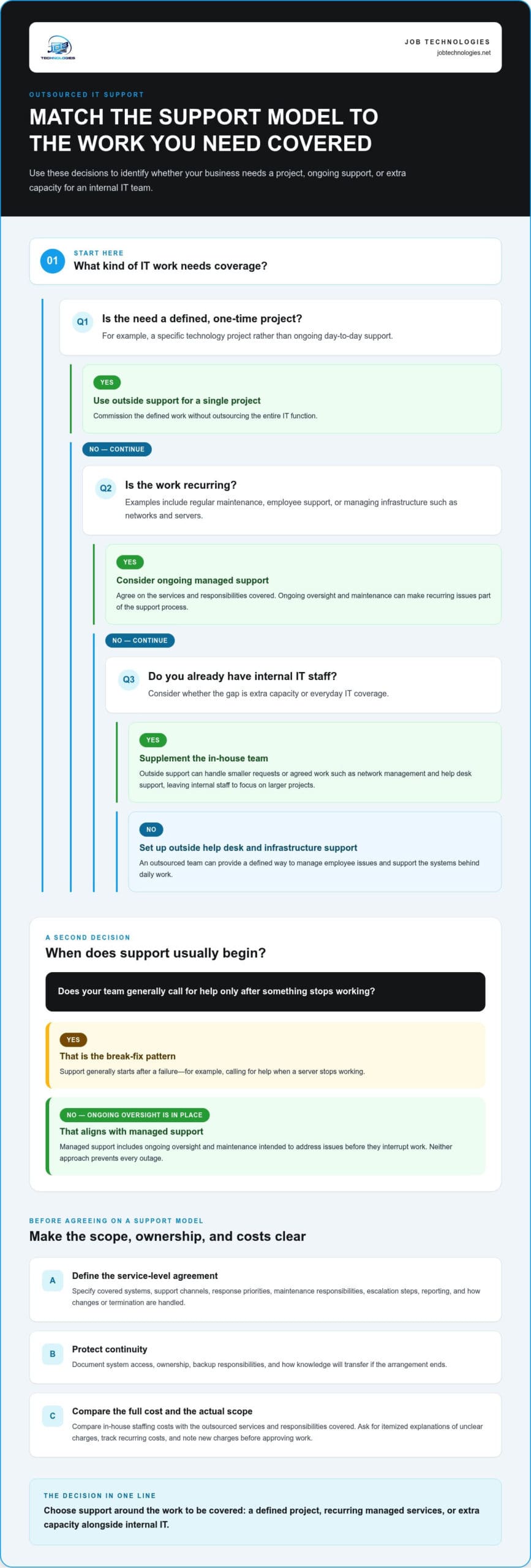
Outsourcing uses outside resources for work traditionally handled by internal staff, according to the Supply Chain Resource Cooperative. A business can outsource its entire IT function, supplement an in-house team, commission a single project, or arrange long-term management and maintenance. For example, a company might keep its internal staff while outsourcing network management and employee help desk support.
That flexibility can make newer technology accessible without a large upfront investment in equipment or full-time specialists. An outsourced team may bring experience with newer tools and help assess whether a business needs them before committing. For example, a company considering automation can first identify a clear workflow problem, then plan an appropriate project instead of buying technology that sits unused.
Outsourcing can ease staffing pressure, but it doesn’t automatically make IT less expensive. Compare the full cost of in-house staffing with the scope of outsourced support, including the services and responsibilities covered by each arrangement.
Unclear invoices create a separate budget problem. If a bill includes vague labor, project, or equipment charges, ask for an itemized explanation and compare it with the agreed scope. Track recurring costs against the budget, and note new charges before approving work. A clear breakdown helps separate expected maintenance from unplanned projects and spot rising costs early.
Downtime has its own business impact. Even when figures focus on large enterprises, smaller firms can lose productivity when staff can’t access email, customer records, or order systems.
An outsourced IT service-level agreement should define covered systems, support channels, response priorities, maintenance responsibilities, escalation steps, reporting, and how either party handles changes or ends the agreement. For example, specify how a company-wide network outage is prioritized compared with one employee’s printer issue.
The risks include less direct control over daily IT work, dependence on an outside team, and delays when responsibilities or escalation paths are unclear. Protect continuity by documenting system access, ownership, backup responsibilities, and how knowledge transfers if the arrangement ends.
Difficulty setting an IT budget is another reason to review your structure. List recurring support needs, planned technology investments, and unexpected repair work, then compare them with actual spending. Managed IT services can provide ongoing support when maintenance and reactive troubleshooting make costs difficult to plan.
2. Outsourced IT support for small and mid-sized businesses
For a small or mid-sized business, one unresolved network problem can disrupt several teams at once. An outsourced provider can support employees through a help desk while maintaining the infrastructure behind their daily work. That may include network and server management, account access, and troubleshooting when essential systems stop working. Employees have a defined way to report problems, while recurring issues can be reviewed instead of treated as isolated incidents.
In-house IT staff work directly for your business and focus on its priorities every day. A managed service provider, or MSP, is an outside organization that supplies agreed IT support and management. It can complement internal staff or handle responsibilities a company cannot resource internally.
Look for patterns in downtime, not just dramatic outages. If employees repeatedly lose access to shared files, a phone system, or business applications, record what failed, who was affected, and how work was delayed. That incident history helps identify whether the cause is a particular device, a network configuration, or a system-wide weakness. Recurring company-wide outages may indicate that the underlying causes aren’t being resolved.
Managed support and break-fix support take different approaches. Break-fix work generally begins after something stops working, such as calling for help when a server fails. Managed support includes ongoing oversight and maintenance intended to address issues before they interrupt work. Neither approach prevents every outage, but proactive support makes maintenance and recurring problems part of the conversation.
Slow or unreliable responses are another signal. Track when staff submit requests, whether urgent issues receive appropriate attention, and whether someone takes ownership through resolution. If an employee can’t access a customer record before a scheduled call, for example, a useful process should identify the impact, prioritize the request, and communicate what happens next. Repeatedly chasing updates can point to gaps in capacity, prioritization, or accountability.
Small businesses may need outside expertise when internal staff lack the resources to manage complex IT tasks. Start by identifying work that falls through the cracks: routine maintenance, employee support, network issues, or planning for growth. If you have internal IT staff, outside support can handle smaller requests and free them to focus on larger projects. If you don’t have an internal IT role, a help desk and infrastructure support can create a clearer way to manage everyday issues.
Before changing your approach, compare the support arrangement with actual business needs: list recurring incidents, note how they affect employees, and identify who owns each resolution. If this review points toward ongoing support, IT support planning can help frame the next steps around your operations.
3. Managing complex systems and specialized IT needs
A growing technology environment can outpace the skills available on an internal team. A business might rely on cloud applications, a complex network, and several security tools, each requiring different oversight. Specialized IT support can help coordinate those systems, identify gaps, and plan technical work around business priorities. This is useful when a new project calls for expertise that doesn’t justify a permanent hire.
Start by mapping the systems that handle sensitive information. Record where customer and employee data is stored, which roles can access it, and how access changes when responsibilities shift. A healthcare organization, for example, should understand how its technology supports its obligations under HIPAA, the Health Insurance Portability and Accountability Act, as identified by the U.S. Department of Health and Human Services.
Security frameworks and certifications may also matter to customers, partners, or procurement teams. SOC 2 and ISO 27001 are examples of security certifications relevant to businesses seeking specialized IT support, according to the International Organization for Standardization. Leaders should distinguish a provider’s own certifications from the technical controls and documentation their business needs. Those are related, but they answer different questions.
Cybersecurity expertise is especially valuable when systems connect across offices, devices, and cloud services. An outsourced specialist can help review vulnerabilities, prioritize patch management, and prepare an incident response plan. For example, document who isolates an affected device, who communicates with leadership, and how operations resume after an incident. A written process gives staff clear actions instead of leaving decisions until a crisis.
Compliance work also depends on the organization’s industry and the data it handles. A practical review connects each requirement to the relevant systems, users, and records. For a company handling regulated health information, that means understanding which applications store or transmit those records and restricting access to appropriate roles. Compliance assistance can support this technical review, while business leaders retain responsibility for their organization’s obligations.
Complexity can show up beyond security, too. A company adding locations may need network changes; one adopting new communications tools may need its phone systems integrated into daily operations. Before a project begins, define the business outcome, existing systems, access needs, and who approves changes. A scoped plan helps specialists work within the environment without creating avoidable disruption.
Consider outside expertise when your team can’t explain how systems connect, security tasks keep slipping, or a project requires skills it doesn’t have. Compare current risks with planned changes, then decide whether ongoing managed IT support, cybersecurity expertise, or help with a defined project fits best. The right structure should make ownership, priorities, and next steps clear.
4. Technology maintenance and keeping skills current
Maintenance is easier to manage when someone owns recurring tasks. Create a schedule for software updates, account reviews, device checks, and backup tests. Record completion and unresolved issues in one place. For example, if outdated applications keep turning up during project work, assign responsibility and a review process instead of relying on employees to notice. Consistent maintenance helps keep systems current and reduce avoidable interruptions.
Employee troubleshooting also carries a productivity cost. Each time someone leaves customer service or operations to resolve an email, access, or printer issue, their primary work pauses. Track the type of problem, how often it occurs, and which roles lose time. If the same issue affects several employees, investigate a shared cause, such as a network setting or application configuration, instead of treating each report separately.
Keeping skills current can be difficult for a small internal team responsible for many systems. ManpowerGroup’s 2025 Global Talent Shortage Survey found that 74% of employers reported difficulty finding the skilled talent they need. For a business, this can mean routine maintenance competes with new technical demands. Identify which tasks require specialized knowledge, then decide whether to train existing staff, bring in outside expertise, or combine both approaches.
Growth puts more pressure on technology. A new location, larger workforce, or additional customer service channel can require changes to network capacity, user access, and communications systems. Before expanding, map the systems employees rely on and identify where added users or locations could create bottlenecks. If the current setup can’t scale with demand, include changes in the growth plan instead of waiting for slow service or system limits to disrupt daily work.
New tools, including AI applications, should solve a defined business problem. Start with one repeatable task, such as organizing incoming requests, and assess the information involved, required access, and expected workflow changes. Then determine how the tool fits existing systems and who will support it. A clear use case helps avoid technology that adds complexity without improving the work employees need to do.
Align maintenance and technology decisions with business priorities through a practical roadmap. List upcoming projects, systems that need attention, and skills the team must maintain. A virtual CIO can help create a multi-year IT roadmap and plan investments within a budget. Review the plan as staffing, customer needs, or business goals change. This makes technology decisions more deliberate and helps leaders see when internal capacity no longer matches the work ahead.
5. Signs that an IT structure is limiting business growth
Growth can expose gaps that were manageable with a smaller team. New employees need accounts, devices, and access; added locations need reliable connections; expanding sales may put more demand on customer and order systems. If every change triggers a scramble, your IT structure may be reacting to growth instead of enabling it. Track delays in areas such as onboarding, approvals, or system capacity, and connect each one to its business impact.
There’s no universal number of IT staff a small business should have based only on employee count. Staffing needs depend on systems, locations, security demands, support requests, and how much the business relies on technology. A company with one office and simple systems, for example, may need a different structure from a similarly sized company with several locations and complex operations.
Hiring and training can lag behind expansion. A new internal IT employee needs time to learn company systems and processes while urgent growth projects continue. If existing staff spend their days handling user requests, they may have little time to plan a new office network or support a major system change. Compare planned projects with available skills and workload before deciding whether to hire, train, or add outside support.
Watch for technology bottlenecks tied to specific growth milestones. If onboarding new staff takes longer because account setup is manual, document each step and identify where access or approvals stall. If a second location can’t use the same systems smoothly, review network capacity and the tools employees need. These examples help distinguish a temporary issue from an IT structure that can’t scale.
Growth also shifts the balance between routine support and strategic work. An internal team may need more resources if it can’t scale technology alongside business demand. Outsourced IT services can scale up or down as needs change, while internal staff retain ownership of business priorities. The right mix depends on which responsibilities require close, daily knowledge of the company and which need added capacity or specialized skills.
Use a simple review before the next hiring wave or expansion: list upcoming business changes, the systems each change affects, and who will handle the work. Then identify gaps in capacity, expertise, or decision-making. A service provider with experience supporting organizations of similar size should be able to grow with your needs. If your current structure leaves growth projects waiting, plan scalable IT support around the next stage of your business.
JOB Technologies: Managed IT Services
JOB Technologies provides Managed IT Services for businesses whose support needs have outgrown occasional troubleshooting. If maintenance keeps slipping, employees lack a clear way to get help, or growth is stretching your current systems, ongoing support can create a more consistent structure for managing technology.
When your needs extend beyond routine support, Network Installation & Management can address business network requirements, while AI Implementation can help put relevant AI tools to work. Phone Systems VoIP can support business communications. The right next step depends on the systems your team relies on and the challenges disrupting work.
Talk with JOB Technologies about your IT priorities and a support approach that fits your business.
Give your IT plan a clear next step
The next step doesn’t have to be a sweeping change. Choose one business priority, such as reducing recurring maintenance interruptions or preparing systems for planned growth, and define what better support would make possible. That gives you a practical way to assess whether your current IT structure is helping the business move forward.
If the signs you need to outsource your IT are becoming harder to ignore, connect the decision to the work ahead. JOB Technologies offers Managed IT Services, Network Installation & Management, and AI Implementation to help businesses manage ongoing IT needs and planned technology changes. A focused discussion can help you explain what your team relies on and where support is falling short.
Explore your IT support options with JOB Technologies and take a considered step toward a structure that fits your business. With a clear priority and the right support plan, your team can approach technology decisions with greater confidence.
Frequently Asked Questions
What Are Outsourced IT Services?
Outsourced IT services let a business assign defined technology responsibilities to an external team. Set clear boundaries: keep business priorities and access approvals internal, while assigning tasks such as account provisioning or email administration externally. Before work begins, document system ownership, who approves changes, how credentials are managed, and how records will be returned if responsibilities later change.
How do I know when to outsource?
Consider outsourcing when a specific IT responsibility repeatedly lacks an owner, expertise, or capacity. Start by reviewing support requests and planned projects from recent months. Note which tasks were delayed, who was affected, and what work had to be postponed. If the same gap keeps disrupting business plans, define the responsibility you want outside support to handle and how you’ll assess the result.
Is outsourcing cheaper than hiring in-house?
It depends on the responsibilities and the full cost of each arrangement. Compare salary, benefits, recruitment, training, tools, and coverage needs with the outsourced scope, then check whether each option includes the expertise your business requires. At JOB Technologies, managed services pricing is per computer or per user, determined after a needs assessment and provided in a proposal. The number of users, systems, and support needs shape that assessment.
Should You Stay with the Local IT Consultant or Switch a Provider with More Capabilities?
Stay with your current consultant if responsibilities are clear and your business needs are being met. Reassess the arrangement if upcoming work requires capabilities your current structure can’t cover, such as network management alongside cybersecurity planning. Businesses in Dubuque, Galena, East Dubuque, Dyersville, Farley, and Peosta can compare their needs with what their current arrangement covers, then decide whether to add expertise or change the structure.
What is IT Outsourcing, and When Does It Make Sense?
IT outsourcing means assigning selected technology work to an outside team rather than relying solely on internal employees. It can make sense when a defined need, such as a network project or a change in business communications, requires expertise or capacity your team lacks. You can outsource a specific project while keeping other decisions and responsibilities in-house, with ownership agreed before work starts.
Why Do Companies Outsource?
Companies outsource to access skills and capacity without building every role internally. For instance, a business preparing to introduce a new system may need specialist guidance during implementation, but not a permanent employee devoted to that project. Outsourcing can also let internal staff focus on work that depends on their knowledge of the company, while an outside team handles an agreed technical responsibility.
What are the signs a business needs to outsource IT support?
Look for recurring gaps between what the business needs and what its current support structure can deliver. Examples include projects that stall because no one owns a technical decision, new employees waiting for system access, or managers unsure who handles a recurring issue. In Dubuque and nearby communities, listing these examples alongside upcoming business changes can help clarify whether additional IT support fits.