

What if the real IT problem isn’t one computer glitch, but the way recurring disruptions ripple through your whole business? When network or email issues interrupt work, it’s natural to look for quick help. Small business IT support in Dubuque can also bring day-to-day troubleshooting, cybersecurity, data backup and recovery, and compliance assistance into a coordinated plan.
The right arrangement depends on your business. Occasional, pay-as-needed help may suit some teams, while ongoing managed support can provide a steadier approach without adding a full internal IT department. This guide explains what business IT support can cover, compares common service models, and offers practical questions to ask a local technology partner. It also outlines how JOB Technologies’ outsourced IT services may fit businesses looking to connect everyday support with continuity and security.
Key Takeaways
- Assess whether your support needs include computers, networks, email, cybersecurity, backups, or several of these areas.
- Compare ad hoc help, internal IT staffing, and outsourced support by continuity, workload, service scope, and responsibility.
- Evaluate small business IT support Dubuque providers by asking how they handle escalation, documentation, security, and recovery.
- Before choosing a partner, define your priorities and confirm what the agreement includes, what it excludes, and how communication will work.
- A practical IT partnership should start with your business goals, users, systems, and current risks, then establish clear responsibilities and regular reviews.
What Small Business IT Support in Dubuque Can Cover
Business IT support helps keep workplace technology usable, connected, and protected. For a small business, that can include employee computers, business networks, email, and other internet-connected tools, as well as cybersecurity, data backup and recovery, and compliance assistance.
These needs often overlap. A network issue, for example, can interrupt email access or shared work across a team. A managed service provider (MSP) may coordinate ongoing technology support instead of waiting for each problem to appear. The right scope depends on your systems, team, and business priorities.
For a general overview of small-business IT support, watch this video:
Which workplace technology may need support?
Start with the technology employees rely on to serve customers and complete daily work: computers, network connections, email, and business phone systems. Note which tasks depend on each system. For example, a network interruption may affect several people at once, while an email problem may block communication with customers or colleagues. Cybersecurity, backups, recovery planning, and compliance assistance are related areas to discuss as part of the overall support scope.
Local businesses won’t all have the same setup. A team with staff working from different locations may have different network and communication needs from a business operating from one site. Small business IT support Dubuque providers should ask about your actual systems and priorities instead of assuming every organization needs the same package.
When does a small business need more than ad hoc help?
Occasional help can make sense when issues are infrequent and someone can clearly own follow-up. Recurring disruptions, maintenance that keeps getting postponed, or uncertainty about who handles security and backups may point to a need for more consistent oversight. As a team grows, informal technology arrangements can become harder to manage, even without a large internal IT department.
To compare ongoing outsourced support with other options, see this managed IT services guide for Dubuque. JOB Technologies provides outsourced IT services for small and medium-sized businesses, including computer, network, and email support, cybersecurity, data backup and recovery, and compliance assistance. Ask any prospective provider to specify which responsibilities are included and which remain with your team.
How Small Business IT Support Helps Keep Work Moving
Good support is more than fixing a computer after it stops working. It connects issue resolution with ongoing technology care, helping a business respond to problems while staying attentive to maintenance, security, and continuity.
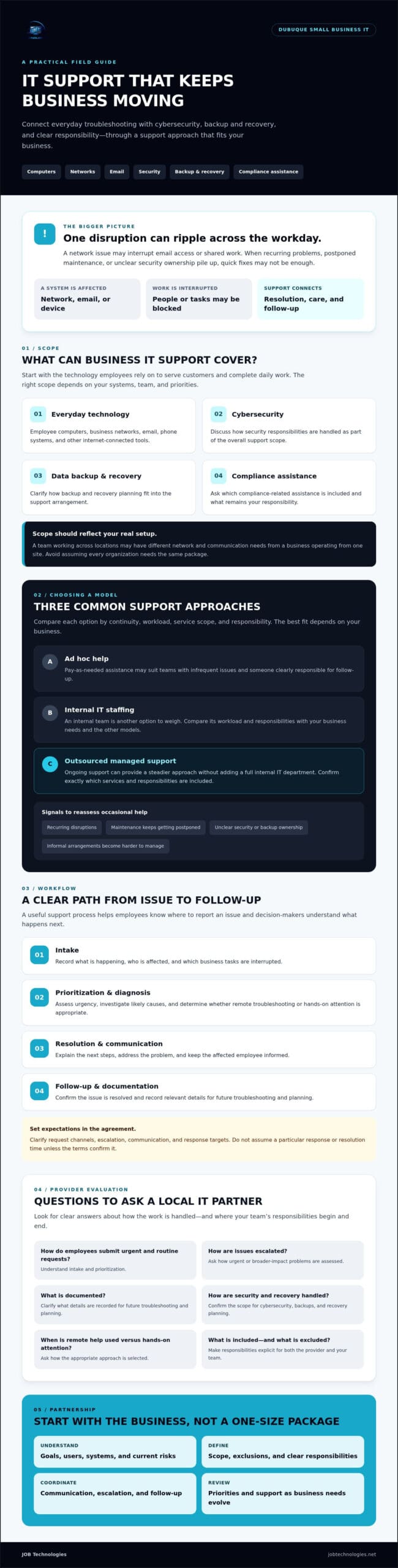
For small business IT support Dubuque teams, the process should be clear enough that employees know where to report an issue and decision-makers understand what happens next. A useful workflow typically includes:
- Intake: Record what’s happening, who is affected, and which business tasks are interrupted.
- Prioritization and diagnosis: Assess urgency, investigate likely causes, and decide whether the issue can be handled remotely or needs hands-on attention.
- Resolution and communication: Explain the next steps, address the problem, and keep the affected employee informed.
- Follow-up and documentation: Confirm the issue is resolved and record relevant details to support future troubleshooting and planning.
What happens after an employee reports an IT issue?
Clear intake and prioritization help distinguish a single-user problem from an outage affecting a shared system or several employees. Ask a prospective provider how staff submit urgent and routine requests, how requests are assessed and escalated, and what information is documented. Clarify expected communication and response targets in the agreement. Without confirmed terms, don’t assume a particular response or resolution time.
Some issues may be suitable for remote troubleshooting, while others may require someone to assess equipment or connections in person. Ask how the provider chooses the appropriate approach and what responsibilities remain with your team.
How do security and recovery fit into everyday support?
Security and continuity are part of keeping work moving, not concerns to consider only after an incident. Cybersecurity and ransomware protection address threats; backups preserve copies of data according to their configuration; and recovery planning sets out how the business will restore access to data or systems if they become unavailable. The Federal Trade Commission offers practical cybersecurity best practices that businesses can use to inform their approach.
Backup availability and recovery outcomes depend on what is configured, what the service agreement covers, and who is responsible for each step. Ask which data and systems are covered, how backups are monitored, and how recovery is handled and reviewed. The business backup and recovery guide can help you prepare those questions.
JOB Technologies provides cybersecurity and ransomware protection, along with data backup and recovery for small and medium-sized businesses. To understand how its outsourced IT services may fit your needs, review JOB Technologies’ business IT services.
Comparing Small Business IT Support Models in Dubuque
There’s no single support model that fits every company. The right choice depends on how much your business relies on technology, the risks you need to manage, and the time or expertise available internally. As you compare small business IT support Dubuque options, focus on the responsibilities each model covers, not just how help is delivered.
| Model | Continuity | Internal workload | Scope | Responsibility |
|---|---|---|---|---|
| Ad hoc break-fix | Support is typically requested when a problem occurs; ongoing oversight may be limited. | Staff coordinate requests and may handle basic troubleshooting. | Often focused on reported issues. Confirm whether maintenance or security work is included. | Responsibilities depend on each engagement, so clarify who tracks unresolved issues. |
| Internal IT staff | Knowledge of your systems can build over time, depending on staffing and coverage. | Technology work sits within the business, alongside the need to manage the role and its priorities. | Can be shaped around company needs, subject to the staff member’s expertise and capacity. | The business manages the position and defines its responsibilities. |
| Outsourced ongoing support | A continuing relationship may support more consistent planning and follow-up. | Some technology responsibilities are handled externally, while your team retains agreed duties. | Varies by agreement. Review coverage for users, networks, email, security, and backups. | The provider and business divide responsibilities according to the service agreement. |
When might on-demand help be enough?
Ad hoc support may suit a business with straightforward technology and occasional issues, especially if someone internally can coordinate requests and routine tasks. Check whether recurring problems are being resolved at their source or simply returning. Without an established process, your team may also have to decide who to contact, what information to provide, and who follows up.
When should a business consider ongoing outsourced support?
Ongoing outsourced support may be worth considering when several employees, systems, or business needs require coordination, but a large internal IT team isn’t practical. Dedicated IT support providers like Networking2000 demonstrate how structured managed services can take ownership of critical infrastructure and everyday troubleshooting. Before choosing small business IT support Dubuque providers, ask how they assign responsibility for network, email, user support, cybersecurity, and backups. Clarify how remote and on-site needs are assessed, what’s included, and how unresolved issues are communicated.
For a security-planning companion to this comparison, see the Dubuque cybersecurity guide for small businesses. Outsourcing isn’t automatically the best answer. Choose a model that gives your team clear ownership, an appropriate scope of support, and a manageable way to address technology needs as they change.
How to Evaluate a Dubuque-Area IT Support Provider
Choosing small business IT support in Dubuque starts with understanding what your business needs, then checking whether a provider’s scope and working arrangements match. Use the same practical checklist to compare providers rather than relying on broad promises.
- 1. List your needs. Note the systems your team relies on, recurring disruptions, security concerns, backup needs, and planned changes.
- 2. Define priorities. Identify what matters most, such as keeping essential systems available, getting clear communication, or assigning responsibility for ongoing technology tasks.
- 3. Compare service scope. Check which users, locations, and systems are included. Ask whether network, email, cybersecurity, backups, and user support are covered or handled separately.
- 4. Clarify responsibilities. Confirm what the provider manages and what your staff must do, including reporting issues, approving changes, and coordinating recovery steps.
- 5. Review the terms. Read the agreement for support channels, escalation process, planned work, documentation, exclusions, and how the arrangement can be reviewed or changed.
Questions to ask before choosing business IT support
Ask which systems and employees are covered, and what falls outside the agreement. How are urgent requests, routine work, and recurring problems communicated? Who documents changes and open issues? For cybersecurity, backups, recovery, and compliance assistance, ask what work is included, how responsibilities are divided, and which outcomes depend on your own decisions or configuration.
Request clear explanations of support channels and escalation, not just a general assurance that help is available. Confirm any response targets in writing, and ask how the provider will keep your team informed if work requires additional steps or falls outside the agreed scope.
How to check local fit across the Tri-State area
Confirm that the provider supports your business location and can accommodate its operating needs. JOB Technologies’ stated coverage includes Dubuque, Galena, East Dubuque, Dyersville, Farley, and Peosta. If your staff or sites are spread across nearby communities, explain that during the evaluation.
Don’t assume that “local” means a specific on-site schedule or that every issue can be handled remotely. Ask how the provider decides between remote and on-site support, whether the arrangement applies to your location, and what availability or response expectations are included in the agreement.
With your requirements in hand, you can compare providers against the same checklist to find the best MSP in Dubuque, IA. To discuss your business IT needs with JOB Technologies, contact the team about business IT support.
What to Expect from a Small Business IT Support Partnership
A useful IT support partnership starts with your business, not a preset list of tools. The provider should take time to understand your goals, who relies on technology, which systems are in place, and which risks or recurring issues need attention. That context helps shape a small business IT support Dubuque plan around your operations instead of assumptions about what every company needs.
What should initial discovery establish?
Early conversations should build a shared picture of your current environment and priorities. Be ready to discuss the systems employees use, problems that keep returning, important business processes, and concerns about security or continuity. Ask how open issues will be recorded and tracked, and who owns each task, including responsibilities that stay with your team.
Agree on practical details before work begins: which users and systems are within scope, how requests and planned work will be communicated, how urgent matters are escalated, and how often you’ll review the arrangement. Clear terms help prevent gaps and confusion. Ask for response expectations and other service commitments to be stated in the agreement rather than assumed.
How can support evolve as a Dubuque business changes?
Your support needs may shift as the team grows, systems change, or security and operational priorities develop. Periodic reviews give you and your provider a chance to revisit what’s working, identify new responsibilities, and decide whether the agreed scope still fits. Reviewing your small business IT support Dubuque plan helps keep it connected to current priorities without assuming you need to add services.
For example, a business considering new communication systems could ask whether VoIP is relevant to its goals. A team exploring ways to apply artificial intelligence to its work could discuss AI implementation. Consider these options in light of a specific need, not simply because they’re available.
For businesses seeking coordinated outsourced support, JOB Technologies works with small and medium-sized businesses and provides network installation and management, cybersecurity and ransomware protection, data backup and recovery, compliance assistance, AI implementation, and VoIP systems. The appropriate scope depends on your requirements. Compliance assistance shouldn’t be taken as a guarantee of regulatory compliance.
A thoughtful partnership makes responsibilities and communication clear, then revisits them as your business changes. If you’re assessing small business IT support Dubuque options, talk with JOB Technologies about your IT support needs.
Build a Support Plan That Fits Your Business
Choosing small business IT support in Dubuque is about more than finding help when something breaks. Look for a support model that matches your team’s technology needs, makes responsibilities clear, and gives appropriate attention to everyday issues as well as security and continuity. Before committing, compare what’s included, how communication works, and how the arrangement can be reviewed as your business changes.
JOB Technologies focuses on outsourced IT services for small and medium-sized businesses. Its services span computer and email support, networks, cybersecurity and ransomware protection, data backup and recovery, compliance assistance, AI implementation, and VoIP systems. Its stated coverage includes Dubuque, Galena, East Dubuque, Dyersville, Farley, and Peosta. Confirm the service scope and working arrangements that fit your location and priorities.
A thoughtful technology partnership can help your team approach IT with greater clarity and less uncertainty. Talk with JOB Technologies about your business IT support needs and explore an approach that aligns with how your business works.
Frequently Asked Questions
What does small business IT support in Dubuque typically include?
Small business IT support in Dubuque may cover computers, networks, email, cybersecurity, backups, and data recovery, but the exact scope depends on the agreement. Ask which users and systems are included, what responsibilities belong to your staff, and what services are excluded. Business IT support focuses on workplace technology and operations. It’s different from residential computer repair or buying hardware alone.
Is outsourced IT support a good fit for a small business?
Outsourced IT support can fit a small business that needs coordinated technology help but doesn’t have enough internal capacity to manage every issue. The decision depends on how much your operations rely on technology, whether problems keep recurring, and which risks you need to address. Not every company needs the same arrangement. Compare the service scope, communication process, and division of responsibilities before deciding.
Can a local IT support provider help with cybersecurity and backups?
Some local IT providers include cybersecurity and backup services, though protection and recovery coverage vary by agreement. Ask what security measures are included, which data and systems are backed up, how recovery responsibilities are divided, and what reporting you’ll receive. Review whether the backup configuration fits your business needs. No provider should imply absolute security or guaranteed recovery without evidence and clearly defined terms.
How much IT support does a small business need?
The amount of IT support you need depends on your employees, systems, the business impact of disruptions, and the expertise available internally. Start by listing recurring problems and the technology your team depends on to serve customers and complete work. Then match the service scope to those needs. There’s no universal number of support hours that suits every business, so avoid choosing based on an arbitrary allowance.
What happens if our business has an urgent technology problem?
Your provider’s documented process should explain how to report urgent issues, how they’re prioritized, and how your team will hear about progress. Before signing, ask which support channels to use, how an issue is escalated, and what service hours and response targets apply. Get those details in writing. Don’t assume a provider offers a particular response time or availability unless the agreement confirms it.
Should a Dubuque business choose remote or on-site IT support?
The right arrangement depends on the problem, your workplace setup, and the provider’s agreement. Some issues, such as certain software or email problems, may be addressed remotely; others involving workplace equipment or connections may require on-site attention. Ask a provider to explain how it chooses between the two, whether your location is covered, and what availability or conditions apply to on-site assistance.
How do I compare IT support providers in the Dubuque area?
Compare providers by service scope, communication, security and backup responsibilities, escalation processes, documentation, and local coverage. Ask for clear written terms, including what’s excluded, and check whether the provider understands your operating needs. If your business is in Dubuque, Galena, East Dubuque, Dyersville, Farley, or Peosta, confirm coverage for your specific location. Don’t choose based only on a broad service list or unsupported claims.
To discuss a support plan for your business in Dubuque, Galena, East Dubuque, Dyersville, Farley, or Peosta, contact JOB Technologies about managed IT services.