

What if the biggest cost of a technology problem isn’t the fix, but the work that stops while your team waits? For small businesses, a computer issue can affect network access, email, and customer service. That’s why small business IT support Dyersville IA companies rely on should connect everyday troubleshooting with broader business continuity.
Support should cover more than a single device or one-off repair. Your team needs technology that works together, protection against security threats, and a plan for recovering important data if something goes wrong. Managed IT services bring these needs into a coordinated relationship, without adding an internal IT department.
This guide explains what dependable business IT support can cover, how to assess whether a provider’s approach fits your operations, and why ongoing maintenance and recovery planning matter. We’ll look at computers, networks, email, cybersecurity, backup and recovery, and practical questions to help you choose local support for the technology your business depends on.
Key Takeaways
- Understand how small business IT support Dyersville IA can coordinate computers, networks, email, security, and recovery as part of ongoing business support.
- See how proactive monitoring and maintenance can help address technology issues before they disrupt employees and customer-facing work.
- Compare support options by looking at service scope, security, recovery planning, communication, and the difference between ongoing support and project work.
- Prepare for a productive IT partnership by documenting users, devices, essential business systems, and recurring technology problems.
- Learn how JOB Technologies’ managed IT, network, cybersecurity, backup and recovery, VoIP, and AI implementation services support connected business technology.
What small business IT support in Dyersville, IA should actually cover
Business IT support is ongoing help managing the technology employees rely on to work, communicate, and access business information. For a small business, that means looking beyond one broken computer or an internet connection. Small business IT support Dyersville IA companies can use should connect everyday technical help with security and recovery planning.
A managed support relationship takes a broader, proactive view than a one-time fix. It helps keep computers, networks, and email working together while addressing risks that could interrupt operations. An internet plan provides connectivity, but it doesn’t manage the devices, accounts, security, or business systems that depend on that connection.
Good security habits also help keep systems dependable. This video offers practical guidance on password hygiene:
Which business systems should IT support connect?
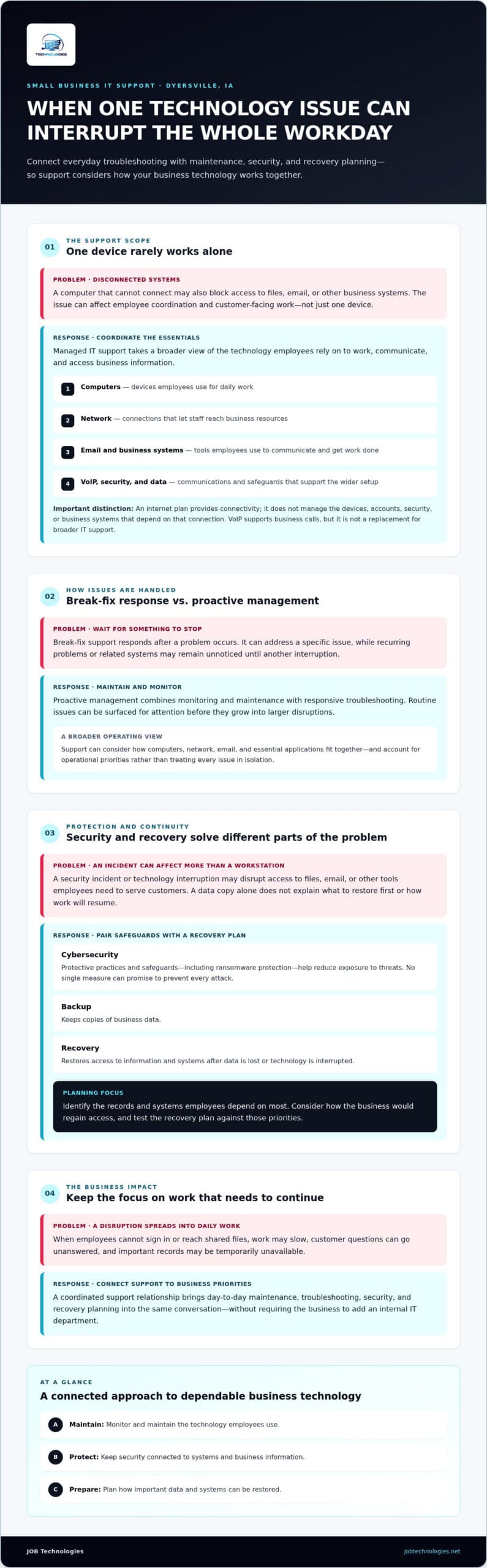
Employee computers handle much of the daily work, but they depend on a functioning network and access to email and other business systems. If a device can’t connect, a network problem may prevent staff from reaching files or communicating with customers. Support that considers these systems together can help identify where an issue begins and which other workflows it may affect.
Cybersecurity and data backup support the same goal: protecting information and helping the business keep operating. Security measures help reduce exposure to threats, while backup and recovery planning prepares the business for lost or unavailable data. VoIP systems support business calls and communications. They’re one part of a connected technology setup, not a replacement for broader IT support. For a foundational overview, see managed IT support.
Why Dyersville businesses may need more than break-fix help
Break-fix support responds after something stops working. It can address a specific issue, but recurring problems or related systems may go unnoticed until another interruption occurs. Proactive management focuses on maintaining technology and monitoring for issues so teams can address them before they grow into larger disruptions.
Consider a Dyersville office where employees can’t access business files or email during a busy workday. The impact may extend beyond one computer to internal coordination and customer-facing work. Ongoing support connects routine maintenance with security and recovery planning, giving the business a steadier approach than relying only on emergency fixes.
How managed IT support protects daily operations and business continuity
A technology interruption rarely stays confined to one device. If employees can’t sign in or reach shared files, work may slow, customer questions can go unanswered, and important records may be temporarily unavailable. Small business IT support Dyersville IA companies rely on should connect day-to-day maintenance with safeguards that help keep work moving when systems are disrupted.
Managed IT support helps create a planned approach. Monitoring and maintenance can surface routine issues for attention before they grow into larger problems, complementing responsive troubleshooting. This work also gives the business a clearer view of how its computers, network, email, and essential applications fit together. Support can then account for operational priorities rather than treating each issue in isolation.
How cybersecurity and ransomware protection fit into IT support
Cybersecurity combines protective practices with safeguards across business technology. It can include measures intended to reduce risk and ransomware protection that strengthens defenses, but no single measure can promise to prevent every attack. Ongoing support keeps security connected to the systems employees use and the business information those systems handle.
That coordination matters because a security incident can affect more than a workstation. It may disrupt access to files, email, or other tools staff need to serve customers. Treating cybersecurity as part of managed IT keeps protection in the same conversation as maintenance and recovery, rather than making it a separate, one-time decision.
Why backup and recovery belong in the support conversation
Backup and recovery are related, but they address different parts of a disruption. A backup keeps copies of business data. Recovery is the process of restoring access to information and systems after data is lost or technology is interrupted. Having a copy alone doesn’t determine what to restore first or how restoration supports the work employees need to resume.
Recovery planning should reflect business priorities. Identify the records and systems employees depend on most, then consider how they would regain access if those systems became unavailable. A recovery plan supports business continuity when it’s tested against the systems and priorities the business depends on. Ready.gov’s business continuity planning resources can help frame preparation for disruptions such as equipment failure or power outages.
For a deeper look at safeguards and restoration planning, see Business Data Backup and Recovery: 2026 Practical Guide. JOB Technologies connects managed IT with cybersecurity, ransomware protection, and data backup and recovery for small and medium-sized businesses. Explore its managed IT services as part of a coordinated approach to daily operations and continuity.
How to compare small business IT support options for a Dyersville company
A useful comparison looks beyond who fixes a computer when it stops working. Small business IT support Dyersville IA companies need should fit the way employees work today and support changes as the business grows. Even a small team depends on connected systems, security, and access to business information. Waiting until something breaks can leave recurring issues and continuity risks unaddressed.
Use these criteria to assess the scope of an ongoing support relationship:
| Area | What to look for | Why it matters |
|---|---|---|
| Scope | Support that considers employee computers, networks, and email together. | Problems can cross systems, so connected support helps address the source and broader impact. |
| Proactive management | Ongoing monitoring and maintenance, not only help after a failure. | Routine attention can help surface issues before they disrupt work. |
| Security | Cybersecurity and ransomware protection included in the technology conversation. | Protection should account for the systems and information employees use. |
| Recovery | Data backup paired with a plan for restoring important systems and records. | Copies of data are useful, but employees also need a path back to essential work. |
| Communication | Clear explanations of technical priorities in terms of business impact. | Decision-makers can better weigh risks and plan changes when the implications are understandable. |
What to look for in a managed IT support relationship
Consider whether support treats computers, networks, and email as parts of one working environment. Cybersecurity and recovery deserve attention alongside everyday assistance, not only after an incident. Communication matters, too: a useful partner explains how an issue affects workflows, customer service, or access to records, then helps prioritize next steps in language your team can act on.
Separate ongoing responsibilities from project work. Monitoring, maintenance, and routine support are ongoing needs. A network installation is a defined project that may establish or change infrastructure. Both can matter, but understanding the distinction helps you compare scope and plan for the work your business actually needs.
When VoIP, AI, or compliance support matters
VoIP support is relevant when business calling needs to work smoothly with how employees communicate and serve customers. AI implementation may be worth considering when a practical use case fits your workflows; it isn’t a requirement for every company. Compliance assistance can help address obligations relevant to the business without assuming every organization follows the same standards.
JOB Technologies provides outsourced IT services for small and medium-sized businesses, connecting managed IT with network management, cybersecurity, backup and recovery, VoIP, AI implementation, and compliance assistance. This connected scope can help Dyersville businesses match support to current operations while planning for evolving technology needs.
How a Dyersville small business can prepare for IT support
A clear picture of how your team uses technology makes it easier to shape support around real business needs. Before discussing small business IT support Dyersville IA, document who relies on your systems, what those systems are, and where interruptions affect work. You don’t need a technical inventory to get started. A practical overview is enough to guide a useful conversation.
What information helps define a useful support plan?
Gather a short record of your users, devices, core applications, and technology dependencies. Note recurring issues and describe how they affect ordinary work, such as delays accessing email or interruptions to customer communication. Then identify the business information and systems that matter most if recovery is needed.
- People and devices: Record employee count, who uses each key computer, and any devices essential to daily tasks.
- Systems and connections: List core applications, network dependencies, email, and business communications, including VoIP if used.
- Recurring issues: Note what happens, how often it affects work, and which employees or tasks are interrupted.
- Protection and recovery: Summarize current security measures and backups, then identify the data and systems the business would need to restore first.
- Operational priorities: Rank the workflows employees need to keep serving customers and maintaining business records.
This preparation helps distinguish an occasional inconvenience from a technology issue that repeatedly slows essential work. It also gives support planning a practical foundation for network, email, security, backup, and communication needs.
How local context shapes support for Dyersville businesses
JOB Technologies serves Dyersville and nearby communities, including Dubuque, Galena, East Dubuque, Farley, and Peosta. Local support planning should still start with your team’s specific work patterns, systems, and priorities, rather than assumptions about what businesses in the area need. Consider which roles depend on shared files, whether staff work across locations, and what would cause the greatest disruption if unavailable.
Clear business priorities help shape IT support that fits the way your team works. If you’re exploring regional considerations, the guide Small Business IT Support in Dubuque: A Practical Guide offers related context. With your users, systems, recurring issues, and priorities documented, you can have a focused discussion about support that aligns with your operations. Discuss your business IT support needs with JOB Technologies.
Small business IT support in Dyersville, IA with JOB Technologies
For small and medium-sized businesses, dependable IT support is about more than resolving isolated technical problems. JOB Technologies provides outsourced IT services for businesses in Dyersville and nearby communities, bringing day-to-day technology support and longer-term operational needs into one working relationship. If you’re evaluating small business IT support Dyersville IA, look for an approach that fits how your team works and the systems it relies on.
How JOB Technologies supports connected business technology
Computer, network, and email support are closely connected. Employees need working devices, dependable access to business systems, and clear communication to keep daily tasks moving. Managed IT services bring these needs into a broader support plan. Cybersecurity and ransomware protection address technology risks, while data backup and recovery help restore important information after a disruption.
Other services can support specific business needs. Network installation and management can support changes to a company’s network. VoIP systems can meet business calling needs, while AI implementation may be relevant when a practical use case fits existing workflows. The value is in considering each part alongside your operations, rather than treating technology decisions as disconnected purchases.
JOB Technologies also provides compliance assistance. Together, these capabilities help businesses consider everyday support, protection, and continuity as related priorities, with the approach shaped around their systems and work.
A practical next step for Dyersville business owners
Start with a concise outline of your users and devices, the systems employees depend on, recurring technology problems, and the work that must continue during a disruption. This gives you a grounded starting point for discussing support priorities, whether your immediate need involves routine IT management, network changes, stronger protection, or recovery planning.
Businesses exploring nearby regional considerations may also find Managed IT Services in Dubuque: The 2026 Guide to Small Business Growth useful. JOB Technologies serves Dyersville and nearby communities with outsourced IT support for small and medium-sized businesses.
Ready to discuss a support approach that fits your team’s systems and priorities? Talk with JOB Technologies about business IT support.
Build a steadier technology foundation for your business
Dependable IT support is more than help after a problem appears. It connects routine management with cybersecurity, backup and recovery, and clear planning for the systems your employees rely on. As you evaluate small business IT support Dyersville IA, consider whether the support fits your workflows, addresses continuity priorities, and can adapt as your business changes.
JOB Technologies provides business-focused managed IT, network management, cybersecurity, backup and recovery, and VoIP services. The company serves Dyersville and nearby communities, including Dubuque, Galena, East Dubuque, Farley, and Peosta. With these connected needs in view, you can move from reacting to isolated technology issues toward a more coordinated support relationship.
Start by outlining your essential systems, recurring problems, and the work your team needs to keep moving. Then take the next step and talk with JOB Technologies about dependable business IT support. A thoughtful plan can help your team approach technology with greater clarity and confidence.
Frequently Asked Questions
What does small business IT support include?
Small business IT support can include managing the technology employees depend on, such as computers, networks, and email. It can also bring together cybersecurity, ransomware protection, data backup and recovery, and business communications such as VoIP. The scope should reflect your systems and daily workflows. For a small business, coordinated support connects routine technology management with the broader priorities of protecting information and keeping operations moving.
Does a small business in Dyersville need managed IT support?
A Dyersville business may benefit from managed IT support if technology problems repeatedly interrupt work or there’s no internal IT team to manage systems, protection, and recovery. The right fit depends on the business’s size, technology, and operating priorities. Managed support provides an ongoing approach to computers, networks, email, and security rather than leaving employees to handle every issue on their own. JOB Technologies serves small and medium-sized businesses in Dyersville and nearby communities.
What is the difference between managed IT support and break-fix support?
Managed IT support takes an ongoing approach to maintaining and managing business technology, while break-fix support generally addresses problems after something stops working. With break-fix support, a computer or network issue may only receive attention once employees are already affected. Managed support connects routine maintenance with security and recovery planning. This helps a business consider recurring needs alongside immediate technical problems, rather than relying only on one-time fixes.
Can outsourced IT support help with cybersecurity and ransomware protection?
Yes. Outsourced IT support can include cybersecurity and ransomware protection as part of managing business technology. These safeguards help address risks to devices, networks, email, and business information, while ongoing support keeps security connected to the systems employees use. No security measure can promise to prevent every attack, so businesses should also consider how they would respond to disruption and recover important information. JOB Technologies provides cybersecurity and ransomware protection for businesses.
How does IT support help a business recover after data loss?
IT support can help a business prepare to restore important information and systems after data loss or disruption. Data backup means keeping copies of business information; recovery planning addresses how to regain access and resume priority work. A practical plan identifies essential records and systems, then considers what employees need first to continue operating. JOB Technologies provides data backup and recovery as part of its business-focused IT services, connecting data protection with continuity priorities.
How much does small business IT support cost?
The cost of small business IT support depends on the scope of services and the technology the business needs managed. Factors can include the number of employees and devices, network and email requirements, cybersecurity, backup and recovery, and project work such as network installation. Rather than assuming every plan covers the same responsibilities, outline your systems and priorities first. That gives you a clearer basis for discussing a support approach suited to your business.
Can one IT provider support computers, networks, email, and VoIP?
Yes. An outsourced IT provider can support computers, networks, and email alongside business communications such as VoIP. Managing these needs together can make it easier to understand how a network issue, for example, affects employees’ access to email or calling systems. JOB Technologies provides computer, network, and email support, network management, and VoIP systems for small and medium-sized businesses. The appropriate scope depends on the systems your team uses and how they work together.
What should a small business prepare before discussing IT support?
Prepare a basic inventory of employees, key devices, core applications, and network dependencies. Write down recurring technology issues and how they affect ordinary work, then identify important business data and systems that would need to be restored after disruption. Include email, cybersecurity, backup, and communication needs such as VoIP. JOB Technologies serves businesses in Dyersville, Dubuque, Galena, East Dubuque, Farley, and Peosta, so a clear outline can help frame a locally relevant support discussion.