

Your internal IT team doesn’t have to handle every issue alone or give up control to get extra help. Supplemental IT support for internal teams in Galena can add capacity while your staff keeps ownership of priorities, systems, and day-to-day decisions. The right co-managed approach works alongside your team, not around it.
It’s understandable to want dependable help without disrupting established workflows or leaving employees unsure where to turn. The goal is to reduce bottlenecks, make support requests easier to manage, and give internal staff more time for projects that move the business forward.
This article explains how co-managed support can fit around an internal IT function, and how service desk tools, automation, and security practices can improve productivity and stability. You’ll also learn what shapes the scope of support, how to assess provider fit, and what a practical next step can look like for your organization.
Key Takeaways
- Set up a clear service desk workflow so requests can be prioritized, tracked, and routed to the right support resource.
- Define which responsibilities stay with your internal IT team and where co-managed support can add capacity.
- Use automation and consistent security practices to reduce repetitive work and support more stable day-to-day operations.
- Compare support arrangements by scope, response process, and how well they fit your systems and internal workflows.
- Understand how project needs, ongoing support, and service scope shape pricing before choosing an engagement model.
Service desk, ticketing, automation, and security tools
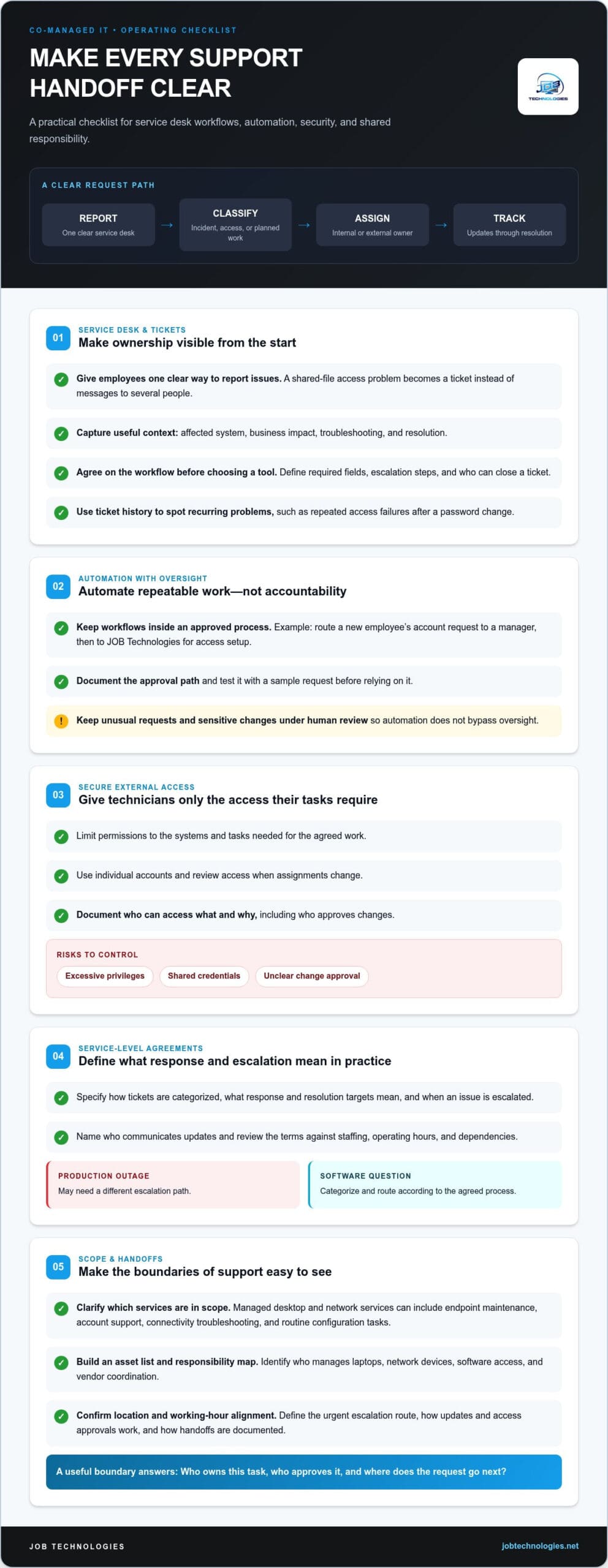
A service desk gives employees one clear way to report technology issues. For example, a staff member who can’t access shared files submits a ticket instead of messaging several people. The ticket records the affected system, business impact, troubleshooting, and resolution. That history helps internal IT spot recurring problems, such as repeated access failures after a password change.
Ticketing also makes ownership visible. A simple workflow can classify requests as incidents, access changes, or planned work, then assign each to an internal or external technician. Before adopting a new tool, agree on required fields, escalation steps, and who can close a ticket. This keeps handoffs clear instead of creating a second, disconnected queue.
To see how external support can complement an internal IT team, watch this overview:
Automation can handle repeatable tasks within an approved process. For example, a workflow might route a new employee’s account request to a manager, then to JOB Technologies for access setup. Document the approval path and test the process with a sample request first. Keep unusual requests and sensitive changes under human review, so automation speeds routine work without bypassing oversight.
Security must be built into external support access. Internal teams should limit permissions to the systems and tasks a technician needs, use individual accounts, and review access when assignments change. Key risks include excessive privileges, shared credentials, and unclear responsibility for approving changes. A documented access process helps your team track who can access what and why.
Service-level agreements (SLAs) should reflect actual business priorities, not generic labels. Define how tickets are categorized, what response and resolution targets mean, when an issue is escalated, and who communicates updates. For example, a production outage may need a different escalation path from one employee’s software question. Review the terms against staffing, operating hours, and dependencies before adopting them.
Managed desktop and network services can cover endpoint maintenance, account support, connectivity troubleshooting, and routine configuration tasks. Set boundaries with an asset list and responsibility map: identify which team manages laptops, network devices, software access, and vendor coordination. This prevents a ticket from stalling because each group assumes someone else owns the task.
For North American service teams, clarify where support staff are located and how their working hours align with your operations. A Galena business serving customers across time zones may need a defined escalation route for urgent issues. Confirm how updates, access approvals, and handoffs work in practice, then document the process so internal staff know exactly where each request goes.
For North American-based service teams, clarify which services are in scope and who handles each request. Service processes should keep requirements explicit and tied to the task. By defining clear operational boundaries and structured workflows, JOB Technologies ensures that administrative and technical requests are properly routed and managed. These examples make clear that requests can involve different services and requirements, so document the relevant details before routing or approving them.
Co-managed IT support for internal teams
Choose supplemental support when an internal IT lead can direct priorities but needs help with execution, coverage, or specialist work. For example, your staff might manage business applications while an outside team handles endpoint maintenance and network troubleshooting. Fully outsourced support is a better fit when no internal role can own daily technology decisions, vendor coordination, and escalation.
Start with a task inventory. List recurring requests, project backlogs, systems requiring specialist attention, and work that depends on one employee. Mark each task as internally owned, shared, or externally handled. If your internal administrator spends time resetting accounts instead of completing a planned system migration, shared support can redistribute the workload without transferring all IT ownership.
Next, define the working relationship in writing. Name one internal decision-maker, identify the outside team’s responsibilities, and document who approves access changes or system updates. For example, the internal lead may approve a new employee’s permissions while external technicians complete the setup. That distinction keeps accountability clear and preserves internal knowledge of business priorities.
Onboarding works best as a sequence: document systems and contacts, agree on responsibilities and escalation routes, provide approved access, then test the process with routine and urgent examples. A sample printer failure can test ticket routing, while a planned account change can confirm approval and documentation steps.
- Build the operating picture. Record key applications, network dependencies, user groups, vendors, and recurring issues. Include where operating procedures and recovery information are stored.
- Set the handoff rules. Decide which requests stay internal, which go to outside support, and who receives updates. Use a real example, such as an employee unable to access a shared folder.
- Grant task-based access. Assign each technician only the permissions needed for agreed work. Record approvals and establish a process for removing access when responsibilities change.
- Run a controlled launch. Route sample tickets, review the work notes, and correct unclear ownership before moving more support tasks into the shared workflow.
Keep internal staff involved after launch. A brief, recurring review of open work, repeated incidents, and upcoming changes helps both teams adjust priorities. If several employees report the same application issue, the teams can investigate the underlying cause instead of treating each ticket as unrelated.
For a Galena business considering a broader ongoing arrangement, compare current responsibilities with the work that remains uncovered. Managed IT Services can be a relevant next step when you need structured support for ongoing IT operations, rather than assistance limited to a single project.
IT productivity and stability
Productivity improves when technical work is planned around business priorities, not just urgent requests. For example, an internal administrator handling repeated account setup may have little time for a system migration. Assigning routine tasks to a defined support workflow can protect time for that planned work. The internal team still sets priorities and decides which changes need business approval.
Stability depends on spotting patterns before they become disruptive. Review incident records for recurring symptoms, such as slow file access after network changes or repeated login failures in one department. Group related issues, identify the underlying cause, and assign corrective work. This turns ticket history into an operational tool rather than a record of isolated fixes.
Choose practical indicators that connect IT activity to employee work. A simple review can track:
- Open work: Compare the current ticket backlog with recently completed requests to find growing queues.
- Repeat incidents: Flag recurring application or connectivity problems for root-cause analysis.
- Planned work: Review whether projects, updates, and system changes are progressing alongside support requests.
- User impact: Record which teams or business processes are affected by each significant interruption.
Use the same definitions each time you review these indicators. If one team marks a request resolved when a workaround is applied, while another waits for a permanent correction, the figures won’t support sound decisions. Agree on when an incident starts, what counts as restored service, and who records the final outcome.
Stability also depends on controlled changes. Before updating a shared application or changing a network configuration, record the purpose, affected systems, approver, and recovery steps. For example, a planned change to file permissions should identify the affected department and preserve a way to restore the previous settings. Clear records help technicians diagnose unexpected effects without relying on memory.
Protect time for preventive maintenance by assigning owners and review dates to recurring tasks. An internal calendar can track software updates, account reviews, backup checks, and equipment changes. The right schedule depends on system needs and business operations. Reviewing each completed task can reveal missed dependencies, such as an application update that also requires a workstation restart.
Finally, use service trends to refine workload boundaries. If password access requests consume internal capacity, document the approval path and standardize routine handling. If a specialized migration is delayed, reserve focused project time and assign a clear technical lead. These steps help internal teams balance employee support, planned improvements, and stable daily operations.
What IT support providers serve businesses in Galena, Illinois?
Businesses in Galena can consider several provider models: a local IT consultant, a managed service provider (MSP), or a larger regional or national support team. These models differ in how they deliver work. A local consultant may focus on a defined project, while an MSP can take responsibility for ongoing support tasks. A larger team may offer remote assistance across multiple business locations.
Start by matching the provider’s service model to your actual need. If your internal administrator needs help with a network migration, define the project scope and handoff. If employees need a consistent route for everyday technical issues, look for a service desk process that fits your team. For supplemental IT support for internal teams in Galena, clarify how outside technicians will work with internal staff before comparing providers.
Location matters most when work requires physical access to your office or equipment. Installing network cabling or diagnosing a disconnected switch, for example, may require an onsite visit. Remote troubleshooting can suit account access or software configuration issues. Ask how a provider distinguishes remote from onsite work, who coordinates the visit, and how the technician documents changes afterward.
Use a written scope to compare providers on practical terms, not broad labels. Check whether the proposed work covers user support, desktop administration, network monitoring, project assistance, or only selected tasks. Then clarify which responsibilities remain with your internal team. If your staff owns application permissions, for instance, the agreement should identify who approves changes and who carries them out.
A focused evaluation can follow these steps:
- Describe the need. Use specific examples, such as recurring login issues, delayed workstation setup, or a network upgrade.
- Map the workflow. Identify who receives requests, assigns work, approves access, and communicates progress.
- Review delivery. Compare remote and onsite processes, escalation routes, and service documentation.
- Test the fit. Walk through a sample request, such as a new employee needing approved access to shared files.
Ask how the provider will preserve continuity if a technician changes or a request moves between teams. A clear record of systems, decisions, and completed work lets the internal team retain useful context. For a Galena organization with multiple offices, also map which locations, networks, and employee groups fall within the proposed scope.
Finally, compare the provider’s communication habits with your operating needs. A business that relies on a shared scheduling system may need a defined escalation path for access failures, while a planned technology project needs documented milestones and approvals. The right match is the arrangement whose scope, location coverage, and handoffs address the specific work your internal team needs to share.
Do Galena IT support providers offer hourly, retainer, or project-based pricing?
IT support agreements can be structured around hourly work, a recurring retainer, or a defined project. Each model connects payment to a different kind of work. Hourly billing suits discrete tasks with a clear start and finish, such as diagnosing one workstation issue. A retainer is designed for ongoing support responsibilities. Project-based pricing focuses on a specified outcome, such as planning a network migration.
For hourly work, define what counts as billable time and how the provider records it. Troubleshooting a laptop may involve diagnosis, repair, and follow-up. Clarify whether each activity is included, how approvals work before additional work begins, and how your team receives a summary. These details help you compare the planned work with the final invoice.
A retainer can make sense when your internal team needs recurring assistance within an agreed scope. For example, the arrangement might cover routine user support and scheduled system administration. Spell out included tasks, excluded work, ticket handling, and how unused or extra capacity is treated. A clear scope helps avoid confusion when an employee requests work outside the agreed responsibilities.
Project pricing ties an agreement to deliverables and acceptance criteria. For a server migration, document the systems in scope, dependencies, testing responsibilities, and what completion means. Also identify how requested changes are handled. If the project expands to include a second office, the revised scope should explain the added work before it proceeds.
Before comparing models, write down your expected workload and business priorities. Include recurring requests, planned upgrades, internal staff responsibilities, and known dependencies. Then compare how each proposed structure handles:
- Scope: Which systems, users, and tasks are included?
- Work outside scope: How are urgent requests or added project tasks approved?
- Reporting: What records show completed work, open requests, and time used?
- Changes: How can responsibilities or project deliverables be revised?
Costs vary by case and are provided after a quote request; factors include support scope, systems involved, workload, project complexity, and required coordination. Compare proposals using the same task list, since different scopes can make similar-looking arrangements difficult to evaluate. For example, one proposal may include ongoing desktop support, while another covers only a defined network project.
Before agreeing, review the scope and payment terms together. Confirm how approval works for added work, when invoices are issued, and how either party documents a change. If you’re planning ongoing support or a defined IT project, request a managed IT support quote based on your requirements.
These examples are distinct from hourly, retainer, or project-based IT agreements, so keep them separate when reviewing a provider’s scope and quote. Federal Title I funds are allocated through four statutory formulas based primarily on census data and the cost of education in each state.
Galena Lacrosse offers bronze sponsors a quarter-page (¼) program ad. Galena Lacrosse offers preseason and out-of-season activities throughout the year. These arrangements have their own terms and should not be treated as IT support pricing options.
JOB Technologies: Managed IT Services
JOB Technologies supports Galena businesses that need additional capacity for ongoing IT operations. Its Managed IT Services can address recurring support needs, while Network Installation & Management suits organizations planning network changes or improvements. If your internal team is balancing daily requests with a larger infrastructure project, these services offer a practical starting point for defining the work and responsibilities.
Organizations exploring AI Implementation or Phone Systems VoIP can also consider how those projects fit their existing systems and priorities. A clear outline of current challenges, internal ownership, and desired outcomes helps shape a focused conversation about next steps.
Contact JOB Technologies to discuss your IT support needs, or visit JOB Technologies online.
Set a Clear Direction for Your IT Team
The next step is to identify where support would make the greatest difference. Choose a current pressure point, such as a project delayed by routine requests or a network change that needs added expertise. Then outline what your internal team wants to retain, what it needs help completing, and how both teams should coordinate. This gives you a practical starting point for supplemental IT support for internal teams in Galena.
JOB Technologies offers Managed IT Services for ongoing IT needs, Network Installation & Management for infrastructure work, and AI Implementation for businesses exploring practical uses for AI. The right conversation starts with your operational priorities, not a predetermined package. Share the work your team needs to move forward and discuss a support approach aligned with those goals.
Contact JOB Technologies to discuss your IT support needs. A clear first step can help your team plan its next move with greater confidence.
Frequently Asked Questions
What supplemental IT support services are available for internal IT teams in Galena?
Available support can include Managed IT Services, Network Installation & Management, cybersecurity and ransomware protection, data backup and recovery, and compliance assistance. For a business using Microsoft or Google, support can also address how its existing systems connect with daily workflows. A practical first step is to identify which tasks your staff wants to retain and where outside help would fill a specific capability or workload gap.
Which Galena-area providers offer co-managed IT support?
JOB Technologies offers Managed IT Services to support businesses working alongside an internal IT team. Its local service area includes Galena, Dubuque, East Dubuque, Dyersville, Farley, and Peosta. For example, an internal administrator can outline the team’s priorities and systems, then discuss how ongoing support could fit those needs. This gives both sides a clear basis for defining responsibilities and coordinating work.
What response times and service-level agreements do local IT support providers offer?
Response times and service-level agreements vary by provider and agreement scope. JOB Technologies states an average response time of 15 minutes, and its service-level agreement includes priority issue resolution. For your own support plan, distinguish an initial response from issue resolution, then clarify how requests are prioritized and communicated. For a Galena business, written definitions make it easier to align support expectations with internal workflows.