

IT should keep your work moving, not become another job to manage. For businesses seeking worry-free IT management in Dubuque, the practical answer is proactive, ongoing oversight of the systems, networks, and data your team relies on. The right approach fits your operations and gives employees a clear path to support when technology needs attention.
It’s understandable to want fewer disruptions and confidence that technical issues won’t distract your staff from daily work. Choosing support is also a matter of trust, so reviews can offer insight into clients’ experiences and help you decide what to look for in a working relationship.
This article explains what managed IT support can cover, how service needs and costs are shaped, and what to consider when evaluating reviews. It also outlines how to direct an inquiry to the appropriate department, so you can take a clear next step without getting lost in technical details.
Key Takeaways
- Use customer reviews to look for patterns in communication, follow-through, and how technical problems are handled.
- Understand how service-level agreements define priorities and response expectations, and identify the terms that matter most to your operations.
- Distinguish around-the-clock monitoring from support availability so you know what coverage a plan actually describes.
- Assess cybersecurity and backup services by how they help protect business systems and support recovery when data is disrupted.
- Expect a provider transition to involve understanding your current setup, planning the handover, and aligning support with your business needs.
Customer reviews
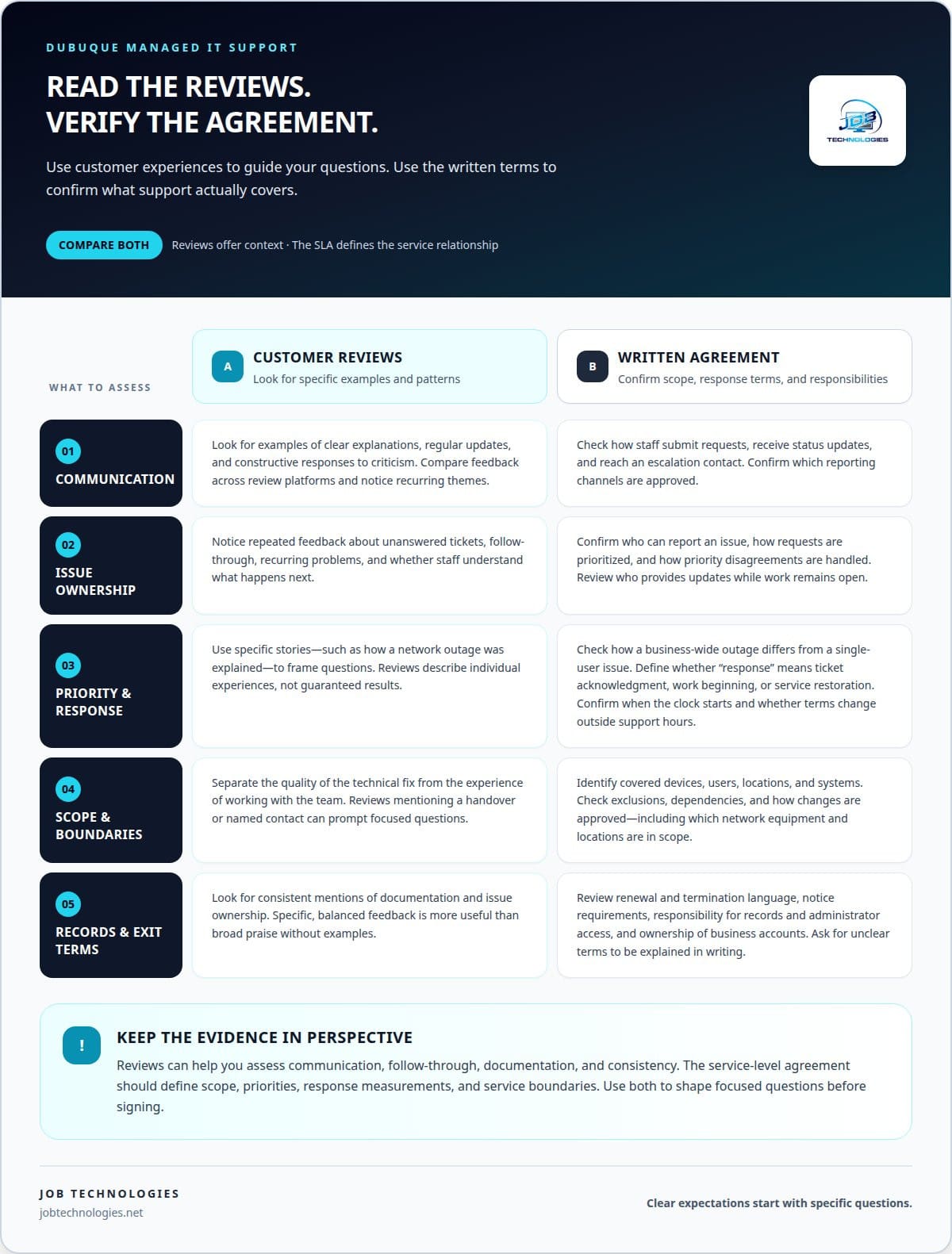
Customer reviews can reveal how an IT provider communicates, documents work, and handles recurring problems. Before signing, review the agreement’s scope, exclusions, response commitments, renewal terms, termination process, and responsibility for accounts or equipment.
Customer Experiences
Read reviews for specific examples, not just star ratings. A review describing how a provider explained a network outage gives more useful context than “great service.” Look for details about communication, follow-through, and issue resolution. These themes can help you judge whether the provider’s approach fits your team’s daily work.
Compare feedback across multiple review platforms, then look for patterns rather than treating one post as a complete verdict. Repeated comments about clear updates, for instance, may point to consistent communication. Repeated concerns about unanswered tickets deserve attention too. Consider when reviews were posted and whether the provider responds constructively to criticism.
Reviews describe individual experiences, not guaranteed results. Use them to shape focused questions about the service relationship. If a reviewer mentions a difficult handover, ask how transition responsibilities are documented. If a review praises regular updates, ask what they cover and who receives them.
Separate the technical work from the experience of working with the team. A review might describe a successful fix but also mention unclear explanations. Both details matter: the issue needs attention, and staff need to understand what happens next. Look for examples involving businesses with needs similar to yours.
Keep a short review checklist: communication, ownership of open issues, documentation, and consistency. A review mentioning a named point of contact, for instance, can prompt a conversation about escalation paths. Specific, balanced feedback is more informative than broad praise without examples. Use it to assess whether the relationship could feel trusted and collaborative.
Service Levels and Response Times
A service-level agreement, or SLA, sets out the support scope and how requests are prioritized. Review how it distinguishes a business-wide outage from a single-user issue. An unavailable shared network, for example, may affect more staff than one person’s printer problem. The agreement should explain how each request enters the support process.
Read the response commitment carefully. Acknowledging a ticket is different from beginning work or restoring service. Check which event the agreement measures, how the clock is calculated, and whether coverage changes outside stated support hours. These definitions help prevent mismatched expectations when an urgent issue interrupts operations.
Review how staff submit requests and receive status updates. The agreement might define a support portal, phone route, or escalation contact. Confirm that it identifies who can report an issue and how priority disputes are handled. Clear steps make it easier for employees to seek help consistently.
Also examine the service boundaries. The agreement should explain included systems, excluded work, dependencies, and how changes are approved. If network installation or management is in scope, identify which equipment and locations the terms cover. Clear boundaries help both parties understand who handles problems involving a vendor, connection, or internal device.
Before signing, review renewal and termination language alongside service commitments. Check how notice is given, what happens to records and administrator access, and who owns business accounts. Ask for unclear terms in the agreement to be explained in writing. A documented understanding of scope, response definitions, and exit steps reduces avoidable confusion later.
What service-level agreements and response times do Dubuque IT providers offer?
A service-level agreement (SLA) describes the support relationship in writing. For a Dubuque business, it should clarify which systems are covered, how requests are prioritized, and what “response” means. A ticket acknowledgment, a technician beginning work, and restoring a system are different milestones. The agreement should define which milestone applies to each commitment.
Response terms vary with the provider’s service model, support hours, issue severity, and covered systems. A company dealing with a shared network outage may need a different priority from an employee who can’t print one document. Look for the agreement’s priority categories and the criteria used to assign them. Clear definitions help staff report incidents consistently.
Read each response target alongside its conditions. Check when the clock starts, how a request must be submitted, and whether the commitment applies outside standard support hours. A phone call and an email, for example, might enter different queues. The SLA should explain approved reporting channels and how urgent issues reach the appropriate support contact.
Response time is not the same as resolution time. A technician may respond promptly but need more time to diagnose a failing network connection or coordinate with another vendor. Review how the agreement handles updates while work continues. A defined communication process can tell your team who provides status information and what happens when an issue remains open.
- Scope: Identify included devices, users, locations, and systems. For example, clarify whether a second office’s network is covered.
- Priority: Check how an outage affecting multiple employees differs from a single-user request.
- Measurement: Define whether a target means acknowledgment, active troubleshooting, or service restoration.
- Escalation: Find the route for an unresolved ticket, such as moving it to a senior technician.
- Exclusions: Note third-party services, project work, or equipment outside the agreement’s scope.
Before signing, map the SLA against a real workday. Consider a morning internet disruption, an account access issue, and a routine software question. For each example, identify its priority, reporting method, and expected update process. This practical review can reveal unclear language before employees rely on the agreement.
Keep the final terms accessible to the people who submit support requests. A short internal guide can explain where to report an outage and what details to include, such as affected users and business systems. Clear reporting helps the support team assess impact and route each request under the documented SLA.
Do Dubuque managed IT providers offer 24/7 monitoring and support?
Some managed IT plans include monitoring around the clock, while support hours and response processes depend on the agreement. These are separate services. Monitoring can identify an alert outside business hours, but that alone doesn’t tell you whether a technician will investigate immediately or contact your team. A server warning at night, for example, may trigger an alert without starting hands-on troubleshooting.
Ask what “24/7” applies to in the written plan. It may describe monitoring, a staffed help desk, emergency response, or a combination. Those distinctions matter if your Dubuque business runs evening shifts, serves customers after hours, or depends on systems that employees use outside the normal workday.
Monitoring is not the same as support
Monitoring generally means observing systems for alerts or signs of trouble. Support means a person or team responds to a request or alert and takes agreed action. A monitoring tool might flag a network device that has gone offline. The support process determines who reviews the alert, how urgency is assessed, and whether anyone contacts your team.
Ask for a practical example involving a system your business relies on, such as email, a shared file server, or a business phone system. Have the provider explain what happens if an alert appears overnight. The answer should identify who receives the alert, the next action, and how your staff learns about the issue.
Match coverage to your operating hours
Start with your actual schedule. A business open only during the day may prioritize prompt handling during work hours. A company with evening operations may need a defined route for reporting a serious outage after employees leave. The right fit depends on downtime’s impact, which systems remain in use, and who can authorize action.
- Monitoring scope: Identify which networks, servers, or systems generate alerts.
- Alert handling: Clarify who reviews an alert and what triggers escalation.
- Support access: Find out how staff report an urgent issue outside regular hours.
- Communication: Establish who receives updates, such as the business owner or designated manager.
- Limits: Understand whether overnight coverage means detection, response, or active troubleshooting.
Then test the process on paper. Consider an internet outage during an evening shift and trace the steps from detection to staff notification. Compare that path with a routine alert, such as a device needing attention. This exercise shows whether the agreed coverage supports your operations or leaves an important gap.
Ask that the plan define “response,” “monitoring,” and “after-hours support” in plain language. A specific example, such as an unavailable shared system, can make those terms easier to interpret. Clear definitions help your team understand what happens at any hour and whom to contact when work is disrupted.
What cybersecurity and data backup services are included in managed IT plans?
Managed IT plans can combine cybersecurity, ransomware protection, and data backup and recovery, but the exact scope varies. To assess coverage, trace a realistic incident. For example, consider an employee opening a malicious attachment that disrupts access to shared files. Ask which security measures are included, who handles the incident, and how recovery would proceed.
Cybersecurity coverage should address both prevention and response. Discuss how a plan helps protect business systems from unauthorized access and ransomware, and how suspicious activity is handled. Ask for a plain-language explanation of each safeguard. “Security monitoring,” for example, should specify which systems it covers and what happens when an alert appears.
Ransomware protection is more than a label. Clarify how the provider helps reduce exposure, what the response process covers, and how the business is supported if files become unavailable. A practical discussion might walk through a compromised employee account. The provider should explain the steps for reporting the incident, assessing affected systems, and coordinating recovery.
Backups serve a different purpose from security tools. They preserve copies of information so it can be restored after data loss or disruption. Ask which business data and systems are covered. A company may rely on email, shared documents, and accounting records. Knowing which sources are included helps you assess whether the plan fits daily operations.
Recovery details matter as much as backup creation. Clarify how restoration is requested, who coordinates it, and how the team identifies the right files or systems to recover. Ask how the provider handles an employee deleting a shared folder or a server becoming unavailable. The plan should define responsibilities and communication during recovery.
- Coverage: Identify the accounts, devices, applications, and business data addressed by the plan.
- Incident handling: Understand how a ransomware alert moves from detection to response.
- Backup scope: Name the information and systems included, such as shared files or business applications.
- Restoration process: Clarify who requests recovery and how restored data is made available.
- Ownership: Establish who communicates with staff and coordinates decisions during an incident.
Finally, connect these services to your operational priorities. If your team depends on shared project files, discuss that workflow specifically. If customer records or financial documents are central, identify those systems in the coverage conversation. Clear examples translate broad service labels into practical protections and recovery steps for your business.
Review the written plan for scope, exclusions, and the division of responsibilities. A clear agreement should distinguish security work from backup and recovery tasks. That distinction helps your team understand which process applies when a suspicious login appears, a file disappears, or ransomware interrupts access.
How does onboarding work when switching to a managed IT provider in Dubuque
A managed IT transition starts with understanding how your business uses technology today. For a Dubuque office, that can mean documenting employee accounts, email, network equipment, shared files, and business applications. This discovery helps identify dependencies before responsibilities change. A team using a shared drive, for example, needs access maintained throughout the handover.
The provider and business then define the transition’s scope and ownership. Identify who can approve account changes, who holds administrator access, and which existing vendors support essential systems. If an outside vendor manages your phone service, record that relationship. A clear map of contacts and responsibilities helps keep requests from falling between teams.
Next, the incoming provider reviews the current environment and records its working configuration. This may include network connections, user permissions, device details, and backup arrangements. Each item gives the support team context for troubleshooting. Knowing which employees need accounting software access, for example, helps avoid disrupting that workflow during account setup.
After discovery, the provider plans the handover around business priorities. The plan should identify tasks, owners, dependencies, and communication steps. A company that relies on email for customer requests may schedule changes to avoid interrupting that process. The transition should also establish how employees report issues and receive updates once support responsibilities move.
Account access deserves particular care. The provider coordinates authorized access to systems and records what changes during the transition. If an administrator account must be transferred, for example, the responsible parties should agree on timing and confirm that required users retain access. Documenting these steps helps preserve continuity and clarify who can approve future changes.
Testing follows the handover. The provider can verify representative workflows, such as signing in to email, reaching shared files, and connecting to the business network. Include any application the team uses daily. Testing helps surface access or configuration issues before employees rely on the new support process for routine work.
- Discovery: Record systems, accounts, vendors, and critical workflows.
- Ownership: Assign contacts for approvals, access, and open issues.
- Transition plan: Sequence changes around business dependencies.
- Validation: Test key employee workflows and record any follow-up tasks.
Keep employees informed with a concise transition note. It should explain where to submit a request, what information to include, and who receives urgent updates. Staff should know, for example, whether a login problem goes through the usual support channel or a designated transition contact. Clear instructions make the new process easier to use from day one.
To discuss a managed IT transition for your business, start a conversation about your IT needs and the systems your team depends on.
JOB Technologies: Network Installation & Management
JOB Technologies provides Network Installation & Management for businesses planning a new network or improving an existing one. When connectivity, access, or routine network management needs coordinated attention, this service offers a practical next step. Managed IT Services can support ongoing technology needs, while AI Implementation and Phone Systems VoIP address specific operational goals.
Start by outlining how your team works: which locations and systems depend on the network, where interruptions cause problems, and what changes are planned. That context keeps the discussion focused on your business priorities rather than a one-size-fits-all setup.
If you’re ready to discuss your network or IT needs, contact JOB Technologies.
Make your next IT decision with confidence
The next step is to connect technology planning with the way your business wants to work. Consider which systems need more proactive oversight, where network changes could support growth, and whether AI implementation serves a real operational goal. These priorities give you a focused starting point for worry-free IT management in Dubuque, without treating every technology challenge as the same problem.
JOB Technologies offers Managed IT Services, Network Installation & Management, and AI Implementation. A conversation can help you explain your goals, current concerns, and the systems your team relies on. From there, you can discuss which approach fits your business and identify a practical next step.
Contact JOB Technologies to discuss your IT needs and begin shaping a plan around your operations. With a clear priority and a trusted partner, your team can move forward with greater confidence.
Frequently Asked Questions
What does worry-free IT management include for Dubuque businesses?
Managed IT Services can bring ongoing technical support and essential business technology services under coordinated management. JOB Technologies’ Managed Services package contains support, business and security software, hardware, and technical advisory. A small business planning an office technology change, for example, can discuss how current systems and future needs fit together. JOB Technologies supports both Microsoft and Google environments, helping businesses work with the platform that fits their workflows.
Which managed IT service providers serve Dubuque, Iowa?
JOB Technologies serves businesses in Dubuque and nearby Galena, East Dubuque, Dyersville, Farley, and Peosta. For companies seeking worry-free IT management in Dubuque, services include managed IT, network installation and management, cybersecurity and ransomware protection, and data backup and recovery. Outline your systems and operational goals to focus the initial conversation on the support your business needs.
What should a Dubuque business look for when choosing a managed IT provider?
Look for a provider whose capabilities match your business systems, team, and growth plans. Ask how its support relates to your email environment, network, and business applications. Confirm that technical recommendations are explained in terms your decision-makers can use. Also understand how services are tailored: JOB Technologies determines managed-services pricing per computer or per user after a needs assessment, then provides the price in a proposal.
How do Dubuque IT providers compare on pricing, services, and customer reviews?
Compare service scope, covered systems, support hours, response commitments, and exclusions in each provider’s agreement. Look across review platforms for patterns in communication, follow-through, documentation, and issue resolution. Assess pricing alongside the services included.