

What if the weakest link in your business communications isn’t a password, but the network carrying your calls, emails, and messages? If you’re concerned about ransomware arriving through email, unsure how HIPAA or privacy requirements apply, or dealing with dropped VoIP calls, those are practical issues to investigate. Secure business communication systems need more than one protective measure. They need coordinated safeguards that protect information without getting in the way of daily work.
This guide explains how encryption, access controls, network readiness, and compliance planning can work together to protect business communications. You’ll also find practical ways to review common weak points, including phishing, unapproved apps, and poor call quality, so you can make informed decisions about the tools and protections your business needs.
For businesses in Dubuque, Galena, East Dubuque, Dyersville, Farley, and Peosta, JOB Technologies provides managed IT, VoIP, cybersecurity, backup and recovery, and compliance assistance. Bringing these services together can help businesses assess how their communication tools, network, and security practices work as a system.
Key Takeaways
- See how reviewing and managing communication tools together can make security easier to oversee.
- Learn how encryption and multi-factor authentication can help protect messages, calls, and user accounts.
- Use a practical audit to find unapproved apps and potential network weaknesses before they become larger risks.
- Assess your network and strengthen the systems that carry business communications.
- Explore how managed IT, VoIP, and cybersecurity support can help businesses in Dubuque, Galena, East Dubuque, Dyersville, Farley, and Peosta maintain secure, dependable communications.
What Defines Secure Business Communication Systems in 2026?
Business communication now involves more than desk phones and separate email accounts. Unified Communications as a Service (UCaaS) brings voice, video, messaging, and collaboration together through cloud-based platforms. That convenience also means a weakness in one account or network connection may affect more than one channel.
Secure business communication systems use multiple layers of protection, including encryption, authentication, and network monitoring, to protect information across the tools a business uses. The systems may include VoIP, email, chat, and file sharing, as well as the devices and network connections that carry information. Encryption helps guard data from interception, but it can’t prevent an attacker from taking over an account or an employee from sharing sensitive information through an unapproved app. The broader concept of secure communication focuses on protecting information from eavesdropping and interception.
For businesses in Dubuque and nearby communities, the practical question isn’t just whether a tool offers encryption. Consider who can access it, whether the network is monitored, and whether its settings suit your business. If employees use voice, chat, and file sharing from different locations, safeguards need to work together. Otherwise, information can still be exposed through a compromised login, an unmanaged device, or a misconfigured service.
The Evolution of Communication Risks
Communication threats can involve convincing phishing messages designed to steal credentials or deliver malware. Remote and hybrid work add more devices, locations, and networks to consider. When staff switch between office systems and personal or home devices, it can be harder to maintain consistent controls and spot unusual access. Clear policies and centralized oversight help address these gaps.
Why “Off-the-Shelf” Solutions Often Fail SMBs
Consumer messaging apps may be convenient, but business conversations in those apps can fall outside the organization’s security and retention practices. VoIP services also need deliberate configuration. Review who can access voicemail, change administrative settings from their defaults, and check call forwarding and account permissions. These are reasons to assess how each tool is deployed and managed, not reasons to avoid cloud tools altogether.
Managed IT services in Dubuque can help businesses coordinate decisions about their network, phone systems, cybersecurity, and compliance needs. JOB Technologies supports small and medium-sized businesses in Dubuque, Galena, East Dubuque, Dyersville, Farley, and Peosta with managed IT and network services. The aim is to protect business information while keeping everyday collaboration practical.
The Essential Components of a Secure Communication Stack
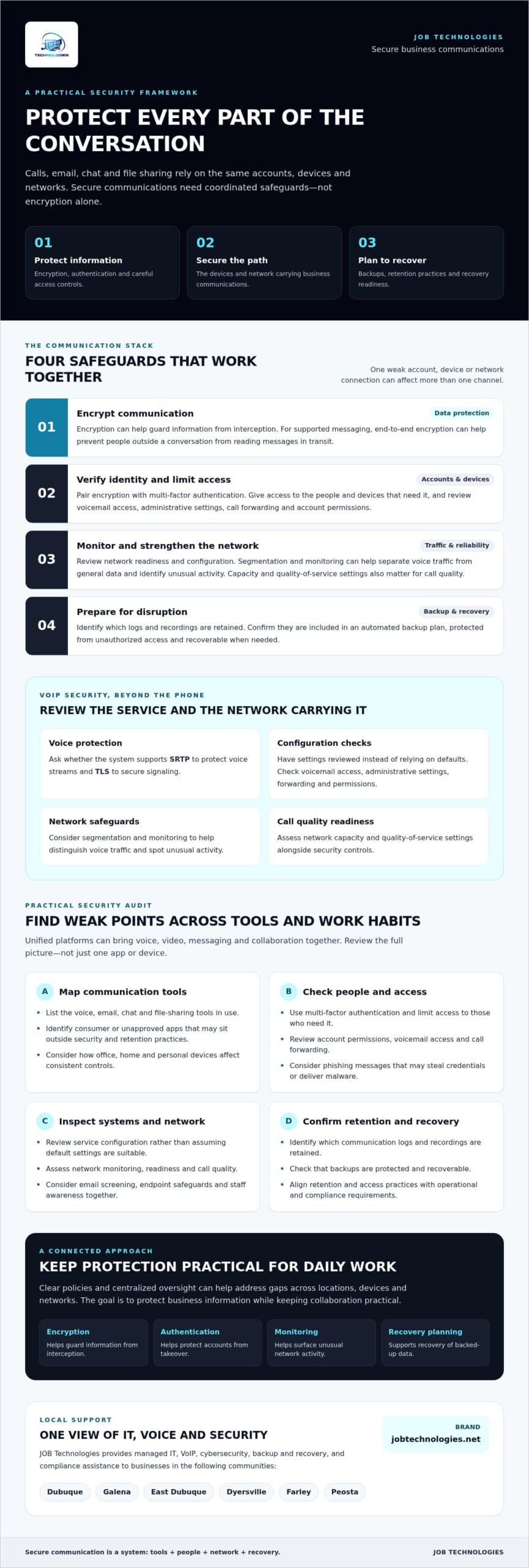
Strong communication security depends on layers that reinforce one another. End-to-end encryption (E2EE) can help prevent people outside a conversation from reading supported messages in transit. But encryption alone won’t stop someone who has stolen an employee’s login. Pair it with multi-factor authentication (MFA), which requires an additional verification step, and limit access to the people and devices that need it.
Ransomware protection should also account for communication channels. A malicious email attachment can provide a route into business files and connected systems. Email screening, endpoint and network safeguards, and staff awareness work together to reduce that risk. The FCC’s FCC Cybersecurity Tips offer small businesses practical guidance on topics such as network security and employee training.
Backups support recovery if messages, call records, or other communication data are lost or affected by an attack. First identify which logs and recordings your business retains. Then confirm they’re included in an automated backup plan, protected from unauthorized access, and recoverable when needed. Retention and access practices should also match your operational and compliance requirements.
Hardening Your Business VoIP Phone Systems
VoIP security depends on both the phone service and the network carrying its traffic. Ask whether the system supports SRTP to protect voice streams and TLS to secure signaling. Have the configuration reviewed rather than relying on defaults. Network segmentation and monitoring can help separate voice traffic from general data and identify unusual activity. Network capacity and quality-of-service settings also matter for call quality. Use these questions when exploring business VoIP phone systems in Dubuque. If your system sends voicemail to email, check how messages are protected in transit and at rest, and who can access them.
Securing Professional Email and Messaging
Spam filters are useful, but businesses can also assess threat detection that flags suspicious links, attachments, and unusual sender behavior. Email authentication helps reduce spoofing: SPF identifies approved sending sources, DKIM adds a verifiable signature, and DMARC tells receiving systems how to handle messages that fail checks. These controls strengthen the email layer but don’t replace MFA or staff judgment.
Before choosing messaging or calling tools, review where business data is stored, who can access it, and how it can be exported or recovered. JOB Technologies provides VoIP, cybersecurity, and ransomware protection as part of its services for local businesses. To review how these services can fit together, learn more about managed IT and communication support.
Evaluating Your Current System: A Security Audit Framework
Before adding tools, map how communication already moves through your business. List the email, messaging, VoIP, file-sharing, and conferencing services employees use, including apps adopted without formal approval. This “Shadow IT” can leave business conversations outside your access controls, backup plan, or retention practices. Ask teams what they use for quick messages and file transfers, then compare those tools with approved options.
Review the network perimeter and user access, too. Check firewall rules and remote access settings. Review access logs for unfamiliar sign-ins or unusual activity, and confirm that employees have only the permissions their roles require. Include former employees, shared accounts, voicemail access, and administrative accounts. A communication audit should occur at least twice a year to account for new hires and emerging cyber threats.
Assessing Compliance: HIPAA, GDPR, and Beyond
Requirements depend on the information your organization handles and the people it serves. Healthcare providers in Dubuque and Galena should assess how protected health information moves through email, calls, voicemail, and collaboration tools. If calls are recorded or transcribed, identify their purpose, who can access the files, where they’re stored, and how long they’re retained. Confirm that processes and safeguards align with applicable requirements. GDPR should be considered when it applies to your organization’s activities, not assumed to apply to every local business. Compliance assistance can help businesses review relevant obligations and identify gaps.
Physical Network Vulnerabilities
Security also depends on the equipment installed on-site. Older office network wiring may limit performance or complicate reliable VoIP connections, especially when the network has grown without a clear plan. Inspect routers, switches, and desk phones for secure placement, controlled administrative access, current configurations, and unnecessary open connections. Equipment that is physically accessible or still uses shared default credentials can undermine other safeguards.
Review guest Wi-Fi separately. Keep visitors’ connections apart from internal systems carrying calls, business files, and staff messages. Then test whether devices on the guest network can reach internal resources they don’t need. Secure business communication systems depend on coordination between policies, user access, and the physical network, not just a vendor checklist. A documented audit gives your team a starting point for correcting weaknesses and prioritizing improvements.
Step-by-Step Guide to Implementing Secure Communications
Secure business communication systems aren’t created by installing one security product. They need to be planned, configured, tested, and maintained as your team and technology change. Use these steps to build a coordinated approach:
- Assess your network and hardware. Document routers, switches, phones, wireless access points, communication apps, and remote connections. Note outdated equipment, unsupported software, and performance issues that could affect security or call quality.
- Strengthen the network perimeter. Configure a managed firewall and assess whether deep packet inspection is appropriate for your traffic and business needs. Review its rules and alerts regularly instead of treating protection as a “set it and forget it” task.
- Choose a secure, cloud-hosted VoIP platform. Confirm which communication channels support encryption, including whether end-to-end encryption is available for the specific calls or features you use. Review administrative controls, access permissions, and how voicemail and recordings are protected.
- Centralize identity and access. Where practical, bring email and file-sharing access under a monitored identity provider. Use individual accounts, least-privilege permissions, and multi-factor authentication so one compromised password doesn’t automatically unlock every service.
- Train staff continuously. Make communication protocols clear: how to report suspicious messages, verify unexpected requests, and use approved tools for business information. Refresh training as processes and threats change.
Phase 1: Hardening the Infrastructure
Ask your network administrator to separate voice and general data traffic using virtual local area networks (VLANs). Then configure Quality of Service (QoS) to prioritize voice packets during busy periods, helping security measures and ordinary network activity coexist without needlessly degrading calls. In higher-security or complex enterprise environments, specialized stealth tunneling architectures from providers like Quantum Infinity illustrate how critical data streams can be shielded against interception. Monitoring should also look for unusual communication patterns, such as unexpected connection attempts or changes in traffic volume, and route meaningful alerts to someone responsible for reviewing them.
Phase 2: User-Centric Security Measures
Require strong, unique passwords and MFA for accounts and devices that access business communications. For mobile devices, consider whether remote locking or wiping is appropriate if a device is lost, and define who can authorize that action. Explain the policy to staff, especially if personal devices are involved. AI tools may help flag suspicious email patterns, but alerts need human review, and staff need a clear way to report possible phishing. Consider AI adoption as part of a broader security plan, not as a replacement for layered controls.
Implementation is ongoing: test configurations, review alerts, and adjust controls as business needs evolve. Discuss a managed communications security plan with JOB Technologies. Its managed IT, VoIP, and cybersecurity services support businesses in Dubuque, Galena, East Dubuque, Dyersville, Farley, and Peosta.
The Managed Advantage: Why Local IT Support is Critical
Secure communication depends on more than the platform you choose. Your phones, network, security controls, and daily workflows need to work together, and someone needs to help maintain them as your business changes. When evaluating IT support, ask how the provider will learn your setup, troubleshoot problems, and coordinate changes across your communication systems.
That support matters when calls stop connecting or staff can’t access essential tools. Ask any IT provider what “response” means, how support is delivered, and what escalation looks like. Clarify the service scope and support hours rather than assuming a particular response or resolution time.
On-Site Support in Dubuque, Galena, and Beyond
Remote troubleshooting can address many problems, but not all of them. A damaged cable, failing switch, misconfigured desk phone, or local connectivity issue may require someone to assess equipment at the office. Businesses in Dubuque, Galena, East Dubuque, Dyersville, Farley, and Peosta may also need to raise questions with their internet provider when VoIP call quality suffers. JOB Technologies offers managed IT and network services, along with VoIP, cybersecurity, data backup and recovery, and compliance assistance.
Future-Proofing Your Business for 2027 and Beyond
Threats and business needs will continue to shift. AI-generated voice or video can make impersonation attempts harder to judge, so teams should establish a way to verify sensitive requests, such as confirming them through a separate, known channel. As your team grows, review user access, phone capacity, communication policies, and how new employees are onboarded. Proactive maintenance can help surface configuration and performance issues before they become disruptive.
Managed IT support can help coordinate reviews with VoIP and cybersecurity planning. Before choosing a provider, ask what systems are monitored, how alerts are handled, and what coverage hours are included. Don’t assume “managed” means 24/7 oversight. Confirm that the service scope fits your business. Regular reviews help communication systems evolve without leaving security and continuity as afterthoughts.
Build a More Resilient Communication Plan
Protecting business calls, email, and messages takes more than choosing encrypted tools. Secure business communication systems depend on coordinated safeguards, regular reviews, and clear practices that help your team use technology safely while keeping daily work moving.
Start by checking how information moves across your network, who can access it, and whether your VoIP, email, and file-sharing tools are properly secured. Keep improving the system through staff training, maintenance, and recovery planning. These steps can help reduce communication risks and prepare your business to respond when problems arise.
For small and medium-sized businesses in Dubuque, Galena, East Dubuque, Dyersville, Farley, and Peosta, JOB Technologies provides managed IT, network management, VoIP, cybersecurity, data backup and recovery, and compliance assistance. These services can help businesses review the technical details behind their communication systems and plan practical next steps.
Talk with JOB Technologies about securing your business communications and take a practical next step toward a more reliable, protected environment.
Frequently Asked Questions
What is the most secure way for employees to communicate remotely?
Use company-approved communication tools with encryption, multi-factor authentication (MFA), individual user accounts, and access limited to each employee’s role. Require staff to connect through trusted, updated devices and avoid sending sensitive business information through unapproved apps or public networks. Set clear procedures for verifying unusual requests, especially those involving payments or confidential data. Secure business communication systems combine these practices with network monitoring, regular updates, and a reliable process for reporting suspicious activity.
Is VoIP more secure than traditional landline phone systems?
Neither VoIP nor a traditional landline is automatically more secure in every situation. VoIP can offer features such as encrypted signaling and voice traffic, but protection depends on the service configuration, user access, and the network carrying calls. Landlines have different risks and may not provide the same management and security controls. Compare the safeguards available, who manages them, and how the system connects with your business network before deciding.
Does HIPAA require end-to-end encryption for business emails?
HIPAA doesn’t simply require end-to-end encryption for every business email in every circumstance. Organizations handling protected health information need to assess risks and apply appropriate safeguards, including protections for electronic information. The right approach depends on the communication, systems, and circumstances involved. Healthcare providers in Dubuque and Galena should review current requirements with a qualified compliance professional, especially before sending patient information by email or storing related messages and attachments.
How can I tell if my current business phone system has been hacked?
Warning signs can include unfamiliar calls or forwarding rules, unexpected voicemail changes, unknown administrator accounts, or unusual login activity. Poor call quality alone doesn’t prove a breach; network congestion or service issues can cause similar symptoms. If something looks suspicious, document what you noticed, contact your IT support provider, and ask them to review account access and system logs. Avoid deleting evidence or making major configuration changes before the system has been assessed.
What should I do if an employee loses a phone with business chat apps on it?
Act promptly: notify your IT contact, report the loss through your organization’s process, and use available device-management controls to lock or erase the phone if appropriate. Revoke active sessions and access tokens for business apps, then reset affected credentials and review account activity. Tell the employee not to try to recover business data through unapproved methods. If sensitive information may be involved, follow your incident response and applicable notification procedures.
Are free messaging apps like WhatsApp safe for business use?
A free messaging app isn’t automatically unsafe, but its suitability depends on the app’s protections, account controls, data handling, and your business requirements. Check whether administrators can manage accounts, remove access when staff leave, retain or export records, and control business information on personal devices. For regulated or sensitive conversations, confirm that the tool fits your compliance obligations before use. Set an approved-app policy so employees know where business discussions belong.
How much does it cost to implement a secure communication system for a small office?
There isn’t one reliable price for every small office. The investment depends on your existing network and phones, number of users, communication tools, security gaps, backup needs, and compliance requirements. Start with an assessment that identifies what can be retained, what needs configuration, and what may need replacement. Ask providers to explain the scope and ongoing support included in a proposal, rather than comparing a single headline figure.
Can a managed IT provider secure my existing network without replacing all my hardware?
A provider may be able to assess existing equipment and improve security through configuration changes, access controls, network segmentation, updates, or monitoring where the hardware supports them. Replacement may still be appropriate if devices are outdated, unsupported, or unable to meet performance or security needs. For businesses in Dubuque, Galena, East Dubuque, Dyersville, Farley, and Peosta, JOB Technologies provides managed IT, network management, cybersecurity, VoIP, backup and recovery, and compliance assistance.