

Preserved article with links added below.
The biggest threat to your company’s voice communications isn’t picking the wrong cloud software; it’s running it on an unmanaged local network that drops calls the moment bandwidth spikes. If you’re frustrated by rising traditional phone bills, obsolete PBX hardware, and static on the line whenever employees use mobile apps, you aren’t alone. Finding the best business VoIP phone systems Dubuque companies can count on shouldn’t mean gambling with call quality or waiting in an anonymous national support queue when a line goes down.
You deserve crystal-clear HD voice across your desktop and mobile devices, seamless automated call routing, and dependable technology backed by responsive local technicians who know your area. In this 2026 buying guide, you’ll discover how to evaluate, select, and deploy a reliable cloud VoIP phone system tailored for your Dubuque operations. We’ll explore the physical network standards required for pristine voice quality, critical federal E911 compliance rules, and the practical deployment steps that keep your team connected without disrupting daily business.
Key Takeaways
- Understand how Voice over IP technology replaces aging, expensive telephone lines by transmitting high-definition voice packets securely across your business internet connection.
- Discover the essential communication features, from automated attendants to mobile integration, that keep your team responsive whether they work at their desks or in the field.
- Learn why internal network readiness, including proper router prioritization and managed switching, prevents latency and choppy calls before modern business VoIP phone systems Dubuque installations go live.
- Compare the hidden trade-offs of national mail-order phone vendors against having a dedicated local technology partner that configures equipment directly at your facility.
- Follow a clear, risk-free transition framework to audit your current telecom agreements, preserve your existing phone numbers, and ensure continuous business operations during your upgrade.
What Is a Business VoIP Phone System and How Does It Work?
At its core, Voice over IP technology replaces aging telephone wiring by converting analog sound into compressed digital data packets. Instead of traveling across legacy copper lines run by telephone monopolies, your conversations move seamlessly over your high-speed business broadband connection. Once those packets reach their destination, the receiving system instantly reassembles them into clear audio.
For Tri-State organizations modernizing their offices, upgrading to modern business VoIP phone systems Dubuque platforms provide is no longer optional. Telecom carriers nationwide are rapidly decommissioning legacy copper facilities under federal orders, making traditional analog circuits increasingly costly and unreliable to maintain. Shifting to cloud-hosted voice delivers a scalable foundation that preserves operational continuity.
Cloud-Hosted VoIP vs. Traditional PBX Systems
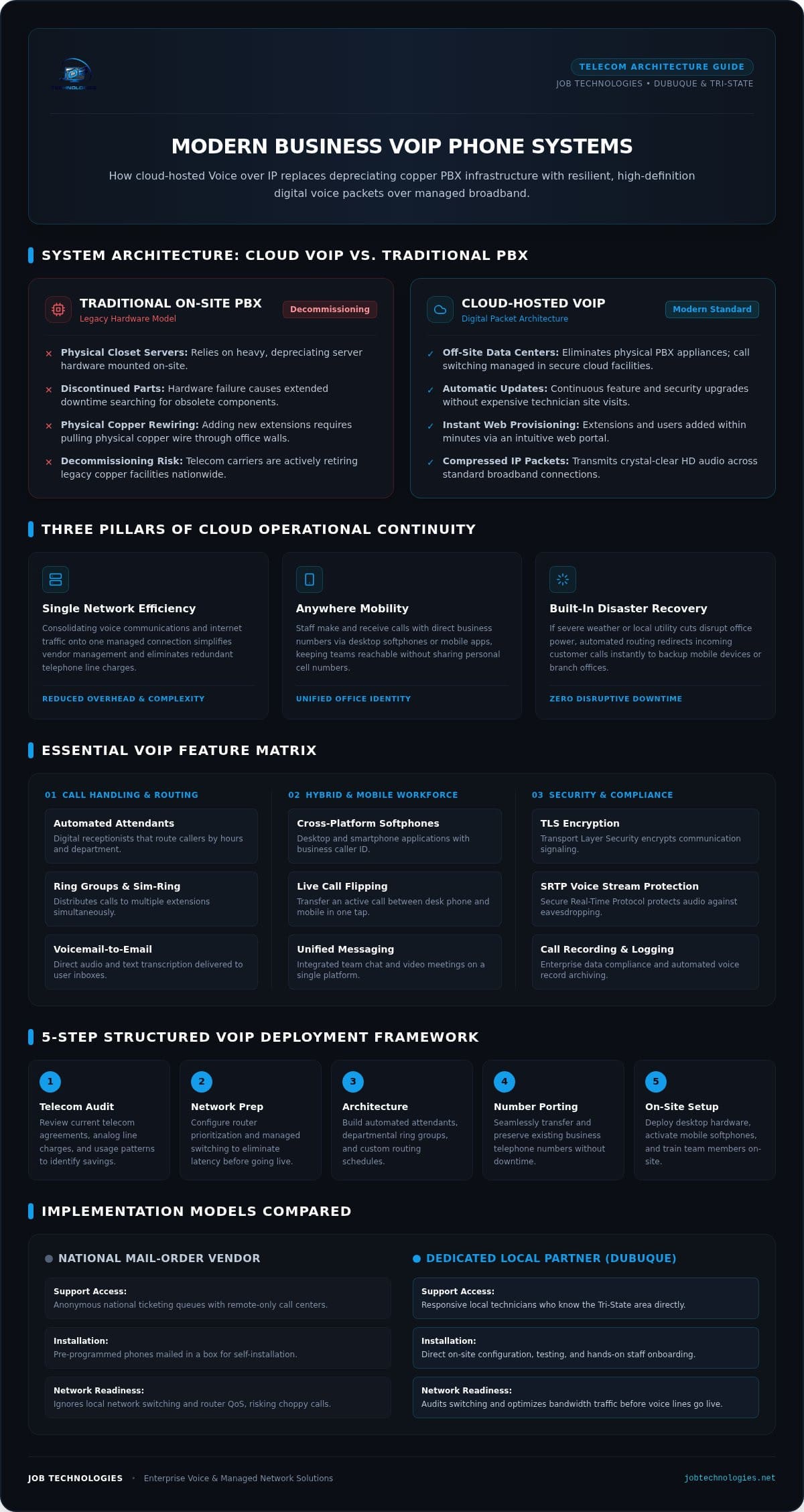
Legacy private branch exchange (PBX) systems rely on heavy, depreciating server hardware mounted inside an on-site utility closet. When components fail, finding discontinued replacement parts causes extended downtime and expensive repair visits. In contrast, cloud VoIP eliminates physical PBX appliances entirely; secure, off-site data centers manage system logic, call switching, and regular software updates.
Adding extensions with cloud architecture requires just a few clicks in a web portal rather than hiring technicians to pull physical copper wiring through walls. Your team gains instant scalability across departments without ongoing hardware maintenance overhead.
Key Business Advantages of Modern Cloud Communications
Transitioning to cloud communications delivers practical operational upgrades that protect daily productivity:
- Single Network Efficiency: Consolidating your voice communications and internet traffic onto one managed connection simplifies vendor management and eliminates redundant telephone line charges.
- Anywhere Mobility: Employees can make and receive company calls using their direct business numbers through desktop applications or smartphone softphones, keeping staff reachable anywhere.
- Built-In Disaster Recovery: If severe weather or local utility cuts disrupt power to your office, automated call routing instantly redirects incoming customer calls to backup mobile devices or secondary offices without missing a beat.
This balance of flexibility and built-in redundancy ensures your business maintains professional customer communication, regardless of unexpected local disruptions.
Essential VoIP Features Every Dubuque Small Business Needs
Modernizing your office communications isn’t about collecting flashy software gadgets; it’s about making your daily operations run smoother. When evaluating business VoIP phone systems Dubuque teams need tools that directly improve customer responsiveness and eliminate administrative friction. A properly designed platform ensures every incoming caller reaches the right person on the first attempt, whether your team is at their desks or working out in the Tri-State area.
Professional Call Handling and Routing Tools
Automated attendants act as digital receptionists, routing inquiries based on customized business hours and departments. Ring groups and simultaneous ring features distribute incoming calls across multiple extensions at once, ensuring an available team member answers before a customer hangs up. If someone leaves a message, voicemail-to-email transcription sends the text and audio directly to your inbox for fast review between client meetings.
Hybrid Work and Mobile Team Capabilities
Field staff and remote employees shouldn’t have to give out personal cell phone numbers to stay accessible. Softphone applications for laptops and smartphones let personnel make and take calls using your office caller ID. Integrated team messaging and video conferencing keep branch offices connected on a single platform. If you need to step away from your desk mid-conversation, live call flipping transfers an active call to your mobile phone with a single tap. For a deeper look at which capabilities matter most for smaller organizations, reviewing the essential VoIP features for small teams can help you prioritize the right tools without overpaying for enterprise complexity.
Security, Call Recording, and Compliance
Voice traffic is sensitive business data that requires strict protection. Enterprise platforms employ Transport Layer Security (TLS) and Secure Real-Time Transport Protocol (SRTP) to encrypt voice packets against network eavesdropping. Features like automated call recording provide searchable archives for quality assurance, staff coaching, and dispute resolution. As detailed in the FCC guide to Voice Over Internet Protocol, commercial providers must also satisfy strict emergency E911 dispatch requirements.
Because cloud telephony runs directly across your local network, your voice platform must integrate tightly with your broader small business cybersecurity strategy. If you want to confirm that your office infrastructure meets modern security standards, partnering with a local team through JOB Technologies helps ensure your communications and data remain fully protected.
Network Readiness: The Overlooked Factor in VoIP Call Quality
Most failed voice rollouts have nothing to do with the phone software itself. Instead, audio dropouts, robotic distortion, and latency occur because the office Local Area Network (LAN) cannot handle real-time traffic. While general web traffic can pause momentarily to buffer, voice packets cannot wait. When exploring business VoIP benefits and features, national DIY providers rarely discuss internal network health. They mail preconfigured handsets, leave you to plug them into whatever cabling exists, and blame your internet service provider when calls start clipping.
Achieving crystal-clear voice on business VoIP phone systems Dubuque companies rely on requires strict performance thresholds. High-fidelity calling demands one-way latency below 150 milliseconds, jitter under 30 milliseconds, and packet loss kept strictly below 1%. If your physical switching or router configurations let those metrics slip, call quality immediately degrades.
Bandwidth Calculation and Quality of Service (QoS)
Each uncompressed concurrent call requires approximately 100 kbps of symmetric upload and download headroom. While standard business internet speeds easily meet total capacity requirements, simultaneous operations create severe bottlenecks without proper traffic management. An unthrottled cloud backup or heavy file upload can instantly saturate your uplink, pushing voice packets aside.
Configuring Quality of Service (QoS) rules inside your commercial router solves this contention. QoS tags voice packets with DSCP 46 (Expedited Forwarding), forcing network appliances to prioritize voice over background file transfers and routine office browsing.
The Role of Physical Network Cabling and Switches
Your hardware foundation plays an equally critical role in voice stability:
- Power over Ethernet (PoE) Switching: Managed 802.3af/at PoE switches deliver electrical power and digital connectivity over a single network line, keeping your desks free of messy wall adapters.
- Voice VLAN Isolation: Segmenting telephony onto an independent Virtual LAN protects voice traffic from broadcast storms and file sharing occurring on your general office data network.
- Cabling Integrity: Aging, damaged Cat5 lines and loose keystones introduce packet errors that drop active calls unexpectedly.
Following proven guidelines for professional office network wiring ensures your physical drops, patch panels, and switches sustain pristine voice clarity under peak daily workloads.
National Cloud Providers vs. Local Dubuque VoIP Partners
Ordering a box of phones from a national telecom conglomerate looks convenient until the hardware arrives on your doorstep. Big-box providers ship mail-order kits with basic quick-start leaflets, expecting your staff to configure routing rules, set up firewalls, and resolve internal networking errors on their own. When a handset fails to register or calls suddenly drop, your only recourse is waiting in a remote, multi-tiered call center queue. You end up explaining your physical office layout to an overseas technician who has never set foot in Eastern Iowa. If you have already experienced this frustration with a major platform, exploring the leading RingCentral alternatives for small business can help you identify a more agile, cost-effective solution without bloated enterprise contracts.
Choosing dependable business VoIP phone systems Dubuque organizations rely on means looking beyond generic national software. Working with a dedicated regional technology team replaces ticketing queues with accountable, on-site engineering. If a switch malfunctions or a conference line requires reconfiguration, a local technician can walk through your front doors to resolve the issue directly.
Deployment and Hands-On User Training
Turnkey deployment removes the guesswork from switching phone providers. Rather than handing employees user manuals and hoping for the best, a local partner physically installs every desk terminal, verifies network throughput, and conducts hands-on staff training sessions. Custom call flows are mapped directly to how your dispatchers, front-desk administrators, and billing departments actually handle daily inquiries. This personal onboarding prevents workflow confusion and eliminates the flood of internal troubleshooting requests that often derail self-installed systems.
Single-Vendor Simplicity for Voice and IT
When voice quality suffers, independent cloud vendors and local IT teams frequently point fingers at one another. The phone company insists your office router is defective, while your computer technician claims the voice provider’s cloud servers are lagging. This frustrating cycle leaves your business caught in the middle while clients encounter busy signals.
Unifying your communications under comprehensive managed IT services eliminates vendor blame entirely. Your network wiring, firewall security, desktop workstations, and cloud voice systems operate under one responsible roof. For organizations operating across Dubuque, Galena, and Dyersville, having a single local team oversee both IT health and telephone infrastructure creates predictable stability. To establish a dependable communications setup backed by local technicians who know your area, contact JOB Technologies to review your office phone requirements.
Choosing & Transitioning to a Dubuque Business Phone System
Switching your office communications doesn’t have to disrupt operations. Many business owners hesitate to modernize because they worry about losing recognizable phone numbers, dropping client calls during the cutover, or confusing their staff with unfamiliar interfaces. With business VoIP phone systems Dubuque organizations adopt today, a methodical, phased rollout eliminates these transition risks while protecting customer goodwill.
Step 1: Conduct a Communications and Workflow Audit
Successful migration begins with a clear inventory of how your team communicates. Document the exact number of active physical desk phones, conference stations, overhead paging systems, and mobile softphone users across your facility. Map out every direct inward dialing (DID) number, main line, and hunt group currently in service.
Reviewing recent carrier invoices during this step often uncovers redundant charges for legacy analog features, unused auxiliary lines, or outdated maintenance contracts that can be retired immediately.
Step 2: Number Porting and Pre-Deployment Testing
Porting existing telephone numbers requires precision to avoid operational dead air. Collecting recent copies of your telecom billing statements and signing a Letter of Authorization (LOA) ensures your number ownership details match carrier records exactly, preventing administrative rejections from the releasing provider.
While the porting date is scheduled, your call handling architecture is built and validated in a cloud staging environment:
- Call Routing Verification: Auto-attendant scripts, department ring groups, and business-hours schedules are programmed and tested before any lines go live.
- Pre-Cutover Hardware Validation: Handsets and softphones are registered and verified on your local network to confirm clean audio transmission.
- 10-Digit Outbound Dialing Alignment: System directories are configured to support required 10-digit dialing patterns across the local 563 area code.
Step 3: Go-Live and Ongoing Local Optimization
Executing the final carrier cutover during off-peak hours ensures your incoming calls transition to the new cloud platform without interrupting daytime business. On launch morning, having on-site technicians physically present ensures staff receive immediate guidance with their handsets, transfer buttons, and voicemail setup.
Partnering with JOB Technologies provides continuous local backing throughout the lifecycle of your modern business VoIP phone systems Dubuque deployment. Rather than submitting generic web tickets to an overseas support center, you gain an experienced regional technology partner to handle ongoing extensions, call routing changes, network performance adjustments, and hardware support as your company grows.
Modernize Your Communications with Local Confidence
Modernizing your office telephone infrastructure isn’t just about escaping rising carrier fees or retiring obsolete copper circuits. It’s about equipping your staff with reliable tools that work seamlessly whether they’re sitting at their desks or answering client inquiries out in the field. Upgrading to the modern business VoIP phone systems Dubuque companies rely on succeeds when powerful cloud software is backed by proper internal network engineering and QoS traffic prioritization.
You don’t have to troubleshoot configuration errors alone or spend hours waiting in impersonal national call center queues. With over 20 years serving businesses across Dubuque, Galena, and Dyersville, JOB Technologies delivers turnkey deployment combining physical network optimization, clean number porting, and responsive on-site support. Unifying your voice infrastructure under comprehensive single-source IT management brings predictable performance and lasting peace of mind to your organization. Schedule a Local VoIP Consultation with JOB Technologies today to build a voice platform your team can depend on every day.
Frequently Asked Questions
Can our business keep our existing phone numbers when switching to VoIP?
Yes, your business can keep all existing local and toll-free phone numbers through standard carrier porting rules. By submitting a recent phone bill and Letter of Authorization, your established numbers in area code 563 transfer cleanly to your new platform. This process ensures customers, suppliers, and partners never encounter disconnected lines or confusing number changes while your company modernizes its communications.
What happens to our business phone system if our office internet goes down?
Your callers won’t experience busy signals or dead air if your local internet connection drops. Because modern business VoIP phone systems Dubuque companies deploy live in resilient off-site data centers, automated failover routing takes over immediately. Incoming calls automatically redirect to designated employee mobile devices, backup office locations, or external voicemail boxes so your organization stays fully accessible until local internet connectivity is restored.
Is VoIP phone call quality really as clear as traditional landlines?
High-definition VoIP audio actually sounds clearer than legacy copper telephone lines, provided your internal office network is configured properly. Cloud voice systems utilize wideband audio codecs that capture a broader frequency range of human speech. When your switches and router prioritize voice traffic through Quality of Service rules, calls sound crisp, natural, and free of background hiss or compression artifacts common on aging analog circuits.
Do we need to replace all of our physical office desk phones to use VoIP?
Not necessarily. If you already use modern IP-capable handsets, they can often be reprovisioned to register with your new cloud platform. Analog telephone adapters can also bridge specialty hardware like warehouse bells or fax machines. Alternatively, staff can bypass physical desk phones altogether by using desktop softphone software and mobile apps, minimizing upfront equipment costs while delivering identical calling features.
How much internet bandwidth does a business VoIP system require per line?
A standard high-fidelity voice call requires approximately 100 kbps of symmetric upload and download bandwidth using standard uncompressed codecs. A ten-person office conducting simultaneous calls consumes around 1 Mbps of dedicated voice throughput. The critical challenge isn’t raw bandwidth volume, but network stability. Consistent call quality requires low packet loss under 1% and jitter kept below 30 milliseconds across your internal network switches.
Can remote and hybrid employees connect to our Dubuque office phone system?
Yes, remote workers and field technicians connect seamlessly using softphone applications installed on smartphones, laptops, and tablets. Whether staff operate from home in Galena or travel across East Dubuque and Dyersville, they make and receive calls showing the company’s primary office caller ID. They can transfer calls across internal extensions, join team ring groups, and check company voicemail just as if they were sitting in the main office.
What is the typical timeframe required to port numbers and deploy a new system?
Most small business deployments take two to four weeks from initial network assessment to final go-live. Releasing carrier approval for telephone number porting usually accounts for the bulk of this timeline. During that waiting window, your local technology partner preconfigures your call menus, installs managed switches, verifies cabling, and trains your team, ensuring a seamless cutover without disruption to your daily operations. A dependable business data backup and recovery plan should also be confirmed before go-live to protect your call records, voicemail archives, and configuration data against unexpected hardware failure or ransomware during the transition period.