

Your team can’t access email, essential files are unavailable, and customers are waiting. In that moment, emergency IT support Dubuque businesses need starts with clear triage, not frantic attempts to restart everything. A suspicious message or sudden system outage can also raise concerns about ransomware or data exposure.
It’s understandable to want operations restored quickly. A few coordinated first steps can help limit disruption and give your IT team a clearer picture of what’s happening. JOB Technologies provides business IT support for companies in Dubuque and nearby communities, including help with computers, networks, email, cybersecurity, and recovery planning.
This guide explains how to assess an urgent technology problem, what details to gather before requesting support, and how to prioritize the systems your business needs to keep serving customers. You’ll also learn how a structured response can support recovery and help reduce the chance of a similar disruption.
Key Takeaways
- Recognize when an issue threatens business operations, data, security, or customer access, and distinguish a single-device problem from a wider outage.
- Use a calm triage process: identify who and what is affected, protect impacted systems, record symptoms, and avoid unplanned changes or file deletion.
- When seeking emergency IT support in Dubuque, share the business impact, affected users and systems, symptoms, and location to help guide the response.
- Look beyond a quick fix by addressing possible root causes and considering how security, backups, and recovery needs affect continuity.
- Prepare for future incidents with a contact tree and a clear record of essential systems, dependencies, access, and restoration priorities.
Emergency IT Support in Dubuque: What Counts as a Business-Critical Incident?
A business IT emergency is more than an inconvenient computer problem. It’s a disruption that threatens essential operations, business data, security, or customers’ ability to reach or work with your company. The deciding factor is impact: if staff can’t complete time-sensitive work, protect information, or serve customers, the issue may need urgent attention. That’s the kind of disruption that leads Dubuque businesses to seek emergency IT support.
Scope matters. One employee’s malfunctioning computer may be isolated if everyone else can continue working. A network outage affecting multiple departments, an email failure disrupting customer communication, or a business system outage blocking orders or payments can affect the whole company. Even a single device can become critical if it’s the only point of access to an essential process or business data.
Working definition: An urgent business IT incident is an unexpected technology or security disruption that materially interferes with essential work, risks business data, or prevents customers or staff from accessing services.
A useful response treats the event as an incident to assess and manage, rather than a reason for everyone to troubleshoot independently. The general principles of incident management emphasize an organized response to unexpected events. For a business, that means establishing what’s affected and how operations are at risk before deciding what should happen next.
Which technology problems require urgent business attention?
Consider whether the issue is spreading, affecting a core process, or putting information at risk. A problem that appears small can warrant prompt attention if it blocks payroll, scheduling, order processing, or another essential workflow.
- Widespread access failures: Staff across the business can’t reach the network, email, or a system needed to complete essential work.
- Possible security incidents: Files become inaccessible, ransomware appears, or accounts show unusual activity. Treat these signs as potential security incidents, not routine glitches.
- Recurring failures: A repeated device, connection, or application problem needs attention when it regularly interrupts a critical process.
By contrast, a minor issue affecting one person and a nonessential task may be suitable for routine support, provided it isn’t connected to suspicious activity or a broader system problem. If you’re unsure about the scope, describe what users can and can’t access and whether the symptoms are changing.
When is a problem a public safety emergency instead?
Technology support addresses business systems. It doesn’t replace emergency services. If there’s an immediate threat to a person or property, contact the appropriate public emergency service rather than attempting IT troubleshooting first.
Dubuque city 911 guidance concerns phone access and emergency location information, including considerations around phone services that use internet connections. That public-safety guidance is different from help restoring a company network or email. County emergency management supports community preparedness, while a campus technology help desk serves its institution’s users. Neither should be confused with commercial IT support for a business outage.
Once immediate safety concerns are addressed, business leaders can assess the technology impact and coordinate support. This keeps the focus first on people’s safety, then on protecting business operations and information.
How to Triage a Business IT Emergency Safely in Dubuque
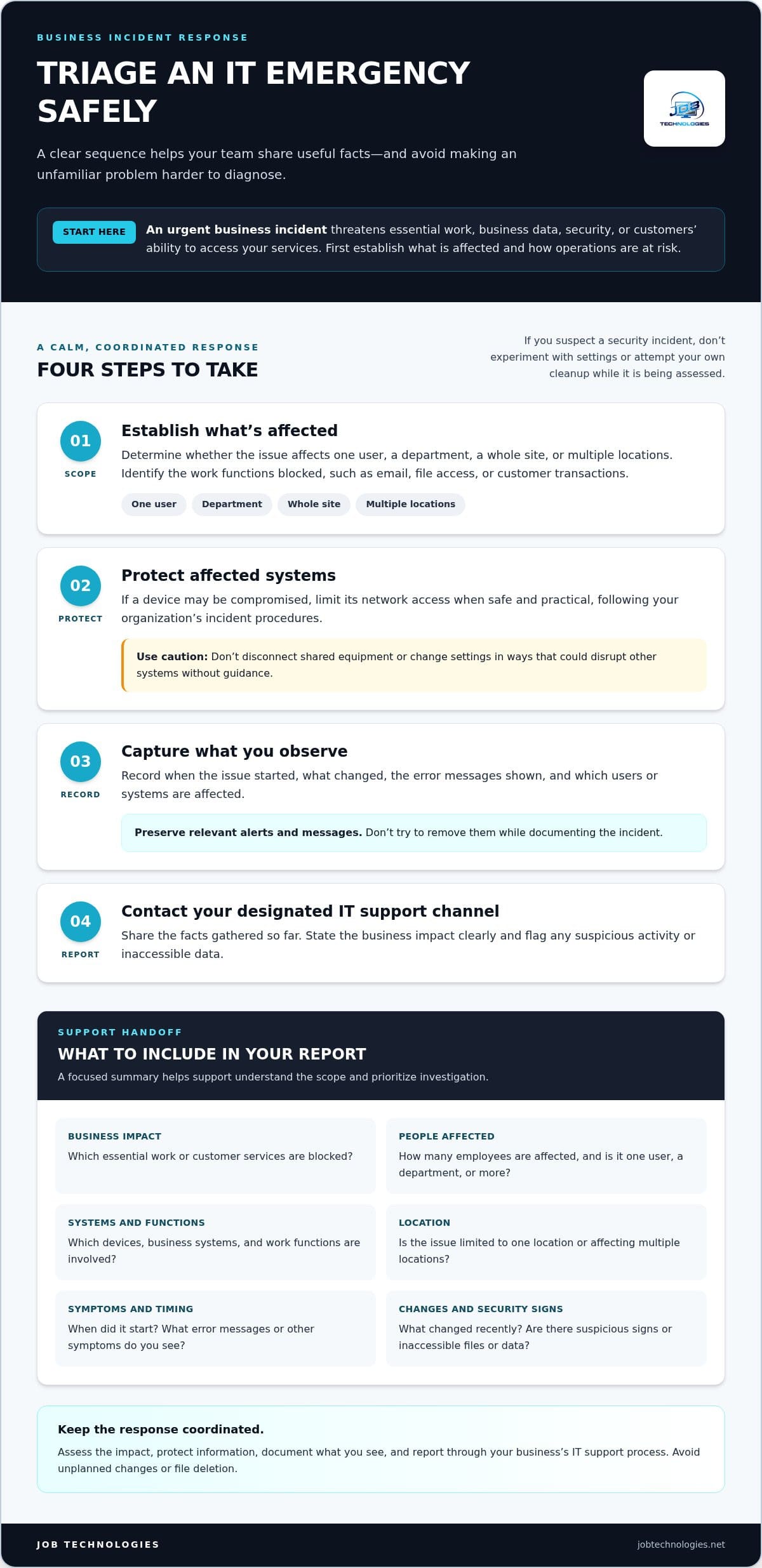
A clear sequence helps your team share useful information without making an unfamiliar problem harder to diagnose. Start by identifying what’s affected, taking reasonable steps to protect business information, and recording what you observe. If you suspect a security incident, avoid experimenting with settings or attempting your own cleanup while the situation is being assessed.
First safe steps: Establish the scope, protect affected systems when it’s safe to do so, record symptoms and recent changes, then report the issue through your business’s IT support process.
- Establish the scope. Find out whether the problem affects one user, a department, a whole site, or multiple locations. Identify which work functions are blocked, such as email, file access, or customer transactions.
- Protect affected systems. If a device may be compromised, limit its network access when safe and practical, following your organization’s incident procedures. Don’t disconnect shared equipment or change settings in ways that could disrupt other systems without guidance.
- Record what you see. Note when the issue started, what changed, the error messages shown, and which users or systems are affected. Preserve relevant alerts and messages instead of trying to remove them.
- Report the incident. Contact the designated IT support channel and share the facts gathered so far. State the business impact clearly, and identify any signs of suspicious activity or inaccessible data.
What information helps IT support diagnose the problem?
Useful details help support staff understand the scope and prioritize investigation. Share when symptoms began, how many employees are affected, which devices and business functions are involved, and whether the issue is limited to one location. For a business operating in Dubuque, Galena, East Dubuque, or another worksite, name the affected location so the issue can be understood in context.
- Copy exact error messages or describe what happens on screen.
- Note recent changes, such as a new application, password reset, or network adjustment, if known.
- Describe what still works and what has stopped working.
- Never send passwords, authentication codes, or sensitive customer information in an incident report.
Separate confirmed observations from guesses. “Three employees at one site can’t open email” is more useful than “the whole system is broken” if the scope hasn’t been verified.
What should employees avoid during a suspected security incident?
Preserve the situation for assessment. Repeatedly changing settings, deleting files, or restarting devices can remove useful clues or complicate troubleshooting. Employees shouldn’t approve unexpected sign-in prompts or follow suspicious links while the issue is being investigated. Report these events through the agreed channel, and keep the affected device disconnected if instructed by the response team.
- Don’t delete suspicious messages, files, or security alerts.
- Don’t reconnect a suspected compromised device without direction from the response team.
- Don’t attempt unapproved scans, cleanup, or password changes on affected systems.
For emergency IT support Dubuque businesses can rely on, a concise report and careful preservation of evidence give the support team a stronger starting point. If your business needs help with computers, networks, email, or cybersecurity, JOB Technologies business IT support can help address the disruption and consider practical prevention steps afterward.
Choosing Emergency IT Support for a Dubuque-Area Business
During an outage, restoring access is only part of the work. A one-time fix may get a device or service functioning again, but if the underlying cause remains, the same interruption could return. Effective emergency IT support for Dubuque businesses considers both the immediate impact and what may have caused the disruption, then identifies practical next steps for stability and continuity.
The right response depends on your business context. An email interruption may affect customer communication, while a network issue could block access to shared files or business systems. If suspicious activity or inaccessible data is involved, security and recovery considerations may shape what can safely be done. JOB Technologies supports business computers, networks, and email, along with cybersecurity and data backup and recovery, so troubleshooting can account for connected systems and operational needs.
What should a business expect from a capable IT support partner?
Expect clear communication, not unexplained technical changes. A support partner should help establish what’s affected, how the issue is disrupting work, and which next steps are being taken. Coordinated troubleshooting considers how computers, networks, email, and security may relate, rather than treating each symptom as an unrelated problem. The response plan should reflect the specific incident; recovery timing and outcomes depend on the circumstances.
Useful support also keeps business priorities in view. If only one function is unavailable, the team can distinguish it from a wider outage. If multiple systems or locations are affected, that broader scope matters to investigation and restoration planning. JOB Technologies works with small and medium-sized businesses in Dubuque and nearby communities on these business IT needs. Its Dubuque small business IT support guide offers further context on support for local companies.
How does urgent support connect to managed IT?
Urgent troubleshooting addresses the immediate incident. Managed IT can extend that work by helping businesses manage ongoing support and infrastructure needs, so recurring issues can be investigated in context instead of handled as isolated events. The aim isn’t to assume every outage has the same cause, but to use what the incident reveals to inform future maintenance and planning.
Security and recovery planning are part of that continuity picture. Cybersecurity measures can complement incident response, while data backup and recovery planning can help businesses prepare for situations where information or systems become unavailable. After an incident, reviewing the cause, affected services, and recovery process can help identify useful prevention steps. JOB Technologies connects troubleshooting with these broader areas of business IT support. For a closer look at ongoing support, see the managed IT services guide for Dubuque.
Choosing support that considers both immediate restoration and longer-term resilience gives your business a clearer path forward. The focus stays on what employees need to work, what customers rely on, and how to reduce the impact of similar disruptions in the future.
Preparing Your Business for the Next IT Outage or Cyber Incident
A continuity plan gives employees a shared playbook instead of leaving each person to guess what to do during an outage. Keep it practical and easy to find, with named roles, a clear way to report incidents, and agreed priorities for restoring work. Review it when systems, staffing, or business locations change.
Start with an incident contact tree. Identify who leads internal communication, who reports technology problems, and how staff reach IT support. Include a backup contact for key roles and make sure employees know where to find the current plan. Document approved access methods without putting passwords or sensitive sign-in details in a broadly shared file.
Which business systems should your continuity plan prioritize?
Work with business leaders to identify the systems employees need to serve customers and resume essential tasks. Rank them by business impact rather than treating every application as equally urgent. Then note the dependencies behind each priority: a business tool may rely on internet connectivity, network access, email, or stored data before staff can use it.
- Essential work: List the processes that need to continue, such as customer communication or order handling.
- Supporting systems: Record the connections and data each process depends on.
- Restoration order: Agree which capabilities should be restored first and who makes that decision.
Document system owners and approved access routes so the team can coordinate without relying on one person’s memory.
How can Dubuque-area businesses reduce repeat disruptions?
After an incident, review what happened, which systems were affected, and whether any unresolved issue could cause a repeat. Turn those findings into practical follow-up actions. For businesses operating across Dubuque, Galena, East Dubuque, Dyersville, Farley, or Peosta, note which locations depend on shared systems and how staff at each site report an outage.
- Refresh staff guidance on reporting suspicious activity and following approved security practices.
- Track recurring technology problems and assign responsibility for follow-up.
- Review backup and recovery arrangements periodically, and test whether important data can be restored. Don’t assume a backup has been tested just because it exists.
Document what a recovery test covered and any gaps that need attention. JOB Technologies’ business data backup and recovery guide can help you consider how backup planning fits into business continuity.
Keep the plan available to the people who need it, and revisit it as your systems and priorities evolve. For help strengthening business IT continuity and recovery planning, contact JOB Technologies about business IT support.
Get Local Emergency IT Support for Your Dubuque Business
A technology disruption can affect more than one computer. It may interrupt your network, email, access to business data, or ability to serve customers. JOB Technologies supports small and medium-sized businesses with computer, network, and email support, cybersecurity, and data backup and recovery. With more than 20 years of company experience, the team helps local businesses address urgent technology needs while keeping operational priorities in view.
When requesting emergency IT support, Dubuque businesses can make the first conversation more productive by sharing clear, practical details. Explain what stopped working, when symptoms began, which employees or systems are affected, and what work the disruption is preventing. Include your business location and mention any signs of unusual account activity, suspicious messages, or inaccessible data. Don’t send passwords or sensitive information in an initial report.
The right next steps depend on the incident and your business environment. A single-device fault calls for a different assessment than a network outage or suspected security event. Support can focus on understanding the problem, identifying safe actions, and prioritizing essential business work without assuming a particular recovery time or outcome.
What happens when your team requests help?
Support begins with understanding the symptoms and their operational impact. The more clearly your team can describe what’s affected, the easier it is to assess whether the issue involves computers, network access, email, security, or data recovery. From there, troubleshooting can focus on diagnosis and appropriate next steps, with the goal of helping your team resume essential work while addressing the incident responsibly.
Keep one person responsible for sharing updates, if possible. This helps avoid conflicting reports and gives staff a consistent point of coordination while the issue is being assessed.
Why partner with a local business IT team?
JOB Technologies focuses on business IT for small and medium-sized companies in Dubuque and nearby communities, including Galena, East Dubuque, Dyersville, Farley, and Peosta. Support needs can vary by business and location, so incident handling should reflect the systems and work each team depends on. Local business context also helps connect troubleshooting with the broader needs of cybersecurity, backup, recovery, and continuity planning.
Once immediate concerns are addressed, the incident can help identify areas to strengthen, such as recurring technical problems, security practices, or recovery arrangements. That makes urgent support part of a larger effort to keep business systems dependable, rather than an isolated fix with no follow-up.
If a technology incident is disrupting your business, contact JOB Technologies about IT support. Share the symptoms, affected users, business impact, and location so the team can understand the situation and discuss appropriate next steps.
Turn Your Next Step Into a More Resilient IT Plan
A technology disruption can put pressure on every decision your team makes. The next step doesn’t have to wait for another outage: use what you’ve learned to clarify who coordinates an incident, how staff report concerns, and which business operations need attention first. A simple plan can help your team respond with purpose instead of improvising under pressure.
If a problem is affecting your business now, share the symptoms and operational impact with your IT support team. For ongoing planning, connect emergency IT support in Dubuque with stronger security and recovery practices, so each incident can inform a more prepared response next time.
Discuss business IT support with JOB Technologies and take a practical step toward protecting the work your customers and employees rely on. With a clear process and a trusted support partner, your team can face technology challenges with greater confidence.
Frequently Asked Questions
Can I get emergency IT support in Dubuque for a business outage?
Yes, JOB Technologies supports small and medium-sized businesses with computer, network, and email needs. If an outage is interrupting work, explain what employees are trying to do and what’s preventing them, such as sending invoices or accessing shared files. Include when the issue began and any changes noticed beforehand. This information helps frame a request for emergency IT support in Dubuque, while next steps depend on the incident.
What should I do first during a business IT emergency?
Start by identifying who and what is affected, then report the disruption through your established IT support channel. A short incident note can help: record the start time, impacted work function, error message, and any recent change you know about. Avoid experimenting with settings or deleting files. If a device may be compromised, limit its network access when safe and practical, and follow your business’s response procedures.
Is an internet or email outage an IT emergency?
It can be, depending on the work it prevents. An email outage may be especially disruptive if staff use it to coordinate orders, communicate with customers, or receive essential business notices. Check whether the issue affects one person or multiple users, and whether another approved business process can keep essential work moving. Report both the service failure and the tasks it blocks so support can assess its priority.
What should I do if I suspect ransomware at my business?
Treat unexpected file changes, ransom messages, or inaccessible business data as a potential security incident. Stop using affected devices for ordinary work and limit their network access when safe and practical. Don’t delete alerts or files, run unfamiliar cleanup tools, or make decisions based only on a message on screen. Preserve relevant information and contact your business IT support team for guidance based on the affected systems.
Can emergency IT support help recover lost business data?
IT support can assess the incident and help determine whether available backups may support recovery. The result depends on what caused the loss, which systems were affected, and the condition of the recovery data. Avoid saving new files to affected storage or making changes that could overwrite information. If you know when the data was last accessible, share that detail with support. JOB Technologies provides data backup and recovery services.
Does emergency IT support include cybersecurity help?
It can involve cybersecurity assessment when an outage includes signs such as unfamiliar account activity, unexpected sign-in requests, or files that can’t be opened. JOB Technologies provides managed cybersecurity and ransomware protection alongside business IT support. Describe what you observed and when, but don’t send passwords or sign-in codes through an unapproved channel. The appropriate investigation and next steps depend on the systems involved and the information available.
Does JOB Technologies provide IT support outside Dubuque?
JOB Technologies supports businesses in Dubuque and nearby communities, including Galena, East Dubuque, Dyersville, Farley, and Peosta. Support needs can vary by business and site, so describe where the affected systems are located and whether other locations are experiencing the same problem. The team supports business computers, networks, email, cybersecurity, and backup and recovery, helping local companies address technology disruptions in the context of their operations.