

Did you know that by mid-2026, the average cost of network downtime has climbed to approximately $5,600 per minute according to DataEndure research? While your office might not face a total blackout, every choppy video call and sluggish cloud upload acts as a micro-drain on your productivity and your bottom line. It’s difficult to grow when you’re constantly second-guessing if you’re actually getting the speeds you pay for. Conducting a thorough business network performance assessment is no longer just a task for the IT department; it’s a vital strategy to ensure your team stays connected and your operations remain fluid.
We understand how frustrating it is to deal with lag during a high-stakes meeting or waiting for a simple file to sync. You deserve a workspace where the technology just works, acting as a silent partner in your success rather than a hurdle. This guide will help you move past the guesswork by showing you how to identify hidden bottlenecks and optimize your office connectivity. We’ll walk through the latest 2026 standards, including NIST 2.0 frameworks and AI-driven monitoring, to provide a clear roadmap for your next tech upgrades.
Key Takeaways
- Understand why a standard speed test only reveals a fraction of your connectivity health compared to a full hardware and software audit.
- Identify the specific roles of bandwidth and latency to finally eliminate choppy video calls and slow cloud syncs.
- Learn the step-by-step process for a preliminary business network performance assessment, starting with a physical inventory of your office hardware.
- Explore how upgrading to Wi-Fi 7 and implementing Quality of Service (QoS) can protect your critical VoIP and AI workloads from lag.
- Recognize the warning signs that indicate your network needs professional-grade monitoring and deep-packet inspection to resolve intermittent issues.
What is a Business Network Performance Assessment?
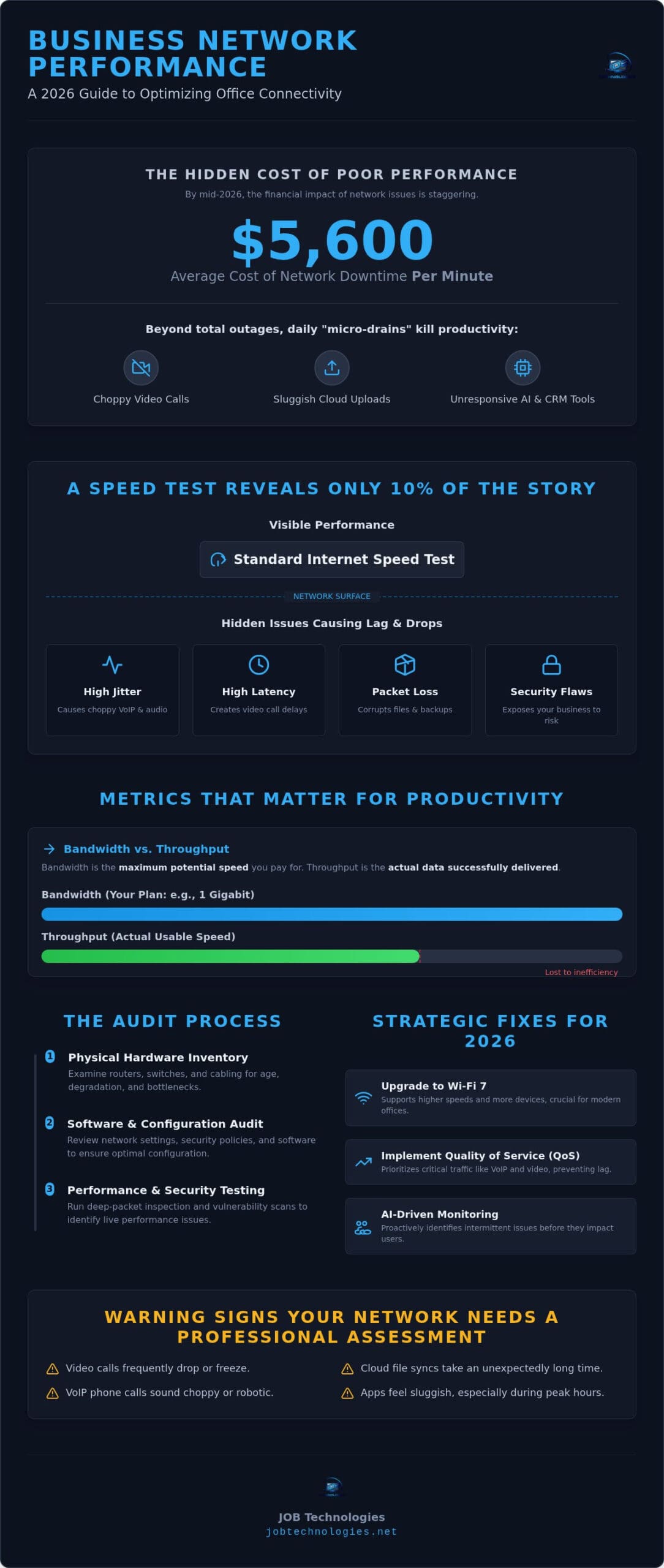
A business network performance assessment is a comprehensive audit of your company’s entire digital infrastructure. It examines your hardware, software, and connectivity to create a clear picture of how data moves through your office. Many business owners rely on a simple web-based speed test to judge their connection. While that is a helpful starting point, it only tells about 10% of the story. A speed test measures your current burst speed at one specific moment, but it doesn’t reveal why your video calls drop when the accounting team starts a cloud backup or why your AI-driven CRM feels sluggish during peak hours.
In a professional environment, there’s a significant difference between “fast” and “reliable.” A network might show high speeds on paper but suffer from high jitter or packet loss. These are the real culprits behind poor VoIP quality and frustrating application lag. As we move through 2026, the demands on your local network have shifted. Modern tools like real-time AI implementation and advanced cloud-based phone systems require more than just raw bandwidth. They need a stable, low-latency environment that a basic residential-style setup simply cannot provide.
The Core Objectives of a Network Audit
The primary goal of a professional audit is to find the friction points before they become failures. We focus on identifying security vulnerabilities within your network perimeter, ensuring that your data isn’t just moving quickly, but safely. We also look for physical hardware bottlenecks. Often, a slow network is actually the result of an outdated router or degraded cabling hidden behind a wall. For our partners in Dubuque healthcare or finance, these assessments are also a critical tool for maintaining regulatory compliance, ensuring that sensitive client information is handled according to current standards.
Why SMBs Need Regular Assessments
Regular check-ups prevent the hidden costs of employee downtime. When your team loses even ten minutes a day to buffering or reconnecting to the server, those costs compound quickly across your entire staff. A proactive business network performance assessment allows you to plan for infrastructure growth before you hire your next ten employees. It is also the best time to ensure your professional office network wiring is up to code and capable of supporting the high-speed demands of Wi-Fi 7 and other emerging 2026 technologies. By identifying these needs early, you maintain a steady, predictable environment for your team to do their best work.
Key Metrics: Measuring What Actually Matters for Productivity
To understand your network, you have to look past the sticker on your monthly bill. Most providers sell you bandwidth, which is essentially the number of lanes on your digital highway. However, a professional business network performance assessment focuses on throughput, which is the actual amount of data successfully reaching its destination. If you have ten lanes but five are closed for construction, your bandwidth remains high, but your throughput is low. This distinction is why a business might pay for gigabit speeds yet still struggle with slow file transfers.
Beyond raw speed, three critical metrics determine your daily experience: latency, jitter, and packet loss. Latency is the time it takes for a signal to travel to the server and back. It’s the silent killer of professional video conferencing; high latency causes that awkward overlap where everyone speaks at once. Jitter is the variation in that timing. When jitter is high, your VoIP phone system sounds choppy or robotic. Finally, packet loss occurs when pieces of data vanish mid-transit. Even a small amount of loss can ruin cloud backups or force a large file transfer to restart from the beginning.
Translating Metrics into Business Outcomes
When we translate these technical numbers into business outcomes, the stakes are clear. High latency makes real-time AI implementation feel clunky and unresponsive. If your team uses AI tools for data analysis or customer support, they need immediate feedback to stay efficient. Similarly, high jitter directly impacts your reputation. A choppy call with a client suggests your technology isn’t reliable. If you’re noticing these issues during peak hours, it might be time to look into managed IT services to ensure your infrastructure supports professional-grade communication.
Setting Performance Benchmarks for 2026
For a modern small office in Dubuque, “good” performance has specific, measurable thresholds. Based on industry standards as of September 2026, your latency should stay below 100 ms for most applications and under 150 ms for one-way video conferencing. Jitter must remain below 30 ms to keep voice traffic clear. We recommend keeping packet loss under 0.1% for general traffic and under 1% for real-time applications like Zoom or Teams.
The most effective way to use these benchmarks is to establish a baseline. We suggest monitoring your network over a 14-day period to capture both typical and peak usage times. This baseline acts as a health record for your business, allowing you to see exactly how new software or additional staff affects your connectivity. It provides the data you need to make informed decisions about future upgrades rather than reacting to a crisis.
Step-by-Step: How to Conduct a Preliminary Network Assessment
A professional audit provides the deepest insights, but you can begin a preliminary business network performance assessment on your own. This initial phase helps you identify “low-hanging fruit” that might be causing immediate frustration for your team. Start by creating a physical inventory of every router, switch, and wireless access point in your office. It’s common for businesses to lose track of old hardware tucked away in closets or under desks. These forgotten devices often run on outdated firmware, creating both performance bottlenecks and security gaps.
Once you’ve mapped your hardware, move on to timing your speed tests. Running a single test at lunch won’t give you the full picture. Instead, run tests at different times of the day, specifically during your busiest hours. This allows you to identify peak-load lag, which usually occurs when everyone is simultaneously on video calls or syncing large files. You should also audit your connected devices to find “vampire” applications. These are non-essential programs, like personal cloud backups or high-definition background streaming, that quietly drain your bandwidth throughout the day.
Finally, walk your office with a basic signal strength app to check for Wi-Fi dead zones. Physical obstructions like filing cabinets or reinforced walls can significantly degrade a signal just a few feet from an access point. Before finishing your preliminary check, review your latest ISP bill. It’s vital to ensure you’re actually receiving the service tier you pay for. Many firms find they’ve been paying for “pro” speeds while using an old modem that physically cannot handle the throughput.
The Physical Layer Audit
The “bones” of your network are just as important as the data traveling through them. During your audit, check your cabling. If you find outdated Cat5 cables, your speeds are hard-capped at 100Mbps, regardless of what your ISP provides. Inspect your hardware for signs of overheating or physical damage; a router that feels hot to the touch is likely struggling to process traffic. This is also the time to verify that your cybersecurity for small business hardware is properly integrated into your main traffic flow without creating a bottleneck.
Software and Traffic Analysis
Monitoring how your software behaves during standard hours reveals the true user experience. Look for patterns in cloud application performance. If your CRM consistently lags at 2:00 PM, you have a traffic spike issue. We recommend documenting the specific “pain points” reported by your staff in Galena or Dyersville. Whether it’s a specific room where Zoom calls always drop or a time of day when file uploads fail, these staff insights are often more valuable than raw data when it comes to troubleshooting intermittent issues.
Strategic Fixes: Improving Business Network Speed and Reliability
Once your business network performance assessment has highlighted specific bottlenecks, it’s time to implement structural changes. In 2026, the most impactful upgrade for many local firms is moving to Wi-Fi 7. This standard is designed specifically for high-density environments where dozens of laptops, phones, and IoT devices compete for the same signal. A proper office Wi-Fi installation for businesses goes far beyond simply purchasing new hardware; it requires careful architectural planning to eliminate dead zones and support 50 or more devices without a slowdown. Beyond wireless, we often recommend replacing aging copper with Cat6a or Fiber. These materials support 10Gbps speeds, ensuring your physical infrastructure won’t need another overhaul for years. We also focus on strategic router placement. In multi-level offices, placing access points centrally and away from metal obstructions can eliminate the dead zones that frustrate your team.
Prioritizing Critical Business Traffic
Quality of Service (QoS) is a powerful tool for maintaining professional communication. By implementing QoS settings on your router, you tell your hardware to prioritize VoIP and AI traffic over less critical tasks. This ensures that a staff member downloading a massive data set doesn’t cause a client’s Zoom call to freeze. A deeper business network performance assessment often reveals that traffic isn’t just slow, it’s disorganized. Managed switches play a vital role here by directing data efficiently across your hardware. Your VoIP system should essentially have its own dedicated lane on the network, protecting voice quality from the fluctuations of general web browsing.
Hardware and Infrastructure Upgrades
For larger offices in Galena, we often see businesses outgrow consumer-grade mesh systems. While those work well at home, an enterprise-grade setup offers the stability and security required for modern operations. These professional systems provide better coverage and can be managed centrally to prevent intermittent drops. We view this process as a collaborative partnership; we don’t just swap out wires, we align your tech with your specific goals. If your firm is leaning heavily into real-time data, your infrastructure needs to reflect that shift. If you are ready to modernize your infrastructure, our managed IT services in Dubuque provide the expert guidance needed to handle these complex upgrades without disrupting your daily workflow.
Don’t let a slow connection hold your business back. Reach out to our team to schedule a professional network installation and management consultation and build a more reliable digital foundation.
Beyond the DIY: When to Call a Dubuque Network Professional
While a preliminary check is a vital first step, DIY tools have inherent limits. Most free software cannot perform deep-packet inspection or provide a clear view of your internal security posture. A professional business network performance assessment uses specialized monitoring equipment to see what is happening at the granular level of your data traffic. This depth is essential for identifying those frustrating “ghost” issues that a simple router reboot never seems to fix. When your productivity depends on every millisecond, guessing is no longer a viable business strategy.
Intermittent issues are particularly difficult to solve without professional help. These problems often disappear the moment you try to test them, only to return during your most critical client calls. We use long-term monitoring tools that capture data over several days to catch these anomalies in the act. As your proactive guardian, we look beyond the immediate speed to ensure the long-term health of your entire digital ecosystem. This approach allows us to integrate our findings into a broader IT strategy that supports your growth for years to come.
Signs You Need a Professional Audit
There are specific moments when a professional eye becomes necessary for your peace of mind. If your team is dealing with persistent connectivity drops that affect your daily operations, it is time for a deeper look. We also recommend a formal audit if you are preparing for a move to a new office in East Dubuque or Dyersville. It’s much easier to build a stable network in a fresh space than it is to fix cabling errors after the furniture is in place. Additionally, if you have recently experienced a security scare or ransomware attempt, a professional business network performance assessment can identify the vulnerabilities that allowed the threat to reach your perimeter. Pairing this audit with dedicated managed network security services ensures that once those gaps are found, they are continuously monitored and protected against future threats.
The JOB Technologies Collaborative Approach
At JOB Technologies, we don’t act as a distant service provider. We position ourselves as a collaborative partner and an extension of your own team. We believe that technology should work for you, not the other way around. Our primary goal is to reduce your operational stress by providing a stable, predictable communication system. We take the time to understand your specific goals, whether you’re implementing new AI tools or upgrading your VoIP system. If you’re ready to stop troubleshooting and start growing, the next step is simple. Scheduling a professional assessment today provides the clarity you need to build a faster, more reliable future for your business.
Building a More Reliable Digital Future
Your network is the backbone of your daily operations. We have explored how a simple speed test only scratches the surface and why metrics like jitter and latency are the true indicators of productivity. By identifying physical bottlenecks and prioritizing critical traffic, you can transform your office from a place of technical frustration into a hub of efficiency. A professional business network performance assessment provides the clarity you need to make informed decisions about your infrastructure rather than reacting to the next outage.
At JOB Technologies, we bring over 20 years of local Dubuque IT expertise to every partnership. Our team acts as a proactive guardian, using advanced monitoring to stop downtime before it starts while ensuring your systems remain HIPAA and data privacy compliant. We are here to guide you through the complexities of modern connectivity with a steady, experienced hand. Stop guessing and start optimizing; schedule your professional network assessment with JOB Technologies today. We look forward to helping your business thrive in a faster, more stable digital environment.
Frequently Asked Questions
How often should a small business perform a network assessment?
We recommend scheduling a full business network performance assessment at least once a year. You should also conduct an audit after adding new employees or moving to a new office in Galena. Regular check-ups help identify hardware aging and software bloat before they cause downtime. For businesses in high-growth phases, semi-annual assessments ensure your infrastructure keeps pace with your team’s expanding needs.
What is the difference between a speed test and a performance assessment?
A speed test is a simple snapshot of your current download and upload speeds at one specific moment. In contrast, a performance assessment is a deep dive into your entire infrastructure. It examines your hardware health, cabling, and traffic patterns. While a test tells you how fast you are, an assessment explains why you are experiencing lag or dropped calls during peak hours in your Dyersville office.
Can old network cables really slow down my office internet?
Old network cables are a frequent cause of office slowness. If your Dubuque business still uses Cat5 cabling, your internal speeds are restricted to 100Mbps, regardless of what your ISP provides. Upgrading to modern Cat6a or fiber allows for 10Gbps speeds. This physical layer is the foundation of your network; if the wires are outdated, even the most expensive routers cannot deliver professional-grade performance.
How much bandwidth does a typical small office in Dubuque actually need in 2026?
Most small offices in the Tri-State area now require at least 500Mbps to 1Gbps of bandwidth. By 2026, the rise of real-time AI implementation and high-definition video conferencing has significantly increased data demands. If your team frequently syncs large cloud files or uses multiple VoIP lines, a gigabit connection provides the headroom needed to prevent congestion during busy afternoon hours.
Will a network assessment find security vulnerabilities too?
Yes, a comprehensive business network performance assessment naturally identifies security gaps. We look for outdated firmware, open ports, and unauthorized devices that could expose your data. By auditing your traffic patterns, we can often spot the early signs of malware or unauthorized access. This proactive approach ensures your network is not just fast, but also a secure environment for your sensitive client information. For businesses that want continuous protection beyond the initial audit, investing in managed network security services provides the 24/7 vigilance needed to stay ahead of evolving threats.
What is ‘Quality of Service’ (QoS) and do I need it?
Quality of Service (QoS) is a setting that prioritizes your most important data traffic. You likely need it if your office uses VoIP phone systems or real-time AI tools. QoS ensures that a large file download doesn’t interrupt a critical client meeting. It acts like a traffic controller, giving your communication systems a dedicated lane so they remain clear and reliable even when the network is busy.
Why is my Wi-Fi fast near the router but slow in the conference room?
Wi-Fi signals degrade as they pass through walls, furniture, and even human bodies. In many Dubuque offices, conference rooms are shielded by reinforced walls or located too far from the primary access point. Signal interference from other electronics can also create dead zones. A professional assessment maps these areas to determine if you need additional access points or a repositioning of your existing hardware to ensure consistent coverage. Following a comprehensive office Wi-Fi installation checklist for businesses can help ensure your wireless architecture is designed to eliminate these problem areas from the start.
How long does a professional network performance assessment take?
A professional assessment typically takes a few hours for the initial on-site audit. However, we often leave monitoring equipment in place for several days to capture data during peak usage times. This long-term view allows us to find intermittent issues that only appear during specific hours. Once the data collection is complete, we provide a detailed report and a roadmap for your future tech upgrades.