
Commercial Wi-Fi is only 5% about the hardware you buy and 95% about the architecture you design. We’ve all been there; you’re in the middle of a high-stakes meeting when your Zoom call freezes, or you’re worried that a guest on your network might accidentally stumble into your private data. It’s frustrating when technology that’s supposed to empower your team ends up causing more operational stress. You know that a stable connection is the backbone of your daily work, but the confusing jargon of VLANs, PoE, and WAPs can make a professional office wifi installation for businesses feel like a daunting puzzle.
We’re here to help you move past the technical noise and build a network that simply works. This guide provides a comprehensive 2026 checklist designed to help you eliminate dead zones, manage 50 or more devices without a slowdown, and integrate the proactive cybersecurity your business deserves. We’ll walk through the essential steps from site surveys to the latest Wi-Fi 7 standards, ensuring you gain the peace of mind that comes from a secure, high-performance workspace that feels like a natural extension of your team.
Key Takeaways
- Learn why residential routers fail under business-level device density and how enterprise-grade hardware protects your operational continuity.
- Discover how a professional office wifi installation for businesses identifies and bypasses “RF killers” like stone walls and kitchens to ensure seamless coverage.
- Master the 2026 equipment essentials, including Wi-Fi 7 access points and PoE switches, to build a network that handles high-bandwidth tasks with ease.
- Evaluate the hidden labor and security risks of DIY setups compared to the long-term reliability of a professionally managed network.
- Implement a final go-live checklist that covers everything from cable certification to secure guest portal configurations for complete data protection.
Why Consumer-Grade Gear Fails the Modern Office
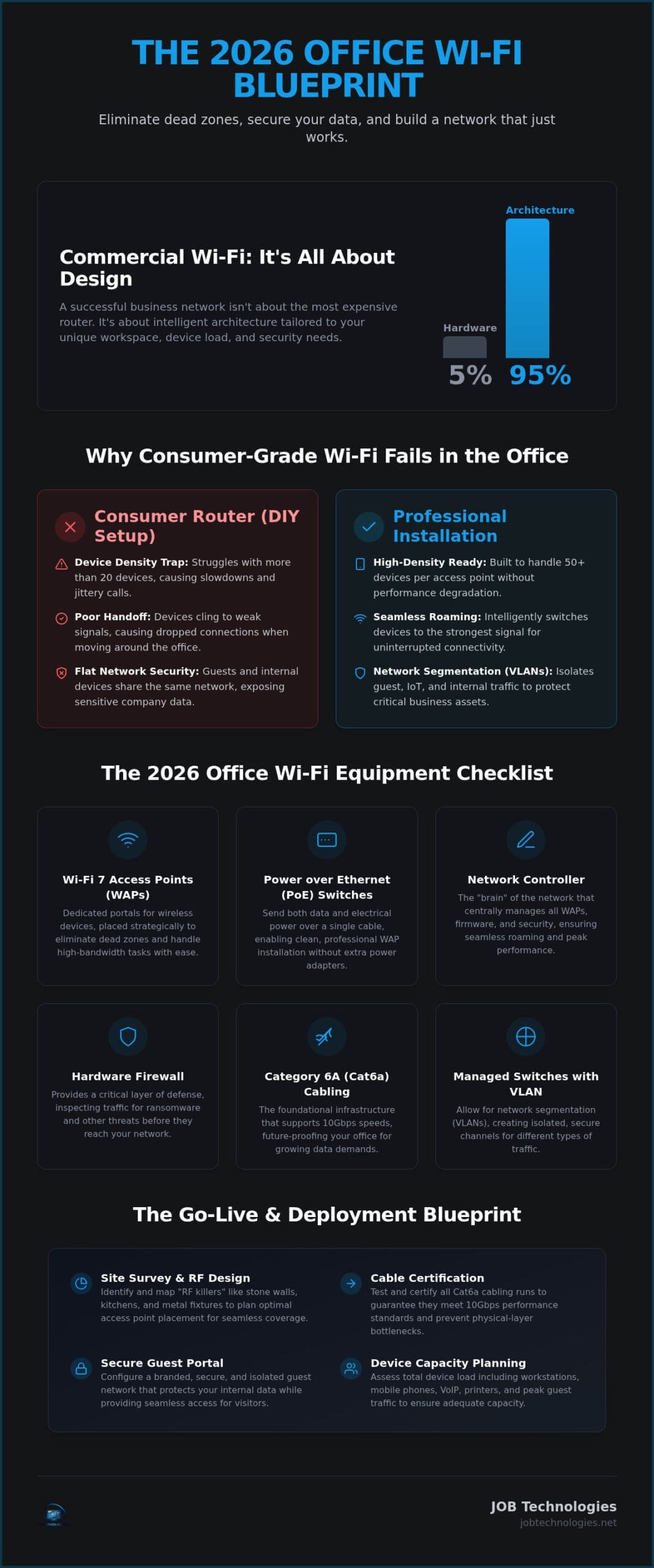
It’s tempting to grab a high-end router from a big-box store and call it a day. After all, if it works for 4K streaming at home, it should handle a few spreadsheets, right? Unfortunately, the reality of a modern Wireless Local Area Network (WLAN) in a professional setting is far more demanding. Consumer-grade gear is designed for low device counts and simple environments. When you transition that hardware into a workspace, you quickly encounter the “Device Density” trap. Most residential routers begin to struggle once they hit 20 active connections. In an office, between laptops, tablets, and smartphones, you’ll reach that limit before lunch.
The result is a slow, agonizing decline in performance. You’ll notice it first in “jittery” video calls or files that take forever to sync. Even worse, home gear lacks sophisticated handoff capabilities. As you walk from your desk to a conference room, your device clings to a distant signal instead of seamlessly switching to the nearest access point. This leads to dropped Zoom calls and frustrated teams. When we look at the true cost of these “budget” solutions, the price isn’t just the hardware; it’s the lost billable hours and the operational stress of a network that can’t keep up. A professional office wifi installation for businesses solves these issues by using hardware built for high-traffic environments.
The Capacity Checklist: Assessing Your Device Load
Before starting an office wifi installation for businesses, we need to look at the math of your workspace. It’s rarely just one device per person. To get a clear picture of your needs, consider these categories:
- Primary Workstations: Count every laptop and desktop that relies on wireless connectivity.
- Mobile Devices: Every employee likely has a smartphone and perhaps a tablet connected to the network.
- Shared Infrastructure: Factor in VoIP desk phones, wireless printers, and smart office equipment.
- Peak Guest Traffic: If you host clients or have a waiting area, your network must handle those extra connections without slowing down your internal team.
Security Vulnerabilities in DIY Setups
Security is where consumer gear truly falls short. Residential routers typically use “Personal” protocols that create a flat network. This means if a guest connects to your Wi-Fi, they might be able to see your internal servers or sensitive company data. Professional setups utilize network segmentation to keep your private data isolated. In 2026, relying on a system without centralized management for firmware and security patches is a significant risk. We view professional network management as a proactive guardian for your digital assets, ensuring your data stays protected while your team stays productive. For businesses seeking comprehensive protection, managed network security services offer the 24/7 vigilance needed to stay ahead of modern threats.
The 2026 Office Wi-Fi Equipment Checklist
Professional networking is no longer about finding the most powerful all-in-one router. Instead, a successful office wifi installation for businesses relies on a modular approach where each component has a specific, dedicated role. Central to this setup is the Wireless Access Point. A Wireless Access Point (WAP) is a dedicated portal for wireless devices to connect to a wired network. By separating the wireless signal from the main routing functions, we can place these units strategically throughout your office to eliminate dead zones and maintain a steady connection for everyone.
To support these access points, we use Power over Ethernet (PoE) switches. These clever devices send both electrical power and data through a single Ethernet cable, which keeps your ceilings and walls free from messy power adapters. Behind the scenes, a Network Controller acts as the “brain” of the operation. It coordinates every WAP in the building, ensuring that when you walk from a private office to the breakroom, your device hands off the signal instantly. This seamless roaming is what prevents the dropped calls and lag spikes common in DIY setups.
Security remains our highest priority. We integrate hardware-based firewalls that provide proactive ransomware protection by inspecting traffic before it ever reaches your team’s laptops. When securing your office Wi-Fi, this physical layer of defense is essential for blocking modern threats. It’s not just about speed; it’s about building a digital fortress that allows you to focus on your work without worrying about data breaches.
Core Infrastructure Requirements
The foundation of your network is the cabling hidden in your walls. For a 2026 installation, we recommend Category 6A (Cat6a) cabling. It supports 10Gbps speeds, which future-proofs your office as data demands grow. We also utilize managed switches with VLAN support. This allows us to isolate sensitive business traffic from guest access, adding a critical layer of protection. Finally, an Uninterruptible Power Supply (UPS) ensures your network stays live during minor power flickers, preventing a two-second surge from causing twenty minutes of reboot time.
Advanced Hardware Features to Look For
When selecting your gear, look for Wi-Fi 7 support. This latest standard utilizes the 6GHz band to reduce congestion in crowded business districts. You should also ensure your hardware features MU-MIMO technology. This allows multiple devices to communicate with an access point simultaneously, rather than waiting in a digital queue. Most modern systems now include cloud-managed dashboards, allowing for remote troubleshooting and real-time monitoring. If you’re ready to upgrade your workspace, our team at JOB Technologies can help you select the right components for your specific office layout.
Site Survey & Design: The Blueprint for Success
Hardware selection is just the beginning. A truly resilient office wifi installation for businesses requires a blueprint that accounts for the physical reality of your workspace. While software can run a “predictive survey,” it’s often only half the battle. In historic regions like Dubuque or Galena, software doesn’t always understand how 19th-century masonry or lead-lined walls swallow signals. We perform on-site assessments to find “RF Killers” that a computer model might miss, ensuring your team doesn’t lose connectivity the moment they step into a meeting.
Kitchens with stainless steel appliances and microwaves are notorious for signal disruption. Server rooms with dense metal racking and stone walls act as signal shields. To bypass these obstacles, we rely on structured cabling. This physical foundation ensures that each access point has a direct, high-speed connection to the core network. It prevents the latency issues found in wireless mesh systems and ensures that every corner of the office, from conference rooms to executive suites, remains a productive zone.
The Physical Environment Checklist
We start by mapping the specific materials used in your construction. Drywall is relatively transparent to Wi-Fi, but the thick masonry found in Dubuque’s Millwork District requires a different approach. We also identify sources of interference. Neighboring Wi-Fi networks in dense business centers can crowd the airwaves, while Bluetooth devices and older microwaves create invisible noise. By assessing ceiling heights and mounting options, we ensure your signal propagates downward and outward for maximum reach.
Heatmapping: Visualizing Your Signal Strength
Using specialized software, we create a visual heatmap of your office. Our goal is a consistent -65 dBm signal strength across all primary work zones. We plan for a 20% signal overlap between access points. This overlap is crucial; it allows your devices to roam between zones without a single dropped packet. For those looking to dive deeper into performance metrics, our guide on improving business network speed offers a look at the data behind these benchmarks. This methodical design phase is a core part of enterprise network security, as a well-planned signal reduces the risk of unauthorized access from outside your walls while maintaining a professional office wifi installation for businesses.
Professional Installation vs. DIY: A Comparison
The temptation to handle your own network setup is understandable. On the surface, it looks like a weekend project involving a few ladders and a configuration app. However, the “hidden labor” of a DIY approach often reveals itself during the first critical meeting of the week. Professional office wifi installation for businesses goes beyond simply plugging in hardware. It involves precise mounting for signal propagation, complex VLAN configuration for security, and the creation of a detailed network map. Without this documentation, troubleshooting a connection drop becomes a guessing game that pulls you away from your actual work.
There is also the matter of compliance. If your business handles medical records or credit card data, a standard “out of the box” setup likely won’t meet HIPAA or PCI requirements. Professional installers understand how to configure your network to isolate sensitive data, providing the digital safety your clients expect. We act as a proactive guardian for your infrastructure, ensuring that your warranty and support aren’t just fine print on a receipt but a steady hand you can call when you need immediate help.
The Cost of Downtime Analysis
When the internet goes down at 9:00 AM, the clock starts ticking on your revenue. Beyond the immediate loss of billable hours, poor Wi-Fi erodes employee morale and can permanently damage how clients perceive your professionalism. IT downtime in 2026 costs organizations an average of $9,000 per minute. When you look at the math, a network that “mostly works” is actually a significant financial liability. Having a clear plan for network troubleshooting for businesses ensures that when connectivity issues do arise, your team can move from reactive panic to restoring order quickly and minimizing lost revenue. A professional installation ensures that your team stays focused on their goals rather than fighting with a signal that disappears the moment they walk behind one of Galena’s historic stone walls.
Long-Term Scalability and Support
A DIY setup is usually designed for your needs right now, but a professional partner looks at your five-year growth plan. We help you choose hardware that scales as you add more devices and higher-bandwidth applications. Because we provide local on-site support in Dubuque and Galena, you don’t have to wait for a national “big box” technician to find your office on a map. We believe that managed IT services in Dubuque offer a much higher ROI than one-off fixes because they prioritize the long-term health of your business ecosystem. If you are ready to move past the stress of unreliable connectivity, reach out to JOB Technologies to start building a network you can trust.
The Go-Live Checklist: Deployment and Testing
The final phase of an office wifi installation for businesses is where a setup transitions from functional to professionally certified. We don’t simply look for a green light on the access point. Every cable drop undergoes a rigorous certification process to ensure it delivers the full speed promised by your hardware. We label every port and cable, creating a logical roadmap for your infrastructure. This meticulous approach ensures that if a problem arises years down the line, we aren’t tracing wires through a ceiling; we’re moving directly to a solution.
Your guest network serves as a critical security barrier. We configure a professional Guest Portal with strict bandwidth limits and “Terms of Service” splashes. This prevents visitors from accidentally hogging the data your team needs for critical operations. Once configured, we perform a real-world stress test. By initiating simultaneous HD video conferences and VoIP calls throughout the building, we verify that your network handles peak demand with the calm reliability your business requires. This testing phase provides the peace of mind that your system is ready for the Monday morning rush.
Network Segmentation Checklist
Proper segmentation is a cornerstone of business continuity and data safety. We organize your traffic into three distinct lanes to prevent congestion and unauthorized access:
- VLAN 1: Internal Corporate Data. This is a secure, encrypted lane for private files, servers, and workstations.
- VLAN 2: VoIP and Communication. This lane is prioritized at the router level to ensure crystal-clear audio and video during every meeting.
- VLAN 3: Guest Access. This lane is completely isolated, allowing visitors to browse the web without ever seeing your sensitive internal servers.
Verification and Documentation
We conclude the project with a comprehensive walk-through to verify signal strength in every corner, from the lobby to the warehouse. Every part of your office network wiring is documented in a final hand-off package. This package includes your secure passwords, detailed network maps, and direct support contact information. By establishing a baseline for “normal” performance on day one, we provide a standard that makes future monitoring possible. You aren’t just getting new gear; you’re gaining a managed connectivity tool that functions as a stable, long-term asset for your team. Our goal is to hand over the keys to a system that feels like a natural, invisible extension of your daily operations.
Building a Foundation for Your Business Continuity
Your network is the invisible infrastructure that supports every decision, meeting, and client interaction. Moving away from consumer-grade limitations and embracing a professional office wifi installation for businesses ensures that your team remains focused on growth rather than troubleshooting. By prioritizing structured design and addressing the unique architectural challenges of our local historic buildings, you create a workspace that is both resilient and secure.
We understand that technical complexities can feel overwhelming, but you don’t have to navigate them alone. With over 20 years of experience in the Dubuque and Galena ecosystem, our team specializes in transforming these challenges into seamless operational assets. We provide the steady hand and proactive 24/7 monitoring you need to maintain complete peace of mind. Are you ready to eliminate dead zones and protect your data with a network built for 2026? Get Your Free Office Wi-Fi Assessment from JOB Technologies today. We look forward to partnering with you to build a more connected and secure future for your office.
Frequently Asked Questions
How many access points does my office actually need?
The number of access points depends on your office square footage and the density of your walls. For a typical 3,000-square-foot office in Dubuque, you might require three to five units to ensure complete coverage. We look at “RF Killers” like the thick masonry found in local historic buildings to determine placement. A professional site survey is the only way to accurately map your signal needs and eliminate dead zones.
What is the average cost of professional office Wi-Fi installation?
While we don’t quote specific project fees here, industry data from 2026 suggests that professional installation often ranges from $650 to $3,500 per access point. This figure includes the hardware, structured cabling, and the labor required for configuration. Your total investment depends on the complexity of your building’s architecture and the number of devices your network must support. We focus on building a resilient system that reduces long-term operational stress.
How long does a typical business Wi-Fi installation take?
A standard office wifi installation for businesses usually takes between one and three business days to complete. The first day often focuses on running Cat6a cabling and mounting hardware. Following this, we spend time on software configuration, security testing, and signal verification. For larger facilities in Galena or Dyersville, we coordinate the timeline to minimize disruption to your team’s daily workflow and ensure a smooth transition.
Can I use my existing internet provider’s router for my business network?
You shouldn’t rely on a standard ISP router if you want a secure and high-performing network. These units are designed for residential use and often crash when handling more than 20 devices. They also lack the advanced security features and VLAN capabilities needed for professional data protection. We replace these basic routers with enterprise-grade equipment that manages high device density and integrates with your cybersecurity strategy.
What is the difference between Wi-Fi 6 and Wi-Fi 7 for businesses?
Wi-Fi 7 offers significantly lower latency and higher capacity than Wi-Fi 6 by utilizing wider 320MHz channels and the 6GHz band. This is a major advantage for offices in the Tri-State area that rely on heavy video conferencing or AI-driven tools. While Wi-Fi 6 is still capable, Wi-Fi 7 is the 2026 standard for future-proofing your infrastructure. It ensures your network won’t become a bottleneck as your data needs grow.
Do I need to run new cables for a professional Wi-Fi setup?
Most professional setups require new Cat6a or Cat7 cabling to support Power over Ethernet (PoE) and high-speed data transfers. Older cables often can’t handle the bandwidth required by modern Wi-Fi 7 access points. By running new, certified lines, we ensure your hardware receives consistent power and data. This foundation is critical for the long-term stability of your network and allows for easier hardware upgrades in the future.
How do I ensure my guest Wi-Fi doesn’t slow down my employees?
We use network segmentation through VLANs to isolate guest traffic from your primary business operations. This allows us to set specific bandwidth limits on the guest portal, ensuring that a visitor’s large download doesn’t cause a dropped call for an employee. It’s a proactive way to maintain performance and security. Your team gets the priority they need, while your guests still enjoy a reliable, separate connection.
What happens if my Wi-Fi goes down and I have managed IT services?
If your network fails, our proactive monitoring system usually alerts us before you even notice a problem. Because we provide local on-site support for Dubuque and Galena businesses, we can quickly dispatch a technician if remote troubleshooting doesn’t solve the issue. You gain peace of mind knowing that an expert team is already working on the remedy. This partnership approach minimizes downtime and keeps your local business ecosystem running smoothly. To learn more about how proactive protection works, explore our overview of managed network security services for small businesses and how they keep your data safe around the clock.