

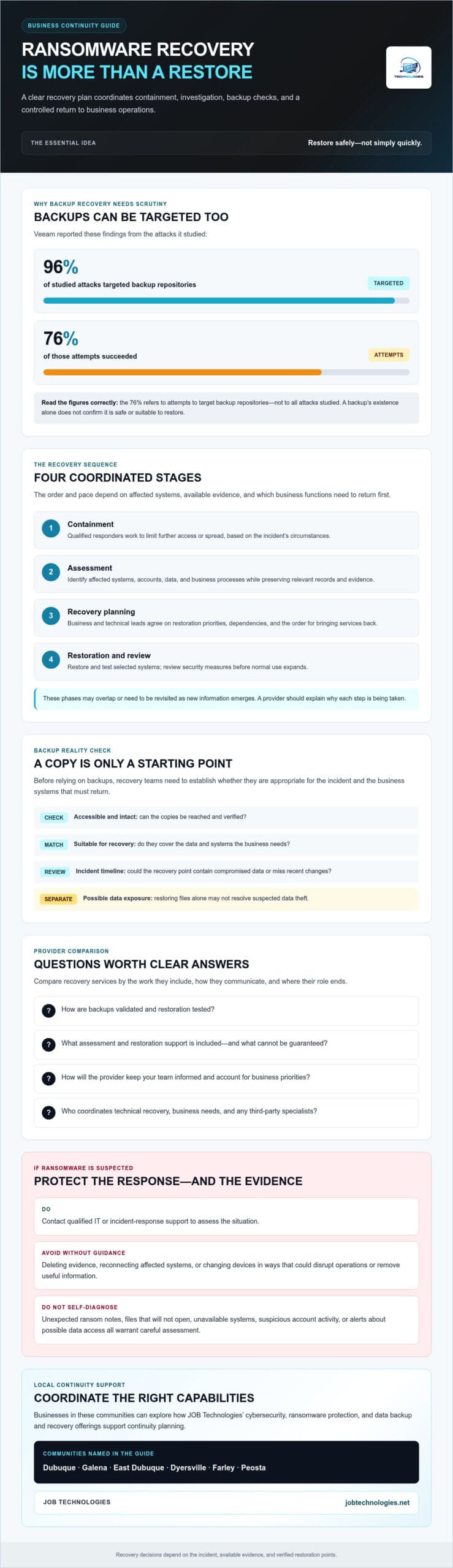
Veeam reported that ransomware targeted backup repositories in 96% of attacks it studied, with 76% of those attempts succeeding. That’s a sobering reminder: having backups doesn’t automatically mean your business can restore safely. When employees can’t access systems and customers are waiting, choosing ransomware recovery services for business can feel like one more urgent, high-stakes decision.
You need a clear recovery plan, not sweeping promises. Recovery may involve containing the attack, checking whether backups are clean, restoring systems in a controlled order, and preserving evidence. If attackers also stole data, restoring files alone may not resolve the incident. A provider should explain what it can do, what it can’t guarantee, and how its work fits your continuity needs.
In this guide, you’ll learn the stages and limits of business ransomware recovery, what to ask before selecting a provider, and practical steps to protect operations and evidence. We’ll also look at how coordinated cybersecurity, backup, and recovery support can help your team make informed decisions, including with a local IT partner such as JOB Technologies.
Key Takeaways
- Understand why ransomware recovery involves more than restoring files, and how a response should account for affected systems and business priorities.
- Compare ransomware recovery services for business by asking how providers validate backups, test restoration, and keep your team informed.
- During a suspected incident, contact qualified IT or incident-response support. Avoid deleting evidence or reconnecting affected systems without guidance.
- Before choosing a provider, clarify who will coordinate technical recovery, business needs, and any third-party specialists.
- Businesses in Dubuque, Galena, East Dubuque, Dyersville, Farley, and Peosta can explore how JOB Technologies’ cybersecurity, ransomware protection, and data backup and recovery offerings support continuity planning.
When does a business need ransomware recovery services?
A business may need recovery support when ransomware, or suspected ransomware, disrupts access to files, applications, devices, or essential systems. Business ransomware recovery coordinates efforts to contain the incident, investigate its scope, and restore operations safely. The goal isn’t simply to make files available again. Teams also need to understand what was affected and whether systems are ready to return to use.
Recovery differs from prevention, managed detection, routine IT support, and backup software. Prevention aims to reduce the chance of an attack, and monitoring may help identify suspicious activity. Routine IT support handles everyday technology issues, while backup software creates copies of data. Recovery brings investigation and restoration together after an incident. For a foundational explanation of how ransomware operates, see this Ransomware overview.
What counts as a ransomware recovery incident?
Warning signs can include files that won’t open, unexpected ransom notes, unavailable systems, or staff who can’t use critical applications. A business may also find suspicious account activity or receive an alert suggesting data was accessed or copied. These signs can point to different problems, so employees shouldn’t try to diagnose malware themselves. Contact qualified IT or incident-response support to assess the situation.
Confirmed encryption isn’t the only reason to seek help. Suspicious activity or a possible account compromise may warrant investigation before files are encrypted. Affected devices and systems need careful handling: changing or disconnecting them without guidance could disrupt operations or remove information useful for understanding what happened. Avoid reconnecting affected systems just to see if they work.
Can backups make recovery services unnecessary?
Backups can support restoration, but their existence alone doesn’t mean recovery will be straightforward. Copies must be accessible, intact, and suitable for restoring the data and systems the business needs. Recovery points also need to be checked against the incident timeline. A backup may contain compromised data or omit recent changes.
Investigation may need to happen before systems are reconnected or restored, especially if the incident’s scope is still unclear. Recovery outcomes depend on what was affected, what evidence is available, and which restoration points can be verified. Even after files return, suspected data exposure may need separate attention. For deeper planning guidance, see the business data backup and recovery guide.
When comparing ransomware recovery services for business, ask what assessment and restoration support is included, how backup suitability is checked, and where the provider’s role ends. Clear answers help your team plan next steps without assuming that prevention tools or a backup copy alone will resolve the incident.
How do ransomware recovery services restore business operations?
Recovery is a coordinated sequence, not a single restore command. The order and pace can change depending on the systems affected, the evidence available, and which business functions need to return first. A provider should explain the reasoning behind each step so leaders can weigh operational needs against the risk of restoring too soon.
- Containment: Qualified responders work to limit further access or spread, based on the incident’s circumstances.
- Assessment: The team identifies affected systems, accounts, data, and business processes while preserving relevant records and evidence.
- Recovery planning: Business and technical leads agree on restoration priorities, dependencies, and the order for bringing services back.
- Restoration and review: Selected systems are restored and tested. Security measures are then reviewed before normal use expands.
These phases may overlap or need to be revisited as new information emerges. The CISA ransomware response checklist, developed with the FBI and NSA, offers additional guidance for organizations planning their response.
What happens during containment and assessment?
Responders assess where suspicious activity occurred and whether it may involve connected systems, user accounts, or business processes. They also gather relevant records to help establish what happened and guide recovery decisions. Staff should follow qualified guidance rather than improvise technical changes. An action intended to restore access can complicate the assessment or affect other systems.
Assessment helps the team separate what’s known from what remains uncertain. That distinction matters: restoration decisions should reflect the incident’s scope, not assumptions based on a single affected computer or server.
How are backups and restored systems checked?
Before using a backup, responders assess whether it’s intact, accessible, and appropriate for the systems and data being restored. They identify potential restoration points, then check whether the selected point is suitable based on available evidence and business requirements. A staged restoration can bring back a limited set of systems first, giving teams a chance to check access, data, and essential functions before broader use.
A recovery point objective (RPO) defines how much data loss, measured in time, a business can accept; a recovery time objective (RTO) sets the target time for restoring a service. These planning objectives help prioritize recovery, but they don’t guarantee what a specific incident will deliver. The business data backup and recovery planning guide provides more detail on preparing for continuity.
After restoration, a security review helps determine whether systems are ready for wider use and what issues still need attention. When evaluating ransomware recovery services for business, ask how a provider validates restoration points, tests recovered systems, and communicates progress. For a local perspective on coordinated IT and recovery planning, explore JOB Technologies’ business IT support.
How should you compare ransomware recovery services for business?
Look beyond broad claims about “getting back online.” A useful comparison explains what the provider will assess, how restoration decisions are made, and how your team will stay informed. Backups are valuable, but they’re only one part of recovery. Safe restoration also involves checking whether copies are suitable, setting business priorities, and deciding when systems are ready to return to use.
| What to compare | Questions to ask | What a clear answer should explain |
|---|---|---|
| Incident scope | How will you identify affected systems, accounts, data, and business processes? | What is assessed, how evidence is handled, and what remains uncertain. |
| Backup validation | How do you determine whether a backup is intact and suitable to restore? | How restoration points are selected and what assumptions affect that choice. |
| Restoration testing | How are recovered systems checked before broader use? | How testing confirms essential functions and what dependencies must be addressed. |
| Communication | Who provides updates, and how are decisions and escalation handled? | Who coordinates technical work, business priorities, client responsibilities, and any needed third-party specialists. |
Which provider questions reveal a credible recovery process?
Ask how the provider will determine which systems and data your business needs first. For example, a system supporting customer transactions may take priority over a less time-sensitive internal tool, depending on your operations and technical dependencies. Ask how restored systems are tested before critical services return to normal use, who approves key decisions, and how often you’ll receive status updates. A credible provider should explain the process, assumptions, and limits without promising a specific outcome.
Also clarify who is responsible for preserving relevant evidence and coordinating any outside specialists. You should understand what the provider needs from your team, how unresolved risks will be communicated, and what conditions could change the recovery plan. A well-documented disaster recovery planning for businesses template can help your team define those responsibilities and priorities before an incident occurs.
How should compliance and sensitive data affect selection?
Choose a process that reflects your organization’s actual obligations and the type of information involved. Requirements differ by business and situation, so don’t assume one framework applies to every company. Ask how the provider will coordinate with your internal compliance contacts or other specialists when needed. If your organization is a healthcare provider in Dubuque, see the HIPAA IT support guide for Dubuque healthcare for related considerations.
Comparing ransomware recovery services for business this way helps you assess operational fit, not just technical claims. Look for clear ownership, practical communication, and an honest account of what the provider can and can’t do.
What should your business do during a suspected ransomware incident?
Keep the first response calm and coordinated. The goal is to limit harm, protect people and essential operations, and give qualified responders reliable information. Use this checklist as a starting point, not a substitute for incident-specific guidance.
- Contact qualified IT or incident-response support. Share what you’ve observed and ask for instructions before changing affected systems.
- Protect people and prioritize essential work. Follow your continuity procedures for affected services, and use trusted communication channels if normal systems may be compromised.
- Handle affected devices carefully. CISA recommends isolating affected systems to limit spread. Get qualified guidance on how to do that in your environment. Don’t power devices down unless advised or isolation isn’t possible, since doing so may remove useful evidence.
- Record observations. Note which systems or accounts appear affected, when symptoms began, which business functions are disrupted, and what actions have already been taken. Keep copies of relevant alerts or messages without interacting with suspicious files.
- Coordinate decisions and communications. Identify who will approve recovery steps, provide staff updates, and communicate with external parties as needed.
For additional response guidance, consult the CISA ransomware guide, which includes recommendations for organizations responding to ransomware. Reporting options and notification duties depend on the incident, your organization, and applicable rules. Confirm current guidance with the appropriate authorities and your legal counsel.
What should you avoid doing before expert guidance?
Don’t delete files, experiment with encrypted data, or reconnect an affected system just to check whether it works. Avoid using devices or accounts that may be compromised to send sensitive information. These actions can spread the problem, change evidence, or expose confidential details. Don’t treat shutting down every device as a universal response either. Ask responders how to handle each system.
A ransom decision also shouldn’t be made by reflex. Paying or refusing can involve serious operational, legal, and security considerations. Bring the right advisers into the discussion before deciding, and don’t assume payment will restore systems or resolve possible data exposure.
Who should be involved in the recovery decision?
Bring together business leadership, IT support, and legal counsel. Involve your insurer if applicable, and determine whether other specialists or authorities should be contacted. Appoint one decision owner to coordinate approvals and updates, while recording key decisions and the information behind them. This helps prevent conflicting instructions during a stressful response.
If your organization needs help aligning cybersecurity, ransomware protection, and data recovery planning, contact JOB Technologies about business IT support.
How can JOB Technologies support business ransomware recovery locally?
Ransomware can disrupt more than access to files. It can affect the systems and processes employees rely on to serve customers and keep work moving. JOB Technologies supports small and medium-sized businesses with managed cybersecurity, ransomware protection, and data backup and recovery. Coordinating these capabilities can help businesses plan for continuity and understand how security and recovery needs fit together.
Businesses in Dubuque, Galena, East Dubuque, Dyersville, Farley, and Peosta can use an initial conversation to describe current risks, backup arrangements, affected systems, and recovery priorities. The details of an incident matter, so discuss what support is available and what needs assessment before assuming a provider’s scope or recovery outcome.
What information should you prepare before contacting a provider?
You don’t need to diagnose the incident before asking for help. A concise record of what you’ve observed can make the conversation more focused. Gather what you can without changing affected systems or delaying urgent support:
- Systems or accounts that appear affected, symptoms observed, and the approximate time they were discovered.
- Business processes disrupted and services the team considers most critical.
- Known backup locations and the dates or results of recent recovery tests, if available.
- Contact details for current IT providers and your insurer, if applicable, along with any active response instructions.
If some details are unknown, say so. Avoid accessing suspicious files or reconnecting affected systems just to collect more information. Follow qualified guidance instead.
What should a recovery conversation clarify?
Ask what support the provider can offer, what information is needed to assess the situation, and which services or systems may require additional expertise. Clarify who will communicate progress, how business priorities will inform decisions, and who on your team should approve next steps. These questions help set expectations without treating a preliminary discussion as a confirmed recovery plan.
Recovery planning can also raise practical questions about ongoing managed IT, cybersecurity, ransomware protection, and data backup and recovery. Discuss how those offerings may connect to your continuity needs, while confirming the provider’s specific scope for your situation.
If your business is considering ransomware recovery services for business or wants to discuss recovery planning, talk with JOB Technologies about your business recovery needs.
Build a Clearer Path to Business Recovery
Ransomware recovery works best as a coordinated effort: contain the incident, assess what’s affected, and restore from verified recovery points in a deliberate order. Backups are important, but they don’t replace investigation, testing, or decisions about which business operations should return first.
When comparing ransomware recovery services for business, ask providers to explain their scope, how they validate and test restoration, who coordinates decisions, and how they’ll communicate progress. Clear answers help you assess whether their approach fits your systems and continuity priorities.
JOB Technologies provides managed cybersecurity, ransomware protection, and data backup and recovery for businesses in Dubuque, Galena, East Dubuque, Dyersville, Farley, and Peosta. Whether you’re reviewing your recovery plans or discussing current concerns, sharing what you know about your systems and backups can help frame a practical conversation.
Talk with JOB Technologies about your business recovery needs. With a thoughtful plan and the right support, your team can move forward with greater clarity and confidence.
Frequently Asked Questions
What do ransomware recovery services for business include?
Ransomware recovery services for business typically coordinate incident containment, assessment, recovery planning, and restoration. The provider works to understand which systems, accounts, and business functions are affected, then helps assess backups and plan a safe return to operations. Scope varies by provider and incident. Ask who coordinates technical work, how restoration is tested, how evidence is handled, and what your team will need to do.
Can a business recover from ransomware without paying the ransom?
Yes, some businesses recover without paying, often by restoring from verified backups or using another available recovery option. The right approach depends on the incident, backup condition, and whether data may have been stolen. Sophos reported that 66% of organizations with encrypted data recovered using backups in its 2026 ransomware study. That finding isn’t a promise for any individual business. Discuss options with qualified responders and legal advisers.
How long does ransomware recovery take for a business?
There’s no reliable timeline that applies to every business. Recovery depends on the number and importance of affected systems, the condition of backups, investigation needs, and dependencies between services. Sophos reported that 53% of organizations fully recovered within one week in its 2025 study, but individual incidents can take longer. Ask a provider to explain current assumptions, priorities, and progress rather than rely on a guaranteed recovery time.
Should I turn off computers during a ransomware attack?
Don’t automatically power down every computer. CISA guidance emphasizes isolating affected systems to limit spread, while powering down may destroy useful evidence in volatile memory. The safest action depends on the situation and your environment, so contact qualified IT or incident-response support and follow their instructions. Avoid reconnecting affected devices or experimenting with encrypted files. If isolation isn’t possible, tell responders what you’re seeing and ask what to do next.
Can ransomware encrypt cloud backups as well as local files?
Yes, cloud backups can be at risk if attackers gain access to the accounts or systems that manage them, or if backup copies are connected and writable. Cloud storage alone doesn’t ensure a copy is separate from an attack. Ask how access is protected, whether backup copies can be changed or deleted, and how restoration is tested. Review backup protections and recovery arrangements with your IT provider before an incident occurs.
How do I know whether business backups are safe to restore?
Don’t assume a backup is safe just because it completed successfully. Qualified IT or incident-response support should assess whether the copy is intact, accessible, and suitable for the affected systems and data. The team should also consider whether the backup point may include compromised files or activity. Test restoration in a controlled way before returning systems to normal use, and confirm that essential business functions work as expected.
When should a small business contact a ransomware recovery provider?
Contact qualified IT or incident-response support as soon as you suspect ransomware, see unexpected file or system access problems, or receive an alert suggesting a compromise. You don’t need to confirm the cause first. Share observed symptoms, affected business functions, and actions already taken, without changing affected devices unless guided. JOB Technologies supports businesses in Dubuque, Galena, East Dubuque, Dyersville, Farley, and Peosta with managed cybersecurity, ransomware protection, and data backup and recovery.