

What if the IT problems that interrupt your work aren’t isolated glitches, but signs your business needs a more consistent approach? When computer, network, or email issues repeatedly pull staff away from customers and core tasks, small business tech support monthly can shift the focus from putting out fires to keeping operations on track.
It makes sense to weigh the commitment carefully. Support plans can differ in what they cover, and cybersecurity, backups, networks, and user help may feel like separate concerns. A useful plan connects the technology your team relies on with the way your business runs, while making responsibilities and communication clear.
This article walks through seven signs recurring IT needs may call for ongoing support, explains what a well-defined plan should address, and outlines questions that clarify scope and accountability. You’ll also see how JOB Technologies connects managed IT, security, backup, and network support with business operations for companies in Dubuque, Galena, East Dubuque, Dyersville, Farley, and Peosta.
Key Takeaways
- Use recurring tech disruptions, staff troubleshooting, and delayed work as signals to review how your business handles IT.
- Understand how small business tech support monthly can create an ongoing support relationship, with responsibilities defined by the agreed scope.
- Compare recurring support with pay-as-needed help by looking at planning, system familiarity, budget predictability, and responsibility boundaries.
- Inventory users, devices, networks, email, data, and business-critical processes to clarify what support your operations need.
- JOB Technologies’ managed IT capabilities connect network support, cybersecurity, backup and recovery, compliance, AI, and VoIP with business needs.
Small Business Tech Support Monthly: When recurring problems become a business issue
It’s draining when technology keeps interrupting the workday. A computer freezes during a routine task, the network drops, or email stops syncing, and someone has to pause their job to get things moving again. One isolated glitch can happen to any business. The more useful question is whether the same disruptions keep returning, consume staff time, or leave no clear owner responsible for resolving the underlying cause.
Monthly business tech support is an ongoing relationship for maintaining and supporting the technology a business relies on, rather than handling only isolated problems. This kind of arrangement is often associated with Managed Services, where agreed responsibilities are handled over time. For a small business, the practical value starts with recognizing when recurring issues are becoming an operational pattern.
Which recurring IT problems are a sign your business needs support?
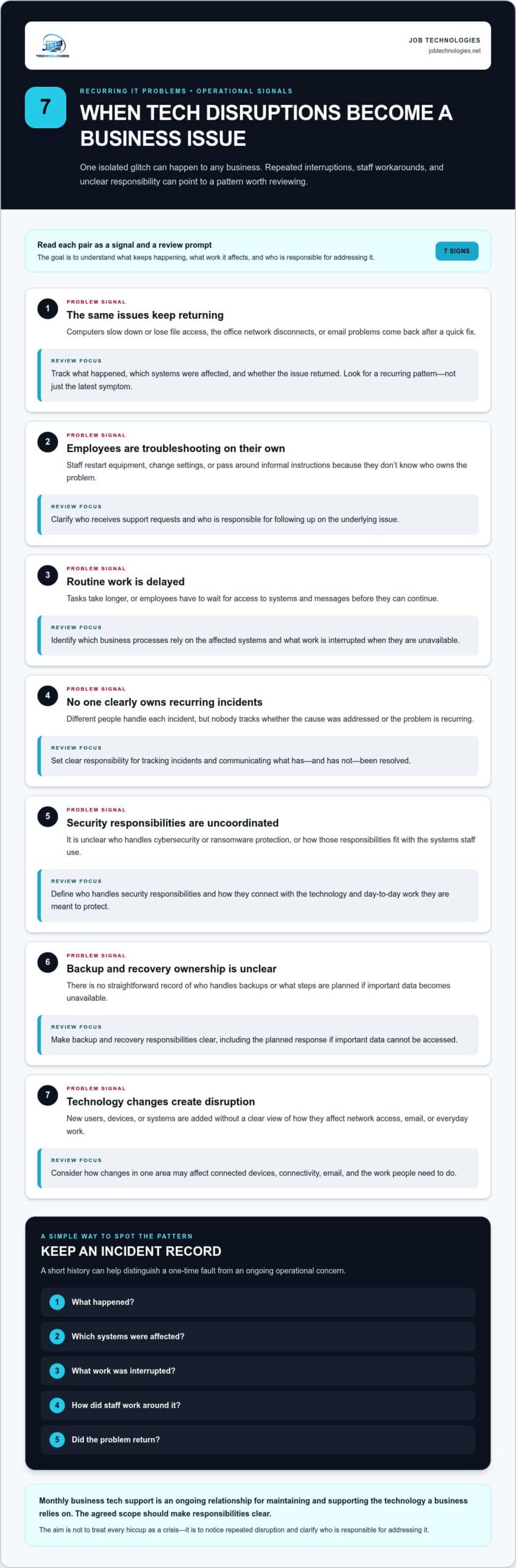
Look at what breaks, how often staff step in, and what work gets delayed. These seven signals can help distinguish an occasional inconvenience from a recurring reliability, security, or productivity concern:
- Repeated issues: A computer slows down or loses access to files, the office network disconnects, or email problems return after a quick fix.
- Staff troubleshooting: Employees restart equipment, change settings, or pass around informal instructions because they don’t know who owns the problem.
- Delayed work: Routine tasks take longer, or employees wait for access to systems and messages before continuing.
- Unclear ownership: Different people handle each incident, but nobody tracks whether the cause has been addressed or the problem is recurring.
- Uncoordinated security tasks: It’s unclear who handles cybersecurity or ransomware protection, or how those responsibilities fit with the systems staff use.
- Unclear backup and recovery responsibilities: The business has no straightforward record of who handles backups or what steps are planned if important data becomes unavailable.
- Technology changes create disruption: New users, devices, or systems are added without a clear view of how they affect network access, email, or day-to-day work.
Improvising can get a task unstuck, but it may also conceal a recurring pattern. If each employee uses a different workaround, the original issue can remain unresolved and become harder to understand. Keep a simple incident record: what happened, which systems were affected, what work was interrupted, how staff worked around it, and whether the problem returned. That history helps distinguish a one-time fault from an ongoing operational concern.
What does unreliable technology interrupt beyond the immediate task?
The impact can reach beyond the person experiencing the issue. For example, an employee who can’t access shared email may be unable to pass a customer request to a colleague. The interruption can affect service, handoffs, and the team’s capacity, even if the technical fault appears minor.
Consider which systems are affected, which business processes rely on them, and what recovery options are in place. A brief computer issue may have limited consequences if work can continue elsewhere. A network or email disruption could matter more if several people depend on it to coordinate essential tasks. The aim isn’t to treat every hiccup as a crisis. It’s to notice when disruptions repeatedly interfere with reliable work and make sure responsibility for addressing them is clear.
What monthly small business tech support can coordinate
Recurring support is a service relationship, not simply a repair reserved for the next time something stops working. It gives a business and its technology partner an ongoing way to address user needs, understand connected systems, and plan support around day-to-day operations. The agreed scope should specify which responsibilities are covered, so both sides know what to expect.
Reactive troubleshooting fixes the issue in front of you; coordinated managed IT support considers how the systems, risks, and business processes around that issue fit together. That wider view connects computer and email support with network management, cybersecurity, and recovery planning, rather than treating each concern as unrelated.
How computer, network, and email support fit together
Employees rely on devices to reach the network, access email, and complete routine work. If a staff member can’t send a message or open a shared resource, the cause may involve more than the computer alone. Understanding how devices, connectivity, and email work together helps support teams investigate recurring problems and recognize when a change in one area affects another.
Professional network installation and management are part of this broader picture. A business needs support that accounts for how its office connects people to the systems they use, alongside help with computers and email. The practical goal is coordination: clear responsibilities and support aligned with real work, with the scope defined for that business.
How cybersecurity and recovery contribute to continuity
Security and continuity are connected, but neither is a single tool or task. Ransomware protection is one part of a broader cybersecurity approach. Backup and recovery planning helps a business prepare for data loss or disruption by considering what information matters and how recovery fits into operations. The right approach reflects the systems and processes the business relies on.
Compliance assistance should reflect the requirements that apply to the business, rather than rely on a one-size-fits-all checklist. Bringing security, recovery, compliance, and everyday technology needs into the same support conversation helps decision-makers understand how these responsibilities relate. Set out the specific responsibilities in the agreed scope so it’s clear which services are included.
Before discussing a plan, note which systems support essential work, where support responsibilities currently sit, and which technology concerns need to be addressed together. That gives the conversation a useful starting point and connects support with business priorities. JOB Technologies provides managed IT services tailored to the technology needs and operations of small and medium-sized businesses.
Monthly support versus pay-as-needed help: compare the working relationship
The choice between recurring support and getting help only when an issue arises isn’t simply a choice between two ways to fix a computer. It’s a decision about how your business wants technology responsibilities handled over time. A small business tech support monthly arrangement creates a continuing relationship and a basis for planning, while pay-as-needed support focuses on specific issues as they occur. The better fit depends on your systems, support needs, and the scope you agree on.
| Consideration | Recurring support | Pay-as-needed help |
|---|---|---|
| Planning | Provides an ongoing framework for discussing support needs and technology priorities. | Typically centers on the issue that prompted a request for help. |
| Familiarity with systems | A continuing relationship can build context about the business’s systems and how they support its work. | Familiarity may need to be established when each new issue is addressed. |
| Budget predictability | A defined recurring arrangement can make support spending easier to plan, depending on its terms and scope. | Costs are tied to the help needed, so spending may vary with the number and nature of issues. |
| Responsibility boundaries | Responsibilities can be set out in an ongoing scope, clarifying what the relationship covers. | Responsibilities are usually defined around a particular request or issue. |
When pay-as-needed support may be enough
A small, stable environment with infrequent, limited support needs may be able to handle occasional help effectively. If technology rarely interrupts work and there’s a clear way to get specific problems addressed—such as turning to hardware repair specialists like firsthelptech.ie when an individual laptop or phone malfunctions—a recurring arrangement may not be necessary. Still, occasional troubleshooting doesn’t automatically cover continuing security or data recovery needs. Review your support history and business requirements rather than assuming either model is right.
When a recurring support relationship may fit better
A recurring relationship may be worth considering if support requests keep returning, your team is growing, or several connected systems need coordinated attention. Ongoing context helps connect IT work with business priorities, so discussions aren’t limited to the latest incident. It doesn’t guarantee that outages won’t occur, but it provides a structure for managing agreed responsibilities over time.
Concerned about paying for help you may not use? Focus on the scope and intended outcomes, not just the label “monthly.” Define which support needs matter, what responsibilities are covered, and how separate work will be handled. A well-matched arrangement reflects your business’s real requirements. That clarity helps you compare the working relationships on their merits, without assuming that ongoing support is necessary for every business or that pay-as-needed help covers every continuing responsibility.
How to assess your monthly tech support needs before choosing a plan
A useful support conversation starts with a clear picture of how technology fits into your work. Before comparing small business tech support monthly options, gather a practical inventory. You don’t need technical documentation for every system. A straightforward record of who uses what, what work depends on it, and who currently handles support can help identify priorities and define a scope that fits your business.
- List users and devices. Note the people who rely on technology and the computers or other work devices they use. Include shared devices and equipment that supports everyday tasks. This helps show who may be affected by an issue and gives a support discussion a grounded view of your working environment.
- Map your network and email. Record the office network and the email systems employees use for daily communication. Note which people or processes depend on each. For a local perspective on support needs, JOB Technologies’ small business IT support in Dubuque guide offers relevant context.
- Track recurring problems and workarounds. Write down what happened, which devices or systems were involved, what task was affected, and how staff responded. Include issues that were temporarily resolved, even if work continued. This record can help distinguish an isolated inconvenience from a pattern that deserves attention.
- Identify business-critical processes. Consider the routine activities your team needs to keep moving, such as responding to customers, coordinating work, or accessing essential information. Note the systems each activity relies on and what staff do if those systems aren’t available. This helps prioritize support according to operational importance.
- Document security, backup, and compliance responsibilities. Record who currently handles cybersecurity, ransomware protection, data backups, and recovery planning. Note how responsibilities are assigned and what information your business uses to understand its backup and recovery approach. A business data backup and recovery guide can help frame that part of your review. Also list applicable compliance obligations without assuming that a particular rule applies to your business.
Bring the inventory together with questions about ownership: who handles routine user support, who is responsible for security tasks, and how recovery responsibilities are coordinated? Gaps in your notes aren’t proof that something is wrong. They’re prompts to clarify how current arrangements work and which support matters most.
Once you’ve documented the people, systems, recurring needs, and responsibilities, you can have a focused conversation about scope. JOB Technologies’ managed IT support connects technology support with the priorities you’ve identified.
Build a dependable local IT partnership with JOB Technologies
Once you’ve identified the systems your team relies on and the support responsibilities that matter most, you have a practical starting point for a focused conversation. JOB Technologies provides managed IT support for small and medium-sized businesses, connecting technology decisions with daily operations. The support scope is shaped around your business needs, rather than assuming every company requires the same arrangement.
What a locally grounded technology relationship can address
For businesses in Dubuque, Galena, East Dubuque, Dyersville, Farley, and Peosta, JOB Technologies brings a local perspective to technology planning and support. Start with the needs you’ve documented, such as user support, network management, or protecting important business information. Reviewing connected responsibilities together can make it easier to see where support areas intersect.
JOB Technologies provides:
- Managed IT services, including computer and email support
- Network installation and management
- Cybersecurity and ransomware protection
- Data backup and recovery
- Compliance assistance
- AI implementation
- VoIP phone systems
These services can be considered in relation to your work. For example, network needs affect how employees access the systems they use, while cybersecurity and backup planning relate to protecting information and preparing for disruption. Recovery, compliance, AI, and VoIP may also address specific business priorities. The agreed scope should reflect those priorities, since a monthly support relationship doesn’t automatically bundle every service into one plan.
Take the next step toward a support plan that fits
Bring a clear account of the recurring issues your team experiences, the processes that rely on technology, and the responsibilities already assigned. Include what’s working well, too. That context keeps the discussion balanced and focused on the support your business needs, rather than treating every system as a problem to solve.
A useful scoping conversation connects those details to practical priorities: which systems are important to daily work, what support would help your team, and how security, recovery, networks, and user support relate to one another. This is especially useful if you’re considering small business tech support monthly and want a working relationship that fits your operations. JOB Technologies can shape an approach around your business and clarify how the support scope aligns with the needs you’ve identified.
Ready to discuss your business’s technology needs? Start a conversation with JOB Technologies about a support approach tailored to your team, systems, and priorities.
Make your next IT decision with confidence
Technology support should fit the way your business works, not add another layer of uncertainty. Use what you’ve learned about your team’s needs to decide which responsibilities need clearer ownership and what a workable support relationship would look like. A small business tech support monthly plan is worth considering when it gives your business a practical way to align ongoing technology needs with day-to-day priorities.
You don’t need every technical detail figured out before taking the next step. Start with the questions that matter most to your operations, then have a focused conversation about the support approach that fits. JOB Technologies works with local businesses on managed IT needs, from everyday technology support to continuity planning.
Ready to explore an approach shaped around your business? Discuss monthly IT support for your business and take a practical step toward a steadier technology experience.
Frequently Asked Questions
What does monthly tech support for a small business usually include?
Monthly support can cover ongoing help with employee computers, networks, and email, with responsibilities set out in the agreed scope. Businesses may also align cybersecurity, data backup and recovery, or compliance assistance with their support approach. For example, a company might prioritize employee access issues and network management, while another may focus on protecting business data. Identify what your operations need and define who handles each responsibility.
Is monthly IT support worth it for a small business?
It can be worthwhile if the ongoing support relationship addresses needs that matter to your business. Consider whether employees spend time resolving technology issues, whether recurring incidents affect essential tasks, and whether ownership of IT responsibilities is clear. Compare those operational needs with the scope of the arrangement. A plan isn’t automatically right for every business, so weigh its value against your actual support requirements.
Can a small business use pay-as-needed IT support instead?
Yes. Pay-as-needed help can suit a business with limited, occasional support needs and a stable technology environment. Keep in mind that addressing individual problems is different from assigning ongoing responsibility for cybersecurity, backup, or recovery planning. To assess whether this approach is working, track support requests and note any effect on daily operations. If needs change as the business grows, revisit how support is organized.
How do I know whether my business needs managed IT support?
Look beyond the number of technical issues and consider their effect on work. A useful indicator is whether staff regularly have to pause their responsibilities to troubleshoot, coordinate fixes, or wait for access to a system. Record incidents and the business tasks they affect. If recurring needs involve several systems or lack clear ownership, managed IT support offers a more coordinated way to handle those responsibilities.
Does monthly IT support include cybersecurity and data backup?
Cybersecurity and data backup can be included in a business’s managed IT approach, as specified in the agreed support scope. JOB Technologies provides cybersecurity and ransomware protection, along with data backup and recovery. Define responsibilities clearly, including who handles security tasks and how recovery planning relates to the systems your business relies on. A monthly arrangement doesn’t automatically include every service.
What should I prepare before discussing a monthly IT support plan?
Prepare a short overview of your staff, work devices, key software, network, email, and the business activities that rely on them. Add examples of recent support issues, who currently handles them, and any scheduled technology changes. It’s also useful to note who manages account access, security responsibilities, and backup processes. This gives the discussion practical context and keeps it focused on your business priorities.
Does JOB Technologies provide small business tech support in Dubuque?
Yes. JOB Technologies provides outsourced managed IT services for small and medium-sized businesses in Dubuque and nearby communities, including Galena, East Dubuque, Dyersville, Farley, and Peosta. Support includes computers, networks, and email, as well as cybersecurity, backup and recovery, and compliance assistance. Businesses can discuss their technology needs and priorities to shape a support approach around their operations.