

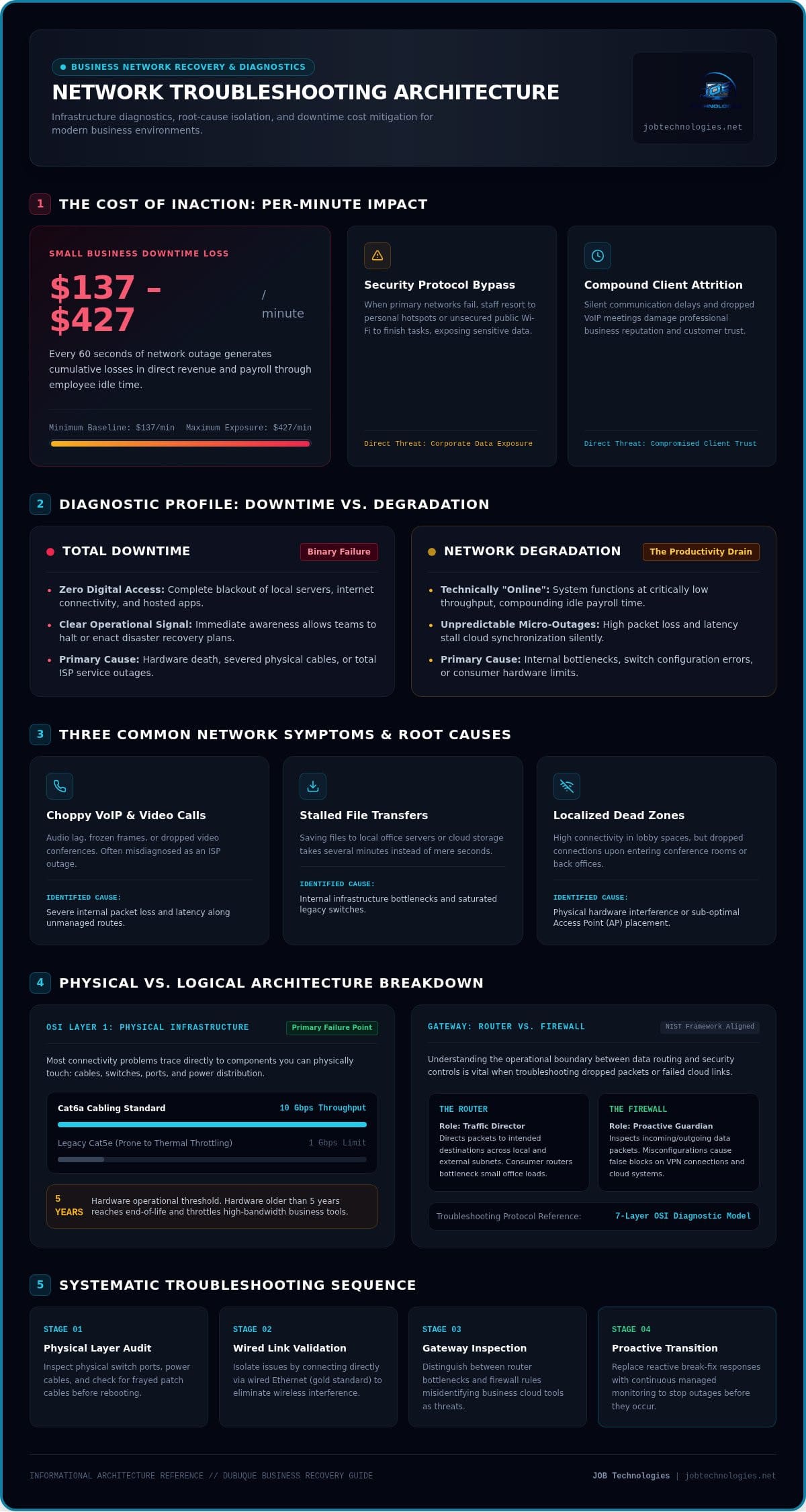
For a small business in Dubuque, a single minute of network downtime can drain between $137 and $427 from your bottom line. It’s a staggering figure that highlights why simply rebooting the router isn’t a sustainable strategy for growth. We understand the sinking feeling that comes when the office goes quiet and the internet indicator turns red. You’ve likely felt the pressure of mounting costs and the frustration of a team that can’t serve your clients. Effective network troubleshooting for businesses isn’t about being a technical wizard; it’s about having a methodical plan to restore order when things go wrong.
We’re here to help you move from reactive panic to proactive stability. In this 2026 recovery guide, you’ll learn how to identify, diagnose, and resolve common office connectivity issues to minimize downtime and keep your operations running smoothly. We’ll provide clear steps to take when a connection drops, moving through a logical path from physical layer checks to modern Wi-Fi 7 optimizations. By the time you finish reading, you’ll have the peace of mind that comes from knowing exactly how to protect your productivity and when to lean on a local partner to keep your network secure.
Key Takeaways
- Understand the critical difference between total downtime and network degradation to keep your VoIP phone systems and cloud applications running without interruption.
- Learn why the “Physical Layer” is the most common failure point and how checking cables and switches first can resolve most connectivity issues.
- Discover why wired connections remain the gold standard for office stability and how to effectively troubleshoot Wi-Fi dead zones in older buildings.
- Follow a logical, step-by-step workflow for network troubleshooting for businesses to isolate problems and reduce the financial impact of employee idle time.
- Explore how moving from a reactive “break-fix” approach to proactive managed IT services can identify and fix network risks before they impact your operations.
Common Business Network Issues: Identifying the Symptoms of Downtime
When your office connectivity falters, it’s easy to assume the entire system has crashed. However, there is a distinct difference between total network downtime and network degradation. Downtime is the complete loss of connectivity, leaving your team unable to access any digital resources. Degradation is often more frustrating; it’s a state where the system is technically functional but performs so poorly that simple tasks take significantly longer to complete. For a local firm, these “micro-outages” can be just as damaging as a total blackout because they disrupt the flow of work without providing a clear signal to stop and pivot.
Effective network troubleshooting for businesses often reveals that “slow internet” isn’t actually a problem with your provider. Instead, the bottleneck frequently exists within your own internal infrastructure. To find the root cause, professional technicians often reference the seven-layer OSI model to determine if the issue is a physical cable, a misconfigured switch, or a software protocol error. Network latency is the measure of time it takes for data to travel from its source to its destination, and even minor delays can stall office productivity by making real-time applications unusable.
Spotting the Signs of a Failing Network
You don’t need to be an IT expert to recognize when your infrastructure is struggling. The most common symptoms include:
- Choppy VoIP and Video: If your Zoom calls are dropping or your office phone system has audio lag, your network is likely struggling with packet loss.
- Stalled File Transfers: When saving a document to your local server or cloud storage takes minutes instead of seconds, an internal bottleneck is usually the culprit.
- Localized Dead Zones: If the internet works perfectly in the lobby but drops every time you enter the conference room, you’re likely facing hardware interference or poor access point placement.
The True Cost of a Glitchy Connection
The financial impact of a poor connection is often higher than business owners realize. As we noted earlier, downtime for small businesses can cost between $137 and $427 per minute in lost revenue and idle labor. Beyond the immediate payroll loss, network instability creates hidden security vulnerabilities. When the primary network is unreliable, employees often bypass security protocols by using personal hotspots or unsecured public Wi-Fi to finish their work. This shift puts your sensitive data at risk and can damage the professional image you’ve worked hard to build with your clients.
The Anatomy of a Network Failure: Hardware vs. Software
A methodical approach to network troubleshooting for businesses begins with a clear distinction between physical hardware failures and logical software errors. Most issues start at the physical layer, which includes everything you can touch, like cables, switches, and power supplies. A frayed Ethernet cord or a failing port on a network switch can cause intermittent drops that look like a provider outage but are actually local. Solving these physical inconsistencies is often the first step in restoring stability to a chaotic office environment.
Hardware Bottlenecks in Small Offices
Many Dubuque offices mistakenly rely on consumer-grade routers meant for home use. These devices lack the processing power to handle dozens of simultaneous connections, leading to invisible bottlenecks that a simple reboot can’t fix. Investing in professional office network wiring ensures your data travels over Cat6a cables capable of 10 Gbps speeds, preventing the thermal throttling common in older Cat5e runs. If your hardware is over five years old, it’s likely reaching its end-of-life and will struggle with modern high-bandwidth applications.
It’s also vital to understand the difference between your router and your firewall. While a router directs traffic, a firewall acts as your proactive guardian, inspecting packets for threats. The NIST Small Business Cybersecurity Corner provides frameworks that help local firms understand these risks and secure their entry points. For many firms, a misconfigured firewall is the silent cause of blocked cloud services or failed VPN connections.
Configuration and Software Conflicts
Software-side issues often hide behind “site not found” errors. These are frequently caused by DNS misconfigurations or IP address conflicts. When two devices on the same network try to claim the same IP address, one or both will lose connectivity. Managing these leases and keeping firmware updated on all security appliances is essential to prevent bugs that attackers could exploit. Solving these software conflicts is a core part of effective network troubleshooting for businesses that want to avoid recurring downtime. If these technical layers feel overwhelming, our team at JOB Technologies can help you implement Managed IT Services to handle these complexities for you.
Wired vs. Wireless Troubleshooting: Solving Connectivity Gaps
Wired connections remain the gold standard for any business that relies on stable VoIP phone systems or high-speed data transfers. While Wi-Fi offers flexibility, it’s prone to interference that can derail a productive afternoon. Effective network troubleshooting for businesses often starts by identifying whether a problem is universal or limited to wireless devices. If your desktop users are fine but your laptop users are struggling, the issue likely lies in your airwaves rather than your internet service provider.
In the historic buildings of Dubuque and Galena, thick brick walls and outdated insulation often create significant “dead zones” where signals simply cannot penetrate. Environmental factors like breakroom microwaves or competing networks from neighboring offices also cause signal drops. We often see teams struggle when bandwidth-heavy applications, such as uncompressed video streaming or large cloud backups, saturate a wireless channel and slow down the entire office.
Optimizing Office Wi-Fi Performance
Selecting the right frequency is critical for a stable connection. Most modern offices benefit from the 5 GHz or 6 GHz bands, which offer more channels and less congestion than the older 2.4 GHz spectrum. While consumer mesh systems are popular for homes, they often fail to handle the high device density of a professional office. Professional access points provide better handoff between zones and allow for more granular control. For a successful rollout, we recommend following our office wifi installation checklist to ensure comprehensive coverage across your floor plan.
Diagnosing Ethernet and Cabling Issues
Even the best wireless setup needs a strong wired backbone. If an Ethernet port seems dead, you can test it by swapping in a known working cable or connecting a different device to the same wall jack. In 2026, the distinction between cable categories is more important than ever. While Cat5e was standard for years, it cannot sustain the 10 Gbps speeds required by modern Wi-Fi 7 access points. Upgrading to Cat6a provides the shielding and bandwidth necessary for future-proofing your firm against thermal throttling and signal degradation.
Security is another reason to favor wired infrastructure for sensitive tasks. The FTC small business network security guidelines emphasize that securing your physical access points and routers is just as important as your software settings. If you’re unsure if your current wiring can handle your team’s growth, a business network performance assessment can identify hidden bottlenecks in your wired infrastructure before they cause a major outage.
A Step-by-Step Business Network Troubleshooting Workflow
When connectivity fails, the instinct is often to rush and start unplugging everything. However, a methodical approach to network troubleshooting for businesses saves time and prevents further complications. Start by isolating the problem. Check if the issue affects just one device, a specific room, or your entire Dubuque office. If the rest of the team is working fine, the problem is likely a local hardware fault or a software conflict on a single workstation. If everyone is offline, you’re looking at a central failure point.
Follow this structured recovery path to get back online quickly:
- Check the physical layer: Verify that cables are seated firmly and power lights are active on your switches and routers.
- Run a ping test: Use the command prompt to ping an external address like 8.8.8.8. If it fails, try a DNS flush to clear out old, corrupted path data.
- Verify ISP status: Check for local outages in the Galena or Dubuque area via your provider’s status page or social media.
- Document the symptoms: Note exactly when the outage started and which services are affected. This data is vital for your IT partner.
The 5-Minute ‘Sanity Check’ for Office Managers
You don’t need to be an engineer to read router status lights. A solid green light usually indicates a healthy link, while flashing amber or steady red often signals a hardware error or a loss of signal from the street. When performing a speed test, always use a wired connection to get accurate data; wireless tests are often skewed by local interference. Most importantly, never hit the “Reset” button on your business router. While a “Restart” (power cycle) is helpful, a “Reset” wipes your professional configurations, which can lead to hours of additional downtime while your settings are rebuilt.
When to Stop Troubleshooting and Call a Professional
There is a point where DIY fixes become a liability. If you notice signs of a security breach, such as unexpected redirects or locked files, stop immediately. Research shows that 84% of businesses identify cybersecurity breaches as a primary cause of downtime. Persistent issues that resolve with a reboot but return every few hours often signal failing hardware or complex managed network security conflicts that require administrative access to resolve. If your network feels like a constant battle, reach out to us at JOB Technologies to discuss a proactive management plan that keeps your team focused on their work rather than their connection.
Beyond the Quick Fix: Proactive Management for Local Businesses
While the steps we’ve covered help you resolve immediate outages, relying on manual network troubleshooting for businesses is a reactive cycle that eventually drains your resources. Every hour you spend diagnosing a cable or a DNS error is an hour you aren’t serving your clients. Moving away from the “break-fix” model means choosing a partner who watches your systems while you sleep. We believe that the best way to handle a network failure is to prevent it from happening in the first place.
Our team at JOB Technologies acts as a proactive guardian for firms across the Tri-State area. We use 24/7 monitoring to identify potential failures, such as a degrading switch or a saturated wireless channel, before your staff even notices a lag. For mission-critical offices, we often implement redundant internet connections, known as failover systems. If your primary fiber line in Dubuque is cut during construction, your network automatically switches to a secondary 5G or cable link. This ensures near-zero downtime and keeps your VoIP phones and cloud apps online without interruption.
The Benefits of a Managed Network
Choosing a managed model replaces unpredictable IT bills with fixed monthly costs. You’ll no longer face surprise emergency repair fees that disrupt your quarterly budget. We handle automated security patching and firmware updates, ensuring your hardware is always shielded from the latest threats without manual intervention. You gain true peace of mind with managed IT services in Dubuque, knowing a local expert is protecting your digital assets around the clock.
Building a Resilient Infrastructure for 2026
As we move through 2026, the complexity of modern networks requires smarter tools. We utilize AI implementation to monitor network health and analyze traffic patterns, flagging anomalies that could signal a hardware failure or a hidden security breach. For firms in Galena and Dubuque, we ensure your infrastructure meets strict data privacy standards like HIPAA or PCI DSS 4.0.1. We don’t just fix what’s broken; we create a long-term technology roadmap that aligns with your specific growth goals. Having a trusted local advisor provides the steady hand you need to guide your business through technical complexity with confidence.
Securing Your Business Continuity for the Future
Network stability is the bedrock of modern operations, and we’ve seen how a methodical approach to network troubleshooting for businesses protects your bottom line. By distinguishing between physical layer faults and complex software configurations, you can resolve minor glitches before they escalate into major outages. Transitioning from a reactive “break-fix” mindset to proactive management ensures your team remains focused on growth rather than connectivity. Relying on a structured workflow and professional infrastructure eliminates the stress of unpredictable IT failures.
Stop struggling with downtime and get a professional network assessment from JOB Technologies today. We bring over 20 years of business technology experience to your office, providing dedicated local support for Dubuque, Galena, and Dyersville. With our proactive 15-minute response time focus, you can rest easy knowing a steady hand is always watching your network. Let’s build a reliable foundation for your success and ensure your business is ready for whatever the future holds.
Frequently Asked Questions
Why is my business Wi-Fi slow even though I have a high-speed ISP plan?
High ISP speeds don’t guarantee fast office Wi-Fi because internal bottlenecks often limit performance. In many Dubuque and Galena offices, signal interference from neighboring networks or thick building materials creates dead zones. Your router might also be overwhelmed by the sheer number of connected devices. Effective network troubleshooting for businesses often reveals that upgrading to professional access points and Cat6a cabling is necessary to actually utilize the high-speed bandwidth you’re paying for monthly.
How often should we reboot our office network equipment?
You shouldn’t need to reboot your office equipment on a regular schedule if your infrastructure is healthy. While a “sanity check” restart can clear temporary glitches, needing to do this weekly suggests your hardware is failing or your firmware is outdated. Modern business-grade routers and switches are designed for continuous uptime. If your Dubuque team is constantly power-cycling the router, it’s time to replace aging consumer-grade gear with enterprise-level solutions that offer long-term stability.
What is the difference between a modem, a router, and an access point?
A modem is your gateway that brings the internet signal into your building from your local ISP. The router acts as the “traffic cop,” directing data to the right devices and providing essential firewall protection. An access point is a dedicated device that broadcasts Wi-Fi signals throughout your office. While home devices often combine these into one box, professional setups in East Dubuque use separate components to ensure better coverage, higher security, and easier maintenance.
Can a bad Ethernet cable really slow down my entire office network?
A single degraded Ethernet cable can definitely throttle your entire office. When a cable is frayed or improperly terminated, it causes packet loss, forcing your network switch to slow down the connection speed for that port. In some cases, this can even create a broadcast storm that impacts every user on the network. Using professional network troubleshooting for businesses helps identify these “invisible” physical faults that standard software restarts simply cannot fix for your team.
How do I know if our network slowness is actually a cybersecurity issue?
Network slowness is often a primary symptom of a cybersecurity breach, such as a ransomware attack or unauthorized data exfiltration. If your connection drops suddenly or you notice unusual traffic spikes during non-business hours, your security may be compromised. Many small businesses in the Tri-State area experience these “glitches” as early warning signs. We recommend implementing proactive monitoring to distinguish between simple hardware failures and active threats that require immediate isolation to protect your assets.
What should I tell my IT support provider when I call about a network outage?
When you call for support, start with the “who, what, and where.” Tell us exactly when the outage began and whether it affects the whole office or just a specific department in Dyersville. Note the color and status of the lights on your main router or switch. Providing these details helps our team hit our 15-minute response time focus, allowing us to isolate the root cause and restore your business continuity as quickly as possible.
Is it worth having a secondary ‘failover’ internet connection for a small office?
A secondary failover connection is a vital investment for any office that relies on VoIP phone systems or cloud-based software. If your primary fiber line in Dubuque goes down due to construction or a provider outage, a failover system automatically switches your traffic to a secondary 5G or cable link. This prevents the high cost of idle labor and ensures your team stays productive, providing peace of mind that a single accident won’t halt your operations.
Why do we need professional network installation instead of doing it ourselves?
Professional installation prevents approximately 90% of the issues that lead to emergency troubleshooting. Our experts use precision tools to test cable integrity and perform heat mapping to ensure perfect Wi-Fi coverage across your floor plan. DIY setups often lead to messy wiring and misconfigured firewalls that leave your data vulnerable. With over 20 years of local experience, we ensure your infrastructure is built correctly the first time, providing a stable foundation for your growth.