

The most recognized name in cloud communications is often the worst fit for an agile local team. If you are researching RingCentral alternatives for small business, chances are you are tired of paying for bloated enterprise software your staff never touches. You likely adopted the platform expecting clear, dependable calling, only to run into confusing administrative dashboards, sudden tier increases, and distant support queues whenever an office extension drops a call.
Running a smooth operation requires dependable voice tools, not rigid contracts packed with features designed for Fortune 500 call centers. In this guide, we evaluate the top alternatives so you can choose a reliable, cost-effective business VoIP phone system without enterprise complexity. We will examine how the leading platforms perform for everyday workflows, help you identify practical options for your team, and show why a properly configured office network is the real secret to crystal-clear audio.
Key Takeaways
- Evaluate top RingCentral alternatives for small business to eliminate enterprise feature bloat and secure predictable monthly billing.
- Understand the critical operational differences between self-service national SaaS vendors and a fully managed, hands-on telephony deployment.
- Discover why clear voice audio depends on proper office network configuration, including router quality of service (QoS) rules and firewall settings.
- Follow a proven carrier number porting checklist to migrate your company extensions smoothly without risking dropped calls or operational downtime.
Why Small Businesses Seek RingCentral Alternatives in 2026
For years, national cloud providers dominated the enterprise conversation. Yet in 2026, smaller teams are walking away from legacy unified communications platforms in record numbers. While Voice over Internet Protocol (VoIP) fundamentally changed how companies manage voice communications, the shift toward all-in-one software suites created fresh operational headaches. Local businesses want dependable audio and simple user controls, not another enterprise software package that requires specialized technical certification just to forward an office line.
The search for viable RingCentral alternatives for small business usually begins when administrative reality clashes with marketing promises. Instead of feeling supported, business owners find themselves wrestling with complex settings, opaque billing structures, and detached overseas call centers during unplanned service interruptions.
The Problem with Enterprise UCaaS Feature Bloat
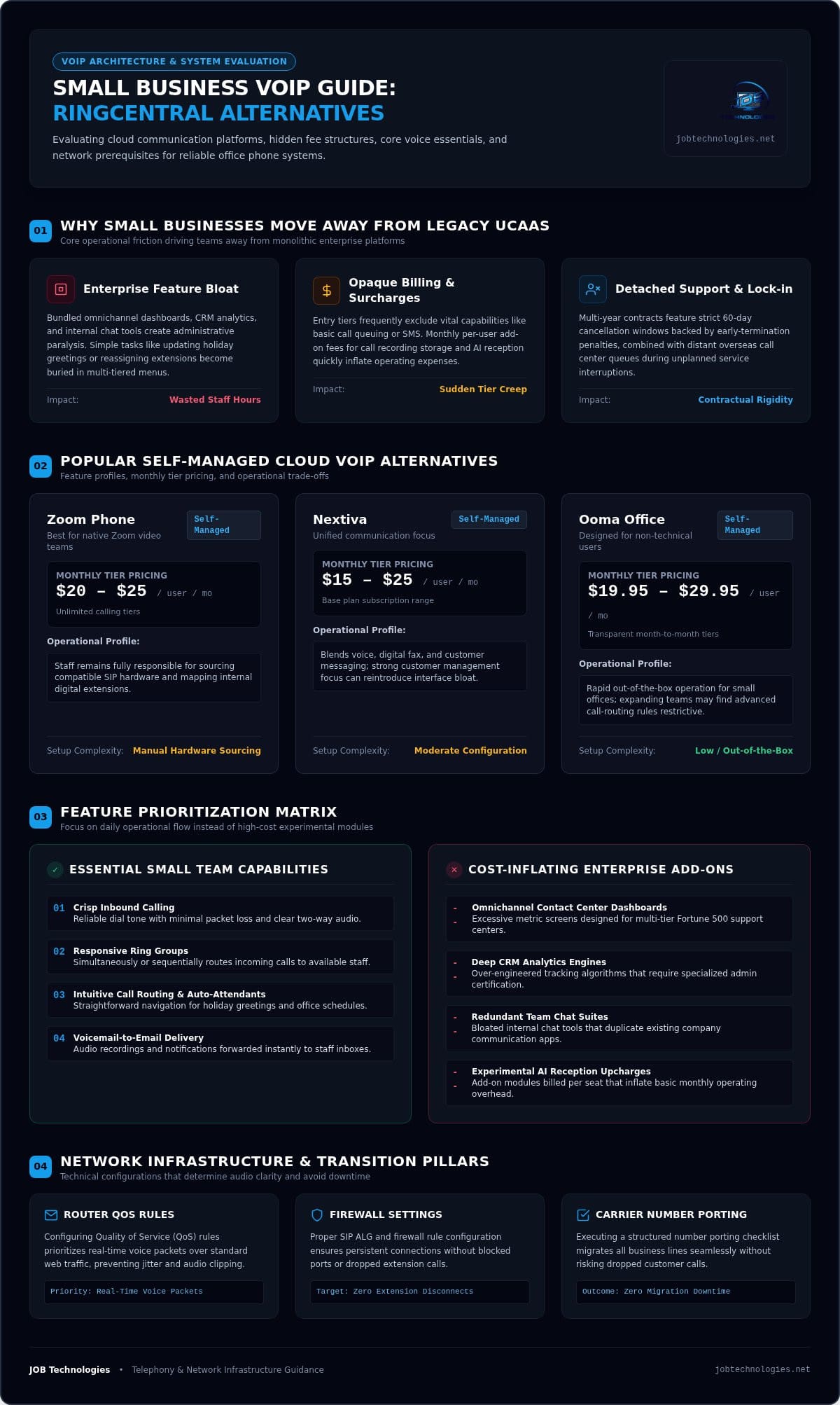
Most small front offices need a handful of core voice features: crisp inbound calling, intuitive call routing, reliable auto-attendants, and voicemail-to-email delivery. National unified communications as a service (UCaaS) providers rarely stop there. They bundle omnichannel contact center dashboards, deep CRM analytics engines, and internal team chat applications into a single dense interface.
This excess creates daily friction. When an office manager attempts a simple task, like updating a holiday greeting or reassigning a desk extension, they must dig through multi-tiered configuration menus designed for multinational enterprises. The result is administrative paralysis, wasted staff hours, and paying for high-end features that nobody on your payroll ever uses.
Hidden Costs and Opaque Cloud Communication Billing
Price transparency has become another major flashpoint for small operations. Entry-level subscriptions often exclude essential capabilities, forcing companies into costlier licensing tiers just to unlock basic call queuing or SMS functionality. Beyond tier creep, small companies frequently face surprises on their statements:
- Add-on feature charges: Monthly per-user fees for basic add-ons like call recording storage or AI reception features quickly inflate monthly expenses.
- Regulatory and administrative surcharges: Carrier and compliance fees regularly add significant unannounced costs on top of the advertised sticker price.
- Contract auto-renewals: Multi-year agreements often feature strict sixty-day cancellation windows backed by hefty early-termination penalties.
When searching for practical RingCentral alternatives for small business, predictable overhead is paramount. A phone system should stabilize your monthly operating budget and keep lines open, rather than tying your business to restrictive agreements and unexpected fees.
Evaluating Top Cloud VoIP Alternatives for Small Business
Selecting the right platform means weighing daily usability against ongoing maintenance. When reviewing popular RingCentral alternatives for small business, the goal is finding reliable dial tone and clear controls without inheriting another layers-deep administrative portal. Reviewing baseline consumer standards in the official FCC guide to VoIP can help you evaluate emergency calling compliance and service expectations before committing to a contract.
Popular Self-Managed Cloud VoIP Platforms
Several self-service providers dominate the current software landscape, each targeting slightly different operational requirements:
- Zoom Phone: A sensible choice if your team already lives inside Zoom video meetings. Unlimited calling tiers run around $20 to $25 per user monthly, but your staff remains entirely responsible for sourcing compatible SIP hardware and mapping digital extensions.
- Nextiva: Blends voice, digital fax, and customer messaging with base plans starting from $15 to $25 per user monthly. While feature-rich, the platform leans heavily into unified customer management, which can reintroduce the software bloat small teams try to avoid.
- Ooma Office: Tailored for non-technical users with transparent month-to-month tiers between $19.95 and $29.95 per user. It delivers rapid out-of-the-box operation, though expanding organizations may find its advanced call-routing rules restrictive.
Key Feature Checklist for Small Office Communication
Rather than paying for experimental AI add-ons, prioritize capabilities that protect daily operational flow. As detailed in our breakdown of essential VoIP features for small teams, local businesses thrive on dependable fundamentals:
- Responsive ring groups: Route incoming customer inquiries to available staff simultaneously or in sequence so critical sales calls never sit unanswered.
- Automated attendants and holiday schedules: Direct callers cleanly after hours without requiring manual switchboard adjustments every Friday afternoon.
- Dependable mobile softphones: Enable field technicians and hybrid workers to place and answer business calls seamlessly on their personal smartphones.
- Shared call appearance: Allow desk staff to view, pick up, or park active calls across separate physical handsets in an open office.
Balancing these features with ongoing maintenance is where self-service cloud tools often stumble. If you prefer avoiding the technical friction of DIY provisioning, collaborating with JOB Technologies gives your team hands-on deployment and managed business phone systems tailored directly to your workflow.
National SaaS Providers vs. Locally Managed VoIP Systems
Most comparison sites focus entirely on subscription tables and software checklists. While resources like PCMag’s top tested business VoIP services for 2026 evaluate software features effectively, they rarely examine what happens after you sign the agreement. For a small business, the biggest dividing line is not whether a vendor offers an automated attendant. It is who handles setup, ongoing changes, and technical emergencies when incoming calls fail to ring.
Comparing self-service software providers against a fully managed communications partner reveals a stark contrast in daily operational overhead. If you are weighing RingCentral alternatives for small business, deciding between a self-managed portal and a managed partner determines how much time your internal staff will spend troubleshooting telephone issues.
The Reality of Self-Installation and Troubleshooting
When you purchase a national SaaS subscription, your handsets usually arrive by mail in cardboard boxes. From that moment, your team is on its own. Setting up physical phones requires navigating network configurations, assigning local IP addresses, and manually provisioning Session Initiation Protocol (SIP) parameters across your firewall.
A DIY deployment introduces specific operational risks:
- Firewall and port vulnerabilities: Leaving default SIP administrative credentials intact or opening unnecessary network ports exposes your office network to unauthorized traffic and toll fraud. Building secure business communication systems requires coordinated safeguards that protect your voice traffic, access controls, and network infrastructure together.
- Endless escalation queues: When an extension drops calls, national help desks typically instruct you to reboot your router, submit an online ticket, and wait hours for level-one technicians to respond.
- Vendor finger-pointing: Software providers frequently blame your local internet service provider for voice packet loss, while your ISP insists their bandwidth is fine. Your business stays stuck in the middle without functioning phones.
The Advantages of a Dedicated Local Technology Partner
A managed model eliminates that entire troubleshooting burden. Instead of leaving you to configure call paths on your own, an accountable technology team handles the deployment end to end. We program your interactive voice response menus, physically install desk hardware, map extension groups, and ensure proper data cabling throughout your building.
Beyond installation, you receive direct local support from engineers who actually understand your physical facility and staff workflows. If an extension breaks or call routing rules need an update before a busy weekend, you talk to local technicians instead of a distant call center. Our practical breakdown of business VoIP phone systems Dubuque illustrates how hands-on support keeps local companies operational without unnecessary technical headaches.
Evaluating RingCentral alternatives for small business ultimately comes down to accountability. Choosing a partner who manages both your voice platform and your internal network—an approach championed by telecommunications specialists like Bunnji—means one trusted team takes full responsibility for your call quality.
Why Network Infrastructure Determines VoIP Success
Switching providers won’t solve dropped calls if the underlying problem sits on your office network switch. When business owners explore RingCentral alternatives for small business, they often blame software when local network instability is the actual culprit. Voice data is delicate. While an email can pause for half a second without disruption, a momentary hiccup in voice transmission ruins an important client conversation.
Three network conditions routinely degrade voice communications: latency (delays in data delivery), jitter (variations in packet arrival times), and packet loss (dropped chunks of audio data). Quality of Service (QoS) functions as a traffic controller for voice packets, giving real-time telephone data immediate priority over everyday web browsing and background system downloads.
Diagnosing Common Voice Quality Issues
Choppy voices, robotic audio, and one-way sound almost always trace back to local network congestion rather than the cloud PBX. When an employee uploads large design files, streams video, or runs an unthrottled cloud backup during business hours, unmanaged routers treat voice packets identically to file downloads. Without strict prioritization, voice packets get delayed in line.
Router firewalls introduce another common bottleneck. Features like Session Initiation Protocol Application Layer Gateway (SIP ALG) attempt to inspect voice traffic, but frequently corrupt the packets instead. This causes phones to unregister unexpectedly or fail to ring when incoming calls arrive.
Building an Optimized Small Business Network
Achieving flawless phone performance requires solid hardware underneath your communications platform. High-performance voice demands proper physical infrastructure, starting with certified Cat6 ethernet runs outlined in our guide to office network wiring Dubuque. Commercial managed switches and business-grade routers allow technicians to configure dedicated voice VLANs (virtual local area networks), completely isolating your phone calls from guest Wi-Fi and heavy workstation traffic.
Aligning your telephony with comprehensive managed IT services Dubuque ensures your switches, firewalls, and ISP connections remain tuned for high-definition voice. If you want crystal-clear calls without guessing which settings to adjust, partner with JOB Technologies for a complete network assessment to stabilize your office connectivity.
Transitioning to a Better Phone System Without Downtime
The biggest fear keeping businesses tied to an unsatisfactory provider is the prospect of missed client calls during a cutover. When researching RingCentral alternatives for small business, owners worry that switching carriers might drop inbound lines or leave staff stranded during business hours. A methodical migration plan removes that risk entirely, keeping your existing phone numbers active while your new platform is thoroughly tested behind the scenes.
Maintaining continuous operations during a transition comes down to proper staging. You never cancel an existing voice contract until your numbers have successfully transferred and outbound testing is complete.
Managing Carrier Number Porting and Call Flows
Telecom carrier number porting requires precise administrative coordination. Any minor discrepancy between your paperwork and your losing carrier’s records will trigger a rejection, delaying the transfer for days. A structured porting checklist prevents these setbacks:
- Match billing records exactly: Submit a recent Customer Service Record (CSR) alongside your signed Letter of Authorization (LOA). The business name, physical service address, and billing telephone number must match carrier files character for character.
- Implement temporary call forwarding: Before the scheduled port date, set up call forwarding from your old carrier to temporary direct inward dialing (DID) numbers on the new system so zero inbound calls slip through.
- Conduct hands-on staff orientation: Train receptionists and office personnel on physical handsets, visual voicemail, call park keys, and desktop softphone apps before the official cutover occurs.
Turnkey Voice Solutions with JOB Technologies
Navigating these technical details on your own often leads to unneeded operational stress. At JOB Technologies, led by Jon with over 20 years of hands-on experience, we provide fully managed phone systems and business VoIP deployments tailored specifically for companies throughout Dubuque, Galena, East Dubuque, Dyersville, Farley, and Peosta.
Instead of leaving you to unpack handsets from a shipping box and configure interactive menus through trial and error, we manage the entire project locally. Our team inspects your data switches, configures dedicated voice prioritization, manages carrier porting documentation, and tests every call flow before your lines go live. Once your system is up, you get accountable local technicians ready to help whenever you need an extension changed or greeting updated.
If you are ready to explore dependable RingCentral alternatives for small business with dedicated regional support, take the next step. Schedule a VoIP assessment with JOB Technologies to build a reliable voice foundation for your business.
Building a Reliable Voice Foundation for Your Business
Evaluating RingCentral alternatives for small business should never mean trading one bloated corporate interface for another frustrating self-service portal. Clear, dependable communication comes down to practical choices: adopting features your team actually uses, eliminating surprise fees, and ensuring your local network switches and firewalls are properly tuned for voice traffic.
At JOB Technologies, we bring over two decades of local technology and network expertise to companies throughout Dubuque and the surrounding Tri-State area. We don’t just hand you a box of phones and leave you to figure out the settings. Our team engineers your cabling, router QoS tuning, and carrier porting to guarantee crystal-clear audio without operational interruptions. When questions arise, you get direct local support from technicians who understand your business.
Take control of your office communications today. Upgrade your business communications with JOB Technologies and enjoy the confidence that comes with a reliable, professionally managed phone system.
Frequently Asked Questions
Why are small businesses switching away from RingCentral in 2026?
Many companies seek RingCentral alternatives for small business because they are tired of paying for enterprise features their staff never uses. Between confusing billing add-ons, rigid contract renewals, and clunky administrative dashboards, smaller teams often find enterprise UCaaS platforms more frustrating than helpful. When phone issues arise, waiting in national support ticket queues makes business owners crave simpler systems backed by responsive technical partners.
Can I keep our existing business phone numbers when switching VoIP providers?
Yes, you can keep all your current phone numbers. Federal regulations guarantee your right to port existing business lines, toll-free numbers, and direct extensions to a new provider. The key to a smooth transfer is ensuring your customer service record and billing details match your current telecom documentation exactly. While paperwork processes, temporary call forwarding keeps your lines active so you never miss an incoming customer call.
How much internet bandwidth does a small business VoIP phone system require?
A standard business VoIP call uses approximately 100 kilobits per second (Kbps) of concurrent upload and download bandwidth using high-definition audio codecs. While ten simultaneous calls need only about one megabit per second, total bandwidth is rarely the real problem. Consistent call quality requires low latency, minimal jitter, and commercial routers configured with Quality of Service rules so file backups or video streams don’t interrupt active conversations.
What is the main difference between self-managed VoIP and managed phone systems?
Self-managed VoIP leaves your internal team responsible for unboxing handsets, programming auto-attendants, configuring network switches, and troubleshooting line drops. In contrast, a locally managed provider handles physical installation, cabling, firewall security, and call-routing adjustments directly. If you are comparing RingCentral alternatives for small business, managed phone systems eliminate administrative strain by giving you direct access to experienced technicians rather than generic help-desk ticket systems.
Do we need new physical desk phones to switch to a modern cloud system?
Not necessarily. If your current office uses unlocked, SIP-compliant desk phones from manufacturers like Yealink or Poly, a technician can often reprogram them for your new service. Alternatively, businesses can choose new pre-configured hardware, or eliminate desktop handsets altogether by using secure softphone applications on laptops, tablets, and mobile devices. A quick hardware review will identify whether your existing phones can carry over smoothly.
What happens to our business phone calls if our office internet goes down?
Your callers won’t receive a busy signal if your local internet service drops. Cloud-hosted phone architecture automatically triggers disaster recovery routing rules the moment an office handset loses its connection. Calls route instantly to mobile softphones, backup cell numbers, remote employees, or cloud voicemail. For businesses in Dubuque, Galena, and surrounding communities, secondary cellular internet connections can also maintain uninterrupted office dial tones.
How long does it typically take to transition to a new business phone system?
A standard transition typically takes between one and three weeks, primarily dictated by how quickly your previous carrier releases your numbers. The physical setup, network configuration, and staff training can be completed in just a few days. Because call paths are staged and tested before the final cutover, your business maintains regular phone operations throughout the entire process without experiencing unexpected downtime.