

What if the reason your staff misses critical customer inquiries isn’t a lack of focus, but a phone setup built for a corporation ten times your size? Juggling personal mobile numbers, suffering through dropped transfers between remote staff, and paying for complex systems nobody knows how to use creates constant operational headaches. Selecting the most effective VoIP features for small teams shouldn’t mean adopting heavy enterprise software that slows your day down. You simply need reliable tools that keep everyone connected, responsive, and confident.
In this guide, we’ll help you pinpoint the essential capabilities needed to eliminate dropped calls, streamline communication between home offices and front desks, and present an established, professional image to every caller. We will examine the core features that drive genuine productivity and clear collaboration, ensuring you invest only in what helps your business thrive without taking on unnecessary overhead.
Key Takeaways
- Modern cloud systems replace rigid copper landlines with adaptable, location-independent calling that keeps distributed staff aligned.
- Selecting the right VoIP features for small teams, such as auto-attendants and hunt groups, ensures incoming customer inquiries never slip through the cracks.
- Mobility tools like softphone apps and voicemail-to-email transcription allow staff to triage messages rapidly without being tied to a physical desk.
- Call quality depends heavily on underlying network health, making bandwidth checks and Quality of Service router configurations essential before rollout.
- A structured audit of call flows and daily pain points prevents costly feature bloat and ensures you deploy only what supports real business growth.
Why Modern Small Teams Are Upgrading to Cloud VoIP Systems
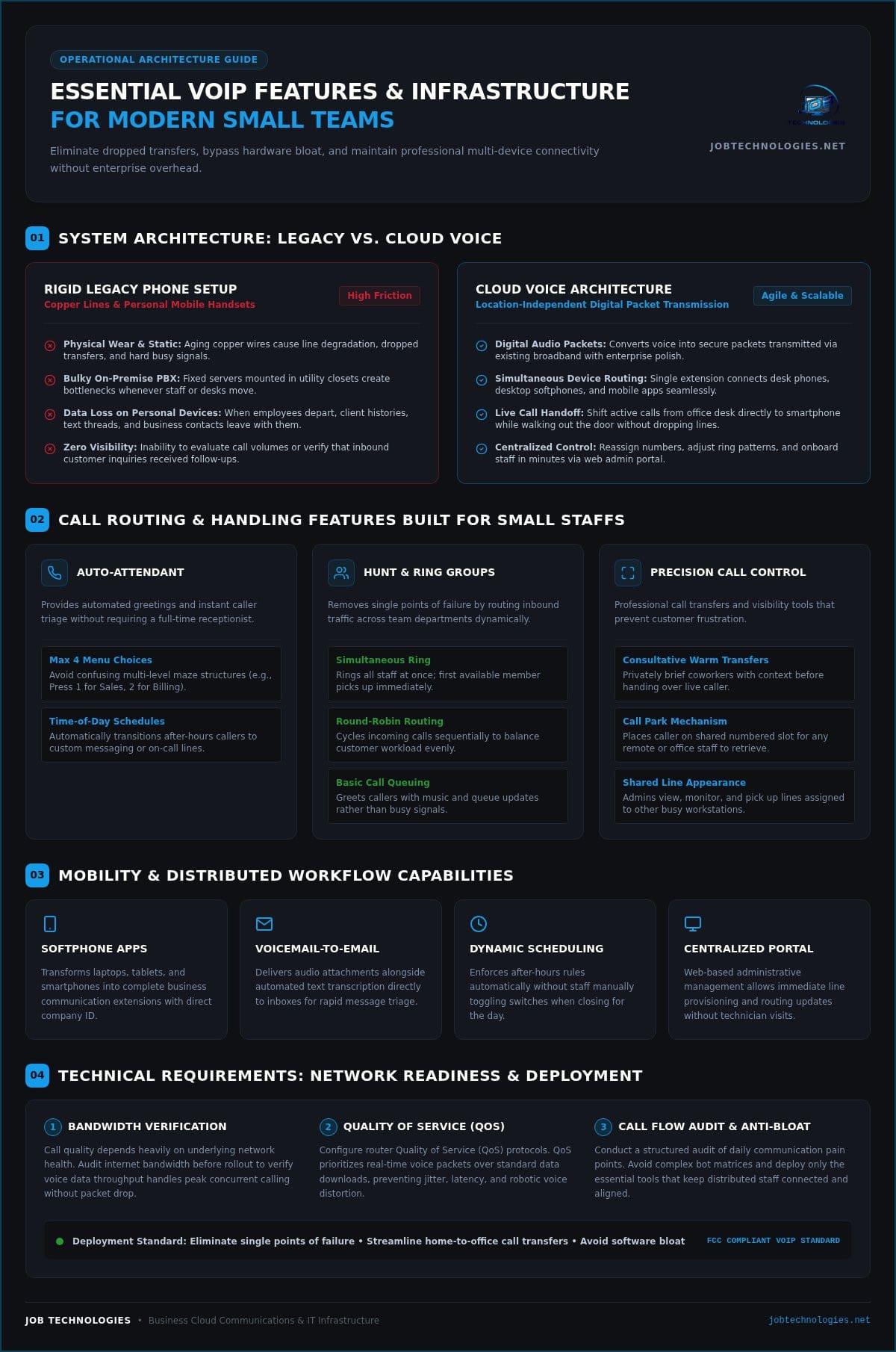
Traditional telephone systems were built around fixed copper wiring and bulky on-premise PBX servers mounted in back utility closets. For growing organizations, that rigid architecture creates operational friction every time a desk moves or a new hire starts. Cloud-hosted business calling fundamentally alters this dynamic. By running voice traffic through Voice over Internet Protocol (VoIP), voice data converts into secure digital packets transmitted over your existing high-speed internet connection. This shift lets an agile office project the polish of a multinational firm without purchasing costly server hardware. Focusing on the right VoIP features for small teams ensures you gain professional call management while keeping your overhead lean.
The Limitations of Traditional Landlines and Cell Phones
Relying on aging copper lines or personal cell phones exposes small businesses to daily vulnerabilities. Copper infrastructure suffers from physical wear, leading to static, dropped transfers, and capped line capacity that greets key clients with frustrating busy signals. Handing work calls over to personal mobile phones creates an even greater problem: fragmented communication. When an employee leaves the company, their personal device takes client contact histories, text records, and direct customer relationships with them. Cell phones also offer zero administrative visibility, making it impossible to evaluate call volumes or verify that inbound customer inquiries received timely follow-ups.
How Cloud Voice Powers Hybrid and Distributed Work
Modern work arrangements require business tools that follow the user rather than anchoring them to a physical desk. Cloud extensions route calls simultaneously across desk phones, desktop softphones, and mobile applications. If an employee needs to step out of the office during a call, they can transfer the active conversation directly to their smartphone without interruption. Centralized administrative portals also allow managers to add new users, adjust ring rules, or reassign numbers in minutes. Selecting modern VoIP features for small teams gives remote, mobile, and in-office personnel identical operational tools, ensuring seamless communication across your entire staff.
Essential Call Routing and Handling Features for Everyday Productivity
Enterprise phone vendors often promote complex conversational bots and intricate routing matrices that confuse non-technical users. For a five-to-twenty person team, that kind of software bloat creates more friction than it solves. What smaller staffs actually need are practical call management tools that guide callers to the right person on the first try. As outlined in the FCC guide on how VoIP technology works, internet-based telephony relies on software controls to route digital audio packets dynamically. Mastering fundamental VoIP features for small teams allows a compact staff to project corporate-level polish while eliminating unanswered calls and chaotic desk transfers.
Virtual Receptionist and Multi-Level Auto-Attendant
An automated receptionist answers incoming calls instantly with a clean, branded greeting. Rather than building labyrinthine sub-menus, smart teams keep menu options under four choices, such as pressing one for sales or two for billing. You can also configure dynamic time-of-day schedules. When the office closes, calls automatically transition to after-hours messaging or direct emergency lines without anyone manually flipping a switch.
Ring Groups, Simultaneous Ring, and Call Queues
Ring groups eliminate the single point of failure that happens when calls only ring one person’s desk. You can customize these workflows to fit your team structure:
- Simultaneous Ring: Alerts all department members at once, allowing whoever is free to pick up instantly.
- Round-Robin Routing: Cycles through available team members sequentially to balance workloads fairly.
- Basic Queuing: Greets high-volume callers with helpful hold music and position updates rather than a dead-end busy signal.
Warm Transfers, Call Park, and Shared Line Appearance
Nothing frustrates a customer more than repeating their issue three times to different representatives. Consultative warm transfers solve this by letting you brief your coworker privately before handing off the live line. Call park functions like a shared public hold button. You place a caller on a numbered park slot, and any colleague in the building or home office can retrieve them from their own device. Shared line appearance allows office administrators to view, monitor, and answer lines on behalf of team leaders. If configuring these customized call paths feels daunting, working with a partner like JOB Technologies helps ensure your call flow aligns with your daily operations from day one.
Modern Collaboration and Mobility Features Small Staffs Rely On
Enterprise platforms often burden users with endless messaging tabs, proprietary video channels, and complex collaboration hubs. For an active office, that complexity often leads to missed messages and workflow friction. Practical mobility means keeping staff reachable through straightforward, unified tools rather than bloated software. Selecting high-impact VoIP features for small teams bridges the physical divide between front reception, field staff, and home offices. Investing in robust business VoIP phone systems Dubuque organizations rely on allows team members to handle business calls and messages seamlessly from any location.
Voicemail-to-Email and Visual Voicemail Transcription
Dialing into an external voicemail inbox to key in passcodes wastes valuable minutes. Voicemail-to-email routes incoming audio messages directly to your inbox as standard digital sound files. Visual voicemail transcription uses speech-to-text algorithms to generate a readable summary inside the notification. When team members are sitting in client meetings, they can discreetly read incoming voicemails to gauge urgency. If a high-priority customer calls with an urgent request, staff can step out or delegate immediately. These audio attachments and written transcripts can also be logged directly into client history files, keeping your communications organized and audit-ready.
Business SMS and Desktop Softphone Applications
Many customers prefer sending a quick text message rather than placing a phone call. Business SMS enables staff to send and receive text updates using the company main line or direct extensions, completely protecting employee personal numbers. Centralizing text communication keeps customer interactions secure within the company infrastructure. Paired with softphone applications, the entire system becomes fully mobile:
- Hardware Elimination: Softphones turn laptops, desktop computers, and tablets into full phone terminals, eliminating desk clutter and reducing hardware upkeep costs.
- Real-Time Presence Indicators: Staff can see at a glance whether a coworker is available, on an active call, or away from their desk before attempting a transfer.
- Unified Calling Experience: Outbound calls made from mobile softphone apps display the official company caller ID, maintaining professional branding wherever your team works.
Prioritizing clear mobility and functional messaging ensures your staff stays connected without being chained to an office desk.
Technical Requirements: Ensuring Quality, Security, and Network Readiness
Even the most advanced VoIP features for small teams will fail if the underlying local network cannot deliver voice packets cleanly. Choppy audio, delayed responses, and dropped calls rarely originate in the cloud. Instead, they typically stem from congested Wi-Fi, unmanaged office routers, or aging network infrastructure. Because voice packets are transmitted in real time, even slight network instability ruins a conversation. Running physical Ethernet drops through structured office network wiring Dubuque businesses rely on eliminates the interference and dropped signals common with wireless connections. Backing that wiring with uninterruptible power supplies (UPS) and automated 4G/5G failover keeps your lines running even during local outages.
Bandwidth Planning and Quality of Service (QoS)
While an individual uncompressed voice call consumes relatively little bandwidth, competing office traffic quickly causes bottlenecks. Without proper controls, large cloud backups or video streams degrade voice conversations. Three main network issues disrupt voice quality:
- Latency: Delays in packet travel that cause awkward pauses and employees speaking over one another.
- Jitter: Uneven packet arrival rates that result in clipped words or garbled, robotic-sounding audio.
- Packet Loss: Dropped voice packets that leave whole syllables or sentences missing from the conversation.
Implementing Quality of Service (QoS) on a commercial-grade router solves this challenge by giving voice traffic strict priority over standard data traffic across your local network.
Voice Security, Encryption, and Emergency 911 (E911)
Voice data flowing across public networks requires the same protection as internal financial records. Commercial VoIP configurations implement Transport Layer Security (TLS) to safeguard call setup data and Secure Real-time Transport Protocol (SRTP) to encrypt the actual voice conversation, preventing unauthorized eavesdropping. Modern compliance standards also require dynamic E911 capabilities. When a team member dials 911, the phone system must automatically broadcast their exact physical office suite or remote work location to emergency responders. Aligning voice security with overarching managed IT services Dubuque businesses trust ensures your communications stay protected and compliant. Building out secure business communication systems that coordinate encryption, access controls, and network readiness is essential for keeping sensitive voice and data traffic safe across your entire organization. To verify your office network is fully optimized for clear calling, schedule a local network assessment with JOB Technologies.
How to Choose and Deploy the Right VoIP Features for Your Team
National comparison platforms frequently encourage businesses to sign up through automated web forms, pick a pre-packaged tier, and handle the implementation themselves. For small organizations, this self-service model often results in months of abandoned settings, broken ring schedules, and accidental downtime. Selecting the most effective VoIP features for small teams requires a structured implementation plan that evaluates daily workflows before purchasing licenses. If you are currently evaluating platforms and feeling overwhelmed by enterprise-tier pricing, reviewing the top RingCentral alternatives for small business can help you identify a cost-effective solution that matches your actual team size and workflow. Follow this five-step deployment methodology to ensure a smooth transition:
- Audit Existing Workflows: Map out current calling patterns, identifying peak inquiry hours and frequent bottlenecks.
- Select Necessary Endpoints: Determine whether desk phones, cordless handsets, or pure laptop softphones best support your users.
- Architect the Routing Plan: Design your auto-attendants, hunt groups, and out-of-office redirects on paper before touching software.
- Coordinate Number Porting: Gather recent telecom bills and account details to schedule seamless carrier transitions without lost inbound calls.
- Test and Train: Conduct internal call handoffs and test E911 settings before opening the system to public incoming traffic.
Auditing Your Workflows Before Purchasing Features
Successful implementations begin by consulting the people who touch the phones every day. Speak directly with your front-desk coordinators, billing personnel, and field technicians. Ask them where calls currently get delayed, how often they juggle client inquiries while away from their desks, and which software functions they rarely touch. Pinpointing these exact operational friction points allows you to distinguish foundational tools from expensive, unnecessary enterprise add-ons. It also lets you establish an accurate user count so your business doesn’t pay for unused software seats.
Self-Managed Cloud Portals vs. Local Managed IT Deployment
Navigating DIY management portals can quickly consume internal hours better spent serving your customers. When an unexpected audio glitch occurs or an after-hours call flow misroutes, waiting in long phone queues for remote support creates needless stress. Partnering with a dedicated local technology provider ensures a turnkey rollout. In Dubuque and the surrounding Tri-State area, having hands-on technicians configure call logic, optimize network switches, and provide ongoing local support gives your team genuine peace of mind. By integrating VoIP deployment into comprehensive business IT management, your phone system functions smoothly alongside your computers, data storage, and cybersecurity defenses.
Streamline Your Business Communications for the Future
Selecting the right VoIP features for small teams isn’t about collecting complex software tools you will never use. It’s about establishing clear, dependable workflows that help your staff collaborate effortlessly and ensure your customers always reach a helpful voice. By combining intuitive call routing with cross-device mobility and a reliable network foundation, your organization can operate with genuine confidence every business day.
You don’t have to tackle phone migrations or network optimization alone. With over 20 years serving Dubuque, Galena, and surrounding Tri-State businesses, our team delivers turnkey VoIP deployment backed by dedicated local technicians. We manage your business phones, network infrastructure, and cybersecurity under one roof so your systems work together seamlessly. Upgrade your team’s communications with JOB Technologies and give your business the dependable, professional phone foundation it deserves.
Frequently Asked Questions
Can a small team keep its existing business phone numbers when switching to VoIP?
Yes, you can retain all of your current business phone numbers through a process called number porting. Federal regulations give businesses the legal right to transfer existing landline, toll-free, and direct numbers to a new provider. For small teams across Dubuque and Galena, coordinating this transfer alongside an IT partner ensures zero downtime, so your clients never experience disconnected lines or missed calls during the migration.
Do small teams need physical desk phones, or can employees use computer apps?
Small teams do not need physical desk phones. Employees can make and take calls entirely through desktop softphones, laptop headsets, or mobile apps on their smartphones. While many offices in the Tri-State area still prefer dedicated hardware for front-desk reception, softphones provide an agile setup that reduces upfront hardware expenses and lets staff work easily from home or field locations.
How much internet speed does a small office need to run VoIP without audio lag?
Running VoIP without lag requires consistent network stability more than raw bandwidth. Each active voice call consumes roughly 100 kilobits per second of upload and download capacity. For a team handling ten concurrent calls, one to two megabits per second dedicated purely to voice traffic is sufficient. The key requirement is configuring Quality of Service on your office router so voice packets always take priority over everyday file downloads.
What happens to business phone calls if our office internet connection goes down?
Inbound calls continue flowing uninterrupted because cloud phone systems operate in offsite data centers rather than inside your building. If local internet or power drops in your Peosta or Dyersville office, automated failover rules immediately redirect callers to employee mobile apps, alternative branches, or backup numbers. You won’t miss customer calls, and callers won’t even realize your local facility lost connectivity.
Is VoIP call quality as reliable as a traditional telephone landline?
VoIP delivers equal or superior call clarity compared to traditional copper landlines when deployed over a healthy network. Modern high-definition voice codecs transmit a broader audio frequency range, making speech sound much clearer and more natural than old analog lines. Selecting the right VoIP features for small teams ensures crystal-clear conversations, provided your local wiring, network switches, and router configurations are properly optimized.
What is the difference between an auto-attendant and an interactive voice response system?
An auto-attendant provides straightforward menu navigation, such as directing callers to press one for sales or two for support. Interactive Voice Response (IVR) handles advanced, data-driven interactions, like querying account databases or processing credit card payments over the phone. For most small teams, an auto-attendant delivers all the professional routing polish needed without the complexity and expense of enterprise-level IVR programming.
Are VoIP phone systems secure enough to protect confidential customer information?
Commercial VoIP phone systems provide strong security when configured with modern encryption protocols. Transport Layer Security protects call setup data, while Secure Real-time Transport Protocol encrypts the voice conversation itself. When paired with comprehensive cybersecurity management, essential VoIP features for small teams protect sensitive customer details, prevent toll fraud, and meet regulatory compliance standards across your entire network.